Overview

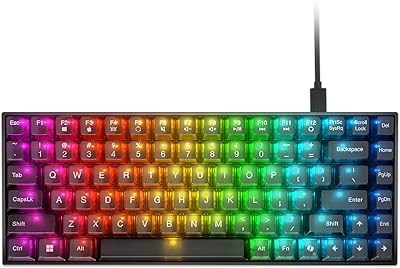
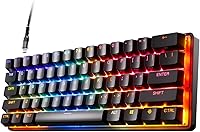
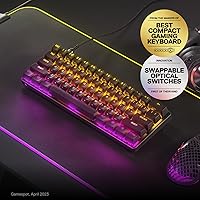
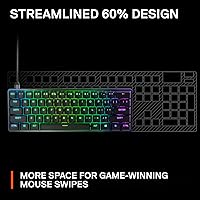
The SteelSeries Apex 9 Mini Gaming Keyboard is SteelSeries' answer to competitive gamers who want speed and precision without sacrificing half their desk to a full-size board. The 60% form factor strips out the numpad, function row, and navigation cluster, freeing up substantial space for wide mouse movements — something FPS players genuinely appreciate. Sitting in the mid-to-premium price range, this compact optical keyboard punches well above its weight in build quality and input performance. That said, anyone accustomed to a traditional layout should think carefully before committing; the trade-offs are real, and the adjustment period is not trivial.

Features & Benefits

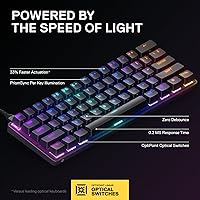
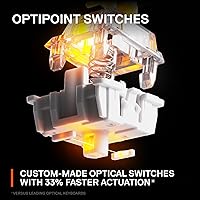
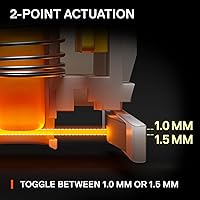
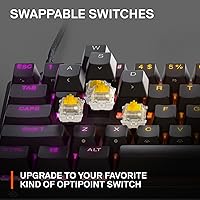
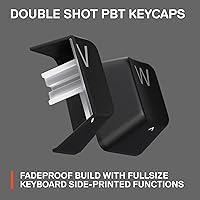
At the heart of this 60% gaming board are SteelSeries' custom OptiPoint optical switches, which use a light beam rather than physical contact to register keystrokes — meaning zero debounce delay and a 0.2ms response time that gives a tangible edge when fractions of a second matter. The dual actuation point system lets you set registration at 1mm for hair-trigger inputs or 1.5mm when you need more deliberate presses. Hot-swap support is a welcome addition, though it is limited to SteelSeries' own OptiPoint switches, not the broader MX ecosystem. The aluminum alloy frame keeps flex to a minimum, and the double shot PBT keycaps resist the shine and fading that plague cheaper boards after heavy use.

Best For

The Apex 9 Mini is squarely aimed at a specific type of gamer. If you spend most of your time in fast-paced shooters or battle royales, the low-latency switches and extra desk real estate this layout provides are genuine, practical advantages. Switch enthusiasts will appreciate having a platform to experiment on without buying a whole new board — just keep in mind the switch compatibility is limited to the OptiPoint lineup. It also fits naturally for anyone already using SteelSeries peripherals, since the GG software ties everything together. Casual typists, coders who rely on F-keys constantly, or anyone who regularly uses a numpad will likely find the layout a frustrating mismatch.

User Feedback

Across a substantial pool of ratings, the Apex 9 Mini holds a strong 4.6-star average, with positive reviews consistently praising how snappy the board feels under fast, repetitive keypresses and how solid it feels compared to plastic-body alternatives at similar prices. Critics, while in the minority, raise points worth considering. The lack of a wireless option is a genuine limitation for anyone who values a clean desk setup. Several users describe a learning curve with the GG software — functional, but not immediately intuitive. A smaller group flags the 60% layout itself, which is less a flaw than a fundamental mismatch for their workflow. Long-term satisfaction holds up well for buyers who went in with clear expectations.

Pros

  • Optical switches register keypresses with virtually no delay, giving a tangible edge in fast-paced competitive play.
  • Selectable actuation depth lets you tune the board between hair-trigger inputs and more deliberate keystrokes.
  • The aluminum alloy frame feels genuinely solid — no flex, no creaking, no cheap plastic resonance.
  • Double shot PBT keycaps hold up over years of heavy use without legends fading or surfaces becoming slick.
  • Hot-swap support means you can change switch feel without tools, soldering, or buying a new board.
  • The 60% layout frees up meaningful desk real estate, particularly useful for gamers with wide-sweep mouse movements.
  • Per-key RGB lighting is well-implemented and integrates cleanly with SteelSeries GG for unified peripheral lighting.
  • A 4.6-star average across hundreds of real-world ratings reflects consistently strong long-term satisfaction.
  • Build quality and input performance sit comfortably in the mid-to-premium tier without requiring top-tier spending.

Cons

  • No wireless option at all — buyers who prefer a cable-free setup have no path forward with this board.
  • Hot-swap support is locked to OptiPoint switches only, ruling out the vast third-party switch ecosystem.
  • The 60% layout removes arrow keys, function row, and numpad — a steep adjustment for traditional keyboard users.
  • SteelSeries GG software has a learning curve and is not as immediately intuitive as some competing software suites.
  • Windows-only compatibility means Mac users are left without full software support or reliable key mapping.
  • Side-printed function labels on keycaps can be hard to read quickly until muscle memory fully develops.
  • The wired-only cable is non-detachable in standard use, which can complicate cable management on tidy desks.
  • Priced at the upper edge of the compact keyboard segment, making it a harder sell if optical switches are not a priority.

Ratings

The scores below were generated by AI after analyzing verified buyer reviews for the SteelSeries Apex 9 Mini Gaming Keyboard from multiple global markets, with spam, bot activity, and incentivized feedback actively filtered out before scoring. Each category reflects an honest synthesis of what real users praised and where they ran into genuine frustrations — nothing is glossed over. The result is a balanced, transparent look at where this compact optical keyboard earns its reputation and where it falls short for certain buyers.

Switch Performance
93%
Gamers consistently describe the OptiPoint switches as the most responsive they have used at this price tier — inputs register without hesitation, and the absence of debounce delay is something competitive FPS players notice immediately after switching from standard mechanical boards. In time-critical situations, the difference is tangible.
The optical feel is not universally loved; users who prefer a pronounced tactile bump or audible click find the default linear optical experience too light and imprecise for extended typing sessions. Those coming from clicky mechanical switches often describe a short but real adjustment period.
Build Quality
91%
The aluminum alloy top frame is the single most praised physical attribute across user reviews — buyers frequently mention that the board feels significantly more premium than competitors at similar price points, with zero flex or resonance when typing hard during intense gaming sessions.
A small but consistent group of reviewers noted that the plastic bottom plate feels noticeably cheaper relative to the metal top, creating a slight quality mismatch. A few users also reported that rubber feet lose grip on glass or polished desk surfaces over time.
Actuation Customization
88%
The ability to toggle between 1mm and 1.5mm actuation depths is a feature competitive gamers genuinely use — FPS players tend to lock into the 1mm setting for maximum speed, while strategy game or productivity users appreciate having the 1.5mm option to reduce accidental keypresses during calmer workflows.
Changing actuation depth requires the SteelSeries GG software on Windows, which means the feature is completely inaccessible on macOS or on PCs where software installation is restricted. There is no onboard memory fallback for this setting that persists reliably across all machines.
Keycap Quality
86%
Double shot PBT construction means the legends will not fade or become unreadable after months of heavy play — something users who previously owned membrane or ABS keycap boards notice and appreciate quickly. The surface texture also provides a consistent, slightly grippy feel that holds up well against sweaty gaming sessions.
Some users find the keycap profile shallower than expected, which can feel unfamiliar if coming from OEM or Cherry profile boards. Aftermarket keycap compatibility is workable but not seamless, as the 60% bottom row uses non-standard sizing that limits options.
Layout Practicality
62%
38%
For gamers, the 60% layout delivers exactly what it promises — a smaller board that keeps everything essential within reach while clearing desk space for the wide mouse arcs that low-sensitivity FPS players depend on. Users who made the switch from full-size boards for gaming specifically rarely want to go back.
This is the most divisive aspect of the Apex 9 Mini. Users who multitask between gaming and productivity work consistently report frustration with missing arrow keys, the absent function row, and the need to memorize function-layer combinations for tasks they previously did instinctively. The learning curve is real and ongoing for some.
Hot-Swap Usability
74%
26%
Users who want to fine-tune their switch feel without purchasing a new board find the hot-swap system genuinely useful — the sockets hold switches securely with no wobble, and the swap process itself requires no tools beyond a basic puller, making it accessible even for first-timers.
The OptiPoint-only compatibility significantly narrows the appeal of this feature. Enthusiasts who expected to drop in popular third-party switches were notably disappointed, and the limited variety within the OptiPoint lineup means the customization ceiling is lower than the hot-swap label implies.
RGB Lighting
82%
18%
Per-key RGB implementation is smooth and visually consistent, with no uneven bleed or dim zones reported across the board. Users invested in the SteelSeries ecosystem especially appreciate how GG software synchronizes lighting effects across their keyboard, mouse, and headset without extra configuration steps.
The RGB experience is noticeably diminished without the GG software installed — out-of-the-box lighting options are limited to basic preset modes with no per-key control. Mac users get the default mode and nothing more, which feels like an oversight for a board at this price.
Software Experience
67%
33%
SteelSeries GG works reliably for its core functions — lighting customization, actuation depth switching, and macro assignment all function as advertised once the software is properly set up. Users with multiple SteelSeries peripherals find the unified dashboard genuinely convenient.
First-time setup is where GG draws consistent criticism. New users frequently describe the interface as non-intuitive, with settings buried under menus that are not clearly labeled. Occasional background resource usage and auto-launch behavior also annoyed users who prefer lightweight software footprints.
Connectivity & Cable
58%
42%
The wired USB connection is stable and latency-free by nature — there are zero reports of dropout, interference, or connection instability, which matters for competitive play where wireless inconsistency is a genuine concern for some users.
The fixed, non-detachable cable is a recurring complaint, particularly from users who travel with their keyboard or prefer minimal desk clutter. Several reviewers specifically wished for a braided detachable cable at this price point, noting that competitors offer it at lower costs.
Value for Money
79%
21%
For users who fall squarely in the target audience — competitive gamers who actively benefit from optical switch speed and the space savings of a 60% board — the pricing feels justified given the aluminum construction, PBT keycaps, and hot-swap capability bundled together.
Buyers who are not specifically drawn to the optical switch technology or the compact layout find it harder to rationalize the cost against full-size competitors that offer more keys, wireless options, and similar build quality at comparable or lower prices.
Noise Level
76%
24%
Optical switches generate less noise than many clicky mechanical alternatives, and users working in shared spaces or recording environments appreciated the relatively subdued sound profile during normal gaming use. Bottoming out is the main source of noise, which is manageable.
The board is not quiet in any absolute sense — bottoming out keys on the aluminum frame produces a sharper, higher-pitched sound than boards with foam dampening or softer plastic housings. Users who need near-silent operation would require additional sound dampening modifications.
Portability
83%
At under 1.9 pounds and roughly the footprint of a sheet of paper, this 60% gaming board is one of the easier full-featured gaming keyboards to pack into a laptop bag or carry to a LAN event. Competitive players who travel frequently cite the compact size as a practical advantage.
The fixed cable adds some inconvenience when packing, and the lack of a carry case or protective sleeve in the box means users need to source their own solution to avoid scratching the aluminum frame during transport.
Long-Term Durability
87%
The combination of an aluminum frame and PBT keycaps positions this board well for multi-year use — optical switches have no physical contact points to wear down, and the keycap legends remain legible far longer than the ABS alternatives found on cheaper competitors. Long-term owners report minimal degradation.
Some users flagged that the hot-swap sockets can develop slight looseness after repeated switch removals over time, which introduces minor switch wobble. This is not a widespread issue but has been documented enough across reviews to be worth noting for frequent switch-swappers.

Suitable for:

The SteelSeries Apex 9 Mini Gaming Keyboard is built for competitive gamers who treat every millisecond as meaningful — particularly those who spend most of their time in fast-paced shooters, battle royales, or any game where reaction speed directly affects outcomes. The 60% layout is a natural fit for players who run large mousepads and need unobstructed lateral arm movement, since removing the numpad and navigation cluster alone frees up several inches of horizontal desk space. Switch enthusiasts will also find real value here, as the hot-swap capability lets them tune the feel of the board over time without replacing the whole unit — provided they stick within the OptiPoint switch family. Gamers already invested in the SteelSeries ecosystem will appreciate how cleanly this compact optical keyboard integrates with GG software alongside their existing headsets or mice. Anyone looking for a durable, premium-feeling board that does not require flagship-level spending will find the aluminum frame and PBT keycaps punch well above expectations at this price tier.

Not suitable for:

The SteelSeries Apex 9 Mini Gaming Keyboard is a poor fit for anyone who relies on a full keyboard layout as part of their daily workflow. Professionals who frequently use the function row for software shortcuts, developers who depend on arrow key clusters for navigation, and anyone who regularly enters numerical data using a dedicated numpad will find the 60% form factor a persistent frustration rather than a convenience. The board is wired-only, so buyers who prefer a cable-free desk or need Bluetooth connectivity for multi-device switching should look elsewhere from the start. The hot-swap support sounds attractive on paper but is constrained to SteelSeries' own OptiPoint switches, which means enthusiasts hoping to drop in third-party mechanical or hall-effect switches will be disappointed. Casual typists who mainly browse, write documents, or use a keyboard for general productivity will likely find the layout adjustment steep and the optical switch feel unfamiliar compared to the quieter, cushioned feedback of a standard office keyboard.

Specifications

  • Form Factor: 60% compact layout omitting the numpad, function row, and dedicated navigation cluster to reduce overall footprint.
  • Dimensions: The board measures 11.53″ in length, 4.02″ in width, and 1.58″ in height.
  • Weight: The keyboard weighs 1.9 pounds, making it manageable for transport without feeling flimsy on the desk.
  • Frame Material: The top housing is constructed from aluminum alloy, providing rigidity and resistance to flex during intense typing sessions.
  • Switch Type: OptiPoint optical switches use an infrared light beam for actuation, eliminating physical contact bounce entirely.
  • Actuation Points: Users can select between a 1mm actuation depth for fast inputs or a 1.5mm depth for more deliberate, controlled keystrokes.
  • Response Time: Optical actuation delivers a 0.2ms response time, which is measurably faster than the typical 5–10ms range of standard mechanical switches.
  • Hot-Swap Support: Switches can be removed and replaced without soldering, though compatibility is limited to SteelSeries OptiPoint switches only.
  • Keycap Material: Double shot PBT keycaps are used throughout, offering strong resistance to surface shine and legend fading over prolonged use.
  • Lighting: Per-key RGB backlighting is supported with full customization available through the SteelSeries GG software suite.
  • Connectivity: The keyboard connects via a wired USB connection with no wireless or Bluetooth option available.
  • Software: SteelSeries GG is the companion software for lighting control, actuation point adjustment, and macro configuration on Windows.
  • Compatibility: Officially compatible with PC running Windows 10; full software features are not supported on macOS.
  • Power Source: The keyboard is powered entirely through its USB connection and requires no external power adapter or batteries.
  • Model Number: The official SteelSeries model number for this keyboard is 64837.
  • Release Date: This keyboard was first made available for purchase in September 2022.
  • BSR Ranking: As of available data, it holds a Best Sellers Rank of #259 in the Computer Keyboards category on Amazon.
  • User Rating: The keyboard carries an average rating of 4.6 out of 5 stars based on 774 customer ratings.

Related Reviews
SteelSeries Apex Pro Mini HyperMagnetic Gaming Keyboard
86%
94%
Performance
88%
Build Quality
91%
Customizability
93%
Portability
78%
Software Experience
More
SteelSeries Arena 9
SteelSeries Arena 9
77%
88%
Surround Sound Performance
91%
Subwoofer & Bass Quality
93%
Wireless Rear Speaker Convenience
82%
Treble & Midrange Clarity
86%
Build Quality & Materials
More
Lenovo Legion K510 Mini Pro Wired Mechanical Gaming Keyboard
86%
88%
Overall Performance
90%
Build Quality
75%
RGB Lighting Customization
92%
Key Response and Feel
91%
Durability (Key Lifespan)
More
KAMRUI AM21 Mini PC
KAMRUI AM21 Mini PC
74%
88%
CPU Performance
61%
Thermal Management
93%
Port Selection & Connectivity
76%
Integrated GPU & Display Output
82%
Build Quality & Form Factor
More
RAMOSU Hair Mist Blooming Perfume Mini Set 9 Scents 9.5mL
85%
84%
Fragrance Strength
72%
Scent Longevity
91%
Ease of Use
95%
Packaging & Portability
80%
Hair Softening Effect
More
SteelSeries Aerox 3 Gaming Mouse
88%
92%
Lightweight Design
88%
Durability
85%
RGB Lighting Customization
91%
Performance in FPS Games
68%
Ergonomics for Large Hands
More
Alienware Pro Wireless Gaming Keyboard
87%
93%
Connectivity
89%
Customization (Hot-Swappable Switches)
91%
Ergonomics and Layout
88%
RGB Lighting
85%
Battery Life
More
TECKNET TK-KB002 Gaming Keyboard
86%
89%
Comfort and Ergonomics
93%
RGB Customization
88%
Key Responsiveness
90%
Durability and Build Quality
84%
Water Resistance
More
FIREBAT MN56 Mini Gaming PC
86%
92%
Performance
87%
Value for Money
90%
Build Quality
94%
Size and Portability
89%
Multitasking Capability
More
MONSGEEK FUN60 Pro Gaming Keyboard
84%
89%
Performance
86%
Build Quality
82%
Ease of Use
91%
Customizability
94%
Latency & Responsiveness
More

FAQ

No, and this is worth knowing before you buy. The hot-swap support on the Apex 9 Mini is designed exclusively for SteelSeries OptiPoint switches. Standard MX-style mechanical or hall-effect switches from other brands will not be compatible, so if cross-brand switch swapping is a priority, this board is not the right platform for it.

You adjust the actuation depth through the SteelSeries GG software on Windows. Once installed, you can switch between the two depth settings per-key or globally, depending on the game or task you are setting up for. The change takes effect immediately without restarting the software.

It will function as a basic plug-and-play keyboard on macOS since the hardware itself is USB-connected, but the SteelSeries GG software is Windows-only. That means you lose access to actuation point adjustment, RGB customization, and macro configuration on a Mac. For full feature access, a Windows PC is required.

It depends heavily on what you are used to. The optical switches have a light, fast feel that some typists enjoy, but the 60% layout removes the function row, arrow keys, and numpad. If your workflow relies on any of those regularly, the adjustment can be genuinely disruptive. For pure gaming use it excels, but as an all-day office or productivity keyboard it asks a lot of the user.

A 60% keyboard keeps only the core alphanumeric keys, modifiers, and a few essentials, stripping out roughly 40% of the keys found on a full-size board. Functions like F-keys, arrow keys, and home or end are accessed through a function layer using key combinations. It frees up a lot of desk space but requires memorizing those secondary layers, which takes time.

It is genuinely straightforward. The switches pull out with a standard keycap and switch puller — no soldering iron needed. SteelSeries designed the hot-swap sockets to be accessible for everyday users, not just enthusiasts. Just make sure the replacement switches are from the OptiPoint lineup before purchasing.

Yes, the keyboard ships with a default RGB lighting mode active out of the box, so it will light up the moment you plug it in. However, customizing colors, effects, or per-key lighting assignments requires SteelSeries GG installed on a Windows machine.

No, the cable on this 60% gaming board is not detachable. It is a fixed wired connection, which is worth considering if you want a cleaner cable management setup or plan to travel with the keyboard regularly.

Optical switches feel noticeably lighter and snappier than most linear mechanicals because there is no physical resistance point to push through before actuation. There is also no tactile bump or audible click unless you specifically choose a tactile OptiPoint variant. Gamers who switch from standard linears usually adapt quickly, but typists who prefer a pronounced tactile feel may find the experience takes adjustment.

The keycaps use a standard layout for the most part, but because this is a 60% board, some keys use non-standard sizing that can make finding a perfectly fitting aftermarket set tricky. Many popular keycap sets include a 60% compatibility kit, so it is doable, but double-check the kit includes the right bottom row modifiers before buying.

Where to Buy