Overview

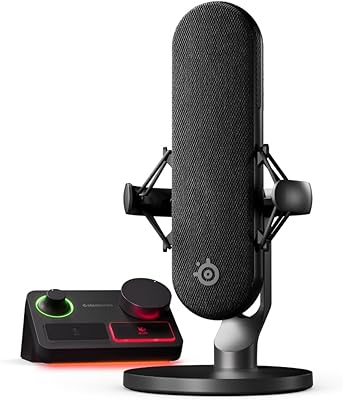
The SteelSeries Alias USB Mic arrived in October 2023 as the brand's serious push into the crowded streaming microphone space, targeting PC gamers and content creators who want something better than a headset mic without going full professional studio. It sits comfortably in the mid-to-upper consumer tier, competing with the likes of the Blue Yeti and HyperX QuadCast. What separates it from the pack is the bundled Sonar audio software, which adds genuine value beyond the hardware itself. That said, this is still a consumer-grade tool — excellent for its intended audience, but not a replacement for an XLR setup in a treated room.
Features & Benefits

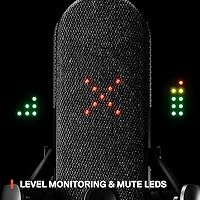
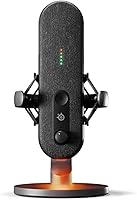
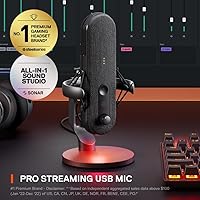
The Alias runs on a large-capsule cardioid design that captures noticeably fuller, warmer vocals than the compact capsules found in most entry-level USB mics — you hear the difference immediately on playback. The free Sonar software is genuinely useful: it handles per-app audio routing, real-time mixing, and AI noise cancellation that does a solid job cutting mechanical keyboard clatter and fan hum, though it won't fully tame a loud HVAC or noisy roommate. Physical touches matter too — the integrated shock mount absorbs desk vibrations at the source, and the green-to-red LED ring lets you monitor input levels without touching your PC. USB-C keeps the setup clean.

Best For

This streaming microphone is a strong fit for streamers and live content creators who want all-in-one audio control without an external mixer or a stack of separate apps. PC gamers moving up from a headset mic will notice an immediate improvement in voice quality on Discord and in-game comms. Solo podcasters working in a reasonably quiet space will also find the cardioid pickup clean and focused. It suits desk builds where RGB aesthetics matter and the mic doubles as ambient lighting. One important caveat: Sonar is Windows-only, so Mac users or anyone on a console gets hardware only — no software features at all.

User Feedback

Across several hundred ratings, the Alias holds a strong 4.5-star average, and the patterns in the reviews are telling. Voice clarity draws the most consistent praise — buyers upgrading from budget options frequently describe richer, fuller audio as the standout improvement. The Sonar noise cancellation also earns real appreciation for handling keyboard and fan noise in typical home setups. On the other side, a handful of users point out the included desktop stand feels light for a 750-gram mic, and several recommend pairing it with a boom arm. The 60 dB signal-to-noise ratio draws mild criticism from more technically minded buyers who feel the spec lags behind competitors at a similar price.

Pros

  • Large capsule delivers noticeably warmer, fuller vocals compared to most USB mics at this price.
  • Sonar software replaces the need for third-party audio routing tools like VoiceMeeter entirely.
  • AI noise cancellation handles mechanical keyboard noise and fan hum reliably in typical home setups.
  • The LED level ring lets you monitor input and mute status at a glance without touching your PC.
  • Integrated shock mount reduces desk vibration at the hardware level, not just through software.
  • USB-C plug-and-play means zero driver installation headaches on Windows 10 and 11.
  • All-metal construction feels premium and holds up well to daily desk use.
  • Per-app audio routing in Sonar gives streamers granular control over game, voice, and music independently.
  • Compact footprint fits comfortably on most desks without dominating the workspace.
  • Strong early adoption and a top-20 Amazon ranking signal reliable ongoing software support from SteelSeries.

Cons

  • Sonar is Windows-only, cutting off Mac users from every software feature that justifies the price.
  • No physical gain knob means all sensitivity adjustments require opening the Sonar app.
  • The included desktop stand is underpowered for the mic body and prone to tipping — budget for a boom arm.
  • Signal-to-noise ratio of 60 dB trails several competitors at a similar or lower price point.
  • Noise cancellation struggles with loud or unpredictable sound sources beyond standard background hum.
  • Cardioid-only pattern limits flexibility for users who occasionally need to record multiple speakers.
  • Console users get no software benefits whatsoever, making the purchase hard to justify at full price.
  • Long-term durability data is limited given the mic only launched in late 2023.
  • A small number of users report USB-C port loosening after extended heavy use.
  • RGB functionality requires Sonar to be running, adding a background process some users would rather avoid.

Ratings

The SteelSeries Alias USB Mic has been put through its paces by a wide range of buyers — from full-time streamers to casual Discord users — and our AI-generated scores reflect that breadth of real-world experience, drawn from verified global reviews with spam, bot, and incentivized feedback actively filtered out. The ratings below capture both what this microphone genuinely does well and the areas where it falls short for certain users, with no glossing over the friction points.
Voice Clarity & Warmth
88%
The large capsule makes a noticeable difference in day-to-day use — voices come through with body and warmth that smaller USB mic capsules simply cannot reproduce. Streamers and podcasters frequently describe it as the biggest sonic jump they have experienced without moving to an XLR setup.
While the warmth is flattering for most voices, users with naturally brighter or sibilant vocal tones occasionally find the sound slightly over-processed when AI correction is active. It is not a dealbreaker, but some fine-tuning in Sonar is needed to dial it in perfectly.
AI Noise Cancellation
79%
21%
In typical home office or gaming room conditions — mechanical keyboards, case fans, air conditioning hum — the Sonar AI noise cancellation does a genuinely solid job, and users regularly call it out as the feature that made their streams sound more professional without any extra hardware.
The cancellation has clear limits: loud or unpredictable noise sources like a TV in the next room or a barking dog can still bleed through noticeably. It works best as a cleanup tool for residual background noise, not as a solution for genuinely noisy recording environments.
Software Experience (Sonar)
82%
18%
Per-app audio routing is the standout feature for streamers — being able to send game audio, Discord, and music to different outputs independently, all from one free app, removes the need for tools like VoiceMeeter. The interface is clean and the drag-and-drop routing takes minutes to learn.
The hard Windows-only requirement shuts out Mac users and anyone hoping to use the mic on a PlayStation or other platform entirely — the hardware still works, but every software advantage disappears. Several reviewers feel SteelSeries undersells this limitation in the product listing.
Build Quality & Materials
83%
The all-metal body gives the Alias a substantial, premium feel that holds up well on a busy desk. At 750 grams it has enough heft to signal quality without being awkward to reposition, and the metal finish resists the scuffs and fingerprints that plague plastic competitors.
The included desktop stand is the one weak point in an otherwise solid physical package — several buyers feel it is undersized for the mic body and prone to tipping if the desk cable is pulled. Most experienced users recommend budgeting for a boom arm from the start.
LED Level Monitoring
86%
The green-to-red input level ring is one of those features that sounds minor but earns consistent praise once users have lived with it. Being able to glance at the mic and instantly know if you are clipping or muted — without alt-tabbing out of a game — is a genuine daily convenience.
The LED brightness is not adjustable in all configurations, and a few users in darker room setups find the ring distractingly bright during nighttime streams. It is a small complaint, but worth noting for anyone sensitive to peripheral lighting.
RGB Aesthetics
74%
26%
The customizable underglow adds a clean ambient accent to a gaming desk without the garish overdone look of some RGB peripherals. Integration with the broader SteelSeries GG ecosystem means it syncs well with other SteelSeries gear for users already in that ecosystem.
For buyers who do not care about RGB, the feature adds no audio value and the customization requires Sonar to be running, which is another reason the Windows-only restriction stings. It is a nice bonus but not a reason to choose this mic on its own.
Ease of Setup
91%
Plug the USB-C cable in and the mic works immediately — no drivers, no firmware fiddling, no configuration required to get started. For buyers who are not technically inclined, that zero-friction first experience makes a strong impression and keeps frustration out of the early hours.
Getting the most out of Sonar does require an initial setup investment — routing apps, configuring noise cancellation thresholds, adjusting gain. It is not complex, but buyers expecting fully optimized audio out of the box without touching software will be slightly disappointed.
Noise Isolation (Passive)
77%
23%
The integrated shock mount handles desk vibration and low-frequency rumble at the hardware level, which means typing on the same desk or bumping the table does not produce the loud thud heard with mics that rely solely on software correction for this problem.
Passive isolation is good but not exceptional — the cardioid pattern does pick up strong off-axis sounds in smaller rooms with reflective walls. Users in untreated spaces may still notice some room ambience, particularly in recordings rather than live streams where listeners are less forgiving.
Value for Money
73%
27%
When you factor in the Sonar software suite as a bundled value-add rather than just a standalone mic purchase, the overall package is competitive for what it delivers in the mid-tier USB mic space. Streamers who would otherwise spend on third-party audio routing software get that covered at no extra cost.
Buyers comparing raw microphone hardware specs at this price point will find competitors with higher signal-to-noise ratios and more polar pattern options. The value proposition depends heavily on how much you will actually use Sonar — if you are on Mac or prefer a different audio app, the case for the price weakens.
Compatibility
58%
42%
On Windows PCs the compatibility story is straightforward and essentially problem-free — USB-C to the port, Sonar installs cleanly, and the mic is recognized without issues across Windows 10 and 11 in tested configurations.
Outside of Windows the picture is notably limited. Mac users get a functional USB microphone but lose every software feature. Console gamers get even less. For a mic marketed broadly to streamers — many of whom stream from consoles or use Macs — this is a meaningful gap that pushes the compatibility score down significantly.
Portability & Form Factor
80%
20%
The compact footprint and solid metal construction make the Alias reasonably easy to pack for LAN events or take to a studio session. The USB-C cable is standard and replaceable, so there is no proprietary connector risk when traveling.
At 750 grams it is not the lightest option for a travel bag, and the included stand adds more bulk without providing the stability of a proper arm. Users who move their setup frequently tend to replace the stand early, which adds to the effective cost.
Gain & Sensitivity Control
71%
29%
Gain adjustment through Sonar is smooth and responsive, letting users fine-tune input sensitivity without large jumps between levels. For streamers who switch between close-mic speaking and leaning back, the software gain control is quick enough to adjust on the fly.
There is no physical gain knob on the mic body itself, which frustrates users who want tactile, instant control without software. The 10 dB sensitivity rating also means the mic needs to be positioned closer to the source than some alternatives to capture quieter voices cleanly.
Longevity & Durability
78%
22%
The metal chassis and quality construction suggest this mic should hold up well under regular daily use. Early buyers from the October 2023 launch report no significant degradation in sound quality or hardware condition after extended use, which is reassuring for a mid-tier investment.
The mic is still relatively new to market, so long-term durability data beyond roughly two years is limited. A small number of users have reported USB-C port wobble after heavy use, though this appears to be isolated rather than a widespread pattern.

Suitable for:

The SteelSeries Alias USB Mic is built for Windows PC users who stream, create content, or game regularly and want a meaningful audio upgrade without the complexity of an XLR setup. It particularly rewards streamers who want to consolidate their audio workflow — Sonar handles routing, mixing, and noise cleanup in one place, replacing the patchwork of third-party apps that many intermediate streamers cobble together. PC gamers moving up from a headset mic will notice an immediate, tangible improvement in how their voice sounds on Discord and in-game comms, without needing any audio engineering knowledge to get there. Solo podcasters recording in a reasonably quiet room will also find the cardioid pickup clean and focused enough for professional-sounding episodes. Anyone already using SteelSeries peripherals will find the ecosystem integration especially natural, with Sonar managing everything from a single interface.

Not suitable for:

The value case for the Alias collapses quickly outside the Windows PC ecosystem, and that is the most important thing to understand before buying. Mac users get a functional USB microphone, but every software feature — the AI noise cancellation, per-app routing, real-time mixing — is completely unavailable, leaving them with hardware that competitors match or beat at a lower price. Console streamers face the same issue: plug-in audio works, but the software-driven advantages that justify the purchase simply do not exist on PlayStation or Xbox. Buyers in genuinely noisy environments — loud households, open offices, rooms with heavy echo — should also temper their expectations, since the noise cancellation handles typical background hum well but is not a substitute for acoustic treatment. Finally, anyone looking for a multi-pattern mic with broadcast-grade specs will find the 60 dB signal-to-noise ratio and cardioid-only design limiting compared to competitors in the same price bracket.

Specifications

  • Polar Pattern: Cardioid only, capturing sound primarily from the front of the mic while naturally rejecting noise from the sides and rear.
  • Connectivity: USB Type-C output connects directly to a PC without drivers, delivering plug-and-play operation on Windows 10 and 11.
  • Signal-to-Noise Ratio: Rated at 60 dB, which is adequate for clean voice capture in quiet-to-moderate environments but trails some competitors at this price tier.
  • Audio Sensitivity: Sensitivity is rated at 10 dB, meaning the mic works best positioned close to the speaker rather than across the desk.
  • Capsule Size: The internal capsule is up to three times larger than those found in typical entry-level USB microphones, contributing to fuller vocal reproduction.
  • Dimensions: The mic body measures 7.1 x 3.11 x 5.39 inches, giving it a solid desktop presence without an oversized footprint.
  • Weight: At 750 g (1.65 lbs), the mic has a premium heft that feels substantial in use but requires a stable stand or boom arm.
  • Material: The exterior is constructed from metal, providing durability and a premium finish that resists everyday desk wear.
  • Power Source: Bus-powered via USB, drawing all necessary power through the connected cable with no separate power supply required.
  • Included Accessories: Comes with a desktop stand and an integrated shock mount; a boom arm is compatible but sold separately.
  • Software: SteelSeries Sonar is included free and provides per-app audio routing, AI noise cancellation, and real-time mixing, but requires a Windows PC to run.
  • LED Indicator: A green-to-red LED ring on the mic body displays live input levels and mute status without requiring any on-screen software interaction.
  • RGB Downlight: A customizable RGB underglow light is built into the base of the mic and can be configured through the Sonar application on Windows.
  • Compatible Platform: Hardware works on any USB-capable device, but Sonar software features are exclusive to Windows PCs and are unavailable on Mac or consoles.
  • Item Model Number: The official SteelSeries model number is 61601, useful for warranty registration and identifying the correct replacement parts or accessories.
  • Release Date: The mic was first made available on October 3, 2023, making it a relatively recent addition to the mid-tier USB microphone market.
  • Shock Mount: An integrated shock mount is built into the mic housing itself, dampening desk vibrations and handling noise at the hardware level.
  • Number of Channels: Records in mono (single channel), which is standard and appropriate for voice-focused applications like streaming, gaming comms, and solo podcasting.

Related Reviews

SteelSeries Alias Pro XLR Mic + Stream Mixer
85%
91%
Sound Quality
88%
Ease of Setup
85%
Customization Options
86%
Build Quality
75%
Microphone Size
More
LEVN UH002 USB Headset
76%
83%
Microphone Clarity
91%
Ease of Setup
67%
Comfort During Extended Use
61%
Build Quality & Durability
88%
Value for Money
More
Wantek SC1-WANTEK USB Headset with Mic
84%
88%
Comfort & Fit
91%
Audio Quality (Noise-Cancelling)
74%
Build Quality
93%
Ease of Setup
89%
Mic Performance
More
KingSom Mic-1
KingSom Mic-1
76%
91%
Value for Money
74%
Audio Clarity
94%
Ease of Setup
58%
Build Quality
66%
Boom Arm Usability
More
Saramonic SR-ULM10 Lavalier Mic with USB-A Connector
85%
91%
Value for Money
85%
Audio Clarity
94%
Ease of Use
80%
Build Quality
88%
Cable Length
More
Samson Go Mic Video
Samson Go Mic Video
77%
78%
Audio Clarity
74%
Video Quality
93%
Ease of Setup
88%
Portability & Form Factor
62%
Mounting & Clip Mechanism
More
Wantek H-USB600-SC USB Headset
79%
83%
Comfort & Wearability
76%
Microphone Clarity
61%
Build Quality
89%
Value for Money
93%
Plug & Play Ease
More
Turtle Beach Universal Digital USB Stream Mic
83%
90%
Audio Quality
93%
Ease of Setup
87%
Versatility Across Platforms
88%
Voice Monitoring Feature
72%
Build Quality
More
Rythflo WD01
Rythflo WD01
74%
78%
Sound Quality
83%
Build Quality
71%
Cable Quality
69%
Comfort & Fit
74%
Noise Isolation
More
Samson Go Mic Portable USB Condenser Microphone
84%
92%
Value for Money
94%
Portability
78%
Sound Quality
90%
Ease of Use
85%
Build Quality
More

FAQ

The hardware itself will function as a basic USB microphone on a Mac — your computer will recognize it and you can record with it. However, the Sonar software is Windows-only, so all the AI noise cancellation, per-app routing, and mixing features are completely unavailable on macOS. If you are a Mac user, you are paying for a mic whose main differentiators you cannot access.

No, the SteelSeries Alias USB Mic is plug-and-play on Windows — just connect the USB-C cable and it works immediately as an audio input device. That said, installing the free Sonar app is strongly recommended if you want to unlock noise cancellation, gain control, and per-app audio routing, which are the features that genuinely set this mic apart.

Yes, the Alias is compatible with standard boom arms that use a 5/8-inch thread mount, which covers the vast majority of popular options on the market. Many users actually recommend going straight to a boom arm, since the included desktop stand, while functional, can feel a bit light for the weight of the mic body.

It handles the usual suspects very well — mechanical keyboard clicks, PC fans, air conditioning hum. In a typical home setup, most of that background noise disappears noticeably. Where it struggles is with louder or more unpredictable sources, like a TV playing in another room or a dog barking nearby. Think of it as a polishing tool for a reasonably quiet space, not a fix for a genuinely noisy environment.

The mic will pass basic audio as a USB device on some consoles, but the Sonar software will not run, which means no noise cancellation, no routing control, and no level monitoring beyond the LED ring. For console streaming specifically, the value proposition here is much weaker than for PC users.

The LED ring is tied to active input monitoring and mute status, so it serves a functional purpose rather than just being decorative. You can adjust and disable the RGB underglow on the bottom through Sonar, but the level indicator ring behavior is linked to the mic operation rather than purely cosmetic settings.

For best results, keep the mic roughly 6 to 12 inches from your mouth and positioned directly in front of you. The sensitivity rating means it does not pick up faint distant sources as aggressively as some higher-sensitivity mics, so leaning back in your chair significantly while speaking can result in thinner-sounding audio even with gain turned up.

It makes a real, practical difference. Desk vibrations from typing or bumping the table are absorbed at the mount level before they reach the capsule, which means you do not get that low thudding noise in your recordings. It is not a replacement for a boom arm if you type aggressively, but it handles incidental contact much better than mics without one.

The Alias has an edge in the software ecosystem for Windows streamers specifically — Sonar is more purpose-built for the streaming workflow than Blue Sherpa. The Blue Yeti offers more polar pattern options and a slightly higher signal-to-noise ratio, which matters if you want to record more than one speaker or need cleaner recordings in a treated room. For solo PC streaming on Windows, the Alias is genuinely competitive; for broader recording flexibility, the Yeti still has an argument.

It uses a standard USB-C cable, which is both common and inexpensive to replace if yours gets damaged or lost. The mic does not use any proprietary connector, so any quality USB-C cable of appropriate length will work as a direct replacement without affecting audio quality.