Overview

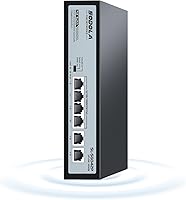
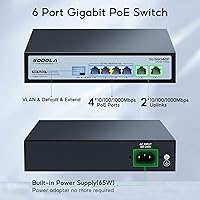
The Sodola 4-Port Gigabit PoE Unmanaged Switch is a compact, no-frills solution built for homeowners and small businesses that need to power a handful of network devices without touching a configuration interface. Six ports total — four PoE+ gigabit ports for cameras or access points, plus two gigabit uplinks — give you enough flexibility for a typical small deployment. The metal chassis feels noticeably solid for this price tier, and the plug-and-play nature means you unbox it, cable it up, and you are running. It carries the Sodola brand but is manufactured by Shenzhen hongyavision Technology, a detail worth knowing when evaluating long-term support expectations.
Features & Benefits

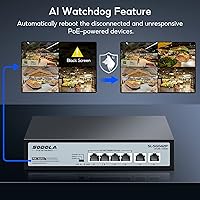
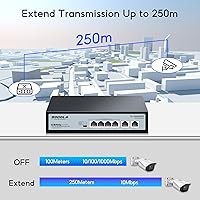
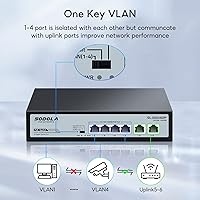
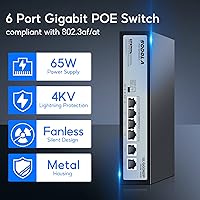
The standout feature for most buyers will be the AI Watchdog, which monitors connected PoE devices and automatically reboots any that stop responding — genuinely useful when cameras are mounted 20 feet in the air. A physical DIP switch on the unit cycles through three modes: Normal, VLAN isolation, and Extend. VLAN mode cuts communication between the four PoE ports, keeping devices segmented without needing a managed switch. Extend Mode pushes cable reach to 250 meters, though speed drops to 10Mbps at that range — fine for security cameras, less ideal for bandwidth-heavy tasks. 4KV lightning protection and full 802.3af/at compliance make this compact network switch genuinely practical for outdoor or semi-exposed installations.

Best For

This PoE switch hits its stride in small, defined deployments rather than complex or growing networks. It is a strong pick for IP camera installations — especially where cable runs exceed 100 meters, since Extend Mode handles that distance without a separate repeater. Homeowners setting up a basic outdoor security system will find the setup refreshingly straightforward. Small businesses wanting basic device segmentation without the cost of a managed switch will also appreciate the VLAN isolation mode. In environments prone to power surges or lightning, the built-in surge protection is a practical bonus. Just do not expect it to carry high-throughput workloads across those extended cable runs.

User Feedback

Buyers consistently praise the build quality for the price — the metal shell gets positive mentions, with many noting it runs warm but not alarmingly hot under sustained load. The AI Watchdog earns real appreciation from camera system owners who previously had to reboot frozen devices manually. On the downside, some users were caught off-guard by the 10Mbps ceiling in Extend Mode, having assumed full gigabit speeds would carry over long runs — worth reading the specs carefully before committing. A few buyers noted that running two or more 30W devices simultaneously starts pressing against the 65W power budget. Warranty experiences are mixed, with some smooth replacements and occasional delays in support response.

Pros

  • Plug-and-play setup means you are up and running in minutes with zero software or configuration required.
  • The AI Watchdog automatically reboots frozen cameras or access points, saving you a trip to the attic or roof.
  • Extend Mode pushes PoE delivery up to 250 meters, covering cable runs that most budget switches cannot handle.
  • Port isolation via DIP switch provides basic device segmentation without the cost of a managed switch.
  • The metal chassis feels notably solid and durable relative to what you are paying for it.
  • 4KV lightning protection on both ports and power supply is a meaningful safety feature for outdoor deployments.
  • Full 802.3af and 802.3at compliance means broad compatibility with virtually any standard PoE-powered device.
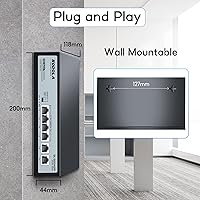
  • Wall or desktop mounting flexibility makes physical installation straightforward in tight or unconventional spaces.
  • Wide input voltage range of 100-240V makes it usable internationally without any adapter concerns.
  • FCC-certified build adds a baseline assurance of electrical compliance that some competing budget units lack.

Cons

  • Extend Mode caps transmission speed at 10Mbps, which surprises buyers expecting full gigabit over long runs.
  • The 65W shared power budget gets tight fast when connecting multiple high-draw 802.3at devices simultaneously.
  • No management interface means zero visibility into traffic, port status, or device activity at any time.
  • Only four PoE ports total — anyone needing five or more endpoints has already outgrown this switch.
  • Long-term support and warranty fulfilment from a lesser-known brand can be inconsistent based on buyer reports.
  • The MAC address table holds only 1,000 entries, which can be a bottleneck in busier or more complex networks.
  • Heat buildup under sustained full load has been noted by some users, and there are no cooling vents or a fan.
  • VLAN implementation is a binary on-or-off switch, not a configurable setup, limiting its usefulness in mixed environments.

Ratings

The Sodola 4-Port Gigabit PoE Unmanaged Switch has been evaluated through AI-driven analysis of verified global buyer reviews, with spam, bot-generated, and incentivized submissions actively filtered out to ensure the scores reflect genuine ownership experiences. Ratings span everything from setup ease and PoE reliability to thermal performance and long-term durability, giving you a transparent, balanced picture of where this compact network switch genuinely excels and where it falls short.
Value for Money
88%
For the price, buyers consistently report getting more than they expected — a metal chassis, AI Watchdog, Extend Mode, and lightning protection are features typically found on pricier hardware. Camera installers in particular flag this as one of the strongest budget PoE options available for small jobs.
A handful of users feel the value calculation shifts if you run into a warranty issue, since support responsiveness from a lesser-known brand can add frustration and hidden time costs that erode the initial savings.
Ease of Setup
93%
Unboxing to fully operational typically takes under five minutes for most buyers. Non-technical homeowners setting up their first IP camera system repeatedly praise the zero-configuration experience, with no app downloads, no login portals, and no firmware to update out of the box.
The DIP switch mode labels on the unit are small and the documentation is minimal, so users who want to understand the exact behavior of each mode before committing may find themselves searching online for clearer explanations.
PoE Reliability
84%
Day-to-day PoE delivery is stable for the vast majority of users running cameras and access points at normal loads. Buyers running two to three standard 802.3af cameras report consistent power with no unexpected drops during extended periods of use.
Stress-testing the full 65W budget by loading all four ports with high-draw 802.3at devices occasionally produces instability, with a few users reporting one port dropping power intermittently when the total draw approaches the ceiling.
AI Watchdog Performance
79%
21%
Camera system owners who previously had to manually reboot frozen cameras every few weeks report that the Watchdog handles those incidents automatically and reliably. The feature works as advertised for its core use case — detecting an unresponsive PoE device and cycling its power without any human intervention.
The Watchdog is not configurable — you cannot set detection thresholds, delay timers, or notification alerts. In a small handful of cases, users report it triggering unnecessary reboots on devices that were simply in a low-activity state rather than genuinely unresponsive.
Build Quality
82%
18%
The all-metal enclosure stands out clearly against plastic-bodied competitors at a similar price point. Buyers who have owned both describe the Sodola switch as feeling noticeably more robust, and several installers mention it holding up well in utility rooms and semi-exposed cabinet environments over more than a year of use.
The finish on the casing shows scratches and scuffs fairly easily, and the port labeling can wear with repeated cable insertions over time. A few buyers noted minor flex in the chassis when pressure is applied, suggesting the metal is relatively thin gauge.
Thermal Management
67%
33%
Under light to moderate loads — say, two or three cameras running 24/7 — the fanless metal chassis manages heat passively without reaching worrying temperatures. The design is adequate for the typical small surveillance setup it is aimed at.
Running all four PoE ports at high sustained draw causes noticeable heat buildup, and users in warm climates or enclosed installation spaces report the unit becoming uncomfortably hot to the touch. There are no ventilation slots or a cooling fan to assist passive dissipation.
Extend Mode Usefulness
71%
29%
For camera installers dealing with long cable runs in warehouses, barns, or large residential properties, the 250-meter reach is a genuine problem-solver that removes the need for a separate PoE extender or additional switch. Most IP cameras operate well within the 10Mbps bandwidth that Extend Mode provides.
The mandatory 10Mbps speed cap in Extend Mode regularly surprises buyers who assumed gigabit speeds would simply be maintained over longer distances. Anyone using modern high-bitrate cameras with demanding bandwidth requirements will hit this ceiling and need a different solution.
Port Isolation
74%
26%
For security-conscious homeowners and small business installers, the ability to isolate camera ports from each other with a simple DIP switch toggle is a meaningful feature that typically requires a managed switch to achieve. It works cleanly and reliably once enabled.
The isolation is all-or-nothing — either all PoE ports are isolated from each other, or none are. There is no way to selectively isolate specific ports while allowing others to communicate, which limits its usefulness in mixed-device environments where some lateral traffic is intentional.
Lightning Protection
81%
19%
Buyers in storm-prone regions and those running outdoor cable to cameras consistently mention the surge protection as a deciding factor in their purchase. Several users report the switch surviving nearby lightning strikes that damaged other unprotected network equipment on the same installation.
While the 4KV protection rating is solid for this price range, it is still a passive hardware safeguard rather than a replaceable surge module, meaning a direct or very close strike could still damage the unit permanently with no user-serviceable fix available.
Compatibility
87%
Full 802.3af and 802.3at compliance means this compact network switch pairs reliably with virtually any standard PoE device on the market — cameras from Hikvision, Dahua, Reolink, and Ubiquiti access points are all commonly mentioned as working without issue straight out of the box.
A very small number of users report compatibility quirks with certain proprietary PoE implementations from older or non-standard devices. These cases are uncommon but worth noting if you are working with legacy hardware that does not strictly follow the 802.3af/at specification.
Port Count & Scalability
52%
48%
For a focused four-camera or four-device installation, the port layout is clean and sufficient. The two uplink ports give you flexibility in how you connect to your upstream router or switch without sacrificing a PoE port.
Four PoE ports is a hard ceiling, and the switch offers no path to expansion. Users whose setups grow beyond four PoE devices must purchase an entirely separate switch, and there is no stacking or daisy-chaining support to extend capacity gracefully.
Documentation & Support
58%
42%
The physical setup is intuitive enough that most buyers never need the manual. For plug-and-play use in Normal mode, the included quick-start guide covers the basics adequately for non-technical users.
The manual is thin and the DIP switch mode descriptions are vague, leaving buyers to figure out edge-case behavior through trial and error or third-party forums. Reaching Sodola customer support for technical queries has produced inconsistent response times based on reported buyer experiences.
Mounting & Installation
77%
23%
The ability to mount on a wall or place flat on a desktop gives installers real flexibility, particularly in tight network closets or security enclosures where orientation matters. The unit's compact footprint makes it unobtrusive in most installation contexts.
The wall-mount hardware included is basic, and a few users report the mounting bracket feeling less secure than expected over time, particularly if the unit is installed in a location subject to vibration or frequent cable movement.
Long-term Durability
69%
31%
A meaningful portion of buyers report the unit running continuously for over a year without failure, which is reassuring for a budget-tier device expected to operate 24/7 in camera systems. The metal build contributes positively to longevity compared to plastic alternatives.
There is a noticeable tail of users reporting failures in the 12-to-18-month range, often involving one port losing PoE capability while others continue functioning. Whether this reflects a design weakness or installation-specific factors is unclear, but it appears often enough in reviews to warrant mention.
Indicator Lights
72%
28%
The per-port LED indicators give a quick, at-a-glance confirmation that each device is linked and passing data, which is useful during installation to verify each cable run is functioning before closing up a wall or ceiling.
The LEDs provide only basic link and activity status — there is no indicator for PoE active state, power draw, or mode confirmation beyond the single DIP switch status light. Diagnosing a PoE power issue versus a data issue requires external testing rather than reading the front panel.

Suitable for:

The Sodola 4-Port Gigabit PoE Unmanaged Switch is purpose-built for homeowners and small business owners who need a straightforward way to power and connect a few IP cameras, wireless access points, or VoIP phones without any networking expertise. If you are running cable to an outdoor camera positioned well beyond the typical 100-meter limit, the Extend Mode is a genuine differentiator at this price point — most competing budget switches simply do not offer it. Installers who drop in equipment and move on will appreciate the physical DIP switch for toggling modes, since there is no app, no web interface, and no configuration headaches involved. The built-in lightning protection also makes this compact network switch a practical choice for properties in storm-prone regions or where outdoor cable runs cross exposed areas. Anyone powering a modest set of standard PoE devices — think four cameras or three cameras and an access point — will find the 65W power budget comfortable for that use case.
Not suitable for:

The Sodola 4-Port Gigabit PoE Unmanaged Switch is the wrong tool if your network needs are growing, dynamic, or require any real management capability. There is no web interface, no SNMP, no traffic monitoring, and no fine-grained VLAN control — the DIP switch gives you three blunt modes and nothing more, which will frustrate anyone who expects the kind of flexibility a managed switch provides. The 65W shared power budget becomes a real constraint the moment you start stacking high-draw devices; two 30W cameras already consume nearly the full budget, leaving almost nothing for a third device. Extend Mode's 10Mbps speed cap is another hard wall — it works for low-bitrate camera feeds, but it is completely unsuitable for anything involving real data throughput over long runs. Buyers who need to support more than four PoE endpoints, or who anticipate scaling their setup significantly, should look at switches with higher port counts and larger power budgets rather than trying to chain this unit.
Specifications

  • PoE Ports: Four gigabit PoE+ ports support both 802.3af (up to 15.4W) and 802.3at (up to 30W) standards for powering connected devices.
  • Uplink Ports: Two additional gigabit Ethernet uplink ports connect the switch to a router or upstream network device.
  • Power Budget: The total shared PoE power budget is 65W across all four PoE ports simultaneously.
  • Switching Capacity: Internal switching capacity is 1.2Gbps with a forwarding throughput of 0.8928Mpps.
  • Extend Mode: Enabling Extend Mode via the DIP switch stretches PoE and data transmission up to 250 meters, though speed is reduced to 10Mbps at that range.
  • Lightning Protection: Hardware-level surge protection reaches 4KV on ports in general mode and 2KV in differential mode, with ESD protection rated at 8KV (air) and 6KV (contact).
  • MAC Table: The MAC address table holds up to 1,000 entries, suited for small, low-complexity network environments.
  • Packet Buffer: Onboard packet buffer is 448K with a maximum jumbo frame size of 2Kbytes.
  • Dimensions: The unit measures 200 x 118 x 44mm and weighs 0.60kg net, making it compact enough for shelf, desktop, or wall installation.
  • Chassis Material: The outer housing is constructed from metal, providing a more durable enclosure than the plastic shells common at this price tier.
  • Power Input: The switch accepts a wide AC input range of 100-240V at 50/60Hz, with an internal power supply running at 52V/1.25A.
  • Operating Temp: Rated for operating temperatures between -10 and 50 degrees C, covering most indoor and sheltered outdoor environments.
  • Mounting Options: Supports both desktop placement and wall mounting, with appropriate hardware included to accommodate either installation style.
  • DIP Switch Modes: A physical DIP switch on the unit toggles between three operating modes: Normal, VLAN port isolation, and Extend, with no software required.
  • AI Watchdog: The built-in AI Watchdog function monitors PoE-connected devices and automatically power-cycles any that become unresponsive.
  • Compliance: The switch meets FCC Part 15 and CISPR EN55032 Class A emissions standards, along with EN61000-4-2 and EN61000-4-5 immunity standards.
  • PoE Standards: Fully compliant with IEEE 802.3af and IEEE 802.3at PoE protocols, ensuring compatibility with the vast majority of standard PoE-powered devices.
  • Network Protocols: Supports IEEE 802.3 (10Base-T), IEEE 802.3u (100Base-TX), and IEEE 802.3x flow control protocols.
  • Cable Requirements: 10Base-T connections require Cat3 or higher UTP cable, while 100Base-TX and gigabit connections require Cat5 or above, all within 100 meters under normal mode.
  • Warranty: Sodola provides a one-year replacement warranty, with the manufacturer committing to product replacement rather than repair within that period.

Related Reviews

YuLinca 6-Port Gigabit PoE Switch with 4 PoE+ Ports
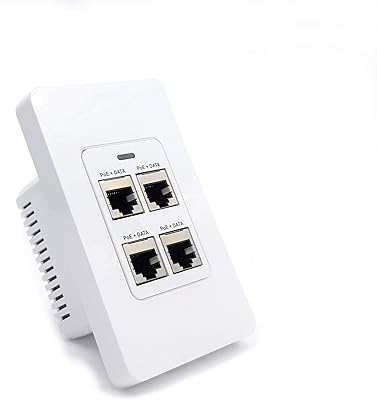
87%
95%
Ease of Installation
88%
PoE Functionality
91%
Build Quality
87%
Performance and Speed
94%
Fanless Operation (Noise)
More
PoE Texas 4 Port in-Wall Gigabit PoE Extender Switch
87%
92%
Installation Ease
88%
Power Output & Range
90%
Aesthetic & Design
89%
Reliability & Stability
84%
Compatibility with Devices
More
MokerLink EXT-AT13GO Outdoor Gigabit PoE Extender
78%
93%
Ease of Setup
71%
Power Delivery
74%
Build Quality
77%
Weatherproofing
88%
Gigabit Performance
More
YuanLey 4-Port Waterproof Gigabit PoE Switch
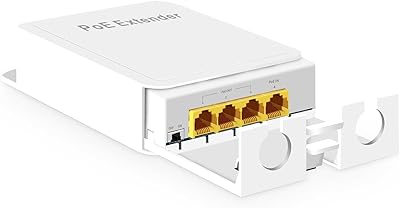
77%
93%
Ease of Installation
81%
Weatherproofing & Durability
84%
PoE Power Delivery
78%
Build Quality
88%
Value for Money
More
Linksys LGS124P 24-Port Gigabit Unmanaged PoE Switch
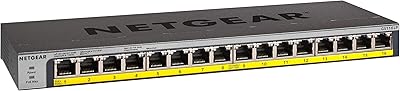
90%
91%
Ease of Setup
88%
Build Quality
93%
PoE Performance
85%
Durability
89%
Energy Efficiency
More
NETGEAR GS116LP 16-Port Unmanaged PoE+ Switch
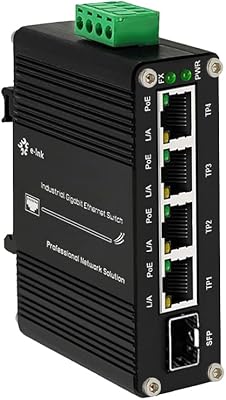
86%
97%
Ease of Setup
93%
PoE Port Coverage
62%
PoE Power Budget
96%
Silent Operation
88%
Build Quality
More
Steloproad Mini Industrial 4-Port Gigabit Ethernet POE+ Switch with SFP
87%
89%
Performance
93%
Build Quality/Durability
85%
Ease of Installation
90%
POE+ Support
92%
Environmental Suitability
More
MokerLink POE-G1604GS 20-Port Gigabit PoE Switch
85%
88%
Performance
93%
Ease of Setup
90%
Build Quality
89%
PoE Power Budget (200W)
91%
Noise Level
More
MokerLink POE-G082G 10-Port Gigabit PoE Switch
78%
94%
Ease of Setup
88%
PoE Reliability
83%
Build Quality
91%
Value for Money
71%
Thermal Management
More
BV-Tech POE-SW802G 8-Port Gigabit PoE+ Switch
79%
94%
Ease of Setup
88%
PoE Reliability
67%
Power Budget
61%
Build Quality
91%
Value for Money
More

FAQ

No, there is nothing to install. You plug in your devices, connect the uplink to your router, and it works immediately. The only configuration option is the physical DIP switch on the unit itself, which toggles between three modes — and even that is optional if you are happy running in the default Normal mode.

That depends on how much power each camera draws. If your cameras are standard 802.3af devices pulling around 15W each, you can comfortably run four. If you are using higher-powered 802.3at cameras at close to 30W each, the 65W total budget realistically supports two with some headroom, or three if the actual draw is modest. Always check the stated power consumption of your specific camera model before assuming all four ports will run at full load simultaneously.

The Watchdog monitors each connected PoE device and, if one stops responding — as IP cameras sometimes do after a firmware hiccup or network glitch — it automatically cuts and restores power to that port to reboot the device. It is not an enterprise-grade diagnostic tool; think of it more as an automatic power-cycling feature that saves you from climbing a ladder to unplug and replug a frozen camera. Most buyers who use it for camera systems report it works reliably for that purpose.

Extend Mode is broadly compatible with standard PoE devices, but there is an important tradeoff to understand: once you enable it, all ports in Extend Mode drop to 10Mbps regardless of what your camera supports. For most IP cameras recording at typical bitrates, 10Mbps is more than enough. However, if you are running high-resolution cameras with very high bitrate streams, you should check the camera's actual bandwidth requirements before relying on Extend Mode.

By default in Normal mode, all ports can communicate freely with each other. Port isolation only kicks in when you flip the DIP switch to VLAN mode. In that mode, the four PoE ports cannot talk to each other at all — they can only reach the uplink ports. This is useful if you want to prevent cameras from accessing each other on the network, which is a common security preference for surveillance setups.

The switch itself is not rated for outdoor exposure — it has no weatherproofing or IP rating. That said, its lightning protection and wide temperature tolerance make it well-suited for installation in sheltered outdoor spaces like garages, sheds, or security enclosures, as long as it is protected from direct moisture. Running cable outdoors to cameras is fine; mounting the switch itself outdoors without an enclosure is not recommended.

It does run warm under sustained load, which is normal for any unmanaged PoE switch without active cooling. The metal chassis helps dissipate heat passively. Most users report it stays within acceptable temperature ranges during everyday use, though you should avoid placing it in an enclosed box with no airflow, especially if all four PoE ports are loaded simultaneously.

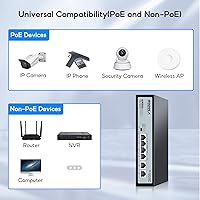
Yes, but only through the two uplink ports. The uplink ports are standard gigabit Ethernet without PoE, so you can connect a non-PoE device there without any issue. The four PoE ports can also physically connect non-PoE devices — they will not force-feed power to a device that does not request it — but those ports are better used for PoE devices given the switch's purpose.

When VLAN mode is active, each of the four PoE ports is effectively in its own isolated segment and can only pass traffic through the uplink ports. This means a camera on port 1 cannot directly communicate with a camera on port 2, which limits the blast radius if one device is compromised or starts generating unusual traffic. It is a basic but meaningful layer of separation for a network where you do not fully trust every connected device.

Sodola states a one-year warranty with a replacement policy rather than a repair service, which is fairly standard for this category. Experiences with actually claiming a warranty replacement vary — some buyers report smooth and fast resolutions, while others have experienced slower response times. Keeping proof of purchase and reaching out through the Amazon order channel tends to be the most straightforward path if you run into an issue within the warranty window.