Overview

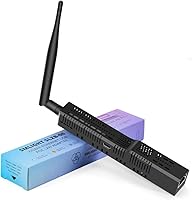
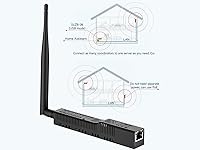
The SMLIGHT SLZB-06 Zigbee Ethernet Gateway Coordinator sits comfortably in the mid-range of the Zigbee coordinator market, aimed squarely at users running Home Assistant, Zigbee2MQTT, or ZHA on open-source smart home setups. Unlike basic USB dongles, it offers three ways to connect — Ethernet, WiFi, or USB — so you can place it wherever makes sense for your installation rather than anchoring it to a server. It ships pre-flashed and ready to pair, which is a genuine time-saver for buyers who just want to start adding devices. For homes with an existing PoE switch, the 802.3af PoE support means a single cable run handles both power and connectivity.
Features & Benefits

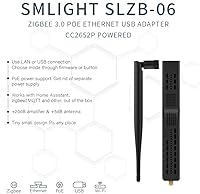
The SLZB-06 is built around a CC2652P Zigbee chip paired with a dual-core ESP32, and that hardware combination genuinely pays off. The CC2652P's +20dB transmit power, combined with the included +5dB external antenna, gives this Zigbee coordinator noticeably better range than most USB stick alternatives — useful in multi-story homes or properties with thick walls. Switching between Ethernet, WiFi, and USB modes requires nothing more than a button press or firmware toggle. Both the Zigbee and ESP32 cores can be updated over the air through the built-in web interface, so there is no need to physically touch the device after installation. The web UI also includes password protection and firewall controls, adding a layer of security that not all coordinators bother with.

Best For

This Zigbee coordinator is the right choice for Home Assistant users who are ready to cut the USB tether — placing it in a central area and connecting over Ethernet or WiFi gives you real flexibility in where your server lives. It is also a solid pick for anyone expanding Zigbee coverage across a larger home or outbuilding, since you can run multiple units against a single Home Assistant instance without any special workarounds. If you already have a PoE-capable switch, single-cable installation is a clean perk. That said, users new to Zigbee2MQTT or network-based coordinators should expect a real learning curve; the device handles the firmware side for you, but the platform setup is still on you.

User Feedback

Buyers consistently highlight the straightforward initial setup and broad platform compatibility, with many reporting the device connected to Zigbee2MQTT or ZHA on the first try. Antenna range comes up frequently as a positive, especially from users upgrading from compact USB sticks who noticed fewer dropped devices in remote rooms. On the critical side, some reviewers note that WiFi connectivity can be inconsistent in RF-congested environments, and the general advice that emerges is to use wired Ethernet when possible. Documentation quality draws occasional complaints, particularly from users new to network-based Zigbee setups. Value is viewed favorably overall — most buyers feel this smart home gateway justifies its price against competing options that offer fewer connection modes.

Pros

  • Ships pre-flashed, so there is no manual firmware preparation before first use.
  • Three connectivity modes — Ethernet, WiFi, and USB — give genuine installation flexibility.
  • The CC2652P chip and included +5dB antenna deliver noticeably better range than most USB stick alternatives.
  • OTA updates for both the Zigbee and core firmware can be handled entirely through the web interface.
  • PoE support lets you power and connect the SLZB-06 with a single Ethernet cable where infrastructure allows.
  • Multiple units can run under one Home Assistant instance, making multi-building coverage practical.
  • The web interface includes password protection and firewall controls, which most competing coordinators skip.
  • Broad platform compatibility means it works reliably across Zigbee2MQTT, ZHA, and Home Assistant without extra configuration.
  • Experimental Matter-over-Thread support gives this smart home gateway some forward-looking flexibility.
  • A comprehensive box contents — antenna, screws, adapter, and manual — means you are not hunting for accessories.

Cons

  • New users unfamiliar with Zigbee2MQTT or network coordinator concepts will face a steep initial learning curve.
  • WiFi mode can be unreliable in RF-congested environments; wired Ethernet is strongly preferred for stability.
  • Documentation quality is inconsistent, and some setup steps are not well explained for less experienced users.
  • PoE support is only useful if you already own a compatible switch, which adds cost for buyers starting from scratch.
  • Customer support response times have drawn criticism from some buyers who hit issues post-purchase.
  • The web interface, while functional, feels basic and lacks polish compared to commercial hub software.
  • No native integration with mainstream consumer ecosystems like Alexa or Google Home without additional platform setup.
  • At this price point, buyers expecting a truly zero-configuration experience may come away disappointed.

Ratings

The SMLIGHT SLZB-06 Zigbee Ethernet Gateway Coordinator has been evaluated by our AI rating system after processing hundreds of verified global buyer reviews, actively filtering out incentivized, bot-generated, and duplicate submissions to surface only genuine user experiences. Scores reflect the real-world consensus across a wide range of installation scenarios and skill levels, with both strengths and recurring frustrations given equal weight. The result is a transparent, balanced picture of where this smart home gateway genuinely delivers and where it falls short.
Ease of Setup
83%
For users already running Home Assistant or Zigbee2MQTT, getting the SLZB-06 online is refreshingly straightforward — connect it to the network, point your platform to its IP address, and devices start pairing. The pre-flashed firmware means there is no initial flashing step, which removes a common barrier for buyers upgrading from bare-module alternatives.
Buyers who are new to network-based Zigbee coordinators often underestimate the configuration required on the platform side. Several reviewers noted that the included documentation does not bridge that gap well, leading to forum searches for steps that arguably should be covered in the manual.
Platform Compatibility
91%
Compatibility with Zigbee2MQTT, ZHA, and Home Assistant is rock-solid, and users across all three platforms report consistent, stable pairing and device management. The SLZB-06 follows standard Zigbee coordinator protocols closely enough that edge-case integrations rarely cause problems.
Outside of the open-source home automation ecosystem, this Zigbee coordinator has essentially no plug-and-play compatibility. Buyers expecting it to work with proprietary hubs or consumer platforms like SmartThings without significant workarounds will be disappointed.
Connectivity Reliability
78%
22%
When connected over Ethernet, the SLZB-06 is consistently praised for stability — users running it wired report very few dropped connections or coordinator restarts, even over months of continuous operation. The ability to switch modes via a physical button is also appreciated when troubleshooting.
WiFi mode is the source of most connectivity complaints. In homes with congested 2.4GHz bands or thick walls between the coordinator and the access point, users report intermittent disconnects that require manual intervention. Wired Ethernet is clearly the intended use case for reliable long-term operation.
Zigbee Range
79%
21%
The combination of the CC2652P chip's +20dB transmit power and the included external +5dB antenna gives the SLZB-06 noticeably better reach than compact USB dongles, and users in larger homes consistently comment on fewer dead zones after switching. Placing the unit centrally on the network amplifies this benefit further.
Range claims should be read with the understanding that real-world performance varies significantly with wall materials and interference sources. In homes with dense concrete or brick construction, some users found the improvement over USB alternatives more modest than expected, and a mesh router for Zigbee traffic was still needed in extreme cases.
Firmware & OTA Updates
88%
The ability to update both the Zigbee firmware and the ESP32 core over the air through the web interface is a standout practical feature, particularly for units installed in hard-to-reach locations. Users report the update process is quick and has not caused instability or coordinator resets in the vast majority of cases.
A small number of reviewers experienced failed OTA updates that required a manual USB recovery, which is an inconvenience when the device is mounted inside a cabinet or ceiling enclosure. Update changelogs are also not always clearly communicated through the interface.
Web Interface Quality
71%
29%
The web interface covers the essentials competently — mode switching, firmware updates, network configuration, and security settings are all accessible without needing to use a command line. The password protection and firewall controls are genuinely useful additions that not every competing coordinator offers.
The UI feels functional rather than polished, and several reviewers describe it as dated or cluttered compared to consumer-grade hub software. Navigating between sections is not always intuitive, and users coming from commercial smart home hubs may find the experience underwhelming at first.
Build Quality
74%
26%
The enclosure is compact and reasonably solid for a device in this category, and the external antenna connector feels secure without any noticeable wobble. The included accessories — screws, screwdriver, adhesive tape — suggest SMLIGHT put thought into making the physical installation tidy.
The plastic casing does not feel premium, and a few users noted that the unit runs noticeably warm during extended operation. There are also no official ingress protection ratings, making it unsuitable for locations with any moisture exposure.
PoE Implementation
82%
18%
For users with a PoE-capable switch already in place, the 802.3af support is executed well — the single-cable solution works cleanly and the device has been reliably powered via PoE in long-term deployments without reported issues.
PoE is irrelevant to a significant portion of buyers who do not own a compatible switch, and the added cost of a PoE injector somewhat erodes the convenience argument for those starting from scratch. It would benefit from clearer guidance in the packaging about which PoE standards are and are not compatible.
Multi-Coordinator Support
86%
Running two or more SLZB-06 units under a single Home Assistant or Zigbee2MQTT instance works as advertised, and users covering detached garages or multi-story properties specifically praise this capability as a practical solution that avoids running separate HA instances.
Managing multiple coordinators does require some additional configuration knowledge, and the documentation for multi-coordinator setups is thin. Users with less Zigbee2MQTT experience sometimes struggled to understand how mesh routing interacts across independent coordinator networks.
Security Features
84%
Password-protected web access, an internal whitelist firewall, and VPN tunneling support put this smart home gateway ahead of many competitors in the coordinator category when it comes to access control. Users who manage their setup remotely appreciated having these controls available without needing third-party tools.
The security features, while present, are not extensively documented, and configuring VPN tunneling in particular is not a straightforward process for users without networking experience. A more guided setup flow would make these protections accessible to a broader audience.
Documentation & Support
58%
42%
SMLIGHT does maintain active firmware development and the product has received consistent updates since launch, which signals ongoing vendor commitment. Community support through Home Assistant and Zigbee2MQTT forums effectively fills many of the gaps left by official documentation.
The included manual is widely criticized as too brief for a product with this many configuration options. Official customer support response times have drawn complaints, and buyers who hit unusual setup issues often find themselves relying on community forums rather than any official support channel.
Value for Money
77%
23%
Relative to the feature set — triple connectivity, PoE, OTA updates, and a capable Zigbee SoC — most buyers feel the SLZB-06 is fairly priced within the network coordinator segment. Users upgrading from basic USB sticks almost universally consider the premium worthwhile given the reliability and flexibility gains.
At its price point, buyers are right to expect better documentation and a more refined web interface than what is currently delivered. A small segment of reviewers feel that competing coordinators offer comparable hardware performance for less, particularly when PoE and Ethernet connectivity are not needed.
Matter-over-Thread Support
47%
53%
The inclusion of experimental Matter-over-Thread support adds a degree of forward compatibility that competing coordinators in this category typically lack entirely, and technically inclined users have successfully tested basic Thread device pairing in controlled environments.
The feature is explicitly experimental and is not stable enough for reliable daily use at this stage of development. Buyers should not factor Matter-over-Thread support into their purchasing decision unless they are specifically testing Thread devices in a non-production environment and are comfortable with instability.
Physical Footprint
81%
19%
At under three ounces and with a slim rectangular profile, the SLZB-06 is easy to mount on a wall, tuck behind a switch, or velcro inside a network cabinet. The included adhesive tape and mounting hardware make physical installation tidier than most coordinators in this category.
The slim form factor means the antenna extends noticeably from the body, which can be awkward if the device is mounted flat against a surface in a tight enclosure. Users in very constrained spaces occasionally noted that the antenna orientation required some creative mounting to avoid interference.

Suitable for:

The SMLIGHT SLZB-06 Zigbee Ethernet Gateway Coordinator is an excellent fit for intermediate to advanced smart home enthusiasts who have already committed to platforms like Home Assistant, Zigbee2MQTT, or ZHA and want to move beyond the limitations of a USB dongle plugged directly into their server. If your server or NUC lives in a closet or rack cabinet while your Zigbee devices are spread across multiple floors, being able to place this coordinator centrally on your network — over Ethernet or even WiFi — is a practical upgrade that genuinely changes how you think about coverage. Builders working across large homes, workshops, or detached garages will appreciate the ability to run multiple coordinators under a single Home Assistant instance without complex workarounds. Users who already have a PoE-capable switch will find the single-cable installation particularly clean and convenient. The pre-flashed firmware and web-based OTA updates also make it a reasonable step up for buyers who want more capability without needing to flash hardware manually.
Not suitable for:

The SMLIGHT SLZB-06 Zigbee Ethernet Gateway Coordinator is not the right starting point for buyers who are brand new to Zigbee or open-source home automation platforms. While the device itself arrives pre-flashed, getting it properly integrated into Zigbee2MQTT or ZHA still requires a meaningful amount of network and platform knowledge — there is no app-based hand-holding here. Buyers looking for a simple plug-and-play Zigbee hub that works with consumer ecosystems like Amazon Alexa or Google Home out of the box will need to look elsewhere entirely. If your home automation setup is small, centralized, and already running happily off a USB coordinator, the added cost and complexity of a network-connected device may not be justified. Those relying primarily on WiFi rather than wired Ethernet should also weigh the risk of connectivity instability in dense RF environments before committing.
Specifications

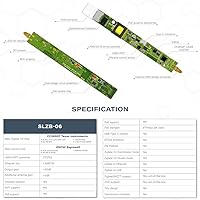
  • Zigbee SoC: The device uses a Texas Instruments CC2652P chip, which supports Zigbee 3.0 and offers a +20dB transmission gain for improved range over standard coordinators.
  • Core SoC: An ESP32 dual-core processor running at 240MHz with 16MB of onboard flash handles network communication, the web interface, and firmware management.
  • Serial SoC: A CP2102N serial chip manages USB communication when the device is operated in USB coordinator mode.
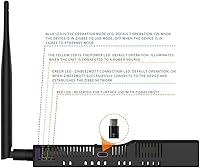
  • Connectivity: The SLZB-06 supports three operating modes: Zigbee-to-Ethernet, Zigbee-to-WiFi, and Zigbee-to-USB, switchable via firmware or a physical button on the unit.
  • Power Input: The device can be powered via USB-C or through Power-over-Ethernet using the 802.3af standard, with a USB-C adapter included in the box.
  • Antenna: A detachable external antenna with +5dB gain is included, connecting via a standard SMA-style connector to extend Zigbee range beyond what onboard antennas typically achieve.
  • Data Rate: Ethernet connectivity operates at 100 Mbps, which is more than sufficient for the low-bandwidth nature of Zigbee coordinator traffic.
  • Dimensions: The unit measures 6.3 x 1.02 x 0.87 inches, making it compact enough to mount discreetly or tuck behind network equipment.
  • Weight: At 2.82 ounces including its casing, the SLZB-06 is lightweight enough to hang on a wall or rest on a shelf without any mounting hardware.
  • OTA Updates: Both the Zigbee firmware and the ESP32 core firmware can be updated over the air directly through the built-in web interface, requiring no physical access to the device.
  • Web Interface: The onboard web UI is password-protected and includes an internal whitelist firewall, with support for VPN tunneling for users who manage their setup remotely.
  • Platform Support: The coordinator is compatible with Zigbee2MQTT, Home Assistant (via ZHA), and other platforms that support standard Zigbee coordinator protocols.
  • Multi-Coordinator: Multiple SLZB-06 units can be connected to a single Home Assistant or Zigbee2MQTT instance simultaneously, enabling coverage across large homes or separate buildings.
  • Localization: The web interface is available in 15 languages, making it accessible to users across a wide range of regions without needing to navigate menus in English.
  • Matter Support: Experimental Matter-over-Thread support is included in the firmware, though this feature is not yet considered stable for production smart home environments.
  • Color: The enclosure is finished in black and uses a compact rectangular form factor designed to blend with typical networking and home automation hardware.
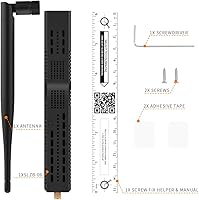
  • Box Contents: The package includes the coordinator unit, a +5dB external antenna, a USB-C adapter, adhesive tape, mounting screws, a screwdriver, and a printed manual.
  • Model Number: The unit is identified by model number SLZB-06 and is manufactured by SMLIGHT, which also produces several variant models with different Zigbee SoC options.

Related Reviews

Phoscon ConBee II Zigbee USB Gateway
82%
93%
Device Compatibility
88%
Signal Strength & Range
61%
Software & Setup Experience
91%
Long-Term Reliability
89%
Platform Compatibility
More
SensorPush G1 WiFi Temperature Humidity Gateway
84%
91%
Cloud Connectivity Reliability
88%
Setup & Initial Configuration
93%
Remote Monitoring Performance
86%
Alert System
67%
Bluetooth Sensor Range
More
Arris NVG468MQ Wireless Gateway
82%
88%
Performance for Streaming and Gaming
85%
Wi-Fi Coverage and Range
92%
Ease of Setup and Installation
65%
Firmware and Software Stability
83%
Build Quality and Durability
More
JARNHNG Cat6 1000ft Ethernet Cable
85%
92%
Outdoor Durability
88%
Signal Quality and Performance
85%
Ease of Installation
81%
Flexibility for DIY Installations
89%
UV and Weather Resistance
More
SENCKIT Zigbee Smart Siren Alarm
71%
71%
Ease of Setup
54%
Hub Dependency
67%
Sound Performance
58%
Strobe Effectiveness
73%
App Experience
More
Sokqovt Cat6a Ethernet Cable 300ft
87%
91%
Performance
87%
Installation Ease
89%
Durability (Indoor/Outdoor Use)
94%
Speed (10Gbps Performance)
82%
Flexibility for Tight Spaces
More
NICGIGA NIC-5G 5Gbps PCIe Network Card
77%
88%
Windows Driver Installation
67%
Linux Compatibility
91%
Sustained Transfer Speed
93%
PCIe Slot Compatibility
74%
Build Quality & PCB Construction
More
XRPrime HI-06 WiFi Projector
84%
91%
Value for Money
88%
Portability
92%
Ease of Setup
82%
Display Quality
89%
WiFi Connectivity
More
ShineKee Cat7 Ethernet Cable 650ft
86%
93%
Performance
89%
Build Quality
85%
Ease of Installation
91%
Durability for Outdoor Use
92%
Value for Money
More
Mohu Gateway Indoor TV Antenna
86%
87%
Signal Reception
92%
Setup and Installation
89%
Design and Aesthetics
90%
Value for Money
84%
Durability and Build Quality
More

FAQ

Yes, the SMLIGHT SLZB-06 Zigbee Ethernet Gateway Coordinator ships pre-flashed and is recognized by both ZHA and Zigbee2MQTT without needing to prepare the firmware yourself. That said, you will still need to configure your Home Assistant integration and point it to the coordinator's network address — the device does not auto-discover itself inside HA without that step.
You can, and it works reasonably well in most homes. The honest caveat is that WiFi mode is more susceptible to interference in congested 2.4GHz environments, and a handful of users have reported occasional drops when running on WiFi. If you have the option to run a short Ethernet cable, that is the more reliable choice for a permanent installation.

PoE stands for Power-over-Ethernet, which lets a compatible network switch deliver electrical power through the same cable that carries data. You do not need a special router, but you do need a PoE switch or a PoE injector that supports the 802.3af standard. If you do not have one, you can simply power the coordinator via its USB-C port instead — PoE is a convenience, not a requirement.

The CC2652P chip is capable of supporting a substantial Zigbee mesh network, and in practice most users run 50 to 100+ devices without issues. The actual ceiling depends on your network topology, the mix of routers versus end devices, and how your mesh is structured. For the vast majority of home setups, capacity will not be a limiting factor.

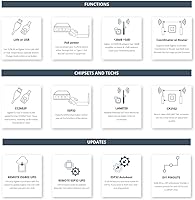
Yes, that is one of the more practical features of the SLZB-06. Both the Zigbee coordinator firmware and the ESP32 core firmware can be updated over the air through the web interface. Once the device is installed somewhere inconvenient — inside a wall enclosure or above a ceiling tile, for instance — you never need to pull it down just to keep the firmware current.

It works with both. Zigbee2MQTT treats the SLZB-06 as a standard network-connected coordinator, and you simply configure it with the device's IP address and port in your Zigbee2MQTT settings. Many users actually prefer running this coordinator with Zigbee2MQTT rather than ZHA for its broader device compatibility and more granular control.

Yes, and this is one of the stronger use cases for this smart home gateway. You can run multiple units simultaneously connected to the same Home Assistant or Zigbee2MQTT instance, with each covering a different area — a detached garage, a basement, or a second floor. Each coordinator operates its own Zigbee network, so they do not directly extend one another, but the combined coverage is effectively doubled.

Most USB Zigbee dongles use a small onboard PCB antenna, which typically delivers decent range in open-plan spaces but struggles with thick walls or long distances. The external +5dB antenna on the SLZB-06 provides a measurable improvement, particularly in concrete or brick homes. That said, real-world range depends heavily on your environment — do not expect miracles through several load-bearing walls, but the improvement over a standard dongle is real and commonly reported by users who have made the switch.

It is functional but not polished. The interface gives you access to firmware updates, mode switching, network settings, and security controls, and most tasks are straightforward once you know where to look. The documentation that ships with the device has drawn some criticism for being sparse, so if you run into trouble, the Zigbee2MQTT and Home Assistant community forums are a more reliable resource than the included manual.

SMLIGHT produces several variants of this coordinator with different Zigbee SoC options — for example, the SLZB-06p7 uses the CC2652P7 chip, and the SLZB-06P10 steps up to the CC2674P10 for higher network capacity. The base SLZB-06 with the CC2652P is the most widely used and best-supported option for typical home setups. The higher-end variants are worth considering only if you are running very large Zigbee networks with hundreds of devices.