Overview

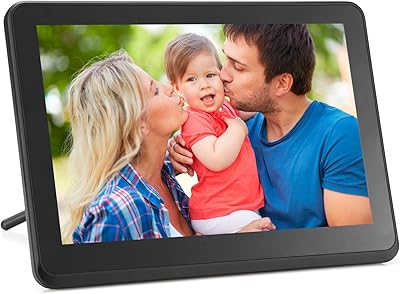
The Skylight 10-Inch WiFi Digital Picture Frame takes the familiar idea of a photo display and gives it a genuine upgrade — one built around keeping families connected rather than impressing tech enthusiasts. Sitting at number two in its category with over 25,000 ratings, it carries real buyer confidence behind it. This is fundamentally a gifting device: something you buy for someone you love, not something you pick apart for spec sheets. The core experience revolves around a 10-inch touch screen and a brilliantly simple email-based sharing system. At its price tier, buyers should expect polish, and for the most part, this photo-sharing display delivers it.

Features & Benefits

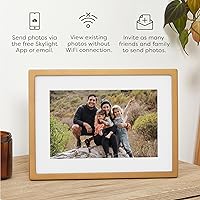
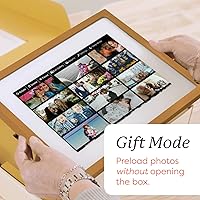
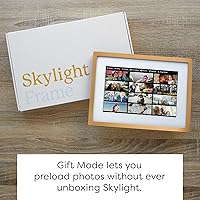
The most practical feature here is the email-based photo sharing — each frame gets its own unique address, so anyone in the family can send photos directly to the screen without downloading an app or creating an account. The 1280x800 display is sharp enough that photos look genuinely good, with colors that hold up well in normal room lighting. There are no memory cards to manage; everything lives in the cloud. The Gift Mode is a clever touch that lets you preload a slideshow before wrapping the box. And if the Wi-Fi drops, the frame keeps cycling through whatever photos it already has stored.

Best For

This digital frame is genuinely well-suited to a specific kind of buyer: someone who wants to give a meaningful, low-maintenance gift to a parent or grandparent who isn't on social media. The whole concept clicks when you picture an elderly relative opening it, plugging it in, and then watching family photos appear on the screen without touching a single setting. It's also a strong fit for long-distance families who want a living photo display that updates automatically. Anyone who dreads managing SD cards or syncing devices will appreciate the cloud-only approach. If you need a ready-to-go gift that requires almost nothing from the recipient, this photo-sharing display is hard to beat.

User Feedback

Buyers consistently highlight two things: how fast setup actually is — many mention it took under five minutes — and the emotional reaction from recipients, particularly older family members who aren't used to getting surprise photos in their living room. The Gift Mode feature comes up repeatedly in reviews as a genuine differentiator. On the flip side, a handful of users note that some advanced features require a paid subscription, which isn't obvious upfront. There are also occasional reports of connectivity hiccups on older routers. Neither issue is a dealbreaker for most, but if you're expecting everything included without any ongoing costs, it's worth reading the fine print before purchasing.

Pros

  • Setup typically takes under five minutes, even for people who rarely use technology.
  • The email-based sharing system means anyone in the family can send photos without installing an app.
  • Cloud storage keeps everything organized without the hassle of memory cards or USB drives.
  • Gift Mode lets you preload a personalized slideshow before the recipient ever opens the box.
  • The 10-inch display delivers sharp, color-accurate photos that look genuinely good in a home setting.
  • Offline mode keeps the slideshow running even when the Wi-Fi connection drops temporarily.
  • The gold-finish frame has a warm, decorative look that fits naturally into most home interiors.
  • Over 25,000 verified ratings at 4.7 stars reflects consistent satisfaction across a wide range of buyers.
  • Recipients who are not on social media can still receive daily photo updates effortlessly.

Cons

  • Some advanced features require a paid subscription that is not clearly disclosed before purchase.
  • Older or dual-band routers can cause intermittent connectivity issues that require manual troubleshooting.
  • There is no SD card or USB input, so local photo loading without Wi-Fi is not an option.
  • The 1280x800 resolution is adequate but not exceptional compared to newer display panels on the market.
  • Users wanting detailed slideshow controls or media organization tools may find the interface too basic.
  • The frame must remain plugged in at all times, limiting where it can realistically be placed.
  • Sending videos is supported, but playback quality and length limitations frustrate some users.
  • At this price point, the lack of a clearly included full-featured subscription feels like an incomplete package.

Ratings

The scores below for the Skylight 10-Inch WiFi Digital Picture Frame were generated by our AI system after analyzing thousands of verified global purchase reviews, with spam, incentivized, and bot-flagged submissions actively filtered out before scoring. Each category reflects the honest distribution of buyer sentiment — strengths and frustrations alike — so you get a realistic picture of what to expect before committing. Whether this photo-sharing display earns a place in your cart depends heavily on who you are buying it for, and these ratings are designed to help you figure that out.
Ease of Setup
93%
Buyers across age groups consistently report that getting the frame running takes less than five minutes from unboxing to first photo. The plug-in, connect-to-Wi-Fi, assign-an-email flow is genuinely intuitive, which matters enormously when the end user is an elderly parent or grandparent with limited tech confidence.
A small but vocal group of users ran into initial connection failures when working with older routers or strict network configurations. In those cases, setup stretched from five minutes to an hour-long troubleshooting session, which is frustrating given how central ease of use is to this product's identity.
Photo Sharing Experience
91%
The email-based system is the heart of this device, and it works reliably in most households. Family members spread across different cities can send a photo from their phone gallery and watch it appear on a parent's mantelpiece within seconds — no apps, no accounts, no friction on the receiving end.
The experience depends entirely on people remembering the frame's unique email address, and there is no centralized address book or group-send feature built into the free tier. A few users also noted that photo delivery occasionally lagged during peak periods, creating a slight disconnect between sending and displaying.
Display Quality
84%
For a frame sitting on a kitchen counter or bedroom shelf, the 1280x800 screen delivers colors that are warm, natural, and accurate enough to make family portraits look genuinely good. Brightness holds up well under typical indoor lighting without washing out or creating glare issues.
Against current display standards in consumer electronics, the resolution is merely adequate rather than impressive — fine for photos viewed at arm's length, but not something that will impress anyone used to high-density screens. There is also no automatic brightness adjustment, which some users notice in darker rooms late at night.
Gift Readiness
96%
Gift Mode is the feature that separates this digital frame from most competitors in a meaningful way. Buyers can preload a curated slideshow before wrapping the box, so the recipient's first experience is already personal and emotionally resonant — not a blank screen asking for Wi-Fi credentials.
Gift Mode requires the buyer to have access to the frame and the Skylight app ahead of time, which adds a small logistical step that can be tricky if the frame is being shipped directly to the recipient as a surprise. A few users also wished the preloaded photo limit was higher on the base tier.
Value for Money
67%
33%
For buyers who primarily want a reliable, beautiful gifting device that just works for a non-technical family member, the price feels justified by the overall polish and the emotional return it delivers. The build quality, display, and sharing system are all consistent with what you would expect at this market tier.
The value equation gets murky when you factor in that several features buyers might reasonably expect — including extended video sharing and richer cloud capabilities — sit behind a paid subscription. Spending this much on hardware and then being nudged toward recurring fees is a friction point that shows up repeatedly in honest reviews.
Build Quality & Design
88%
The gold-finish frame has a warm, considered aesthetic that sits naturally in living rooms and bedrooms without screaming tech gadget. At under an inch thick and just over two pounds, it feels solid in hand without being heavy, and the materials give an impression of durability that matches the price point.
The frame must remain plugged in at all times, which limits placement options more than buyers sometimes anticipate. The cable routing is functional but not elegantly concealed, and on a clean shelf the cord can be a minor visual annoyance depending on your setup.
Touch Screen Responsiveness
79%
21%
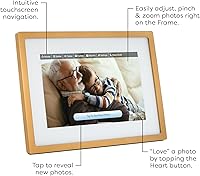
For the target audience — which largely consists of older adults who are not habitual smartphone users — the touch screen is straightforward and responsive enough for basic navigation like pausing the slideshow or adjusting settings. The interface does not demand precision tapping.
Power users expecting a tablet-like experience will find the touch response slightly sluggish during certain transitions. The touch interface is built for simplicity rather than speed, and anyone who has been conditioned by modern smartphone screens may notice the difference fairly quickly.
Wi-Fi Reliability
71%
29%
On modern dual-band routers and standard home broadband setups, the frame maintains a stable connection and receives new photos without requiring manual reconnection. Most buyers in average home environments report no ongoing connectivity issues after the initial setup.
The frame's behavior on older single-band routers or networks with complex configurations has generated a disproportionate share of negative feedback. Dropped connections that require unplugging and restarting the frame are a recurring theme for this subset of users, which is a real concern for buyers gifting to elderly relatives with older home network equipment.
Cloud Storage & Management
77%
23%
Eliminating SD cards and USB drives entirely removes a common source of frustration for less technical users — there are no physical media to lose, format, or corrupt. Cloud delivery also means photos are accessible across devices without manual transfers.
Storage limits and management features are not entirely transparent on the free plan, and users who send large volumes of photos over time have noted that older images can cycle out of the display rotation without clear explanation. More control over what stays in the library and for how long would be welcomed.
Video Support
61%
39%
The ability to send short video clips adds a layer of life to what would otherwise be a static photo display, and for birthdays or milestone moments it can be genuinely touching for the recipient to see a moving memory rather than a still image.
Meaningful video functionality is largely gated behind the subscription tier, and the base experience with video is limited in both clip length and format support. Buyers who expect robust video display out of the box tend to be disappointed once they discover those restrictions.
App Experience
74%
26%
The Skylight companion app is clean, easy to navigate for senders, and makes uploading and directing photos to a specific frame straightforward. Most senders — regardless of technical background — can figure it out without a tutorial.
The app has received periodic reports of minor bugs and slower-than-expected refresh times when managing multiple frames. It also acts as the gateway to the subscription upsell, which some users find intrusive when all they wanted was a simple way to send a photo.
Offline Functionality
72%
28%
The offline mode works as advertised — when internet access drops, the frame continues cycling through its stored photos without freezing or displaying error messages. For recipients in areas with inconsistent broadband, this baseline behavior is reassuring.
Offline mode is purely passive; it does not allow any new photos to be added, settings to be changed, or management actions to be performed without a Wi-Fi connection. Users in rural areas or those frequently affected by outages will find the frame significantly less functional than in well-connected households.
Emotional Impact on Recipients
97%
This category is genuinely difficult to score on a neutral scale because the emotional response from recipients — particularly elderly parents and grandparents — is almost universally described in deeply positive terms. Reviewers regularly describe parents crying when they first see the frame update with a grandchild's photo.
The emotional payoff depends on family members actively continuing to send photos over time. A handful of buyers noted that initial enthusiasm from senders faded after a few weeks, leaving the frame cycling through the same small set of original images — which can feel like a letdown for the recipient.
Subscription Transparency
48%
52%
The base free tier does cover the fundamental use case — receiving photos by email and displaying them in a slideshow — which means the frame is usable without spending anything beyond the purchase price. That core promise is delivered without requiring an immediate subscription.
The lack of upfront clarity about which features are free versus paid is one of the most consistent criticisms from otherwise satisfied buyers. Discovering after purchase that video sharing, additional cloud storage, or certain display features require an ongoing fee feels like a transparency failure for a product at this price point.

Suitable for:

The Skylight 10-Inch WiFi Digital Picture Frame is an ideal choice for anyone buying a gift for a family member who is not particularly tech-savvy but would genuinely treasure seeing photos from loved ones without any effort on their part. Think of the grandparent who still prints photos at the pharmacy, or the parent who never quite figured out how to navigate Instagram — this digital frame removes every barrier between them and their favorite memories. Adult children living far from home will find it especially valuable, since they can send photos directly to the frame from their phone without the recipient needing to do anything at all. Families spread across different cities or countries can effectively turn a shelf display into a living, updating photo album that never goes stale. It also makes a genuinely strong holiday or birthday gift for anyone who wants something meaningful and personal rather than another generic present.
Not suitable for:

Buyers looking for a technically flexible media display should think carefully before committing to the Skylight 10-Inch WiFi Digital Picture Frame, because it is built around simplicity rather than customization. If you want fine-grained control over slideshow settings, video playback options, or the ability to load photos directly from a USB drive or SD card, this photo-sharing display will feel limiting. Users who expect all features to be available without any ongoing costs may be caught off guard, as certain advanced functionalities are tied to a subscription plan that is not prominently advertised upfront. People with older home routers or complex dual-band network setups have reported occasional connectivity frustrations that require some troubleshooting. If the recipient of this frame lives somewhere with unreliable internet access, the core value of the product — receiving new photos remotely — largely disappears.

Specifications

  • Screen Size: The display measures 10 inches diagonally, providing a comfortable viewing area for slideshows on a shelf or countertop.
  • Resolution: The screen renders at 1280x800 pixels, delivering a clear and color-accurate Full HD image for everyday photo display.
  • Touch Screen: The frame features a capacitive touch screen that responds to taps for navigating settings and managing displayed content.
  • Connectivity: The frame connects to home Wi-Fi networks, enabling remote photo delivery and cloud synchronization without any cables.
  • Photo Sharing: Each frame is assigned a unique email address, allowing any family member or friend to send photos directly to the display.
  • Storage: Photos and videos are stored via cloud, removing the need for SD cards, USB drives, or any local physical media.
  • Offline Mode: When Wi-Fi is unavailable, the frame continues cycling through previously received photos stored in its local memory.
  • Gift Mode: Gift Mode allows the buyer to preload a curated set of photos onto the frame before the recipient opens the box.
  • Dimensions: The frame measures 10.7 x 7.4 x 0.99 inches, making it compact enough for a nightstand, bookshelf, or kitchen counter.
  • Weight: At 2.2 pounds, the frame is light enough to reposition easily but substantial enough to feel well-built.
  • Finish: The frame is available in a gold finish that is designed to complement warm, traditional, and contemporary home interiors.
  • Power Source: The frame is powered via a plug-in connection and ships with a battery included for initial setup purposes.
  • Compatible Devices: Photo sending is compatible with any smartphone, and senders do not need to download an app to share images.
  • Brand: The frame is manufactured by Skylight Frame, a brand focused specifically on connected digital photo display products.
  • Market Rank: This digital frame holds the number two position in the Digital Picture Frames category on Amazon based on sales performance.
  • Date Available: The product was first made available for purchase on July 14, 2023, and has accumulated over 25,000 ratings since launch.

Related Reviews
Feelcare HN-DPF1003 10-inch Digital Picture Frame
76%
88%
Ease of Setup
83%
Display Quality
76%
App Experience
51%
Video Support
79%
Touchscreen Responsiveness
More
NOBKLEN 10.1-Inch WiFi Digital Photo Frame
81%
91%
Ease of Setup
86%
App Experience
72%
Display Quality
94%
Gifting Experience
88%
Photo Sharing Speed
More
akimart 32GB 10.1-inch WiFi Digital Picture Frame
73%
88%
Ease of Setup
84%
Remote Photo Sharing
71%
Display Quality
63%
Build Quality
82%
Touch Screen Responsiveness
More
Atatat Digital Picture Frame 10-inch
84%
90%
Display Quality
85%
Ease of Setup
88%
Slideshow Functionality
80%
Build Quality
83%
Remote Control Usability
More
Skylight Digital Picture Frame 15-inch
84%
91%
Ease of Setup
88%
Display Quality
74%
Wi-Fi Connectivity
85%
Design & Build Quality
89%
User Interface
More
Jaihonda 10 Inch Digital Picture Frame
80%
90%
Display Quality
88%
Ease of Use
84%
Value for Money
75%
Build Quality
94%
Setup & Installation
More
KECAG 10.1-inch 1080p Digital Picture Frame
73%
88%
Display Quality
91%
Ease of Setup
84%
Value for Money
72%
Motion Sensor
63%
Remote Control
More
Aura Carver 10.1″ WiFi Digital Picture Frame
82%
94%
Ease of Setup
91%
Display Quality
83%
App Experience
92%
Multi-Contributor Sharing
93%
Gifting Experience
More
Kimire 10-inch WiFi Digital Photo Frame
72%
83%
Image Quality
77%
Remote Sharing Experience
81%
Setup & Ease of Use
61%
WiFi Connectivity
58%
Build Quality
More
Canupdog 10.1″ WiFi Digital Picture Frame 16GB
88%
94%
Display Quality
89%
Touchscreen Responsiveness
87%
Storage Capacity
91%
WiFi Connectivity
88%
Setup & Installation
More

FAQ

The recipient only needs to plug the frame in and connect it to Wi-Fi during initial setup — that is the full extent of their involvement. Once it is connected, photos sent to the frame's unique email address appear automatically on screen without any account creation on their end.

Yes, and this is honestly one of the best things about it. You simply share the frame's email address with whoever you want to include — siblings, cousins, friends — and they can all send photos independently. There is no app required on the sender's side either.

The frame will keep displaying whatever photos it has already received. The offline mode is not something you need to activate manually; it just works automatically when the internet connection drops. New photos will not arrive until connectivity is restored, but the slideshow continues without interruption.

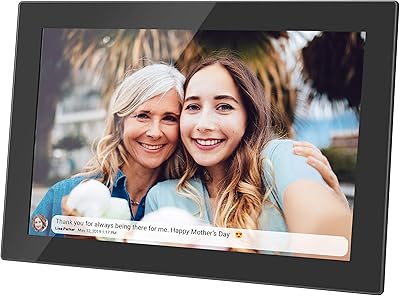
The basic functionality works without a subscription, but Skylight does offer a paid plan called Skylight Plus that unlocks additional features like video sharing, caption support, and extra cloud storage. It is worth reading the current plan details on Skylight's website before purchasing if you expect those features to be included out of the box.

Before the recipient opens the box, you can connect the frame yourself and preload it with a set of photos through the Skylight app. When the recipient turns it on for the first time, they are greeted with a personalized slideshow right away. It is a genuinely thoughtful feature for gifting occasions.

It works on most standard home Wi-Fi setups, but a small number of users with older single-band or complex dual-band routers have reported occasional connection difficulties. If the recipient has an older router or inconsistent internet, it may be worth troubleshooting the network setup during the initial installation.

Once it is set up and connected to Wi-Fi, the recipient does not need to do anything at all — photos simply appear on the screen. The touch screen allows them to tap through photos if they want, but there is no ongoing maintenance required on their end. It is genuinely one of the most hands-off devices in this category.

No, this photo-sharing display does not have a USB port or SD card slot. All photos must be delivered via the frame's email address or through the companion app. If local media loading is important to you, this particular frame is not the right fit.

Most buyers report that the display holds up well in typical indoor lighting conditions, including moderately lit living rooms and kitchens. It is not an outdoor-rated display, and in very bright sunlight it would struggle, but for normal home use the brightness and color accuracy are consistently praised in real-world reviews.

Video support does exist, though it is worth noting that certain video features and longer clip lengths are tied to the Skylight Plus subscription. For basic video sharing, check the current feature breakdown on Skylight's website to confirm exactly what is available on the free tier before assuming full video functionality is included.