Overview

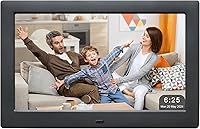
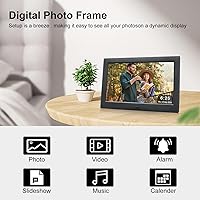
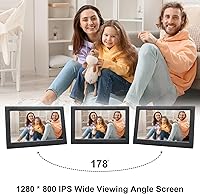
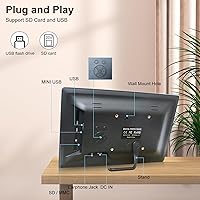
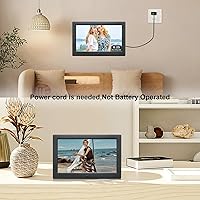
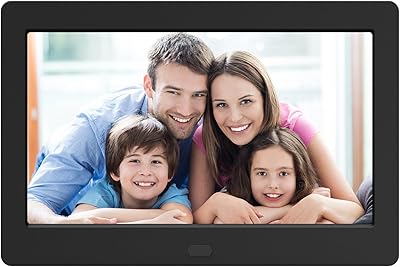
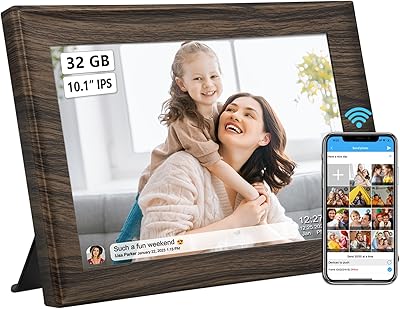
The Jaihonda 10-Inch Digital Picture Frame sits in that practical sweet spot where simplicity meets everyday usefulness, especially if you're shopping for someone who doesn't want to fiddle with apps or Wi-Fi. The 10.1-inch IPS display produces genuinely decent color clarity and a wide 180-degree viewing angle, so photos look good from across the room. Setup is refreshingly straightforward — plug in a USB drive or memory card and it starts building a slideshow on its own. It also wall-mounts cleanly and comes packaged well enough to hand over as a gift without extra wrapping fuss.

Features & Benefits

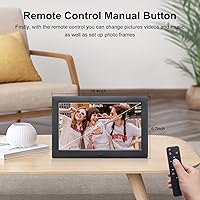
The IPS panel holds up well at off-angles, which matters more than people realize when a frame sits on a shelf or mantle. One of the more practical touches is the 4-window display mode, which lets you show multiple photos at once in a collage-style layout — useful for family portraits or event photos where you don't want to wait for a slideshow to cycle through. Background music support adds a personal layer if you drop MP3s onto the same drive. The included remote control is a real convenience, letting you browse thumbnails or switch modes without standing up and touching the screen every time.

Best For

This photo display is genuinely well-suited to older adults or anyone who finds modern smart devices more frustrating than helpful. No account setup, no app pairing, no network connection required — just plug in and go. That said, it also works nicely on an office desk or bedroom nightstand for anyone wanting a low-maintenance rotating photo display. Gift shoppers will appreciate that the packaging is tidy and presentation-ready. If your recipient lives somewhere without reliable Wi-Fi or simply prefers things that work without a tutorial, the Jaihonda frame makes a lot of sense at this price point.

User Feedback

With around 115 ratings and a 4.3-star average, the feedback is generally positive but the sample size is modest enough that a few strong opinions can skew things. Buyers tend to appreciate how quickly it gets up and running, and gift recipients reportedly respond well to it. On the critical side, some users flag concerns about remote control range and limitations around supported video formats — worth knowing if video playback is a priority for you. A few mention the build feels lightweight, which tracks for the price tier. Longevity data is thin given the frame has been available since late 2020, so long-term durability remains an open question.

Pros

  • No Wi-Fi or app setup required — just plug in a USB drive and it starts running immediately.
  • The IPS display produces solid color accuracy and wide viewing angles for the price.
  • Showing up to 4 photos simultaneously gives it a collage-style flexibility most basic frames lack.
  • Background music playback adds a genuinely personal touch to slideshow presentations.
  • The included remote means you never have to walk up and fidget with the frame to change settings.
  • Wall-mount support is a practical bonus that many competing frames in this range omit.
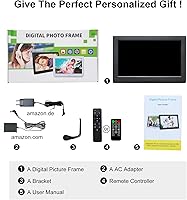
  • Gift-ready packaging removes the need for extra wrapping — it looks presentable right out of the box.
  • At under two pounds, it is light enough to reposition or move between rooms without hassle.
  • Supports both photo and video formats, making it more versatile than photo-only alternatives.

Cons

  • The remote control range has frustrated some buyers, requiring closer proximity than expected.
  • Video format compatibility is limited, and not all common file types play back reliably.
  • The plastic build feels lightweight in a way that may not hold up well over years of continuous use.
  • With only around 115 reviews, there is not enough long-term feedback to judge durability confidently.
  • No wireless photo transfer means updating the frame always requires physically handling a USB drive or card.
  • The 1280x800 resolution, while acceptable, does not match the sharpness of pricier IPS alternatives.
  • There is no built-in storage, so you are always dependent on external media being inserted.
  • Some users find the 4-window layout feels visually cramped depending on photo orientation and content.

Ratings

Our AI-generated scores for the Jaihonda 10-Inch Digital Picture Frame were produced by analyzing verified buyer reviews from multiple global markets, with spam, incentivized feedback, and bot activity actively filtered out before scoring. The ratings below reflect both what this photo display genuinely does well and where it falls short, so you can make an informed decision without wading through hundreds of individual opinions. Strengths and pain points are weighted equally — nothing is glossed over.

Ease of Setup
93%
Buyers consistently describe getting this digital frame running in under two minutes — insert a USB drive, plug in the power, and the slideshow begins automatically. For gift recipients who are not comfortable with technology, that frictionless experience is genuinely appreciated and frequently called out in reviews.
The simplicity does come with a ceiling: there is no onboarding guide for more advanced functions like the 4-window mode or music sync, so some users spend time trial-and-erroring features they did not know existed.
Display Quality
78%
22%
The IPS panel earns consistent praise for its wide viewing angle, meaning photos look clear from the side of a room rather than only head-on. Colors are described as vibrant for the price tier, and most buyers find it more than adequate for displaying family photos on a shelf or desk.
At 1280x800 resolution, fine detail in high-resolution photos is visibly softened compared to higher-end frames. A small number of buyers also noted the display can look slightly washed out in bright rooms with direct sunlight exposure.
Value for Money
86%
At its price point, this photo display offers a feature set that would have cost significantly more just a few years ago — IPS screen, 4-window mode, music playback, remote control, and wall-mount capability all bundled together. Gift buyers in particular feel they are getting a lot of visible quality for the spend.
Budget expectations need to be set correctly: the plastic chassis and lightweight build remind you of the price tier every time you handle it. Buyers expecting a premium feel will be disappointed, even if the core functionality delivers.
Build Quality
58%
42%
The frame is light enough to reposition easily and does not feel fragile in normal tabletop use. For a frame that sits undisturbed on a shelf or nightstand, the construction is adequate for day-to-day life.
Multiple reviewers flag the plastic housing as feeling noticeably cheap, and a few have noted the stand wobbles slightly on uneven surfaces. Long-term durability is an open question given the limited review volume and the frame having only been on the market since late 2020.
Remote Control
62%
38%
Having a remote at all is a genuine convenience — it means elderly users or anyone seated across the room can adjust the slideshow, volume, or display mode without standing up and touching the frame directly.
The infrared remote requires relatively close range and a fairly direct line of sight to work reliably. Buyers who expected to control it from across a living room have reported frustration with missed inputs and the need to point more precisely than anticipated.
Multi-Window Display
71%
29%
The 4-window collage mode is a differentiating feature at this price and works well for landscape-oriented family photos. Buyers who use it for event albums or holiday memories say it adds a lot of visual interest compared to a standard single-photo slideshow.
Portrait-oriented photos feel cramped when shown in the 4-window layout, and some users find the mode harder to navigate than expected without clear instructions. It is more of a nice bonus than a polished feature.
Music Playback
74%
26%
Being able to add MP3s to the same USB drive and have music play alongside a slideshow is a thoughtful touch that buyers use for family gatherings, memorials, and holiday displays. It adds emotional weight to what would otherwise be a silent photo loop.
Audio quality is limited by the built-in speaker, which some reviewers describe as thin and low in volume. It works for ambient background music but is not suited to a room with any competing noise.
Video Playback
59%
41%
The ability to play short video clips alongside photos is a welcome addition and sets this frame apart from photo-only alternatives. Buyers who tested it with MP4 home videos report it works reasonably well for casual use.
Format compatibility is inconsistent — not every video codec plays back smoothly, and some buyers have encountered files that simply will not load. This feels like an undercooked feature rather than a reliable core function.
Mounting Flexibility
81%
19%
The wall-mount option genuinely expands where you can place this frame, and buyers who use it on a hallway or kitchen wall report it looks clean and intentional. The lightweight build actually works in its favor here, since it does not need heavy anchoring.
The wall-mount hardware included is basic, and buyers with drywall or tile surfaces may need to source their own anchors. A clearer installation guide would reduce the setup uncertainty for less confident DIY-ers.
Gift Presentation
88%
The packaging is consistently described as tidy, clean, and presentable enough to hand over without additional gift wrapping. For last-minute shoppers or anyone mailing a gift, this is a practical and appreciated detail.
There is no personalization option included in the box — no gift card slot, no customization insert. For a product marketed heavily as a gift, that feels like a small missed opportunity.
Photo Navigation
76%
24%
Browsing through photo thumbnails before selecting a specific image is a useful feature that buyers appreciate, especially when a USB drive holds a large and varied photo library. It avoids the frustration of waiting for a slideshow to cycle to a specific image.
The navigation interface is functional but not intuitive, and a few reviewers mention a learning curve when first using the thumbnail browser. The menu logic is not immediately obvious without experimentation.
Compatibility
69%
31%
Standard JPEG photos from smartphones and cameras load without issue in nearly all reported cases, making it easy to pull photos directly off a phone memory card or export from a PC onto a USB drive.
Less common file formats and higher-bitrate videos can cause playback issues, and the frame provides little feedback when a file fails to load. Buyers who work with RAW image files or newer video formats may run into walls quickly.
Long-Term Reliability
55%
45%
The frame has been on the market since late 2020, and a portion of reviewers who purchased early have reported continued normal operation years later. For a device that stays plugged in and runs continuously, that is a reasonable baseline.
The overall review volume of around 115 ratings is too small to draw confident conclusions about long-term durability. A handful of buyers have noted quality degradation over time, but there is not enough data to quantify how common that experience is.

Suitable for:

The Jaihonda 10-Inch Digital Picture Frame is a strong fit for anyone who values simplicity over smart features — particularly older adults, grandparents, or less tech-savvy users who just want their photos on a screen without dealing with apps, accounts, or Wi-Fi setup. If you're a gift buyer on a modest budget, the tidy packaging and plug-and-play operation make it easy to hand over without needing to set anything up on behalf of the recipient. It works well in living rooms, on bedside tables, or propped on a desk where a rotating photo display adds a personal touch to the space. The wall-mount option gives it more flexibility than many frames at this price, and the 4-window mode is a nice bonus for households with lots of family photos to show off at once.

Not suitable for:

The Jaihonda 10-Inch Digital Picture Frame is not the right choice for buyers who want cloud connectivity, remote photo sharing via an app, or the ability to send photos wirelessly from a smartphone. If video playback is a primary use case, it's worth checking supported formats carefully before buying, since some users have run into compatibility limitations. The build quality reflects the accessible price tier — if you're expecting a premium, hefty frame with a glass front and solid construction, this will likely disappoint. It's also not ideal for large rooms where a 10-inch screen might feel too small, or for anyone who wants the convenience of updating photos without physically swapping a USB drive or memory card. Those comfortable with modern smart frames from established electronics brands may find the feature set here underwhelming.

Specifications

  • Screen Size: The display measures 10.1 inches diagonally, providing a comfortable viewing area for photos and slideshows.
  • Display Type: Uses an IPS (In-Plane Switching) panel, which maintains accurate colors and contrast across a wide range of viewing angles.
  • Resolution: The screen outputs at 1280x800 pixels, delivering clear and reasonably detailed image reproduction for standard photos.
  • Viewing Angle: The IPS panel supports up to 180 degrees of horizontal and vertical viewing angle, minimizing color shift when viewed from the side.
  • Multi-Window: Supports a 4-window display mode that shows up to four photos simultaneously in a collage-style layout on a single screen.
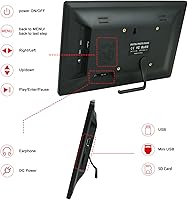
  • Media Input: Accepts photos, videos, and music files via USB flash drives or compatible memory cards inserted directly into the frame.
  • Audio Support: Plays background music from MP3 files stored on the connected USB drive or memory card during photo slideshows.
  • Video Support: Capable of playing video files in addition to static photos, though supported formats should be verified before loading content.
  • Remote Control: Comes with an infrared remote control in the box, allowing navigation, mode switching, and volume adjustment without touching the frame.
  • Mounting Options: Can be displayed on a tabletop using the built-in stand or mounted flush to a wall using the included wall-mount hardware.
  • Dimensions: The frame body measures 6.69 x 10.5 x 0.99 inches, keeping it compact enough for desks, shelves, or nightstands.
  • Weight: Weighs 1.69 pounds, making it light enough to reposition easily or mount without heavy-duty wall anchors.
  • Power Source: Operates via a standard AC power adapter (plug-in), so the frame must remain near an accessible outlet during use.
  • Battery: Includes one Lithium Ion battery, which supports the remote control unit rather than powering the frame itself.
  • Brand: Manufactured and sold under the Jaihonda brand, which has been available on the Amazon marketplace since November 2020.
  • Warranty: Jaihonda offers free returns and exchanges within 30 days of purchase as its stated customer support policy.
  • Market Rank: Holds a Best Sellers Rank of #261 in the Digital Picture Frames category on Amazon at time of listing.
  • Connectivity: Does not include Wi-Fi, Bluetooth, or any wireless connectivity — all content is loaded via physical media only.

Related Reviews
Atatat Digital Picture Frame
73%
91%
Ease of Setup
72%
Display Quality
61%
Build Quality
83%
Value for Money
58%
Remote Control
More
Skylight 10-Inch WiFi Digital Picture Frame
78%
93%
Ease of Setup
91%
Photo Sharing Experience
84%
Display Quality
96%
Gift Readiness
67%
Value for Money
More
Feelcare HN-DPF1003 10-inch Digital Picture Frame
76%
88%
Ease of Setup
83%
Display Quality
76%
App Experience
51%
Video Support
79%
Touchscreen Responsiveness
More
KECAG 10.1-inch 1080p Digital Picture Frame
73%
88%
Display Quality
91%
Ease of Setup
84%
Value for Money
72%
Motion Sensor
63%
Remote Control
More
NOBKLEN 10.1-Inch WiFi Digital Photo Frame
81%
91%
Ease of Setup
86%
App Experience
72%
Display Quality
94%
Gifting Experience
88%
Photo Sharing Speed
More
Anna Bella 10.1 Inch Digital Picture Frame
86%
88%
Display Quality
91%
Ease of Setup
82%
WiFi Connectivity
74%
App Performance
89%
Storage Capacity
More
akimart 32GB 10.1-inch WiFi Digital Picture Frame
73%
88%
Ease of Setup
84%
Remote Photo Sharing
71%
Display Quality
63%
Build Quality
82%
Touch Screen Responsiveness
More
Uhale CR-1010 10.1-inch Digital Picture Frame
79%
91%
Ease of Setup
88%
Remote Photo Sharing
74%
Display Quality
67%
App Stability
72%
Build Quality
More
Frameo Digital Picture Frame 10.1 Inch with 64GB Memory

83%
85%
Display Quality
92%
Ease of Setup
80%
App Performance
91%
Storage Capacity
72%
WiFi Connectivity
More
eco4life 7-Inch Digital Picture Frame
76%
93%
Ease of Setup
88%
Value for Money
71%
Display Quality
62%
Build Quality
66%
Remote Control
More

FAQ

No, there is nothing to install or register. You load your photos or videos onto a USB drive or memory card, plug it into the frame, and it starts the slideshow automatically. It is about as straightforward as it gets.

The frame handles common image formats like JPEG and BMP for photos, and supports popular video formats such as AVI and MP4, though not every codec is guaranteed to work. If video playback is important to you, it is worth testing your specific files before gifting or relying on it heavily.

No — this frame has no Wi-Fi or Bluetooth, so there is no wireless transfer option. To update the photos, you physically swap out the USB drive or memory card. For some people that is a dealbreaker, but for others it is actually preferable since nothing needs to be paired or configured.

When activated, the screen splits into four sections, each showing a different photo at the same time. It works best with landscape-oriented images. Portrait photos can feel a little cramped in that layout, so it is worth keeping in mind when curating your photo collection.

Yes, this is genuinely one of its strongest points. There are no menus to navigate before it starts working — plug in the power, insert a USB drive with photos, and it begins cycling through them on its own. The remote also means they rarely need to touch the screen directly.

Yes, you can add MP3 music files to the same USB drive or memory card, and the frame will play them as background audio during the slideshow. It is a nice touch for setting up a display at a family gathering or a memorial tribute.

The frame includes wall-mount hardware, so you do not need to buy extra brackets or adapters. That said, you will still need your own screwdriver and appropriate wall anchors depending on your wall type.

A handful of reviewers have noted that the remote requires you to be reasonably close to the frame and pointed fairly directly at it to register commands. It is not a long-range remote, so sitting across a large room might cause occasional missed inputs.

No, there is no built-in storage. All content must remain on the USB drive or memory card that is inserted into the frame. If you remove the drive, the frame has nothing to display.

Most buyers seem to think so. The box is described as tidy and presentable, which makes it a decent choice if you want to hand it over without spending extra time on gift wrap. For a more formal or special occasion gift, you might still want to add a bag or box of your own.