Overview

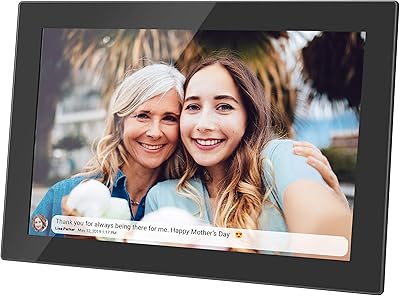
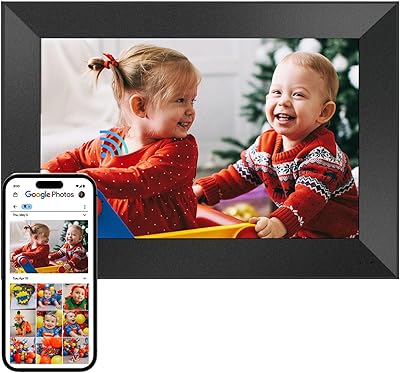
The Aura Carver 10.1″ WiFi Digital Picture Frame is one of those rare products that actually delivers on its promise of keeping people connected through photos. Recommended by outlets like The New York Times Wirecutter and Oprah's Favorite Things, it has earned genuine editorial credibility in a category full of forgettable devices. The 10.1-inch color-calibrated HD display looks sharp in real-world conditions, and the free unlimited storage — with no subscription attached — makes it easy to commit long-term. Setup runs through the Aura app on both iOS and Android, so getting it running rarely takes more than a few minutes.
Features & Benefits

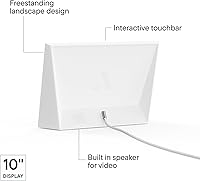
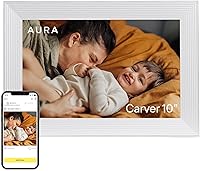
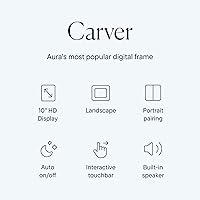
The display does more than just look good at a glance. At 1280x800 across a 10.1-inch panel, photos render with enough clarity that printed-quality memories genuinely hold up on the screen. Automatic brightness adjustment means it doesn't blast light into a dark room at night — and the auto-off scheduling takes care of that anyway. The WiFi connection lets anyone you invite add photos from their phone, anywhere in the world, which is the core feature that sets this WiFi photo display apart from basic USB-loaded frames. There's a built-in speaker for video clips, and the privacy-controlled sharing ensures only people you approve can contribute.

Best For

This digital frame is a natural fit for a few specific situations. If you have aging parents or grandparents who aren't particularly comfortable with technology, the Aura app does the heavy lifting — they just plug it in and photos start appearing. It also works well as a gift; you can pre-load photos and a personal message before shipping it, which makes for a genuinely thoughtful gesture. Remote families who want a living room presence beyond a group chat will get the most out of it. One honest caveat: it's landscape-only, and it does require both WiFi and a smartphone to function, so it's not for everyone.

User Feedback

With over 17,000 ratings averaging 4.7 out of 5 stars, this WiFi photo display has built an unusually consistent track record. Ease of setup comes up repeatedly in positive reviews — people are genuinely surprised by how little friction there is getting it going. Display quality gets consistent praise too, with many noting how naturally photos look on the screen compared to cheaper alternatives. The gifting workflow — specifically the ability to add photos before someone even opens the box — earns frequent mentions. On the critical side, some users wish the frame supported portrait orientation, and a handful flag reliance on the app as a minor inconvenience. Overall, negative reviews are rare.

Pros

  • Free unlimited photo storage with no recurring subscription fees ever.
  • Remote contributors can add photos from anywhere — no coordination needed on the recipient's end.
  • Setup takes most users under five minutes from unboxing to displaying photos.
  • Auto-brightness adjustment keeps the display comfortable across different lighting conditions.
  • The pre-gifting feature lets senders load photos before the frame ships, making it immediately personal.
  • Display colors are accurate and natural-looking rather than oversaturated like many competing frames.
  • Privacy-controlled sharing means only invited contacts can contribute to the frame.
  • Built-in speaker adds genuine value when playing back short family video clips.
  • Auto-off scheduling works reliably, so energy use is minimal without any manual effort.
  • Long-term ownership costs stay low since there are no fees beyond the initial purchase.

Cons

  • Portrait-mode photos are cropped or letterboxed due to landscape-only orientation.
  • No USB or SD card slot means the frame is entirely dependent on WiFi and the Aura app.
  • Contributor permission controls are basic — all invitees share the same level of access.
  • Some Android users experience occasional photo sync delays that require app restarts.
  • The stand feels less premium than the frame itself for a product at this price point.
  • Advanced slideshow curation options are limited; photo cycling order isn't fully user-controlled.
  • Troubleshooting WiFi pairing issues isn't well-guided inside the app for less confident users.
  • Long-term data retention policies for stored photos aren't clearly communicated by the brand.
  • Customer support response times have drawn mixed feedback when issues do arise.

Ratings

The Aura Carver 10.1″ WiFi Digital Picture Frame earns consistently high marks across thousands of verified global reviews, and the scores below reflect an AI-driven analysis that actively filters out incentivized, bot-generated, and outlier feedback to surface what real buyers actually experience. Strengths around display quality and ease of use come through loudly — but genuine pain points around orientation limitations and app dependency are weighted transparently here too.
Ease of Setup
94%
Setup is where this digital frame genuinely stands out. Most users report going from unboxing to displaying photos in under five minutes using the Aura app, with very few steps required even for people who rarely configure connected devices. That frictionless first experience is mentioned more often than almost any other quality in long-form reviews.
A small number of users hit WiFi pairing hiccups, particularly on older routers or networks with strict security settings. When setup does stall, the troubleshooting path inside the app isn't always intuitive, which can be frustrating for less technically confident users.
Display Quality
91%
Photos look genuinely good on the 10.1-inch panel — colors feel accurate rather than oversaturated, and the automatic brightness adjustment means it reads well in both sunlit living rooms and dim evening settings. Users frequently note that their photos look more natural here than on competing frames they've tried.
At 1280x800, the resolution is respectable but not class-leading, and users with large high-resolution prints occasionally feel the panel doesn't do their photos full justice. Viewing angles are fine head-on but can wash out slightly when the frame is positioned above or below eye level.
App Experience
83%
The Aura app handles the heavy lifting well — photo uploads, contributor invites, and display management all live in one tidy interface that works across both iOS and Android. Families particularly appreciate how easy it is to add a new contributor without needing any technical explanation on the recipient's end.
The frame is fully dependent on the app, which is a real constraint — there's no USB or SD card fallback for loading photos. Some Android users report occasional sync delays, and a handful note that app updates have occasionally introduced minor bugs that temporarily disrupted their slideshow settings.
Multi-Contributor Sharing
92%
The ability to invite family members from anywhere in the world to add photos is genuinely well-executed. Parents report waking up to new photos from their adult children without any coordination required, which is exactly the kind of low-effort connection this WiFi photo display was built for.
There's no granular permission control — all invited contributors have essentially the same ability to add content, which occasionally leads to unwanted or duplicate photos appearing in the rotation. A contributor management feature with more admin-level control would address a recurring user request.
Gifting Experience
93%
The ability to pre-load photos and add a personal message before the frame ever ships to the recipient is a feature that genuinely separates this from generic gift options. Reviewers buying it for parents and grandparents consistently highlight the emotional impact of a frame that arrives already full of memories.
The gifting setup requires the giver to have the Aura app and a stable internet connection during the process, which adds a small layer of coordination. A few users also noted that the packaging, while clean, doesn't feel quite as premium as the price point might suggest.
Value for Money
77%
23%
No recurring subscription, no storage cap, and a solid display in a well-built enclosure — when stacked against the total cost of ownership, the one-time price holds up reasonably well over time. Users who've owned it for more than a year tend to rate value highly because the experience doesn't degrade.
The upfront cost is meaningful, and buyers comparing it to cheaper digital frames will notice the gap immediately. Those who primarily want a simple photo slideshow without the sharing features may feel they're paying for functionality they'll never use.
Build Quality & Design
86%
The frame feels solid and purposefully minimal — nothing about it looks out of place in a living room or on a bedroom shelf. The Sea Salt and Gravel colorways are understated enough to blend into most home aesthetics without drawing attention to themselves.
At just under 4.1 pounds, it's heavier than some buyers expect, which can make wall mounting feel like more effort than anticipated. A handful of users also mention the stand feels slightly less premium than the frame itself, particularly at this price tier.
Video Playback
72%
28%
Having a built-in speaker for video clips adds a dimension most competing frames skip entirely. Short family video clips — first steps, birthday moments — play back with enough audio clarity to be genuinely enjoyable rather than just a novelty feature.
Video support feels secondary to the photo experience — clip length limits and occasional playback stuttering come up in reviews from users who hoped to lean into this feature more heavily. It's a welcome addition, but not a reason to choose this frame on its own.
Privacy & Security
89%
The invite-only contributor model means photos stay within a defined circle of people, which matters a lot to users who are cautious about cloud-connected devices in their homes. Knowing that no stranger can push content to the frame provides genuine peace of mind for privacy-conscious buyers.
A small subset of technically oriented reviewers have raised questions about how long photo data is retained on Aura's servers if a user cancels their account or the company's service changes. For most users this isn't a concern, but it's a legitimate long-term question the brand could address more clearly.
Orientation Flexibility
41%
59%
For content that's shot in landscape — travel photos, group shots, wide scenic images — the fixed landscape orientation works naturally and the 16:10 aspect ratio handles most smartphone photos without awkward cropping.
The frame supports landscape orientation only, full stop. Users with a lot of portrait-mode photos — which is most smartphone photography — will notice cropping or black bars on a significant portion of their library. This is the most cited limitation in critical reviews and a real dealbreaker for some buyers.
Reliability & Connectivity
85%
Long-term owners report stable performance with very few incidents of the frame dropping off WiFi or requiring manual resets. The auto-off and auto-on scheduling works consistently, which builds quiet confidence in the device over daily use.
A minority of users experience occasional WiFi disconnects that require them to re-enter credentials, especially after router firmware updates. Customer support response times have drawn mixed feedback, with some users finding resolution slower than expected for a premium product.
Photo Management & Curation
79%
21%
The Aura app gives users a reasonable degree of control over which photos cycle through and how often, which helps avoid the slideshow becoming repetitive over time. The unlimited storage means there's no pressure to delete older photos to make room for new ones.
Users who want more fine-tuned control — custom display order, per-album scheduling, or time-of-day photo sets — will find the management options somewhat limited. The algorithm for cycling photos isn't fully transparent, and some users report certain images appearing far less frequently than others without an obvious reason.
Energy Efficiency
88%
The auto-off scheduling is easy to configure and works reliably, meaning the display isn't burning energy through the night. Users who set it up to match their household routine rarely think about power consumption at all, which is the goal.
There's no physical power button, so if the auto-schedule misfires or needs a quick override, the options are limited to the app. A small number of users find this slightly inconvenient in practice, particularly when they want to quickly turn the display off for a meeting or movie.

Suitable for:

The Aura Carver 10.1″ WiFi Digital Picture Frame is genuinely well-matched to anyone who wants photos to move from a phone to a living space without friction or ongoing costs. It's an especially strong fit for adult children who live far from aging parents — the ability to push new photos from anywhere in the world means grandparents wake up to fresh family moments without touching an app themselves. Seniors and less tech-confident users benefit most here, because the recipient's experience requires almost nothing of them beyond plugging the frame in. Gift-givers will appreciate the pre-loading feature, which allows photos and a personal message to be waiting the moment the box is opened. Households that already document life heavily through smartphones will find the transition to a living room display natural and satisfying. Anyone who has been burned by digital frames that require monthly fees or clunky SD card management will find the unlimited, subscription-free storage a meaningful long-term advantage.

Not suitable for:

The Aura Carver 10.1″ WiFi Digital Picture Frame is not the right choice for buyers who want full flexibility in how their photos are displayed. The frame supports landscape orientation only, which means portrait-mode shots — the default for most smartphone cameras — will either be cropped or displayed with black bars on the sides, and for users with large portrait-heavy photo libraries this is a persistent frustration rather than a minor quirk. Anyone without a reliable home WiFi network or a compatible smartphone will hit a hard wall, since there's no USB, SD card, or Bluetooth fallback for loading photos. Buyers who want granular control over display order, scheduling by album, or fine-tuned curation settings will find the software options more limited than they'd hope. If the priority is pure display resolution and pixel density over connectivity features, there are competing frames at similar prices with sharper panels. Finally, anyone deeply skeptical of cloud-dependent devices storing personal photos on third-party servers may feel more comfortable with a fully offline alternative.
Specifications

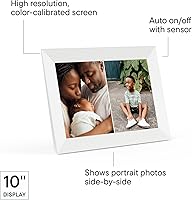
  • Display Size: The screen measures 10.1 inches diagonally, providing enough surface area for photos to feel substantial without dominating a shelf or side table.
  • Resolution: The panel runs at 1280 x 800 pixels, delivering clear, detailed photo rendering across its full display area.
  • Aspect Ratio: The display uses a 16:10 aspect ratio, which suits most landscape-oriented smartphone and camera photos with minimal cropping.
  • Orientation: The frame is designed exclusively for landscape orientation and does not support portrait display mode.
  • Dimensions: The overall unit measures 10.5″ x 7.3″ x 2.1″, including the rear stand.
  • Weight: The frame weighs 4.09 pounds, making it stable on a surface but requiring secure mounting hardware if wall-hung.
  • Connectivity: The frame connects exclusively over WiFi; there is no Ethernet port, USB slot, SD card reader, or Bluetooth pairing option.
  • App Compatibility: The free Aura app is required for setup and photo management, and supports iOS 14 or later and Android 5.0 or later.
  • Photo Storage: Aura provides free, unlimited cloud storage for photos and videos with no subscription fee or storage cap at any point.
  • Video Support: The frame supports video playback with audio through a built-in speaker, allowing short clips to play alongside still photos in the rotation.
  • Brightness Control: An automatic brightness sensor adjusts screen luminosity based on ambient room lighting, reducing glare in bright conditions and softening the display at night.
  • Sleep Scheduling: Users can configure a custom auto-off schedule through the app so the frame powers its display down and back up at set times each day.
  • Photo Sharing: An unlimited number of contributors can be invited via the Aura app to add photos remotely from any location in the world.
  • Privacy Model: Photo sharing is strictly invite-only; no one outside the owner's approved contact list can send content to the frame.
  • Colorways: The Carver is available in two finishes: Gravel (dark) and Sea Salt (light/white), both designed to complement neutral home interiors.
  • Speaker: A built-in mono speaker handles audio playback during video clips; it is not designed for music streaming or general audio output.
  • Power: The frame operates via a corded AC power adapter included in the box and has no internal battery.
  • Model Number: The official item model number is UKEU900-WHT, corresponding to the White/Sea Salt colorway variant.

Related Reviews

NOBKLEN Digital Picture Frame 10.1 Inch WiFi
88%
93%
Ease of Setup
88%
Display Quality
85%
App Experience (Frameo)
90%
Build Quality
92%
Value for Money
More
ApoloSign Nixplay 10.1″ WiFi Digital Picture Frame


86%
91%
Display Quality
96%
Ease of Setup
89%
WiFi Connectivity
92%
Voice Control Functionality
85%
Cloud Storage Service
More
Canupdog 10.1″ WiFi Digital Picture Frame 16GB
88%
94%
Display Quality
89%
Touchscreen Responsiveness
87%
Storage Capacity
91%
WiFi Connectivity
88%
Setup & Installation
More
akimart 32GB 10.1 Inch WiFi Digital Picture Frame
83%
89%
Ease of Setup
91%
Display Quality
72%
WiFi Connectivity
87%
Design & Aesthetics
90%
User Interface
More
CozylaHome 10.1″ Digital Picture Frame
82%
88%
Ease of Setup
93%
AI Photo Enhancement
85%
Display Quality
82%
Video Playback Support
70%
Connectivity (WiFi)
More
Aura Walden 15″ WiFi Digital Picture Frame
84%
92%
Ease of Setup
89%
Display Quality
65%
WiFi Connectivity
94%
Cloud Storage
88%
Build Quality
More
Feelcare 10-inch Digital WiFi Picture Frame
86%
94%
Ease of Setup
88%
Display Quality
87%
Storage Capacity
90%
User Interface
80%
WiFi Connectivity
More
KECAG 10.1 Inch Digital Picture Frame
86%
88%
Display Quality
92%
Ease of Use
89%
Value for Money
90%
Energy Efficiency (Motion Sensor)
83%
Build Quality
More
Aura Mason WiFi Digital Picture Frame 9-inch
86%
91%
Setup and Installation
94%
Display Quality
88%
App Experience
80%
Connectivity and WiFi Performance
85%
Value for Money
More
Cozyla 10.1-inch WiFi Digital Photo Frame
84%
88%
Display Quality
94%
Ease of Setup
91%
Photo Sharing Experience
83%
App Integration
79%
User Interface
More

FAQ

The initial setup does require a smartphone running the Aura app, so someone with a phone will need to do the first-time configuration. The good news is that once it's set up, the recipient doesn't need to touch the app or a phone at all — photos just appear on the frame automatically as family members send them. Most people set it up on behalf of the gift recipient before shipping it.

No, there are no subscription fees. The Aura app and unlimited cloud storage are completely free, and there's no premium tier required to unlock core features. The one-time purchase price covers everything.

Yes, and this is genuinely one of the most useful aspects of the Aura Carver 10.1″ WiFi Digital Picture Frame. The frame's owner can invite as many contributors as they like through the app, and each person can add photos from their own phone independently. There's no coordination required once the invites are accepted.

This is worth knowing upfront: the frame is landscape-only, so portrait photos will either be cropped to fill the screen or displayed with black bars on the sides depending on your settings. If most of your photos are taken vertically on a smartphone, you'll notice this regularly. It's the most commonly cited limitation by buyers who wish they'd known before purchasing.

Yes, and it works really well. Through the app, you can add photos and even attach a personal message before the frame is ever turned on by the recipient. When they plug it in for the first time, your photos are already there waiting — which is a big part of why it's become such a popular gift option.

It needs WiFi to receive new photos, but it will continue to cycle through already-loaded photos even if the connection drops temporarily. That said, for the best experience — and to receive new contributions in real time — a stable WiFi connection is recommended.

Short video clips play back reasonably well, and the built-in speaker produces enough volume to hear clearly in a quiet room. It's not going to fill a large space with sound, but for a birthday clip or a short family moment, it works fine. Users who want strong audio output will be underwhelmed, but for occasional video it does the job.

You have some control through the app — you can delete photos you don't want and adjust general display preferences. However, the algorithm that determines how frequently specific photos appear in rotation isn't fully user-configurable, which frustrates people who want precise curation. It's more of a curated shuffle than a strict manual playlist.

It comes with a rear stand designed for tabletop use, which works well and keeps it stable. Wall mounting is possible but requires a separate mounting solution since the included hardware is stand-only. Given that it weighs just over four pounds, make sure any wall mount you choose is rated appropriately.

Both the Sea Salt and Gravel versions of this 10.1-inch model share the same internal hardware, display specs, and feature set — the only difference is the outer finish color. Whichever color you choose, the experience will be identical.