Overview

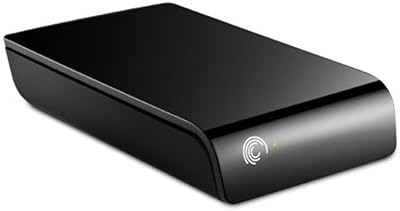
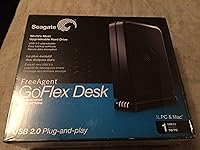
The Seagate FreeAgent GoFlex Desk 1TB Hard Drive arrived in 2010 as a thoughtfully designed desktop storage option aimed at home users and small offices that needed reliable, stationary backup capacity. What set it apart from the crowded external drive market at the time was its modular GoFlex system — a single 3.5-inch drive body that accepted swappable interface adapters, letting buyers evolve their setup without replacing the drive itself. Out of the box it ships with a USB 2.0 adapter featuring a built-in capacity gauge, a small but genuinely useful touch that lets you check remaining space without launching any software.
Features & Benefits

The standout selling point of the GoFlex Desk 1TB is the adapter upgrade path. The base unit comes with USB 2.0, which was perfectly adequate for everyday backups in 2010, but Seagate also sold eSATA, FireWire, and USB 3.0 adapters separately, meaning the drive body could remain relevant as your speed needs changed. Those adapters were an extra purchase, not included — worth knowing upfront. Beyond the interface flexibility, setup is genuinely plug-and-play on most systems, and the preloaded backup and encryption software means new users can start protecting files within minutes. The drive also sits vertically or horizontally, a small convenience that matters when desk space is tight.

Best For

This desktop hard drive makes the most sense for home backup users who want a dependable, stationary drive they can plug in and largely forget about. It is also a natural fit for anyone already invested in the GoFlex ecosystem — if you own adapters from another GoFlex drive, swapping them onto this unit gives you instant speed without buying new hardware. Small offices archiving documents, spreadsheets, or media files without needing to move the drive around will find the 1TB capacity and stable desktop form factor practical. Those who prefer a physical capacity indicator over digging through software will especially appreciate the adapter's built-in gauge.

User Feedback

With a 4.4-out-of-5 rating across nearly 600 reviews, buyer satisfaction is notably consistent. Most praise centers on straightforward setup and the confidence of owning a drive from an established brand with a solid reliability track record. Long-term owners frequently mention running this GoFlex Desk 1TB for years without incident, which carries real weight. The recurring criticism is transfer speed: USB 2.0 crawls when moving tens of gigabytes at once, and even by 2010 standards some buyers wished they had gone straight to a USB 3.0 adapter from the start. On overall value, the consensus is positive — solid build, dependable day-to-day performance, and fair pricing for what was delivered.

Pros

  • Plug-and-play setup works on most operating systems with zero driver installation required.
  • The modular GoFlex adapter system lets you upgrade interface speeds without replacing the entire drive.
  • A physical capacity gauge on the adapter shows remaining storage at a glance — no software needed.
  • Bundled backup and encryption software means data protection is ready to go right out of the box.
  • Supports both vertical and horizontal placement, which helps when desk space is limited.
  • Seagate's reputation for long-term reliability holds up here; many owners report years of trouble-free use.
  • The 1TB capacity was generous for its era and remains practical for document and media archives.
  • A 4.4-out-of-5 rating across nearly 600 buyer reviews reflects consistent, real-world satisfaction.
  • The drive body itself is sturdy and well-built for a stationary desktop environment.

Cons

  • USB 2.0 transfer speeds are noticeably slow when moving large files or doing a full system backup.
  • Faster interface adapters (USB 3.0, eSATA, FireWire) are sold separately, adding unexpected cost.
  • Requires a dedicated power outlet, unlike bus-powered portable drives that run off a single cable.
  • The mechanical hard disk is inherently more vulnerable to data loss from vibration or accidental knocks than an SSD alternative.
  • 1TB may feel limiting within a few years for users with growing media libraries or backup needs.
  • The included software is basic and may not satisfy users who want granular backup scheduling or cloud sync.
  • This desktop hard drive has no built-in network connectivity, ruling it out for shared household or office access.
  • The design and ecosystem are aging, meaning GoFlex-compatible replacement adapters can be difficult to source new.

Ratings

The scores below reflect an AI-driven analysis of verified global buyer reviews for the Seagate FreeAgent GoFlex Desk 1TB Hard Drive, with spam, incentivized responses, and bot activity actively filtered out to surface authentic user sentiment. Each category is scored on a 0–100 scale and accounts for both the praise and the frustrations real owners have shared over years of daily use. Nothing has been softened — the strengths and the genuine pain points are both represented fairly.

Ease of Setup
93%
Buyers consistently describe the initial setup as one of the smoothest they have experienced with an external drive — plug it in, and it is ready to use within seconds on both Windows and Mac without hunting for drivers. First-time users and less technically confident buyers praised this especially, noting they had the drive running and backing up files within minutes of opening the box.
Mac users who want full read-write access need to reformat the drive, which is a step that catches some buyers off guard. The included software installer also occasionally prompted confusion for users who expected the backup tool to auto-launch on first connection.
Transfer Speed
52%
48%
For light, everyday tasks like backing up documents, photos, or small media files, the USB 2.0 connection holds up adequately and does not create noticeable frustration during incremental backups once the first full backup is complete. Users running overnight scheduled backups largely reported no practical issue with the speed ceiling.
Moving large files — full system images, high-definition video libraries, or anything measured in tens of gigabytes — is genuinely slow on USB 2.0, and this is the single most repeated complaint in buyer reviews. Even by the standards of 2010, faster alternatives existed, and today the gap feels wide enough to be a real daily irritation for data-heavy users.
Build Quality
81%
19%
The enclosure feels solidly assembled for a stationary desktop drive, with enough heft to stay put on a desk without sliding or rattling. Long-term owners frequently note the chassis has held up well after years of continuous use, which speaks to Seagate's manufacturing consistency at this tier.
The matte plastic exterior scuffs and attracts dust more noticeably than premium metal-clad alternatives. A few buyers mentioned that the adapter connection point felt slightly loose after extended use, which introduced intermittent disconnection issues over time.
Reliability & Longevity
84%
A meaningful portion of reviewers specifically mentioned using this GoFlex Desk drive for three or more years without a single failure, which is encouraging for a mechanical drive used as a backup destination. Seagate's underlying drive engineering earns consistent credit in long-term ownership accounts.
As with all mechanical HDDs, a subset of buyers reported early failures or unexpected drive drops, and the consequences of failure on a backup-only drive can be significant if no secondary copy exists. The failure rate is not alarmingly high relative to the category, but it is present and worth acknowledging.
Modular Adapter System
76%
24%
Buyers who understood the GoFlex ecosystem upfront genuinely appreciated being able to swap in a USB 3.0 or eSATA adapter and immediately get faster speeds from the same drive body — it extended the useful life of the hardware without any waste. For users already owning adapters from a previous GoFlex device, the value proposition was immediately apparent.
The upgrade adapters are sold separately, and a number of buyers felt misled by marketing that implied greater out-of-box speed flexibility than actually existed. Those who did not already own adapters found the added cost and the need to source older GoFlex accessories increasingly inconvenient as the product line aged.
Capacity Gauge
79%
21%
The physical LED capacity indicator on the adapter is one of those small features that users mention disproportionately positively, because it removes the need to open any application just to answer the basic question of how full the drive is. Home users running regular backups found it particularly useful for a quick visual check during the day.
The gauge is approximate rather than precise, showing remaining space in rough increments rather than exact figures, which limits its usefulness for users managing storage closely. It also only functions via the USB 2.0 adapter, so buyers who upgraded to a different interface adapter lost the feature entirely.
Bundled Software
63%
37%
Having backup and encryption software preloaded and ready on first connection is a genuine convenience for users who just want something that works without researching third-party options. Non-technical buyers appreciated not having to configure anything complicated to start protecting their files.
More experienced users found the included software limiting compared to dedicated backup solutions, citing a lack of flexible scheduling options and a dated interface. Several buyers reported uninstalling it in favor of third-party tools fairly quickly, making it a nice-to-have rather than a genuine value-add for this audience.
Desk Footprint & Placement
82%
18%
The ability to orient the drive either vertically or horizontally is a practical benefit that many buyers noted when dealing with tight or cluttered desk setups. At just under 1.7 pounds and with a reasonably compact footprint, it does not crowd a workstation the way some older 3.5-inch enclosures did.
It does require its own power adapter cable in addition to the data cable, which adds to desk cable clutter — something portable USB-powered drives avoid entirely. Users with minimal desk space found the power brick an annoyance that offset the gains from the compact enclosure.
Noise Level
71%
29%
Under typical backup workloads the drive operates at a low hum that most users described as easy to tune out, especially in a home office with ambient noise present. The spin-up sound on power-on is brief and not jarring compared to older-generation desktop drives.
In quiet rooms or overnight environments some buyers noticed the idle spinning noise more than expected, and active read or write cycles produced a light clicking that a minority of users found distracting. It is not loud by mechanical HDD standards, but it is not the near-silent experience some buyers hoped for.
Value for Money
78%
22%
At its launch price, the GoFlex Desk 1TB offered competitive storage capacity with the added bonus of the modular adapter concept, which genuinely differentiated it from similarly priced competitors of the time. Buyers who got full use of the GoFlex ecosystem felt the total investment held up well against the alternatives.
Buyers evaluating this drive purely on per-gigabyte cost today will find significantly better value in current-generation drives. Those who had to purchase additional adapters to get usable transfer speeds found the effective total cost meaningfully higher than the sticker price suggested.
Mac Compatibility
67%
33%
The drive connects and mounts on macOS without any driver installation, making the initial recognition step smooth for Mac users. Several Mac-based buyers used it successfully for Time Machine backups after reformatting, reporting stable long-term performance in that role.
The drive ships formatted for Windows (NTFS), so Mac users who want to write files — not just read them — must reformat before the drive is fully functional, a step that is not prominently communicated in the packaging. Some buyers lost time troubleshooting read-only behaviour before realising a reformat was needed.
Encryption & Security
66%
34%
The inclusion of hardware-compatible encryption software out of the box gives home and small-office users a basic but functional layer of data protection that most competing drives of the era did not offer preloaded. For users storing sensitive documents or financial records, having that option ready on day one carried genuine peace of mind.
The encryption implementation is software-based rather than hardware-level, which means it depends on the bundled application being installed and maintained on the host computer — losing or reinstalling that software can complicate access to encrypted data. Power users requiring enterprise-grade or hardware-enforced encryption found this approach too fragile for serious security needs.
Portability
29%
71%
The drive is not marketed as portable, and within its intended desktop-only role it does not need to be — users who kept it on a fixed desk never cited portability as a concern. Its stability and weight are actually advantages in a stationary context.
Anyone hoping to use this GoFlex Desk drive between locations — even moving it occasionally between a home and an office — will find the separate power adapter, the 1.7-pound weight, and the 3.5-inch chassis a real inconvenience. It is simply not designed for that use case, and buyers who expected otherwise were consistently disappointed.

Suitable for:

The Seagate FreeAgent GoFlex Desk 1TB Hard Drive is a solid pick for home users who want a dependable, set-it-and-forget-it backup drive that lives on a desk and does its job without fuss. If you are already in the GoFlex ecosystem and own adapters from a previous drive, this unit slots right in and saves you money by reusing hardware you already paid for. Small offices that need to archive growing collections of documents, spreadsheets, or project files will appreciate the 1TB capacity and stable desktop form factor — there is no need for portability when the drive never leaves the desk. Buyers who like to physically see how full their drive is, rather than opening an app to check, will find the adapter's capacity gauge a genuinely handy daily-use feature. It also suits anyone who wants backup and encryption software ready to go the moment the drive is plugged in, without spending time hunting down third-party tools.

Not suitable for:

Anyone who needs to move large amounts of data quickly should think carefully before committing to the Seagate FreeAgent GoFlex Desk 1TB Hard Drive, because USB 2.0 transfer speeds are a real bottleneck when you are pushing tens of gigabytes at a time. Users who need a drive they can toss in a bag and take to meetings or job sites will want to look elsewhere entirely — the 3.5-inch desktop form factor and reliance on a power adapter make it strictly a stay-at-home solution. If you are shopping today expecting modern USB 3.0 or USB-C speeds out of the box, you will need to factor in the additional cost of a separately sold GoFlex adapter, which adds to the total investment. Those building a NAS setup or needing multi-drive redundancy will also find this GoFlex Desk drive too limited in scope. Power users managing video production workflows or large raw photo archives will likely outgrow the speed ceiling quickly.

Specifications

  • Storage Capacity: The drive provides 1TB of total storage, suitable for holding large media libraries, system backups, and extensive document archives.
  • Drive Type: It uses a traditional mechanical hard disk (HDD) with a 3.5-inch platter design, standard for desktop external drives of its generation.
  • Form Factor: The 3.5-inch desktop form factor requires a power adapter and is designed exclusively for stationary use, not portable carry.
  • Dimensions: The unit measures 6.22 x 4.88 x 1.73 inches, making it compact enough to sit beside a desktop tower or monitor without dominating the workspace.
  • Weight: The drive weighs 1.7 pounds, which is typical for a bus-powered 3.5-inch desktop enclosure of this capacity.
  • Base Interface: The included adapter provides USB 2.0 connectivity with a theoretical maximum transfer rate of 480 Mbps, adequate for routine backups and file transfers.
  • Adapter Upgrades: The GoFlex modular system supports separately purchased adapters for USB 3.0, eSATA, and FireWire, allowing interface upgrades without replacing the drive body.
  • Capacity Gauge: The included USB 2.0 adapter features a physical LED-based capacity gauge that displays remaining storage space without requiring any software.
  • Plug-and-Play: The drive connects and mounts on most Windows and Mac operating systems without requiring manual driver installation.
  • Orientation: The enclosure is designed to function correctly in both vertical and horizontal positions, offering placement flexibility on a desk.
  • Included Software: Seagate bundles preloaded backup and encryption software on the drive, allowing users to begin protecting files immediately after first connection.
  • Compatible Devices: This drive is intended for use with desktop computers and is not designed or recommended as a portable device for laptops or travel use.
  • Color & Finish: The enclosure comes in a matte black finish that blends unobtrusively with most desktop setups.
  • Model Number: The official model identifier is STAC1000100, which can be used to confirm compatibility with GoFlex adapter accessories.
  • Manufacturer: The drive is manufactured by Seagate, one of the longest-established hard disk drive companies in the storage industry.
  • First Available: This product was first made available in May 2010, positioning it within the mid-range desktop storage market of that era.

Related Reviews
Seagate FreeAgent GoFlex 500GB External Hard Drive
76%
91%
Portability & Form Factor
88%
Modular Interface System
93%
Ease of Setup
58%
Transfer Speed (USB 2.0)
74%
Build Quality & Durability
More
Seagate Exos 1TB Internal Hard Drive
80%
91%
Reliability & Uptime
67%
Value for Money
78%
Sequential Performance
88%
Noise Level
84%
Build & Durability
More
Seagate BarraCuda ST1000DM010 1TB Internal Hard Drive
77%
91%
Value for Money
74%
Reliability & Longevity
79%
Read & Write Performance
93%
Installation Ease
68%
Noise & Vibration
More
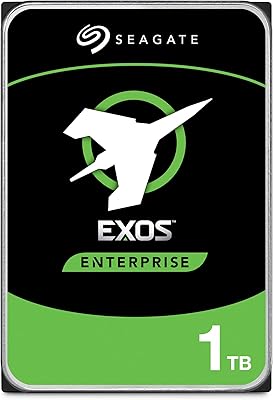
Seagate FireCuda Gaming Hard Drive 1TB
84%
88%
Performance
91%
Data Transfer Speed
94%
Ease of Setup
80%
RGB Lighting Customization
85%
Compatibility with PC & Mac
More
Seagate Basic 1TB Portable External Hard Drive
85%
90%
Value for Money
95%
Portability
88%
Transfer Speed
80%
Build Quality
91%
Ease of Use
More
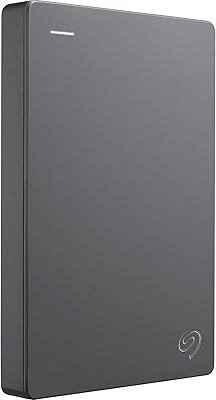
Seagate Expansion Portable 1TB External Hard Drive
85%
88%
Performance
94%
Setup & Installation
91%
Portability & Size
89%
Compatibility
87%
Value for Money
More
Seagate One Touch 1TB Portable Hard Drive
76%
93%
Ease of Setup
91%
Portability
58%
Transfer Speed
84%
Build Quality
76%
Encryption & Security
More
Seagate BarraCuda Pro 1TB 7200RPM Internal Hard Drive
87%
92%
Performance
90%
Speed
88%
Reliability
95%
Ease of Installation
65%
Noise Levels
More
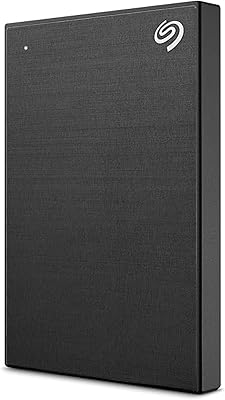
Seagate ST310005EXA101-RK 1TB External Hard Drive
77%
93%
Ease of Setup
47%
Transfer Speed
74%
Storage Capacity
88%
Reliability & Durability
62%
Value for Money
More
Seagate Constellation ES 1TB Internal Hard Drive
77%
93%
TLER / Error Recovery
91%
Drive Longevity
88%
RAID Compatibility
54%
Refurbished Condition Consistency
79%
Value for Money
More

FAQ

No, the drive is plug-and-play on most modern Windows and Mac systems, so it should show up in your file browser as soon as you connect it. Seagate does include backup and encryption software preloaded on the drive if you want to use it, but it is entirely optional.

Not out of the box. The drive ships with a USB 2.0 adapter, so you will get USB 2.0 speeds even if your computer has a USB 3.0 port. To get faster transfers, you would need to purchase a separate GoFlex USB 3.0 adapter, which is sold independently.

It is a small physical indicator built into the USB 2.0 adapter that shows roughly how much space remains on the drive at a glance, without opening any software. It is a simple but convenient feature, especially if you use the drive for incremental backups and want a quick visual check.

Yes, it works with both platforms, though it ships pre-formatted for Windows. Mac users will need to reformat the drive to HFS+ (or use a third-party tool like Paragon NTFS) to write files natively on macOS. Reading files on a Mac without reformatting is possible, but writing requires that extra step.

Yes, that is one of the main advantages of the GoFlex system. If you already own eSATA, FireWire, or USB 3.0 GoFlex adapters from another GoFlex drive, they are fully compatible with this desktop hard drive and will work without any additional purchase.

Like most 3.5-inch mechanical drives, you will hear a faint spin-up sound when it powers on and occasional light clicking during active read or write operations. Under normal desktop backup workloads it is not intrusive, but it is not silent either — if you are very sensitive to drive noise, that is worth knowing.

Yes, the GoFlex Desk uses a separate power adapter and cannot draw power from the USB connection alone, which is standard for 3.5-inch desktop drives. You will need a free outlet nearby, so it is worth factoring that into your desk setup.

Yes, the enclosure is designed to work in both vertical and horizontal orientations, so you can stand it upright if that saves desk space or lay it flat if that fits your setup better. Either way, the drive performs the same.

Based on feedback from buyers who have owned this GoFlex Desk 1TB for several years, reliability has generally been strong. Many report using the drive for archival backups over extended periods without failure. That said, all mechanical drives carry some long-term risk, and keeping a secondary backup of critical data is always a sensible precaution regardless of brand.

It is a practical fit for that use case. The preloaded backup software handles automated backups without much configuration, and 1TB is enough headroom for most home computer backups unless you are storing large video files. The main thing to keep in mind is that USB 2.0 will make the very first full backup slow — subsequent incremental backups are much faster once the initial one is done.

Where to Buy