Overview

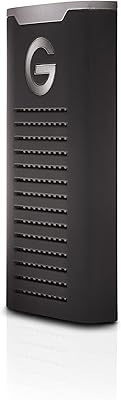
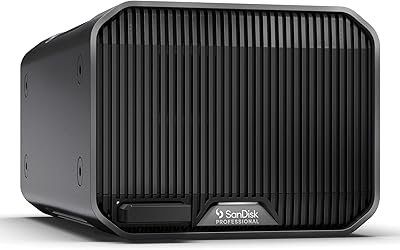
The SanDisk Professional G-Drive 12TB External Hard Drive is a desktop storage solution built for creative professionals who need serious capacity without cutting corners on reliability. What separates it from typical consumer drives is the enterprise-class Ultrastar HDD inside — the same drive family found in data centers, packaged into an enclosure most working creatives can actually afford. It ships Mac-ready, which is convenient, though Windows users can reformat it without much trouble. One thing worth setting straight upfront: this is a spinning-disk hard drive, not an SSD. If you need raw speed for real-time editing, look elsewhere. If you need high-capacity reliable storage at a reasonable price point, this desktop drive is worth a serious look.
Features & Benefits

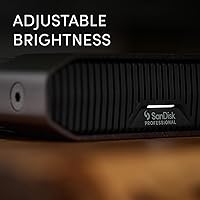
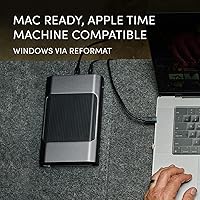
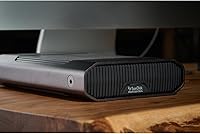
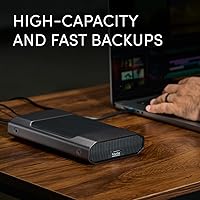
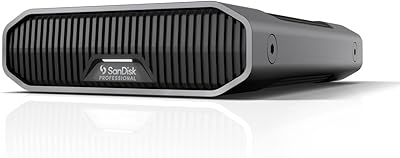
The G-Drive 12TB runs on a 7200RPM Ultrastar HDD, which translates to sustained sequential transfer speeds of up to 250MB/s — fast enough to move a folder of RAW files or a full 4K project archive without much waiting around. The USB-C connector runs at 10Gbps, so the interface itself is not the bottleneck. The anodized aluminum body doubles as a passive heat sink, keeping things cool during long backup sessions, and it stacks neatly on a desk. There is a three-level LED indicator that lets you dial back brightness — a minor touch, but appreciated in a dim editing suite. Out of the box, it is formatted for Apple Time Machine and ready to run on any modern Mac.

Best For

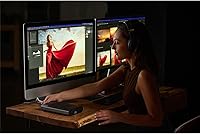
This desktop drive is a natural fit for Mac-based creative professionals — photographers sitting on tens of thousands of RAW files, videographers building 4K archives, or editors who need a dependable nightly backup destination. It also suits small studios or solo freelancers who want one reliable unit instead of juggling several smaller drives. If your workflow demands fast random reads, or you plan to edit directly off the drive, an SSD will serve you better. But if you want a set-and-forget backup with enterprise internals and room to grow, the G-Drive 12TB fits that role well. Windows users can make it work, but reformatting is required — factor that in before buying.

User Feedback

With a 3.7-star average across over a thousand reviews, this external hard drive carries a genuinely split reputation — and it is worth being upfront about that. Satisfied buyers tend to highlight the quiet, steady operation, the solid aluminum construction, and the consistent speeds during long backup runs. The complaints, though, are not trivial: a notable number of users report early drive failures or units that stopped being recognized entirely. Some also question whether the price premium over bare drives or NAS alternatives is justified. Mac users report a noticeably smoother experience; Windows users encounter more friction. The LED brightness control draws polarized opinions — some appreciate it, many consider it irrelevant at this price level.

Pros

  • Enterprise-class Ultrastar HDD internals provide a level of reliability credibility rare at this price point.
  • Sustained read and write speeds of up to 250MB/s make large file transfers genuinely fast for an HDD.
  • Anodized aluminum enclosure runs cool during long backup sessions without any active fan noise.
  • Mac users enjoy a completely plug-and-play setup — Time Machine ready in under two minutes.
  • 12TB capacity is enough to consolidate multiple older drives into a single, tidy desktop unit.
  • Stackable flat form factor keeps a busy workstation organized when multiple units are in use.
  • Quiet operation during normal use makes this external hard drive unobtrusive in a studio environment.
  • Adjustable LED brightness is a small but thoughtful feature for dim editing or color-grading workspaces.
  • USB-C connectivity works natively with current Mac setups without needing dongles or adapters.

Cons

  • A notable number of users reported early drive failures or units that stopped being recognized — a serious concern at this price.
  • Windows users must reformat before use, with no clear in-box guidance to help them through the process.
  • Price-per-terabyte is significantly higher than bare drives or entry-level NAS alternatives of similar capacity.
  • Only one short USB-C cable is included, which is limiting for users with larger or more complex desk setups.
  • Real-world transfer speeds drop sharply during mixed small-file operations, far below the advertised ceiling.
  • No bundled backup software for Windows users after reformatting — they are left to source their own solution.
  • The drive is heavy and desktop-bound, making it impractical for anyone who needs to move storage between locations.
  • WD Discovery companion software has a poor reputation among experienced users and adds little meaningful value.

Ratings

Our AI rating system analyzed thousands of verified global purchases of the SanDisk Professional G-Drive 12TB External Hard Drive, actively filtering out incentivized reviews and bot activity to surface what real buyers actually experienced. The scores below reflect an honest synthesis of both the genuine strengths and the frustrations that surfaced repeatedly across creative professionals, studio users, and everyday power users. Nothing has been softened — the pain points are weighted just as carefully as the praise.

Build Quality
88%
The anodized aluminum enclosure consistently earns compliments from users who have owned plastic-bodied drives before. It feels solid on a desk, runs noticeably cool during extended backup sessions, and holds up well in busy studio environments where gear takes some abuse.
A few users noted that the aluminum finish shows fingerprints and fine scratches over time, which bothers those who keep a tidy workstation. The drive's footprint is also larger than some expected, which can feel bulky on a cramped desk.
Reliability & Longevity
63%
37%
Users who received fully functional units generally reported consistent, trouble-free operation over months of regular use. The enterprise-class Ultrastar internals give confidence that the drive was not designed to a consumer cost-cutting standard.
This is where the mixed rating largely comes from. A meaningful number of buyers reported early failure — drives dying within weeks or not being recognized at all by the host system. For a drive at this price tier, that failure rate is hard to overlook and weighs heavily on trust.
Transfer Speed
82%
18%
For a spinning-disk drive, the sustained sequential throughput impressed users moving large RAW photo dumps or multi-gigabyte video project folders. Backing up a full day of 4K footage runs noticeably faster than on older 5400RPM alternatives.
The 250MB/s ceiling is real but not always achieved in practice — users doing mixed small-file transfers saw much lower actual speeds, which is inherent to mechanical HDD architecture rather than a flaw specific to this unit.
Mac Compatibility
91%
Out-of-box experience on macOS is genuinely smooth. The APFS formatting means plug-in and Time Machine setup takes under two minutes, and users across multiple Mac generations reported zero driver issues or mount failures during initial setup.
The Mac-first design is a deliberate trade-off. Users who share between macOS and Windows found the reformatting step mildly annoying, and a small number of Windows-primary users felt misled by the packaging emphasis on Apple compatibility.
Windows Compatibility
58%
42%
Reformatting the drive for exFAT or NTFS is a straightforward process and well within reach of any moderately experienced Windows user. Once reformatted, performance on Windows machines was generally reported as stable.
The drive ships in APFS format, which Windows cannot read without third-party software. Users who did not read the fine print were caught off guard, and a subset of negative reviews stem entirely from this out-of-box Windows incompatibility rather than any hardware defect.
Value for Money
67%
33%
For buyers who specifically want enterprise HDD internals in a polished desktop enclosure, the price feels justifiable — particularly compared to buying a NAS enclosure and bare drive separately. The brand premium does carry some real-world backing here.
A vocal subset of users pointed out that competing bare drives or NAS configurations offer similar or greater capacity for less money. The pricing assumes you value the plug-and-play enclosure and brand assurance, which not every buyer does.
Noise & Vibration
84%
The drive runs quietly enough that users in home studios and small offices rarely noticed it during operation. The aluminum chassis dampens vibration effectively, and several reviewers specifically mentioned it was among the quieter HDDs they had used.
At 7200RPM, occasional spin-up sounds are audible in a very quiet room, and a few users noted a faint hum during sustained transfers. Not a dealbreaker, but those sensitive to ambient noise in recording environments should be aware.
Capacity & Storage Efficiency
89%
12TB is enough to consolidate years of RAW photo libraries, documentary footage, or project archives onto a single unit. Users who previously managed multiple smaller drives found it genuinely practical to reduce clutter while gaining headroom.
Formatted capacity comes in slightly under the advertised 12TB, as expected with any large-capacity drive. Not a surprise to experienced buyers, but first-time high-capacity drive owners occasionally flag this in reviews as unexpected.
Setup & Ease of Use
86%
Mac users praised the zero-configuration setup — plug in, open Finder, and it is ready to go. Time Machine detection was consistently described as immediate and painless, which matters to users who just want backup to work without tinkering.
Windows users face a reformatting step before the drive is usable, which requires some comfort with Disk Management. There is no included setup guide that clearly flags this for cross-platform buyers, leading to avoidable frustration.
Thermal Management
81%
19%
The full aluminum body acts as a passive radiator, and users running long overnight backups or archiving sessions noted that the drive stayed warm but never alarmingly hot. No active fan means no additional noise source either.
In very warm ambient environments — like poorly ventilated editing suites in summer — a handful of users reported the enclosure getting uncomfortably hot to the touch during sustained heavy use. Passive cooling has its limits at high ambient temperatures.
Port & Cable Quality
74%
26%
The USB-C connector feels well-seated and the included cable is appropriately thick for the data rates involved. Users appreciated that the port is modern enough to work directly with current MacBook Pro and Mac Studio setups without adapters.
Only one cable is included, and it is relatively short. Users who need to route the cable along a desk or around a monitor arm found themselves needing to source a longer USB-C cable separately, which adds minor cost and inconvenience.
LED Indicator
61%
39%
The three-level brightness adjustment is a thoughtful touch for photographers and video editors working in dim color-grading suites. Users who noticed it appreciated being able to dial it down to avoid distracting light bleed near their screens.
A fair number of buyers considered this feature irrelevant or even gimmicky at this price point — they would have preferred that the engineering budget go elsewhere. It is a nice extra for some, but far from a purchasing factor for most.
Portability & Form Factor
55%
45%
The stackable flat design is genuinely useful on a crowded desk, and users with multiple units appreciate that they align neatly. The footprint is predictable and easy to plan around in a permanent studio setup.
At nearly 3 pounds and with desktop-only power requirements, this drive is not portable in any meaningful sense. Users who bought it expecting to move it between locations regularly found it impractical compared to bus-powered portable alternatives.
Software & Ecosystem Support
72%
28%
No bloatware is bundled, which experienced users consistently appreciated. The drive works immediately with macOS native tools, and WD Discovery software is available for those who want optional cloud or backup management features.
WD Discovery has a lukewarm reputation — some users found it unnecessary and avoided it entirely. There is no included backup software for Windows users, which means Windows buyers need to source their own solution after reformatting.

Suitable for:

The SanDisk Professional G-Drive 12TB External Hard Drive is built for Mac-based creative professionals who need a dependable, high-capacity archive solution that just works without configuration headaches. Photographers sitting on years of RAW shooting libraries, videographers building out 4K project archives, and editors who want a reliable nightly Time Machine destination will feel right at home with this desktop drive. It also suits small studios and solo freelancers who are tired of juggling three or four smaller drives and want to consolidate everything into one well-built unit. If your priority is sequential throughput for large file transfers — moving entire project folders, ingesting shoot cards, or running automated overnight backups — the G-Drive 12TB delivers that consistently. The enterprise-grade Ultrastar internals give it a credibility that most consumer-tier drives simply cannot match, which matters when you are trusting a single drive with irreplaceable work.
Not suitable for:

The SanDisk Professional G-Drive 12TB External Hard Drive is the wrong tool for buyers who need SSD-class speed for real-time editing or fast random file access — this is a mechanical spinning disk, and no amount of premium branding changes that fundamental limitation. Windows-primary users should also think carefully before purchasing, since the drive ships formatted for macOS only and requires a manual reformat before it is usable on a PC, with no included guidance to walk through that process. Anyone shopping primarily on price-per-terabyte will likely find better value in a bare drive paired with an affordable enclosure, or in a basic NAS setup. The drive is also a poor fit for users who need portability — at nearly 3 pounds with no bus power, it belongs on a desk and stays there. Finally, buyers who have been burned by reliability issues with previous WD or SanDisk products may find the mixed failure rate reports in user reviews difficult to look past, and should factor the availability of warranty support into their decision.

Specifications

  • Storage Capacity: The drive provides 12TB of raw storage capacity, suitable for large RAW photo libraries, 4K video archives, and long-term project backups.
  • Drive Type: Uses a mechanical Ultrastar hard disk drive with enterprise-class internals manufactured by Western Digital Technologies.
  • Rotational Speed: The internal HDD spins at 7200RPM, enabling consistently higher sequential throughput than typical 5400RPM consumer desktop drives.
  • Read Speed: Rated for sequential read speeds of up to 250MB/s under optimal conditions and compatible host hardware.
  • Write Speed: Rated for sequential write speeds of up to 250MB/s, measured using internal testing with conditions that may vary in real-world use.
  • Interface: Connects via USB-C using the USB 3.2 Gen 2 standard, delivering up to 10Gbps of interface bandwidth.
  • Connector: Ships with a USB-C cable; the port is compatible with modern Mac and PC hosts that support USB 3.2 Gen 2 or USB 3.1 Gen 2.
  • Default Format: Arrives pre-formatted in APFS for macOS, making it immediately compatible with Apple Time Machine and modern Mac systems out of the box.
  • Windows Support: Windows compatibility requires reformatting the drive to exFAT or NTFS using Disk Management; no third-party software is needed for the reformat process itself.
  • Enclosure Material: The outer shell is constructed from anodized aluminum, which provides passive thermal dissipation and resistance to everyday wear and impact.
  • Dimensions: Measures 8.27″ x 5.24″ x 1.61″, with a low-profile flat shape designed to stack neatly alongside other G-Drive units.
  • Weight: Weighs 2.91 pounds, making it a fixed desktop unit rather than a portable solution for on-the-go use.
  • Power Source: Requires AC wall power via an included power adapter; the drive is not bus-powered and cannot operate from a laptop USB port alone.
  • LED Indicator: Features an activity LED with three selectable brightness levels, allowing users to reduce light output in dim studio or editing environments.
  • Color: Available in Dark Grey with a brushed anodized aluminum finish that resists minor surface scratches over time.
  • Mac Compatibility: Fully compatible with macOS and natively supports Apple Time Machine for automated incremental backups without any additional software installation.
  • Manufacturer: Designed and sold under the SanDisk Professional brand, which is a division of Western Digital Technologies, Inc.
  • Product Series: Part of the G-DRIVE product line, positioned as the single-drive desktop tier within the SanDisk Professional storage ecosystem.

Related Reviews
SanDisk Professional G-Drive 6TB

67%
84%
Build Quality
51%
Drive Reliability
76%
Transfer Speed
89%
Mac Compatibility
53%
Value for Money
More
SanDisk Professional G-Drive 22TB External Desktop Hard Drive

84%
89%
Performance
91%
Build Quality
96%
Capacity
72%
Ease of Setup
65%
Noise Level
More
SanDisk Professional 8TB G-Drive External Desktop Hard Drive
83%
92%
Performance
90%
Build Quality & Durability
89%
Data Transfer Speed
85%
Ease of Use & Setup
87%
Capacity & Storage Value
More
G-Technology 2TB G-DRIVE Mobile USB-C Portable External Hard Drive
88%
91%
Portability
88%
Transfer Speed
89%
Build Quality
94%
Ease of Use (Plug-and-Play)
92%
Compatibility (Mac/Windows)
More
G-Technology 4TB G-DRIVE Mobile USB-C Portable External Hard Drive
88%
88%
Performance
94%
Portability
91%
Build Quality
89%
Compatibility
95%
Setup & Installation
More
SanDisk Professional G-Drive SSD 4TB
86%
91%
Performance
94%
Durability
88%
Speed (Read/Write)
74%
Portability/Weight
81%
Ease of Use
More
SanDisk Professional G-Drive ArmorATD 6TB
83%
88%
Durability
82%
Performance Speed
85%
Portability
79%
Ease of Use
91%
Water & Dust Resistance
More
SanDisk Professional 2TB G-Drive ArmorATD Hard Drive
76%
93%
Build Quality
88%
Durability & Protection
61%
Transfer Speed
91%
Portability
94%
Mac Compatibility
More
SanDisk Professional G-Drive SSD 500GB
85%
92%
Performance
89%
Build Quality & Durability
90%
Portability & Size
75%
Compatibility
85%
Ease of Use
More
SanDisk Professional G-DRIVE SSD 2TB
88%
94%
Performance
91%
Durability
87%
Ease of Use
92%
Transfer Speed
86%
Compatibility
More

FAQ

Not immediately. The drive ships formatted in APFS, which Windows cannot read or write to without third-party software. You will need to reformat it to exFAT or NTFS using Windows Disk Management before it is usable on a PC. The process only takes a few minutes, but be aware that reformatting erases everything on the drive, so do not copy anything to it first if you plan to reformat.

Yes, and this is honestly one of the strongest use cases for this drive. It arrives pre-formatted in APFS and macOS recognizes it immediately as a Time Machine destination. Setup takes under two minutes on a modern Mac.

It depends on what you are editing. For 1080p or moderately compressed 4K footage, the 250MB/s sequential speeds are generally sufficient. For high-bitrate RAW 4K or multi-stream workflows, you would be better served by an SSD. Most professionals use this drive for archive and backup rather than as an active edit drive.

It contains a Western Digital Ultrastar HDD, which is a drive family designed for data center and enterprise use rather than consumer desktops. That is a meaningful distinction in terms of build standards, though it does not make the drive immune to failure.

It is a legitimate concern and worth taking seriously. A notable portion of verified buyers did report units failing within the first few weeks or not being recognized by their computers. That said, the majority of units appear to perform reliably over time. Registering the drive for warranty coverage immediately after purchase is strongly recommended, and keeping a redundant backup is always good practice regardless of drive brand.

Not particularly. Most users describe it as quiet during normal operation, with only a faint spin-up hum audible in very silent rooms. It is considerably quieter than older desktop HDDs and should not be disruptive in a typical studio or home office environment.

No software installation is required for Mac users — just plug it in and it works. WD Discovery is available as an optional companion app if you want cloud integration or additional management features, but most users skip it entirely. Windows users will need to reformat before use but do not need any additional drivers.

Yes. The flat, low-profile aluminum enclosure is specifically designed to stack. If you are building out a desktop storage array with multiple units, they align cleanly and stay stable on a flat surface.

Western Digital typically provides a three-year limited warranty for this product line, covering manufacturing defects. You should register your drive through WD's website after purchase to activate coverage and make any future claims easier to process.

One USB-C cable is included, but it is fairly short — which has frustrated users who need to route cables around monitors, docking stations, or other desk equipment. If your host port is not close to where the drive will sit, budget for a longer USB-C cable separately.

Where to Buy