Overview

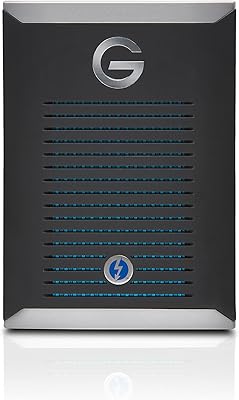
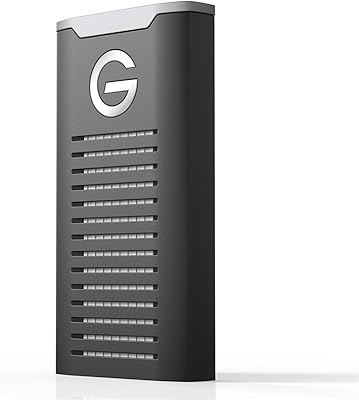
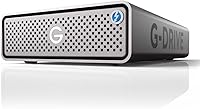
The SanDisk Professional G-DRIVE Pro 20TB Desktop Hard Drive sits firmly at the professional end of the external storage market — built not for casual backup but for creatives who depend on their storage every single working day. The G-DRIVE Pro lineage has long been trusted in post-production environments, and this 20TB variant represents the top of that range. What makes it worth serious attention is what's inside: a WD Ultrastar drive, the same enterprise-class hardware found in data centers. This is a desk-bound device; it is not trying to be portable. The space grey aluminium enclosure does double duty — it looks sharp on a professional desk and helps manage heat during sustained workloads.
Features & Benefits

Two Thunderbolt 3 ports are where this professional hard drive earns its keep in a real studio setup. Rather than forcing you to choose between your drive and other peripherals, the daisy-chain capability lets you connect up to five additional devices off a single Thunderbolt connection — monitors, audio interfaces, whatever the workflow demands. Sustained speeds of up to 260MB/s read and write mean multicam 4K edits or large RAW archive offloads don't become waiting games. The USB-C port adds useful flexibility for Windows workstations where Thunderbolt support can be inconsistent. That five-year limited warranty is also notably longer than the two years most consumer drives offer, which matters at this price tier.

Best For

This desktop drive makes most sense for people whose work genuinely strains their storage. Video editors cutting ProRes or RAW footage, colorists maintaining large project archives, photographers running multi-terabyte Lightroom catalogs — these are the users who will actually feel the difference day to day. It suits small studio environments where daisy-chaining means one Thunderbolt port can serve an entire peripheral chain. If you have outgrown a NAS that feels over-engineered for a one-person operation, or a basic USB drive that bottlenecks your transfers, the G-DRIVE Pro 20TB occupies a sensible middle ground. Mac Pro and MacBook Pro users with existing Thunderbolt 3 infrastructure will find it slots in without friction.

User Feedback

Across a broad range of buyer reviews, a few consistent themes emerge. Users repeatedly praise real-world speed consistency — the drive tends to hold close to its rated throughput during long transfers, not just in short bursts. Quiet operation and solid build quality come up often too. The criticisms are equally consistent: the price-per-TB sits high compared to competing solutions, and Windows users occasionally encounter friction with Thunderbolt 3 driver compatibility. The daisy-chain port is appreciated but rarely described as the deciding purchase factor. Warranty support experiences skew positive when needed. A small number of early-failure reports exist, though the proportion appears typical for a drive sold at this volume and professional tier.

Pros

  • Sustained read and write speeds of up to 260MB/s hold up reliably during long, heavy transfers — not just in short bursts.
  • The WD Ultrastar drive inside brings a data-center reliability pedigree that most external drives simply cannot match.
  • Dual Thunderbolt 3 ports with daisy-chain support let you connect up to five additional devices without sacrificing a port on your machine.
  • A five-year limited warranty is significantly longer than the two-year coverage typical of consumer-grade storage.
  • The space grey aluminium enclosure manages heat effectively during sustained workloads and looks at home in a professional workspace.
  • USB-C compatibility means the drive remains usable on Windows machines or newer devices where Thunderbolt is unavailable.
  • 20TB of capacity gives editors, colorists, and photographers genuine long-term headroom without constantly juggling archive drives.
  • Mac and PC compatibility means the drive works across platforms without demanding reformatting out of the box.
  • Quiet operation under load is a consistent point of praise — it does not create noise distraction in recording or editing environments.

Cons

  • Price-per-TB is high compared to many competing desktop hard drives, making the cost harder to justify without a Thunderbolt 3 setup.
  • Windows users may encounter Thunderbolt 3 driver friction that requires troubleshooting before the drive performs at full capability.
  • At 2.6 pounds and 3.5-inch form factor, it is strictly desk-bound — there is no portable or bus-powered version of this drive.
  • The daisy-chain feature, while useful, is rarely the deciding reason buyers choose this drive and goes unused in simpler setups.
  • Mechanical HDD speeds, however consistent, cannot compete with external SSDs for workflows that demand near-instantaneous file access.
  • Users without Thunderbolt 3 ports pay a significant premium for a headline feature they cannot actually use.
  • A small but notable number of buyers have reported early-failure units, which is worth factoring in despite the strong warranty coverage.
  • The high capacity and professional positioning make it an expensive choice for anyone whose storage needs are modest or infrequent.

Ratings

The scores below reflect an AI-driven analysis of verified global buyer reviews for the SanDisk Professional G-DRIVE Pro 20TB Desktop Hard Drive, with spam, bot activity, and incentivized feedback actively filtered out before any scoring was applied. Each category captures both the genuine strengths buyers praise and the friction points they consistently flag — nothing is glossed over. The result is an honest picture of where this professional hard drive excels and where prospective buyers should set realistic expectations.

Transfer Speed
88%
Buyers regularly report that real-world sustained speeds align closely with the rated 260MB/s, which is meaningful for editors working with large ProRes or RAW files. Offloading a full day of multicam footage or running a multi-terabyte backup overnight feels notably faster than with typical consumer drives at 5400RPM.
While 260MB/s is strong for a mechanical drive, users migrating from fast external SSDs will notice the gap immediately. For workflows involving many small files — such as DAW projects with hundreds of audio assets — the speed advantage narrows considerably compared to peak sequential numbers.
Build Quality
91%
The aluminium enclosure draws consistent praise for feeling solid and premium without being unnecessarily heavy. Users note it stays cool to the touch even after hours of continuous use, and the fit and finish quality is frequently described as matching or exceeding what you would expect at this price point.
A small number of buyers reported cosmetic scratching on the enclosure after relatively light desk use, suggesting the Space Grey finish may be softer than it appears. The single cable included in the box also drew occasional criticism for feeling less premium than the drive itself.
Reliability
84%
The WD Ultrastar internals give buyers genuine confidence — this is the same drive family used in enterprise storage arrays, and many reviewers explicitly cite the MTBF rating as part of their purchase reasoning. Long-term users in the 12-to-24-month range report no degradation in performance or unusual behaviour.
A visible minority of reviews document early-failure units, typically within the first few weeks of use. While the proportion is not alarming relative to the sales volume, it is a pattern worth noting — and it underscores the importance of not treating any single drive as a sole backup destination.
Thunderbolt 3 Performance
86%
For Mac users with Thunderbolt 3 infrastructure already in place, the connection experience is described as plug-and-play with no driver installation needed. The daisy-chain functionality works as advertised, and users running a display plus two drives off a single Mac port report clean, stable performance in daily editing sessions.
The Thunderbolt 3 advantage is entirely contingent on having the right hardware. Windows users regularly encounter driver compatibility challenges, and a subset of PC buyers report spending significant time troubleshooting before achieving reliable Thunderbolt connectivity — a frustration that feels disproportionate at this price level.
Value for Money
61%
39%
For buyers who are fully invested in Thunderbolt 3 workflows and need enterprise-level reliability in a single enclosure, the pricing reflects a coherent value proposition. The five-year warranty alone reduces the long-term cost-of-ownership argument compared to replacing cheaper drives more frequently.
The price-per-TB is difficult to justify for anyone who cannot fully leverage the Thunderbolt 3 interface or does not specifically need the Ultrastar internals. Competing 20TB desktop drives from other brands offer similar raw capacity at meaningfully lower prices, and that gap is hard to ignore without a clear professional use case.
Noise & Vibration
83%
In quiet studio environments — recording spaces, colour suites, photography editing rooms — this desktop drive is consistently described as unobtrusive. The aluminium enclosure dampens vibration effectively, and users sitting within a metre of the drive while working rarely mention it as a distraction.
It is still a 7200RPM mechanical drive, so there is an audible hum and periodic seek noise that more sensitive users in ultra-quiet environments will notice. Those coming from SSD-based external storage should calibrate their expectations accordingly — silence is not achievable with spinning media.
Daisy-Chain Usability
74%
26%
Users who actually use the daisy-chain feature describe it as a genuine workflow convenience, especially in compact desk setups where Thunderbolt ports are scarce. Connecting a second drive and a Thunderbolt display through a single cable run is a clean, tidy solution that studio users appreciate.
A notable portion of buyers admit they have never used the second Thunderbolt port in practice, which means they are paying a premium for a feature that goes unused. Setup for first-time daisy-chain users also involves some trial and error around device ordering and power sequencing.
Heat Management
81%
19%
The passive aluminium enclosure handles thermals better than most similarly specified plastic-shell competitors. Buyers using the drive for extended archive operations or continuous backup jobs report it running warm but never uncomfortably hot, even without active cooling.
In warm ambient environments or poorly ventilated desk setups, the enclosure surface can become noticeably warm during multi-hour sustained transfers. There is no active cooling, so placement in an open, ventilated spot is advisable rather than tucking it into a cabinet.
Setup & Compatibility
79%
21%
Mac users universally describe setup as immediate — the drive mounts on the desktop within seconds of connection and requires no software installation for basic use. The pre-formatted HFS+ configuration means creative professionals on Mac can start transferring files the moment the drive is out of the box.
Windows users face a mandatory reformatting step before the drive is fully functional, and Thunderbolt 3 on Windows adds another layer of configuration complexity. The out-of-box experience is clearly optimised for Mac, and PC buyers should factor in some setup time before their first productive session.
Warranty & Support
82%
18%
The five-year limited warranty is a genuine differentiator that buyers bring up unprompted in positive reviews. Those who have needed to initiate warranty claims generally describe the process as straightforward, with replacement units arriving within a reasonable timeframe.
A handful of buyers reported difficulty reaching support during peak periods and some confusion around whether their specific failure scenario was covered under the warranty terms. Data recovery is not included in the warranty, which is an important caveat for users treating this drive as primary — not backup — storage.
Software & Ecosystem
67%
33%
The bundled SanDisk Professional software covers the basics for drive health monitoring and simple backup scheduling, which is adequate for users who want a no-fuss setup without investing in third-party tools. Integration with Mac's Time Machine also works cleanly after a brief configuration step.
Professional users almost unanimously bypass the included software in favour of dedicated tools like Carbon Copy Cloner, ChronoSync, or Backblaze. The software feels like an afterthought relative to the hardware quality, and there is no meaningful update cadence that would improve it over time.
Port & Cable Inclusion
58%
42%
The drive ships with both a Thunderbolt 3 cable and a USB-C cable, which means most users can connect immediately without purchasing additional accessories. Having both cables in the box is a thoughtful inclusion that removes an easy friction point on day one.
Several buyers noted that the included Thunderbolt 3 cable is on the shorter side, which creates real desk routing challenges depending on where the drive is positioned relative to the host machine. A longer cable option in the box — or a more premium cable material — would better match the drive's price positioning.
Capacity Practicality
89%
Twenty terabytes represents a genuinely useful working capacity for video production, large-scale photography, and studio archiving. Buyers who previously juggled multiple smaller drives describe consolidating onto a single unit as a meaningful quality-of-life improvement that also simplifies backup strategy.
A minority of buyers question whether 20TB in a single enclosure without RAID protection creates too much risk in one place. While the Ultrastar internals are reliable, the absence of built-in redundancy means a catastrophic failure would be especially costly for anyone who relied on this drive without maintaining a second copy.

Suitable for:

The SanDisk Professional G-DRIVE Pro 20TB Desktop Hard Drive was built for one type of buyer: the working creative who treats storage as infrastructure, not an afterthought. Video editors regularly cutting multicam 4K or RAW ProRes footage will appreciate sustained throughput that holds up across long sessions, not just during a benchmark. Photographers managing sprawling Lightroom catalogs or running tethered shoots that generate hundreds of gigabytes per day will find 20TB gives genuine room to breathe. Small studios and one-person production setups benefit especially from the dual Thunderbolt 3 ports — daisy-chaining an audio interface, a second drive, or a display off a single port connection is a real workflow advantage on machines with limited I/O. Mac Pro and MacBook Pro users with Thunderbolt 3 already in their setup will find integration straightforward. If you have outgrown basic USB drives and find a NAS more complexity than your operation actually needs, this desktop drive sits in a practical and well-justified middle ground.

Not suitable for:

Buyers looking for portability should stop here — this professional hard drive is a 3.5-inch desktop unit weighing 2.6 pounds, and there is no bus-powered or travel-ready option in this form factor. If your machine lacks Thunderbolt 3 ports, you will be limited to the USB-C connection, which still performs respectably but leaves the drive's headline capability untouched and harder to justify at this price point. Windows users should be aware that Thunderbolt 3 driver compatibility on PC can introduce setup friction that Mac users simply do not encounter. Budget-conscious buyers comparing raw cost per terabyte will find more affordable mechanical drives from competing brands, and those who need faster-than-HDD performance for tasks like real-time SSD-speed editing should look at external SSD alternatives instead. Casual home users storing photos and documents have no practical need for enterprise-class internals and a five-year warranty at this price tier — the G-DRIVE Pro 20TB is deliberately overspecified for everyday consumer use, and that cost premium makes little sense outside a professional context.

Specifications

  • Storage Capacity: This desktop drive provides 20TB of raw storage capacity, suited to large media libraries and long-term professional archives.
  • Internal Drive: A WD Ultrastar enterprise-class mechanical hard disk is housed inside, the same drive family used in commercial data-center applications.
  • Rotational Speed: The internal drive spins at 7200RPM, enabling consistent sustained throughput across extended read and write sessions.
  • Primary Interface: Thunderbolt 3 is the primary connection standard, operating at up to 20Gbps and requiring a compatible Thunderbolt 3 port on the host machine.
  • Secondary Interface: A single USB-C port provides an alternative connection path for systems without Thunderbolt 3 support, including most Windows desktops and laptops.
  • Port Configuration: Two Thunderbolt 3 ports are built into the enclosure, enabling daisy-chaining of up to five additional compatible devices from a single host port.
  • Read Speed: Maximum sustained read speeds reach up to 260MB/s under optimal conditions, based on internal testing by the manufacturer.
  • Write Speed: Maximum sustained write speeds also reach up to 260MB/s, matching read performance for balanced throughput during large file transfers.
  • Form Factor: The drive uses a 3.5-inch internal form factor, making it a desktop-only device that requires AC power and is not designed for portable use.
  • Enclosure Material: The outer shell is machined from aluminium in a Space Grey finish, which aids passive heat dissipation during sustained workloads.
  • Dimensions: The enclosure measures 8.27 x 5.12 x 1.81 inches (length x width x height), fitting a standard desktop footprint.
  • Weight: The unit weighs 2.6 pounds, reflecting the robust aluminium enclosure and full-size 3.5-inch internal drive.
  • Platform Support: The drive is compatible with both Mac and PC operating systems without requiring a full reformat out of the box for most common use cases.
  • Warranty: A five-year limited warranty is included, which is significantly longer than the one- or two-year coverage standard on most consumer external drives.
  • Manufacturer: The G-DRIVE Pro line is manufactured by Western Digital Technologies, Inc. and sold under the SanDisk Professional brand.

Related Reviews
SanDisk Professional G-Drive 22TB External Desktop Hard Drive

84%
89%
Performance
91%
Build Quality
96%
Capacity
72%
Ease of Setup
65%
Noise Level
More
SanDisk Professional 8TB G-Drive External Hard Drive
68%
83%
Transfer Speed
88%
Build Quality
58%
Reliability
91%
Mac Compatibility
41%
Windows Compatibility
More
SanDisk Professional G-Drive 6TB
67%
84%
Build Quality
51%
Drive Reliability
76%
Transfer Speed
89%
Mac Compatibility
53%
Value for Money
More
SanDisk Professional G-DRIVE Pro 1TB External SSD
73%
93%
Transfer Speed
88%
Build Quality
91%
Portability
89%
Mac Compatibility
41%
Windows Compatibility
More
SanDisk Professional G-Drive 12TB External Hard Drive
75%
88%
Build Quality
63%
Reliability & Longevity
82%
Transfer Speed
91%
Mac Compatibility
58%
Windows Compatibility
More
SanDisk Professional G-DRIVE SSD 2TB
88%
94%
Performance
91%
Durability
87%
Ease of Use
92%
Transfer Speed
86%
Compatibility
More
SanDisk Professional 2TB G-Drive ArmorATD Hard Drive
76%
93%
Build Quality
88%
Durability & Protection
61%
Transfer Speed
91%
Portability
94%
Mac Compatibility
More
SanDisk Professional G-Drive SSD 1TB
89%
94%
Read/Write Performance
96%
Durability & Build Quality
91%
Portability & Size
95%
Water & Dust Resistance
89%
Thermal Stability
More
SanDisk Professional G-DRIVE 500GB Portable SSD
81%
91%
Transfer Speed
93%
Durability & Ruggedness
96%
Water & Dust Resistance
61%
Value for Money
47%
Windows Compatibility
More
SanDisk Professional G-Drive ArmorATD 6TB
83%
88%
Durability
82%
Performance Speed
85%
Portability
79%
Ease of Use
91%
Water & Dust Resistance
More

FAQ

It works with both, but there is an important nuance for Windows users. Thunderbolt 3 on Windows requires Intel Thunderbolt hardware and the correct drivers, and getting that set up can take some troubleshooting. If your PC lacks Thunderbolt 3 entirely, you can still connect via the USB-C port, though you will not reach the drive's peak speeds.

Thunderbolt 3 and USB-C share the same physical connector shape, but they are not the same thing. Thunderbolt 3 runs at up to 20Gbps and supports daisy-chaining additional devices, while a standard USB-C connection typically tops out at a fraction of that speed. Only use the Thunderbolt 3 ports if your machine actually has Thunderbolt 3 — plugging a USB-C cable into a Thunderbolt port still works, it just runs at USB speeds.

With sustained speeds of up to 260MB/s, the G-DRIVE Pro 20TB handles most 4K editing workflows comfortably, including multicam ProRes timelines. For highly compressed formats or single-stream 4K, you will have no issues at all. Where mechanical drives start to show limitations is with very high-bitrate 8K RAW or when running multiple simultaneous streams, where a fast external SSD would be the safer choice.

You connect the drive to your Mac via one of its Thunderbolt 3 ports, then use the second Thunderbolt 3 port on the drive to connect your next device — another drive, a display, an audio interface, and so on — up to five additional devices in a chain. Each device in the chain draws from the same Thunderbolt 3 bandwidth, so if you are running multiple high-throughput devices simultaneously, you may notice some speed sharing. For most studio setups, however, it works cleanly without any meaningful bottleneck.

Quiet operation is one of the more consistently praised aspects of this drive across buyer reviews. The aluminium enclosure and enterprise-class internals produce minimal vibration noise, and the drive stays well-behaved even during long, intensive transfer sessions. It is not silent, but it is unlikely to be noticeable in a typical studio or office environment.

The five-year limited warranty is handled through SanDisk Professional's support channels, and buyer experiences with warranty claims have generally been described as straightforward. You would typically need to register the product and contact support with proof of purchase. It is worth noting that warranty replacement covers the drive hardware, not the data on it, so maintaining a backup of your backup is always advisable regardless of warranty coverage.

It ships pre-formatted for Mac use, so Mac users can plug it in and start working immediately. Windows users will need to reformat the drive to exFAT or NTFS before it will be fully writable on a PC. The reformat process takes only a few minutes using the built-in Disk Management tool on Windows or Disk Utility on Mac.

A NAS at this capacity gives you network access, RAID redundancy options, and the ability to serve multiple users simultaneously — things this desktop drive cannot do. But a NAS also brings configuration complexity, ongoing maintenance, and often a higher total cost once drives are included. If you are a solo creative who wants fast, direct-attached storage without the setup overhead, this professional hard drive is a much simpler and more immediate solution.

The aluminium enclosure is specifically designed to dissipate heat passively, and in practice the drive runs warm but well within safe operating temperatures during extended sessions. It should not get hot enough to cause concern under normal working conditions. Positioning it with reasonable airflow around it — rather than enclosed in a tight cabinet — is a sensible precaution.

SanDisk Professional includes access to a version of their desktop software for drive management and basic backup tools, though many professional users opt to use their own backup solution such as Carbon Copy Cloner, Time Machine, or Backblaze. The drive functions as plain storage out of the box without requiring any software to operate.

Where to Buy