Overview

The SanDisk 8TB Creator Desk Drive External SSD arrived in late 2024 as a serious storage option for creators who constantly outgrow their drives. It sits in the premium price tier, but the combination of high capacity and fast SSD speeds makes that easier to justify than it might initially seem. One bundled perk worth noting: a one-month Adobe Creative Cloud subscription is included, a thoughtful touch for the target audience. Just be clear going in — this is a desktop-first drive. It stays on your desk, plugged in, and trades the freedom of portability for thermal performance that smaller portable SSDs often struggle to maintain.

Features & Benefits

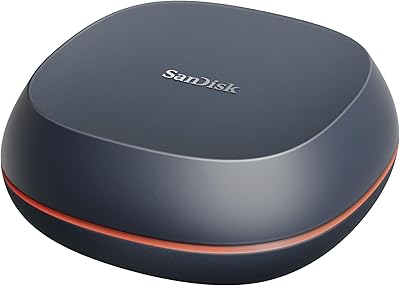
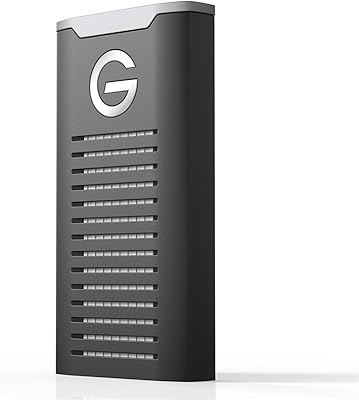
The standout number is up to 1000MB/s over USB 3.2 Gen 2 — genuinely fast, but only achievable if your computer has a matching Gen 2 port. Older USB 3.0 or 3.1 connections will bottleneck performance, so verify your host hardware before expecting peak throughput. For 8TB of SSD storage, the compact one-pound chassis is surprisingly modest; it takes up far less space than a traditional hard drive enclosure. The USB-C connector handles modern machines, while the included Type-A adapter keeps older setups covered. Both Apple Time Machine and downloadable Acronis True Image software are supported, making this a Mac and Windows backup option without extra software cost.

Best For

The Creator Desk Drive is purpose-built for people whose storage demands are genuinely large. Think video editors cutting 4K or 8K footage, photographers managing multi-terabyte raw archives, or AI practitioners who need somewhere fast to store training datasets and generated content. Mac users who want a reliable Time Machine destination without the complexity of a NAS will find this plugs in and just works. It also fits studio workstations where the drive stays put permanently. Anyone expecting to travel with it will be let down — this is a desk-bound solution by design. Creators already exploring Adobe Creative Cloud get a one-month trial included to sweeten the deal.

User Feedback

With a 4.4-star average across more than 500 ratings, the overall reception for this high-capacity external drive is clearly positive. Creative professionals tend to highlight the sheer capacity and fast file transfers as the two strongest points. Where the criticism appears, it usually centers on real-world speeds falling short of the advertised ceiling — a predictable outcome when the host port is not USB 3.2 Gen 2. A handful of buyers also report the drive running noticeably warm during sustained transfers, though no one has flagged it as a serious issue. Given the December 2024 launch date, long-term durability data is still thin, but early impressions around build quality lean favorable.

Pros

  • 8TB of SSD storage handles even the most demanding media libraries without requiring multiple drives.
  • Rated read and write speeds of up to 1000MB/s make large file transfers noticeably faster than HDD alternatives.
  • Both Apple Time Machine and Acronis True Image are supported out of the box, covering Mac and Windows users.
  • The included USB-C to Type-A adapter ensures compatibility with older machines without hunting for a separate cable.
  • At just one pound, the Creator Desk Drive has a surprisingly small footprint for the storage density it offers.
  • Shock-resistant build adds a layer of confidence for an always-on desk drive that rarely gets handled carefully.
  • The bundled one-month Adobe Creative Cloud subscription is a genuinely useful bonus for creators already in that ecosystem.
  • Ranks in the top 50 external SSDs on Amazon with over 500 ratings, suggesting strong early market validation.
  • No moving parts means quieter operation and lower risk of mechanical failure compared to traditional hard drives.

Cons

  • Peak speeds require a USB 3.2 Gen 2 host port — older laptops and desktops will see significantly lower real-world throughput.
  • Some users report the drive runs warm during sustained large transfers, which may raise questions about long-term thermal management.
  • Real-world transfer speeds reported by buyers frequently fall short of the advertised 1000MB/s ceiling.
  • The Adobe Creative Cloud inclusion is a single month only — do not factor it in as ongoing added value.
  • As a December 2024 release, long-term reliability and durability data is still limited compared to more established drives.
  • No onboard hardware encryption is mentioned, which may matter to professionals handling sensitive client files.
  • The premium price point is hard to justify for users who do not genuinely need both high capacity and SSD speeds simultaneously.
  • Desktop-only form factor means buyers who occasionally work from different locations cannot bring their storage with them.

Ratings

The SanDisk 8TB Creator Desk Drive External SSD has been scored below using AI analysis of verified global buyer reviews, with spam, bot-submitted, and incentivized feedback actively filtered out before scoring. Each category reflects what real creators, editors, and power users actually experienced — not just the marketing promise. Strengths and friction points are weighted equally so you get an honest picture before you buy.

Transfer Speed
78%
22%
Users who have a USB 3.2 Gen 2 port on their workstation consistently report fast, snappy transfers when moving large video project folders or raw photo batches. Dumping a 50GB 4K project onto the Creator Desk Drive takes a fraction of the time it would on a spinning HDD, and that difference is felt immediately in a real editing workflow.
A recurring frustration is that advertised peak speeds are rarely hit in everyday use, and buyers with USB 3.0 or 3.1 machines are left seeing speeds well below half the rated maximum. Several verified reviewers specifically flagged the gap between the spec sheet and their measured results as misleading.
Storage Capacity
93%
Eight terabytes is a genuinely freeing amount of space for creators who previously juggled multiple drives just to stay organized. Photographers archiving years of raw files and video producers maintaining multiple active project timelines both report finally having room to breathe without constantly offloading or deleting older work.
The formatted usable space lands closer to 7.2–7.4TB due to the difference between manufacturer and OS calculation methods, which surprises some buyers expecting the full labeled amount. For most creative workflows this shortfall is inconsequential, but it is worth knowing upfront.
Value for Money
71%
29%
When buyers factor in both the 8TB SSD capacity and the sustained read and write speeds, the price becomes easier to justify compared to building out a multi-drive HDD solution for the same usable space. The bundled one-month Adobe Creative Cloud redemption also softens the upfront cost for creators already planning a subscription trial.
For buyers who do not need SSD speeds and simply want mass storage at the lowest cost per terabyte, this drive is a tough sell when HDD alternatives exist at a fraction of the price. Those who purchased primarily for the speed and then could not reach peak throughput due to older ports feel the value proposition collapses significantly.
Build Quality
83%
The enclosure feels solid and purposeful in hand — not plasticky or flimsy — and the shock-resistant rating gives desk users reasonable confidence that accidental nudges or minor bumps will not jeopardize their data. Several creators running studio setups mentioned appreciating the sturdy construction given that the drive stays plugged in and potentially gets knocked around.
Because the drive launched only in late 2024, long-term durability data from real-world use is still thin. Early buyers have not reported major failures, but no one has lived with this desktop SSD for multiple years yet, which leaves some uncertainty around how it holds up over a full creative production cycle.
Thermal Management
66%
34%
Under moderate workloads — copying a few large files, running occasional backups — the drive stays at a manageable temperature without any active cooling required. For users who run it as a Time Machine destination or secondary archive where it is not being hit continuously, heat is rarely mentioned as a concern.
Sustained heavy transfers, like ingesting a full day of multi-camera 8K footage in one session, cause the enclosure to run noticeably warm. A handful of buyers in warmer studio environments or with the drive tucked into enclosed spaces reported throttling or slower speeds after extended periods of intensive use.
Setup & Compatibility
89%
Plug-in setup is genuinely straightforward on both Mac and Windows — Mac users particularly praised the immediate Time Machine recognition with zero configuration headaches. The included Type-A adapter means the drive works right out of the box even on older desktops that lack USB-C ports, which reviewers called a thoughtful inclusion.
Windows users who want to use Acronis True Image need to download and register it separately, which adds a few extra steps that some buyers found less intuitive than expected. A small number of users also noted that switching the drive between Mac and Windows file systems required reformatting, which erased their existing data.
Software Bundle
74%
26%
The one-month Adobe Creative Cloud code is a genuinely useful perk for creators who are curious about the full Adobe suite or who need a bridge month during a subscription gap. For new creators just setting up a studio workflow, having immediate access to Premiere Pro, Lightroom, and the rest of the CC apps is a meaningful head start.
The bundle's value is entirely capped at a single month, and buyers who did not read carefully sometimes expected an ongoing subscription rather than a one-time trial. Once that month expires, there is no continued software benefit, which means the bundle has diminishing relevance as the drive ages into a household.
Backup Reliability
86%
Mac users running Time Machine backups report consistent, error-free performance with no dropped or corrupted backup sessions observed in reviews. The lack of moving parts removes the mechanical failure risk that has plagued spinning-disk backup drives, giving users more confidence leaving automated backups running overnight.
There is no onboard hardware encryption mentioned or confirmed for this drive, which is a gap for professionals handling sensitive client work or confidential project files. Users requiring encrypted backup solutions may need to rely on software-level encryption, adding setup complexity that is not immediately obvious from the product listing.
Portability
41%
59%
The one-pound weight and compact footprint mean the drive is easy enough to relocate within a studio or move between two fixed desks. It is not bulky or awkward to unplug and repack when it genuinely needs to travel.
This is not a portable drive, and buyers who purchased it expecting something they could slip into a laptop bag and use on location were consistently disappointed. It requires a power connection through its USB cable and lacks the slim, bus-powered profile of purpose-built portable SSDs, making on-the-go use genuinely impractical.
Real-World Read Speed
76%
24%
On compatible Gen 2 hardware, users editing directly from the Creator Desk Drive report smooth 4K timeline scrubbing without stutter or buffering, which validates the speed claims for those with the right setup. File-intensive tasks like batch exporting or ingesting large card dumps feel meaningfully faster than any HDD alternative.
The gap between rated and measured speeds is one of the most commonly cited issues across reviews, with many buyers landing in the 600–800MB/s range rather than the advertised ceiling. The drive's performance is port-dependent in a way that is not clearly communicated to buyers at the point of purchase.
Noise Level
97%
With no spinning platters or moving actuator arms, this high-capacity external drive runs in complete silence under all workloads. Studio users who work in quiet recording or mixing environments specifically called out the zero-noise operation as a meaningful quality-of-life improvement over older external HDDs.
There is virtually no criticism of noise performance — it is one of the clearest wins of SSD technology over mechanical drives and a non-issue for every buyer segment this drive targets.
Connector & Cable Quality
81%
19%
The USB-C connection feels secure and does not wobble or disconnect during normal desktop use, which matters for a drive that stays plugged in all day. The bundled Type-A adapter is a practical addition that reviewers appreciated rather than having to source their own separately.
Some users wish the included cable were longer to give more desk placement flexibility, particularly when the nearest USB port is on the back of a desktop tower. The cable is functional but not exceptionally premium for a drive in this price tier.
Brand Trust
84%
SanDisk has decades of consumer trust in flash storage, and buyers frequently cite brand familiarity as a deciding factor that gave them confidence choosing this over lesser-known alternatives at a similar price. The Western Digital parent company backing also reassures buyers who are investing heavily in a high-capacity drive.
A small portion of the review base expressed concern that SanDisk's recent product lines have had some quality control inconsistencies, referencing issues with other models rather than this drive specifically. Given the recency of this launch, the brand halo is doing meaningful work that the drive's own track record has not yet fully earned independently.

Suitable for:

The SanDisk 8TB Creator Desk Drive External SSD was clearly designed with a specific type of buyer in mind, and if you fit that profile, it delivers well. Video editors cutting 4K or 8K projects will appreciate having 8TB of fast local storage that does not bottleneck their workflow the way a spinning hard drive would. Photographers managing years of raw files, and AI practitioners who store training datasets or large generated content archives, will also find the capacity genuinely useful rather than aspirational. Mac users who want a straightforward Time Machine destination get plug-and-play compatibility without configuring a NAS or dealing with network unpredictability. If your machine has a USB 3.2 Gen 2 port and your drive stays on a desk all day, this is a compelling option that balances speed, storage density, and solid backup software support in one compact unit.

Not suitable for:

Anyone expecting to toss this in a bag and use it on the go will be disappointed — the SanDisk 8TB Creator Desk Drive External SSD is a desk-bound device by design, not a portable drive with extra capacity. Buyers whose laptops only have USB 3.0 or 3.1 ports will never see the advertised transfer speeds, making the premium harder to rationalize against cheaper alternatives they would saturate just as easily. Casual users who store documents, music, or light photo libraries do not need 8TB and will find this drive is significant overkill for their actual needs. Budget-conscious shoppers should also be realistic: the price reflects the SSD technology and high capacity, and there are spinning-disk alternatives that offer similar storage at a fraction of the cost if raw speed is not a priority. Finally, those who prioritize long-term warranty confidence may want to wait for more reliability data, since this drive only launched in late 2024.
Specifications

  • Storage Capacity: The drive offers 8TB of solid-state storage, suitable for large media libraries, video archives, and AI-generated content collections.
  • Read Speed: Rated read speeds reach up to 1000MB/s under ideal conditions using a compatible USB 3.2 Gen 2 host port.
  • Write Speed: Rated write speeds also reach up to 1000MB/s, though real-world performance varies depending on file size, type, and host hardware.
  • Interface: The drive uses USB 3.2 Gen 2 (10Gbps) for data transfer, requiring a matching port on the host device to achieve peak throughput.
  • Connector: A USB-C connector is built in, and a USB Type-A adapter is included in the box for compatibility with older computers and hubs.
  • Form Factor: This is a desktop SSD designed to remain stationary on a desk, not a portable drive intended for travel or frequent handling.
  • Weight: The unit weighs 1 pound, which is compact for an 8TB SSD but heavier than typical pocket-sized portable drives.
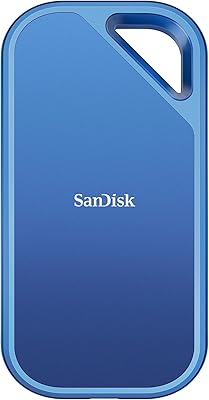
  • Color: The drive is finished in blue and carries SanDisk branding, manufactured by Western Digital Technologies Inc.
  • Shock Resistance: The enclosure is rated shock-resistant, offering a degree of protection against accidental bumps or drops during normal desk use.
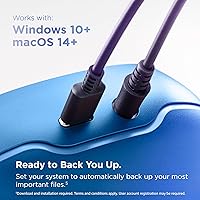
  • Mac Backup: The Creator Desk Drive works natively with Apple Time Machine, allowing Mac users to set it up as an automatic backup destination without additional software.
  • Windows Backup: Windows users can download Acronis True Image software (included via redemption) to manage backups and system imaging on compatible PCs.
  • Bundled Software: One month of Adobe Creative Cloud is included as a redemption offer, giving access to Adobe's full suite of creative applications for that period.
  • Drive Technology: The unit uses NAND flash SSD technology with no moving parts, which contributes to quieter operation and lower mechanical failure risk versus HDDs.
  • Manufacturer: The product is manufactured by Western Digital Technologies Inc. and sold under the SanDisk brand, model number SDSSDT40C-8T00-N25.
  • Availability Date: The drive became available in December 2024, making it a recent release with a growing but still limited user review base.
  • Warranty: SanDisk provides a limited warranty on this drive; buyers should confirm specific warranty duration and terms directly with SanDisk or the retailer at time of purchase.
  • Market Ranking: The drive holds a top-50 position in the External Solid State Drives category on Amazon, with over 500 verified ratings averaging 4.4 out of 5 stars.

Related Reviews

SanDisk Professional 8TB G-Drive External Desktop Hard Drive
83%
92%
Performance
90%
Build Quality & Durability
89%
Data Transfer Speed
85%
Ease of Use & Setup
87%
Capacity & Storage Value
More
SanDisk 4TB Desk Drive SSD
86%
91%
Performance
95%
Read Speed
89%
Build Quality
88%
Reliability
84%
Portability/Size
More
SanDisk Professional G-Drive 6TB
67%
84%
Build Quality
51%
Drive Reliability
76%
Transfer Speed
89%
Mac Compatibility
53%
Value for Money
More
SanDisk Professional G-Drive 22TB External Desktop Hard Drive
84%
89%
Performance
91%
Build Quality
96%
Capacity
72%
Ease of Setup
65%
Noise Level
More
SanDisk Extreme 2TB Portable External SSD
81%
88%
Transfer Speed
91%
Build Quality
94%
Portability
87%
Durability & Reliability
83%
Compatibility
More
SanDisk Creator Pro 2TB Portable SSD
82%
88%
Transfer Speed
91%
Build Quality
86%
Weather & Dust Resistance
93%
Portability & Form Factor
63%
Heat Management
More
Seagate Expansion 8TB External Hard Drive
71%
91%
Value for Money
93%
Ease of Setup
94%
Storage Capacity
67%
Transfer Speed
72%
Build Quality
More
SanDisk Professional G-Drive SSD 500GB
85%
92%
Performance
89%
Build Quality & Durability
90%
Portability & Size
75%
Compatibility
85%
Ease of Use
More
SanDisk Professional G-Drive SSD 1TB
89%
94%
Read/Write Performance
96%
Durability & Build Quality
91%
Portability & Size
95%
Water & Dust Resistance
89%
Thermal Stability
More
SanDisk Extreme Portable SSD 8TB V2
88%
94%
Read Speed Performance
91%
Write Speed Performance
93%
Build Quality
90%
Durability
88%
Portability
More

FAQ

Only if your laptop has a USB 3.2 Gen 2 (10Gbps) port. If your machine has an older USB 3.0 or 3.1 connection, you will see noticeably lower speeds — often in the 400–500MB/s range or less. Check your port specifications before expecting peak performance.

Yes, it works with both operating systems. Mac users get native Apple Time Machine support right out of the box. Windows users can download the bundled Acronis True Image software for backup and imaging. You may need to reformat the drive if you want to switch between file systems like APFS and NTFS.

It can handle both roles comfortably. With 1000MB/s transfer speeds and 8TB of space, many editors use this desktop SSD as a fast primary project drive rather than just a backup destination. That said, running it as your only copy of important data is never advisable — always keep a second backup somewhere.

Some users have noted it runs warm during sustained, heavy transfers — which is fairly typical for high-speed SSDs in compact enclosures. It is not reported as reaching dangerous temperatures, but if your studio setup runs it hard for hours at a time, make sure it has a bit of airflow around it and is not buried under other equipment.

It is a single month of Adobe Creative Cloud, redeemable via a code included with the drive. It is not a recurring subscription — once that month ends, you will need to pay for Adobe CC separately if you want to continue. Think of it as a trial bonus, not an ongoing included benefit.

Technically you can unplug it and bring it along, but the Creator Desk Drive is designed to stay put. It requires an external power source through its USB connection and is not pocket-sized or bus-powered in the way a true portable SSD is. If you need something to carry around regularly, a compact portable drive would serve you better.

Most SanDisk external drives ship pre-formatted in exFAT, which is readable by both Mac and Windows without modification. If you plan to use it exclusively with a Mac for Time Machine, macOS will prompt you to reformat it to a Mac-compatible file system during setup — just follow the on-screen instructions.

Like all consumer storage devices, the usable space you see on your computer will be slightly less than 8TB due to how drive manufacturers and operating systems calculate capacity — expect around 7.2–7.4TB of formatted usable space. For most creators, that difference is negligible given the scale of the drive.

No, it is completely silent. Since this high-capacity external drive uses solid-state technology rather than spinning platters or a mechanical read head, there are no operational sounds whatsoever. For a quiet studio setup, that is a meaningful advantage over traditional external hard drives.

Early buyer feedback leans positive on build quality, but since the drive only launched in late 2024, there is limited long-term reliability data available yet. SanDisk has a solid track record with flash storage, which is encouraging. That said, no single drive should be your only copy of irreplaceable files — treat this as one layer of a broader backup strategy.

Where to Buy