




Overview

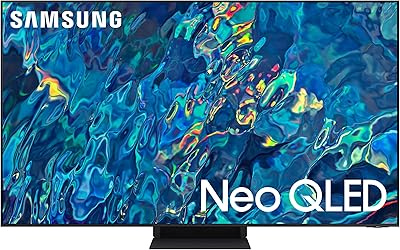
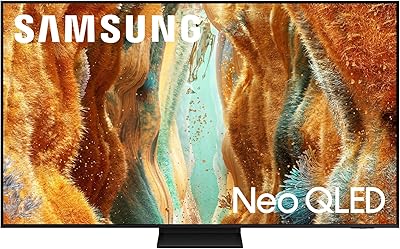
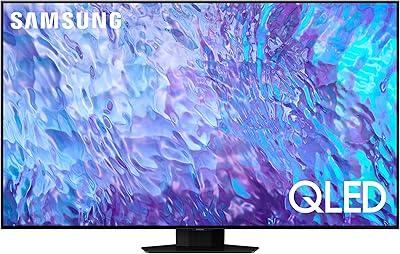
The Samsung QN90F 50-inch Neo QLED 4K TV is Samsung's 2025 entry point into serious Mini LED territory — and it earns its spot in Amazon's top-20 QLED rankings for good reason. At its core is the NQ4 AI Gen2 processor, which handles both picture optimization and sound intelligence without requiring you to dig through settings menus. This is a strong all-rounder for mixed-use households that want premium performance without paying OLED prices. If you are cross-shopping with OLED, know that the QN90F trades absolute black levels for notably better peak brightness and long-term resilience in sunlit rooms — a real-world consideration worth factoring in.

Features & Benefits

The Mini LED backlighting is what separates the QN90F from Samsung's standard QLED lineup — it allows finer local dimming control, producing brighter highlights and stronger contrast in most conditions. That said, fast cuts between very dark and very bright scenes can reveal faint blooming halos around objects, a known Mini LED trade-off and not unique to this model. The AI upscaling is genuinely useful in practice: streaming an HD show looks noticeably crisper than on older panels. For gaming, 165Hz VRR support at 4K is uncommon at this size and price point, and the built-in Gaming Hub lets PC users stream titles without a separate console attached.

Best For

This 50-inch Samsung is an easy pick for households that refuse to choose between movie nights, Premier League weekends, and late-night gaming sessions. The glare-free panel alone makes it worth serious consideration if your living room catches afternoon sun — it is a feature that sounds minor until you have actually watched a thriller on a TV without it. Buyers upgrading from a 1080p or aging 4K set will notice the improvement immediately, especially in how the processor handles motion and mixed-quality source content. Those already in Samsung's ecosystem will also find that native Alexa integration and Tizen's smart platform remove the need for an extra streaming device entirely.

User Feedback

Owners consistently praise peak brightness and the anti-glare coating as standout real-world strengths, particularly in living rooms where OLED sets would wash out. Gaming responsiveness earns high marks too, with low input lag making a noticeable difference in fast-paced play. The built-in speakers hold up reasonably well for a set this size, though buyers in larger spaces often recommend adding a soundbar for fuller coverage. On the downside, Tizen OS surfaces ads on the home screen — something a portion of users flag as genuinely annoying — and the standard remote has drawn repeated criticism for feeling cheap relative to the TV's price tier. Blooming in high-contrast night scenes is occasionally mentioned but widely accepted as a fair trade-off.

Pros

  • Peak brightness is genuinely impressive, making HDR content pop in ways that mid-range panels simply cannot match.
  • The glare-free coating works — afternoon sunlight no longer turns the screen into a mirror.
  • 165Hz VRR gaming at 4K is a rare find at this screen size and price point.
  • AI upscaling makes everyday HD streaming look noticeably sharper, not just native 4K content.
  • Built-in Gaming Hub lets PC users stream titles without connecting a separate device.
  • Motion clarity during fast sports is strong — panning shots and ball tracking hold up well.
  • The QN90F ships with a full smart platform, so there is no need to budget for a separate streaming stick.
  • Setup is straightforward, and the Tizen OS interface is responsive and well-organized despite its quirks.
  • Built-in Dolby Atmos support adds meaningful audio depth for a TV-only sound setup.
  • At its price tier, this 50-inch Samsung offers more processing intelligence than most competing brands.

Cons

  • Blooming halos around bright objects on dark backgrounds are visible in high-contrast scenes and can be distracting.
  • Tizen OS displays ads and sponsored content on the home screen, which users cannot fully remove.
  • The included remote feels noticeably cheap relative to what the TV costs — a small but recurring complaint.
  • Built-in speakers are decent for the size, but larger rooms will likely need a soundbar to fill the space.
  • Local dimming in very fast-cut scenes can occasionally cause brief brightness inconsistency across the panel.
  • No HDMI 2.1 bandwidth headroom beyond what current consoles need — future-proofing is limited at four ports.
  • 50 inches may feel undersized once wall-mounted in open-plan rooms where viewing distance exceeds 10 feet.
  • Samsung's smart TV data collection practices require manual opt-outs during setup, which not all buyers notice.
  • The stand design occupies a wide footprint on TV units and does not support center-column placement.

Ratings

The scores below reflect AI-driven analysis of verified global buyer reviews for the Samsung QN90F 50-inch Neo QLED 4K TV, with spam, bot activity, and incentivized submissions actively filtered out before scoring. Each category captures what real owners experienced after weeks and months of daily use — not just first-impression unboxing reactions. Strengths and genuine frustrations are weighted equally, so the numbers you see here tell the full picture.

Picture Brightness
93%
Owners consistently single out peak brightness as the QN90F's most immediately impressive trait. HDR content — especially live sports and nature documentaries — looks vivid and punchy in ways that comparable mid-range panels cannot match. In well-lit rooms, the difference is obvious from the first viewing session.
A small number of users running very high brightness settings for extended periods reported that the panel throttled luminance during long static scenes to manage heat. This is a known behavior on high-brightness Mini LED sets and rarely affects typical viewing, but it is worth knowing about.
Contrast & Blacks
76%
24%
For a non-OLED display, the local dimming system delivers noticeably deeper blacks than conventional QLED panels, and most buyers found the contrast performance genuinely satisfying for everyday streaming and sports content. Dark scenes in drama series hold up well under typical living room conditions.
The Mini LED blooming issue surfaces regularly in critical feedback — bright text overlays on dark cinematic backgrounds, night-sky sequences, and credits rolls all tend to produce visible light halos. Users who watch a lot of dark, high-contrast films in a light-controlled room flag this as a persistent annoyance.
Anti-Glare Performance
91%
The glare-free coating is one of the most frequently praised real-world features, with owners in sun-facing living rooms noting that afternoon glare — which rendered their previous TVs unwatchable — is dramatically reduced. It handles both direct sunlight and lamp reflections noticeably better than standard panels.
A handful of users with very particular color accuracy requirements noted that the coating adds a very slight haze to the image under direct ambient light, marginally softening perceived sharpness. This is barely noticeable during normal content but can register to those coming from a glossy OLED screen.
Gaming Performance
89%
Response times in Game Mode are genuinely competitive, and the 165Hz VRR ceiling is a meaningful advantage for PC gamers who want a large-screen setup without sacrificing frame-rate smoothness. PS5 and Xbox Series X owners report that auto-detection works reliably and that the Gaming Hub is a practical bonus for streaming PC titles.
Some users noted occasional compatibility quirks with VRR on older graphics cards, requiring manual port selection to achieve stable high-refresh output. The HDMI port configuration also means that cable management at the back of the set can become crowded quickly in multi-device setups.
AI Upscaling
84%
Buyers upgrading from older sets were consistently impressed by how the AI processor handles everyday HD and SDR content — broadcast sports, standard Netflix streams, and even older DVD-quality material look noticeably sharper and better defined than on previous-generation panels. The improvement is visible without any manual calibration.
Heavily compressed streaming sources, particularly at lower bitrates during peak network hours, still show compression artifacts that the upscaler cannot fully recover. A small number of users also found the default sharpening slightly aggressive on faces in close-up shots, preferring to dial it back manually.
Motion Handling
82%
18%
Sports viewers are a reliable positive voice here — fast panning shots during football and basketball hold together cleanly, and ball-tracking clarity during action sequences is noticeably better than on older panels without AI-assisted motion processing. The default motion settings work well for most content without feeling artificially smoothed.
Some users find the default motion interpolation setting too aggressive for cinematic content, producing the classic soap-opera effect on films. It is adjustable, but buyers who are not comfortable in settings menus may not discover this until they have already decided the picture looks odd.
Sound Quality
67%
33%
For a flat-panel TV without a soundbar, the built-in audio holds up reasonably well in smaller rooms. The Dolby Atmos support adds a modest sense of spatial depth to action sequences and music, and dialogue clarity is generally solid at medium volume levels — better than the thin output many buyers expected.
In living rooms larger than roughly 15 by 12 feet, the speakers start to feel underpowered, and bass response is clearly limited. A meaningful portion of owners added a soundbar within the first few months, suggesting the built-in audio is adequate but not a long-term solution for demanding listeners.
Smart TV Interface
62%
38%
Tizen OS is genuinely fast and well-organized, with quick app loading, responsive voice commands through Alexa, and a logical layout that most users adapted to within a day or two. The Gaming Hub is a practical addition that reduces the need for a separate streaming or cloud gaming device.
Sponsored content and app recommendations on the home screen are the single most common complaint in user feedback — they are present by default and cannot be fully disabled, only partially reduced through settings opt-outs. This is a recurring irritant that a vocal subset of owners mention months after purchase.
Remote Control
58%
42%
The remote is ergonomically shaped and has a relatively clean button layout that most users can navigate without referring to a manual. The Alexa button adds quick hands-free access to search and smart home controls, which buyers in Samsung's ecosystem found genuinely useful day to day.
Build quality is the persistent complaint — the remote feels light and plasticky relative to the TV's price tier, and several users reported button responsiveness degrading within the first year. The lack of a dedicated input button also frustrates multi-device users who rely on fast source switching.
Setup Experience
78%
22%
Initial setup is straightforward for most buyers, with the SmartThings app guiding the process step by step. Auto-detection of connected devices — consoles, soundbars, set-top boxes — works reliably in most cases, and the stand assembly is manageable for two people without specialist tools.
The setup flow includes several screens prompting data sharing and Samsung account sign-in that some buyers found pushy and difficult to skip cleanly. A small number of users also reported Wi-Fi connectivity drops in the first week that resolved after a firmware update, suggesting early software polish was slightly rough.
Build & Design
81%
19%
The Titan Black finish and slim bezel give the QN90F a premium appearance that owners consistently describe as looking more expensive than competing sets at a similar price. The panel feels solid and well-constructed, and the overall aesthetic blends cleanly with modern living room setups.
The stand legs require a wide TV unit — they spread to nearly the full panel width — which catches some buyers off guard. Wall-mount installation is straightforward with the right VESA bracket, but the stand's footprint rules out narrower furniture arrangements without an upgrade.
Color Accuracy
79%
21%
Out of the box, the QN90F delivers punchy, vivid colors that look impressive for streaming and sports content without requiring any manual calibration. The Quantum Dot layer adds color volume that standard LED panels cannot match, and skin tones in well-lit scenes are generally natural and accurate.
Buyers with colorimetry experience note that the default picture modes lean toward slightly oversaturated colors that flatter content rather than reproduce it with strict accuracy. Hitting true reference-grade color calibration requires third-party tools and manual tweaking, which is beyond the reach of most casual users.
Value for Money
74%
26%
Considered purely on feature-to-price ratio — Mini LED backlighting, 165Hz VRR, AI processing, a glare-free panel, and a full smart platform in a single 2025 package — the QN90F offers more than most 50-inch competitors at its tier. Buyers who cross-shopped extensively tended to feel the price was justified by the gaming and brightness performance alone.
At this price point, entry-level OLED alternatives are within reach, and buyers who prioritize cinematic contrast over brightness may feel the QN90F is not the most efficient use of their budget. The smart TV ads and remote quality also leave some owners feeling the premium pricing is not fully reflected in every aspect of the package.
Connectivity
83%
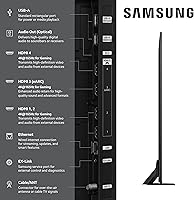
The full range of HDMI, USB, Ethernet, Bluetooth, and Wi-Fi ports covers most household setups without requiring adapters or hubs. Bluetooth audio output for wireless headphones works reliably, and Ethernet support is appreciated by users who prioritize a stable 4K streaming connection over Wi-Fi.
Power users with multiple 4K sources — a console, a PC, a streaming box, and a Blu-ray player — can find the HDMI port count tight. The port placement on the back of the panel is also slightly awkward for wall-mounted installations, making cable runs more involved than they need to be.

Suitable for:

The Samsung QN90F 50-inch Neo QLED 4K TV was built for households that genuinely use their TV for everything — and expect it to handle all of it well. If your living room doubles as a gaming setup on weekends and a sports bar on match days, the QN90F's combination of high peak brightness, 165Hz VRR support, and fluid motion processing means you are not compromising in any one area to gain in another. Buyers upgrading from older 1080p sets or early-generation 4K panels will notice a sharp, immediate improvement in how the processor handles everyday streaming content, not just reference-quality material. The glare-free panel is a genuine differentiator for anyone whose room gets afternoon sun or who keeps ambient lighting on during viewing — it solves a problem that specs sheets rarely capture but real-world use makes obvious fast. Those already within Samsung's ecosystem, or who want to ditch their streaming dongle entirely, will also find Tizen OS and built-in Alexa integration genuinely convenient rather than just a checkbox feature.

Not suitable for:

The Samsung QN90F 50-inch Neo QLED 4K TV is not the right call for buyers who prioritize absolute picture accuracy above everything else. Dedicated home theater enthusiasts or videophiles who watch a lot of dark, cinematically graded content in a fully light-controlled room will find OLED's per-pixel black levels more satisfying than what Mini LED local dimming can offer — and at this price tier, entry-level OLED options are a real alternative worth comparing. The blooming effect around bright objects against dark backgrounds, while manageable for casual viewing, can be a persistent distraction during night-sky scenes or high-contrast movie moments for those who notice such things. Buyers expecting a 55-inch or larger screen for a big open-plan living space may also find the 50-inch panel slightly undersized once it is mounted across the room. Finally, anyone who particularly dislikes ad-supported smart TV interfaces should know that Tizen OS surfaces promotional content on the home screen — a minor but real annoyance that some users find difficult to fully disable.

Specifications

  • Screen Size: The panel measures 50 inches diagonally, making it well-suited for living rooms and bedrooms with a viewing distance of roughly 6 to 10 feet.
  • Display Type: Neo QLED with Mini LED backlighting delivers more precise local dimming zones compared to conventional QLED, producing stronger contrast across the panel.
  • Resolution: Native 4K UHD resolution of 3840 x 2160 pixels provides four times the pixel density of a standard 1080p display.
  • Processor: The NQ4 AI Gen2 chip drives picture upscaling, scene-by-scene brightness adjustment, and sound optimization using 128 neural networks.
  • Refresh Rate: The panel runs at a native 120Hz and supports Variable Refresh Rate up to 165Hz when connected to compatible gaming hardware.
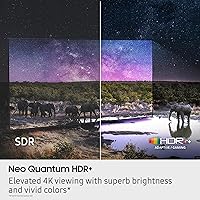
  • HDR Support: Neo Quantum HDR+ handles high dynamic range content by boosting brightness in specific zones while preserving shadow detail in darker areas.
  • Sound System: Object Tracking Sound Lite with Dolby Atmos support provides directional audio staging, though it uses a lighter speaker configuration than the full OTS system found on higher-tier Samsung models.
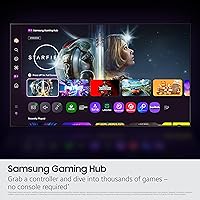
  • Smart Platform: Tizen OS powers the smart interface, with built-in Alexa voice control and Samsung Gaming Hub for streaming PC games without a console attached.
  • Connectivity: Ports and wireless options include HDMI, USB, Bluetooth, Wi-Fi, and Ethernet for broad compatibility with consoles, PCs, soundbars, and home networks.
  • Gaming Features: Low input lag mode, VRR, and a dedicated Game Mode optimize response times for both console and PC gaming at up to 4K 165Hz.
  • Panel Coating: A glare-free anti-reflection coating reduces surface glare from windows and light sources without significantly degrading color accuracy.
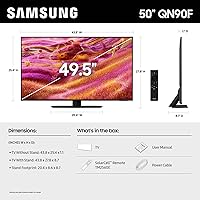
  • Dimensions: With the stand attached, the TV measures 43.8″ wide, 27.8″ tall, and 8.7″ deep, requiring a reasonably wide TV unit for stable placement.
  • Weight: The set weighs 38.8 pounds with the stand, which is manageable for two-person wall mounting but worth noting if working alone.
  • Color Finish: The chassis ships in Titan Black, a matte dark finish that minimizes reflections on the bezel and blends with most room aesthetics.
  • Model Number: The official North American model identifier is QN50QN90FAFXZA, useful when searching for compatible wall mounts, accessories, or warranty registration.
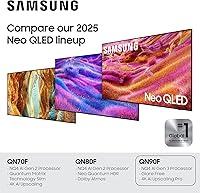
  • Release Year: This model entered the market in 2025 as part of Samsung's current Neo QLED lineup, placing it among the most recent generation of the QN90 series.
  • Power Supply: A power cable is included in the box; the remote requires two AAA batteries, which are not included with the unit.
  • Included Items: The box contains the TV panel, stand assembly hardware, power cable, remote control, and a printed user manual.

Related Reviews
Samsung QN90C 50-inch Neo QLED 4K TV
79%
93%
Picture Brightness
88%
Color Accuracy
71%
Contrast & Black Levels
91%
Gaming Performance
86%
Anti-Glare Performance
More
Samsung QN95B 65-Inch Neo QLED 4K TV
75%
93%
Picture Brightness
88%
Color Accuracy
76%
Contrast & Black Levels
89%
Gaming Performance
84%
Anti-Glare Effectiveness
More
Samsung QN90B 43-inch Neo QLED 4K TV
80%
91%
Picture Quality
93%
Gaming Performance
88%
Brightness & HDR
83%
Anti-Glare & Viewing Angle
54%
Built-in Audio
More
Samsung Q60B 50-inch QLED TV
75%
82%
Picture Quality
84%
Color Accuracy
63%
HDR Performance
54%
Viewing Angles
78%
Smart TV Experience
More
Samsung QN90D 98-inch Neo QLED 4K TV
80%
93%
Picture Quality
96%
Screen Size Impact
88%
HDR Performance
87%
Gaming Performance
89%
Motion Clarity
More
Samsung The Frame Pro 75-inch QLED TV
76%
92%
Art Mode & Artwork Display
94%
Design & Aesthetics
88%
Wireless Installation Experience
84%
Picture Quality
61%
Value for Money
More
Samsung The Frame LS03F 50-inch QLED TV
77%
91%
Art Mode & Display Illusion
78%
Picture Quality
94%
Design & Aesthetics
58%
Art Store Value
88%
Installation & Setup
More
Samsung QN70F 65-inch Neo QLED Smart TV

80%
86%
Picture Quality
91%
Gaming Performance
88%
Motion Handling
79%
AI Upscaling
71%
Smart Platform
More
Samsung 50-Inch QLED 4K Q80C Series Smart TV
84%
94%
Picture Quality
88%
Sound Quality
91%
Gaming Performance
89%
Value for Money
85%
Smart Features
More
Samsung QN70F 55-inch Neo QLED Smart TV
78%
83%
Picture Quality
88%
Gaming Performance
84%
Motion Handling
81%
Brightness & HDR
78%
Smart TV Platform
More

FAQ

It depends on your room and viewing habits. OLED wins on absolute black levels and shadow detail in dark rooms, but the QN90F hits significantly higher peak brightness and holds up far better in rooms with natural light. If you watch a lot of daytime sports or keep lamps on during movies, the brightness and glare-free panel here will likely matter more to you day-to-day than the contrast advantage of OLED.

It is real but contextual. You will notice light halos around bright objects — like subtitles or a streetlight — against very dark backgrounds, particularly in cinematic night scenes. For sports, gaming, and general streaming it is rarely distracting. If you watch a lot of dark, high-contrast films in a blacked-out room, it is worth being aware of before you buy.

Yes, both consoles connect via HDMI and the TV will prompt you to enable Game Mode automatically when it detects a console signal. VRR activates with supported titles, and input lag drops to competitive levels in Game Mode. You do not need to dig through settings menus to get a solid gaming experience out of the box.

It works with PC too, provided your graphics card supports the output and you use the correct HDMI port. The QN90F supports VRR for both AMD FreeSync and NVIDIA G-Sync Compatible setups, so most modern gaming rigs should be fine. Just double-check your GPU's HDMI output version to confirm compatibility at higher refresh rates.

For a single person or a small room, the built-in speakers are genuinely decent — Dolby Atmos support adds some sense of space to the audio. In a larger living room or if you sit far from the screen, the sound can feel thin at higher volumes. A dedicated soundbar is not mandatory, but most buyers who sit more than 12 feet away tend to add one eventually.

Yes, Samsung's smart TV interface does surface sponsored content and recommended apps on the home screen. You can reduce this somewhat by adjusting interest-based advertising settings and opting out during setup, but you cannot eliminate it entirely. It is a mild annoyance for most people but has become a recurring complaint from users who prefer a cleaner interface.

The stand legs spread fairly wide — accounting for most of the TV's 43.8-inch width — so you will need a TV unit that is at least that long with clearance on both sides. The design does not support a center-column configuration, which means narrow or floating units may not be suitable. Wall mounting is a popular alternative if your unit is on the smaller side.

Genuinely better than most people expect. Watching a HD Netflix show or a standard broadcast sports channel, the NQ4 processor visibly sharpens edges and stabilizes motion compared to what a mid-range panel would show with the same source. It is not magic — heavily compressed content still looks compressed — but the improvement over non-AI upscaling is consistent and noticeable in everyday use.

Sports is actually one of its stronger suits. The AI motion processing actively tracks fast-moving objects like balls and smooths out camera pans, which makes live football or basketball look fluid rather than choppy. You can also tune the motion settings manually if the default smoothing feels too aggressive for your taste. Most sports viewers find the defaults work well straight out of the box.

The QN90F uses a VESA 200 x 200mm mounting pattern, which is compatible with a wide range of standard wall mounts in that size bracket. When shopping for a mount, use the model number QN50QN90FAFXZA to confirm fit, and account for the TV's depth of 8.7″ with the stand removed if you are using a low-profile flush mount.