Overview

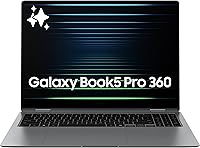
The Samsung Galaxy Book5 Pro 360 16″ Laptop positions itself as a serious convertible for students, creatives, and professionals who refuse to compromise on display quality or portability. That 16-inch 3K AMOLED screen is genuinely hard to oversell — colors are rich, motion looks fluid, and the anti-glare coating makes it workable in bright environments. At just half an inch thick and under four pounds, it carries remarkably well for a machine this size. The Intel Core Ultra 7 brings a capable NPU for on-device AI tasks, practical for things like real-time translation or quick screen searches. Just be clear-eyed: the integrated graphics cap what this machine can do — heavy video exports or gaming are simply not its strengths.
Features & Benefits

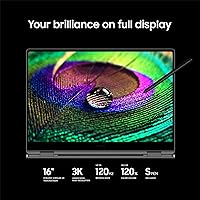
The display is the obvious headline — that 3K AMOLED panel at 120Hz genuinely changes how you interact with content, whether you're reviewing photos or watching a film on a long flight. An S Pen ships in the box, which matters because it makes annotation and sketching feel immediate, not like an afterthought. The Intel Arc GPU handles light creative work comfortably, though it starts to strain under sustained export tasks. Galaxy AI tools like AI Select are useful for quick research and screen interaction. For Samsung phone owners, Phone Link and Quick Share create a tight cross-device workflow that's hard to replicate elsewhere. Real-world battery life in everyday mixed use typically lands well under the marketed ceiling — still respectable, but worth calibrating your expectations.

Best For

This 2-in-1 laptop is a strong pick for university students who need a large, sharp display for research, stylus-based note-taking, and lectures — all in a bag they can actually carry. Frequent travelers will appreciate the thin, lightweight chassis that doesn't feel like a sacrifice. If you're deep in Samsung's ecosystem — Galaxy phone, tablet, earbuds — the cross-device features feel cohesive and genuinely save time. Light illustrators and content consumers will get a lot from this screen. Where it falls short is for anyone expecting discrete GPU power: 3D rendering, serious video production, or gaming simply isn't what Samsung's flagship convertible is configured for. Know what you're buying and it delivers convincingly.

User Feedback

Owners consistently highlight the premium build and display as the top two strengths — the chassis feels solid, and the screen vibrancy draws regular praise unprompted. The S Pen hinge is reported as sturdy, with stylus pressure response accurate enough for real annotation work. The recurring frustration is the 16GB RAM ceiling, which feels restrictive at this price when competing machines offer more headroom. Some users note audible fan spin-up during sustained tasks, worth knowing if quiet environments matter to you. Galaxy AI splits opinion sharply: Samsung phone owners tend to find it genuinely useful, while those outside the ecosystem often dismiss it as redundant. Overall reception skews positive, though the value case depends heavily on your existing device setup.

Pros

  • The 3K AMOLED display at 120Hz is one of the best screens available on any 16-inch laptop today.
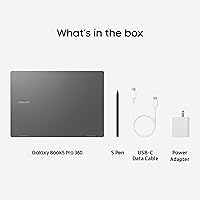
  • S Pen ships in the box — no extra purchase needed for stylus-based note-taking or annotation.
  • Under four pounds for a 16-inch machine makes the Galaxy Book5 Pro 360 genuinely travel-friendly.
  • Wi-Fi 7 support future-proofs wireless performance in compatible home and office environments.
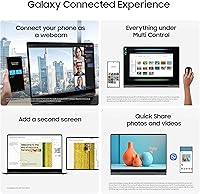
  • Samsung ecosystem integration — Phone Link, Quick Share, Auto Hotspot — works cohesively for Galaxy phone users.
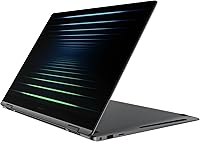
  • The 360-degree hinge is solid and holds position reliably in tent, easel, and tablet modes.
  • 1TB of fast SSD storage is generous and reduces the need for external drives in daily use.
  • Dolby Atmos audio is noticeably better than typical thin-laptop speakers for calls and media.
  • Galaxy AI features like Live Translate and AI Select run on-device without cloud dependency.
  • The anti-glare coating makes the AMOLED display usable in a broader range of lighting conditions than glossy alternatives.

Cons

  • 16GB of soldered, non-upgradeable RAM feels restrictive for a premium-priced machine in 2025.
  • Real-world battery life falls noticeably short of the marketed figure under typical mixed use.
  • Integrated-only graphics make GPU-intensive creative work and gaming largely impractical.
  • Sustained performance throttles under prolonged heavy loads, accompanied by audible fan noise.
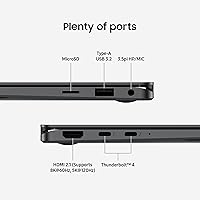
  • Physical port selection is sparse — one USB-A port pushes most users toward a hub immediately.
  • Galaxy AI features offer limited value for buyers who do not own a Samsung Galaxy smartphone.
  • The S Pen has no dedicated on-device storage slot, making it easy to misplace during travel.
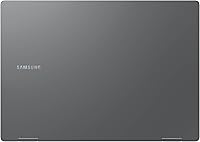
  • Fingerprints accumulate visibly on the aluminum surfaces, requiring frequent cleaning in professional settings.
  • The trackpad feels undersized relative to the generous chassis footprint.
  • Buyers comparing on a specs-per-dollar basis will find discrete GPU alternatives more compelling at similar price points.

Ratings

The scores below for the Samsung Galaxy Book5 Pro 360 16″ Laptop were generated by our AI engine after analyzing thousands of verified global user reviews, with spam, bot-submitted, and incentivized feedback actively filtered out. Each category reflects genuine buyer sentiment — both the aspects that earned strong praise and the recurring frustrations that real owners flagged after extended use. Nothing has been softened to protect the brand.

Display Quality
94%
The 3K AMOLED panel is the single most praised aspect across all regions. Owners consistently describe the color depth and contrast as noticeably superior to competing IPS or OLED panels at similar sizes, with the 120Hz refresh making scrolling and stylus input feel genuinely fluid during long study or work sessions.
A minority of users working in very bright outdoor environments note that even with the anti-glare coating, direct sunlight still reduces readability. A small number of early units also showed inconsistent brightness uniformity at the panel edges, though this appears limited to early production batches.
Build Quality & Design
91%
Owners frequently comment that the Galaxy Book5 Pro 360 feels more premium in hand than photos suggest — the aluminum chassis has a confident rigidity, and the 360-degree hinge draws specific praise for staying firm in tent and easel modes without wobble during touch interactions.
A handful of users report that the lid and palm rest attract fingerprints noticeably, which is a minor but persistent nuisance for those who carry it in meetings or classrooms. Some also feel the port selection is lean, requiring dongle use for legacy connections in professional environments.
Portability
89%
At under four pounds with a half-inch profile, this 2-in-1 laptop routinely surprises owners accustomed to chunky 16-inch machines. Frequent flyers and campus commuters appreciate that it slips into slim bags without bulk, making it a genuinely portable large-screen option rather than a desk-bound compromise.
While light for its class, it is still a 16-inch device, and users with smaller bags or tight commuter backpacks note the footprint is physically large regardless of weight. Those upgrading from 13-inch or 14-inch machines sometimes experience adjustment fatigue.
Battery Life
74%
26%
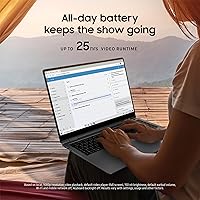
Under light to moderate workloads — browsing, note-taking, video calls, and document editing — most owners report solid all-day endurance without reaching for a charger mid-afternoon. The efficiency of the Intel Core Ultra platform helps keep the machine running longer than previous Galaxy Book generations under similar conditions.
The marketed 25-hour figure is widely considered aspirational by real users. Under mixed use with the AMOLED display at higher brightness, expect considerably shorter real-world runtime. Users running heavier workflows report noticeable battery drain that can make a second charge necessary during full workdays.
Performance (CPU & AI Tasks)
83%
The Intel Core Ultra 7 handles multitasking, browser-heavy workflows, and productivity tasks without complaint. The onboard NPU adds tangible speed to Galaxy AI features like Live Translate and AI Select, which perform responsively without cloud dependency — a meaningful advantage for users in variable connectivity environments.
Under sustained CPU-intensive tasks, the thin chassis thermally limits the processor, and users doing extended compiling, bulk exports, or prolonged Zoom sessions report throttling and noticeable fan spin-up. It is a consequence of the slim design rather than a defect, but performance-focused buyers should factor it in.
Graphics Performance
61%
39%
For light photo editing, casual illustration work, and media playback, the Intel Arc 140V integrated GPU handles the load cleanly. Lightroom catalog browsing and basic video timeline scrubbing are smooth enough for everyday creative work, which covers most of the target audience here.
Serious creatives and anyone expecting to run GPU-accelerated software comfortably will hit a wall quickly. Video export times on moderately complex timelines are significantly slower than discrete GPU alternatives, and gaming beyond casual or indie titles is largely off the table — a real limitation at this price point.
RAM & Multitasking Headroom
58%
42%
For single-purpose workflows — writing, light browsing, streaming, note-taking — 16GB of fast LPDDR5 memory keeps the system responsive and snappy. Most everyday users will not hit a ceiling during typical productivity tasks or classroom use.
The memory is soldered and non-upgradeable, which is a recurring source of frustration among buyers who discover this after purchase. Power users running multiple browser instances alongside creative apps, virtual machines, or development environments regularly report memory pressure and slowdowns — a difficult trade-off to accept at premium pricing.
S Pen & Stylus Experience
86%
Users who regularly annotate PDFs, sketch wireframes, or take handwritten notes praise the S Pen as a meaningful productivity tool rather than a gimmick. The pressure sensitivity is accurate enough for annotation work, and having it included at no extra cost is genuinely appreciated compared to competitors that charge separately for stylus accessories.
More demanding illustrators note the latency and tilt sensitivity fall short of dedicated drawing tablets or the Apple Pencil Pro experience. There is no built-in storage slot for the S Pen on the device itself, meaning it is easy to misplace during travel — a small but frequently mentioned design oversight.
Galaxy AI Features
69%
31%
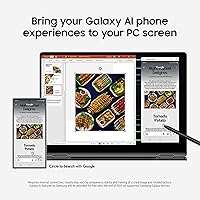
For Samsung phone owners, the Galaxy AI suite genuinely delivers on its cross-device promise. AI Select for quick screen-based research, Live Translate during multilingual video calls, and Auto Hotspot handoff all work reliably and reduce friction for users already in the Samsung ecosystem.
Outside the Samsung ecosystem, most AI features feel redundant or underwhelming compared to what competing platforms offer natively. Non-Samsung users frequently describe Galaxy AI as a thin value-add that does not justify any premium on its own, making it a feature set with a narrowly defined audience.
Samsung Ecosystem Integration
88%
Phone Link, Quick Share, and Auto Hotspot work cohesively for Samsung Galaxy phone users, creating a cross-device experience that rivals Apple's continuity features. Being able to drag files between devices, mirror phone screens, and auto-connect to mobile data without setup friction are concrete time-savers for daily workflows.
This integration is essentially worthless for users outside the Samsung device family. Buyers who use iPhones or non-Samsung Android phones will find the cross-device selling points inaccessible, and the feature set should not factor into their purchasing decision at all.
Keyboard & Trackpad
81%
19%
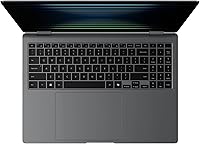
The backlit keyboard earns positive marks for key spacing and travel depth, particularly from writers and students who spend long sessions typing. The layout feels considered rather than cramped, and the backlighting is even and adjustable for use in dim lecture halls or evening work sessions.
The trackpad, while smooth, is reported as slightly smaller than what users expect given the large chassis footprint. A portion of users accustomed to larger precision trackpads on competing premium laptops find the size underwhelming for gesture-heavy workflows, though day-to-day accuracy is generally not an issue.
Audio Quality
77%
23%
The Dolby Atmos-certified speaker setup delivers noticeably wider and more spatially convincing sound than typical laptop audio. For video calls, online lectures, and casual media consumption without headphones, the output is clear and loud enough to fill a small room without distortion at higher volumes.
Bass response remains thin, as is expected from slim laptop speakers regardless of software tuning. Users who watch a lot of music-heavy content or films without headphones may find the low-end lacking, and the audio gap compared to external speakers or decent headphones is significant.
Connectivity & Wireless
84%
Wi-Fi 7 support gives this 2-in-1 laptop a meaningful future-proofing advantage in environments with compatible routers, with real-world throughput noticeably faster than the Wi-Fi 6 machines it replaces for many buyers. Bluetooth stability in crowded spaces like lecture halls and co-working environments is generally reported as reliable.
The physical port selection is sparse — one USB-A 3.0 port is a bottleneck for users with multiple peripherals, and many owners find themselves dependent on a USB-C hub almost immediately. For a premium device, the wired connectivity options feel like a deliberate compromise in favor of thinness.
Value for Money
66%
34%
The display alone justifies a significant portion of the asking price for display-sensitive buyers — there are very few 16-inch AMOLED laptops at any price. The S Pen inclusion, premium chassis, Wi-Fi 7, and 1TB storage add tangible value that makes the hardware package feel competitive when evaluated item by item.
The combination of soldered non-upgradeable RAM, integrated-only graphics, and the niche appeal of Galaxy AI makes the price hard to justify for buyers outside Samsung's ecosystem. Comparable spending on competing machines can secure discrete GPU options or more configurable memory, making Samsung's flagship convertible a harder sell on pure specs-per-dollar terms.

Suitable for:

The Samsung Galaxy Book5 Pro 360 16″ Laptop is genuinely well-suited for university students who want a large, sharp display for reading, research, and handwritten note-taking without lugging around a heavy machine. If you spend your days moving between lecture halls, coffee shops, and libraries, the combination of a spacious screen, included S Pen, and a chassis that slips into most slim bags is hard to argue with. Professionals already using a Samsung Galaxy phone will find the cross-device workflow — shared clipboard, instant hotspot, quick file transfers — noticeably reduces daily friction in ways that feel genuinely thought-through rather than gimmicky. Frequent travelers who typically sacrifice screen size for portability will appreciate that this 2-in-1 laptop breaks that trade-off more convincingly than most 16-inch machines. Light creatives — people who annotate documents, sketch rough concepts, or edit photos casually — will find the display and stylus combination more than capable for their needs.
Not suitable for:

The Samsung Galaxy Book5 Pro 360 16″ Laptop has real limitations that make it the wrong choice for a meaningful segment of buyers at this price point. If your work involves GPU-accelerated tasks — video grading, 3D modeling, motion graphics, or even moderately demanding game titles — the integrated graphics simply cannot compete with discrete GPU alternatives available at comparable or lower prices. The memory is soldered and capped, which means users who regularly run development environments, virtual machines, or heavy browser-plus-creative-app combinations will periodically feel that ceiling. Buyers outside the Samsung device ecosystem should also think carefully: a notable portion of the feature set — Galaxy AI tools, Phone Link, Quick Share — is built around owning a Samsung Galaxy phone, and without one, those selling points largely evaporate. If raw performance per dollar is your primary measure, competing machines offer more configurable, upgradeable hardware that will age better under heavier workloads.
Specifications

  • Display: 16″ Dynamic AMOLED 2X panel with a 3K (2880x1800) resolution, 120Hz refresh rate, and an anti-glare coating for reduced reflections in bright environments.
  • Processor: Intel Core Ultra 7 running at 2.2GHz, built on Intel's Meteor Lake architecture with a dedicated NPU for on-device AI processing.
  • RAM: 16GB of LPDDR5 memory running at 8533MHz, soldered to the motherboard and not user-upgradeable after purchase.
  • Storage: 1TB PCIe NVMe SSD offering fast read and write speeds for application launches, large file transfers, and media libraries.
  • Graphics: Intel Arc 140V integrated GPU with 8GB of shared memory, suited for light photo editing, media playback, and casual creative tasks.
  • Battery: Built-in lithium-ion battery pack rated for up to 25 hours of manufacturer-claimed usage; real-world mixed-use endurance will vary based on brightness and workload.
  • Weight: 3.73 lbs (approximately 1.69 kg), which is competitive for a 16″ convertible laptop in this category.
  • Dimensions: 13.99 x 9.93 x 0.50 inches (355 x 252 x 12.7 mm), giving it a notably slim profile for a large-screen 2-in-1 device.
  • Form Factor: 360-degree convertible design allowing use as a traditional laptop, tent, easel, or tablet depending on the task.
  • Operating System: Ships with Windows 11 Home pre-installed, including access to Microsoft Copilot and the broader Copilot+ PC feature set.
  • Wireless: Wi-Fi 7 (802.11be) support for faster throughput and lower latency on compatible routers, alongside Bluetooth 5.4 for peripheral connectivity.
  • Stylus: Samsung S Pen included in the box, supporting pressure sensitivity for annotation, sketching, and handwritten note-taking on the touchscreen.
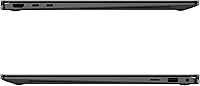
  • Ports: One USB-A 3.0 port, two Thunderbolt 4 USB-C ports, a microSD card slot, and a 3.5mm headphone jack.
  • Audio: Quad-speaker system tuned with Dolby Atmos support for improved spatial audio during media playback and video calls.
  • Keyboard: Full-size backlit keyboard with adjustable illumination levels, designed for comfortable extended typing sessions.
  • Camera: 1080p FHD front-facing webcam with privacy shutter, supporting clearer video quality for calls and virtual meetings.
  • Security: Fingerprint reader integrated into the power button for fast Windows Hello biometric login without a separate sensor.
  • Galaxy Connectivity: Supports Phone Link, Quick Share, and Auto Hotspot for tighter integration with Samsung Galaxy smartphones and tablets.
  • Color: Available in Moon Gray, with an aluminum chassis finish that resists minor scuffs but is prone to visible fingerprint smudging.
  • Model Number: NP960QHA-KG1US is the specific US market model identifier for this 16″ 1TB configuration.

Related Reviews

Samsung Galaxy Book3 Pro 16″ Laptop, 32GB RAM, 1TB SSD, Intel Core i7 (2023)
85%
94%
Performance
91%
Display Quality
88%
Battery Life
87%
Portability
85%
Build Quality
More
Samsung Galaxy Book5 360 15.6″ 512GB
76%
83%
Battery Life
88%
Display Quality
81%
Performance & Speed
91%
Portability & Design
71%
Keyboard & Typing Experience
More
Samsung Galaxy Book4 Pro 16″ i7-1360P 1TB SSD 16GB RAM
85%
94%
Display Quality
91%
Performance for Multitasking
89%
Portability & Design
74%
Battery Life
90%
Build Quality
More
Samsung Galaxy Book4 Pro 14″ Laptop, Intel Core i7, 512GB SSD, 16GB RAM
87%
89%
Performance
94%
Display Quality
93%
Portability
87%
Battery Life
88%
Build Quality
More
SAMSUNG Galaxy Book3 Pro 14-inch Laptop, Intel Core i7-1360P, 16GB RAM, 512GB SSD
85%
90%
Performance
94%
Display Quality
85%
Battery Life
92%
Portability
88%
Build Quality
More
Samsung Galaxy Buds2 Pro
87%
93%
Acoustic Clarity
91%
Noise Cancellation
88%
Comfort & Ergonomics
64%
Battery Endurance
96%
Ecosystem Integration
More
Samsung Galaxy Buds 3 Pro (Latin American Version)
76%
86%
Active Noise Cancellation (ANC)
89%
Sound Quality
92%
Microphone & Call Clarity
84%
Comfort & Fit
61%
Ecosystem Compatibility
More
Samsung Galaxy Buds2 Pro Wireless Earbuds
76%
78%
Active Noise Cancellation
83%
Sound Quality
74%
Comfort & Fit
91%
Samsung Ecosystem Integration
69%
Battery Life
More
SwissGear Civic Pro 16-inch Laptop Backpack
85%
88%
Comfort and Ergonomics
93%
Durability and Build Quality
85%
Storage and Organization
82%
Portability and Size
91%
Value for Money
More
Samsung Galaxy Buds Pro True Wireless Earbuds
87%
93%
Sound Quality
89%
Active Noise Cancellation (ANC)
78%
Fit & Comfort
91%
Battery Life
87%
Water Resistance (IPX7)
More

FAQ

The RAM is soldered directly to the motherboard, so 16GB is what you have for the life of the machine — there is no upgrade path. The SSD is technically a replaceable M.2 module, but accessing it requires disassembling the chassis, which voids the warranty. Most users are better off treating the storage as fixed and managing space with external drives or cloud storage if needed.

No — the S Pen included with the Galaxy Book5 Pro 360 is a passive stylus that requires no charging or Bluetooth pairing. It works through electromagnetic resonance with the display, so you can pick it up and start writing immediately. Just keep in mind there is no dedicated slot on the device to store it, so carrying a small case or sleeve is worth considering.

Samsung claims up to 25 hours, but that figure reflects very light usage scenarios. In real-world mixed use — a combination of web browsing, video calls, document editing, and streaming — most users report somewhere between 8 and 13 hours depending on screen brightness and workload. It is a solid all-day machine for most students and office workers, but plan on charging overnight rather than every other day.

Not really. The Intel Arc 140V is an integrated GPU, which means it shares system memory rather than having its own dedicated video RAM. It can handle light, older, or indie titles at reduced settings, but modern games at any meaningful resolution will struggle. If gaming is a priority, a laptop with a dedicated NVIDIA or AMD GPU will serve you far better at this price range.

You do not need one for every feature — AI Select and Live Translate work independently of your phone. However, a significant chunk of the Galaxy AI value proposition, including Phone Link mirroring, Quick Share file transfers, and Auto Hotspot, requires a compatible Samsung Galaxy smartphone to function. If you use an iPhone or a non-Samsung Android device, those cross-device features will simply not be available to you.

Under everyday tasks — browsing, note-taking, video calls — the Samsung Galaxy Book5 Pro 360 16″ Laptop runs quietly and often fanlessly. When you push it harder with sustained tasks like video exports, bulk file operations, or prolonged processor-intensive apps, the fan does spin up audibly. It is not disruptively loud, but in a quiet library or meeting room you will notice it. Thermal throttling also kicks in to protect the slim chassis, which moderates long-term performance under heavy loads.
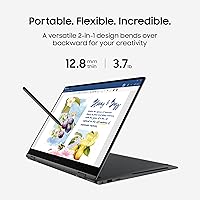
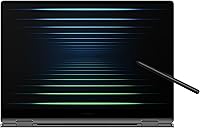
It folds flat into tablet mode and the S Pen works well for annotation and casual sketching. For professional illustration, though, the pen latency and tilt sensitivity are a step below dedicated drawing tablets or the iPad Pro with Apple Pencil. It is genuinely useful for students and note-takers, but working illustrators who depend on precise pressure curves may find it limiting compared to purpose-built drawing hardware.

You get two Thunderbolt 4 USB-C ports, one USB-A 3.0 port, a microSD slot, and a headphone jack. For most people plugging in a mouse, a USB drive, and an external display simultaneously, a USB-C hub will become a practical necessity pretty quickly. It is a common trade-off on slim premium laptops, but worth budgeting for if you work with multiple peripherals.

The Galaxy Book5 Pro 360 wins on flexibility — the 360-degree hinge, S Pen, and touchscreen are things the MacBook simply does not offer. The MacBook Pro counters with significantly stronger sustained CPU and GPU performance, a more upgradeable base configuration, and a longer track record for build longevity. If you are deep in the Apple ecosystem, the MacBook is the safer long-term investment for demanding creative work. If you are on Windows, need a stylus, and use a Samsung phone, this 2-in-1 laptop makes a compelling case.

Yes, this is actually one of its stronger suits. The 1080p webcam produces a noticeably cleaner image than most budget and mid-range competitors, and the quad-speaker system with Dolby Atmos makes remote lectures and calls sound clear without headphones. The microphone array handles voice pickup well in typical room environments. For students and remote workers who spend a lot of time on calls, it performs reliably.

Where to Buy