Overview

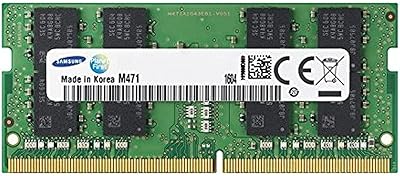
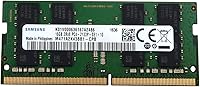
The Samsung M471A2K43BB1-CPB 16GB DDR4-2133 SoDIMM Laptop Memory is about as no-frills as RAM gets — and that's exactly the point. Samsung is one of the few manufacturers that produces its own DRAM chips at scale, supplying memory to Dell, HP, Lenovo, and virtually every other major laptop brand. This 16GB DDR4 laptop RAM sits in Samsung's EOL-Strategic series, which sounds alarming but simply reflects Samsung's internal product lifecycle classification — it remains available and fully supported. Don't expect RGB lighting or an overclocking profile. This is a straightforward, dependable upgrade stick built for people who want more memory in their laptop without any fuss.
Features & Benefits

At the core of this Samsung SoDIMM module is a spec set designed for broad compatibility rather than peak performance. Running at 2133 MHz with CL15 latency, it hits the standard DDR4 baseline that the vast majority of laptops from the mid-2010s onward support without a hitch. The 1.2V low-voltage design means it runs cooler than older DDR3 sticks and puts a lighter draw on your battery — a small but real benefit for mobile use. Being a single 16GB stick, it leaves your second SoDIMM slot open, which means dual-channel potential down the road if you ever want to add another module. Packaging is minimal, as expected from an OEM part.

Best For

This 16GB DDR4 laptop RAM makes the most sense for a specific kind of buyer. If your notebook shipped with 4GB or 8GB and you're tired of watching the task manager spike every time you open a browser with more than a handful of tabs, this is a practical fix. IT managers refreshing older office laptops will appreciate the straightforward plug-and-replace nature of OEM-grade sticks like this. It's also worth noting that DDR4-2133 slots are backward-compatible with faster DDR4 modules, so this stick will work in DDR4-2400 systems as well, just running at 2133 MHz. If you need cutting-edge speed for video editing or gaming, look elsewhere. But for everyday productivity and reliable multitasking, it does the job cleanly.

User Feedback

With over 100 ratings averaging 4.6 out of 5, this memory upgrade stick has a strong track record. Most buyers are everyday users and IT professionals who installed it in aging business laptops and reported immediate BIOS recognition with no configuration needed. The recurring theme is reliability — people just install it and forget about it, which is exactly what you want from RAM. On the downside, a handful of reviewers ran into compatibility issues with specific laptop models, underscoring the importance of checking your system's maximum supported RAM and slot type before ordering. A few noted they could find similar-spec sticks for less from other brands, though Samsung's reputation for consistency kept most satisfied buyers content.

Pros

  • Samsung manufactures its own DRAM chips, so quality control is genuinely tier-1 rather than relying on third-party components.
  • Installs cleanly without any driver or BIOS configuration — most systems recognize it immediately on first boot.
  • Single-stick design preserves the second SoDIMM slot for a future dual-channel upgrade.
  • Low 1.2V operating voltage keeps thermals in check, which matters in thin laptops with limited airflow.
  • Broad DDR4-2133 compatibility means it works in a wide range of Intel and AMD notebook platforms from the past decade.
  • At its price point, this 16GB DDR4 laptop RAM undercuts many retail-branded alternatives without sacrificing chip quality.
  • Over 100 verified buyers give it a 4.6 out of 5 average rating, with stability and ease of installation cited most often.
  • Backward-compatible with DDR4-2400 slots, running reliably at 2133 MHz in those systems.
  • Lightweight OEM packaging means no unnecessary waste — just the module and basic protection.

Cons

  • DDR4-2133 is the slowest DDR4 speed tier; users who can use faster RAM will leave real performance on the table.
  • No retail warranty card or boxed documentation — support depends on the seller rather than a clear Samsung end-user policy.
  • The EOL-Strategic series label can create uncertainty about long-term restocking, making future matched-pair purchases less predictable.
  • A small but consistent portion of reviewers ran into compatibility problems with specific laptop models or older BIOS versions.
  • Bare OEM packaging offers minimal physical protection during shipping, which has occasionally led to damaged modules on arrival.
  • No XMP or performance profile support, so there is no headroom to tune timings or push speeds beyond stock.
  • This memory upgrade stick is SoDIMM-only — easy to order by mistake if you are not certain of your system's slot type.
  • Some buyers found comparably priced options from competing brands offering DDR4-2400 speeds, making the value case less clear-cut.

Ratings

Our AI rating engine analyzed verified global buyer reviews for the Samsung M471A2K43BB1-CPB 16GB DDR4-2133 SoDIMM Laptop Memory, actively filtering out incentivized, duplicate, and bot-generated submissions to reflect what real upgraders actually experienced. Scores are calibrated across both enthusiast and everyday-user feedback, so the strengths are earned and the pain points are not glossed over.

Compatibility
88%
The vast majority of buyers reported their systems recognized this 16GB DDR4 laptop RAM without any BIOS changes or driver installs — it simply worked on first boot. IT administrators refreshing older Dell and Lenovo business notebooks particularly praised how predictably it slotted into DDR4-2133 and DDR4-2400 platforms alike.
A recurring minority of buyers ran into compatibility walls with specific laptop models, particularly certain HP and Asus configurations with restrictive BIOS memory whitelists. These cases were not the norm, but they were consistent enough to be a real concern for buyers who skip the pre-purchase compatibility check.
Reliability & Stability
92%
Long-term stability was the most consistently praised aspect across reviewers — buyers running this memory upgrade stick through months of daily office workloads reported zero crashes, no memory errors, and clean MemTest86 passes. Samsung's in-house DRAM fabrication clearly contributes to a tighter quality baseline than many third-party branded modules.
A small number of buyers received modules that showed instability early on, suggesting occasional quality control variation at the unit level rather than a systemic design flaw. These cases were infrequent, but the lack of a clear Samsung end-user warranty process made resolution more dependent on the individual seller.
Installation Experience
91%
Buyers consistently described installation as straightforward — the module seated cleanly into SoDIMM slots without force, and the physical fit was precise. Non-technical users who had never opened a laptop before reported completing the upgrade in under 15 minutes using only a small screwdriver and a YouTube tutorial.
The bare OEM packaging means there are no instructions included, which left a handful of first-time upgraders unsure of the correct insertion angle or seating confirmation. This is a minor friction point, but retail-boxed memory kits from competitors do a better job of hand-holding new users through the process.
Performance Impact
76%
24%
For users upgrading from 4GB or 8GB, the real-world improvement was substantial — multitasking became noticeably smoother, browser-heavy workflows stopped stuttering, and system responsiveness during file transfers improved meaningfully. Everyday productivity users got exactly the headroom they needed.
DDR4-2133 is the slowest end of the DDR4 speed range, and buyers coming from faster DDR4-2400 or DDR4-3200 kits noticed no performance gain — and in some cases a slight regression if their previous module ran at higher clocks. Power users doing video work or running VMs will find this speed tier genuinely limiting.
Value for Money
79%
21%
Buyers who compared this Samsung SoDIMM module against retail-boxed alternatives from Crucial or Kingston consistently noted they were getting the same underlying Samsung chip quality at a lower street price. For IT buyers purchasing multiple units to refresh a notebook fleet, the cost efficiency was a clear advantage.
Some reviewers pointed out that competing brands now offer DDR4-2400 modules at similar or lower prices, which makes the value case for this 2133 MHz part less compelling than it once was. Buyers who do not specifically need 2133 MHz might get more for their money by shopping current-generation alternatives.
Thermal Performance
84%
The 1.2V operating voltage kept temperatures in check even in thin and light laptops with constrained airflow, and buyers who monitored system temps noted this memory ran noticeably cooler than older DDR3 modules it replaced. In thermally tight chassis, that margin matters for sustained workloads.
There is no heat spreader on this bare OEM module, which is entirely normal for SoDIMM notebook RAM but worth noting for buyers accustomed to desktop memory with passive cooling fins. In extreme sustained workloads, temperatures are adequate rather than exceptional.
Build & Physical Quality
83%
The PCB felt solid and the gold contact fingers showed clean, even plating consistent with OEM-grade manufacturing standards. Buyers who handled multiple units in bulk IT deployments noted consistent physical quality across the batch, with no bent pins or surface defects reported at scale.
Arriving as a bare module with minimal packaging, there is a slightly higher risk of physical damage during shipping compared to modules packed in rigid retail boxes. A small number of buyers received units with minor contact scuffing, though functional issues tied to this were rare.
Packaging & Presentation
54%
46%
For buyers who understand they are purchasing an OEM component, the minimal packaging is entirely expected and not a problem. It keeps costs down and avoids unnecessary waste, which some environmentally conscious buyers actually appreciated.
Anyone expecting a retail unboxing experience will be disappointed — there is no documentation, no warranty card, and no branded box. The bare anti-static sleeve is functional but does little to inspire confidence when the package arrives, and it has led to some buyers questioning whether they received a genuine new unit.
Seller Warranty & Support
58%
42%
For buyers purchasing through Amazon's fulfilled listings, the standard return and replacement window provided a basic safety net. Some third-party sellers offered their own short-term guarantees that buyers found adequate for a component of this type.
Unlike retail-packaged memory kits that come with clearly stated multi-year manufacturer warranties, this OEM module leaves buyers reliant entirely on seller-level support. If issues arise outside the return window, there is no straightforward path to Samsung's own customer service, which frustrated a subset of buyers.
Long-term Availability
61%
39%
At the time of purchase, the module has remained consistently available despite its EOL-Strategic classification, and buyers who needed a matched second stick within a reasonable timeframe were generally able to find one. The sustained Best Sellers Rank suggests ongoing stock levels from multiple sellers.
The EOL-Strategic designation is a real signal that Samsung is not actively pushing production on this part, and several buyers expressed concern about sourcing a second matched module months or years down the line for dual-channel upgrades. Stock consistency may become less reliable over time.
Dual-Channel Readiness
73%
27%
Buying a single 16GB stick intentionally leaves the second SoDIMM slot open, giving users a clear upgrade path to 32GB in dual-channel mode later. Buyers planning staged upgrades appreciated that this approach preserved flexibility without committing to the full cost upfront.
Running a single module means forgoing dual-channel memory bandwidth from day one, which produces measurably lower memory throughput compared to a matched pair. Users who went straight to a 2x16GB configuration with this module noted better overall system snappiness than those who started with a single stick.
OEM Chip Authenticity
89%
Buyers who inspected the chip markings confirmed genuine Samsung DRAM cells, consistent with what the same model number ships on in brand-name laptops from major OEMs. This authenticity was a key trust signal for IT professionals who scrutinize component sourcing more carefully than typical consumers.
A small number of skeptical buyers on third-party marketplace listings raised questions about module provenance, which is a real concern when purchasing refurbished or gray-market OEM parts from less established sellers. Sticking to fulfilled-by-Amazon listings significantly reduces but does not entirely eliminate that risk.
Energy Efficiency
81%
19%
The 1.2V specification translated into real-world battery behavior that some mobile-focused buyers noticed positively, particularly on older laptops where the previous DDR3 RAM ran at 1.5V. The lower voltage draw contributes to a cooler overall system temperature during light productivity tasks.
The efficiency advantage over other DDR4 modules at the same voltage is essentially zero — all standard DDR4 SoDIMMs run at 1.2V, so this is a benefit relative to older DDR3 upgrades only, not a differentiator within the DDR4 category itself.

Suitable for:

The Samsung M471A2K43BB1-CPB 16GB DDR4-2133 SoDIMM Laptop Memory is a strong fit for anyone dealing with a notebook that has simply run out of headroom — the kind of machine that slows to a crawl with a few browser tabs open alongside a spreadsheet or video call. Students, remote workers, and home office users who bought a budget or mid-range laptop a few years ago and are now feeling the squeeze will get a meaningful real-world improvement from this upgrade. IT administrators managing a fleet of older business notebooks will especially appreciate the OEM-grade consistency; Samsung chips are what many of those laptops shipped with in the first place, so compatibility tends to be predictable. It also suits buyers who want to leave a second SoDIMM slot free for a future expansion, since installing a single 16GB stick now keeps that option open. Anyone running a DDR4-2133 or DDR4-2400 system who just needs reliable, worry-free extra memory — without chasing specs they'll never fully use — will be well served here.

Not suitable for:

The Samsung M471A2K43BB1-CPB 16GB DDR4-2133 SoDIMM Laptop Memory is not the right call for users whose workflows genuinely demand high memory bandwidth — think video editors rendering 4K timelines, 3D modelers, or power users running multiple virtual machines simultaneously. DDR4-2133 is the slowest end of the DDR4 spectrum, and buyers who could benefit from DDR4-3200 or faster should look at purpose-built upgrade kits with tighter timings and XMP profiles. This module is also strictly a SoDIMM part, meaning it will not fit in a desktop, a full-size tower, or any system requiring a standard DIMM — a detail worth double-checking before ordering. Buyers hoping for a retail boxed experience with printed documentation, a warranty card, or branded packaging may also be disappointed, as this ships as a bare OEM component. Finally, anyone who has not confirmed their specific laptop model supports 16GB per slot should do that research first, since some older systems top out at 8GB per channel regardless of the module installed.

Specifications

  • Capacity: This module provides 16GB of RAM on a single stick, making it one of the more practical single-slot upgrades for DDR4-compatible notebooks.
  • Memory Type: It uses DDR4 SDRAM, the fourth generation of double data rate synchronous memory, which is standard across most laptops produced from 2015 onward.
  • Speed: The module operates at 2133 MHz, representing the baseline DDR4 clock speed and ensuring compatibility with a broad range of older Intel and AMD platforms.
  • Latency: CL15 (CAS Latency 15) is the rated timing for this module, which is typical for DDR4-2133 and carries no performance penalty on compatible systems.
  • Form Factor: It uses a 204-pin SoDIMM form factor, the compact slot type found in laptops, mini-PCs, and Intel NUC systems — not compatible with standard desktop DIMM slots.
  • Voltage: Operating voltage is 1.2V, which runs cooler and draws less power than older DDR3 memory, contributing to modest but real battery life improvements in notebooks.
  • Manufacturer: Samsung Electronics is both the brand and the DRAM chip manufacturer, meaning the memory cells on this module come directly from Samsung's own fabrication plants.
  • Model Number: The official model identifier is M471A2K43BB1-CPB, which can be used to verify compatibility charts on laptop manufacturer support pages.
  • Series: This module belongs to Samsung's EOL-Strategic internal classification, which reflects Samsung's product lifecycle management rather than any end-of-support status for end users.
  • Weight: The module weighs 0.774 ounces, consistent with bare OEM notebook RAM shipped without retail packaging or heat spreaders.
  • Package Dimensions: The retail package measures 7.17 x 5.28 x 0.47 inches, sized for a standard anti-static blister or envelope enclosure rather than a boxed consumer product.
  • Compatible Devices: Designed for use in laptops and notebooks with an available DDR4 SoDIMM slot; also compatible with select mini-PCs and NUCs that use the same slot type.
  • Channel Support: As a single module, it runs in single-channel mode by default, but pairing it with an identical second stick enables dual-channel operation for improved memory bandwidth.
  • Date Available: This module was first listed in March 2016, reflecting its origins as an OEM part for laptop production runs from that era.
  • Seller Rank: It holds a Best Sellers Rank of approximately #942 in Computer Memory on Amazon, indicating consistent and sustained purchase volume over time.
  • Average Rating: Across more than 100 verified ratings, this memory upgrade stick averages 4.6 out of 5 stars, reflecting a high rate of buyer satisfaction.
  • ECC Support: This is a non-ECC (Error-Correcting Code) module, which is standard for consumer and business laptops and is not intended for server or workstation ECC-required platforms.
  • XMP Support: No XMP or overclocking profile is included, meaning the module runs strictly at its rated 2133 MHz with no BIOS-level speed tuning options available.

Related Reviews
NVTEK 16GB DDR4 2666MHz SODIMM Laptop RAM
78%
84%
Value for Money
88%
Installation Ease
76%
Everyday Performance
71%
Compatibility
86%
Warranty Coverage
More
DATO 16GB DDR4 3200MHz SODIMM Laptop Memory
88%
94%
Performance
89%
Energy Efficiency
92%
Ease of Installation
85%
Compatibility
90%
Reliability
More
Samsung M471A5143EB0 4GB DDR4 Laptop Memory
72%
91%
Installation Ease
63%
Compatibility Clarity
84%
Value for Money
88%
Build & Hardware Quality
74%
Performance for Daily Use
More
Samsung 16GB DDR4 3200MHz SODIMM Laptop RAM
82%
93%
Reliability & Longevity
91%
Installation Ease
83%
System Compatibility
78%
Real-World Performance
84%
Value for Money
More
Crucial 16GB DDR4-2400 SODIMM Memory
84%
88%
Performance Boost
75%
Installation Ease
90%
Energy Efficiency
84%
Compatibility with Laptops
87%
System Responsiveness
More
Dell 16GB DDR4-2400MHz SODIMM Memory Module
86%
88%
Performance Improvement
91%
Compatibility
85%
Ease of Installation
90%
Energy Efficiency
87%
Reliability
More
NVTEK 8GB DDR4 3200MHz SODIMM RAM
76%
88%
Value for Money
93%
Installation Ease
74%
Compatibility
67%
Performance
84%
Warranty & Support
More
NVTEK 8GB DDR4 2666MHz SODIMM Laptop Memory
77%
88%
Value for Money
76%
Compatibility
93%
Installation Ease
84%
Daily Task Performance
62%
Speed & Latency
More
DATO 8GB DDR4 3200MHz SODIMM Laptop RAM
79%
91%
Value for Money
88%
Ease of Installation
74%
Compatibility Range
83%
Performance Improvement
79%
Stability & Reliability
More
Samsung 64GB DDR4 3200MHz SODIMM Laptop RAM
86%
93%
Installation Ease
88%
Compatibility Range
91%
Real-World Performance
67%
Value for Money
92%
Module Reliability
More

FAQ

The safest approach is to check your laptop manufacturer's support page or use a compatibility tool from a memory vendor like Crucial or Kingston — enter your exact model number and it will tell you the supported RAM type and maximum capacity. What you are looking for is DDR4, SoDIMM form factor, and a maximum per-slot capacity of at least 16GB. If your laptop lists DDR4-2400 support, this module will still work — it will just run at 2133 MHz, which the system negotiates automatically.

Quite possibly, yes. Samsung supplies DRAM chips to virtually every major laptop manufacturer, so there is a reasonable chance your original installed memory already carries Samsung chips under the hood. This 16GB DDR4 laptop RAM uses Samsung's own fabricated cells, so in terms of chip quality, it is on par with what many OEMs install at the factory.

Not really. EOL-Strategic is Samsung's internal product classification — it means Samsung has flagged the part within their own supply chain planning, not that the product is defective or unsupported for buyers. It is still being sold, still covered by seller warranties, and the modules themselves function exactly as intended. The main practical implication is that long-term restocking availability may eventually become inconsistent, so if you need a matched pair now or later, it is worth buying both sticks at the same time.

You can mix it with an existing stick, but there are trade-offs. For dual-channel operation — which gives you a real bandwidth boost — you ideally want two identical modules. If you pair this 16GB stick with a different 8GB stick, the system will run in single-channel or flex mode, and you may see minor instability depending on how your laptop handles mismatched RAM. For best results, either run this stick alone or pair it with an identical second module.

In most cases, no. Under the Magnuson-Moss Warranty Act in the US, manufacturers generally cannot void your warranty simply because you upgraded the RAM, provided the upgrade itself did not cause the damage in question. That said, policies vary by brand and region, so it is worth a quick check of your laptop's warranty terms. Lenovo, Dell, and HP, for example, explicitly allow user RAM upgrades on most consumer and business models.

For most laptops, yes. The process typically involves removing the bottom panel with a small Phillips-head screwdriver, locating the SoDIMM slot, angling the module in at about 30 degrees, and pressing it flat until it clicks into the retention clips. YouTube has model-specific tutorials for nearly every laptop. The Samsung M471A2K43BB1-CPB 16GB DDR4-2133 SoDIMM Laptop Memory itself requires no software — once physically installed, your system should detect it automatically on the next boot.

For most everyday workloads, absolutely. If you regularly run a browser with multiple tabs, a productivity app, and maybe a video call at the same time, 8GB tends to run out quickly and forces your system to use slower virtual memory on the drive. Going to 16GB removes that ceiling for the vast majority of common tasks — things feel more responsive, switching between apps is faster, and background processes stop competing as aggressively.

It depends on the Mac. Older Intel-based MacBook Pros and Mac Minis that use a DDR4 SoDIMM slot are potentially compatible, but Apple is particular about memory specifications and not all third-party modules play well with every Mac model. Newer Apple Silicon Macs (M1, M2, M3) have memory soldered directly to the chip and cannot be upgraded at all. If you have an older Intel Mac, cross-reference this module's specs against Apple's official memory specifications for your exact model.

Yes. DDR4 memory is backward-compatible, so a 2133 MHz module inserted into a 2400 MHz slot will run at 2133 MHz. The system automatically negotiates the lower speed during the POST process. You will not get the full 2400 MHz potential of your slot, but the module will work without any errors or instability. If extracting every bit of bandwidth matters for your workload, you would want a native DDR4-2400 module instead.

This is an OEM-grade bare module, so it does not ship with a boxed Samsung retail warranty card. Warranty coverage depends on the seller — Amazon fulfilled orders typically offer a standard return window, and some third-party sellers include their own limited warranties. Before purchasing, it is worth checking the seller's listed warranty terms directly on the product page. Samsung does not broadly offer end-user warranty service on OEM memory modules sold outside their direct channels.

Where to Buy