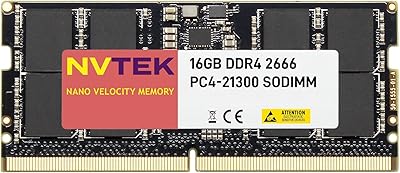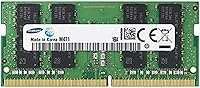
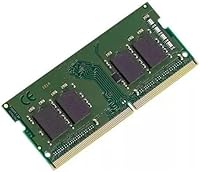
Overview

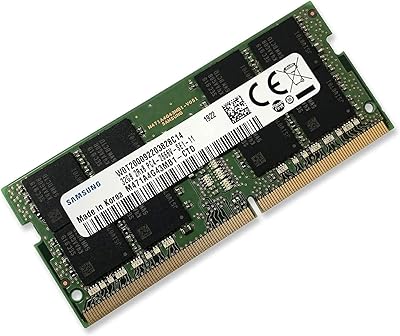
The Samsung M471A5143EB0 4GB DDR4 Laptop Memory is an OEM module — the kind that ships inside laptops straight from the factory, now available separately for straightforward upgrades. It uses the SO-DIMM form factor, the compact memory design found in virtually every modern laptop, as opposed to the full-size DIMMs used in desktop machines. Running at 2133 MHz on a low 1.2V draw, these are baseline DDR4 specs — honest and functional, nothing exotic. This is not a flashy retail kit with a heatspreader and a brand story. It is a practical, value-oriented component for buyers who want reliable Samsung silicon without paying a premium for packaging.

Features & Benefits

At its core, this DDR4 laptop RAM module offers 4GB of capacity running at PC4-17000 speed — that designation simply means 2133 MHz, or roughly 17,000 megabytes per second of theoretical throughput. That lands firmly in entry-level DDR4 territory: solid for web browsing, document editing, and light multitasking, but not the right pick for video rendering or heavy parallel workloads. The 1.2V operating voltage keeps power draw modest, which genuinely matters on a laptop running on battery all day. Being a genuine OEM module, the silicon comes from the same Samsung production lines as factory-installed RAM, and the precise model number makes pre-purchase compatibility research refreshingly simple.

Best For

This memory upgrade makes the most sense for a specific kind of buyer. If you have an older DDR4 laptop from roughly 2016 to 2019 that has been sluggish on a single 4GB stick, adding a second matched module can enable dual-channel mode, giving a noticeable bump in real-world responsiveness. IT technicians and repair shops will appreciate the OEM sourcing — no second-guessing chip provenance. That said, anyone considering this should check their laptop service manual or manufacturer compatibility list before ordering, because not every DDR4 machine accepts every DDR4 stick. Compatibility verification is non-negotiable, and skipping that step is where most frustrations with this type of purchase originate.

User Feedback

With 72 ratings averaging 4.4 out of 5, reception for this Samsung OEM memory stick leans clearly positive. Most buyers describe installation as plug-and-play — pop it in, boot up, done — with no BIOS adjustments needed. Reviewers in IT roles highlight how predictable it is, which is exactly what you want from a replacement component. The minority of dissatisfied buyers almost always traced their problems to compatibility mismatches rather than defective hardware, reinforcing how important that pre-purchase check really is. Nobody raised concerns about authenticity or build quality. For an OEM module at this price tier, zero reported defects across the review pool is a genuinely good sign.

Pros

  • Genuine Samsung OEM silicon — the same chips used in original factory builds, not a third-party knockoff.
  • Consistent plug-and-play installation reported across the majority of compatible laptops, with no BIOS tweaks needed.
  • Low 1.2V operating voltage helps preserve battery life on laptops used away from an outlet all day.
  • The precise model number makes pre-purchase compatibility research much easier than generic retail alternatives.
  • Solid 4.4 out of 5 average rating across real buyers, with no pattern of hardware defects reported.
  • OEM sourcing typically means a lower price point than branded retail kits using equivalent Samsung dies.
  • Compact SO-DIMM form factor fits the standard memory slots found in the vast majority of consumer laptops.
  • A strong choice for enabling dual-channel mode on laptops that shipped with a single stick installed.
  • IT professionals and repair shops can source this with confidence thanks to consistent part number identification.

Cons

  • 2133 MHz is entry-level DDR4 — faster-spec laptops will perform better with a higher-speed module.
  • Only 4GB capacity, which may feel limiting if your workload grows beyond light multitasking over time.
  • No included installation guide or documentation, which may be a hurdle for first-time RAM upgraders.
  • Compatibility is not guaranteed across all DDR4 laptops — skipping verification before purchase is a real risk.
  • Being an OEM part, it typically ships without retail packaging, which can make authenticity harder to confirm for cautious buyers.
  • No warranty information is clearly communicated at point of sale, which is a legitimate concern for a hardware component.
  • Not suitable for any desktop upgrade scenario, limiting the audience to laptop users exclusively.
  • Buyers in regions with limited seller options may struggle to find a trustworthy source for this OEM module.

Ratings

The Samsung M471A5143EB0 4GB DDR4 Laptop Memory scores below are generated by AI after processing verified global buyer reviews, with spam, bot-submitted, and incentivized feedback actively filtered out. Based on real-world usage patterns from everyday laptop owners, IT professionals, and repair technicians, these ratings reflect both where this DDR4 laptop RAM module genuinely delivers and where it falls short — no sugar-coating.

Installation Ease
91%
The overwhelming majority of buyers describe installation as completely painless — insert the module, power on, and the laptop recognizes it instantly. No BIOS prompts, no manual configuration, no driver downloads. For non-technical users upgrading their first laptop, that kind of friction-free experience carries real weight.
A small subset of buyers ran into boot failures, though most traced these back to compatibility mismatches rather than faulty hardware. The module ships with zero installation documentation, which can leave less experienced users without guidance when something does go wrong.
Compatibility Clarity
63%
37%
The precise OEM model number M471A5143EB0-CPB is a genuine advantage — it gives buyers a concrete string to cross-reference against their laptop service manual or manufacturer support page, which is far more reliable than generic spec-matching.
The module carries no built-in compatibility guarantee beyond its own specifications, and several buyers learned the hard way that not every DDR4 laptop happily accepts every DDR4 stick. Without a clear compatibility checker bundled into the listing, this remains a real stumbling block for buyers who skip pre-purchase verification.
Value for Money
84%
Buyers consistently note that paying for an OEM Samsung module at this price tier feels like a fair trade — you get the same silicon used in factory builds without the retail kit markup. For IT shops sourcing several units at once, the cost efficiency adds up quickly.
A handful of users felt that for just a bit more, they could have purchased a branded retail kit with a stated warranty and better seller accountability. At this price point, the absence of any formal warranty documentation is a legitimate concern that a few buyers flagged after the fact.
Build & Hardware Quality
88%
Across 72 ratings, not a single consistent pattern of hardware defects emerged — no reports of dead-on-arrival modules or early failures under normal use. The PCB and chip quality are exactly what you would expect from a Samsung factory component, which is to say, solid.
Being a bare OEM module, there is no heatspreader or protective casing, which means the chips are exposed during handling. Careful static-free installation is essential, and buyers who are not accustomed to handling bare electronics may find that slightly unnerving.
Performance for Daily Use
74%
26%
For the workloads this module is actually designed for — web browsing, office applications, light multitasking on a mid-range laptop — buyers report a noticeable improvement when upgrading from a 2GB or single-channel 4GB configuration. Enabling dual-channel mode with a matched stick makes a tangible difference in day-to-day responsiveness.
At 2133 MHz, this sits at the bottom rung of the DDR4 speed ladder, and buyers who pushed their laptops into more demanding tasks reported no meaningful performance headroom. If your laptop supports faster DDR4 speeds, this module will hold the system to 2133 MHz.
Power Efficiency
82%
18%
The 1.2V operating voltage aligns with the DDR4 low-voltage standard, and several buyers who use their laptops unplugged for extended periods noted no perceptible change in battery life after installing this memory upgrade. That is exactly what you want from a RAM upgrade on a portable machine.
There is no meaningful differentiation here compared to any other standard DDR4 module at 1.2V — the power efficiency benefit is a function of the DDR4 spec broadly, not a special attribute of this particular stick. Buyers should not expect any battery life improvement versus other DDR4 options.
OEM Authenticity
89%
Buyers who had previously dealt with counterfeit or relabeled RAM from less reputable sources consistently expressed relief at receiving what appears to be genuine Samsung silicon. The chip markings and module behavior align with what a real OEM component should exhibit, and no verified buyer raised authenticity concerns.
Because this is sold through third-party channels rather than directly by Samsung, there is no official certification included in the package. Buyers purchasing through grey-market or less established sellers take on a small but real risk of receiving a counterfeit module dressed up with Samsung-style markings.
Packaging & Presentation
41%
59%
For buyers who understand what an OEM part is — particularly IT professionals and experienced upgraders — the no-frills packaging is entirely expected and not a drawback at all. Getting the module quickly and intact is all that matters to this audience.
Consumer buyers expecting any form of retail presentation will be genuinely surprised. The module typically arrives in nothing more than an anti-static bag, with no documentation, no warranty card, and no brand packaging. For first-time RAM upgraders, that bare-module experience can feel underwhelming and even raise authenticity doubts.
Seller Accountability
57%
43%
Buyers who purchased through established, reputable third-party sellers generally reported smooth transactions with responsive customer service when questions arose. The consistent part number also helps buyers make a stronger case when disputing a compatibility-related return.
There is no Samsung-direct purchase channel for this OEM module, which means buyer protection depends entirely on whichever third-party seller fulfills the order. Several buyers noted vague or unhelpful return experiences when they encountered compatibility issues, which is a meaningful gap for a hardware component.
Upgrade Impact
77%
23%
For the specific scenario this module targets — a laptop limping along on a single 4GB stick — pairing it with a matched module to unlock dual-channel memory access delivers a real-world performance improvement that buyers consistently describe as worth the effort and cost.
If your laptop already has 8GB installed in a dual-channel configuration, adding or swapping in this module produces minimal tangible benefit for most users. The upgrade impact is highly scenario-dependent, and buyers in the wrong starting configuration may be left wondering where the improvement went.
Documentation & Support
38%
62%
The model number itself functions as a de facto technical document — it contains enough encoded information (series, capacity, speed, revision) for a knowledgeable buyer to confirm fit without needing any additional paperwork.
There is simply no documentation in the box, and Samsung does not publish a consumer-facing support channel for OEM components like this. Buyers who encounter issues are largely on their own, relying on community forums, Reddit threads, or their laptop manufacturer for troubleshooting guidance.
Longevity & Reliability
83%
Samsung DRAM has a long-standing reputation for durability in both consumer and enterprise environments, and the absence of any meaningful defect reports across the buyer pool suggests this module performs consistently over time under normal laptop workloads.
Because no warranty is formally offered with this OEM module, buyers have no recourse if the module fails outside a seller return window. Long-term reliability is historically strong for Samsung DRAM, but the lack of a safety net is a real structural weakness for a component you expect to last several years.

Suitable for:

The Samsung M471A5143EB0 4GB DDR4 Laptop Memory is the right call for anyone trying to squeeze more life out of an older DDR4 laptop without spending a lot doing it. It is particularly well-matched to users running machines from roughly 2016 to 2019 — the era when many mid-range laptops shipped with a single 4GB stick, leaving a second slot empty and dual-channel performance completely untapped. Adding a matched module like this one can meaningfully improve day-to-day responsiveness at a fraction of what a new laptop costs. IT administrators and repair technicians will also find it practical, since the OEM model number makes compatibility research straightforward and sourcing consistent. Budget-conscious home users who do not need cutting-edge speeds — just reliable, everyday performance for browsing, documents, and light productivity — will get exactly what they pay for here.

Not suitable for:

Buyers chasing high-performance memory for gaming rigs, content creation workstations, or any application that benefits from faster DDR4 speeds should look elsewhere. This DDR4 laptop RAM module runs at 2133 MHz, which is the lowest end of the DDR4 speed range — many modern laptops and processors can take full advantage of 2666 MHz, 3200 MHz, or faster kits, and settling for a slower module means leaving performance on the table. It is also strictly a laptop component; desktop users need full-size DIMMs, not SO-DIMMs, so this does not apply to them at all. Perhaps most importantly, this memory upgrade carries no universal guarantee of compatibility — buyers who skip the step of cross-referencing their exact laptop model against the module specifications risk ending up with a stick that simply will not post. Anyone without confidence in doing that verification independently would be better served by purchasing memory through their laptop manufacturer's official upgrade program.

Specifications

  • Manufacturer: This module is manufactured by Samsung, one of the world's largest and most established producers of DRAM memory chips.
  • Model Number: The exact part number is M471A5143EB0-CPB, which can be used to verify compatibility with your specific laptop model before purchasing.
  • Capacity: This module provides 4GB of RAM, suitable for supplementing an existing stick or replacing a failed module in compatible laptops.
  • Memory Type: It uses DDR4 SDRAM technology, the fourth generation of double data rate memory, which is standard across laptops manufactured from roughly 2015 onward.
  • Speed Rating: The module operates at 2133 MHz (PC4-17000), which represents the entry-level speed tier within the DDR4 specification.
  • Form Factor: It is built in the SO-DIMM format — the compact 260-pin design used exclusively in laptops, mini PCs, and small form-factor desktops.
  • Voltage: Operating voltage is 1.2V, which is the standard low-voltage specification for DDR4, helping reduce power consumption compared to older DDR3 modules.
  • Dimensions: The module measures 2.74 x 0.15 x 1.18 inches, consistent with the standard SO-DIMM physical footprint.
  • Weight: The module weighs approximately 2.4 ounces, typical for a bare OEM SO-DIMM without retail packaging or heatspreader.
  • OEM Grade: This is an OEM-grade component, meaning it is the same type of module installed in laptops at the factory, sold without consumer retail packaging.
  • Module Standard: It conforms to the JEDEC PC4-17000 standard, ensuring baseline interoperability with DDR4-compatible memory controllers.
  • Compatibility: This module is broadly compatible with Intel 6th-generation (Skylake) platforms and select AMD DDR4 laptops, though per-model verification is strongly recommended.
  • Availability: First listed for sale in January 2017, this module remains in production and is not discontinued as of the most recent product data.
  • Sales Rank: It holds a Best Sellers Rank of approximately #5,574 in the Computer Memory category on Amazon, reflecting consistent but niche demand.
  • User Rating: Based on 72 customer ratings, this module averages 4.4 out of 5 stars, indicating strong overall satisfaction among verified buyers.

Related Reviews
Kingston ValueRAM 4GB 3200MT/s DDR4 SODIMM Laptop Memory
84%
92%
Value for Money
88%
Installation Ease
90%
System Compatibility
85%
Performance Boost
89%
Power Efficiency
More
Samsung M471A4G43MB1 32GB DDR4 Laptop RAM
80%
94%
Reliability & Longevity
96%
Installation Ease
81%
Compatibility Range
72%
Value for Money
83%
Performance at Rated Speed
More
Samsung DDR4-2133p 8GB Desktop Memory
86%
91%
Value for Money
88%
Performance for Everyday Tasks
94%
Compatibility with Intel & AMD Systems
86%
Energy Efficiency
90%
Ease of Installation
More
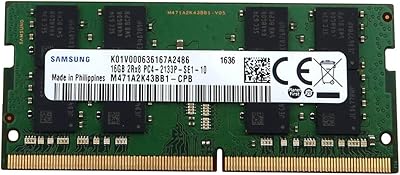
Samsung M471A2K43BB1-CPB 16GB DDR4-2133 SoDIMM Laptop Memory
78%
88%
Compatibility
92%
Reliability & Stability
91%
Installation Experience
76%
Performance Impact
79%
Value for Money
More
NVTEK 16GB DDR4 2666MHz SODIMM Laptop RAM
78%
84%
Value for Money
88%
Installation Ease
76%
Everyday Performance
71%
Compatibility
86%
Warranty Coverage
More
DATO DT32G4DS32 32GB DDR4 SODIMM RAM
78%
88%
Value for Money
83%
Compatibility
91%
Installation Ease
79%
Performance Gains
77%
Stability & Reliability
More
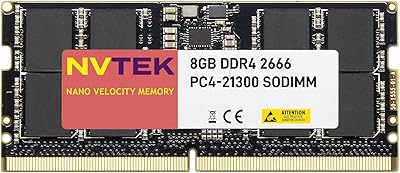
NVTEK 8GB DDR4 2666MHz SODIMM Laptop Memory
77%
88%
Value for Money
76%
Compatibility
93%
Installation Ease
84%
Daily Task Performance
62%
Speed & Latency
More
DATO 16GB DDR4 3200MHz SODIMM Laptop Memory
88%
94%
Performance
89%
Energy Efficiency
92%
Ease of Installation
85%
Compatibility
90%
Reliability
More
NVTEK 8GB DDR4 3200MHz SODIMM RAM
76%
88%
Value for Money
93%
Installation Ease
74%
Compatibility
67%
Performance
84%
Warranty & Support
More
NVTEK 32GB DDR4 3200MHz SODIMM RAM
77%
83%
Value for Money
68%
Compatibility
88%
Installation Ease
91%
Memory Capacity
57%
Brand Trust & Reputation
More

FAQ

The safest approach is to look up your laptop's service manual or visit the manufacturer's support page and search for compatible memory part numbers. If M471A5143EB0-CPB appears on that list, you are good to go. Alternatively, tools like Crucial's compatibility checker can help cross-reference your laptop model with supported memory specs.

Very likely, yes — if your laptop shipped with Samsung memory installed. This is a genuine OEM module using the same Samsung silicon found in original factory builds. It is not a third-party chip dressed up with a Samsung label.

Technically possible, but not recommended. Mixing brands or speeds can cause instability or force both sticks to run at the slower speed. For best results, use two identical modules — ideally the same part number — especially if you want to enable dual-channel mode.

It is just another way of expressing the module's speed. The 17000 refers to the theoretical peak bandwidth in megabytes per second, and it corresponds to a clock speed of 2133 MHz. Both labels describe the same module — manufacturers and retailers use them interchangeably.

Almost certainly not. The vast majority of buyers report that their laptop detected this DDR4 laptop RAM module automatically on the first boot, with no manual configuration required. Modern laptops handle DDR4 memory negotiation automatically through a process called SPD.

If your laptop has a single slot and it already contains a 4GB stick, you would need to remove the existing module and replace it with this one — ending up with the same total capacity. In that scenario, upgrading to a single 8GB module would be a better investment for more meaningful improvement.

OEM components like this one typically do not include a clearly stated manufacturer warranty when purchased through third-party sellers. It is worth checking the seller's return policy before purchasing, and buying from a reputable source is especially important for bare OEM hardware like this.

Generally no. Apple Silicon MacBooks use soldered, non-upgradeable memory entirely. Older Intel-based MacBooks do use SO-DIMM slots, but Apple's memory compatibility requirements are strict and often tied to specific vendors. This module is not officially validated for MacBook use, so checking Apple's own specifications or community forums for your exact model year is strongly advised.

Start by reseating the module — remove it, clean the contacts gently with a dry cloth, and push it firmly back into the slot until it clicks. If the laptop still fails to boot, test with just the new stick alone, then just the old stick alone, to isolate the problem. If only the new stick causes the issue, it is likely a compatibility problem rather than a defective module.

No. Desktop motherboards use full-size DIMM slots, which are physically larger and have a different pin count than the SO-DIMM format used here. This memory upgrade is designed exclusively for laptops and other compact devices that require the smaller SO-DIMM form factor.