Overview

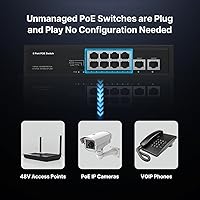
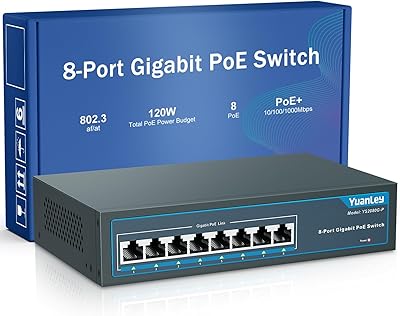
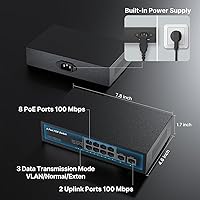
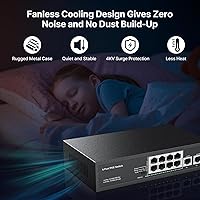
The Real HD 8-Port 120W PoE+ Unmanaged Switch sits in that practical sweet spot where affordability meets genuine utility for small-scale network builds. It offers eight PoE+ ports alongside two uplink ports — a configuration that handles most home or small-office camera and phone deployments without leftover complexity. Worth flagging early: all ports run at 100Mbps, not Gigabit, so if high-bandwidth throughput is your priority, temper expectations accordingly. The fanless metal housing keeps things quiet and durable enough for a shelf, closet, or compact equipment space. No software, no web interface, no login — just plug in your devices and this PoE switch handles the rest.
Features & Benefits

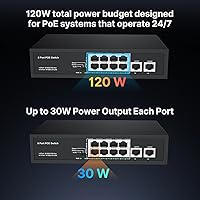
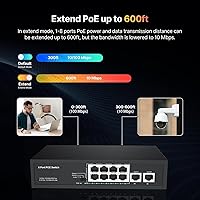
The 120W total power budget is the headline spec here, allowing up to 30W per port — in practice, that means running four or five mid-range IP cameras simultaneously without any port throttling. The switch conforms to IEEE 802.3af/at standards, so compatibility with most current PoE cameras and VoIP phones is essentially guaranteed. There is also an Extend mode that pushes data range out to 250m, handy for cameras mounted far from the main closet, though the port speed drops to 10Mbps in that mode — a real trade-off, not marketing fine print. Auto PD detection quietly prevents accidental power delivery to non-PoE equipment, and per-port LED indicators make diagnosing a dropped connection straightforward without any management interface.

Best For

This unmanaged switch makes the most sense for anyone deploying a basic IP camera system at home or in a small business — think four to eight cameras feeding an NVR, with no need for VLANs or traffic shaping. VoIP phone deployments in compact offices are another strong fit; the per-port power budget handles standard desk phones without any configuration overhead. Installers needing a reliable drop-in device they can hand off to a non-technical client will appreciate the zero-setup nature. One important caveat: the Real HD 8-port switch does not support passive 24V PoE devices, so older Ubiquiti access points and similar gear will not function here — verify compatibility before purchasing.

User Feedback

Across 267 ratings averaging 4.6 stars, the feedback pattern is fairly consistent: buyers appreciate easy out-of-box setup and the reliable way this PoE switch powers cameras from the moment it is plugged in. Build quality draws repeated praise — the metal housing feels more substantial than shoppers typically expect at this price tier. The most common frustration centers on port speed; reviewers who assumed Gigabit throughout report disappointment, even though the 100Mbps spec is clearly documented. Longer-term users generally report stable temperatures and no throttling after months of continuous operation. Extend mode feedback matches the spec sheet honestly: it works as advertised, but the speed reduction is noticeable enough that it is not a substitute for proper cable runs.

Pros

  • Plug-and-play setup means most users are up and running in under five minutes, no IT background required.
  • 120W total PoE budget reliably powers up to eight standard IP cameras or VoIP phones simultaneously.
  • Per-port output of up to 30W covers virtually all 802.3af/at compliant devices without any manual configuration.
  • Fanless metal housing runs quietly and stays cool enough for enclosed spaces like closets or small cabinets.
  • Extend mode stretches cable runs out to 250m, useful for cameras mounted far from the main network closet.
  • Auto PD detection prevents accidental power delivery to non-PoE equipment, protecting connected gear.
  • Per-port LED indicators make it easy to spot a dead connection without needing any software or login.
  • Wide AC 100–240V input means it works straight out of the box in most countries without a voltage adapter.
  • Compact footprint and lightweight build make it easy to mount, shelf, or tuck into tight spaces.
  • Consistent 4.6-star rating across hundreds of real buyers points to solid reliability over time.

Cons

  • All ports are capped at 100Mbps — buyers expecting Gigabit speeds throughout will be disappointed.
  • Extend mode drops transmission speed to 10Mbps, making it impractical for anything beyond basic camera feeds.
  • No support for passive 24V PoE devices, which rules out a significant chunk of older Ubiquiti hardware.
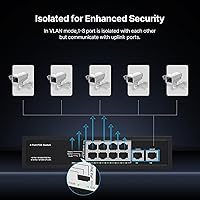
  • Unmanaged design means zero traffic control, no VLANs, and no way to prioritize or monitor bandwidth.
  • MAC address table limited to 1K entries, which can cause issues in busier or more complex network environments.
  • No rackmount support makes it unsuitable for structured equipment racks in professional installations.
  • Only 2 uplink ports available, which may restrict flexibility when connecting to larger upstream infrastructure.
  • The brand has limited visibility outside of Amazon, making warranty support and long-term parts availability uncertain.

Ratings

The scores below for the Real HD 8-Port 120W PoE+ Unmanaged Switch were produced by our AI rating engine after analyzing verified purchase reviews from buyers worldwide, with spam, bot activity, and incentivized feedback actively filtered out. Each category reflects the honest balance of praise and frustration found across real deployments — from home camera installs to small-office VoIP setups — so you get a clear picture of where this switch genuinely delivers and where it falls short.
Ease of Setup
96%
Buyers consistently describe unboxing to fully operational in under ten minutes, with no driver downloads, no web interface, and no configuration steps whatsoever. Installers working on client sites particularly appreciate being able to hand off a completely functional network node without leaving behind a manual or a password.
A small number of users noted that the total absence of any management interface becomes a drawback when something goes wrong — there is no way to check port status, reset individual ports, or diagnose issues beyond reading the LED indicators.
PoE Reliability
91%
The vast majority of reviewers running four to eight IP cameras report rock-solid, uninterrupted power delivery over weeks and months of continuous operation. Auto PD detection works as intended, with no reported cases of accidental power delivery damaging non-PoE devices plugged into the same switch.
A handful of users running higher-draw devices close to the 30W-per-port ceiling reported occasional instability, particularly when several ports were simultaneously at or near maximum load and ambient temperatures were elevated.
Build Quality
84%
The all-metal enclosure feels noticeably more solid than most competitors in this price bracket, and buyers who have left it running in warm utility closets for six-plus months report no warping, port degradation, or chassis issues. The fanless design eliminates moving parts entirely, which several long-term users credit for its longevity.
The port labeling is minimal and the overall finish is utilitarian rather than polished, which is a minor frustration for users mounting it in a visible or client-facing location. A few reviewers also noted the power cord connector feels marginally loose on their units.
Port Speed & Throughput
52%
48%
For the specific use cases this switch targets — standard-definition and 1080p IP camera streams, VoIP calls, and basic network access — 100Mbps per port is functionally adequate and buyers deploying it purely for surveillance report no buffering or frame-drop issues.
This is the single most common source of buyer disappointment: many purchasers assume Gigabit throughput and only discover the 100Mbps limitation after the switch arrives. Users trying to push 4K camera streams or run NAS transfers through this unmanaged switch will hit a genuine ceiling that no firmware or setting can change.
Power Budget
88%
A 120W shared budget across eight ports is generous relative to competing switches in this class, and buyers running six standard cameras drawing 10–12W each report comfortable headroom without any port throttling. The per-port ceiling of 30W also covers PTZ cameras and more demanding access points that would overwhelm lower-rated alternatives.
Users who tried to populate all eight ports with higher-power devices — such as PTZ cameras drawing 20–25W each — found the shared budget constrictive, with some ports failing to deliver full power once the aggregate draw approached the ceiling.
Compatibility
78%
22%
IEEE 802.3af/at compliance means this PoE switch works reliably with the overwhelming majority of modern IP cameras, VoIP handsets, and access points straight out of the box, with no compatibility research needed for standard deployments.
The passive 24V PoE incompatibility is a real trip hazard for anyone coming from a Ubiquiti-heavy environment — older UniFi access points simply will not power on, and several buyers reported frustration at discovering this only after installation. The product documentation could be clearer about this limitation upfront.
Extend Mode
67%
33%
For users with cameras mounted on outbuildings or at the far end of a long cable run, the ability to push data out to 250m is a practical feature that saves the cost of a secondary switch or media converter. Several reviewers confirmed it works reliably at that extended distance for basic camera feeds.
The mandatory drop to 10Mbps while Extend mode is active is a steep trade-off that limits the feature's usefulness to low-bandwidth applications only. Users expecting to stream high-resolution footage over an extended run were noticeably let down by the resulting quality degradation.
Thermal Management
82%
18%
The fanless passive cooling design keeps the switch completely silent, which is particularly valued by users placing it in living spaces, reception areas, or anywhere noise is a concern. Long-term reviewers consistently report the metal chassis stays warm but never uncomfortably hot under sustained load.
In poorly ventilated enclosures or during extended summer heat, a few users noted the case running warmer than expected, and one or two reported a port dropping PoE power temporarily under peak thermal stress — though this appears to be an edge case rather than a systemic issue.
Value for Money
89%
For buyers who understand and accept the 100Mbps port limitation, the price-to-capability ratio is genuinely strong — eight PoE+ ports, a 120W budget, a metal chassis, and zero ongoing management costs add up to a compelling package for budget-conscious home and small-business deployments.
Buyers who purchased expecting Gigabit speeds and later had to return or replace the switch naturally rate the value much lower, dragging down the overall perception for this category. If your use case demands Gigabit, spending more upfront on the right switch avoids a more costly second purchase.
LED Indicators
76%
24%
Per-port LEDs covering both PoE power status and link activity give users a fast, no-software way to confirm that each connected device is receiving power and passing data — a feature that saves meaningful troubleshooting time during initial installs.
The LEDs provide only binary status information and cannot distinguish between different power states or error conditions, which leaves users guessing when a device is connected but not functioning correctly. More granular indicator behavior would make field diagnostics significantly easier.
Physical Footprint
87%
At under a kilogram and roughly the footprint of a large paperback book, the Real HD 8-port switch fits comfortably on a shelf, inside a small cabinet, or zip-tied to a wall bracket — a genuine advantage for installers working in tight spaces like closets, back-of-rack setups, or small retail environments.
The lack of any rackmount support or included mounting hardware limits installation flexibility for users who prefer structured rack deployments, and the flat form factor can be awkward to secure neatly without improvising a mounting solution.
Long-Term Durability
81%
19%
Reviewers who have been running this unmanaged switch continuously for over a year report stable performance with no port failures or power delivery issues, which is a strong signal for a product in this price class. The all-metal construction and fanless design remove the two most common hardware failure points found in cheaper plastic alternatives.
The brand lacks the established service network and warranty infrastructure of larger networking vendors, so buyers who do experience a hardware failure after the return window closes have limited recourse beyond contacting the Amazon seller directly.
Documentation & Support
58%
42%
The included quick-start guide covers the basics adequately for a plug-and-play device, and most users genuinely do not need more than a single page of instructions to get up and running with a standard camera or phone deployment.
Buyers who encountered edge cases — such as passive PoE incompatibility, Extend mode behavior, or power budget allocation — found the documentation too thin to provide meaningful guidance, and the brand offers no online knowledge base, community forum, or accessible technical support channel to fill that gap.

Suitable for:

The Real HD 8-Port 120W PoE+ Unmanaged Switch is a strong fit for anyone who needs to power a handful of IP security cameras or VoIP desk phones without the cost or complexity of a managed switch. Home users building out a basic surveillance setup — say, four to six cameras feeding a local NVR — will find the 120W power budget more than adequate, and the plug-and-play nature means there is genuinely nothing to configure. Small business owners who just need reliable PoE delivery across a single floor, without any VLANs or traffic prioritization, are in the same boat. It also works well for professional installers who need a dependable, low-maintenance drop-in device they can hand off to a non-technical client. The wide AC input range and fanless operation make it a sensible choice for international deployments or installations in warm, enclosed spaces like server cabinets.
Not suitable for:

The Real HD 8-Port 120W PoE+ Unmanaged Switch is not the right tool if you need Gigabit throughput — all ports top out at 100Mbps, which can become a bottleneck for high-resolution camera streams or any bandwidth-intensive application. Anyone running a network that requires VLANs, QoS, traffic monitoring, or remote management should look at a managed switch instead, since this device offers none of those capabilities. Users with older Ubiquiti access points or any hardware that relies on passive 24V PoE should know upfront that those devices are explicitly not supported and will not power on correctly. If you are cabling more than eight PoE devices or expecting to scale your setup within a year or two, the port count and fixed 120W budget will likely feel limiting sooner than you expect. Finally, anyone expecting rackmount installation should look elsewhere — this switch is designed for flat surface placement only.
Specifications

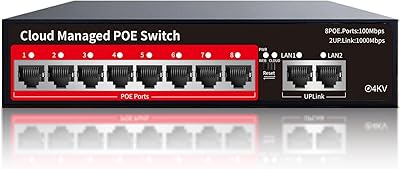
  • PoE Ports: Eight 10/100Mbps PoE+ ports each capable of delivering up to 30W of power to connected devices.
  • Uplink Ports: Two 10/100Mbps Ethernet uplink ports for connecting the switch to a router or upstream network device.
  • PoE Standard: Fully compliant with IEEE 802.3af and 802.3at standards, ensuring compatibility with the vast majority of modern PoE devices.
  • Total PoE Budget: The switch provides a combined maximum power output of 120W shared across all eight PoE ports.
  • Per-Port Power: Each individual PoE port can supply up to 30W, sufficient for most IP cameras, VoIP phones, and wireless access points.
  • Switching Bandwidth: Non-blocking switching bandwidth of 2Gbps ensures traffic is handled without internal bottlenecks under normal load.
  • Extend Mode: An optional Extend mode stretches the maximum cable run from 100m up to 250m, though port speed is reduced to 10Mbps while active.
  • Housing: Compact fanless metal enclosure measuring 22cm x 16cm x 3.5cm, designed for quiet, passive cooling in confined spaces.
  • Weight: The unit weighs 0.92kg, making it lightweight enough to shelf-mount or secure in a small equipment cabinet without additional support.
  • Power Input: Accepts AC 100–240V at 50/60Hz, allowing use across different regional power standards without a separate voltage converter.
  • Operating Temp: Rated for operating temperatures between -20°C and 55°C, covering typical indoor environments including warm closets or equipment rooms.
  • MAC Table: Supports a MAC address table of up to 1K entries, appropriate for small-scale deployments with a limited number of connected devices.
  • Management: Fully unmanaged and plug-and-play — no software installation, web interface, or configuration is required at any point.
  • PD Detection: Automatic powered device detection identifies whether a connected device requires PoE power, protecting non-PoE equipment from unintended power delivery.
  • LED Indicators: Per-port LED indicators display PoE power status and link or activity state, enabling quick visual diagnostics without any management tools.
  • Data Transfer Rate: Maximum data transfer rate across all ports is 100Mbps; the switch does not support Gigabit speeds on any port.
  • Passive PoE: Passive 24V PoE devices, such as certain older Ubiquiti hardware, are explicitly not supported by this switch.
  • Rackmount: The switch does not support rackmount installation and is intended for flat surface or shelf placement only.

Related Reviews

STEAMEMO 8-Port 120W Managed PoE+ Switch
80%
91%
Value for Money
83%
PoE Power Delivery
88%
Ease of Setup
79%
Build Quality
52%
Port Speed Performance
More
YuanLey 8-Port 120W Gigabit PoE Switch
80%
91%
Value for Money
94%
Ease of Setup
78%
PoE Power Delivery
83%
Build Quality
74%
Thermal Performance
More
Reidubo 8-Port Gigabit PoE Switch 120W
86%
92%
Value for Money
89%
Ease of Setup
90%
Power Delivery
88%
Build Quality
85%
Performance Stability
More
AUMOX PRO SG308P 8-Port PoE Gigabit Switch 120W
85%
85%
Performance
94%
Ease of Setup
89%
Build Quality
91%
Fanless Operation
87%
Power Efficiency
More
MokerLink POE-F062F 8-Port PoE Switch
86%
91%
Value for Money
88%
Performance Stability
95%
Ease of Installation
85%
PoE Power Output
82%
Build Quality
More
LINOVISION POE-SW508G Industrial 8-Port PoE++ Switch
77%
91%
Power Delivery
88%
Build Quality
93%
PoE Watchdog
84%
Installation Ease
86%
Thermal Performance
More
BV-Tech POE-SW802G 8-Port Gigabit PoE+ Switch
79%
94%
Ease of Setup
88%
PoE Reliability
67%
Power Budget
61%
Build Quality
91%
Value for Money
More
D-Link DES-1008PA 8-Port PoE Fast Ethernet Switch
82%
94%
Ease of Setup
88%
PoE Port Reliability
91%
Build Quality & Durability
58%
Network Speed & Throughput
97%
Noise Level
More
YuLinca 6-Port Gigabit PoE Switch with 4 PoE+ Ports
87%
95%
Ease of Installation
88%
PoE Functionality
91%
Build Quality
87%
Performance and Speed
94%
Fanless Operation (Noise)
More
Loocam 8-Port Gigabit PoE Switch
81%
92%
Ease of Setup
88%
PoE Power Budget
85%
Performance Stability
90%
Noise Level
80%
Build Quality
More

FAQ

No, there is nothing to configure at all. You plug in your devices, connect the uplink port to your router, and the switch handles everything automatically. It is genuinely zero-setup.

It depends on the model. The switch supports standard IEEE 802.3af/at PoE devices, so newer Ubiquiti access points that draw standard PoE power should work fine. However, older Ubiquiti hardware that relies on passive 24V PoE is explicitly not compatible — check your device specs before purchasing.

Yes, all ports on the Real HD 8-Port 120W PoE+ Unmanaged Switch run at 100Mbps — both the PoE ports and the uplink ports. For IP camera feeds and VoIP phones that is usually plenty, but if you are running high-bitrate cameras or need fast file transfers over the same switch, you may want to consider a Gigabit alternative.
In theory, if each camera draws 15W or less, you can power all eight simultaneously within the 120W total budget. Most standard IP cameras consume between 5W and 15W, so you will likely be fine in a typical setup. Just be aware that if you connect higher-powered devices like PTZ cameras that draw closer to 30W each, you will hit the budget limit faster.

Extend mode allows the switch to push data over cable runs up to 250m rather than the standard 100m. The catch is that port speed drops to 10Mbps while Extend mode is active on that port. For a fixed camera that just streams low-resolution video, that is workable. For anything requiring consistent throughput, it is better to keep runs under 100m if you can.

It runs passively cool with no fan, and the metal housing does a reasonable job of dissipating heat. Under normal load — powering several cameras continuously — the case gets warm but not alarmingly so. Long-term users report no heat-related issues, though placing it in a well-ventilated spot rather than a completely sealed box is always sensible.

Yes. The auto PD detection feature means the switch only delivers power to devices that request it through the standard PoE handshake. If you plug in a regular Ethernet device that does not support PoE, the switch simply provides data connectivity without sending any power — your equipment is safe.

Yes, the built-in power supply accepts AC 100–240V at 50/60Hz, which covers virtually every residential and commercial power standard worldwide. You may just need a plug adapter depending on the outlet type in your country.

Up to eight cameras on the PoE ports, provided their combined power draw stays within the 120W total budget. For most standard 1080p or 4MP cameras consuming around 8–12W each, you can comfortably fill all eight ports. Higher-power PTZ cameras will reduce how many you can run at once.

Real HD is a relatively small brand primarily sold through Amazon, which means warranty support is handled through the seller rather than a well-established service network. As a practical step, keep your purchase receipt, check the seller's listed return and warranty policy at the time of purchase, and contact the seller directly for any hardware issues.