

Overview

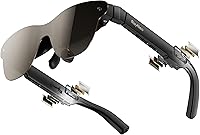
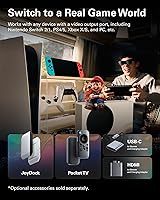
The RayNeo Air 3s Pro AR Glasses occupy an interesting niche — they are not a standalone mixed-reality headset, and being clear about that upfront matters. What this wearable display actually does is project a 201″ virtual screen in front of you, roughly the experience of sitting before a large cinema panel, without any physical screen required. At 2.68 oz, they are light enough to wear through a long flight without discomfort becoming the story. They connect to iPhones, Android devices, Macs, PS5, Steam Deck, and Switch 2, making these AR glasses one of the more broadly compatible options currently available in this category.

Features & Benefits

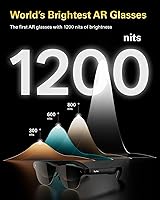
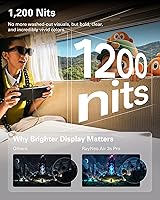
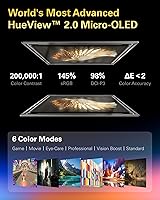
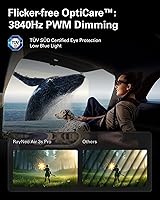
The figure that matters most here is 1,200 nits to-eye brightness — most competing glasses fall well short of that, which translates to washed-out images the moment ambient light picks up. Combined with the HueView 2.0 Micro-OLED panel delivering a 200,000:1 contrast ratio and 98% DCI-P3 color coverage, dark scenes actually read as dark rather than murky grey. The 120Hz refresh rate keeps motion sharp during fast gaming sequences. For extended sessions, the TÜV SÜD-certified display covering both low blue light and flicker-free specs is a practical differentiator. Nearsighted users can also have prescription lenses fitted by a local optician — a detail most rivals in this space simply do not address.

Best For

The Air 3s Pro makes the clearest case for a fairly defined type of buyer. Frequent travelers stand to gain the most — fitting a personal cinema into a glasses case is a meaningful upgrade over packing a portable monitor. Steam Deck and Switch 2 users get a much larger screen without adding carry weight, though both require a hub. Remote workers moving between locations will find an on-demand secondary display genuinely useful. The plug-and-play experience is cleanest with iPhone 15, 16, or 17 and USB-C Android devices; older iPhones and HDMI sources need extra adapters. Anyone sensitive to eye strain during long viewing sessions will also find the display engineering here more considered than most alternatives.

User Feedback

Across 255 ratings and a 4.2-star average, the Air 3s Pro sits in solid but not universally praised territory. The most consistent praise centers on brightness and color fidelity, with buyers specifically noting how well it holds up in brighter environments compared to previous wearable displays they had tried. Build quality also earns regular compliments. The recurring frustration, however, is adapter dependency — Switch 2, older iPhone, and HDMI setups all require additional purchases that are not included in the box, and that adds up fast. A portion of reviewers also flagged that wear comfort dips noticeably past the 90-minute mark, which is worth weighing if long sessions are your primary use case.

Pros

  • At 1,200 nits to-eye, the Air 3s Pro holds up in bright rooms where competing wearable displays visibly struggle.
  • The Micro-OLED panel produces deep blacks and rich color that makes HDR content look genuinely cinematic.
  • 120Hz refresh rate keeps fast gaming and action sequences visibly smooth with no motion smear.
  • TÜV SÜD dual certification for low blue light and flicker-free display is a real differentiator for extended viewing.
  • At 2.68 oz, these AR glasses are light enough for a full flight without physical fatigue becoming the story.
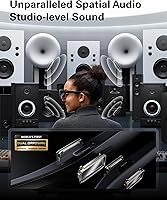
  • Whisper Mode spatial audio delivers private, directional sound without requiring headphones.
  • Plug-and-play simplicity with iPhone 15 and newer or USB-C Android is genuinely hassle-free out of the box.
  • Prescription lens support via a local optician opens the product up to a buyer segment most rivals ignore.
  • Build quality feels solid and travel-ready, with no flex or creak that signals early wear.
  • Six display presets cover movies, gaming, and outdoor use without requiring any manual calibration.

Cons

  • Switch 2, older iPhones, and HDMI devices all require additional hubs or adapters sold separately.
  • Comfort noticeably drops past the 90-minute mark for many users, limiting true marathon session use.
  • No onboard processing means the glasses are completely non-functional without a connected source device.
  • Custom color calibration is not available beyond preset modes, frustrating users with professional display needs.
  • The included cable is short, which restricts comfortable positioning relative to the source device.
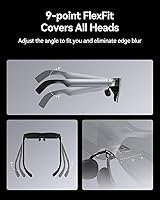
  • Nose bridge and temple fit cannot be user-adjusted after purchase, leaving limited recourse if comfort is off.
  • Some flicker-sensitive users report the low-brightness dimming is not fully imperceptible despite the spec.
  • Prescription lens fitting requires finding a compatible local optician, which adds time, effort, and variable extra cost.

Ratings

The RayNeo Air 3s Pro AR Glasses earned a 4.2-star average across 255 verified global ratings — a score our AI analysis weighted further by filtering out incentivized reviews and low-signal submissions to surface what genuine buyers actually experienced. The scores below reflect both the standout strengths and the friction points that real users ran into, from daily commutes to living-room gaming setups. Nothing here is softened to protect the product; the numbers reflect the full picture.

Display Brightness
93%
Reviewers who previously owned AR glasses from competing brands consistently called out the brightness difference as immediately noticeable. Using these AR glasses in a sun-lit cabin or a bright hotel room — situations where most wearable displays wash out — buyers reported the image staying punchy and watchable without cranking settings.
A small number of users noted that peak brightness at close range can feel intense during the first few minutes of use, particularly in very dark rooms. The 20-level control helps, but some buyers felt the lowest settings were still slightly too bright for pitch-dark environments.
Image & Color Quality
91%
The Micro-OLED panel's contrast and color coverage drew frequent praise from buyers who watch a lot of HDR content or use the Air 3s Pro for creative work on a laptop. Dark scenes in films reportedly showed shadow detail that earlier wearable displays simply crushed into flat black.
A handful of color-critical users noted slight uniformity differences at the extreme edges of the virtual display, which became more noticeable on very wide content. This was a minor complaint but consistent enough across reviews to be worth flagging for anyone who does color-sensitive work.
Eye Comfort & Fatigue
88%
The TÜV SÜD dual certification resonated strongly with buyers who specifically sought these AR glasses because of eye strain from other displays. Multiple reviewers mentioned being able to watch two or three episodes in a row without the headache or dryness that other wearable displays caused them.
A portion of reviewers — particularly those sensitive to any flicker or PWM — noted that at the lower brightness levels, a faint perceptible effect returned for them despite the high-frequency dimming spec. It did not affect most users, but those who are genuinely flicker-sensitive should be aware.
Comfort & Wearability
74%
26%
At 2.68 oz, the Air 3s Pro is light enough that the first hour of wear draws almost no complaints. Travelers and commuters especially appreciated not feeling the weight during a typical movie runtime, and the frame design accommodated a reasonable range of face shapes without feeling pinched.
Past the 90-minute mark, a meaningful number of reviewers reported nose bridge pressure or temple soreness that became distracting. For shorter sessions or commutes it is largely a non-issue, but for buyers planning marathon viewing nights, the fit becomes a legitimate limiting factor.
Device Compatibility
69%
31%
Out of the box, the plug-and-play experience with iPhone 15, 16, and USB-C Android devices is genuinely clean — buyers praised the zero-setup connection that just works when you plug in the cable. Mac users reported similarly smooth behavior, and Steam Deck compatibility drew positive notes from handheld gamers.
The adapter situation for older iPhones, Switch 2, and HDMI sources frustrated a vocal segment of buyers, who felt the marketing implied broader native compatibility than actually exists. The extra hub or adapter costs add up, and not having at least one included in the box feels like a miss at this price tier.
Audio Quality
79%
21%
The quad-speaker system surprised buyers who expected thin, tinny output from glasses-mounted drivers. Spatial audio performance during gaming and film content earned genuine compliments, and Whisper Mode — which directs sound toward the ears — worked well enough in quiet public spaces like planes and trains.
In genuinely loud environments, the audio isolation breaks down and the spatial effect becomes harder to appreciate. A few users also noted that at higher volumes the frame vibrates slightly, which is a minor but noticeable quirk that headphone users would not encounter.
Build Quality
84%
The materials and overall fit-and-finish of this wearable display consistently earned praise even from buyers who had reservations about other aspects. The hinge action felt solid, the cable connection point showed no early loosening, and the frame did not flex or creak in ways that suggest fragility.
The nose pads and temples are not user-replaceable on most configurations, which means if comfort fit is wrong out of the box, options are limited. A few buyers also felt the matte finish showed fingerprints and skin oils more than expected for an item worn on the face.
Gaming Performance
82%
18%
The 120Hz refresh rate made a tangible difference for fast-paced titles on Steam Deck and PS5, with buyers noting that action sequences and competitive games felt notably smoother compared to 60Hz wearable displays they had tried before. Latency was not flagged as an issue by the majority of gaming reviewers.
Switch 2 and console gaming require hub setups that are not included, and some buyers reported minor compatibility quirks depending on which third-party hub they used. Input lag was not a widespread complaint, but a small number of PC gamers noted it was not quite at the standard of a dedicated gaming monitor.
Prescription Lens Support
77%
23%
For nearsighted and astigmatic buyers, the ability to have custom lenses fitted by a local optician addresses a pain point that most competing wearable displays completely ignore. Reviewers who used this feature reported that the display sharpness improvement was significant enough to be worth the extra optician visit.
The process requires sourcing a local optician who can work with the included sample, which adds friction and cost that varies considerably by location. Some buyers in smaller cities reported difficulty finding a compatible optician, and the turnaround time meant they used the glasses without corrected lenses for weeks.
Setup & Ease of Use
81%
19%
For USB-C device users, setup is close to effortless — plug in, select a viewing mode, and the display is ready within seconds. The six viewing mode presets were appreciated by buyers who did not want to manually calibrate settings and just wanted a good default for movies or games.
The initial brightness and IPD adjustment learning curve tripped up some buyers who found the controls unintuitive at first. The instruction documentation also drew occasional criticism for being sparse, leaving new users to figure out mode-switching through trial and error.
Value for Money
72%
28%
For buyers coming from bulkier portable monitor setups or entry-level AR glasses, the Air 3s Pro's display performance at this price tier represents a meaningful step up. Travelers and remote workers who regularly pay for in-flight entertainment or hotel streaming subscriptions often justified the cost quickly.
The adapter and hub costs required for certain device configurations quietly inflate the real total price, which stings for buyers who did not anticipate them. Compared to some competitors at a similar price, the lack of onboard compute or standalone functionality means the value proposition depends entirely on already owning a capable source device.
Portability
86%
The glasses case is compact enough to slip into a laptop bag or carry-on without dedicated space allocation, and buyers on long-haul routes specifically mentioned appreciating the form factor versus portable monitors. The cable management is clean and nothing rattles during transit.
The cable, while included, is not especially long, which limits comfortable positioning when connected to a device sitting in a bag pocket or table across from you. A few buyers wished a slightly longer or right-angle cable variant were included.
Viewing Mode Flexibility
76%
24%
The six preset modes gave buyers practical options for switching between movie watching, gaming, and outdoor use without diving into menus. Reviewers who tested multiple modes found the differences meaningful rather than cosmetic, particularly the contrast between the cinema and standard modes.
Custom calibration options are limited beyond preset selection, which disappointed buyers who wanted more granular control over color temperature or gamma curves. Users doing creative or professional work found the presets useful as a starting point but felt constrained by the lack of manual override settings.

Suitable for:

The RayNeo Air 3s Pro AR Glasses make the most sense for a specific kind of buyer, and that clarity actually works in their favor. Frequent travelers are the clearest fit — if you spend meaningful time on planes, trains, or in hotels, replacing a bulky portable monitor with something that fits in a glasses case is a genuinely practical trade. Steam Deck and Switch 2 owners who want a larger screen without adding carry weight will find these AR glasses slot naturally into their existing setup, provided they budget for a compatible hub. Remote workers who hop between locations and miss having a second display will also find real utility here. USB-C Android users and iPhone 15, 16, or 17 owners get the cleanest experience with no adapter overhead. And for nearsighted users who have historically been locked out of wearable displays, the prescription lens compatibility with a local optician is a practical and underappreciated option that most rivals simply do not offer.

Not suitable for:

The RayNeo Air 3s Pro AR Glasses are not the right purchase for everyone, and it is worth being direct about where they fall short before you commit. These are display glasses that depend entirely on a connected source device — there is no onboard processing, no apps running locally, and no standalone functionality whatsoever, so anyone expecting a self-contained AR experience will be disappointed. Buyers with older iPhones, HDMI-only consoles, or legacy devices should factor in the additional cost of hubs and adapters, none of which are included in the box, because the real total outlay can be higher than the listed price suggests. If marathon sessions of three hours or more are your primary use case, the reported pressure and discomfort past the 90-minute mark is a meaningful caveat worth taking seriously. Users who are genuinely sensitive to display flicker may also find that lower brightness settings do not fully resolve the issue despite the high-frequency dimming spec. And buyers who want granular manual control over color calibration for professional creative work will find the preset-only approach limiting.

Specifications

  • Virtual Screen: Projects a 201″ virtual display at approximately 6 meters distance, replacing a physical monitor or TV for personal viewing.
  • Brightness: Delivers 1,200 nits to-eye brightness, the highest rated figure among commercially available AR display glasses at time of launch.
  • Display Type: Uses a 5th-generation tandem Micro-OLED panel (HueView 2.0) for deep contrast and accurate color reproduction.
  • Contrast Ratio: Achieves a 200,000:1 contrast ratio, allowing dark scene detail that lower-contrast wearable displays typically lose to grey crush.
  • Color Gamut: Covers 98% of the DCI-P3 color space, suitable for HDR film and video content with accurate, saturated color rendering.
  • Refresh Rate: Supports up to 120Hz refresh rate, reducing motion blur in fast-paced gaming and high-frame-rate video content.
  • PWM Dimming: Operates at 3,840Hz high-frequency PWM dimming to minimize perceptible flicker across all brightness levels.
  • Eye Certification: Holds TÜV SÜD dual certification for both Low Blue Light and Flicker-Free performance, verified by independent third-party testing.
  • Brightness Control: Offers 20 discrete brightness levels, giving users fine-grained control to match ambient lighting conditions.
  • Viewing Modes: Includes 6 optimized display presets covering common use cases such as cinema, gaming, and outdoor viewing.
  • Audio System: Features a self-developed quad-speaker spatial audio system with a Whisper Mode that directs sound toward the wearer's ears for private listening.
  • Weight: Weighs 2.68 oz (approximately 76g), keeping the frame light enough for extended wear without significant nose or temple fatigue in typical sessions.
  • Dimensions: Measures 3.94 x 7.87 x 6.3 inches in its packaged form factor.
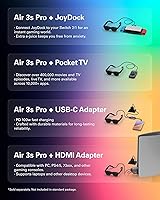
  • Connectivity: Connects via USB-C with DisplayPort output support; HDMI sources require the separately sold RayNeo HDMI adapter.
  • Compatible Devices: Natively supports iPhone 15, 16, and 17, USB-C Android devices, Mac, Nintendo Switch 2 (hub required), PS5, and Steam Deck.
  • OS Support: Compatible with Android, Windows, and iOS operating systems depending on the connected source device.
  • Prescription Lens: Includes a prescription lens sample that nearsighted or astigmatic users can take to a local optician to have custom corrective lenses made and installed.
  • Model Number: Official model identifier is XRGF37, manufactured by RayNeo Co., Ltd.
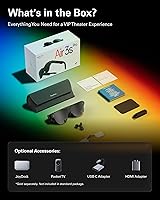
  • In the Box: Package includes the glasses unit and a USB-C cable; hubs, HDMI adapters, and additional accessories are sold separately.
  • Certifications: Holds TÜV SÜD Low Blue Light and Flicker-Free dual certification as the only wearable display glasses with both credentials simultaneously.

Related Reviews
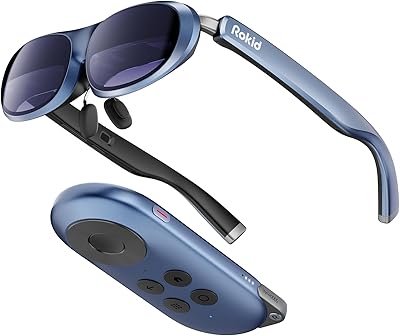
Rokid AR Joy Pack AR Glasses
75%
83%
Display Quality
67%
Comfort & Wearability
88%
Setup & Ease of Use
86%
App & Content Access
84%
DRM & Streaming Compatibility
More
VITURE Pro XR Glasses
80%
93%
Display Clarity
88%
Brightness & Visibility
91%
Electrochromic Dimming
54%
IPD Compatibility
89%
Refresh Rate & Motion Smoothness
More
XREAL One AR Glasses
80%
91%
Display Clarity
88%
Latency & Responsiveness
68%
Field of View
86%
Audio Quality
83%
Build Quality
More
VITURE Luma Pro XR Glasses
83%
91%
Display Quality
75%
Comfort and Fit
88%
Gaming Performance
80%
Compatibility
85%
Build Quality
More
realme Buds Air 7 Pro
86%
91%
Sound Quality
89%
Noise Cancellation (ANC)
90%
Battery Life
85%
Connectivity (Bluetooth)
88%
Comfort & Fit
More
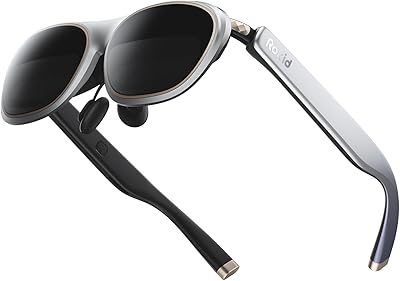
OhO A8 Pro Bluetooth Smart Sunglasses
76%
67%
Open-Ear Audio Quality
88%
Situational Awareness Design
71%
Transitional Lens Performance
83%
Voice Control & Smart Assistant Integration
78%
Call Quality & Microphone
More
Rokid Max 2 AR Glasses
75%
91%
Display Quality
68%
Field of View
73%
Comfort & Fit
62%
Brightness & Visibility
74%
Build Quality
More
ANRAN AR Pro 2K Wireless Security Camera
85%
88%
Video Quality
78%
Battery Life
75%
Motion Detection Accuracy
92%
Ease of Setup
85%
Night Vision Performance
More
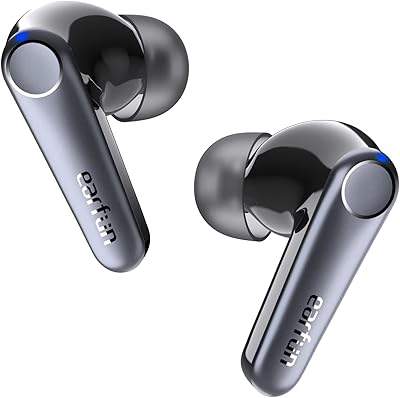
JLab JBuds Air Pro True Wireless Earbuds
85%
88%
Sound Quality
91%
Battery Life
84%
Comfort & Fit
87%
Build Quality
85%
Connectivity (Bluetooth)
More
MEN'S GROOMING BARBER PRO CADB-01 Air Duster
80%
93%
Portability & Form Factor
84%
Motor Performance
67%
Battery Life
78%
Noise Level
82%
Nozzle Versatility
More

FAQ

It depends on your device. If you have an iPhone 15 or newer, or any USB-C Android phone or tablet with DisplayPort output, you can plug in and start watching immediately using the included cable. If you have an older iPhone, a Nintendo Switch 2, or any device with an HDMI port, you will need to buy a compatible hub or adapter separately before anything will work — that cost is not included and catches some buyers off guard.

Yes, but not directly. The Switch 2 connection requires a compatible USB-C hub that supports DisplayPort output, which you will need to source separately. Once you have the right hub in the chain, the setup works, and the larger virtual screen is a meaningful upgrade for handheld gaming sessions.

Yes, and this is one of the more practical features the Air 3s Pro offers that competitors often skip entirely. The package includes a prescription lens sample that you take to a local optician, who fabricates and installs corrective lenses matched to your prescription. The fitting process takes some effort and adds cost, but it means you do not have to wear contacts or awkwardly stack these over your existing frames.

Most users report the first 60 to 90 minutes are comfortable with minimal pressure. Past that point, a noticeable number of reviewers mention nose bridge discomfort or temple pressure becoming distracting. For a typical movie or a few episodes that is fine, but if you are planning a three-hour gaming session, you may want to take breaks — the fit does not improve the longer you wear them.

It is a wearable display, not a mixed-reality or standalone AR headset. The glasses show a virtual screen in your field of view fed entirely from a connected device — there is no onboard processor, no spatial mapping, and no app ecosystem running locally on the glasses themselves. If you are expecting something like a Meta headset or a true AR overlay experience, this is a different product category entirely.

Yes, Mac connectivity is one of the cleaner use cases for these glasses. Any MacBook with a USB-C or Thunderbolt port that supports DisplayPort output will work with the included cable, effectively giving you a large secondary display wherever you are. It is a practical setup for remote workers who want an extra screen without packing a monitor.

Better than you would expect from glasses-mounted speakers. The quad-speaker system with spatial audio performs well enough for solo film watching in reasonably quiet environments, and Whisper Mode directs sound toward your ears rather than broadcasting it around the room. In loud environments like airports or cafes, the isolation is not sufficient and you would be better off pairing Bluetooth earphones alongside.

This is where these AR glasses have a genuine edge over most rivals. The 1,200 nits to-eye rating is meaningfully higher than competing wearable displays, and reviewers consistently noted that the image stayed readable and vibrant in bright hotel rooms, lit cabins, and indoor settings where other AR glasses wash out. Direct sunlight outdoors is still a challenge, but bright indoor environments are handled well.

Whisper Mode uses the spatial audio algorithms to focus sound delivery directly toward the wearer rather than projecting it outward. In quiet or moderately noisy environments it works reasonably well for personal listening without fully relying on headphones. In very quiet spaces, like a library or silent train car, some audio leakage is noticeable to people sitting immediately adjacent, so it is not a perfect substitute for headphones in those contexts.

Yes, because the glasses draw power over the USB-C connection from your source device rather than having an internal battery. This means your phone, tablet, or Steam Deck is powering the display on top of its normal processing load, which will accelerate battery drain compared to regular screen use. Simultaneous charging while using the glasses requires an additional adapter beyond what is in the box, so plan accordingly for longer sessions.

Where to Buy