

Overview

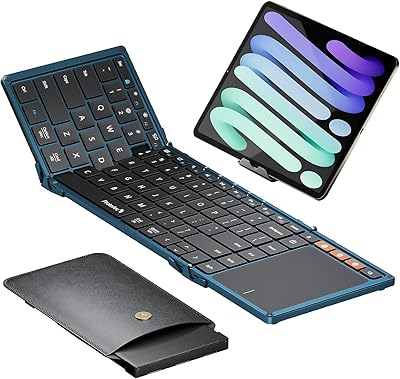
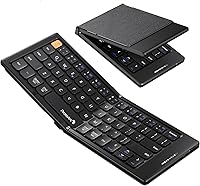
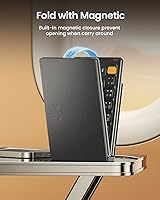
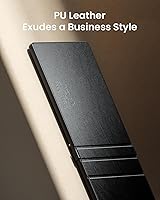
The ProtoArc XK04 Foldable Bluetooth Keyboard arrived in late 2024 and has quietly climbed to a top ranking in its category — not through flashy specs, but by solving a real traveler problem. Worth saying upfront: the keys are small (14mm wide), and if you have large hands or type quickly, there will be an adjustment period. What separates it from similar compact boards is the PU leather cover, which gives it a more polished feel than the bare plastic alternatives at this price tier. Think of it as a convenience tool built for quick tasks on the road, not a replacement for your desk setup.

Features & Benefits

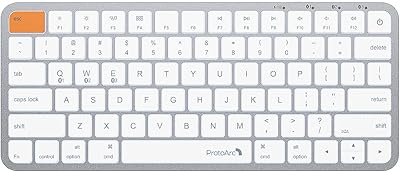
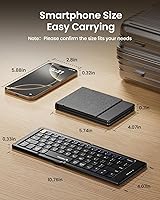
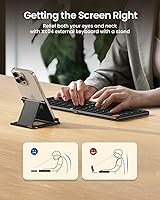
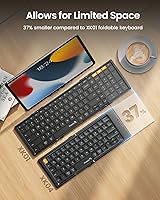
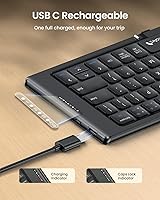
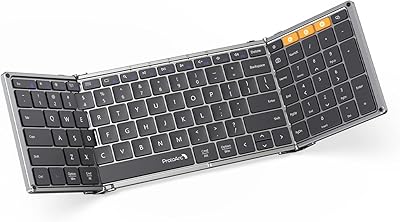
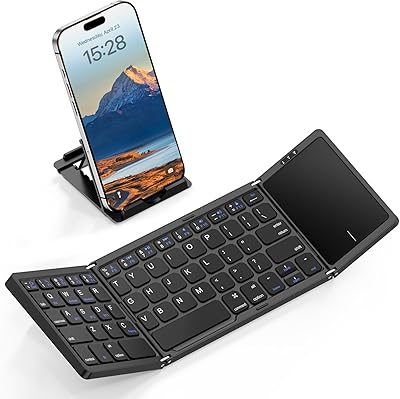
Fold it up and this foldable keyboard fits in a jacket pocket — 5.74 x 4.0 inches when closed, barely thicker than a passport. Open it, and you get a workable 10.75-inch typing surface paired with a three-channel Bluetooth system that lets you hop between phone, tablet, and laptop without re-pairing every time. The battery charges via USB-C in roughly two hours, and ProtoArc claims 150+ days of standby — plausible for light daily use, though your experience will vary. The bundled phone stand is a small but practical touch. Just budget some time to learn the layered shortcut system; accessing numbers and symbols through Fn and Shift combos is not intuitive at first.

Best For

This travel keyboard makes the most sense for people who type in short bursts: replying to emails at a coffee shop, jotting notes during a meeting, or editing a document on a tablet without carrying a full-size board. It works particularly well as a multi-device daily companion — if your day involves moving between a phone in the morning and a laptop by afternoon, the three Bluetooth channels genuinely earn their keep. That said, fast typists or anyone regularly writing longer pieces will find the compact layout frustrating before long. It is a purpose-built travel tool, not a workstation keyboard in disguise.

User Feedback

Across 700+ ratings, the XK04 holds a 4.4 out of 5 average — strong for this category. Buyers consistently praise the leather finish and how quickly it pairs with new devices. Battery performance is a recurring bright spot; people are genuinely surprised by how long it lasts between charges. The most consistent criticism focuses on keycap size: 14mm is noticeably small, and users with larger hands report a real learning curve that does not fully disappear. A number of reviewers also flag the symbol and number shortcut layers as confusing without the manual nearby. Initial pairing hiccups, reported by a smaller group, are almost always resolved by toggling the physical power switch.

Pros

  • Folds to passport size and weighs under 8 ounces — easy to carry in any bag.
  • Three Bluetooth channels let you switch between phone, tablet, and laptop without re-pairing.
  • PU leather cover looks and feels noticeably more premium than bare plastic competitors.
  • USB-C charging with a roughly two-hour fill time fits naturally into any modern cable routine.
  • Auto-sleep feature keeps the battery healthy during gaps between typing sessions.
  • Bundled phone stand is a genuinely useful addition for hands-free tablet or phone viewing while typing.
  • Pairs reliably with iOS, Android, and Windows devices without meaningful compatibility issues.
  • Typing noise is subdued enough for library or quiet cafe use without drawing attention.
  • Strong value for the feature set, especially the multi-device support at this price tier.

Cons

  • 14mm keycaps cause a real adjustment period for anyone with average or larger hands.
  • No dedicated number row makes spreadsheet and data entry work genuinely awkward.
  • The layered shortcut system for symbols and numbers is confusing without the manual nearby.
  • Deck flex under firm typing pressure is noticeable and undermines confidence during longer sessions.
  • No backlight makes the keyboard difficult to use in dim environments like planes or dark rooms.
  • The 150-plus day standby claim is manufacturer-reported and likely overstated for regular daily use.
  • Phone stand is single-angle and can feel unstable with larger phones or landscape-oriented tablets.
  • A minority of users experience initial pairing failures that require toggling the power switch to resolve.
  • PU leather edges show wear over time, reducing the premium feel the XK04 starts with.

Ratings

The ProtoArc XK04 Foldable Bluetooth Keyboard has been evaluated by our AI rating system after analyzing hundreds of verified global buyer reviews, with spam, incentivized, and bot-flagged submissions actively filtered out before scoring. The scores below reflect a transparent, unvarnished picture of where this travel keyboard genuinely delivers and where real users have run into friction. Both the strengths that keep buyers recommending it and the pain points that show up repeatedly in critical feedback are represented here.

Portability
94%
Buyers consistently single out the folded footprint as the XK04's strongest asset. At under 8 ounces and roughly passport-sized when closed, it disappears into a coat pocket or small travel pouch without adding noticeable weight to a bag. Frequent flyers and commuters cite it as the first keyboard they have actually kept with them daily.
A small number of users expected something even more compact based on product photos, finding the folded thickness slightly bulkier than anticipated. Those upgrading from ultra-thin sleeve-style keyboards occasionally felt the hinge added unwanted rigidity to packing.
Build Quality
71%
29%
The PU leather outer cover is the clear differentiator here, giving the XK04 a noticeably more premium look and feel compared to the bare plastic competitors at the same price point. Most users describe the hinge mechanism as sturdy enough for daily fold-unfold cycles without wobble during the first few months of use.
The ABS plastic body underneath the leather shows its budget-tier origins on closer inspection, with flex in the keyboard deck noticeable when typing firmly. Several longer-term owners report that the PU leather surface begins to show wear at the edges after extended use, which undercuts the initial premium impression.
Key Size & Layout Comfort
58%
42%
For users with smaller hands or those primarily typing on a phone anyway, the 14mm keycaps feel like a natural step up in comfort rather than a compromise. Short message writers and note-takers report adapting within a day or two, especially when the keyboard is propped on a flat surface.
This is the most cited frustration in the review pool. Anyone with average or larger hands will find the keycaps genuinely cramped, and the learning curve is real rather than brief. Touch typists accustomed to standard key spacing describe recurring mis-hits even after a week of regular use, which limits its appeal for productivity-heavy sessions.
Bluetooth Connectivity
83%
The three-channel Bluetooth setup is well-executed for this price tier, and switching between a phone, tablet, and laptop throughout the day works reliably once the initial pairing is done. Most buyers report fast reconnection when returning to a previously paired device, which matters a lot during a busy travel day.
A recurring minority complaint involves the keyboard failing to connect on first power-up, almost always fixed by toggling the physical power switch off and on. This quirk is harmless once known but is an avoidable friction point that a firmware update could likely resolve.
Battery Life
88%
Battery performance is one of the most positive surprises buyers report, particularly given the price. The two-hour charge time via USB-C is fast enough that topping up overnight feels effortless, and the auto-sleep feature genuinely stretches real-world use between charges for light daily users.
The manufacturer-reported 150-plus day standby figure is hard to verify independently and likely reflects very minimal usage patterns. Buyers who type for an hour or more daily report significantly shorter cycles, so treating that number as a best-case ceiling rather than a practical average is the safer expectation.
Shortcut & Function Key System
53%
47%
Once learned, the layered Fn, Shift, and Esc combo system does cover a reasonable range of functions for a keyboard this size, including media controls, brightness, and volume access. Users who invested time reading the manual report that the logic becomes manageable after a week of consistent use.
The learning curve here is steep and genuinely unintuitive without the manual in hand. Accessing numbers requires pressing Fn plus the top row, symbols require Shift combos, and the logic does not follow any standard keyboard convention most buyers are familiar with. Several reviewers describe this as their single biggest day-to-day frustration with the XK04.
Typing Experience
66%
34%
Key feedback is tactile enough for accurate short-burst typing, and the travel on each key, while shallow, is consistent across the board. Users typing messages, emails, or quick notes on a tablet found the experience noticeably more comfortable than an on-screen keyboard during short sessions.
The typing experience breaks down quickly during longer writing sessions, not just because of key size but also due to the slight deck flex and the absence of any wrist support. Sustained writing on a lap or uneven surface amplifies these issues, making the XK04 better suited for brief inputs than extended composition.
Multi-Device Switching
81%
19%
The dedicated channel buttons for three paired devices are straightforward to use in practice, and the switch itself is fast enough that users bouncing between a work laptop and personal phone during the day rarely wait more than a second or two for the connection to register.
Re-pairing from scratch when switching to a brand-new device occasionally requires a reset sequence that is not clearly documented on the keyboard itself. A few buyers reported briefly losing track of which channel was assigned to which device after some time without use.
Charging & Power
86%
USB-C charging is the right call for a keyboard launching in 2024, and buyers appreciate being able to use the same cable they already carry for phones and laptops. The included cable is functional, and the charging indicator light clearly signals when the battery is full.
The charging port placement on the unit means the cable hangs awkwardly if someone tries to use the keyboard while it charges, which is a minor but slightly annoying ergonomic oversight. The battery indicator only communicates full charge and low battery, with no granular level readout.
Included Accessories
77%
23%
The bundled phone stand is a practical inclusion that many buyers did not expect at this price point, and it works well enough for propping a phone at a comfortable viewing angle during typing sessions at a cafe or on a plane tray table. Having the USB-C cable included out of the box avoids the need for an extra purchase.
The phone stand is basic and single-angle, so taller phones or tablets in landscape orientation can feel unstable on it. The user manual, while necessary given the shortcut system complexity, is described by multiple buyers as difficult to follow due to small print and translation quality.
Compatibility
82%
18%
Pairing with iOS devices, Android smartphones, and Windows laptops works reliably across the board based on buyer feedback, with no meaningful device-specific exclusions reported. iPad users in particular rate compatibility highly, making this a practical companion for the growing segment of tablet-primary workers.
A small subset of users report that certain media shortcut keys behave inconsistently depending on the operating system, particularly on macOS where some Fn combos do not map as expected. This is a known trade-off with compact keyboards that use non-standard shortcut layers rather than true OS-level key mapping.
Noise Level
79%
21%
The key actuation noise is relatively subdued for a mechanical-feeling compact keyboard, and buyers using it in libraries, open-plan offices, or quiet cafes report no complaints from those around them. The typing sound is closer to a soft click than a loud clatter.
It is not silent, and in very quiet meeting rooms or during video calls, the keystrokes are audible enough to be noticed. Buyers who specifically need a near-silent input device for professional settings may want to verify this before committing.
Value for Money
84%
At its price tier, the XK04 offers a combination of features — leather cover, triple Bluetooth channels, USB-C charging, and a phone stand — that would cost more on most competing products. Buyers who understand what they are buying report high satisfaction relative to what they paid.
Buyers who expected full-size desktop typing quality at this price point tend to feel let down, though that expectation was arguably misaligned from the start. The value proposition depends heavily on using it as a supplemental travel tool rather than a primary keyboard.

Suitable for:

The ProtoArc XK04 Foldable Bluetooth Keyboard was clearly designed with a specific type of user in mind, and for that user it genuinely delivers. If you spend a lot of time in transit — airports, trains, coffee shops, hotel lobbies — and need a physical keyboard for quick email replies, short notes, or light document edits on your phone or tablet, this foldable keyboard earns its place in your bag without argument. It works especially well for people who juggle multiple devices throughout the day, since the three-channel Bluetooth switching means you can move from your iPad at breakfast to your laptop at a co-working space without re-pairing anything. Tablet-first workers and smartphone power users who find on-screen typing slow but do not want to carry a full-size keyboard will find the trade-offs here very manageable. Even for minimalist home setups where a keyboard needs to disappear into a drawer when not in use, the compact folded footprint is a genuine practical advantage.

Not suitable for:

Be honest with yourself before buying: the ProtoArc XK04 Foldable Bluetooth Keyboard is not the right tool if physical typing is a core part of your daily workflow. The 14mm keycaps are objectively small, and anyone who touch-types at speed or spends hours writing long-form content will hit a frustration wall that patience alone cannot fully clear. It also lacks a dedicated number row, which rules it out for anyone regularly working with spreadsheets, data entry, or financial documents. The shortcut system for accessing numbers and symbols through key combinations is genuinely convoluted, and there is no backlight, so low-light environments like a dim airplane cabin make it significantly harder to use. If you are comparing it to other foldable keyboards in a higher price bracket, you will also notice the ABS plastic construction more, particularly the flex in the keyboard deck under firm typing pressure.

Specifications

  • Folded Size: When closed, the keyboard measures 5.74 x 4.0 x 0.7 in, compact enough to fit in a jacket pocket or small travel pouch.
  • Unfolded Size: Opened for use, the typing surface extends to 10.75 x 4.0 in, providing a workable layout for short to medium typing sessions.
  • Weight: The keyboard body weighs approximately 7.8 oz, keeping the overall carry load minimal for daily travelers.
  • Keycap Size: Each keycap measures 0.55 in (14mm) across, which is notably smaller than a standard full-size keyboard and requires an adjustment period for most typists.
  • Connectivity: Connects via Bluetooth with three independent pairing channels, supporting simultaneous registration of up to three devices.
  • Wireless Range: Maintains a stable Bluetooth connection at distances of up to 33 ft (approximately 10 meters) under normal operating conditions.
  • Charging Port: Charges via a USB Type-C port, compatible with the same cables used by most modern smartphones and tablets.
  • Charge Time: A full charge from empty takes approximately 2 hours, with the onboard indicator light turning green when charging is complete.
  • Standby Time: ProtoArc rates standby time at 150-plus days per charge, though this reflects minimal-use conditions rather than daily active typing.
  • Auto-Sleep: An automatic sleep function activates during idle periods to conserve battery, requiring a keypress or power toggle to wake the keyboard.
  • Multi-Device Support: Supports pairing with up to 3 devices across channels 1, 2, and 3, switchable via dedicated keys on the keyboard.
  • Layout: Uses a compact layout with no dedicated number row; numerals are accessed via the Fn key combined with the top function row.
  • Cover Material: The outer cover is wrapped in PU leather, providing a textured surface that protects the keys when folded and distinguishes it from bare-plastic competitors.
  • Body Material: The keyboard chassis is constructed from ABS (Acrylonitrile Butadiene Styrene) plastic, which is lightweight but shows minor deck flex under firm typing pressure.
  • Backlight: There is no backlight on this keyboard, making it harder to use in low-light environments such as dim airplane cabins or dark rooms.
  • Included Items: Each unit ships with the foldable wireless keyboard, a phone stand, a USB-C charging cable, and a printed user manual.
  • Power Switch: A dedicated physical On/Off switch is located on the keyboard body and must be toggled to the On position before Bluetooth pairing will function.
  • Compatibility: Works with Bluetooth-enabled iPads, iPhones, Android smartphones, tablets, and laptops running iOS, Android, Windows, and macOS operating systems.

Related Reviews
ProtoArc XK01 Foldable Bluetooth Keyboard
89%
91%
Typing Comfort
96%
Portability
88%
Connectivity Reliability
85%
Build Quality
93%
Durability of Hinges
More
ProtoArc XK03 Ergonomic Foldable Bluetooth Keyboard
85%
94%
Portability
89%
Ergonomics
90%
Battery Life
84%
Ease of Use
86%
Build Quality
More
ProtoArc XK01 TP Foldable Bluetooth Keyboard with Touchpad
85%
94%
Portability
88%
Typing Comfort
78%
Trackpad Performance
91%
Battery Life
83%
Build Quality
More
ProtoArc XK01 Plus Backlit Foldable Bluetooth Keyboard
84%
93%
Portability
88%
Backlighting Functionality
85%
Ease of Use
90%
Battery Life
80%
Typing Comfort
More
ProtoArc K90-A Bluetooth Keyboard
85%
88%
Typing Experience
91%
Multi-device Connectivity
94%
Portability & Size
87%
Battery Life & Efficiency
85%
Backlighting Functionality
More
Geyes GK608 Foldable Bluetooth Keyboard
75%
93%
Portability
81%
Build Quality
58%
Typing Experience
77%
Dual Device Connectivity
84%
Value for Money
More
GEODMAER Foldable Bluetooth Keyboard
82%
93%
Portability
71%
Typing Experience
88%
Multi-Device Switching
63%
Touchpad Usability
91%
Battery Life
More
iClever BK18 Foldable Bluetooth Keyboard
84%
93%
Portability & Design
88%
Battery Life
90%
Multi-device Pairing
74%
Typing Comfort
92%
Compatibility
More
JPHTEK Foldable Bluetooth Keyboard with Touchpad
87%
92%
Portability & Design
87%
Typing Experience
90%
Battery Life
85%
Compatibility with Devices
88%
Ease of Setup
More
PuechAxe Bluetooth Foldable Keyboard B088BL
86%
94%
Portability
89%
Ergonomics
92%
Battery Life
85%
Build Quality
90%
Ease of Use
More

FAQ

No, and this is one of its more practical features. The XK04 has three dedicated Bluetooth channels, so you pair each device once to its own channel. After that, switching is just a button press — no re-pairing needed unless you reset the keyboard or swap in a new device.

You press the Fn key along with the top row of keys — those keys double as numbers 1 through 0. It takes a few days to build the muscle memory, but most short-session users adapt reasonably quickly. If you regularly need to enter numbers, budget a week to get comfortable with it.

This is the most common setup issue reported by buyers. The first thing to try is toggling the physical power switch off, waiting a couple of seconds, and switching it back on. Most users find this resolves the initial connection problem immediately. Also confirm you are on the correct Bluetooth channel for the device you are trying to pair.

Yes, it pairs with Macs via Bluetooth without any additional software. Most standard keys work as expected, though a handful of the Fn shortcut combos — particularly media control keys — may not map perfectly to macOS conventions. For basic typing it is fully functional on Mac.

It can, but with a real caveat. The keycaps are 14mm wide, which is noticeably smaller than a standard keyboard. If your hands are average-sized or larger, expect an adjustment period of at least a week before your accuracy improves. Some users never fully adapt, especially for fast typing, so it is worth trying one in person if possible before committing.

The manufacturer claims 150-plus days of standby, but that figure reflects very light use. In practice, if you type for 30 to 60 minutes a day, most users report several weeks of use between charges. It is a positive performer for this price range, but treat the maximum standby figure as a best-case ceiling rather than a daily-use expectation.

Technically yes, but the cable placement makes it awkward. The USB-C port is positioned such that the charging cable hangs off the side during use, which can get in the way depending on your setup. Most users just charge it overnight rather than during active use.

The hinge feels solid during regular daily fold-and-unfold cycles, and most users report no issues in the first several months of consistent use. Longer-term durability data is limited given the product only launched in late 2024, so it is harder to speak to how it holds up after a year or two of heavy travel.

Yes, the phone stand comes in the box. It works fine for most standard-sized phones, but for larger phones in certain orientations — particularly landscape mode — it can feel a little unstable. It is a welcome inclusion at this price point, but it is a basic design rather than a fully adjustable stand.

It is genuinely best suited for short bursts of typing — emails, quick notes, brief edits. The compact keycap size, lack of a number row, and slight keyboard flex all add up to make extended writing sessions noticeably less comfortable than a standard keyboard. If you plan to write for more than 15 to 20 minutes at a stretch on a regular basis, a larger compact keyboard would serve you better.