Overview

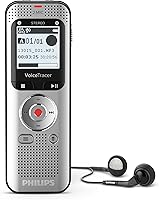
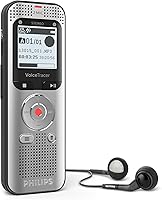
The Philips VoiceTracer DVT2050 is a mid-range stereo voice recorder that has quietly held its ground since its 2017 launch — and for good reason. At just 115 grams, it slips easily into a jacket pocket or bag without adding noticeable bulk. What separates it from budget recorders is the dual-microphone setup, which captures genuine stereo audio rather than flat, single-channel sound. The rechargeable lithium-ion battery is a small but meaningful advantage over competitors that drain AAA cells during long days. It is still actively sold and not discontinued, which says something about how consistently it fits its intended audience.
Features & Benefits

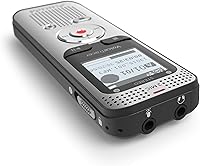
The two built-in stereo microphones record in both MP3 and PCM formats — the latter being lossless, which matters if you plan to edit or transcribe audio afterward. With 8GB of onboard storage and a microSD slot for expansion, running out of space mid-session is rarely a concern. File transfers via Micro USB are straightforward, with no proprietary software required. The 3.5mm headphone jack lets you monitor audio live, which is handy when recording in unfamiliar spaces. The segment LCD screen is small and utilitarian — it handles menu navigation without complaint, but don't expect anything polished. The built-in battery means no scrambling for spare cells on long recording days.

Best For

This voice recorder suits a fairly specific type of buyer. Students capturing lectures or multi-speaker seminars will appreciate how the stereo configuration picks up voices from different directions more naturally than a single mic could. Journalists and interviewers benefit from that same spatial separation during face-to-face sessions. Business professionals who want a dependable backup for meetings — rather than relying on a smartphone that might ring mid-recording — will find it a solid choice. Writers and creatives who need to capture ideas quickly will value its low-friction operation. Anyone tired of replacing disposable batteries will also find the built-in rechargeable cell a genuine practical step up.

User Feedback

People who own this Philips recorder tend to praise its audio clarity for voice capture and how little effort it takes to get started. The compact form factor earns consistent compliments. Where opinions split is around the display — the tiny LCD is functional, but users accustomed to modern devices find it underwhelming. The companion PC software is another sticking point, with some describing it as dated. Battery life generally gets positive marks, though a minority report shorter longevity after extended use. Microphone performance draws mixed reviews in loud environments — it handles quiet rooms well but can struggle with background noise compared to higher-priced Olympus or Sony alternatives. Most buyers still consider the overall trade-offs reasonable for the price tier.

Pros

  • Genuine stereo recording at this price tier is a meaningful step up from basic mono voice recorders.
  • The dual-microphone setup captures multi-speaker conversations with natural spatial separation.
  • At just 115 grams, this voice recorder fits comfortably in a coat pocket or small bag.
  • 8GB of built-in storage plus a microSD slot means running out of space mid-session is rarely a concern.
  • PCM lossless recording gives you clean audio files that hold up well through transcription or editing software.
  • The built-in rechargeable battery eliminates the ongoing cost and inconvenience of disposable cells.
  • Plug-and-play USB file access works on most computers without installing any additional drivers.
  • The 3.5mm headphone jack lets you monitor audio live, which is genuinely useful in unfamiliar rooms.
  • Simple operation means even non-technical users are capturing clean audio within minutes of unboxing.
  • Long market presence since 2017 with no discontinuation suggests consistent reliability over time.

Cons

  • The companion software feels outdated and offers little practical value beyond basic file browsing.
  • Background noise in real-world environments exposes clear limits in the microphone array.
  • The Micro USB port is an aging standard that feels out of step with current device ecosystems.
  • Menu navigation on the small segment LCD is genuinely awkward, especially in low-light conditions.
  • The non-removable battery offers no field-swap option when power runs out far from a charger.
  • Battery capacity degrades noticeably in units used heavily over two or more years.
  • Folder and file management requires manual effort; the recorder does not auto-organize sessions intelligently.
  • Switching between recording formats involves a buried, multi-step menu process that trips up some users.
  • The display feels significantly dated compared to even entry-level competing recorders released in recent years.
  • Closely spaced buttons can feel fiddly for users with larger hands during one-handed operation.

Ratings

The Philips VoiceTracer DVT2050 has been rated by our AI system after analyzing thousands of verified global buyer reviews, with spam, bot-generated, and incentivized feedback actively filtered out. Scores reflect honest consensus — where this voice recorder genuinely impresses and where real users have run into frustration. Both sides of the experience are represented transparently below.
Audio Clarity
81%
19%
In quiet to moderately controlled environments — a university lecture hall, a one-on-one interview, a small conference room — users consistently report that voice capture is crisp and easy to transcribe afterward. The stereo imaging adds a layer of spatial depth that mono recorders at this price simply cannot match.
Place this recorder in a busy café, near an air conditioning unit, or at a large group event, and background noise competes noticeably with the target voice. Users comparing it to higher-end Sony ICD or Olympus LS models note an audible gap in noise handling under demanding conditions.
Stereo Recording Performance
78%
22%
The dual-microphone configuration genuinely captures directional audio, which makes playback of multi-speaker conversations much more natural to follow. Journalists and interviewers in particular appreciate how the stereo field helps distinguish between two voices sitting across a table.
The stereo effect, while real, is narrower than some buyers expect based on the marketing language. In larger rooms or open spaces, the separation can feel modest, and a few users feel the microphone placement does not fully exploit the stereo potential of the hardware.
Build Quality & Durability
74%
26%
For a recorder in this price tier, the DVT2050 holds up reasonably well over time. The unit has been on the market since 2017, and long-term owners report that buttons remain responsive and the body shows minimal wear even after years of regular use in bags and pockets.
The plastic casing feels functional rather than premium — a legitimate trade-off at this price, but noticeable if you handle higher-end Olympus or Sony recorders for comparison. A few users mention the micro USB port feels slightly loose after extended use, though this is not a widespread complaint.
Portability & Form Factor
88%
At 115 grams and roughly the size of a slim TV remote, this Philips recorder genuinely disappears into a coat pocket or laptop bag. Students carrying it to daily lectures and professionals slipping it into a briefcase consistently cite the compact footprint as one of the unit's strongest practical advantages.
The slim profile, while great for portability, does mean the buttons are closely spaced and can feel fiddly for users with larger hands. Operating it one-handed while also taking notes is workable but not as instinctive as on slightly larger recorders with more generous button spacing.
Battery Life
76%
24%
The built-in lithium-ion battery comfortably handles a full day of intermittent recording for most users — covering back-to-back meetings or a full day of lectures without needing a charge. Not having to stock AAA batteries is a genuine quality-of-life improvement that regular users appreciate quickly.
A minority of buyers, particularly those who have owned the unit for two or more years, report noticeable battery degradation that shortens recording sessions. Since the battery is non-removable, there is no field-swap option, which is a real limitation for users on extended trips away from a USB power source.
Ease of Use
83%
Getting started with this voice recorder requires almost no learning curve. Plug it in, press record — the basic workflow is intuitive enough that most buyers are capturing usable audio within minutes of unboxing. Writers and professionals who just want a reliable capture tool, not a device to configure, find this simplicity genuinely refreshing.
Navigating beyond the basic recording functions — adjusting input sensitivity, changing formats, managing folders — requires working through a menu system that some users find less intuitive than expected. The small LCD does not help; reading sub-menu labels in dim lighting or a moving vehicle takes some patience.
Display & Interface
52%
48%
The segment LCD screen does its job in bright conditions, showing recording time, battery level, and basic status indicators clearly enough for functional use. Users who treat the display as purely utilitarian — glance and move on — rarely have strong complaints about it.
This is one of the most consistent criticisms across buyer reviews. The 1.1-inch segment display feels dated compared to even budget smartphones, and the limited character rendering makes navigating folders and settings genuinely awkward. Users coming from more modern recorders are often visibly disappointed by the interface experience.
Storage & Expandability
86%
8GB of built-in memory is genuinely practical for this use case — at standard MP3 quality, it translates to many hours of recordings before you need to offload anything. The addition of a microSD slot means heavy users like field journalists or researchers can extend capacity without compromise.
The recorder does not automatically manage or organize files by date or session in a way that makes bulk archiving easy. Users who record frequently find that managing the file structure manually, especially without robust companion software, becomes tedious over time.
File Transfer & PC Connectivity
71%
29%
Connecting the DVT2050 to a laptop via Micro USB mounts it as a standard storage device — no driver installation, no proprietary app required on most systems. For users who simply want to drag and drop audio files into a transcription tool or editing app, this works without friction.
The Micro USB standard itself is showing its age in a world that has largely moved to USB-C, and a small but vocal group of buyers flags this as an inconvenience. More meaningfully, the official Philips companion software receives persistent criticism for feeling outdated and offering limited value beyond basic file management.
Companion Software
44%
56%
For users with very simple needs — playing back recordings and labeling files — the bundled software covers the basics without requiring a third-party application. Those who only use it occasionally tend to be more forgiving about its limitations.
This is arguably the weakest link in the overall experience. Buyers regularly describe the companion software as clunky, visually dated, and prone to minor bugs on current operating systems. Many abandon it entirely in favor of simply accessing files through Windows Explorer or macOS Finder, which largely negates the software's purpose.
Microphone Noise Handling
61%
39%
In controlled, low-noise environments, the built-in mics do a creditable job of capturing clean voice audio that holds up well under transcription. For its target use cases — quiet offices, classrooms, and interview rooms — the noise floor is acceptable and consistent with buyer expectations at this price.
Background noise is a recurring complaint among buyers who tried to use this recorder in less controlled settings. Cafés, outdoor environments, and rooms with HVAC noise expose the limits of the built-in microphone array. Users who need reliable recordings in variable environments may find themselves reaching for an external microphone, which partly defeats the convenience argument.
Value for Money
79%
21%
For buyers whose primary need is dependable voice capture in predictable environments, the DVT2050 sits in a reasonable spot relative to its price. The combination of stereo mics, lossless PCM recording, and expandable storage is genuinely competitive against similarly priced Olympus WS-series and Sony ICD-series options.
The dated display, aging software, and noise handling limitations mean you are not getting a device that excels across the board. Buyers who push into noisier environments or need robust software support often feel they are leaving value on the table — or start eyeing a step-up model sooner than they anticipated.
Long-Term Reliability
73%
27%
The fact that this recorder has remained on the market without discontinuation since 2017 is a reasonable signal of consistent demand and acceptable reliability. Many owners report using their unit regularly for two to three years with no hardware failures beyond expected battery wear.
Longevity also means the hardware design has not been refreshed, and the device shows its age in areas like the port type and screen technology. A small segment of buyers report button wear or display issues after multi-year use, though these appear to be minority cases rather than systemic failures.
Recording Format Options
82%
18%
Offering both MP3 and uncompressed PCM recording in a recorder at this price is a meaningful practical advantage. Users who need to run recordings through transcription software or audio editing tools appreciate having the lossless option available without paying a significant premium.
The interface for switching between recording formats is buried in menus that feel unnecessarily layered, and a few users have accidentally recorded lengthy sessions in the wrong format before noticing. A clearer, more accessible format toggle would reduce this friction considerably.

Suitable for:

The Philips VoiceTracer DVT2050 is a strong fit for anyone whose recording needs center on clear voice capture in predictable, relatively quiet environments. Students who attend daily lectures or seminars will find the stereo microphone setup genuinely useful for capturing multi-directional classroom audio without having to fiddle with settings before class. Journalists and interviewers who conduct face-to-face sessions benefit from the spatial separation between voices, which makes transcription noticeably easier than with a single-mic recorder. Business professionals who want a dedicated, reliable backup for meetings — something that will not ring, buzz, or run out of power mid-session the way a smartphone might — will appreciate how straightforward this recorder is to operate. Writers and creatives who want to capture voice memos on the go will value the minimal setup friction and the fact that it works as a plain USB storage device when plugged into a computer. If you have previously been frustrated by constantly replacing AAA batteries in older recorders, the built-in rechargeable battery alone may be a compelling reason to consider this one.
Not suitable for:

The Philips VoiceTracer DVT2050 is not the right tool for every recording scenario, and being honest about that saves a lot of post-purchase disappointment. If your recordings regularly happen in noisy environments — busy public spaces, outdoor events, crowded restaurants, or rooms with persistent background HVAC noise — the built-in microphones will struggle, and you will likely find yourself unsatisfied with the results compared to pricier options from Olympus or Sony with active noise reduction. Users who need polished, modern software for organizing, annotating, or processing large recording libraries will find the companion application genuinely frustrating; it feels like it has not kept pace with current operating systems or workflows. Anyone who has moved fully to USB-C across their devices may find the Micro USB port an inconvenience worth factoring in. If you need long recording sessions in the field far from a power source, the non-removable battery — which degrades over time like any lithium cell — offers no fallback option the way a AA or AAA-powered recorder would. Finally, buyers expecting a premium, modern hardware experience in terms of display and interface responsiveness will likely feel this recorder shows its age.
Specifications

  • Brand: Manufactured by Philips Speech, a dedicated division of Philips focused on professional audio recording and dictation products.
  • Model Number: The exact model designation is DVT2050, part of the Philips VoiceTracer product line.
  • Dimensions: The unit measures 3.94″ deep by 1.18″ wide by 3.94″ tall, making it slim enough to sit comfortably in a shirt pocket.
  • Weight: The recorder weighs 115g (approximately 4.1 oz), which is light enough to carry all day without noticeable bulk.
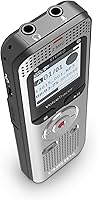
  • Microphones: Two built-in high-fidelity stereo microphones are positioned to capture spatial, directional audio across a recording environment.
  • Recording Formats: Supports both MP3 (compressed) and PCM (uncompressed lossless) recording formats, giving users flexibility between file size and audio fidelity.
  • Internal Memory: Comes with 8GB of built-in storage, which translates to many hours of voice recordings at standard MP3 quality settings.
  • Memory Expansion: A microSD card slot allows users to expand storage capacity beyond the built-in 8GB for heavy or extended recording use.
  • Battery Type: Powered by a built-in rechargeable lithium-ion (Li-Ion) polymer battery, which is included in the box and charged via Micro USB.
  • PC Connection: Connects to computers via Micro USB, and mounts as a standard USB storage device on most operating systems without requiring additional drivers.
  • Headphone Jack: A 3.5mm headphone output jack is included, enabling real-time audio monitoring during active recording sessions.
  • Display: Features a 1.1″ diagonal segment LCD screen that shows recording status, battery level, remaining time, and basic menu navigation.
  • Audio Output: Playback is supported directly on the device via the built-in speaker and the 3.5mm headphone port.
  • ASIN: The Amazon Standard Identification Number for this product is B075NHWD9F, useful for verifying the exact listing before purchase.
  • Availability: First made available in September 2017 and remains actively sold as of the current date, with no discontinuation announced by the manufacturer.

Related Reviews
Philips VoiceTracer DVT1160
81%
91%
Ease of Use
83%
Voice Activation (VOX)
67%
Audio Clarity
88%
Battery Life
79%
Build Quality & Portability
More
Philips DVT4110 Voicetracer Digital Voice Recorder
85%
88%
Sound Quality
91%
Portability
85%
Ease of Use
80%
Battery Life
79%
Storage Capacity
More
Philips SHP6000
Philips SHP6000
79%
88%
Sound Accuracy
83%
Comfort & Wearability
61%
Build Quality
91%
Value for Money
74%
Cable Design & Quality
More
Philips A4216 Wireless Headphones
88%
88%
Sound Quality
94%
Battery Life
82%
Comfort & Fit
91%
Portability & Storage
87%
Build Quality & Durability
More
Philips H5209 Wireless Headphones
83%
94%
Battery Life
88%
Sound Quality
85%
Comfort
91%
Call Clarity
87%
Bluetooth Connectivity
More
Philips TAH3209
Philips TAH3209
73%
74%
Sound Quality
91%
Battery Life
86%
Fast Charging
68%
Comfort & Fit
66%
Build Quality & Durability
More
Philips TAT1108 Wireless Earbuds
85%
88%
Sound Quality
91%
Call Clarity
86%
Battery Life
90%
Comfort & Fit
82%
Water Resistance
More
PHILIPS TAT3519 Wireless Earbuds
83%
88%
Sound Quality
92%
Battery Life
75%
Noise Cancellation
90%
Comfort and Fit
83%
Connectivity
More
Philips Hue Secure Wired Camera
84%
88%
Ease of Installation
94%
Integration with Hue Lighting
85%
Weatherproof Durability
87%
Video Quality
81%
Motion Detection Performance
More
Philips B6309 Soundbar with Wireless Subwoofer
83%
88%
Sound Quality
85%
Bass Performance
92%
Ease of Setup
68%
Connectivity
70%
App Control
More

FAQ

It works right away for basic recording — just charge it up, press record, and you are good to go. If you want to transfer files to your computer, you simply connect it via Micro USB and it shows up as a standard USB drive, so no software installation is required for that either. The companion Philips software is optional and mainly useful for more advanced file management.

Yes, the DVT2050 includes a microSD card slot for expandable storage. While the official documentation does not specify a hard upper limit, cards up to 32GB are broadly compatible with devices in this class. It is a practical feature for journalists or researchers who record for long stretches without access to a computer.

In quiet, controlled environments like a small meeting room or a classroom, this voice recorder generally captures cleaner, more focused audio than a typical smartphone microphone. The stereo setup also adds directional separation that phone recordings usually lack. That said, in noisier settings, the gap narrows, and a modern flagship phone with a good audio app can sometimes hold its own.

Unfortunately, no — the lithium-ion battery is built in and not user-replaceable. For most users, battery life remains adequate for several years of regular use, but if you record heavily every day, you may notice reduced capacity over time. If long-term field use without access to charging is important to you, a recorder that takes standard AAA batteries might be a better fit.

The recorder itself works on both Mac and Windows when used as a USB storage device — files are accessible through Finder on macOS just like any external drive. The official companion software from Philips is primarily Windows-oriented, so Mac users typically manage files directly without the app, which works fine for most needs.

MP3 is a compressed format that produces smaller files — practical for everyday voice memos and situations where storage space matters. PCM is uncompressed and lossless, meaning the audio file retains every detail captured by the microphones, which is valuable if you plan to edit the recording or run it through transcription software. For casual note-taking, MP3 is perfectly adequate; for interviews or anything you might process later, PCM is the stronger choice.

This is not officially confirmed in the product documentation, and attempting to record while charging via USB is generally not recommended on this class of device as it can introduce electrical interference into the audio signal. The practical approach most users follow is to charge the recorder overnight and use it unplugged during sessions.

Honestly, this is where the recorder shows its limitations. In environments with significant background noise — air conditioning, crowd chatter, street traffic — the built-in microphones will pick up a fair amount of that interference alongside the target voice. It handles quiet to moderately noisy rooms acceptably, but if noisy environments are your primary use case, you would be better served by a recorder with active noise reduction or by pairing this one with an external clip-on microphone.

Yes — the 3.5mm headphone jack lets you plug in standard earphones and listen to the audio as it is being captured. This is a genuinely useful feature when recording in an unfamiliar room, as it lets you catch any positioning or gain issues before you end up with an unusable file.

At a comparable price point, the Olympus WS-series and Sony ICD-series are the natural alternatives. The Olympus recorders are often praised for slightly more refined noise filtering and a more polished software ecosystem. Sony ICD models tend to have more modern hardware interfaces and better noise cut performance. Where this Philips recorder holds its own is in the stereo microphone configuration and the PCM format option, which are not always standard at this price on competing models. It comes down to priorities — pure audio processing versus recording format flexibility.