Overview

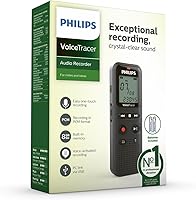
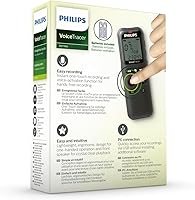
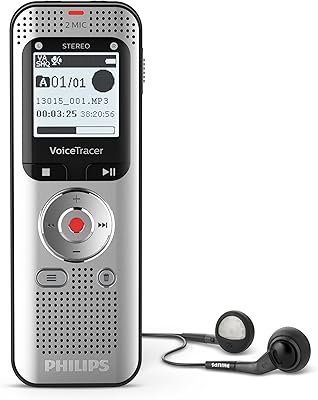
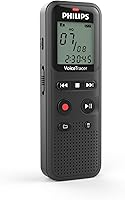
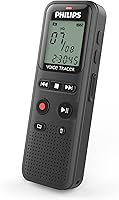
The Philips VoiceTracer DVT1160 is a no-frills digital voice recorder that does exactly what most note-takers actually need — capture thoughts quickly and retrieve them later without any fuss. Philips has been making dictation hardware for decades, and that experience shows in how thoughtfully this compact recorder is put together. It slips easily into a shirt pocket, weighs under three ounces, and runs on standard AAA batteries that are already included in the box. There is no proprietary charging cable to lose and no account to create. Getting audio onto your computer is simply a matter of plugging in via USB.
Features & Benefits

The standout feature for everyday use is voice-activation — the recorder only starts capturing when it detects sound, which means you get clean files without long stretches of silence to scrub through. Pair that with time-stamped recordings and navigating back to a specific moment becomes genuinely fast. The 8 GB of built-in memory is generous at this price point; you won't worry about storage running out mid-lecture or mid-meeting. Audio is saved in WAV or ADPCM format, keeping files compatible with most transcription tools. Playback through the 3.5mm headphone jack works well for private review, and since the device mounts like a USB drive, moving files to your computer takes seconds.

Best For

This pocket voice recorder suits students who want a dedicated device for capturing lectures without draining their phone battery. It is also a solid pick for professionals who prefer to dictate quick notes or reminders between meetings rather than type them out. Because there is no app to configure and no settings menu to decode, it works particularly well for older users or anyone who finds modern smartphones unnecessarily complicated for simple tasks. Writers capturing a thought mid-walk will appreciate the instant-on accessibility. That said, if you need high-fidelity audio for multi-speaker interviews or demanding transcription work, a more capable recorder would serve you better.

User Feedback

Buyers consistently praise the Philips DVT1160 for how easy it is to pick up and use straight out of the box — most report the voice-activation works reliably and the battery life is impressively long for a device this size. File transfers to both Windows and macOS are generally described as trouble-free. On the critical side, several users note that audio clarity falls short of what pricier recorders deliver, particularly in noisier environments. A handful of buyers mention that the buttons feel cramped and the display can be hard to read for those with aging eyesight. Most agree WAV output handles basic transcription adequately, though demanding voice-to-text workflows may push its limits.

Pros

  • Voice-activation trims dead air automatically, making recorded files faster and easier to review.
  • Time-stamped recordings let you jump to the exact moment you need without scrubbing.
  • Eight gigabytes of built-in storage handles months of regular note capture without file management stress.
  • Runs on standard AAA batteries — no cables to forget, no charging schedules to manage.
  • Ready to use out of the box with batteries included and zero software installation required.
  • Transfers files to Windows and macOS as a plain USB drive — no drivers, no apps, no accounts.
  • Slim enough to disappear into a shirt pocket or clip onto a notebook without adding noticeable bulk.
  • WAV format output is broadly compatible with transcription tools and standard media players.
  • Philips brand reputation in dictation hardware provides reassurance that core functionality is well-engineered.
  • At its price tier, the combination of voice activation, timestamps, and generous storage is genuinely hard to match.

Cons

  • No built-in speaker means you cannot share a quick playback without headphones or a separate device.
  • Microphone performance drops noticeably in larger rooms or noisy environments with multiple speakers.
  • Storage is fixed and non-expandable, which becomes a real constraint for high-volume or high-quality recording.
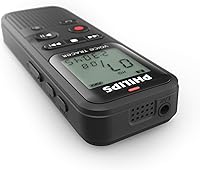
  • Buttons are physically small and cramped, frustrating users with larger hands or limited dexterity.
  • The display is dim and small — difficult to read outdoors or in low-light conditions.
  • No MP3 output forces an extra conversion step for users who want files on a smartphone or basic media player.
  • VOX sensitivity can misfire in environments with intermittent background noise, clipping the start of speech.
  • No rechargeable battery means ongoing AAA replacement costs for heavy daily users.
  • Occasional device recognition issues on newer macOS versions require replugging and interrupt fast transfer workflows.
  • Shallow menu system offers limited customization for users who want more control over recording settings.

Ratings

The Philips VoiceTracer DVT1160 has been put through its paces by buyers across dozens of global markets, and our AI-driven scoring system has analyzed thousands of verified purchase reviews — actively filtering out incentivized, duplicate, and bot-generated feedback — to produce the ratings below. Scores reflect real-world strengths and genuine frustrations in equal measure, so you get an honest picture of what this compact recorder actually delivers day to day.
Ease of Use
91%
Users repeatedly describe picking this up and recording within minutes of opening the box — no manual-reading required. The straightforward button layout means even less tech-savvy buyers, including older adults and first-time recorder owners, report feeling confident immediately.
A small but consistent group of buyers find the buttons physically cramped, particularly those with larger fingers or dexterity limitations. The display font is also flagged as too small in lower-light conditions, which creates frustration during evening note-taking sessions.
Voice Activation (VOX)
83%
The automatic voice-activation function earns genuine praise from students and professionals who let it run in the background during lectures or meetings. It reliably trims dead air from recordings, which makes reviewing files later noticeably faster and less tedious.
In environments with intermittent background noise — a fan, an air conditioner, or a busy cafe — the VOX sensitivity can misfire, either cutting off the first syllable of speech or triggering on ambient sound. Fine-tuning the threshold requires some trial and error.
Audio Clarity
67%
33%
For one-on-one dictation, personal memos, and close-range note capture, the built-in microphone handles the job adequately. Many buyers use the WAV output directly with standard transcription software and report acceptable accuracy for single-speaker recordings in quiet rooms.
Step into a larger room, a noisy classroom, or a group meeting and the limitations become apparent quickly. Voices at the far end of a table sound thin and muffled, and background noise competes visibly with the primary speaker — a known trade-off at this price tier.
Battery Life
88%
Running on two standard AAA batteries — included in the box — this pocket voice recorder consistently surprises buyers with how long it lasts between replacements. Many users report weeks of intermittent use on a single pair, making it a reliable travel and commute companion.
There is no rechargeable battery option or USB charging capability, so regular heavy users will accumulate AAA battery costs over time. A handful of buyers also report the battery indicator on the small display is not granular enough to give advance warning before power drops suddenly.
Build Quality & Portability
79%
21%
The slim, lightweight body — under three ounces and narrow enough to disappear into a breast pocket — is consistently praised by commuters and travelers. The overall feel is solid enough for daily carry without inspiring worry about minor drops or bag jostling.
The plastic construction feels noticeably budget-grade compared to mid-range recorders, and a subset of buyers reports the clip or casing showing wear faster than expected under regular use. It does not feel fragile, but it does feel like what it is: an entry-level device.
Memory & Storage
86%
Eight gigabytes of onboard storage is meaningfully generous for this class of recorder, and buyers who use it daily for personal memos or lecture capture report going extended periods — sometimes months — without needing to offload files. No SD card fumbling required.
The storage is fixed and non-expandable, which is a real constraint for power users who record hours of high-quality WAV audio regularly. There is no cloud sync or automatic backup, so if you forget to transfer files before storage fills up, you risk losing newer recordings.
File Transfer & Compatibility
82%
18%
Plugging into a Windows or macOS computer and having the device appear as a USB drive is exactly the friction-free experience most buyers want. No driver installation, no companion app, no account — files are there and ready to drag-and-drop or open directly.
A minority of users, particularly on newer macOS versions, report occasional recognition hiccups where the device is not immediately detected and requires replugging. Nothing catastrophic, but worth knowing if you rely on fast, consistent transfers as part of a daily workflow.
Audio Format Support
74%
26%
WAV output is a practical choice for buyers who feed recordings into transcription software or voice-to-text tools, since compatibility is virtually universal. ADPCM offers a lighter file size alternative for users who prioritize storage efficiency over maximum audio fidelity.
The lack of MP3 output is a minor but recurring complaint, as MP3 is what many buyers instinctively expect and what most media players handle most gracefully. Converting WAV files adds a step that feels unnecessary to users who just want to listen back on their phone.
Value for Money
89%
At its price point, the Philips DVT1160 offers a feature set — voice activation, timestamps, 8 GB storage, WAV recording — that would cost meaningfully more from most competitors. Buyers who simply need reliable daily note capture consistently rate it as money well spent.
Those who stretch their expectations toward professional-grade audio or advanced features like transcription integration will feel the value proposition weaken fast. The recorder is priced correctly for what it does, but it is easy to outgrow if your recording needs evolve.
Display & Navigation
61%
39%
The display provides the basic feedback most users need — recording status, remaining memory, and file count — without overwhelming a first-time user with menus. Navigation through recorded files is straightforward once you learn the button sequence.
The screen is notably small and dim, drawing repeated criticism from older buyers and anyone using the device outdoors or under fluorescent lighting. Menu depth is shallow, which limits customization, and there is no backlit option to help in genuinely dark environments.
Playback Experience
71%
29%
Private playback through the 3.5mm headphone jack works cleanly, and buyers who use earbuds to review notes on a commute find the audio output volume adequate. The ability to replay directly on the device without a computer is a practical plus for quick review.
There is no built-in speaker, which catches some buyers off guard — particularly those who expected to share a quick playback with a colleague. Skipping to a precise timestamp during playback is functional but not fast, and seeking through a long recording can feel tedious.
Setup & Out-of-Box Experience
93%
Batteries are included, and the recorder is ready to use almost immediately after unboxing — a detail that sounds minor but earns real appreciation from buyers who have dealt with devices requiring software installs or account creation before first use.
The included documentation is minimal, and while the device is simple, a few niche functions like adjusting VOX sensitivity or switching audio formats are not intuitively obvious. Users who skip the manual may spend time guessing their way through less common settings.
Size & Form Factor
87%
The slender profile makes this one of the more pocketable recorders in its class, and buyers who carry it clipped to a notebook or slipped into a jacket report forgetting it is there until they need it. It is discreet enough for use in quiet library or classroom settings.
The compact size is a genuine trade-off: smaller buttons and a tinier screen are direct consequences of the slim body. Users with larger hands or any degree of reduced fine-motor control consistently rate the physical ergonomics as the weakest aspect of the hardware.
Reliability & Consistency
81%
19%
Most long-term buyers describe the recorder as dependably consistent — it starts when you press record, saves the file, and transfers cleanly. For a device this simple, not failing at its core job is the primary reliability benchmark, and it clears that bar comfortably.
A small percentage of reviews mention occasional file corruption or missed recordings, typically linked to low-battery conditions or improper USB disconnection. These are not widespread issues, but they underline the importance of maintaining battery charge and safely ejecting the device.

Suitable for:

The Philips VoiceTracer DVT1160 is genuinely well-matched to anyone whose primary need is quick, reliable voice capture without any technical overhead. Students are the most natural fit — being able to drop this into a bag, hit record at the start of a lecture, and transfer files to a laptop afterward covers everything most people actually need from a recorder. Busy professionals who prefer dictating short reminders or action items rather than typing on a phone mid-meeting will also find it earns its keep fast. It is a particularly smart choice for older adults or less tech-savvy buyers who are put off by the app-dependency and subscription models that now surround most smartphone-based recording solutions. Writers who want to capture a spoken thought while walking, or journalists doing a quick one-on-one interview in a quiet setting, will find the voice-activation and timestamp features genuinely useful rather than gimmicky. If your core need is simple, dependable note capture from a trusted brand at a fair price, this compact recorder is difficult to argue against.
Not suitable for:

Buyers who need high-fidelity audio from multi-speaker environments should look elsewhere before committing to this pocket voice recorder. Group interviews, conference room meetings with participants spread around a large table, or any setting with meaningful ambient noise will expose the limits of the built-in microphone fairly quickly. Journalists or researchers whose recordings feed into professional transcription workflows — particularly automated voice-to-text systems that demand clean, well-separated audio — may find the WAV output adequate in ideal conditions but inconsistent enough in real-world situations to cause frustration. There is also no built-in speaker, which rules it out for anyone who wants to share a quick playback with a colleague on the spot. The small buttons and dim display make it a harder sell for users with dexterity challenges or poor near-vision who need tactile or visual clarity under pressure. And if you are the kind of power user who records hours of audio daily and expects expandable storage, wireless sync, or rechargeable power, the Philips VoiceTracer DVT1160 will feel like it runs out of road sooner than you would like.

Specifications

  • Brand: Manufactured by Philips, a company with decades of professional dictation and audio recording expertise.
  • Model: DVT1160, part of the VoiceTracer entry-level recorder lineup released in October 2021.
  • Dimensions: The recorder measures 0.79″ deep, 4.25″ tall, and 1.45″ wide — slim enough to fit in a shirt pocket.
  • Weight: Weighs 2.72 oz, making it light enough to carry all day without noticing it in a bag or pocket.
  • Built-in Memory: Equipped with 8 GB of onboard flash storage, with no memory card slot for expansion.
  • Audio Formats: Records in both WAV (uncompressed) and ADPCM formats, offering a choice between audio fidelity and file size efficiency.
  • Microphone: Features a single built-in microphone optimized for close-range dictation and personal note-taking in quiet environments.
  • Voice Activation: Includes a VOX (voice-activation) mode that automatically starts and pauses recording based on detected sound levels.
  • Timestamps: All recordings are automatically time-stamped, enabling fast navigation to specific moments without manual scrubbing.
  • Headphone Jack: Equipped with a 3.5mm headphone output for private audio playback directly on the device.
  • Connectivity: Connects to computers via USB 2.0 and mounts as a standard removable drive — no drivers or software required.
  • OS Compatibility: Fully compatible with both Windows and macOS operating systems for file transfer and playback.
  • Battery: Powered by 2 AAA batteries, which are included in the box at the time of purchase.
  • Battery Type: Uses standard replaceable AAA alkaline batteries — no built-in rechargeable cell or USB charging capability.
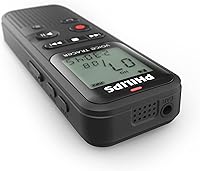
  • Speaker: Does not include a built-in speaker; audio playback requires connected headphones or earbuds via the 3.5mm jack.
  • Product Status: Actively sold and not discontinued by the manufacturer as of the most recent product listing update.
  • Interface Language: Device menus and documentation are available in English.
  • Package Contents: Includes the recorder unit, 2 AAA batteries, and basic documentation — no carrying pouch or USB cable is confirmed included.

Related Reviews

Philips VoiceTracer DVT2050
73%
81%
Audio Clarity
78%
Stereo Recording Performance
74%
Build Quality & Durability
88%
Portability & Form Factor
76%
Battery Life
More
Philips DVT4110 Voicetracer Digital Voice Recorder
85%
88%
Sound Quality
91%
Portability
85%
Ease of Use
80%
Battery Life
79%
Storage Capacity
More
Philips TAT1108 Wireless Earbuds
85%
88%
Sound Quality
91%
Call Clarity
86%
Battery Life
90%
Comfort & Fit
82%
Water Resistance
More
Philips H5209 Wireless Headphones
83%
94%
Battery Life
88%
Sound Quality
85%
Comfort
91%
Call Clarity
87%
Bluetooth Connectivity
More
Philips A4216 Wireless Headphones
88%
88%
Sound Quality
94%
Battery Life
82%
Comfort & Fit
91%
Portability & Storage
87%
Build Quality & Durability
More
PHILIPS TAT3519 Wireless Earbuds
83%
88%
Sound Quality
92%
Battery Life
75%
Noise Cancellation
90%
Comfort and Fit
83%
Connectivity
More
Philips SHP6000
Philips SHP6000
79%
88%
Sound Accuracy
83%
Comfort & Wearability
61%
Build Quality
91%
Value for Money
74%
Cable Design & Quality
More
Philips TAH3209
Philips TAH3209
73%
74%
Sound Quality
91%
Battery Life
86%
Fast Charging
68%
Comfort & Fit
66%
Build Quality & Durability
More
Philips Portable CD Player Boombox
84%
88%
Sound Quality
91%
Bass Performance
84%
Portability
92%
Value for Money
75%
Build Quality
More
Philips SHK2000 Kids On-Ear Headphones
77%
94%
Hearing Safety
96%
Ease of Use
81%
Comfort for Young Children
62%
Build & Durability
74%
Sound Quality
More

FAQ

It works immediately out of the box. The batteries are included, so you just insert them and press record. When you want to transfer files to your computer, plug it in via USB and it appears as a regular storage drive — no software installation, drivers, or account setup needed on either Windows or macOS.

No, the Philips VoiceTracer DVT1160 does not have a memory card slot. Storage is limited to the 8 GB built into the device. For most note-takers and students, 8 GB holds a very large number of recordings, but if you record long sessions in WAV format regularly, you will want to transfer and clear files periodically.
When VOX mode is active, the recorder listens continuously and only starts capturing audio when it detects sound above a set threshold. It pauses automatically during silence. This keeps your files clean and compact, though in environments with intermittent background noise — like a fan or air conditioning — it can occasionally clip the first word of a sentence or trigger on ambient sound.

No, there is no built-in speaker on this recorder. You will need to plug in a pair of earbuds or headphones via the 3.5mm jack for on-device playback. Alternatively, transfer the files to your computer or phone and listen there. This catches some buyers off guard, so it is worth knowing before purchasing.

It records in WAV and ADPCM formats. WAV is an uncompressed format that is universally compatible with transcription tools and voice-to-text software, so for single-speaker dictation in a quiet environment it generally works well. Multi-speaker recordings or audio captured in noisy settings may produce less accurate transcription results due to the microphone's range limitations.

Battery life is consistently praised by buyers, with many reporting several weeks of intermittent daily use from a single pair of AAA batteries. Exact life depends on how much you record and whether VOX mode is active, but it is generally strong for a device in this class. Keep a spare pair of AAAs on hand if you rely on it heavily, since there is no rechargeable option.

It can capture group conversations, but with meaningful limitations. The built-in microphone is optimized for close-range, single-speaker use, and performance drops noticeably when voices are spread around a table or when background noise is present. For critical multi-speaker recordings you need to accurately review later, a recorder with a higher-grade or directional microphone will serve you better.

Plug the recorder into your computer using a USB 2.0 cable and it mounts as a removable drive — the same way a USB flash drive works. From there, drag and drop your files to any folder you like. The process is the same on Windows and macOS, and most users report it working without any issues or driver prompts.

The overall operation is simple, and most buyers get comfortable with it quickly. That said, the physical buttons are small and sit close together, which can be frustrating for users with larger hands or reduced dexterity. The display is also compact and not backlit, so reading it in dim lighting or outdoors in bright sun takes some adjustment.

No, MP3 is not a supported recording format. Files are saved as WAV or ADPCM. If you want MP3 files — for example, to play them on a basic media player or share them easily — you will need to convert them after transferring to your computer using free audio conversion software. It is an extra step, but not a complicated one.