Overview

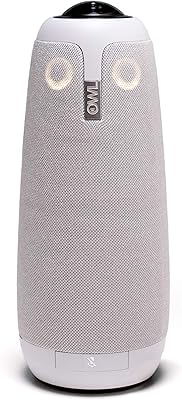
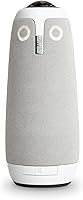
The Owl Labs Meeting Owl 3 is a cylindrical all-in-one conference camera that sits at the center of your meeting table and captures everyone in the room simultaneously. Unlike a traditional webcam mounted on a screen, this conference camera takes a fundamentally different approach — place it in the middle, plug it into a laptop via USB, and the room is covered. It pairs 360° video with a built-in omnidirectional microphone array, so both visuals and audio come from a single device. Optional Wi-Fi connectivity adds flexibility for rooms where cable management is a concern. For organizations navigating hybrid work, the Owl Labs device is designed to make the divide between in-room and remote participants feel noticeably smaller.
Features & Benefits

The standout capability here is the Owl Intelligence System, which automatically tracks and zooms in on whoever is speaking using both audio and visual cues — so remote participants always see the active speaker rather than a static wide shot of the room. The omnidirectional microphone picks up voices up to 18 feet away, which matters in a room where people sit far from the device. For larger spaces, the Owl Labs device supports an expandable ecosystem: you can pair two units, add a dedicated Expansion Mic, or combine it with the Owl Bar to extend coverage. It is certified for Microsoft Teams and works reliably with Zoom, Google Meet, and Webex.

Best For

This conference camera makes the most sense for mid-sized to large meeting rooms where a single screen-mounted webcam simply cannot capture everyone at the table. It is a strong fit for hybrid teams where remote colleagues need to feel like active participants rather than an afterthought on a wall-mounted screen. IT administrators will appreciate the ability to manage multiple units through The Nest, Owl Labs' centralized fleet management dashboard, which simplifies bulk configuration and firmware oversight across locations. Organizations already running Microsoft Teams or Zoom as their primary platform, and carrying the budget for a premium solution, will find this conference camera a genuinely capable investment.

User Feedback

Owners who have used this conference camera for several months consistently praise the accuracy of its speaker-tracking, noting it rarely misidentifies who is speaking even in lively group discussions. Setup earns high marks too — most users report being up and running in under ten minutes. That said, the price point is a recurring sticking point, and some buyers question whether the jump over cheaper alternatives is justified for smaller teams. Audio performance draws mixed comments: it holds up well in treated rooms but can struggle in open spaces with hard surfaces. A handful of users note the low-light video quality falls short of expectations, and the companion app has been described as occasionally inconsistent between firmware updates.

Pros

  • AI speaker tracking is genuinely accurate, shifting focus naturally between speakers without disruptive lag.
  • 360-degree room coverage means every seat at the table is visible to remote participants simultaneously.
  • Plug-and-play USB setup has most users running their first meeting within minutes of unboxing.
  • Microphone pickup reaches up to 18 feet, handling larger conference tables with surprising consistency.
  • Certified for Microsoft Teams and reliably compatible with Zoom, Google Meet, and Webex.
  • The expandable ecosystem lets organizations scale coverage for bigger rooms without replacing hardware.
  • IT admins can manage entire device fleets centrally through The Nest dashboard.
  • Remote participants consistently report feeling more engaged compared to fixed-camera meeting setups.
  • Long-term hardware reliability is strong, with most multi-month owners reporting consistent performance.
  • Firmware updates have improved tracking and stability meaningfully since the device launched.

Cons

  • The price point is a significant barrier for small teams or organizations with limited AV budgets.
  • Low-light video quality falls short of what buyers at this price tier might reasonably expect.
  • Wide-angle barrel distortion in the panoramic view can be distracting during full-room display mode.
  • The companion app has a history of inconsistent behavior across mobile platforms and OS versions.
  • Firmware updates occasionally reset user-configured settings without prior warning.
  • Audio quality deteriorates noticeably in rooms with hard surfaces, glass walls, or open-plan layouts.
  • Wi-Fi setup is considerably more frustrating than the straightforward USB connection path.
  • Expanding to larger rooms requires purchasing additional accessories that add meaningful cost.
  • A minority of long-term users report intermittent connectivity drops requiring a full power cycle.
  • The Nest dashboard lacks diagnostic depth that enterprise IT teams managing large deployments may need.

Ratings

The Owl Labs Meeting Owl 3 earns its reputation as one of the more capable 360-degree conference cameras on the market, but whether it justifies the premium ask depends heavily on your room size, team structure, and tolerance for occasional software friction. These scores were generated by our AI engine after analyzing verified global buyer reviews, with spam, bot activity, and incentivized feedback actively filtered out. Both the standout strengths and the genuine frustrations are reflected transparently below.

Speaker Tracking Accuracy
88%
Users consistently describe the AI-driven tracking as one of the most reliable they have tested in a conference setting. In multi-person discussions, the camera shifts focus naturally between speakers without the jarring lag that plagues cheaper alternatives, making remote participants feel genuinely part of the conversation rather than watching a static wide shot.
In louder rooms or sessions with frequent crosstalk, the system occasionally locks onto the wrong person for a few seconds before self-correcting. Some users in L-shaped or irregularly shaped rooms note that the tracking logic can get confused near room boundaries.
360° Video Coverage
84%
Placing the device at the center of the table and having every seat captured simultaneously is a practical advantage that traditional webcams simply cannot replicate. For rooms with eight or more people, this approach means no one is ever cut off from the frame, which remote participants consistently mention as a major improvement over prior setups.
The 360-degree field of view introduces noticeable barrel distortion at the edges of the room view, which some users find distracting during the panoramic display mode. Low-light performance also takes a visible hit compared to the 1080p quality achieved in well-lit environments.
Audio Quality
79%
21%
The omnidirectional microphone array handles a surprisingly large room with reasonable clarity, and users in standard-sized conference rooms report that even soft-spoken participants at the far end of the table come through clearly. The 18-foot pickup range is not marketing fiction — it holds up in real-world rectangular rooms.
Echoey spaces with hard floors and glass walls expose the limits of the onboard processing, with some remote participants describing a hollow or reverberant quality to the audio. Open-plan environments where ambient office noise bleeds into the room cause noticeable pickup inconsistency, and the Owl Labs device does not offer granular EQ controls to compensate.
Ease of Setup
93%
The plug-and-play USB experience lives up to the promise — the vast majority of users report being fully operational within minutes of unboxing, with no driver installation required on modern operating systems. IT teams particularly appreciate how straightforward first-time deployment is, even for non-technical staff setting up a room independently.
Wi-Fi configuration, while optional, introduces more complexity than the USB path and has been described by some users as finicky during initial pairing. Firmware updates have occasionally caused temporary connection drops, requiring a restart before the device behaves normally again.
Platform Compatibility
91%
The Microsoft Teams certification is well-implemented, and the Owl Labs device behaves like a first-class peripheral within the Teams ecosystem rather than a workaround. Zoom and Google Meet users report equally reliable performance, and switching between platforms requires no reconfiguration.
A small number of users on legacy enterprise IT environments have encountered driver conflicts or recognition issues, particularly on older Windows builds. Cisco Webex compatibility, while listed, draws fewer positive mentions and occasional reports of audio sync issues in longer calls.
Build Quality & Design
86%
The cylindrical form factor feels intentional and sturdy rather than like a cost-cut compromise. The matte grey finish holds up well to daily handling in shared conference rooms, and the device does not feel fragile when passed around or repositioned between meetings.
At just over 2.6 pounds, the device is heavier than it looks, which surprises some users who expected something more portable. The power cable connection point has drawn a few comments about feeling less robust than the rest of the unit after extended daily use.
Value for Money
61%
39%
For organizations running multiple large hybrid meetings daily, the quality improvement over mid-range alternatives is tangible enough that IT decision-makers tend to justify the outlay relatively quickly. Teams that previously struggled with engagement from remote participants often cite measurable improvements in meeting participation after switching.
The price point is the single most recurring concern in buyer reviews, and rightly so — solo purchasers and small teams frequently conclude that the per-meeting value does not match the cost. Several reviewers explicitly note they expected more from the video resolution and low-light performance given what the Owl Labs device costs.
Low-Light Performance
63%
37%
In conference rooms with consistent overhead lighting, the CMOS sensor delivers clean, well-exposed footage that holds up on larger screens without obvious noise or compression artifacts. Most corporate meeting environments fall within the lighting range where performance is acceptable.
Dim boardrooms, rooms with windows as the primary light source, or evening meetings with only ambient lighting expose a clear weakness — footage becomes grainy and the speaker-tracking loses some of its precision when contrast is low. Competing devices at similar price points perform more consistently in challenging lighting.
Ecosystem Expandability
83%
The ability to pair two units or add an Expansion Mic to cover a larger room is a genuine differentiator that most competitors cannot match. Organizations that have invested in the Owl Labs ecosystem describe the scalability as one of the primary reasons they standardize on this platform across multiple offices.
Expanding the setup adds cost quickly, and some users feel the base unit should cover more ground before requiring accessories. The Owl Bar pairing, while functional, has a learning curve in terms of positioning and configuration that not all IT teams find intuitive on first attempt.
Companion App & Firmware
67%
33%
The Owl Labs app allows basic configuration adjustments and provides access to firmware updates, which have meaningfully improved tracking behavior in several incremental releases. Users who stay current with updates generally report a more polished experience than those running older firmware.
The app itself has been described as inconsistent — some users encounter login issues, slow device recognition, or UI elements that do not respond as expected on certain mobile platforms. A handful of reviewers note that a firmware update introduced new bugs that were not present in previous versions.
IT Management (The Nest)
81%
19%
For IT administrators managing a fleet of devices across multiple locations, The Nest dashboard is a practical tool that centralizes registration, settings, and bulk update management in a way that genuinely reduces overhead. Larger enterprise teams consistently rate this capability as a meaningful advantage.
Smaller organizations with only one or two devices find The Nest adds more complexity than value, and some IT staff describe the initial account setup process as unnecessarily involved. Reporting and diagnostics within the dashboard are functional but lack the depth that enterprise IT teams familiar with more mature device management platforms might expect.
Remote Participant Experience
87%
The combination of speaker tracking, 360-degree room view, and reliable audio creates a notably better experience for people joining remotely compared to traditional fixed-angle setups. Remote participants in user reviews frequently describe feeling more engaged and less like passive observers during discussions.
When the room is crowded or multiple people speak simultaneously, the experience for remote participants can briefly become disorienting as the camera cycles between subjects. The panoramic room view, while useful for context, can appear distorted on smaller screens or lower-resolution displays on the remote side.
Portability & Portability Setup
71%
29%
The self-contained design means there is only one device to carry and one cable to connect, which makes moving the conference camera between rooms a realistic option for teams that share equipment across spaces. The relatively compact footprint leaves plenty of table space free.
The weight and the lack of a dedicated carry case in the standard package make frequent transport less convenient than the form factor implies. Users who move it between rooms daily mention that the cable management situation requires a bit of discipline to avoid wear on the connections over time.
Long-Term Reliability
78%
22%
Most users who have owned the Owl Labs device for six months or more report that hardware performance has remained consistent, with no significant degradation in camera or microphone quality. The software updates have generally maintained stability over extended use.
A minority of long-term users report intermittent connectivity drops that require a full power cycle to resolve, with no clear pattern to when they occur. A few reviewers note that after several firmware updates, certain settings they had configured reverted to defaults without warning.

Suitable for:

The Owl Labs Meeting Owl 3 was built for organizations that run genuine hybrid meetings — not occasional video calls, but structured sessions where remote participants need to feel like active contributors rather than distant observers on a wall-mounted screen. It performs best in mid-sized to large conference rooms where a single fixed-angle webcam simply cannot capture everyone seated at the table, making it a natural fit for teams of six or more who meet regularly across physical and remote locations. IT administrators managing multiple office locations will appreciate the centralized fleet management through The Nest, which removes the usual headache of individually configuring and updating devices across sites. Companies already standardized on Microsoft Teams or Zoom get the smoothest experience, since the device is fully certified and behaves as a native peripheral rather than a third-party workaround. Organizations with room to scale — whether by pairing two units or adding the Owl Bar for larger boardrooms — will find the ecosystem investment compounds in value over time.

Not suitable for:

Buyers who are primarily looking for a personal webcam upgrade or a solution for small two-to-three person huddle spaces will find this conference camera difficult to justify, both financially and functionally. The device is engineered for room-scale coverage, and that specialization means it is overbuilt for scenarios where a fraction of the budget would deliver comparable results. Teams operating in challenging acoustic environments — open-plan offices, rooms with concrete walls, or spaces without acoustic treatment — should be aware that the omnidirectional microphone pickup can struggle with echo and ambient noise in ways that a directional mic setup would handle more gracefully. Anyone expecting flagship low-light video performance at this price tier may come away disappointed, as several long-term users note the image quality degrades noticeably in dim or unevenly lit rooms. Buyers who prefer a set-and-forget experience with no software maintenance should also factor in that firmware updates and the companion app require occasional attention to keep the Owl Labs device running at its best.

Specifications

  • Video Resolution: Records and streams at 1080p HD, delivering clear footage of in-room participants across all supported conferencing platforms.
  • Field of View: Captures a full 360-degree horizontal view of the room simultaneously, eliminating blind spots that fixed-angle cameras cannot address.
  • Mic Pickup Range: The omnidirectional microphone array picks up voices from up to 18 feet (5.5m) away, covering most standard conference table lengths.
  • Speaker Tracking: The proprietary Owl Intelligence System uses combined audio and visual cues to automatically identify and zoom in on the active speaker in real time.
  • Photo Sensor: Uses a CMOS image sensor to capture video, balancing color accuracy and detail in well-lit conference environments.
  • Connectivity: Connects to a host computer via USB for plug-and-play operation, with optional Wi-Fi support for wireless deployment scenarios.
  • Audio Formats: Supports AAC, MP3, and PCM audio formats for broad compatibility with recording and conferencing software.
  • Storage: Includes a Micro SD card slot for local storage of meeting recordings or firmware assets.
  • Dimensions: Measures 4.37 x 4.37 x 10.72 inches, with a compact cylindrical footprint designed to sit unobtrusively at the center of a conference table.
  • Weight: Weighs 2.61 pounds, making it stable on a tabletop while remaining manageable enough to relocate between meeting rooms.
  • Platform Certification: Officially certified for Microsoft Teams, ensuring full compatibility and native device recognition within the Teams ecosystem.
  • Compatible Platforms: Works with Zoom, Google Meet, Cisco Webex, GoTo Meeting, and most other major web-based video conferencing platforms without additional configuration.
  • Ecosystem Support: Can be paired with a second Meeting Owl, an Expansion Mic, or an Owl Bar to extend audio and video coverage in larger rooms.
  • Fleet Management: IT administrators can register, configure, and update multiple devices remotely through The Nest, Owl Labs' centralized management dashboard.
  • Color: Available in Grey, with a matte finish designed to blend into standard corporate conference room environments.
  • Model Number: Carries the official model number MTW300-1000, useful for procurement, warranty registration, and IT asset tracking purposes.
  • Availability Date: First made available for purchase on June 6, 2022, with ongoing firmware updates released since launch to improve performance and stability.

Related Reviews

Owl Labs Meeting Owl Pro 360-Degree Smart Video Conference Camera
86%
93%
Video Quality
85%
Audio Performance
91%
Speaker Tracking Accuracy
97%
Ease of Setup
89%
Platform Compatibility
More
DS Labs Revita Matte Pomade, 3.3oz
83%
85%
Effectiveness for Thickening Hair
88%
Medium Hold & Flexibility
90%
Matte Finish & Texture
80%
Ease of Application
92%
Non-Greasy Formula
More
KCEVE USB 3.0 KVM Switch 3 Monitors 3 Computers
85%
94%
Ease of Setup
92%
Video Quality
88%
Build Quality
85%
Switching Speed
91%
Compatibility
More
DS Labs Revita Hair Styling Gel, 3.4oz
85%
86%
Hold & Volume Effectiveness
92%
Texture & Finish
89%
Suitability for Fine Hair
94%
Non-Sticky & Residue-Free
91%
Ingredient Quality & Safety
More
Lab Series All-In-One Multi-Action Exfoliating Face Wash 3.92oz
86%
88%
Effectiveness & Results
90%
Skin Compatibility
83%
Scent/Fragrance
85%
Exfoliation Performance
91%
Ease of Application
More
Lab Series All-In-One Defense Face Lotion SPF 35, 3.4oz
84%
90%
Sun Protection Effectiveness
88%
Moisturizing Effectiveness
91%
Absorption and Finish
89%
Texture and Feel
87%
Suitability for Sensitive Skin
More
ikuai 3.5″ USB 3.0 Hard Drive Enclosure
80%
93%
Ease of Setup
71%
Build Quality
62%
Cable Quality & Reliability
88%
Drive Compatibility
74%
Data Transfer Speed
More
Olaplex No. 3 Hair Perfector 3.5oz
86%
94%
Effectiveness at Repairing Hair
88%
Hair Texture Improvement
91%
Damage Reduction & Prevention
80%
Ease of Application
87%
Long-Term Results
More
Avantree Audikast 3 Bluetooth 5.3 Transmitter
84%
94%
Dual Headphone Connection
88%
Sound Quality
91%
Ease of Setup
85%
Stability/Connection Reliability
86%
Volume Boost for Optical
More
Jafra JF9 BLACK Cologne 3.3 fl. oz.
85%
89%
Scent Profile
84%
Longevity
87%
Versatility
78%
Fragrance Strength
92%
Packaging & Dispensing
More

FAQ

For the vast majority of users on modern Windows and macOS systems, it genuinely is plug-and-play — connect the USB cable, and the operating system recognizes the device automatically without any driver installation. The optional companion app is useful for firmware updates and fine-tuning settings, but it is not required to get into a meeting.

In normal meeting conditions where participants take turns speaking, the tracking is impressively accurate and transitions between speakers without obvious delay. The system does struggle when several people talk simultaneously — it can briefly lock onto the wrong person before self-correcting. For most structured meetings, this is a minor issue rather than a persistent one.

Yes, the Owl Labs Meeting Owl 3 is certified for Microsoft Teams, which means it appears as a recognized peripheral in the Teams device settings without any workarounds. Zoom recognition is equally straightforward — the device shows up as a standard camera and audio source. Switching between the two platforms requires no reconfiguration on the device itself.

This is a genuine limitation worth knowing about upfront. The Owl Labs device performs well in consistently lit rooms with overhead lighting, but in dim or unevenly lit environments — including rooms where window glare creates contrast issues — image quality drops noticeably. If your room has challenging lighting, it is worth factoring that in alongside the investment required.

A single unit is rated for rooms up to roughly 18 feet in microphone range, which covers many standard conference setups but may leave the far ends of a very long boardroom feeling underserved. For larger spaces, pairing two units or adding an Expansion Mic significantly extends both audio and video coverage, though that does add to the overall cost.

Remote participants see two views: a focused shot that automatically tracks the active speaker, and a panoramic 360-degree view of the full room available simultaneously. The wide panoramic view does have some barrel distortion typical of ultra-wide optics, which some people find distracting, but the speaker-focused view is a standard rectangular frame that looks normal on any screen.

That is exactly what The Nest dashboard is designed for. IT administrators can register all devices, push firmware updates in bulk, and manage default settings across every location from a single web interface. Teams managing larger fleets report it reduces per-device maintenance time considerably, though smaller organizations with only one or two units may find it more setup than they need.

Owl Labs releases firmware updates periodically, and many have meaningfully improved tracking accuracy and stability since launch. That said, some users have reported that updates occasionally reset custom settings or caused temporary connectivity issues that required a device restart. It is a good idea to update before a critical meeting rather than right before one.

For a typical rectangular conference room with standard acoustics and up to around 12 people, the built-in microphone array is generally sufficient on its own. In rooms with hard floors, glass walls, or significant ambient noise, the audio can sound hollow or echoey to remote participants. If your room has known acoustic challenges, pairing the Owl Labs device with a dedicated Expansion Mic is worth considering.

Most users never experience mid-meeting disconnections during normal USB operation, but a minority of long-term owners report intermittent drops that seem unrelated to any specific trigger. When it does happen, the fix is typically a full power cycle — unplug and reconnect — which takes about 30 seconds. It is worth having that troubleshooting step in the back of your mind if you are using it for high-stakes calls.