



Overview

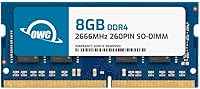
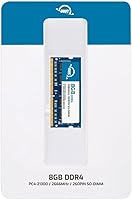
The OWC 8GB DDR4 2666MHz SODIMM Laptop RAM comes from Other World Computing, a brand that has spent decades helping Mac and PC owners squeeze more life out of their machines. This laptop RAM stick is not trying to be flashy — it is a dependable, no-fuss upgrade aimed at everyday users who need more breathing room in their system. At its mid-range price, you get a single 8GB module, which is worth noting if your laptop has two open slots and you are thinking about dual-channel performance. It also runs fine in slower DDR4 systems, so backward compatibility with 2400MHz and 2133MHz platforms is a genuine practical convenience.

Features & Benefits

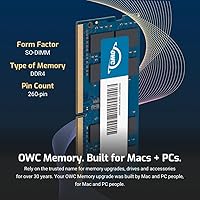
Running at 2666MHz with a CL19 latency rating, this OWC memory module hits a comfortable mark for everyday computing — faster tab switching, smoother multitasking, and less waiting when your system is juggling several apps at once. The 260-pin SO-DIMM form factor fits laptops, mini PCs, NAS drives, and POS terminals. Operating at just 1.2 volts, it draws less power than older DDR3 sticks, which matters in thin machines where heat and battery life are in constant tension. It meets JEDEC standards and is RoHS certified, meaning it was built to consistent benchmarks. OWC's lifetime limited warranty and Advanced Replacement Program mean a replacement ships before you even send the old one back.

Best For

This SO-DIMM upgrade suits laptop owners who are genuinely running out of headroom — the kind of person whose machine slows to a crawl with a browser, a spreadsheet, and a video call open at once. It is also well-suited for compact systems like mini PCs, NAS boxes, and point-of-sale terminals where size constraints limit your options. If your system runs DDR4 at 2400MHz or 2133MHz, this stick will still work at your board's native speed. One honest caveat: if your laptop has a second empty slot, consider buying two matched sticks, since dual-channel configurations deliver meaningfully better memory bandwidth than a single module ever will.

User Feedback

With a 4.4-star average across 58 reviews, this laptop RAM stick earns solid marks without setting any records. The review pool is modest, so treat it as a directional signal rather than a definitive verdict. That said, the recurring themes are encouraging: buyers consistently report the module is recognized by the BIOS immediately on first boot, installs without hassle, and runs stably day-to-day. The main gripe is not really a product flaw — users occasionally remind others to confirm their laptop has a free slot before ordering. No significant reports of premature failures, and those who contacted OWC support came away reasonably satisfied with the experience.

Pros

  • Installs without drama — buyers consistently report the system recognizes it on the very first boot.
  • OWC's lifetime limited warranty removes long-term risk from the equation entirely.
  • The Advanced Replacement Program means you are not left waiting with a dead stick before help arrives.
  • Low 1.2V operation keeps heat output minimal, which matters in tight laptop chassis.
  • Backward compatibility with slower DDR4 platforms makes this SO-DIMM upgrade broadly versatile.
  • JEDEC-standard compliance means consistent, predictable behavior across different host systems.
  • Free tech support from OWC is a real differentiator — not a throwaway perk most brands quietly omit.
  • Works across a surprisingly wide range of devices, from laptops to NAS boxes and POS terminals.
  • RoHS certification signals responsible manufacturing and materials safety.
  • OWC has decades of reputation in the memory upgrade market, which carries genuine weight.

Cons

  • A single 8GB stick leaves dual-channel bandwidth on the table if your laptop has two open slots.
  • 58 ratings is a thin review pool — directionally useful, but not a statistically robust sample.
  • Non-ECC design rules this out for any workload where memory error correction is a requirement.
  • Buyers must confirm their laptop has a free or accessible SO-DIMM slot before ordering — not always obvious.
  • No real benefit if your system is bottlenecked by storage or CPU rather than memory.
  • DDR4 2666MHz is a mature standard; users on newer DDR5 platforms will find this module irrelevant.
  • The 8GB capacity may feel limiting sooner than expected for users who run memory-hungry creative apps.
  • Some ultra-thin laptops with soldered RAM cannot use any SO-DIMM module, making compatibility checks essential before purchase.

Ratings

Our AI rating engine analyzed verified global user reviews for the OWC 8GB DDR4 2666MHz SODIMM Laptop RAM, actively filtering out incentivized, duplicate, and bot-generated submissions to surface what real buyers actually experienced. Scores reflect a transparent picture of both where this laptop RAM stick genuinely delivers and where it falls short for certain buyers.

Installation Ease
93%
Buyers across skill levels — from first-time DIYers to seasoned technicians — consistently report that this SO-DIMM upgrade slots in without drama. The module is recognized by the BIOS on the first boot in the vast majority of cases, requiring no manual configuration.
A small number of users encountered initial non-detection, typically traced back to incomplete seating of the module rather than a defect. Laptop disassembly difficulty varies significantly by manufacturer and is outside OWC's control.
System Compatibility
88%
JEDEC compliance and backward compatibility with 2400MHz and 2133MHz DDR4 systems give this laptop RAM stick an unusually wide hardware footprint. Users upgrading everything from aging business laptops to compact NAS boxes report consistent recognition without BIOS tweaks.
Buyers occasionally discover too late that their laptop uses soldered memory with no accessible SO-DIMM slot. The module is also DDR4-only, so anyone on an older DDR3 platform or a newer DDR5 system will find it entirely incompatible.
Performance Uplift
74%
26%
Users upgrading from 4GB report noticeable day-to-day improvements — faster tab loading, smoother multitasking, and less system freeze during video calls. For genuinely memory-starved machines, the difference is real and immediate.
Users expecting dramatic speed gains on systems already running 8GB in dual-channel are often underwhelmed. As a single-rank, single-stick module, it cannot match the memory bandwidth of a matched pair, which limits its ceiling in bandwidth-sensitive workloads.
Warranty & Support
91%
OWC's lifetime limited warranty and Advanced Replacement Program stand out clearly at this price tier — you get a replacement shipped before you return the faulty unit, which minimizes downtime. Buyers who contacted OWC support generally found the team knowledgeable and responsive.
A small cohort of users noted that the warranty claim process requires some back-and-forth communication, which can feel slow when you need your machine running urgently. International buyers have occasionally reported longer replacement shipping windows.
Value for Money
78%
22%
When the lifetime warranty, Advanced Replacement Program, and free tech support are factored in, this OWC memory module holds its own against cheaper alternatives. Buyers who have been burned by generic no-name sticks in the past tend to view the modest price premium as well-spent.
Purely on a cost-per-gigabyte basis, competing generic DDR4 SO-DIMMs can undercut this module. Budget-conscious buyers who do not place value on brand backing or warranty support may feel the premium is harder to justify for a commodity component.
Build Quality
84%
RoHS compliance and JEDEC-standard manufacturing indicate consistent quality control that goes beyond what many low-cost alternatives offer. Users report stable long-term operation with no reports of degradation or intermittent errors in day-to-day use.
With only 58 reviews available, long-term reliability data is thinner than for more established best-sellers. There is not yet enough field history to draw strong conclusions about failure rates over a multi-year ownership period.
Thermal Performance
86%
Operating at 1.2V, this SO-DIMM upgrade generates notably less heat than older DDR3 modules, which is meaningful in thin-and-light laptops where thermal headroom is perpetually tight. Users in warm climates or with fanless mini PCs report stable operation without thermal throttling.
RAM heat contribution is generally minor compared to the CPU and GPU in any system, so the low-voltage advantage, while real, is unlikely to be something most users will ever consciously notice in practice.
Dual-Channel Potential
51%
49%
For laptops with a single SO-DIMM slot, this module maximizes what that configuration can offer. It pairs cleanly with an identical stick when a second slot is available, making it a reasonable starting point for a phased upgrade approach.
As a single module, it inherently operates in single-channel mode unless paired, which leaves meaningful memory bandwidth unrealized. Users with two open slots would get better throughput by purchasing two matched 8GB sticks from the outset rather than starting with one.
Capacity Adequacy
69%
31%
For light users — email, document editing, casual browsing, and video streaming — 8GB remains workable in 2024 and avoids the cost of a larger module they may not need. Users replacing a 4GB stick report the jump to 8GB feels genuinely meaningful for everyday workflows.
Power users, developers, and anyone running virtual machines or memory-hungry creative applications are likely to find 8GB constraining within a short ownership period. OWC's own 16GB and 32GB variants of this module are better suited for those users.
BIOS Recognition
92%
One of the most frequently praised aspects across user reviews is how reliably the system detects this OWC memory module on the very first boot. There are almost no reports of persistent non-detection or repeated reseating needed to get the system to acknowledge the new RAM.
A handful of users reported a one-time POST warning screen after installation, which alarmed first-time upgraders even though it is a normal system notification confirming the hardware change — better pre-purchase documentation could prevent unnecessary panic.
Packaging & Presentation
77%
23%
The module arrives in compact, adequately protective retail packaging that keeps the stick safe during transit without excessive waste. Buyers generally report the product arriving in clean, undamaged condition.
Packaging is purely functional with no included installation guide in the box — OWC directs users to an online video instead, which requires internet access and may not suit buyers who prefer printed instructions or are upgrading in a location without easy connectivity.
Brand Reputation
89%
OWC carries genuine credibility built over decades of selling memory and storage upgrades directly to Mac and PC users. Buyers frequently cite familiarity with the brand as a deciding factor, particularly when choosing between this and an anonymous alternative at a similar price.
OWC's brand recognition is stronger in the Mac upgrade community than in the broader Windows laptop market, meaning some buyers are choosing it on faith rather than prior personal experience — a reasonable bet, but not a guarantee.
Backward Compatibility
87%
The module's automatic downclocking to match slower DDR4 host systems is seamless — users on 2133MHz and 2400MHz platforms confirm it operates at the board's native speed without any manual BIOS adjustment. This makes it a flexible choice for multi-system households.
Backward compatibility only extends within the DDR4 family. Users on DDR3 systems hoping to take advantage of this stick, or those on cutting-edge DDR5 platforms, will find it incompatible regardless of slot count.

Suitable for:

The OWC 8GB DDR4 2666MHz SODIMM Laptop RAM is a strong pick for everyday laptop users who are noticing their machine struggling under normal workloads — think sluggish tab switching, slow app launches, or choppy video calls when multiple programs are open. It is equally well-suited for anyone upgrading a mini PC, NAS device, or POS terminal that accepts a standard 260-pin SO-DIMM module. DIY-minded buyers who want a straightforward install without worrying about compatibility guesswork will appreciate that this stick meets JEDEC standards and works reliably across a wide range of DDR4 platforms, including slower 2400MHz and 2133MHz systems. Those who have been burned by no-name memory before will find real comfort in OWC's track record and the fact that a replacement unit ships to you before you have even returned the faulty one. If your priority is a dependable, brand-backed upgrade from a company with genuine technical support on offer, this module makes a lot of sense.

Not suitable for:

The OWC 8GB DDR4 2666MHz SODIMM Laptop RAM is not the right choice for users chasing maximum memory bandwidth, particularly those whose laptops support dual-channel operation and have two open slots — in that scenario, two matched 8GB sticks will outperform a single module in memory-intensive tasks like video editing or large spreadsheet processing. It is also not a fit for systems that require ECC memory, such as certain workstation-class laptops or servers where data integrity is critical, since this is a non-ECC module by design. Buyers hoping for DDR5 speeds or next-generation performance will need to look elsewhere, as this stick is firmly a DDR4 product for compatible platforms only. If your laptop's RAM is soldered to the motherboard — which is increasingly common in ultra-thin designs — this SO-DIMM upgrade simply will not apply to your machine at all. Finally, power users who need 16GB or 32GB in a single slot would be better served by OWC's higher-capacity variants rather than this 8GB configuration.

Specifications

  • Capacity: This module provides 8GB of DDR4 SDRAM, suitable for general productivity, web browsing, and light multitasking on compatible laptops and compact systems.
  • Memory Type: DDR4 SDRAM is the memory standard used, offering improved efficiency and speed over the previous DDR3 generation.
  • Speed: Rated at 2666MHz (PC4-21300), this module operates at a widely supported DDR4 speed tier that balances everyday performance with broad hardware compatibility.
  • CAS Latency: CL19 timing means the module introduces a latency of 19 clock cycles per memory access, which is standard and expected for DDR4 at this speed grade.
  • Form Factor: The 260-pin SO-DIMM form factor is the compact standard used in laptops, mini PCs, NAS enclosures, and point-of-sale systems.
  • Voltage: Operating at 1.2V, this module draws less power than older memory standards, which helps manage heat output in thermally constrained laptop chassis.
  • Rank: This is a 1RX8 single-rank module, meaning all memory chips are accessed in a single pass, which is typical for standard consumer SO-DIMMs at this capacity.
  • ECC Support: This module is Non-ECC, meaning it does not include error-correcting code functionality and is intended for consumer laptops and desktops rather than workstation or server applications.
  • Compatibility: Designed for use in laptops, notebooks, mini desktops, micro servers, NAS systems, and POS terminals that accept a standard 260-pin DDR4 SO-DIMM.
  • Backward Compatibility: This stick is backward compatible with DDR4 systems running at 2400MHz or 2133MHz, defaulting to the host system's supported speed automatically.
  • JEDEC Compliance: The module is fully compliant with JEDEC standard specifications, ensuring consistent and predictable behavior across a broad range of certified DDR4 platforms.
  • RoHS Certification: RoHS compliance confirms that the module was manufactured without hazardous substances, meeting European and international environmental safety standards.
  • Warranty: OWC provides a limited lifetime warranty backed by an Advanced Replacement Program, which ships a replacement unit to the customer before the defective module is returned.
  • Tech Support: Free technical support from OWC (Other World Computing) is included with purchase, accessible for installation guidance or compatibility questions.
  • Package Weight: The complete retail package weighs 3 ounces, reflecting the compact and lightweight nature of the SO-DIMM module and its minimal packaging.
  • Manufacturer: Designed and sold by OWC, also known as Other World Computing, a company with a long history specializing in memory and storage upgrades for Mac and PC systems.
  • Model Number: The official OWC model identifier for this module is OWC2S6D41R808GB, which can be used to verify compatibility or reference warranty claims.
  • Available Capacities: This product line is also available in 16GB and 32GB single-module configurations for users who need more headroom in systems with limited SO-DIMM slots.

Related Reviews
A-Tech 8GB DDR4 2666MHz SODIMM Laptop RAM
81%
93%
Value for Money
91%
Installation Ease
78%
Compatibility Range
82%
Performance Impact
84%
Build & Module Quality
More
Adamanta 32GB DDR4 2666MHz Laptop RAM
77%
71%
Compatibility
88%
Installation Ease
83%
Performance Gain
84%
Value for Money
91%
Single-Slot Capacity
More
NVTEK 8GB DDR4 2666MHz SODIMM Laptop Memory
77%
88%
Value for Money
76%
Compatibility
93%
Installation Ease
84%
Daily Task Performance
62%
Speed & Latency
More
KLEVV DDR4 8GB 3200MHz SODIMM Laptop RAM
82%
93%
System Stability
91%
Installation Ease
88%
Value for Money
74%
Performance Gain
82%
Compatibility
More
Crucial Basics 8GB DDR4 2666MHz SODIMM RAM
85%
88%
Performance Boost
93%
Ease of Installation
91%
Compatibility with Laptops
85%
Power Efficiency (Battery Life)
92%
Overall Value for Money
More
Samsung M471A1K43CB1-CTD 8GB DDR4 Laptop RAM
84%
93%
Installation Ease
88%
Compatibility
91%
Reliability & Stability
84%
Multitasking Performance
89%
Value for Money
More
A-Tech 8GB DDR4 2400MHz SODIMM Laptop RAM
82%
91%
Value for Money
68%
Compatibility
88%
Ease of Installation
78%
Performance Improvement
83%
Reliability & Longevity
More
A-Tech 8GB DDR4 2133MHz SODIMM Laptop RAM
81%
91%
Value for Money
67%
Compatibility Range
93%
Installation Experience
88%
System Stability
74%
Performance Uplift
More
A-Tech 8GB DDR4 3200 MHz SODIMM Laptop RAM
89%
91%
Performance Boost
95%
Ease of Installation
89%
Value for Money
88%
System Compatibility
90%
Speed and Responsiveness
More
NEMIX RAM 64GB (4x16GB) DDR4 2666MHz SODIMM Laptop Memory Kit
89%
94%
Performance for Multitasking
88%
Ease of Installation
91%
Gaming Performance
92%
Compatibility with Laptops
89%
Power Efficiency
More
NEMIX RAM 64GB DDR4 2666MHz SODIMM Kit
79%
91%
Installation Ease
74%
Compatibility Range
86%
Performance Uplift
83%
Build & Module Quality
88%
Stability & Reliability
More

FAQ

Yes, it will. This SO-DIMM upgrade is backward compatible with DDR4 systems running at 2400MHz and 2133MHz. Your laptop will simply run the module at its native supported speed rather than at 2666MHz, and the transition is automatic — no settings adjustment needed.

Absolutely, especially if you are currently running 4GB or a slower single stick. You will not get dual-channel benefits with one slot, but the raw capacity increase alone can make a meaningful difference for everyday tasks like web browsing, video calls, and running multiple apps simultaneously.

Dual-channel is a memory configuration where two matched sticks work in parallel, effectively doubling the memory bandwidth available to your processor. If your laptop has two SO-DIMM slots, using two identical 8GB modules will outperform a single 8GB stick in bandwidth-sensitive tasks like video editing or gaming. If you only have one slot, this is not something you need to think about.

The easiest way is to check your laptop's service manual or the manufacturer's support page for your specific model. You can also download a free tool like CPU-Z on Windows, which shows how many slots your system has and how many are currently occupied. On a Mac, the System Information app under About This Mac will show you the same.

It depends on the MacBook model. This module fits MacBook Pro and MacBook models that use upgradeable DDR4 SO-DIMM slots, which were available through certain Intel-era models. However, Apple's M1, M2, and M3 MacBooks have unified memory that is soldered to the chip and cannot be upgraded with any external module. Always verify your specific MacBook model before purchasing.

It is OWC's approach to warranty service that prioritizes getting you back up and running fast. Instead of making you ship back the defective module first and then waiting weeks for a replacement, OWC ships you a new unit right away. You return the faulty stick afterward. For anyone who depends on their laptop daily, that kind of turnaround is genuinely useful.

In most cases, no. This laptop RAM stick is designed to be plug-and-play. The vast majority of buyers report that their system recognized the module immediately on first boot without any manual BIOS changes. In rare cases, you may see a one-time message asking you to confirm the memory configuration change, but that is just a standard POST notification, not an error.

For light to moderate use — email, web browsing, document editing, video streaming — 8GB is still workable. If you regularly run resource-heavy applications, work with large files, or keep dozens of browser tabs open, 16GB will serve you better long-term. OWC does offer this same product line in 16GB and 32GB configurations if you want more headroom from the start.

ECC stands for Error-Correcting Code, a feature that detects and fixes single-bit memory errors in real time. It is used in servers and professional workstations where data integrity is critical. For everyday laptop use, Non-ECC is the standard and is completely appropriate — you would only need ECC if you were running a specialized workstation or server operating system that explicitly requires it.

For most laptops, it is a straightforward process that requires nothing more than a small Phillips screwdriver and a few minutes. You remove the bottom panel, locate the SO-DIMM slot, insert the module at an angle until it clicks into place, and replace the panel. OWC provides installation video guides as well. The trickiest part is often just removing the laptop's bottom cover, which varies by manufacturer.