Overview

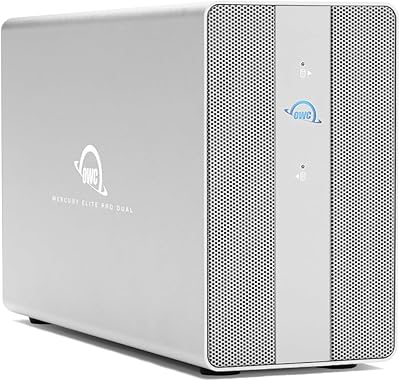
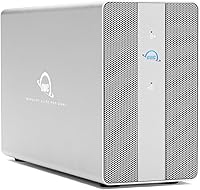
The OWC Mercury Elite Pro Dual 32TB RAID Enclosure is OWC's answer to a specific professional need: serious bulk storage that doesn't require a rack or a network closet. OWC has long been a trusted name in Mac-compatible storage, and this dual-bay enclosure reflects that pedigree. It supports both Thunderbolt 3 and USB-C connections, which is genuinely useful when moving between machines or setups. The aluminum chassis and built-in cooling fan signal professional intent — this isn't a consumer external drive dressed up in a nice box. Expect a learning curve if RAID configuration is new to you.
Features & Benefits

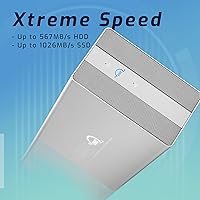
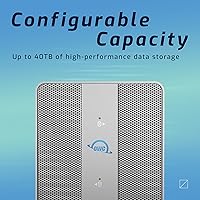
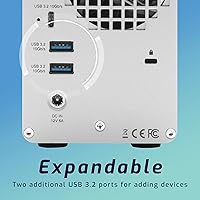
The hardware RAID controller is one of this unit's most practical differentiators. Rather than relying on software RAID — which ties performance to your CPU and OS — the OWC Mercury Elite Pro Dual handles RAID logic on-board, switchable between RAID 0, RAID 1, Span, and JBOD via a physical dial. In RAID 0, real-world speeds reach up to 974 MB/s, holding up well for multi-stream video editing. The integrated three-port USB hub (one USB-C, two USB-A, all at 10Gb/s) is a handy bonus for keeping a card reader or camera tethered, though it won't replace a full desktop dock. Both 2.5-inch and 3.5-inch SATA drives are supported, adding useful flexibility for future upgrades.

Best For

This Thunderbolt 3 storage unit fits best on the desk of someone doing real production work — video editors cutting 4K or 6K timelines, photographers managing large RAW archives, or audio engineers who need fast, reliable scratch storage nearby. It's also a sensible choice for anyone who wants hardware RAID redundancy without the overhead of running a full NAS. The integrated hub trims cable count, which matters in tight studio setups. That said, this isn't the right pick for casual backups or light home use — the configuration options assume some baseline familiarity with RAID concepts, and buyers expecting a simple plug-in drive may find the setup more involved than anticipated.

User Feedback

Across roughly 90 verified ratings, this dual-bay RAID enclosure holds a 4.0 out of 5 — a score that reflects genuine appreciation with some honest reservations attached. Build quality and speed earn consistent praise; buyers report that real-world throughput aligns closely with OWC's published numbers, which isn't always the case in this category. The hub convenience gets noted often as a welcome extra. On the other side, some users flag fan noise under load as noticeable in quiet environments, and a handful raise questions about value compared to NAS alternatives at similar price points. Long-term reliability feedback skews positive, though the relatively modest review count limits how definitive those conclusions can be.

Pros

  • Hardware RAID controller requires no software or drivers — RAID mode changes are made with a physical switch.
  • Real-world speeds reach up to 974 MB/s in RAID 0, holding up well for demanding 4K and 6K video workflows.
  • The all-aluminum chassis feels genuinely overbuilt and has shown strong durability across several years of user ownership.
  • Thunderbolt 3 and USB-C support in one unit covers a wide range of modern Mac and PC workstations without adapters.
  • Supports both 2.5-inch and 3.5-inch SATA drives, making future upgrades to SSDs straightforward and cost-effective.
  • The integrated three-port USB hub trims desk cable clutter without requiring a separate hub device.
  • Ships pre-loaded with two 16TB HDDs and is ready to format and use out of the box in your chosen RAID mode.
  • RAID 1 mode provides genuine on-device data redundancy — useful for anyone consolidating backup and working storage.
  • Long-term owners report consistent reliability with no major failure patterns emerging since its 2020 launch.

Cons

  • Fan noise ramps up audibly under sustained heavy load, which can be distracting in quiet recording or mixing environments.
  • Switching RAID modes requires a full reformat — there is no migration path, and data loss is immediate if you forget.
  • No companion app means there is no easy way to monitor drive health, temperatures, or RAID status at a glance.
  • The USB hub lacks video output and meaningful power delivery, so it cannot replace a proper desktop dock.
  • Only SATA drives are supported — NVMe users looking to repurpose existing M.2 drives will need to look elsewhere.
  • At nearly 9 pounds, repositioning the unit regularly is awkward and portability is essentially not an option.
  • In-box documentation assumes baseline RAID knowledge, leaving less experienced buyers without enough guidance.
  • No Thunderbolt 4 or USB4 support limits the long-term connectivity lifespan as newer host machines roll out.
  • The review pool of roughly 90 ratings is modest, making it harder to draw firm conclusions about edge-case reliability.

Ratings

The OWC Mercury Elite Pro Dual 32TB RAID Enclosure has been scored by our AI system after analyzing verified buyer reviews from global marketplaces, with spam, incentivized, and bot-generated feedback actively filtered out. Scores reflect the honest consensus of real working professionals — video editors, photographers, and studio operators — who rely on this unit daily. Both the standout strengths and the friction points that cost it marks are transparently captured below.
Transfer Speed
91%
In RAID 0, sustained real-world throughput consistently approaches the advertised 974 MB/s ceiling, which is meaningful when you are pulling multi-gigabyte video assets or writing continuous camera dumps. Reviewers doing 4K and even 6K timeline work report noticeably shorter wait times compared to previous single-drive setups.
Speeds drop substantially when switching to RAID 1 for redundancy, which is expected but still catches some buyers off guard. Performance over USB-C without a Thunderbolt 3 host also lags behind the headline figures by a meaningful margin.
Build Quality
88%
The full aluminum chassis feels intentionally overbuilt in the best possible way — there is no flex, no plastic creaking, and the unit sits firmly on a desk without vibrating noticeably under load. Several long-term owners who have used it since 2020 or 2021 report zero signs of structural wear.
At nearly 9 pounds, portability is essentially off the table — this is a sit-on-the-desk-and-stay-there unit. A few users noted that the drive bay doors, while solid, require a firm push to seat correctly and feel slightly misaligned out of the box.
RAID Configuration Flexibility
84%
Having a hardware RAID controller with a physical mode switch is a real advantage over software-dependent solutions. You can toggle between RAID 0, RAID 1, Span, and JBOD without installing drivers or opening a configuration utility, which matters when you are reformatting or repurposing the unit for a different workflow.
The flip side is that mode changes require reformatting the drives, and there is no on-screen guidance — buyers unfamiliar with RAID concepts have reported accidentally wiping data by switching modes without understanding the consequence. A clearer warning label or included quick-start card would reduce this risk.
Connectivity & Compatibility
86%
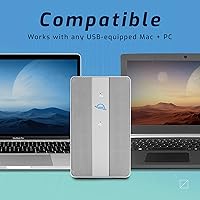
Thunderbolt 3 and USB-C support in one enclosure means this Thunderbolt 3 storage unit works across a wide range of modern Macs, Windows Thunderbolt laptops, and USB-C workstations without adapters. That dual-interface design makes it practical for studios running mixed hardware.
There is no Thunderbolt 4 or USB4 support, which is increasingly relevant as newer Macs and PCs ship with those standards. Buyers planning for a multi-year investment should factor in whether current connectivity will still fit their setup in a few upgrade cycles.
USB Hub Utility
74%
26%
Having three 10Gb/s USB ports built in — one Type-C and two Type-A — is a practical bonus for keeping a card reader, camera tether, or portable SSD attached without adding another device to the desk. It handles everyday peripherals without any noticeable speed bottleneck.
It should not be mistaken for a full desktop dock. There is no video output passthrough, no Ethernet, and no charging power delivery to speak of. Users who were hoping to consolidate their hub situation entirely will still need a separate solution.
Noise Level
69%
31%
At idle and during light file transfers, the 30dB fan is genuinely unobtrusive — usable in a home office or recording space without becoming a distraction in the background. The aluminum chassis does meaningful passive heat work before the fan ramps up.
Under sustained heavy load — prolonged RAID 0 transfers, for instance — the fan audibly increases in a way that some studio users find distracting. In a quiet mixing or recording environment, that ramp-up is more noticeable than the spec sheet implies.
Drive Compatibility
82%
18%
Supporting both 2.5-inch and 3.5-inch SATA drives, in SSD or HDD form, gives this dual-bay RAID enclosure real long-term value. When the included HDDs eventually age out, swapping in a pair of SSDs for a speed-focused RAID 0 setup is straightforward.
Only SATA drives are supported — no NVMe. For users who already own M.2 NVMe drives and were hoping to repurpose them here, that is a firm limitation. It also means maximum speed is capped by SATA III bandwidth regardless of how fast your Thunderbolt connection is.
Thermal Management
78%
22%
The combination of an aluminum body and active fan cooling keeps drive temperatures in a safe range even during extended heavy use. Buyers running 8-to-10 hour editing days report that the unit never feels alarmingly hot to the touch.
In warmer ambient environments — a poorly ventilated closet setup or a summer studio without air conditioning — thermal performance is less consistent, with a few users noting the fan running persistently at higher speeds than expected.
Setup & Initial Configuration
63%
37%
The unit ships pre-loaded with drives and can be formatted and operational within 15 minutes for anyone already familiar with RAID concepts. OWC includes enough documentation to get a confident user up and running without needing external resources.
For buyers without prior RAID experience, the setup process has a genuine learning curve. Several reviewers expected a consumer-style plug-and-use experience and were caught off guard by the need to choose and understand a RAID mode before formatting. Better in-box guidance would help significantly.
Value for Money
61%
39%
For a professional who needs hardware RAID, Thunderbolt 3 throughput, and a reliable brand with a long Mac compatibility track record, the OWC Mercury Elite Pro Dual delivers a coherent, well-engineered package that justifies its position in the market.
At this price tier, buyers are legitimately comparing this against NAS devices that offer remote access, more bays, and greater expandability at similar or lower cost. The value proposition depends heavily on whether you specifically need a direct-attached hardware RAID solution — if you do not, there are more flexible ways to spend this budget.
Long-term Reliability
79%
21%
Units purchased in 2020 and 2021 are still appearing in reviews with no major failure reports, which is a reasonable signal for a product now several years into its market life. OWC's reputation for standing behind its hardware also gives buyers some confidence.
The review pool of roughly 90 ratings is relatively modest for drawing strong reliability conclusions, and HDD-based RAID systems do carry inherent mechanical risk over time. Users running mission-critical archives should still maintain an off-device backup regardless of RAID mode selected.
Form Factor & Footprint
76%
24%
At 9 x 3 x 6 inches, this dual-bay RAID enclosure takes up a manageable amount of desk real estate relative to what it holds. The low-profile horizontal design tucks under a monitor or alongside a desktop tower without dominating the workspace.
It is not light — nearly 9 pounds means repositioning it regularly is mildly awkward, and the footprint, while compact for a dual-bay RAID unit, is still noticeably larger than a single portable drive. This is a stationary piece of kit, full stop.
Software & Driver Requirements
83%
Because RAID is handled entirely in hardware, there are no proprietary drivers or management utilities required for basic operation. It mounts like a standard volume once formatted, which keeps the software overhead minimal and reduces compatibility headaches across OS updates.
There is no companion app for monitoring drive health, RAID status, or fan behavior, which more advanced users might expect at this price point. Diagnosing a potential issue means relying on OS-level disk utilities rather than any dedicated OWC tooling.
Mac Ecosystem Integration
87%
The OWC Mercury Elite Pro Dual has been designed with Mac workflows in mind from the start — it formats and operates cleanly under macOS, plays well with Time Machine in JBOD mode, and pairs naturally with Thunderbolt 3 Mac Pro and MacBook Pro setups that demand sustained throughput.
Windows compatibility is functional but clearly secondary. A handful of PC users report minor hiccups during initial setup and note that the documentation leans heavily toward macOS workflows, which can slow down a Windows-first user trying to configure things from scratch.

Suitable for:

The OWC Mercury Elite Pro Dual 32TB RAID Enclosure is built for working creative professionals who treat storage as a critical part of their workflow, not an afterthought. Video editors cutting 4K or 6K timelines will benefit most — the hardware RAID 0 configuration delivers sustained throughput that keeps up with multi-stream media without taxing the host CPU. Photographers managing sprawling RAW archives and audio engineers who need fast, always-accessible scratch drives are equally well-served. It also makes strong sense for anyone running a compact Mac studio setup who wants to reduce cable clutter, since the built-in USB hub handles a card reader or camera tether without adding another box to the desk. If you specifically need direct-attached hardware RAID — reliable, fast, and free of software dependencies — this Thunderbolt 3 storage unit hits that brief cleanly.
Not suitable for:

The OWC Mercury Elite Pro Dual 32TB RAID Enclosure is genuinely the wrong choice for buyers expecting a simple plug-and-use experience. If you have never configured a RAID array before and are not willing to spend time understanding the difference between RAID 0, RAID 1, and JBOD before formatting, there is a real risk of accidental data loss when switching modes. Casual home users looking for a straightforward backup drive will find the configuration overhead unnecessary and the price hard to justify. Buyers who need remote access to their files, multiple drive bays for future expansion, or network-attached storage features should look at NAS solutions instead — this dual-bay RAID enclosure offers none of that. It is also not a good fit for users building a portable or travel kit, given its near-9-pound weight and desktop-only form factor. Finally, anyone planning to repurpose NVMe drives will hit a firm wall — only SATA drives are supported.
Specifications

  • Brand: Manufactured by OWC (Other World Computing), a long-established brand specializing in Mac-compatible storage and memory solutions.
  • Model Number: The unit's official model identifier is OWCMEDCH7T32.
  • Total Capacity: Ships with 32TB of total raw storage across two pre-installed 16TB mechanical hard drives.
  • Drive Bays: Houses two independent drive bays, each supporting 2.5″ or 3.5″ SATA SSD or HDD drives.
  • RAID Modes: Supports four hardware RAID configurations — RAID 0, RAID 1, Span, and JBOD — selectable via a physical switch on the enclosure.
  • Max Speed: Real-world tested throughput reaches up to 974 MB/s in RAID 0 mode using a Thunderbolt 3 host connection.
  • Primary Interface: Connects to host computers via a single USB-C port that supports both Thunderbolt 3 (up to 40Gb/s) and standard USB-C protocols.
  • USB Hub Ports: Includes three downstream USB 3.2 Gen 2 ports — one Type-C and two Type-A — each operating at up to 10Gb/s.
  • Drive Interface: Internal drives communicate via Serial ATA-600 (SATA III), with a maximum theoretical drive-level bandwidth of 6Gb/s per bay.
  • HDD Spin Speed: The included mechanical hard drives operate at 7200 RPM, which supports higher sustained sequential read and write performance than 5400 RPM alternatives.
  • Chassis Material: The outer enclosure is constructed from heat-dissipating aluminum, which passively conducts warmth away from internal components.
  • Cooling System: An active 30dB cooling fan works alongside the aluminum chassis to maintain safe operating temperatures during sustained workloads.
  • Dimensions: The unit measures 9 x 6 x 3 inches (length x height x width), designed for a horizontal desktop orientation.
  • Weight: The fully loaded enclosure weighs 8.85 pounds, making it a stationary desktop unit rather than a portable solution.
  • Platform Support: Compatible with Mac and PC systems that include a Thunderbolt 3 or USB-C port running a supported operating system.
  • RAID Controller: RAID processing is handled entirely by an on-board hardware controller, requiring no proprietary drivers or software utilities for basic operation.
  • Date Released: The product was first made available for purchase in August 2020 and has remained in active production since.
  • UPC: The product's Universal Product Code is 810586035552.
  • Market Rank: Ranked #151 in the External Hard Drives category on Amazon at the time of this review, reflecting a strong niche presence.
  • User Rating: Holds an aggregate rating of 4.0 out of 5 stars based on 92 verified reviews across global Amazon marketplaces.

Related Reviews

OWC 24TB Mercury Elite Pro Dual USB-C/Thunderbolt 3 External RAID Storage Enclosure
85%
94%
Performance
88%
Ease of Setup
91%
Speed/Transfer Rate
89%
Build Quality & Durability
80%
Noise Levels
More
OWC 8TB SSD Mercury Elite Pro Dual USB-C/Thunderbolt 3 External RAID Storage Enclosure
85%
94%
Performance Speed
91%
Build Quality
78%
Ease of Setup
88%
Connectivity Options
85%
RAID Versatility
More
OWC Mercury Elite Pro 2TB Hard Drive Enclosure
74%
83%
Build Quality
71%
Transfer Speed
88%
Ease of Setup
58%
Drive Reliability
63%
Value for Money
More
OWC Mercury Elite Pro 12TB External Hard Drive Enclosure
85%
88%
Performance
91%
Build Quality & Durability
93%
Ease of Setup
89%
Compatibility with Multiple Devices
68%
Noise Levels
More
OWC Mercury Elite Pro 6TB External Hard Drive Enclosure
85%
87%
Performance
91%
Build Quality
93%
Data Transfer Speed
90%
Setup & Installation
88%
Compatibility
More
OWC Mercury Elite Pro 16TB External Hard Drive Enclosure
83%
89%
Performance & Speed
75%
Value for Money
91%
Build Quality & Durability
65%
Noise Levels
88%
Ease of Setup
More
OWC Mercury Elite Pro Mini 2TB External Hard Drive
86%
88%
Performance
91%
Portability
85%
Durability
92%
Compatibility
93%
Setup & Installation
More
OWC Mercury Extreme Pro 6G 2TB SSD
82%
83%
Read/Write Performance
86%
Sustained Speed Consistency
91%
Compatibility
88%
Installation Experience
84%
Build Quality
More
OWC Mercury Pro External Blu-ray Drive
78%
93%
Build Quality
89%
Burn Reliability
91%
M-DISC Compatibility
88%
Mac Compatibility
82%
Windows Compatibility
More
MAIWO K25272 Dual Bay Hard Drive RAID Enclosure 16TB
84%
89%
Performance
88%
Build Quality
92%
Ease of Setup
87%
Data Transfer Speed
85%
Compatibility
More

FAQ

No, and that is one of its genuine advantages. The OWC Mercury Elite Pro Dual 32TB RAID Enclosure uses a hardware RAID controller, so once you select a RAID mode with the physical switch and format the drive on your Mac or PC, it mounts like any standard external volume. No drivers, no management apps, no OS update headaches.
Everything on the drives will be erased — immediately and without warning. Switching RAID modes triggers a full reinitialisation of the array, so you must back up everything first. This is standard behaviour for hardware RAID enclosures, but it catches unprepared users off guard more often than it should.

Yes, it will. Thunderbolt 4 ports are backward compatible with Thunderbolt 3 devices, so the OWC Mercury Elite Pro Dual will connect and operate at full Thunderbolt 3 speeds without any adapter. You will not see a speed increase beyond Thunderbolt 3 bandwidth, but there are no compatibility issues.

Absolutely. Set the RAID mode to JBOD or RAID 1, format one or both volumes in macOS, and Time Machine will recognise them without any issue. RAID 1 is particularly sensible for a Time Machine destination since it mirrors data across both drives, adding an extra layer of redundancy to your backup.

At idle and during light file transfers, the fan is barely audible — most people working in a normally furnished room will not notice it. Under sustained heavy load, like a prolonged RAID 0 transfer session, it does ramp up to an audible level. It is not disruptive for most workspaces, but if you record audio in the same room, it is worth considering where you position the unit.

Yes, and it is one of the better long-term value arguments for this enclosure. Both 2.5″ and 3.5″ SATA SSDs are supported, so when you are ready to upgrade, you can pull the mechanical drives and drop in a pair of SATA SSDs for significantly faster RAID 0 performance. Just note that NVMe M.2 drives are not compatible — only SATA.

It is genuinely useful for light peripheral duty — plugging in a card reader, a camera for tethered shooting, or a portable drive — but it is not a replacement for a proper desktop dock. There is no video output, no Ethernet, and limited power delivery. Think of it as a convenient bonus rather than a core feature.

RAID 1 mirrors your data across both drives, so if one drive dies, you can pull it, replace it, and rebuild the array without losing anything. What it does not protect against is accidental deletion, file corruption, or a scenario where both drives fail simultaneously — which is rare but possible. RAID 1 is redundancy, not a substitute for a separate backup.

It depends entirely on your use case. A NAS at this price gives you network access, more drive bays, and greater expandability, which is better for multi-user environments or remote access needs. This dual-bay RAID enclosure wins when you need direct-attached speed over Thunderbolt 3, zero software overhead, and a compact desktop footprint. If you are a solo creative professional working locally, the direct-attached approach is often faster and simpler. If you need your storage accessible from multiple machines or over a network, a NAS is the more practical answer.

There is no dedicated OWC app for health monitoring, so you will need to rely on your operating system. On macOS, Disk Utility gives you basic status information, and third-party tools like DriveDx can read SMART data from the drives inside the enclosure. It is worth checking SMART data periodically — especially as the drives accumulate years of use — rather than waiting for a visible failure.