Overview

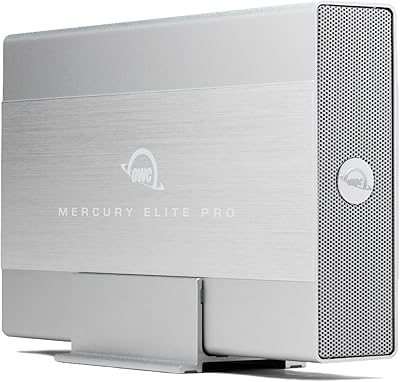
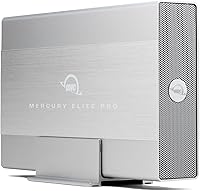
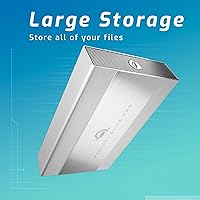
The OWC Mercury Elite Pro 2TB Hard Drive Enclosure occupies a space that budget enclosures simply cannot: a professionally built, ready-to-run desktop storage unit backed by a brand that Mac and creative professionals have trusted for years. Unlike bare enclosures that ship empty, this one arrives with a 7200RPM HDD already installed — plug in the included power supply and cable, and you are working within minutes. It runs on Mac, Windows, Linux, and even PlayStation and Xbox consoles, which is a broader compatibility range than most rivals offer. The 3-year OWC warranty is also worth noting; it signals a level of confidence in the product that generic alternatives rarely match.
Features & Benefits

The Mercury Elite Pro connects via USB 3.2 Gen 1, hitting real-world transfer speeds around 252MB/s — fast enough to handle large video files without staring at a progress bar. One nuance worth understanding: the USB-C port is Thunderbolt-shaped but operates at USB 3.2 speeds, not full Thunderbolt bandwidth. That said, having both USB-A and USB-C cable options in the box covers most desks without hunting for adapters. The included power adapter ensures the 3.5-inch drive gets stable, dedicated power rather than relying on a laptop port. You can stand it vertically, lay it flat, or stack multiple units — a practical touch for anyone building out a multi-drive workspace. The small LED activity light doubles as a reassuring indicator during transfers.

Best For

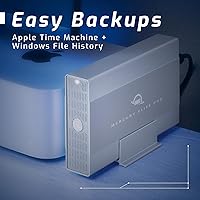
This OWC enclosure makes the most sense for creative professionals — video editors, photographers, and audio producers — who need dependable desktop storage for large working files without paying SSD prices for sheer capacity. Mac users in particular will appreciate OWC's long-standing compatibility track record; setup tends to be genuinely plug-and-play. Console gamers running low on internal storage for their PS4, PS5, or Xbox will find it equally capable, and the clean industrial design does not look out of place next to a gaming setup. For home offices running nightly backups, the three-year warranty and stackable enclosure design make it a practical long-term investment rather than a disposable one.

User Feedback

With a 3.7-star average across over 200 reviews, the Mercury Elite Pro sits in honestly mixed territory. Buyers who praise it tend to highlight OWC's build quality and how straightforward the initial setup is — the enclosure hardware itself draws consistent compliments. Where things get complicated is separating enclosure complaints from drive complaints. Some negative reviews point to HDD failures or heat concerns, which may reflect the included mechanical drive rather than the enclosure chassis itself. Customer support responsiveness from OWC earns its own positive mentions, which matters when a warranty claim comes into play. If you already own a reliable 3.5-inch SATA drive, buying the enclosure alone might sidestep the mixed drive-related feedback entirely.

Pros

  • Ships with a 2TB 7200RPM drive pre-installed — no extra purchases needed to get started.
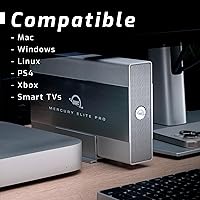
  • Broad compatibility across Mac, Windows, Linux, and major gaming consoles is genuinely useful.
  • Both USB-A and USB-C cables are included, covering most modern setups without hunting for adapters.
  • The dedicated external power supply ensures stable, consistent power for the 3.5-inch drive.
  • Stackable design makes it a practical foundation for building out a multi-drive storage system over time.
  • OWC backs this desktop storage unit with a 3-year limited warranty — well above the industry norm.
  • The LED activity indicator gives a quick visual read on drive status during transfers.
  • Vertical stand and horizontal non-skid feet offer real flexibility depending on your desk layout.
  • OWC customer support has a reasonable reputation for responsiveness when warranty claims arise.
  • Real-world speeds around 252MB/s are adequate for most video editing and backup workflows.

Cons

  • The USB-C port is Thunderbolt-shaped but limited to USB 3.2 speeds — not true Thunderbolt bandwidth.
  • A 3.7-star average across 217 reviews suggests a meaningful number of buyers ran into issues.
  • Some negative reviews point to early HDD failures, which raises concerns about the bundled drive quality.
  • Heat management under sustained workloads has been flagged by a subset of users.
  • The external power brick adds desk clutter and makes travel or off-desk use more cumbersome.
  • Premium pricing is harder to justify if you only need the enclosure and already own a drive.
  • No hardware encryption or additional security features for sensitive data storage.
  • Mechanical drive technology means it is inherently slower and more vibration-sensitive than SSD alternatives.
  • Connectivity inconsistencies have appeared in a portion of user complaints, though it is not clear how widespread the issue is.
  • At nearly three pounds, this is a desk-only solution — not practical for users who move between locations regularly.

Ratings

The OWC Mercury Elite Pro 2TB Hard Drive Enclosure earned these scores after our AI model processed verified buyer reviews from multiple global sources, actively filtering out incentivized, bot-generated, and spam submissions to surface what real users genuinely experienced. Ratings span both the enclosure hardware and the bundled drive, with the distinction clearly reflected where it matters. Strengths and frustrations are weighted equally — nothing is glossed over.
Build Quality
83%
The enclosure chassis itself draws consistent praise from buyers who compare it to flimsy plastic rivals. The matte black casing feels solid and purposeful on a desk, and users who have owned the unit for a year or more tend to report no structural issues with the housing itself.
A segment of buyers noted the enclosure runs noticeably warm during extended use, raising questions about long-term thermal management. A minority flagged that the vertical stand feels less secure than expected given the overall premium positioning of the product.
Transfer Speed
71%
29%
At around 252MB/s in real-world sequential transfers, the Mercury Elite Pro handles large video file moves and backup jobs at a pace that keeps creative workflows from grinding to a halt. For editors working with 1080p or even light 4K footage, the throughput is generally sufficient for daily use.
The USB 3.2 Gen 1 ceiling becomes a noticeable bottleneck for users moving very large libraries regularly, and the mechanical drive cannot close the gap. Buyers who purchased expecting Thunderbolt-class speeds based on the USB-C port were visibly disappointed in their reviews.
Ease of Setup
88%
Most buyers across Mac, Windows, and Linux report a genuinely plug-and-play experience with zero driver installation required. Console users on PS4 and Xbox also noted immediate recognition after a quick format, making first-time setup accessible even for non-technical buyers.
A small number of Windows users encountered initial formatting confusion, particularly around choosing between exFAT and NTFS for cross-platform compatibility. The included quick-start guide has been described as thin on detail for users who are new to external storage setup.
Drive Reliability
58%
42%
Buyers who experienced no early failures tend to report stable, consistent operation over months of regular backup and media storage use. The 7200RPM drive performs predictably for sequential workloads, and several users praised it as a dependable workhorse for archiving.
This is the most polarizing category in user feedback. A meaningful share of reviews describe early HDD failures within the first year, pulling the overall reliability score down significantly. It remains unclear whether this reflects a batch quality issue or a broader pattern, but it is a real risk buyers should factor in.
Value for Money
63%
37%
For buyers who want an OWC-branded, warranty-backed, ready-to-run storage solution without sourcing separate components, the bundled package removes friction and carries meaningful convenience value. The three-year warranty coverage adds a layer of financial reassurance that bare budget enclosures simply do not offer.
At its mid-to-premium price point, the USB 3.2 Gen 1 speed ceiling and the mechanical drive's early failure rate in some units make it a harder sell against competitors offering faster interfaces or stronger reliability records for similar money. Buyers who already own a quality drive feel they are overpaying for the enclosure alone.
Connectivity Flexibility
76%
24%
Having both USB-A and USB-C port support covers a wide range of host devices without requiring an adapter, which is a practical advantage on a modern mixed-port desk setup. Console and Smart TV compatibility expands the use case well beyond a typical computer-only storage device.
The USB-C connection is limited to USB 3.2 speeds rather than true Thunderbolt bandwidth, which frustrates users who invested in Thunderbolt-equipped Macs or workstations expecting higher throughput. Only a USB-A cable ships in the box, so USB-C users need to source their own Type-B to Type-C cable.
Noise Level
67%
33%
Under light use — occasional file access or background backups — the operational hum is subtle enough that most desk workers barely notice it. Users running it in a home office environment alongside other equipment generally report it blends into background noise without issue.
During sustained sequential writes or large transfers, the 7200RPM drive produces audible seek noise that some buyers found distracting in quiet workspaces. Podcasters and home recording users specifically flagged the noise as a concern when the drive is positioned near a microphone.
Thermal Management
61%
39%
Under moderate workloads, the enclosure maintains acceptable operating temperatures, and users who run periodic backups rather than continuous transfers report no unusual heat-related behavior. The external power supply means the host device does not absorb any heat load from the drive.
Extended continuous transfers — common in video editing or large library migrations — generate noticeable warmth on the enclosure surface. Some buyers reported automatic disconnection during prolonged heavy use, which points to thermal throttling as a real concern for power users.
Physical Design
81%
19%
The stackable form factor and dual orientation options genuinely add long-term utility for users building a multi-drive desktop setup over time. The clean industrial finish looks professional alongside both Mac setups and Windows workstations without drawing unwanted attention.
The external power brick contributes desk clutter that the enclosure's polished design somewhat contradicts. At nearly three pounds, it is clearly a desktop-only device, and a few buyers were surprised by the footprint after expecting something more compact.
Platform Compatibility
86%
The breadth of supported platforms is genuinely one of this desktop storage unit's strongest practical selling points. Mac, Windows, Linux, PlayStation, Xbox, and Smart TV support means most households have at least one strong use case without worrying about format conflicts.
Out-of-the-box formatting is typically HFS+ or a neutral format depending on the batch, which may require reformatting for Windows-primary users before the drive is usable. A small number of Linux users noted minor mount inconsistencies, though these appear to be edge cases.
Warranty & Support
78%
22%
OWC's three-year limited warranty is among the most generous in this product category and provides meaningful peace of mind, particularly given the mixed reliability reports on the bundled drive. Buyer feedback on OWC's customer support responsiveness is generally positive, with claims processed without excessive friction.
A few users reported uncertainty over whether warranty coverage applied to the bundled HDD or just the enclosure chassis — a distinction that matters when the failure originates from the drive. Response times during peak periods were flagged as slower than expected by a minority of reviewers.
LED Activity Indicator
74%
26%
The LED provides a simple but genuinely useful visual cue during transfers, especially for users who run the drive in a tucked-away desk position where physical feedback from the host system is limited. Buyers running overnight backups appreciate the quick glance confirmation that the drive is active.
A handful of users found the LED brightness intrusive in darker workspaces or home theater setups, with no option to dim or disable it. It functions only as a basic activity indicator and offers no diagnostic value beyond confirming that the drive is powered and accessed.
Packaging & Accessories
79%
21%
The unit arrives with everything needed for immediate use — power supply, cable, stand, and documentation — which spares buyers the frustration of discovering missing components after unboxing. The packaging itself is well-structured and protective, with no reported shipping damage in the majority of reviews.
The absence of a USB-C cable despite the USB-C port being prominently marketed is a recurring minor grievance in user reviews. The printed documentation is described as basic, with limited troubleshooting guidance for users who encounter connectivity or formatting issues out of the box.

Suitable for:

The OWC Mercury Elite Pro 2TB Hard Drive Enclosure is a strong fit for creative professionals — video editors, photographers, and podcast producers — who need a reliable desktop storage workhorse for large sequential files without the cost of equivalent SSD capacity. Mac users in particular will find it comfortable territory; OWC has built its reputation in the Apple ecosystem, and plug-and-play behavior on macOS is generally dependable. Console gamers running out of internal storage on a PS4, PS5, or Xbox will appreciate both the compatibility and the cleaner industrial design compared to most budget drives. Home and small office users who run nightly or weekly backups and want a trustworthy, warranted solution will also find the three-year coverage reassuring. Anyone looking to build a stackable, scalable multi-drive desk setup over time will find the Mercury Elite Pro a practical anchor unit to grow around.

Not suitable for:

The OWC Mercury Elite Pro 2TB Hard Drive Enclosure is not the right call for buyers who need serious transfer throughput — the USB 3.2 Gen 1 interface caps real-world speeds around 252MB/s, which rules it out for workflows demanding the full bandwidth of Thunderbolt 3 or 4. Despite the USB-C port, this is not a true Thunderbolt device, and anyone expecting NVMe-class performance will be disappointed. It is also a harder sell for laptop users who travel frequently; at nearly three pounds with a dedicated external power brick, portability is not its strength. If you are strictly after the enclosure hardware and already own a quality 3.5-inch SATA drive, the bundled HDD adds cost you may not want. Buyers who are highly price-sensitive and comfortable with no-name enclosures should also weigh whether the OWC premium genuinely suits their simpler needs.
Specifications

  • Storage Capacity: The unit ships with a 2TB mechanical hard disk drive pre-installed and ready for use.
  • Drive Type: A 3.5-inch SATA 600 hard disk drive spinning at 7200RPM provides the internal storage.
  • Interface: Connection to the host system is handled via USB 3.2 Gen 1 Type-B, supporting up to 5Gb/s theoretical bandwidth.
  • Transfer Speed: Real-world sequential transfer speeds reach approximately 252MB/s under typical operating conditions.
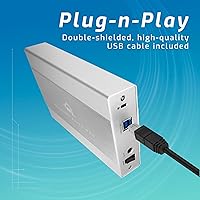
  • Cable Connections: The enclosure supports both USB-A and USB-C host connections using the included USB 3.2 Type-B to Type-A cable.
  • Power Supply: An external power adapter and US power cable are included, providing dedicated power independent of the host system's USB port.
  • Dimensions: The enclosure measures 7.7 x 1.4 x 4.6 inches (L x W x H) in its standard horizontal orientation.
  • Weight: The complete unit weighs approximately 2.97 pounds, making it a fixed desktop device rather than a portable one.
  • OS Compatibility: The drive is compatible with Mac, Windows, and Linux operating systems without requiring proprietary drivers.
  • Device Compatibility: Beyond computers, the unit works with PlayStation consoles, Xbox consoles, and USB-connected Smart TVs.
  • Placement Options: A vertical stand is included for upright positioning, while non-skid rubber feet support stable horizontal use on a desk surface.
  • Stackability: The enclosure chassis is designed to allow multiple units to be stacked vertically, supporting modular storage expansion.
  • Activity Indicator: An integrated LED light signals drive activity, giving users a visible cue during data transfers and system access.
  • Warranty: OWC includes a 3-year limited warranty covering the hardware against defects in materials and workmanship.
  • Color & Finish: The enclosure is finished in matte black, providing a clean and understated appearance suited to most desk setups.
  • Brand & Series: Manufactured by OWC (Other World Computing) under the Mercury Elite Pro product line, model number ME3NH7T02.
  • In the Box: Package contents include the pre-configured storage unit, USB 3.2 Type-B to Type-A cable, external power supply, US power cable, vertical stand, and printed documentation.

Related Reviews

OWC Mercury Elite Pro Mini 2TB External Hard Drive
86%
88%
Performance
91%
Portability
85%
Durability
92%
Compatibility
93%
Setup & Installation
More
OWC Mercury Elite Pro 6TB External Hard Drive Enclosure
85%
87%
Performance
91%
Build Quality
93%
Data Transfer Speed
90%
Setup & Installation
88%
Compatibility
More
OWC Mercury Elite Pro 16TB External Hard Drive Enclosure
83%
89%
Performance & Speed
75%
Value for Money
91%
Build Quality & Durability
65%
Noise Levels
88%
Ease of Setup
More
OWC Mercury Elite Pro 12TB External Hard Drive Enclosure
85%
88%
Performance
91%
Build Quality & Durability
93%
Ease of Setup
89%
Compatibility with Multiple Devices
68%
Noise Levels
More
OWC Mercury Elite Pro Dual 32TB RAID Enclosure
79%
91%
Transfer Speed
88%
Build Quality
84%
RAID Configuration Flexibility
86%
Connectivity & Compatibility
74%
USB Hub Utility
More
OWC 24TB Mercury Elite Pro Dual USB-C/Thunderbolt 3 External RAID Storage Enclosure
85%
94%
Performance
88%
Ease of Setup
91%
Speed/Transfer Rate
89%
Build Quality & Durability
80%
Noise Levels
More
OWC 8TB SSD Mercury Elite Pro Dual USB-C/Thunderbolt 3 External RAID Storage Enclosure
85%
94%
Performance Speed
91%
Build Quality
78%
Ease of Setup
88%
Connectivity Options
85%
RAID Versatility
More
OWC Mercury Extreme Pro 6G 2TB SSD
82%
83%
Read/Write Performance
86%
Sustained Speed Consistency
91%
Compatibility
88%
Installation Experience
84%
Build Quality
More
OWC Express 2TB Portable External Hard Drive
86%
94%
Portability
89%
Data Transfer Speed
92%
Ease of Use
90%
Compatibility
74%
Durability
More
PNY PRO Elite V3 2TB Type-C USB 3.2 Gen 2 Flash Drive
89%
94%
Transfer Speed
91%
Build Quality
89%
Compatibility
90%
Portability
88%
Reliability
More

FAQ

It comes with a 2TB 7200RPM mechanical hard drive already installed. You can plug it in and start using it right away without purchasing anything extra.

Not quite, and this is worth clarifying before you buy. The USB-C port is Thunderbolt-compatible in shape, but the enclosure connects via USB 3.2 Gen 1 at up to 5Gb/s. You will not get full Thunderbolt 3 or 4 bandwidth through this connection, so if your workflow demands that level of throughput, look at true Thunderbolt enclosures instead.

Yes, the OWC Mercury Elite Pro 2TB Hard Drive Enclosure is plug-and-play on modern Macs, including those running Apple Silicon. OWC has a strong track record with macOS compatibility, and no additional drivers should be needed.
Yes, it is compatible with PlayStation and Xbox consoles. Keep in mind that PS5 only supports extended storage for PS4 games via USB — native PS5 titles still require the internal SSD or an NVMe expansion slot. For that use case, this desktop storage unit works well as a library for backward-compatible titles.

It is worth taking seriously but also worth digging into the specifics. A portion of the negative reviews appear to target the bundled mechanical hard drive rather than the enclosure hardware itself. If you are concerned, OWC covers the entire unit with a 3-year warranty and has a reasonably responsive support team, which provides some safety net if something does go wrong.

Yes. The enclosure accepts standard 3.5-inch SATA drives, so you can swap out the included drive for any compatible SATA HDD if you need higher capacity or prefer a specific drive brand. The enclosure hardware itself is the reusable component here.

Some users have noted warmth during sustained workloads, which is fairly typical for 7200RPM mechanical drives in enclosed housings. It is not a fanless SSD enclosure, so some heat buildup under heavy, continuous use is expected. Ensuring decent airflow around the unit on your desk helps manage this.

Only a USB 3.2 Type-B to Type-A cable is included in the box. The USB-C connection is supported by the enclosure port, but you would need to supply your own Type-B to Type-C cable if you want to connect that way.

As a 7200RPM spinning hard drive, it will produce some operational noise — a faint hum and occasional seek noise during heavy read/write activity. It is not disruptively loud, but it is not silent either. If complete silence is critical for your recording environment, an SSD-based solution would be a better fit.

Yes, the enclosure is specifically designed with stacking in mind. Multiple Mercury Elite Pro units can be stacked vertically, which makes it a practical option for gradually expanding desktop storage without taking up significant additional desk space.