
Overview

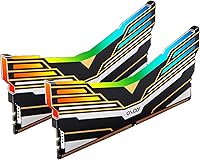
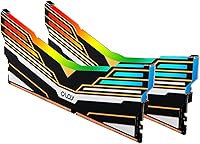
The OLOy Warhawk DDR4 32GB Desktop RAM Kit enters a crowded market dominated by established names like Corsair and G.Skill, yet it holds its own as a capable, value-oriented option for desktop builders. Running in a 2x16GB dual-channel configuration, you get the kind of memory bandwidth that makes a real difference in gaming and everyday multitasking — not just on paper. At 3200MHz, the speed sits right where most DDR4 gaming builds want to be, without the premium attached to faster tiers. ASUS users will also appreciate the Aura Sync RGB support. OLOy is a younger brand, but their track record with this kit has earned genuine credibility among builders watching their budget.

Features & Benefits

The 3200MHz clock speed pairs with CL16-20-20-38 timings, which is a reasonable latency profile for this speed class — not ultra-tight, but perfectly suited to gaming workloads where raw bandwidth matters more than sub-nanosecond latency differences. Intel users get XMP 2.0 support, meaning the kit reaches its rated speed with a single BIOS toggle, no manual tuning required. AMD compatibility exists, but worth noting: XMP is an Intel specification, so on Ryzen platforms the profile runs via DOCP or EXPO depending on your board — check your motherboard's QVL first. Operating at just 1.35 volts, thermals stay manageable even in tighter cases. The lifetime warranty rounds things out as a genuine long-term assurance from a brand still building its reputation.

Best For

This Warhawk RAM kit is a natural fit for budget-conscious gamers building or refreshing a DDR4 desktop, particularly those who don't want to sacrifice aesthetics to save money. If you're running an ASUS motherboard, the Aura Sync RGB integration works well and keeps your lighting ecosystem consistent without extra software headaches. First-time builders will appreciate that XMP setup is essentially just enabling a BIOS option — no spreadsheet of memory timings required. It also makes sense for anyone who values total capacity over bleeding-edge speed; 32GB handles gaming, light video editing, and heavy browser multitasking without breaking a sweat. Those chasing the tightest CL14 timings or DDR4-3600 speeds will want to look elsewhere, but for most builders this kit punches well above its cost.

User Feedback

With a 4.6-star average across nearly 2,000 reviews, the OLOy Warhawk has clearly landed well with buyers. The most consistent praise centers on how effortlessly the kit boots to its rated speed on Intel platforms, and how the RGB lighting looks out of the box — clean, bright, and functional without needing extra software fiddling. That said, AMD users have occasionally reported compatibility hiccups on certain boards, particularly older or budget-tier AM4 motherboards, so checking your board's memory compatibility list before purchasing is a smart move. A handful of buyers have also noted that Aura Sync software can occasionally be finicky with lighting sync. Overall, sentiment skews strongly positive for this price tier, though OLOy is still earning the kind of brand trust that Corsair or Kingston have built over decades.

Pros

  • 32GB of dual-channel capacity handles gaming, multitasking, and light creative work without compromise.
  • XMP 2.0 support makes hitting 3200MHz on Intel platforms a one-toggle BIOS operation.
  • Aura Sync RGB works reliably out of the box for ASUS motherboard users.
  • The 1.35V operating voltage runs cooler than standard 1.5V kits, helpful in compact or warm cases.
  • Lifetime warranty offers meaningful long-term peace of mind from a newer brand.
  • Nearly 2,000 buyer reviews back up the kit's real-world reliability, not just spec-sheet claims.
  • The black heatspreader design looks clean in both windowed and closed cases.
  • Priced well below comparable Corsair and G.Skill kits with similar speed and capacity.

Cons

  • OLOy lacks the decades-long brand trust that established memory makers carry.
  • CL16-20-20-38 timings are decent but not competitive with tighter kits at the same speed.
  • Some AMD users report compatibility hiccups on certain boards — checking the QVL before buying is essential.
  • Aura Sync software can occasionally be finicky, with lighting sync dropping after system restarts for some users.
  • No DDR5 version exists, making this kit a dead end for anyone planning a future platform upgrade.
  • RGB cannot be fully disabled on some boards without software, which may bother minimalist builders.
  • Customer support responsiveness for a smaller brand like OLOy is harder to predict than with major names.
  • Not ideal for memory-sensitive workloads like video rendering where tighter sub-timings make a measurable difference.

Ratings

Our AI-powered scoring for the OLOy Warhawk DDR4 32GB Desktop RAM Kit was built by analyzing thousands of verified global buyer reviews, actively filtering out incentivized, bot-generated, and outlier feedback to surface what real users genuinely experience. Each category score reflects the full picture — consistent strengths and recurring frustrations alike — so you can make a confident, clear-eyed buying decision.

Value for Money
93%
Buyers consistently call this one of the best-priced 32GB DDR4 kits they could find without sacrificing meaningful performance. For first-time builders especially, getting dual-channel 3200MHz RAM with RGB and a lifetime warranty at this price point felt like a genuine win compared to spending significantly more on Corsair or G.Skill equivalents.
A small segment of buyers who later encountered AMD compatibility issues felt the savings were offset by troubleshooting time. If you end up needing a different kit after a failed boot on a budget Ryzen board, the value equation shifts quickly.
Compatibility
78%
22%
On Intel platforms — LGA1200 and most LGA1700 DDR4 boards — users report near-universal plug-and-play success with XMP enabled. Compatibility with mainstream mid-range AMD boards like the B550 and X570 chipsets is also broadly positive, with most users hitting 3200MHz without issue via DOCP.
Budget AM4 boards and certain older AMD platforms have produced a notable number of compatibility complaints, with some users unable to post at rated speed or experiencing instability. OLOy is not listed on every motherboard QVL, which creates uncertainty for buyers who do not cross-check before purchasing.
Ease of Setup
91%
The XMP 2.0 profile makes getting to 3200MHz on Intel systems genuinely effortless — enable it in BIOS and you are done. First-time builders specifically praised not having to manually input timing or voltage values, which removed a major source of anxiety from their first build experience.
AMD users occasionally find the DOCP/EXPO process less intuitive, particularly if their motherboard labels the setting differently or buries it in an advanced menu. A handful of users reported needing multiple BIOS saves and restarts before the profile stuck consistently.
Performance
82%
18%
At 3200MHz with CL16 timings, the kit delivers real, measurable performance gains over slower JEDEC-spec RAM, particularly in gaming scenarios where frame pacing and minimum FPS are sensitive to memory bandwidth. Users running demanding titles noticed noticeably smoother performance compared to their previous 2400MHz or 2666MHz kits.
Enthusiasts who benchmark obsessively note that the secondary and tertiary timings — 20-20-38 — are looser than competing kits at comparable speeds, which shows up in memory latency tests. For everyday gaming and multitasking the gap is negligible, but it matters to users chasing benchmark leaderboards.
RGB Lighting Quality
84%
The diffuser along the top of each stick produces even, well-distributed lighting that looks polished in a windowed case without being garish. ASUS Aura Sync users in particular praised how reliably the kit synced with their motherboard and GPU lighting out of the box, giving their build a cohesive look without manual color matching.
Non-ASUS users found RGB customization limited, since deep control depends on Aura Sync. Several buyers also noted that after system restarts or software updates, the lighting occasionally reverted to a default rainbow cycle, requiring a software re-sync to restore their saved settings.
Build Quality
79%
21%
The black aluminum heatspreader feels solid in hand and sits flush without any visible gaps or uneven edges. Users who have handled premium Corsair or G.Skill sticks note the construction feels comparable for the price — not the heaviest spreader on the market, but not flimsy either.
A few buyers reported minor cosmetic inconsistencies between the two sticks in their kit, such as slight variation in RGB diffuser brightness. Nothing that affects function, but noticeable for detail-oriented builders photographing their finished build.
Thermal Performance
86%
Running at 1.35V keeps heat output low during sustained workloads — users with compact mid-tower and even some mini-ITX builds reported no thermal throttling or instability during long gaming or rendering sessions. The heatspreader does its job passively without needing active airflow directed at the sticks.
In extremely tight cases with poor overall airflow, a small number of users reported occasional instability under prolonged stress testing, though this appears to be an edge case tied to case design rather than a fundamental flaw in the kit itself.
Brand Reputation
67%
33%
OLOy has built meaningful credibility within the value-PC builder community over the past few years, and the sheer volume of positive reviews on this specific kit goes a long way toward reassuring first-time buyers. Tech forums and budget-build communities have generally adopted the brand as a trustworthy option in its price class.
Outside of enthusiast circles, OLOy remains largely unknown, and buyers who prioritize established brand pedigree will still feel more comfortable with Kingston, Corsair, or G.Skill. The brand's newer status also means a shorter track record for assessing long-term reliability across multiple product generations.
Warranty & Support
74%
26%
The lifetime warranty is a legitimate differentiator for a brand at this price level, and buyers who have submitted warranty claims generally report a functional — if not fast — resolution process. Having that coverage removes some of the risk of buying from a less-established manufacturer.
Customer support responsiveness has received mixed feedback, with some users reporting slow email reply times compared to larger brands that offer live chat or phone support. Buyers dealing with urgent build deadlines may find the support cadence frustrating.
Dual-Channel Reliability
88%
When installed correctly in paired DIMM slots, the two sticks initialize in dual-channel mode reliably across the vast majority of supported boards. Users upgrading from single-stick configurations consistently noticed real-world improvements in application load times and gaming smoothness after switching to this paired kit.
A small number of users installed the sticks in adjacent rather than alternating slots and mistakenly blamed the kit for underperformance — though this is a user error, it highlights a need for clearer installation guidance in the packaging.
Heatspreader Clearance
83%
At 2.4 inches tall, the heatspreader clears the majority of popular tower CPU coolers without issue, including wide-base options from Noctua and be quiet!. Most users slotting this into standard mid-tower and full-tower builds had zero fitment concerns.
Buyers using large dual-tower coolers or oversized heatsinks that extend over the DIMM slots reported needing to double-check clearance specs before installing. A couple of users with particularly bulky coolers had to adjust RAM slot selection or cooler orientation to get a safe fit.
Packaging & Presentation
71%
29%
The kit arrives in a simple, functional retail box that keeps both sticks secure and protected during shipping. For buyers who do not care about unboxing aesthetics, it does exactly what it needs to do without unnecessary bulk or waste.
Compared to the premium unboxing experience of Corsair Dominator or G.Skill Trident kits, the packaging feels noticeably basic. Buyers gifting a PC build component or those who enjoy the ritual of a premium unboxing will likely be underwhelmed.
Long-Term Stability
81%
19%
The majority of buyers who have owned the OLOy Warhawk for a year or more report no degradation in performance or stability. Several users running 24-7 workloads like home servers or always-on workstations noted zero errors across extended memtest runs even after prolonged use.
A subset of early buyers reported that stability at rated XMP speed occasionally degraded after BIOS updates changed default timing behavior on their boards — not a kit failure per se, but a sign that long-term stability can be sensitive to firmware changes on the motherboard side.

Suitable for:

The OLOy Warhawk DDR4 32GB Desktop RAM Kit is a strong pick for gamers and general desktop users who want a solid 32GB dual-channel setup without overspending on brand-name premiums. It suits first-time PC builders especially well, since XMP 2.0 means you enable one BIOS setting and the kit runs at its rated 3200MHz automatically — no manual timing adjustments or overclocking knowledge needed. ASUS motherboard owners will get the most out of the Aura Sync RGB integration, keeping their build's lighting cohesive across components without extra software layers. It also works well for people doing moderate content creation, streaming, or running multiple applications simultaneously, where 32GB of total capacity matters more than chasing the last few nanoseconds of memory latency. If your Intel-based DDR4 build needs a reliable, visually appealing kit at a fair price, this Warhawk RAM kit is hard to argue against.

Not suitable for:

The OLOy Warhawk DDR4 32GB Desktop RAM Kit is not the right call for every buyer, and it's worth being upfront about where it falls short. Enthusiasts who tune memory manually and want the tightest possible timings — CL14 or lower at comparable speeds — will find better options from G.Skill Trident Z or Corsair Vengeance Pro territory. AMD Ryzen users should also approach with measured expectations: XMP is an Intel specification, and while many AMD boards run this kit just fine via DOCP mode, compatibility is not guaranteed across all AM4 and AM5 platforms, particularly on budget-tier motherboards. Anyone planning a laptop memory upgrade or a small form-factor system using SO-DIMM slots should look elsewhere entirely, as this is strictly a full-size desktop UDIMM kit. And if brand reputation and long-established market track record are important factors in your buying decision, OLOy is still a relatively young company — buyers who only trust household names like Kingston or Corsair may not feel fully comfortable here regardless of the specs.

Specifications

  • Capacity: The kit includes two 16GB modules for a total of 32GB of usable system memory when installed in dual-channel configuration.
  • Memory Type: Uses DDR4 SDRAM, the standard for desktop platforms released between roughly 2014 and 2022, including Intel LGA1200, LGA1700 (certain boards), and AMD AM4.
  • Speed: Rated at 3200MHz, which is the most broadly supported high-performance DDR4 speed across both Intel and AMD consumer desktop platforms.
  • Timings: Primary latency timings are CL16-20-20-38, representing a balanced profile between access latency and clock frequency at this speed class.
  • Voltage: Operates at 1.35V, which is below the DDR4 default of 1.5V and helps keep thermals lower in compact or thermally constrained cases.
  • Form Factor: 288-Pin UDIMM, compatible with standard full-size desktop motherboard DIMM slots — not compatible with laptops or SO-DIMM sockets.
  • XMP Support: Supports Intel XMP 2.0, allowing automatic speed and timing configuration via a single BIOS toggle on compatible Intel motherboards.
  • AMD Support: Functions on AMD AM4 platforms via DOCP or EXPO mode depending on the motherboard; not all budget-tier AMD boards are guaranteed to run the kit at full rated speed.
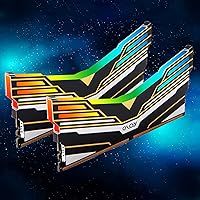
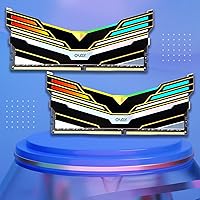
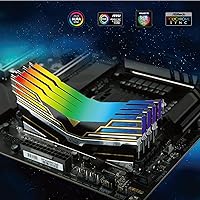
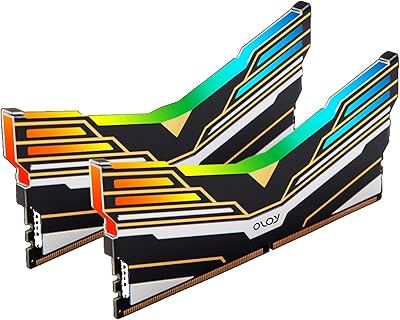
  • RGB Lighting: Features addressable RGB lighting along the top diffuser, compatible with ASUS Aura Sync for synchronized lighting control across supported components.
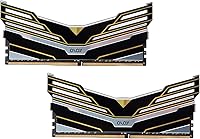
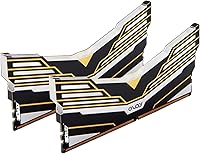
  • Heatspreader: Fitted with a black aluminum heatspreader that aids passive heat dissipation and provides a clean visual profile in both windowed and solid-panel cases.
  • Dimensions: Each module measures 5.63 x 2.4 x 0.26 inches, which is a standard DIMM profile with a moderate heatspreader height suitable for most tower coolers.
  • Weight: Each stick weighs approximately 1.72 ounces, consistent with standard heatspreader-equipped DDR4 DIMMs.
  • Warranty: Covered by OLOy's lifetime warranty, which applies to the original purchaser and covers manufacturing defects under normal operating conditions.
  • Model Number: The official model identifier is MD4U1632161DE0DA, useful for cross-referencing motherboard QVL (qualified vendor lists) before purchase.
  • Channel Config: Designed to run in dual-channel mode when both sticks are installed in the correct paired slots as specified by your motherboard manual, typically slots 2 and 4.
  • Compatible Devices: Intended exclusively for desktop PCs with DDR4-compatible motherboards; not compatible with DDR3, DDR5, or any laptop memory interface.

Related Reviews
D DUOMEIQI 32GB Kit DDR4 3200MHz Desktop RAM
87%
91%
Performance for Gaming
88%
Ease of Installation
85%
System Compatibility
92%
Value for Money
87%
Multitasking & Productivity Performance
More
OLOy Warhawk 16GB DDR4 Desktop RAM
80%
88%
Value for Money
82%
Performance at Speed
91%
XMP Setup & Usability
63%
Latency & Timings
67%
Aura Sync RGB
More
A-Tech 32GB DDR4 2133MHz Desktop RAM
79%
88%
Value for Money
94%
Installation Ease
69%
Compatibility
86%
Stability & Reliability
61%
Memory Speed
More
D DUOMEIQI DDR4 32GB 2400MHz RAM Kit
85%
92%
System Performance Boost
90%
Ease of Installation
88%
Reliability
85%
Compatibility with Systems
91%
Price vs Performance
More
A-Tech 128GB DDR4 3200MHz Desktop RAM Kit
87%
92%
Performance
88%
Installation Ease
81%
Compatibility with Systems
90%
Reliability and Stability
85%
Build Quality
More
Gigastone Game Turbo 32GB DDR4 RAM
80%
88%
Value for Money
91%
Installation Ease
86%
XMP Performance
83%
Gaming Performance
84%
RGB Lighting Quality
More
NEMIX RAM 32GB DDR4-2666 ECC SODIMM Kit
81%
91%
NAS Compatibility
93%
ECC Reliability
88%
Installation Ease
78%
Value for Money
89%
Warranty & Support
More
Crucial Pro 32GB DDR4 3200MHz Kit (2x16GB)
84%
94%
Installation Ease
92%
System Stability
78%
XMP & Speed Configuration
88%
Compatibility Range
83%
Value for Money
More
Yongxinsheng DDR3 32GB Kit (8GBx4) Desktop RAM 1600MHz
85%
88%
Performance
92%
Ease of Installation
90%
Value for Money
83%
Heat Dissipation
75%
Compatibility with Motherboards
More
Kingston Fury Renegade 32GB DDR4 RAM Kit
82%
91%
XMP Setup Experience
88%
Speed Performance
86%
Stability & Reliability
63%
Value for Money
67%
AMD Compatibility
More

FAQ

It can, but with a caveat worth knowing before you buy. XMP is an Intel specification, so on AMD boards you will be looking for a DOCP or EXPO setting in your BIOS to load the 3200MHz profile automatically. Most mid-range and high-end AM4 boards handle this without issue, but some budget AMD boards have been reported to struggle — always cross-check the kit against your specific motherboard's memory QVL to be safe.

By default, DDR4 memory initializes at a lower JEDEC standard speed — typically 2133 or 2400MHz — regardless of its rated speed. To get the full 3200MHz, you need to enter your BIOS after installation and enable XMP (on Intel) or DOCP/EXPO (on AMD). It is a single toggle, takes about 30 seconds, and you will not need to touch any individual timing or voltage values.

The lighting is specifically designed around Aura Sync, so full per-zone control works best within the ASUS ecosystem. Some users have had partial success using third-party tools, but outside of Aura Sync, your control options are limited. If you are not on an ASUS board, the RGB will still light up — you just may not be able to sync it with other components or customize it beyond basic static modes.

That depends entirely on how many DIMM slots your motherboard has. Most consumer desktop boards have four slots, meaning you could install a second 32GB kit alongside this one for a total of 64GB if your board and CPU support it. Just make sure any additional kit matches the speed and, ideally, the brand and model to avoid potential compatibility conflicts between kits.

OLOy is a newer brand compared to household names like Corsair or G.Skill, which understandably gives some buyers pause. That said, the OLOy Warhawk DDR4 32GB Desktop RAM Kit has accumulated nearly 2,000 ratings with a 4.6-star average, which is a meaningful signal of real-world reliability rather than just marketing claims. The lifetime warranty also suggests the company stands behind the product. They are not a legacy brand, but in the value DDR4 space, they have earned a reasonable level of trust from the builder community.

At 2.4 inches tall, the heatspreader has a moderate profile that fits comfortably under most tower coolers, including popular options with wide bases. That said, if you are running an especially large low-profile cooler that extends directly over the DIMM slots, it is worth checking the clearance spec for your specific cooler. Noctua and other manufacturers typically publish DIMM clearance figures in their product documentation.

In most gaming scenarios, the real-world difference is modest but measurable — particularly on AMD Ryzen systems where the memory controller is more tightly linked to CPU performance. You are more likely to notice the gap in CPU-heavy games and minimum frame rates than in average FPS. For general productivity and multitasking, the speed difference is minimal, but at similar price points, 3200MHz is the better choice.

You can physically install a single stick, and the system will boot and run normally. However, running a single module means losing dual-channel mode, which measurably reduces memory bandwidth — especially noticeable on integrated graphics and Ryzen platforms. For best performance, always install both sticks in the correct paired slots as listed in your motherboard manual.

For dual-channel operation, most motherboards want you to use the second and fourth DIMM slots rather than the first two — these are often color-coded or labeled A2 and B2 in the manual. Installing them in slots 1 and 2 side by side typically results in single-channel operation. Always check your specific motherboard manual for the recommended pairing, since slot labeling varies between manufacturers.

No dedicated OLOy software is included or required. The RGB is controlled through your motherboard's existing lighting software — in this case, ASUS Aura Sync if you are on a compatible board. If you do not use Aura Sync or a compatible RGB hub, the sticks will still light up in a default mode automatically; you just will not have granular control over colors or effects without the appropriate software.