Overview

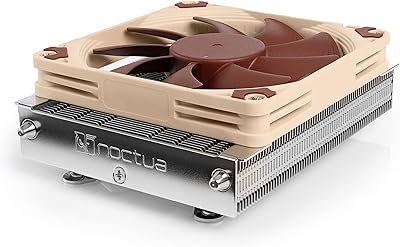
The Noctua NH-L12Sx77 Low-Profile CPU Cooler is essentially Noctua's answer to a specific complaint: the original NH-L12S ran out of thermal headroom when paired with modern, power-hungry processors. By bumping the height to 77mm — still genuinely compact — the design gains meaningful cooling capacity without locking builders out of the cases they already own. The bottom-to-top airflow direction is a thoughtful touch, pushing hot air directly toward case exhaust rather than letting it pool. In a market where low-profile air cooling options are either mediocre or obscure, this cooler arrived in April 2024 and immediately established itself near the top of the category.
Features & Benefits

The jump from four to six copper heatpipes over the standard NH-L12S is not just a spec bump — it translates directly into the ability to sustain lower temperatures during extended workloads. The NF-A12x15 fan is already respected in the enthusiast community for being impressively quiet given its 15mm thickness. Noctua includes a Low-Noise Adaptor that caps fan output for near-silent idle behavior, though under a demanding CPU it will spin up and you will hear it. PWM speed control handles everything automatically, and the bundled NT-H2 thermal paste is a welcome inclusion that most competing coolers simply leave out of the box.

Best For

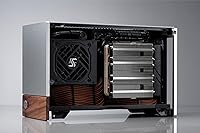
Noctua's SFF flagship was built with a very specific builder in mind: someone squeezing a high-performance CPU into a tight chassis and refusing to accept the thermal compromises that usually come with that territory. Cases like the Fractal Design Terra, Silverstone Milo ML12, and Louqe Raw S1 are natural pairings, since the 77mm height and upward airflow work with rather than against those enclosures. Anyone running an Intel Core Ultra 285K or AMD Ryzen 9950X inside a Mini-ITX build will find this cooler far more capable than it looks. It also offers a clean upgrade path for existing NH-L12S owners who need more headroom without swapping their case.

User Feedback

Early buyers are largely impressed, with near-silent idle operation earning consistent praise — particularly from those coming from noisier alternatives. Thermal results on high-TDP chips draw genuine surprise; people clearly did not expect this kind of sustained performance from something so flat. Two criticisms come up repeatedly. The brown-and-beige color scheme divides opinion: it is Noctua's signature look, and not everyone wants it visible through a windowed panel. The offset AM5 mounting also requires patience and careful alignment, which catches some builders off guard. Price registers as an upfront hesitation, though most reviewers conclude it felt justified once they held the finished build quality in their hands.

Pros

  • Six heatpipes deliver sustained thermal performance that routinely surprises builders given the 77mm height constraint.
  • Bottom-to-top airflow pushes hot air directly out of the case rather than recirculating it internally.
  • The NF-A12x15 fan is one of the best slim 120mm fans available — not a compromise inclusion.
  • Near-silent at idle; the Low-Noise Adaptor makes quiet desktop use genuinely achievable.
  • NT-H2 thermal paste is included, saving an extra purchase and ensuring out-of-box performance is maximized.
  • SecuFirm2 mounting covers Intel LGA1851 through LGA115x and AMD AM5 and AM4 without additional kit purchases.
  • Noctua's track record of releasing free mounting upgrade kits for new sockets adds long-term platform confidence.
  • At under 1.2 lbs, this low-profile cooler does not stress the motherboard during transport or daily use.
  • Compatible with popular SFF cases like the Louqe Raw S1 and Silverstone Milo ML12 where quality options are scarce.
  • Premium build materials — copper base, nickel-plated heatpipes, aluminium fins — feel built to outlast multiple PC generations.

Cons

  • The brown-and-beige color scheme clashes with RGB builds and is a genuine aesthetic dealbreaker for some buyers.
  • Offset AM5 and AM4 mounting requires patience and careful alignment, especially inside tight enclosures.
  • Fan noise increases meaningfully under sustained CPU load — this is not a silent cooler at full tilt.
  • The upfront price demands a deliberate purchasing decision; budget builders will feel the cost acutely.
  • Builders with very tall RAM heatspreaders may still experience clearance issues even with the offset mounting applied.
  • No Y-cable or fan splitter is included, which multi-fan builders have to source separately.
  • Thermal paste application requires care — the compound is thicker than water-thin pastes and can be over-applied easily.
  • Not compatible with any HEDT or workstation socket, restricting it to mainstream consumer platforms only.

Ratings

The Noctua NH-L12Sx77 Low-Profile CPU Cooler has been scored across every dimension that matters to real SFF builders, based on AI analysis of verified global buyer reviews with spam, bot activity, and incentivized feedback actively filtered out. The scores reflect honest consensus — where this cooler genuinely excels and where it creates friction — so you can make a confident buying decision without sifting through hundreds of individual opinions yourself.
Thermal Performance
88%
For its height, the NH-L12Sx77 handles sustained workloads on demanding processors better than most buyers anticipate. Reviewers running chips like the Ryzen 9900X inside compact cases report temperatures that comfortably stay within safe operating ranges during extended rendering or gaming sessions.
At peak CPU loads — especially on chips with high power limits — the cooler does reach its thermal ceiling and temperatures climb noticeably. Builders pushing processors beyond stock settings will likely feel constrained here.
Acoustics & Noise Level
91%
During light tasks and idle, this cooler is genuinely hard to hear. The NF-A12x15 fan combined with the included Low-Noise Adaptor creates an ambient noise floor that most users describe as effectively silent at the desktop.
Under real CPU load, the fan spins up and becomes audible. It is not objectionable by any stretch, but buyers expecting whisper-quiet operation during heavy workloads should adjust their expectations accordingly.
Build Quality & Materials
94%
The copper base, nickel-plated heatpipes, and aluminium fin stack feel genuinely premium in hand. Nothing flexes, rattles, or feels like a cost-cutting compromise — which tracks with Noctua's reputation for treating manufacturing tolerances seriously.
There is essentially no complaint on this front from buyers. The only minor note is that the brown-beige color of the plastic components contrasts with the otherwise polished metal, which can look slightly mismatched under certain lighting.
Fan Quality
92%
The NF-A12x15 is widely regarded as one of the best 15mm slim fans available, and its inclusion here is a genuine advantage over competing coolers that bundle generic fans. The PWM response curve is smooth and predictable across different load conditions.
Being a slim fan, it physically cannot move as much air as a full-thickness 120mm unit. Users who want maximum airflow at any noise cost will find the trade-off limiting, though that is an inherent constraint of the form factor.
Installation Experience
71%
29%
The SecuFirm2 mounting system is well-documented and Noctua includes everything needed in the box. Intel socket installations are described as mostly straightforward, and the hardware quality means nothing feels like it could strip or break during assembly.
The offset mounting option for AM5 and AM4 catches builders off guard. Aligning the cooler correctly in tight cases requires patience, and several reviewers mention needing to partially disassemble their build to get the angle right. It is manageable but genuinely fiddly.
RAM & Motherboard Clearance
83%
The offset mounting option specifically exists to improve RAM compatibility, and it works. Builders using taller memory modules in small boards report that the clearance is much more usable than with the original NH-L12S, which was a known pain point.
Clearance is still geometry-dependent, so results vary by board layout. A small number of users with very tall RAM heatspreaders and dense micro-ATX boards report it remains a tight fit even with the offset option applied.
Case Compatibility
86%
At 77mm total height, this cooler fits cleanly in popular SFF enclosures including the Fractal Design Terra, Silverstone Milo ML12, and Louqe Raw S1. Builders who have struggled to find a capable cooler for these specific cases consistently call it one of the few that actually works well.
The added height over the NH-L12S means it will not fit every case that accepted the original. Anyone with a particularly shallow chassis needs to verify clearance carefully before purchasing, as 77mm is not universally low-profile.
Value for Money
74%
26%
Once assembled and running, most buyers conclude the price is justified by the combination of fan quality, included NT-H2 paste, long-term warranty coverage, and Noctua's track record for supporting products with updated mounting kits. The total cost-of-ownership argument is solid.
The upfront price is a genuine barrier. In a segment where budget-friendly options exist, the NH-L12Sx77 sits at a premium that requires a deliberate buying decision. First-time Noctua buyers occasionally express sticker shock before experiencing the product.
Included Accessories
89%
NT-H2 thermal paste, the Low-Noise Adaptor, all mounting hardware, and a full compatibility kit are included out of the box. Noctua treats the unboxing as part of the product experience, and almost no buyer has reported missing a component.
There is no fan splitter or Y-cable included, which builders using multi-fan setups sometimes wish was bundled. A minor complaint, but one that comes up often enough to note.
Upgrade Value vs NH-L12S
82%
18%
For existing NH-L12S owners who have hit thermal limits with newer CPUs, the jump to this cooler within the same case is a clear and practical upgrade. The two additional heatpipes and slightly taller profile make a measurable difference under sustained load.
If your CPU is modest and your NH-L12S is keeping up, the upgrade is harder to justify on performance grounds alone. The value proposition is strongest for builders who have already identified a specific thermal problem they need to solve.
Aesthetics & Design Language
63%
37%
The overall construction looks purposeful and precise. Noctua's engineering choices — the fin stack density, the fan integration, the symmetry of the heatpipe layout — give it a technical credibility that enthusiasts tend to appreciate on close inspection.
The brown-and-beige color scheme remains deeply divisive. Builders with windowed cases or RGB-heavy builds frequently describe the color as clashing with everything else. This is a known and accepted Noctua trade-off, but it genuinely affects buyer satisfaction for a subset of the audience.
Socket & Platform Support
87%
Intel LGA1851 through LGA115x and AMD AM5 and AM4 are all covered without needing to purchase additional mounting kits. For mainstream desktop platforms this is comprehensive, and Noctua's history of releasing free upgrade kits for new sockets adds long-term confidence.
HEDT and workstation platforms are entirely unsupported, but that is expected for a cooler designed around compact consumer builds. Buyers on those platforms simply need a different product category.
Thermal Paste Quality
88%
NT-H2 is a genuinely high-performance compound that competes with the best third-party pastes on the market. Including it eliminates an extra purchase and ensures the cooler starts at its full potential right out of the box.
Application requires care — it is slightly thicker than water-thin pastes and can be unforgiving if over-applied in a tight socket area. A minor learning curve for first-time builders, though the included spatula helps.
Weight & Physical Footprint
84%
At just under 1.2 lbs, this cooler is light enough that it does not stress motherboard mounts or create transport concerns in portable ITX builds. The 120mm fan footprint is compact enough to avoid conflicting with VRM heatsinks on most boards.
The physical width still encroaches slightly on adjacent PCIe slot clearance on some densely populated mini-ITX boards. Not a dealbreaker, but worth checking against your specific board layout before buying.

Suitable for:

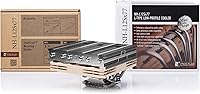
The Noctua NH-L12Sx77 Low-Profile CPU Cooler was purpose-built for a specific kind of builder: someone who has chosen a compact case and refuses to accept mediocre thermals as the inevitable trade-off. If you are working with an enclosure like the Fractal Design Terra, Silverstone Milo ML12, or Louqe Raw S1, this cooler is one of the few air-cooling options that genuinely fits and performs rather than just fitting. It is particularly well-matched for users running modern, power-hungry chips — think Intel Core Ultra 285K or AMD Ryzen 9950X — who need sustained thermal headroom rather than just impressive burst performance. Builders who care about acoustics will also find it rewarding: at idle and light load, the system is close to inaudible, which matters enormously in a bedroom workstation or a living-room HTPC. Existing NH-L12S owners who have started hitting thermal walls with newer CPUs can treat this as a clean, case-compatible upgrade path rather than a full rebuild.
Not suitable for:

If your priority is achieving the absolute lowest possible temperatures regardless of noise, size, or budget, the Noctua NH-L12Sx77 Low-Profile CPU Cooler is not the right tool — a taller tower cooler or a 240mm AIO will outperform it under sustained heavy loads, plain and simple. Builders with a very shallow case that accepted only the 54mm NH-L12S will likely find the 77mm height a dealbreaker, so checking case clearance specs before purchasing is non-negotiable. Anyone chasing a clean, modern aesthetic — particularly those with windowed side panels and RGB-heavy builds — should know that Noctua's brown-and-beige color scheme is not subtle and clashes visibly with most color-coordinated setups. If you are on AMD TR4, sTRX4, sTR5, or any HEDT or workstation platform, there is no compatible mounting solution available for this cooler at all. Budget-conscious builders who need only modest cooling for a mid-range chip will likely find the premium price hard to rationalize when cheaper alternatives exist that are more than adequate for lighter workloads.
Specifications

  • Total Height: The cooler stands 77mm tall from base to fan top, making it compatible with a wide range of compact SFF enclosures where taller tower coolers simply cannot fit.
  • Fan Size: A single NF-A12x15 slim 120mm fan is included, measuring 120mm in diameter and only 15mm thick — one of the best-performing fans available in that slim format.
  • Heatpipes: Six copper heatpipes run from the nickel-plated copper base through the aluminium fin stack, providing the thermal transfer capacity needed for sustained high-TDP CPU loads.
  • Noise Level: Maximum acoustic output is rated at 23.9 dB(A), measured at full fan speed without the Low-Noise Adaptor installed.
  • Airflow Direction: The fan is configured in a bottom-to-top orientation, drawing cool air from below the cooler and exhausting warm air upward and out of the chassis.
  • Fan Connector: The NF-A12x15 uses a standard 4-pin PWM connector, enabling the motherboard to automatically regulate fan speed based on real-time CPU temperature.
  • Power Draw: Total fan power consumption is 1.56W at 12V, making the electrical load on the motherboard header negligible even during extended operation.
  • Weight: The complete cooler assembly weighs 1.19 lbs (approximately 540g), light enough to avoid placing meaningful stress on motherboard mounting points during transport.
  • Base Material: The contact base is machined copper with nickel plating, which provides excellent thermal conductivity at the CPU interface while resisting oxidation over time.
  • Fin Material: The heatsink fin array is constructed from aluminium, chosen for its combination of low weight and adequate thermal dissipation capacity across the fin stack.
  • Socket Support: Compatible sockets include Intel LGA1851, LGA1700, LGA1200, LGA1150, LGA1151, LGA1155, and LGA1156, as well as AMD AM5 and AM4 — all supported without purchasing additional mounting kits.
  • Mounting System: Noctua's SecuFirm2 system is included and provides a secure, tool-friendly installation process with an offset mounting option on AM4 and AM5 for improved RAM clearance.
  • Thermal Paste: NT-H2 compound is included in the box — a high-performance thermal interface material that competes with the best third-party pastes and eliminates the need for a separate purchase.
  • Low-Noise Adaptor: An LNA (Low-Noise Adaptor) is included, which electronically reduces maximum fan speed to lower the noise ceiling during workloads where full cooling capacity is not required.
  • Dimensions: The overall footprint measures 5.04″ in length, 5.16″ in width, and 3.03″ in height, keeping the cooler compact enough for dense Mini-ITX motherboard layouts.
  • Cooling Method: This is a pure air cooler with no liquid, pump, tubes, or reservoirs — reducing long-term failure risk compared to all-in-one liquid cooling solutions.
  • Voltage: The fan operates at 12V DC, which is the standard voltage supplied by all modern desktop motherboard fan headers.
  • Warranty: Noctua provides a 6-year manufacturer warranty on this cooler, one of the longest standard warranties offered by any CPU cooling brand.

Related Reviews

Noctua NH-D12L Low-Height Dual-Tower CPU Cooler
87%
88%
Cooling Performance
92%
Noise Level
94%
RAM Compatibility
91%
Ease of Installation
89%
Build Quality
More
Cooler Master i71C RGB Intel Low-Profile CPU Air Cooler
84%
88%
Cooling Performance
91%
Noise Level
85%
RGB Customization
89%
Build Quality
75%
Installation Ease
More
Noctua NH-U9S 92mm CPU Cooler
86%
94%
Acoustic Performance
78%
Thermal Performance
91%
Compatibility & Socket Support
93%
Installation Experience
89%
RAM & PCIe Clearance
More
upHere H85K6 Low Profile CPU Cooler
88%
88%
Cooling Performance
92%
Size & Compatibility
90%
Noise Level
85%
Ease of Installation
87%
Build Quality
More
Noctua NH-U9DX i4 CPU Cooler
87%
91%
Cooling Performance
95%
Noise Levels
88%
Compatibility
85%
Installation Ease
90%
Build Quality
More
Noctua NH-L9a-AM5 Low-Profile CPU Cooler
83%
74%
Thermal Performance
91%
Noise Level
93%
Case Compatibility
89%
RAM & PCIe Clearance
88%
Installation Experience
More
Noctua NH-D15 chromax.Black
85%
94%
Thermal Performance
93%
Acoustic Performance
91%
Build Quality
92%
Noise-to-Cooling Ratio
76%
Installation Experience
More
Noctua NH-D9L chromax.Black CPU Cooler
88%
89%
Cooling Performance
91%
Noise Levels
95%
Compatibility with Small Builds
90%
Ease of Installation
93%
Build Quality
More
ID-COOLING IS-40X V3 Low Profile CPU Cooler
83%
80%
Performance
75%
Cooling Efficiency
92%
Noise Levels
84%
Build Quality
88%
Ease of Installation
More
Noctua NH-L9i-17xx chromax.Black CPU Cooler
89%
87%
Cooling Performance
94%
Noise Level
92%
Build Quality
90%
Ease of Installation
91%
Compatibility with SFF Cases
More

FAQ

Yes, both cases are explicitly compatible with this cooler and are among the enclosures Noctua designed it around. The 77mm height and bottom-to-top airflow direction work well with those chassis layouts, channeling heat directly toward the case exhaust. Always double-check the case manufacturer's CPU cooler height limit to be safe, but the NH-L12Sx77 is one of the most commonly recommended options for those specific builds.

At idle and during light tasks like web browsing or video playback, this low-profile cooler is genuinely close to inaudible — the NF-A12x15 fan and the included Low-Noise Adaptor together keep things impressively calm. That said, under sustained CPU load the fan does spin up and you will hear it. It is not loud by any standard, but buyers expecting absolute silence during heavy rendering or gaming should know the fan noise increases noticeably with CPU demand.

If your NH-L12S is keeping up with your CPU comfortably, there is probably no urgent reason to swap. But if you have upgraded to a newer, more power-hungry chip and started seeing thermal throttling or higher-than-expected temperatures under load, the jump to six heatpipes and the slightly taller profile makes a real difference. The two coolers share compatible cases in most scenarios, so it is a straightforward swap without needing to rethink your entire build.

It depends on the specific RAM and motherboard combination. The offset mounting option for AM5 and AM4 was added specifically to improve clearance over the first memory slot, and it helps with most standard-height heatspreaders. Very tall premium RAM kits — typically anything over 40mm in height near the first slot — can still be a tight fit. Check your RAM's actual heatspreader height and compare it against your board's first slot position relative to the CPU socket before buying.

It is not technically difficult, but it does require more attention than a standard installation. The key challenge is that inside a compact SFF case, getting the mounting plate aligned at the correct offset angle while also managing cables and the fan can feel fiddly. Most builders who have done it say the second time is much easier than the first. Noctua's installation guide is clear and their support team is responsive if you get stuck — working outside the case first to get familiar with the hardware helps a lot.

The Noctua NH-L12Sx77 Low-Profile CPU Cooler handles mainstream desktop chips well, including demanding options like the Intel Core Ultra 285K and AMD Ryzen 9950X under stock settings. For everyday workloads — coding, video calls, moderate gaming, content creation — it manages these chips without breaking a sweat. Where it reaches its limits is under extended, full-power workloads like long rendering sessions or sustained all-core stress tests on chips with high power limits. It will keep things running safely, but temperatures will push higher than they would under a full-size tower cooler.
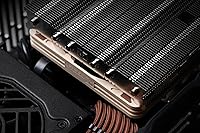
Everything you need for a standard installation on a supported socket is in the box — mounting hardware for Intel and AMD platforms, NT-H2 thermal paste with a spatula, the Low-Noise Adaptor, and the fan itself. You will not need to buy additional mounting kits for mainstream Intel or AMD sockets. The one thing some builders wish was included is a Y-cable or fan splitter for multi-fan setups, but for a single-fan build like this is designed to be, nothing is missing.

Honestly, it is a polarizing choice and Noctua knows it. The brown-beige fan frame and plastic components contrast sharply with the silver and black aesthetic most modern builds follow, and it looks especially out of place alongside RGB components. If your case has no window or you genuinely do not care about internal aesthetics, it is a non-issue. If you have spent real money on a color-coordinated build that will be visible, it is worth factoring into your decision — some builders accept it, others find it difficult to overlook.

Noctua backs this cooler with a 6-year manufacturer warranty, which is considerably longer than most competing brands offer. More practically, Noctua has a strong reputation for actually honoring warranty claims without excessive friction, and they regularly release free mounting upgrade kits when new CPU sockets launch. That combination of long warranty coverage and ongoing platform support is a meaningful part of the long-term value case for paying the premium price.

PWM support on your motherboard header gives you the best experience — automatic speed control means the fan ramps up and down based on CPU temperature without any manual configuration. If your board only has a 3-pin DC header, the fan will still work, but speed control will be handled differently depending on your motherboard firmware and may not be as smooth or precise. Most modern motherboards include at least one PWM-capable header, so this is rarely a practical problem.

Where to Buy