Overview

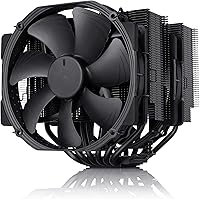
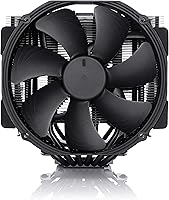
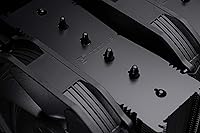
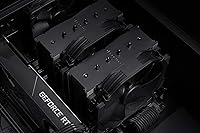
The Noctua NH-D15 chromax.Black represents a meaningful shift for a brand long identified by its polarizing brown-and-beige colorway — and for builders who care about aesthetics as much as performance, that change matters. This dual-tower air cooler sits at the premium end of the air cooling market, delivering thermal performance that genuinely challenges mid-range all-in-one liquid coolers. Over 300 awards from hardware publications back that reputation, but the real proof is in sustained workloads where temperatures stay controlled without fan noise climbing noticeably. Out of the box, build quality impresses immediately — the fins are tight, the heatpipes are solid, and the packaging includes every accessory a careful builder expects.

Features & Benefits

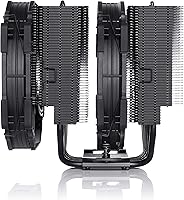
The chromax.Black ships with two NF-A15 140mm PWM fans that balance airflow and acoustics better than most competitors at this size. At idle, the included Low-Noise Adaptors drop fan speeds to a point where the cooler is effectively inaudible — you won't hear it during normal desktop use. Under a heavy rendering job or an extended overclock, the six copper heatpipes distribute heat across the aluminium fin stack efficiently enough that temperatures stay comfortable before the fans need to spin up meaningfully. Installation is handled by the SecuFirm2 mounting system, covering both modern Intel and AMD sockets without adapter guesswork. On AM4 and AM5 boards, an offset mount option helps recover clearance for tall RAM kits — a thoughtful touch.

Best For

This dual-tower air cooler is built for builders who push flagship CPUs hard and need both silence and thermal headroom in return. Chips like the Ryzen 9950X or Intel Core Ultra 285K generate substantial heat under sustained loads, and Noctua's all-black flagship handles them without the fans becoming intrusive. It's also the practical choice for anyone stepping away from liquid cooling — whether due to concerns about pump longevity, leak risk, or a preference for fewer moving failure points. Physically, it needs a mid-tower or larger case, and builders should verify RAM slot access and side-panel clearance before purchasing. Those running a compact build or a modest CPU will likely find the size disproportionate to their actual needs.

User Feedback

Owners consistently highlight two things: how quiet the cooler runs during everyday tasks, and how well it holds temperatures under the kind of load that causes cheaper alternatives to throttle or spin up audibly. Long-term reliability gets mentioned often — buyers who purchased several years ago report fans still running smoothly with no bearing noise. The flip side involves installation: fitting the second fan with tall RAM already seated can require some maneuvering, and a handful of buyers wish they had checked case interior width more carefully beforehand. A small group feels Noctua's all-black flagship is simply oversized for their setup. Still, silence and durability earn the most repeat mentions, and the overall reception is strongly positive across thousands of verified reviews.

Pros

  • Keeps flagship high-TDP CPUs cool under sustained workloads without audible fan noise during normal use.
  • Near-silent at idle — in a quiet room, you genuinely cannot hear the chromax.Black spinning.
  • Fan bearings remain smooth and consistent years into ownership, with long-term durability frequently praised.
  • The SecuFirm2 mounting system covers both current Intel and AMD sockets cleanly, with no extra adapter purchases needed.
  • Premium NT-H1 thermal paste and Low-Noise Adaptors are included — the cooler is fully operational straight from the box.
  • Six-year manufacturer warranty is one of the longest offered in the CPU cooler category.
  • All-black finish integrates naturally into dark builds and pairs well with RGB or monochrome aesthetics.
  • Offset AMD mounting option helps recover RAM clearance on AM4 and AM5 boards with taller memory kits.
  • Thermal performance competes with mid-range 240mm all-in-one liquid coolers without any liquid cooling risk.
  • Build quality impresses immediately — tight fin stacks, solid heatpipes, and a finish that feels like a premium product.

Cons

  • Tall RAM kits on Intel boards can conflict with the front fan, requiring partial disassembly during installation.
  • Case compatibility must be verified carefully — the width clearance catches buyers who skip this step.
  • The price-to-performance ratio weakens considerably for mid-range or low-TDP CPU pairings.
  • Significantly heavier than average, which can add minor stress to the motherboard in transport or vertical mounts.
  • No integrated RGB lighting, which may disappoint builders expecting visual flair at this price level.
  • Full-speed fan noise under extreme sustained load is audible, despite being controlled compared to many rivals.
  • The sheer physical bulk makes installation noticeably more cumbersome inside tighter mid-tower interiors.
  • Warranty claim experience varies by region — buyers outside key markets report inconsistent support response times.

Ratings

The scores below for the Noctua NH-D15 chromax.Black were generated by AI after analyzing thousands of verified global buyer reviews, with spam, bot activity, and incentivized feedback actively filtered out. Ratings reflect real-world usage patterns across a wide range of builds — from quiet home workstations to overclocked enthusiast rigs — and both the standout strengths and the genuine frustrations are represented without bias.

Thermal Performance
94%
Under heavy sustained loads — long rendering sessions, extended overclocks, demanding game compilations — this dual-tower air cooler keeps flagship CPUs at temperatures that rival what many 240mm liquid coolers achieve. Owners running chips like the Ryzen 9950X consistently report comfortable headroom with no throttling.
On paper-thin workloads or low-TDP chips, the full performance potential is largely wasted, making the thermal headroom irrelevant for casual users. A small share of buyers on very high-TDP processors pushing extreme overclocks noted the cooler operates closer to its ceiling than they expected.
Acoustic Performance
93%
At idle or light desktop tasks, the chromax.Black is effectively silent — most owners report they have to physically check whether the fans are spinning. With the included Low-Noise Adaptors installed, even moderate gaming loads stay quiet enough that the cooler disappears acoustically inside a closed case.
At full fan speed under a prolonged all-core stress test, there is audible airflow noise, though it remains controlled compared to many rivals. Buyers who expected zero noise at every load point may find the full-speed behavior mildly surprising the first time they push the CPU hard.
Build Quality
91%
The fin stack is tight and uniform, the copper heatpipes feel substantial, and the nickel-plated finish shows no shortcuts. Unboxing the cooler gives an immediate sense of something built to last — a feeling reinforced by long-term owners who report zero degradation in fan bearing quality after several years of continuous use.
At this price point, the expectations are high, and a handful of buyers received units with minor cosmetic blemishes on the fin edges. Nothing structural, but noticeable in a build where aesthetics matter and the cooler is visible through a glass side panel.
Noise-to-Cooling Ratio
92%
Few air coolers at any price deliver as much cooling per decibel as Noctua's all-black flagship. The PWM control curve is well-tuned — the fans ramp up gradually and proportionally, so there is no sudden acoustic jump when workload increases. For silent PC enthusiasts, this balance is the core reason to choose air over liquid.
Achieving the quietest operation does require using the Low-Noise Adaptors, which slightly reduce peak airflow. Buyers who skip that step and run the fans at unrestricted speed will get more cooling but lose some of the acoustic advantage that defines the cooler's reputation.
Installation Experience
76%
24%
The SecuFirm2 mounting hardware is clearly labeled, well-packaged, and supports a wide range of current Intel and AMD sockets without needing separate adapter kits. Most builders with moderate PC building experience complete the install without consulting a guide, and the included instructions are clearer than those from most competitors.
Fitting the second fan after the cooler is mounted can be awkward, especially with tall RAM already seated — many owners resort to temporarily removing one stick. The cooler's sheer size also makes the process physically cumbersome inside tighter mid-tower cases, and inexperienced builders can find the weight and bulk intimidating.
RAM Clearance
61%
39%
The offset mounting option on AM4 and AM5 boards genuinely helps recover clearance on one side, and for builders with low-profile memory, the issue is largely non-existent. Noctua's awareness of this limitation and their engineering response to it is appreciated by buyers who plan ahead.
Tall RGB memory kits are a real compatibility problem, particularly on Intel boards where the offset option is not available. A meaningful share of buyers report having to remove the front fan to seat RAM, then reinstall it afterward — a frustrating extra step that the product's premium positioning makes feel inconsistent.
Case Compatibility
67%
33%
In a full-tower or a roomy mid-tower, the chromax.Black fits without drama — the dimensions are well-documented and most popular enthusiast cases from reputable brands list clearance specs that accommodate it. Builders who check compatibility before purchasing report no surprises.
The 165mm height and 161mm width rule out a meaningful number of mid-tower cases, and the side-panel clearance near the motherboard can be razor-thin in some builds. Buyers who skipped the compatibility check have left negative feedback that is really a self-inflicted fitment issue, but it happens often enough to be worth flagging clearly.
Value for Money
78%
22%
For a builder running a high-end CPU who wants silence, long-term reliability, and no liquid cooling maintenance, the price-to-performance ratio holds up strongly over a multi-year ownership window. The six-year warranty, included thermal paste, and complete mounting kit reduce the real cost of ownership compared to coolers that require separate purchases.
For mid-range CPUs or modest workloads, the price is genuinely hard to justify — capable air coolers at half the cost perform within a few degrees. Budget-conscious builders and those not running top-tier chips are likely overpaying for headroom they will never use.
Aesthetic Design
88%
The all-black finish is not just a cosmetic update — for a large share of buyers it was the deciding factor. It integrates naturally into dark-themed builds, pairs cleanly with RGB lighting without clashing, and projects a stealthy, premium look that Noctua's traditional colorway could never achieve in modern build aesthetics.
The chromax.Black commands a modest price premium over the standard version for what is functionally identical hardware in a different finish. Buyers who are indifferent to color and purely performance-focused may feel the aesthetic tax is unnecessary.
Fan Quality
93%
The NF-A15 fans have a long-standing reputation for refined bearing quality, consistent airflow, and exceptional longevity. Owners who have run them for three or more years report the same smooth, quiet operation as day one — a durability track record that is genuinely rare in the fan market.
The fans are optimized for static pressure and airflow balance rather than raw maximum airflow, so in unusual case configurations with poor ambient airflow they may not compensate as effectively as higher-speed alternatives. This is an edge case, but worth noting for unusual or restrictive case designs.
Included Accessories
89%
The accessory bundle is genuinely complete — NT-H1 thermal compound, Low-Noise Adaptors, the full SecuFirm2 mounting kit, and even a small screwdriver are all present. Buyers appreciate not having to source anything separately just to get the cooler operational, which is not a given at this category.
The Low-Noise Adaptors are not clearly explained in context within the documentation for new builders, and a portion of first-time Noctua buyers are unsure whether to use them or not. A brief practical guide on when to choose each mode would reduce installation confusion.
Long-Term Durability
96%
Durability is one of the most consistently praised aspects across multi-year ownership reviews. The all-aluminium and copper construction does not degrade, corrode, or warp over time, and the fan bearings maintain their performance characteristics well beyond the period where cheaper coolers begin to show wear.
There is essentially no meaningful durability criticism from verified long-term owners. The only caveat is theoretical — any fan can eventually fail, and while Noctua's six-year warranty covers replacement, buyers outside supported warranty regions may face friction in the claims process.
Warranty & Support
87%
A six-year manufacturer warranty is one of the longest in the CPU cooler category and signals genuine confidence in the product's lifespan. Noctua's reputation for responsive customer support is well-documented across hardware communities, and replacement parts are available separately if needed.
Warranty servicing experience varies noticeably by region — buyers in markets without direct Noctua distribution sometimes report slower response times or complications with claims. The warranty is a strong differentiator in supported regions but less reliable as a selling point globally.
Packaging & Unboxing
84%
The packaging is protective, organized, and clearly segmented so every component is easy to locate before starting the build. The cooler arrives with no cosmetic transit damage in the overwhelming majority of reported cases, which matters when buyers are paying a premium for a product they want to display.
The box is large and generates a fair amount of packaging material. Minor gripe, but buyers who are eco-conscious or working in tight spaces note that the packaging footprint feels slightly oversized relative to what is strictly necessary to protect the contents.

Suitable for:

The Noctua NH-D15 chromax.Black is purpose-built for enthusiast PC builders who demand both serious thermal performance and near-silent operation from a single cooling solution. If you are running a high-TDP processor — think a Ryzen 9950X, a Core Ultra 285K, or anything in that power bracket — and you want sustained all-core workloads handled quietly without the fans audibly ramping up mid-session, this dual-tower air cooler is a genuinely strong match. It also makes a compelling case for builders who have grown wary of liquid cooling: no pump to fail, no coolant to degrade, no leak risk near expensive components, and a construction quality that long-term owners consistently describe as unchanged years into use. The all-black finish is worth acknowledging as a legitimate buying factor rather than a minor bonus — for builders running dark-themed or RGB-accented systems, the chromax.Black integrates cleanly in a way the standard beige variant simply cannot. Anyone with a mid-tower or full-tower case that meets the clearance requirements and a CPU that justifies premium cooling will find this cooler a well-considered, complete package right out of the box.

Not suitable for:

Buyers on tighter budgets running mid-range CPUs should think carefully before committing to the Noctua NH-D15 chromax.Black, because the performance headroom it provides is largely theoretical at lower power levels — capable coolers at a fraction of the price close that gap to within a few degrees. Compact build enthusiasts are a firm no: the cooler's physical footprint is substantial, and cases that are borderline on interior width or CPU cooler height clearance will cause real installation problems that no amount of enthusiasm compensates for. Tall RAM kits are another practical friction point, particularly on Intel platforms where the offset mounting option that helps on AMD boards is not available — if your memory slots are packed with large-profile sticks, expect to work around the front fan during installation. If you are building in an ITX or small form-factor case, this is simply the wrong tool regardless of your CPU. And if aesthetics are irrelevant to your build and you are purely chasing thermal performance per dollar, there are competing air coolers that close the gap meaningfully at a lower price point.

Specifications

  • Cooling Method: Dual-tower air heatsink with six copper heatpipes, aluminium fin stacks, and two 140mm PWM fans operating in a push-pull configuration.
  • Fan Size: Two NF-A15 140mm fans are included, each using a 4-pin PWM connector for automatic speed control by the motherboard.
  • Max Fan Speed: Each fan spins up to 1500 RPM under full load, with speed scaling down significantly during light use or idle.
  • Airflow: Combined airflow capacity reaches 140.2 cubic meters per hour, providing strong throughput across the dual fin stack.
  • Noise Level: Maximum acoustic output is rated at 24.6 dB(A), measured at full fan speed — equivalent to a very quiet background hum.
  • Dimensions: The cooler measures 161mm wide, 150mm deep, and 165mm tall with both fans installed; case CPU cooler clearance must meet or exceed 165mm.
  • Weight: Total weight with both fans installed is approximately 2.87 lbs (around 1.32 kg), which is typical for a full-size dual-tower heatsink.
  • Heatpipes: Six copper heatpipes run from the nickel-plated copper base through both fin towers, distributing heat efficiently across the full surface area.
  • Materials: Base and heatpipes are copper with nickel plating; cooling fins are aluminium; all joints are soldered for long-term thermal and structural integrity.
  • Socket Support: Compatible with Intel LGA1851, LGA1700, LGA1200, LGA1150, LGA1151, LGA1155, and LGA1156, as well as AMD AM5 and AM4 platforms.
  • Voltage: Fans operate at 12V DC, supplied through the standard 4-pin PWM motherboard header.
  • Thermal Paste: Noctua NT-H1 high-performance thermal compound is included in the box, ready to apply without a separate purchase.
  • Mounting System: SecuFirm2 mounting hardware is included, covering all supported Intel and AMD sockets with a tool-friendly installation process.
  • Low-Noise Adaptors: Two Low-Noise Adaptors (LNAs) are included, reducing maximum fan speed and lowering acoustic output during everyday or lightly loaded use.
  • AMD Offset Mount: An offset mounting option is available for AM4 and AM5 installations, shifting the cooler slightly to improve clearance for RAM in the adjacent slots.
  • Warranty: Noctua provides a 6-year manufacturer warranty covering defects in materials and workmanship from the date of purchase.
  • Color: All external components — fans, heatsink fins, and mounting hardware — are finished in uniform matte black as part of the chromax series.
  • Power Connector: Standard 4-pin PWM headers are used on both fans, compatible with any modern desktop motherboard fan header.

Related Reviews
Noctua NH-D9L chromax.Black CPU Cooler
88%
89%
Cooling Performance
91%
Noise Levels
95%
Compatibility with Small Builds
90%
Ease of Installation
93%
Build Quality
More
Noctua NH-U12A chromax.Black
87%
88%
Thermal Performance
96%
Noise Level
93%
Build Quality
71%
Value for Money
82%
Installation & Compatibility
More
Noctua NH-L9i-17xx chromax.Black CPU Cooler
89%
87%
Cooling Performance
94%
Noise Level
92%
Build Quality
90%
Ease of Installation
91%
Compatibility with SFF Cases
More
Noctua NF-F12 PWM chromax.Black.swap 120mm Fan
90%
93%
Performance
95%
Noise Level
90%
Build Quality
91%
Airflow Efficiency
88%
Ease of Installation
More
Noctua NH-U9S CPU Cooler
86%
88%
Performance
95%
Noise Levels
92%
Installation Ease
90%
Compatibility
87%
Build Quality
More
Noctua NH-U12S SE-AM4
89%
91%
Cooling Performance
95%
Noise Level
88%
Installation Ease
89%
Build Quality
90%
Size and Compatibility
More
Noctua NH-L9a-AM5 CPU Cooler
87%
88%
Performance
91%
Noise Level
85%
Cooling Efficiency
92%
Build Quality
76%
Ease of Installation
More
Noctua NH-U9DX i4 CPU Cooler
87%
91%
Cooling Performance
95%
Noise Levels
88%
Compatibility
85%
Installation Ease
90%
Build Quality
More
Noctua NH-L12Sx77 Low-Profile CPU Cooler
89%
93%
Thermal Performance
89%
Noise Level
91%
Installation Ease
95%
Build Quality
88%
Compatibility
More
Noctua NH-D12L Low-Height Dual-Tower CPU Cooler
87%
88%
Cooling Performance
92%
Noise Level
94%
RAM Compatibility
91%
Ease of Installation
89%
Build Quality
More

FAQ

It depends on your specific case. The cooler stands 165mm tall with fans attached, so your case needs to officially support at least that much CPU cooler clearance. Check your case specifications before ordering — this is the single most common fitment mistake buyers make, and it is entirely avoidable with a quick spec check.

It can be tricky. On AMD AM4 and AM5 boards, the offset mounting option shifts the cooler slightly away from the RAM slots, which often resolves the conflict. On Intel boards, that option is not available, and tall memory kits may physically clash with the front fan. Many builders in this situation remove the front fan, install the RAM, then reattach the fan afterward — it works, but it adds steps to the build process.

At idle or during light tasks like browsing or document work, the chromax.Black is effectively inaudible inside a closed case — most owners say they have to visually confirm the fans are spinning. Under a sustained all-core workload like video rendering or a long compile, the fans do spin up and produce some airflow noise, but it stays controlled and is noticeably quieter than most competing coolers at equivalent thermal loads.

No. Noctua includes a tube of their NT-H1 thermal compound in the box, which is a genuinely capable compound — not a budget filler paste. You can apply it straight out of the box without sourcing anything extra.

Yes. It supports Intel LGA1851 and LGA1700 (covering 12th through 15th and Core Ultra gen CPUs), as well as AMD AM5 and AM4. The SecuFirm2 mounting kit in the box covers all these sockets without any additional adapter purchases required.

For most builds, yes — thermal benchmarks consistently show this dual-tower air cooler matching or coming within a few degrees of 240mm all-in-one coolers under sustained loads. The gap widens slightly on the most power-hungry CPUs at extreme overclocks, where a 360mm AIO may pull ahead. But for the majority of enthusiast builds, the performance difference is marginal and easily justified by the lack of a pump, liquid, or long-term maintenance.

It is manageable, but the cooler's size and weight make it less forgiving than a small single-tower unit. The SecuFirm2 mounting hardware is well-labeled and the process is documented clearly, but working around both fin towers in a populated case takes patience. First-timers should give themselves extra time and consider removing the GPU temporarily for easier access to the motherboard area.

Yes, running a single fan is a supported and practical configuration. The thermal performance drops slightly compared to dual-fan push-pull, but the cooler still handles high-TDP CPUs comfortably in single-fan mode. Many builders use this approach specifically to resolve RAM clearance issues — the single fan is installed on the side facing away from the memory slots.

The warranty covers manufacturing defects in both the heatsink and the fans. Noctua's support reputation is strong in North America and Europe, with direct RMA processes that most buyers describe as responsive. In less supported regions, the experience can vary, so it is worth checking Noctua's regional distributor coverage before assuming a frictionless claims process everywhere.

Both approaches work, but they serve different goals. The Low-Noise Adaptors physically cap the maximum fan speed regardless of the PWM signal, which means the cooler is quieter even when the motherboard tries to ramp fans up under load. Relying purely on motherboard PWM curves gives you more flexibility to tune performance versus acoustics in your BIOS, but requires a well-tuned fan curve to match what the LNAs provide by default. For most users who want quiet without fussing with BIOS settings, the included adaptors are a practical shortcut.