Overview

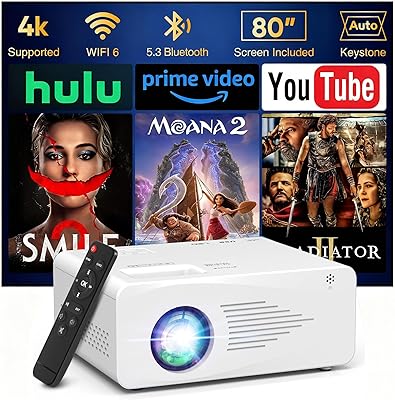
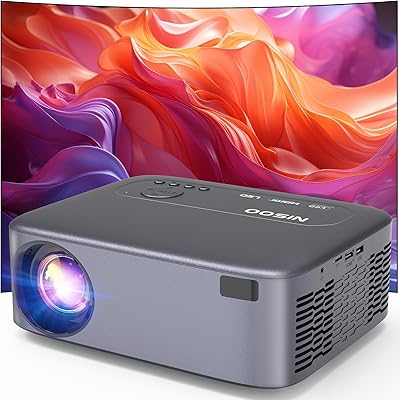
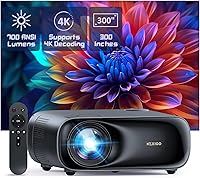
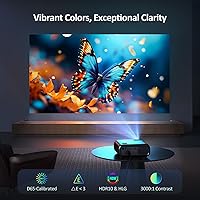
The NexiGo PJ40 Gen 3 1080P Projector sits in a competitive mid-range bracket where most buyers are choosing between cheap throwaway units and pricier dedicated home theater setups. What sets this one apart is a genuine D65 color calibration standard — a spec more commonly found on professional monitors than affordable projectors. In plain terms, D65 means the image white point is tuned to natural daylight, keeping skin tones honest and colors from looking washed out or artificially vivid. This NexiGo projector handles both living room and backyard duty reasonably well, though it is worth being upfront: it is not a replacement for a high-end cinematic rig. Think of it as a capable, versatile daily driver for casual home entertainment.
Features & Benefits

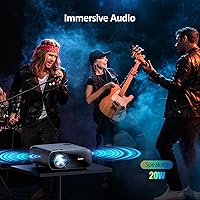
At its core, this home theater projector delivers a native 1080p picture that holds up well in a properly darkened room — though buyers expecting to use it in a bright living room will be disappointed. The color calibration is the real standout; a dE score under 3 means color error is essentially invisible, producing natural-looking images rather than the oversaturated pop common on cheaper units. The 20W built-in speakers are genuinely usable for casual viewing — not audiophile-grade, but surprisingly full for a projector this size. Fan noise is adjustable across levels, which is thoughtful, though in a very quiet room the higher cooling settings are noticeable. The connectivity suite covers dual HDMI, Wi-Fi mirroring, and Bluetooth, handling most modern device combinations without fuss.

Best For

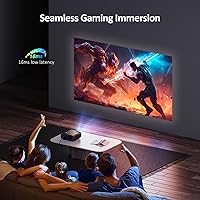
The PJ40 Gen 3 really shines for backyard movie nights — the portable build, decent speaker output, and wide zoom range make outdoor setups genuinely practical without hauling extra gear. Casual gamers will appreciate the low input latency, sufficient for console play even if it won't satisfy competitive players. It is also a solid pick for anyone who regularly mirrors content from a phone or laptop via 5GHz Wi-Fi. One important note: Netflix and similar apps do not support wireless mirroring due to copyright restrictions, so pairing this with a Fire TV Stick is the workaround most buyers rely on. Flexible mounting options — table, tripod, or ceiling — round out its everyday practicality nicely.

User Feedback

Across several hundred reviews, the PJ40 Gen 3 holds a steady four-out-of-five rating — broadly positive, but not without recurring complaints. Most owners praise the out-of-box color accuracy and the stronger-than-expected audio output as genuine highlights. On the downside, brightness in ambient-lit rooms comes up frequently; this is not a projector for daytime use without blackout curtains. Some buyers are initially caught off guard by the Netflix limitation, though those who add a streaming dongle tend to adjust quickly. First-time projector users generally describe setup as straightforward. Fan noise draws mixed reactions — barely noticeable for most, but a real distraction for anyone watching in a near-silent environment at higher cooling settings.

Pros

  • D65 color calibration produces noticeably natural, accurate colors straight out of the box.
  • Built-in 20W speakers are genuinely usable for movie nights without reaching for an external audio setup.
  • Low 16ms input latency makes casual console gaming on a large screen a comfortable experience.
  • The optical zoom range lets you resize the image significantly without physically repositioning the projector.
  • 5GHz Wi-Fi mirroring works reliably for phones, laptops, and non-DRM content without extra apps.
  • Dual HDMI inputs allow a streaming dongle and a gaming console to stay connected simultaneously.
  • Adjustable fan speed gives you real control over the cooling-versus-noise tradeoff depending on the environment.
  • Supports table, tripod, and ceiling mount setups, covering almost every realistic installation scenario.
  • Lightweight enough to carry between the living room and backyard without any real effort.
  • First-time projector owners consistently report a fast, frustration-free setup experience.

Cons

  • Requires a properly darkened room — ambient light kills image quality faster than most buyers expect.
  • Netflix, Prime Video, and Hulu cannot be mirrored wirelessly due to DRM; a streaming dongle is effectively mandatory.
  • No built-in smart TV operating system, so accessing streaming apps always depends on an external device.
  • Fan noise at higher cooling levels is a genuine distraction in quiet rooms during soft or dialogue-heavy scenes.
  • The 4K support is upscaling only — native 4K content will not look as sharp as on a true 4K projector.
  • Horizontal keystone correction is manual only, making angled setups more fiddly to dial in precisely.
  • The remote feels noticeably cheaper than the projector itself and drew consistent criticism in user reviews.
  • No ceiling mount bracket is included in the box, despite ceiling installation being a listed supported option.
  • Edge sharpness softens slightly when heavy keystone correction is applied at wider projection angles.

Ratings

The NexiGo PJ40 Gen 3 1080P Projector scores below were generated by our AI system after analyzing verified buyer reviews from multiple global markets, with spam, bot-submitted, and incentivized feedback actively filtered out. The result is an honest, balanced picture of where this home theater projector genuinely delivers and where real owners have run into friction. Both the standout strengths and the recurring frustrations are reflected directly in every score.
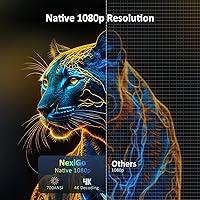
Image Quality
83%
Buyers consistently highlight how natural and accurate colors look straight out of the box, particularly for movies with lots of skin tones and outdoor scenery. The D65 calibration makes a visible difference compared to cheaper units that oversaturate everything, and most users notice it immediately during first use.
In anything brighter than a dimmed room, the image loses punch and starts to wash out noticeably. Buyers who did not plan for blackout curtains or evening-only use were the most likely to feel let down by the overall brightness ceiling.
Brightness Performance
61%
39%
For evening backyard screenings or a properly darkened living room, the light output is more than adequate, producing a clear and watchable image up to a generous screen size. Users running it after sunset for outdoor gatherings reported solid results without needing any additional setup.
This is the single most common complaint across reviews — daytime or ambient-light use is simply not practical. Even with curtains drawn but some light leaking in, the picture quality drops off fast, and buyers expecting versatile all-day use were consistently disappointed.
Color Accuracy
88%
The D65 calibration standard is a genuine differentiator at this price tier, and experienced buyers notice it. Film content looks tonally balanced rather than artificially punchy, which matters most during long movie sessions where eye fatigue from oversaturated images becomes a real issue.
A small number of users reported that the default factory calibration was not perfectly consistent across units, requiring minor manual adjustment. Those without experience tweaking projector settings found the color menu a bit intimidating to navigate.
Built-in Audio
77%
23%
The 20W speaker output genuinely surprised a lot of buyers who expected throwaway sound quality. For outdoor movie nights or casual living room use, most users found they could skip the external speaker entirely, which simplifies the whole setup considerably.
At higher volumes the sound starts to thin out, losing low-end body — music-heavy content and action films expose this more than dialogue-driven movies. Buyers with any investment in home audio will still want to connect external speakers via Bluetooth or the 3.5mm port.
Fan Noise
64%
36%
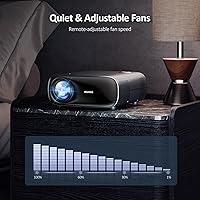
The adjustable fan speed is a genuinely thoughtful feature, and buyers watching in moderately sized rooms at lower fan settings found the noise completely ignorable. Outdoor users especially noted that ambient environment sound masks the fan entirely.
In a quiet bedroom or during soft dialogue scenes, the fan at higher cooling levels becomes a background distraction that some buyers found hard to tune out. A few reviewers noted the projector defaulted to higher fan speeds than necessary in normal room temperatures.
Connectivity & Ports
82%
18%
The port selection is comprehensive for a projector in this class — dual HDMI inputs alone make it easy to keep a streaming dongle and a gaming console connected simultaneously without swapping cables. HDMI CEC support is a small but appreciated bonus for users with compatible TVs and soundbars.
The wireless screen mirroring, while functional, hits a hard wall with Netflix, Amazon Prime Video, and Hulu due to DRM restrictions — buyers who did not read this in advance were noticeably frustrated. The practical fix is a Fire TV Stick or Chromecast, but it is an extra cost and step that some felt should be disclosed more prominently.
Wi-Fi & Wireless Mirroring
71%
29%
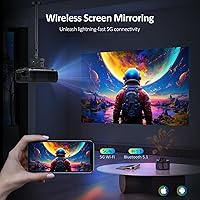
The 5GHz Wi-Fi connection for screen mirroring worked reliably for most buyers casting from phones and laptops for photos, YouTube, and local media. Users mirroring presentations or non-DRM video content generally reported stable, low-lag connections.
The inability to mirror Netflix or similar streaming apps is a structural limitation that no firmware update will fix, and it catches a meaningful number of buyers off guard. Those who expected to simply cast their phone and watch any app found the workaround with a dongle mildly inconvenient.
Input Latency for Gaming
74%
26%
At 16ms, the input latency is low enough for casual console gaming — sports titles, RPGs, and adventure games all felt responsive to buyers who tested it with PS5 and Nintendo Switch. It is a genuine step up from most projectors in this bracket.
Competitive or fast-reaction gaming, particularly fighting games and first-person shooters, still feels slightly sluggish compared to a dedicated gaming monitor. Buyers should treat this as a couch-gaming projector, not a performance gaming display.
Zoom & Screen Size Flexibility
79%
21%
The 60–100% optical zoom range means buyers can meaningfully adjust the image size without physically moving the unit, which is a real convenience for living rooms with fixed furniture layouts. Backyard users appreciated being able to dial in a clean image on different-sized screens or walls.
At the upper end of the zoom range and projection distance, some buyers noted a slight softening at the image edges. The 300-inch maximum is technically achievable but demands near-perfect darkness and a flat, evenly colored surface to look acceptable.
Keystone Correction
76%
24%
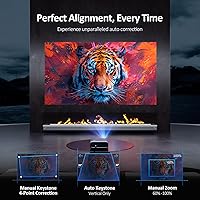
Having both manual 4D keystone correction and automatic vertical correction gives buyers real flexibility when the projector cannot be perfectly centered. Users placing it on a coffee table slightly below screen level found the auto-correction quick and accurate enough for everyday use.
Auto keystone only handles the vertical axis, so horizontal adjustments still require manual input — a minor inconvenience but noticeable when the projector is set up at an angle. Buyers using aggressive keystone correction also reported a subtle reduction in sharpness at the corrected edges.
Setup & Ease of Use
84%
First-time projector owners consistently called out how approachable the setup process is — from unboxing to a working image typically takes under fifteen minutes. The remote is intuitive and the menu structure does not require consulting the manual for basic configuration.
Getting the image truly dialed in — fine-tuning color calibration, keystone, and focus together — takes a bit more patience than plug-and-play. Buyers who skipped the calibration steps and left everything on default occasionally reported slightly off colors that they blamed on the hardware rather than the settings.
Build Quality & Design
72%
28%
The chassis feels solid and well-balanced for its size, and at just over six pounds the unit is light enough to move between rooms or carry outdoors without hassle. Several buyers noted the matte finish resists fingerprints and looks relatively premium compared to cheaper plastic-heavy competitors.
A handful of users described the lens housing and surrounding trim as feeling slightly less robust than the rest of the body. The remote in particular drew some criticism for feeling budget-grade relative to the projector itself.
Installation Versatility
81%
19%
Support for table, tripod, and ceiling mount installations genuinely expands where and how this projector fits into a home. Buyers who ceiling-mounted it in a dedicated media room appreciated the clean setup, and the standard tripod thread made outdoor stands easy to source.
Ceiling installation requires more effort than the listing implies — buyers without prior mounting experience found the process fiddly, and there is no included ceiling bracket in the box. Those expecting a turnkey ceiling-mount solution needed to budget for additional hardware.
Value for Money
78%
22%
For buyers whose primary use is evening movie nights — indoors or outside — the combination of calibrated color, usable built-in audio, and broad connectivity represents strong value at this price tier. It competes meaningfully against more expensive options when used in the right conditions.
Buyers who pushed the projector beyond its brightness comfort zone or expected native streaming app support felt the value proposition weakened. The need to add a streaming dongle to unlock basic Netflix use is a recurring friction point that slightly undermines the overall package.

Suitable for:

The NexiGo PJ40 Gen 3 1080P Projector is a strong match for anyone who wants a capable big-screen experience without the complexity or cost of a dedicated home cinema build. It is particularly well-suited to households that host regular evening movie nights, whether that means pulling the curtains in the living room or setting up in the backyard with friends. The D65 color calibration makes it genuinely appealing to film enthusiasts who care about how movies actually look, not just how bright or large the image is. Casual console gamers will find the low input latency comfortable for relaxed play on a PS5 or Switch. If you travel between spaces — bedroom, living room, patio — the lightweight build and flexible mounting options make it easy to move and re-install. People who regularly mirror content from phones or laptops for work presentations, YouTube, or personal media will also find the 5GHz wireless mirroring reliable and cable-free.
Not suitable for:

The NexiGo PJ40 Gen 3 1080P Projector is not the right choice for anyone who cannot consistently control the lighting in their room. If your living space has large windows, open-plan areas, or you intend to use the projector during the day without blackout solutions, the brightness simply will not deliver a satisfying image. Buyers who want to stream Netflix, Disney+, or Amazon Prime Video wirelessly straight from their phone will hit a hard wall — DRM restrictions block screen mirroring for those apps, and a streaming dongle becomes a necessary add-on rather than an optional convenience. This is also not the projector for serious home cinema enthusiasts who want laser-sharp detail, reference-level brightness, or true 4K resolution — the 4K support here is upscaling, not native. Competitive gamers who need sub-10ms response times will find a gaming monitor a far better fit. Finally, buyers in small, very quiet rooms who are sensitive to background noise should know that the fan at higher cooling levels produces a hum that becomes noticeable during quiet dialogue or soft music.
Specifications

  • Native Resolution: The projector outputs a true 1920 x 1080 pixel image natively, with upscaling support for 4K source content.
  • Brightness: Rated at 700 ANSI lumens, delivering a clear picture in darkened rooms but requiring controlled lighting for best results.
  • Color Calibration: Factory calibrated to the D65 color standard with a dE value under 3, meaning color error is imperceptible to the human eye under normal viewing conditions.
  • Contrast Ratio: Delivers a 3000:1 contrast ratio, providing reasonable depth between dark and bright areas of the image.
  • Projection Size: Supports screen sizes ranging from 50″ to 300″ depending on throw distance and zoom level.
  • Zoom Range: Optical zoom adjusts between 60% and 100%, allowing meaningful image resizing without physically moving the unit.
  • Keystone Correction: Offers 4D manual keystone correction covering ±30° vertical and ±20° horizontal, plus automatic vertical-only correction for quick alignment.
  • Light Source: Uses an LED light source, which typically offers a longer operational lifespan and lower heat output compared to traditional lamp-based projectors.
  • Input Latency: Measured input latency of 16ms makes this projector suitable for casual console gaming without significant perceivable lag.
  • Built-in Audio: Equipped with a 20W built-in stereo speaker system capable of filling a mid-sized room or outdoor backyard space with clear audio.
  • Wireless Audio: Bluetooth 5.1 allows stable wireless pairing with headphones, soundbars, or external Bluetooth speakers.
  • Wi-Fi: Supports 5GHz Wi-Fi for screen mirroring from iOS, Android, and Windows devices without requiring additional apps or adapters.
  • Ports: Includes 2x HDMI (HDMI 2.0 with CEC support), 2x USB, one composite AV input, one RJ45 ethernet port, and a 3.5mm analog audio output.
  • Fan Noise: Fan speed is manually adjustable across ten levels, with measured noise output ranging from approximately 35dB at the lowest setting to 46dB at maximum cooling.
  • Dimensions: The unit measures 11.30 x 10.78 x 4.80 inches, making it compact enough to move between rooms or transport outdoors with minimal effort.
  • Weight: The projector unit weighs 6.07 lbs, with total packaged shipping weight of approximately 7.83 lbs.
  • Installation Modes: Compatible with tabletop, tripod, and ceiling mount installation configurations, offering broad flexibility for permanent and temporary setups alike.
  • Operating System: The PJ40 Gen 3 does not run a built-in smart TV operating system and relies on external devices such as streaming sticks or connected hardware for app-based content.

Related Reviews

Nebula Capsule 3 Laser Portable Mini Projector
77%
83%
Image Quality
61%
Brightness & Ambient Light Performance
93%
Portability & Form Factor
88%
Smart OS & App Experience
86%
Autofocus & Image Correction
More
ROVE R3 3-Channel Dash Cam
78%
83%
Video Quality
88%
Cabin Night Vision
91%
Three-Channel Coverage
79%
WiFi & App Experience
86%
GPS Performance
More
TUIFAC GT806 3 Channel Dash Cam 2.5K+1080P+1080P
83%
89%
Value for Money
92%
Camera Quality (Front)
90%
Ease of Setup
78%
Night Vision Performance
85%
Rear Camera Quality
More
Vantec NST-371C31-BK NexStar Gx USB 3.1 Gen 2 Type-C 3.5″ SATA HDD/SSD Enclosure
84%
89%
Performance
94%
Ease of Setup
85%
Build Quality
92%
Compatibility with Systems
88%
Data Transfer Speed
More
Vantec NexStar JX 3.5″ HDD Enclosure
76%
93%
Ease of Setup
78%
Transfer Speed — USB
86%
Transfer Speed — eSATA
74%
Thermal Management
67%
Build Quality
More
GKLPO 1080P Projector
86%
88%
Image Quality
92%
Wi-Fi Connectivity
89%
Bluetooth Connectivity
90%
Portability
85%
Setup & Ease of Use
More
NexiGo N980P
NexiGo N980P
78%
83%
Video Clarity
88%
Frame Rate Smoothness
71%
Low-Light Performance
79%
Wide-Angle Lens
62%
Built-in Microphone
More
ViewSonic PA503HD 4000-Lumen Full HD Projector
77%
91%
Brightness Performance
87%
Image Sharpness & Clarity
84%
Color Accuracy & Contrast
88%
Setup & Ease of Installation
86%
Value for Money
More
NexiGo N60 1080P Webcam
74%
78%
Image Quality
93%
Setup & Ease of Use
67%
Microphone Performance
91%
Value for Money
88%
Privacy Cover
More
JOWLURK M7 Native 1080p Projector
74%
88%
Ease of Setup
74%
Image Quality
57%
Brightness Accuracy
83%
Wireless Connectivity
79%
Bluetooth Performance
More

FAQ

Not wirelessly through screen mirroring — Netflix, Amazon Prime Video, Hulu, and similar services block mirroring at the OS level due to copyright protections. The practical fix most buyers use is plugging in a Fire TV Stick or Chromecast into one of the HDMI ports, which works perfectly and gives you full access to all streaming apps.

Realistically, you want the room properly darkened for the best experience. Blackout curtains or evening use outdoors are ideal. In a room with some ambient light leaking in, the image becomes noticeably washed out. This is a 700 ANSI lumen projector — solid for controlled environments, but not designed for bright daytime rooms.

For most casual use — movie nights, backyard gatherings, general TV watching — the 20W output is genuinely sufficient and better than what you get from most projectors in this class. If you are a more serious listener or watching action-heavy content at high volumes, you will probably want to pair it with a Bluetooth speaker or connect one via the 3.5mm port, but it is far from a mandatory upgrade.

Yes, the NexiGo PJ40 Gen 3 1080P Projector supports wireless screen mirroring from iOS devices over 5GHz Wi-Fi without needing a separate app. Just keep in mind that any DRM-protected apps like Netflix or Apple TV+ will not mirror — but photos, local videos, YouTube, and most other content work without issues.
At lower fan settings it is genuinely quiet — most people in a normally furnished room will not notice it during a movie. At higher cooling levels, it produces a steady background hum that becomes more noticeable in a very quiet room, particularly during soft dialogue scenes or music. The good news is you can dial the fan speed down manually if thermals allow.

Absolutely — just run an HDMI cable from your console into one of the two HDMI 2.0 ports. The 16ms input latency is comfortable for most gaming genres. Competitive multiplayer or fast-reflex games will still feel slightly behind a dedicated gaming monitor, but for adventure, sports, RPG, and couch co-op titles it works very well on a large screen.

D65 is the international standard for white point calibration — essentially it means the projector is tuned so that white light matches natural daylight, keeping all other colors accurate relative to it. In practice, it means skin tones look natural rather than orange or pallid, and film colors reproduce closer to what the director intended. At this price tier, having a sub-3 dE score out of the box is a genuine differentiator — most cheaper projectors skip this entirely.

In an average-sized living room with about 10 to 12 feet of throw distance, you can comfortably hit a 100 to 150-inch image, which is already a significant cinematic experience. The 300-inch maximum requires a much longer throw and near-perfect darkness to look clean. For most home setups, somewhere in the 80 to 120-inch range is the sweet spot between image quality and room practicality.

Not at all — most first-time users report getting a working image within ten to fifteen minutes of unboxing. The auto vertical keystone correction handles the basics automatically, and the remote and menu system are straightforward enough that you generally do not need to consult the manual for initial setup. Fine-tuning focus and color settings takes a little more patience, but nothing intimidating.

No, a ceiling mount bracket is not included in the box despite ceiling installation being a supported option. You will need to purchase a compatible universal projector ceiling mount separately. The unit does have a standard mounting thread on the base, so compatible mounts are easy to find, but it is worth factoring in if ceiling installation is your plan.

Where to Buy