Overview

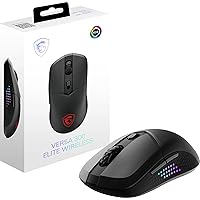
The MSI VERSA 300 Elite Wireless Gaming Mouse is one of those rare budget peripherals that actually makes you stop and reconsider what you expect at this price point. At 65g, it sits comfortably in lightweight territory without requiring you to pay a premium tax for that privilege. Triple connectivity — 2.4GHz RF, Bluetooth 5.3, and a wired USB-C option — is genuinely unusual at this tier; most competitors make you choose one or two. The symmetrical shape is another thoughtful touch, welcoming left-handed players who are often ignored by budget mouse makers. That said, with only six buttons total, macro-heavy players will want to look elsewhere.
Features & Benefits

The sensor alone makes a strong case for the VERSA 300 Elite. MSI chose the PixArt PAW3395 — a chip found in mice that cost considerably more — which means tracking stays accurate and consistent whether you're making slow, deliberate aim adjustments or snapping across the screen fast. The 200-hour battery life is genuinely impressive; most wireless gaming mice in this category deliver 60 to 80 hours, so this wireless gaming mouse is a real outlier. Wireless performance runs at 1ms latency over 2.4GHz, fast enough that you won't notice a difference from wired in daily use. OMRON switches provide a crisp, satisfying click feel, and the PTFE skates deliver smooth, consistent glide across most desk surfaces.

Best For

This wireless gaming mouse is a natural fit for players who want genuine wireless performance without the steep price of flagship options. Ambidextrous users and left-handed players stand to benefit most from the symmetrical build — a layout that remains surprisingly rare among budget wireless mice. The multi-device flexibility — swap between PC via 2.4GHz and a laptop or tablet via Bluetooth — makes it a practical pick for anyone working across multiple setups. FPS and MOBA players will appreciate the accurate sensor without needing a macro grid they'll rarely use. If you find yourself constantly charging mid-session, the battery life here will feel like genuine relief.

User Feedback

Among verified buyers, the VERSA 300 Elite holds a 4.2-star average, and the pattern in reviews is fairly consistent. Most praise centers on two things: how long the battery actually lasts in real use — many report figures matching or approaching the advertised claim — and how smooth the tracking feels straight out of the box. Where people push back is on the software side; RGB lighting and deeper customization require MSI's Windows application, leaving Mac and Linux users with basic hotkey controls only. A handful of buyers also flag the side buttons as slightly awkward to reach depending on hand size. Build quality draws mixed reactions, with some finding it solid for the price and others expecting more substantial materials.

Pros

  • The PixArt PAW3395 sensor tracks accurately and consistently, matching chips found in mice that cost significantly more.
  • Up to 200 hours of wireless use per charge makes battery management a non-issue for most players.
  • Symmetrical design genuinely supports left-handed and ambidextrous users, which remains rare at this price point.
  • 1ms latency over 2.4GHz wireless is fast enough that you will not feel a gap compared to wired play.
  • Bluetooth 5.3 adds real flexibility for switching between devices without swapping dongles.
  • OMRON switches feel crisp and are rated for tens of millions of clicks, suggesting solid long-term durability.
  • Pure PTFE skates provide smooth, consistent glide across cloth and hard desk surfaces right out of the box.
  • At 65g, the VERSA 300 Elite is light enough for extended sessions without wrist fatigue.
  • The included USB-C cable means you can charge and play simultaneously, keeping downtime near zero.
  • Value relative to performance is genuinely strong; the sensor and battery alone justify the asking price.

Cons

  • Only six buttons total limits usefulness for MMO players or anyone relying on on-the-fly macro inputs.
  • RGB lighting and deep customization require MSI's Windows app, leaving Mac and Linux users with basic hotkey control only.
  • Some buyers find the side buttons awkwardly positioned depending on hand size, requiring an adjustment period.
  • Build materials feel cost-conscious up close; the plastic shell lacks the solidity of pricier competitors.
  • Scroll wheel feedback is average at best and may feel imprecise to users coming from higher-end mice.
  • No onboard memory means DPI profiles and settings may reset without the software installed on each machine.
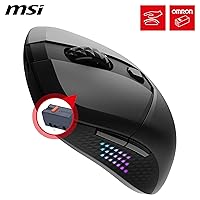
  • The 2.4GHz USB dongle has no dedicated storage slot on the mouse body, making it easy to misplace.
  • Bluetooth mode, while convenient, introduces slightly more latency than the 2.4GHz connection during demanding sessions.

Ratings

The scores below for the MSI VERSA 300 Elite Wireless Gaming Mouse were generated by our AI rating engine after parsing verified buyer reviews from multiple global markets, with spam, bot-submitted, and incentivized feedback actively filtered out. Each category reflects the honest balance of what real users praised and where they ran into friction — nothing is glossed over.
Sensor Performance
92%
Users consistently report that the PixArt PAW3395 tracks with precision across both cloth and hard pads, and many note that there is no detectable jitter or spin-out during fast lateral swipes in FPS sessions. For a mouse at this price, that kind of sensor accuracy is not something buyers take for granted.
A small number of reviewers note that the five fixed DPI presets feel limiting without software installed, particularly if their preferred sensitivity falls between hardware steps. Non-Windows users cannot fine-tune the presets at all, which reduces the sensor's practical flexibility on those platforms.
Battery Life
94%
Battery longevity is the single most praised attribute across buyer reviews — many users report going weeks between charges during regular daily gaming sessions, which removes the low-battery anxiety that plagues shorter-lived wireless mice. Several buyers specifically switched to the VERSA 300 Elite after getting burned by competitors that needed charging every two or three days.
The advertised 200-hour figure assumes dimmed or disabled RGB, and buyers who run lighting at full brightness report meaningfully shorter real-world runtimes closer to 120 to 150 hours. There is no battery percentage indicator on the mouse itself, so the first signal that charge is low can arrive unexpectedly mid-session.
Wireless Reliability
88%
The 2.4GHz RF connection draws consistent praise for staying stable across a typical desktop range, with buyers in competitive gaming contexts noting they cannot distinguish the feel from a wired setup during normal play. Dropout complaints are rare in verified feedback.
Bluetooth mode, while genuinely useful for laptop or tablet switching, introduces a perceptible latency bump that a handful of more sensitive users notice during fast-paced gaming. The 2.4GHz dongle has no storage slot on the mouse body, which creates a real risk of misplacing it during travel or desk moves.
Build Quality
67%
33%
For the price tier, most buyers consider the construction acceptable — the shell holds its shape under normal use, and the clicks do not develop rattle or wobble within the first few months of ownership. The OMRON switches in particular draw positive comments for their consistent, snappy feel over time.
A recurring thread in negative reviews is that the plastic casing feels noticeably lightweight in a way that reads as cheap rather than intentionally light. Users upgrading from mid-range or premium mice frequently flag that the materials do not match the sensor and battery hardware inside the shell, creating a mismatched impression of quality.
Comfort & Ergonomics
78%
22%
The symmetrical shape earns genuine appreciation from left-handed users and ambidextrous players who rarely find wireless options designed for them at this price. The 65g weight means long sessions — three or four hours of competitive play — rarely produce the fatigue that heavier mice cause.
Users with larger hands note the profile sits slightly low for a comfortable palm grip, and the side button placement draws repeated criticism for sitting slightly too far forward for natural thumb access without repositioning the hand. Fingertip and claw grip users adapt more easily than palm grip players.
Click Feel
83%
The OMRON switches produce a tactile, confident click that buyers describe as satisfying without being loud enough to disturb others nearby. Long-term users report no significant softening of the click response after months of heavy use, which aligns with the 60-million-click durability rating.
Some users coming from flagship mice find the left and right click buttons slightly less differentiated in resistance than they prefer, describing them as marginally mushy compared to higher-end switches. This is a minor complaint but surfaces often enough in enthusiast-oriented feedback to be worth noting.
Glide & Mouse Feet
86%
The pre-installed pure PTFE skates are one of the more consistently praised physical details — buyers note smooth, consistent movement across cloth pads with no scratching or uneven drag, even straight out of the box without a break-in period. Hard pad users report equally clean performance.
No spare set of feet is included in the box, which means if the skates wear down through heavy use, buyers need to source replacements independently. This is a common omission at this price tier but still a practical gap given how central the feet are to the mouse's main glide advantage.
Software & Customization
52%
48%
For Windows users who install MSI Center, the customization options cover the essentials — DPI profile editing, RGB color assignment, and button remapping work as expected with no major reported stability issues in recent software versions.
The Windows-only limitation is a real restriction that affects a meaningful slice of buyers using Mac or Linux, who are left with fixed presets and no RGB control beyond a cycling hotkey. Several reviewers describe discovering this limitation only after purchase, which fuels frustration disproportionate to the actual hardware quality.
RGB Lighting
71%
29%
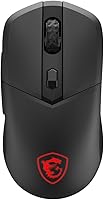
The illuminated MSI Dragon logo looks clean and visible in low-light environments, and buyers who use it on Windows report that the Mystic Light software handles color customization reliably without requiring complex setup.
RGB functionality is effectively cosmetic-only on non-Windows systems, and the single-zone lighting means there is no per-zone or pattern complexity that lighting enthusiasts might expect. Several buyers who purchased primarily for RGB aesthetics on Mac setups were visibly disappointed in their reviews.
Multi-Device Connectivity
81%
19%
The combination of 2.4GHz and Bluetooth on the same mouse is practical and well-executed for users who split time between a gaming desktop and a work laptop — switching modes requires minimal interruption and avoids the need for a second peripheral entirely.
There is no dedicated button to toggle between connection modes on the fly; switching requires navigating a button combination that some users find non-intuitive without referencing the manual. For users who switch devices multiple times per day, the process becomes second nature, but the initial setup curve frustrates some buyers.
Value for Money
91%
The combination of a flagship-tier sensor, exceptional battery life, and triple connectivity at this price point is genuinely difficult to match among direct competitors, and the majority of buyers explicitly state they feel they received more than what they paid for. Repeat buyers — those who replaced a different budget mouse — rate value particularly highly.
The overall value equation weakens slightly for Mac and Linux users who lose software features, and for players who need more than six buttons, since spending more on a fully-featured mouse becomes unavoidable. Within its intended use case the value is strong, but outside it the cost-benefit calculus shifts.
Scroll Wheel
61%
39%
The scroll wheel handles everyday navigation and in-game inventory scrolling without skipping steps or feeling imprecise in ways that actively disrupt use. For casual and mid-level users, it functions adequately across browsers, documents, and game UIs.
Enthusiast reviewers describe the scroll wheel steps as vague and under-damped compared to mice with dedicated scroll engineering, and a few users report occasional double-step behavior when scrolling quickly. It is the hardware element most likely to feel out of step with the otherwise competitive spec sheet.
Out-of-Box Experience
84%
Most buyers report that the mouse connects and works correctly within minutes of unboxing — the USB dongle plug-and-play experience is smooth on Windows, and the Bluetooth pairing process is straightforward on other devices. No driver installation is required for basic functionality.
The lack of a printed quick-start guide in some shipped units leaves buyers guessing at the button combination for DPI cycling and connectivity switching. A small number of reviewers note the included cable feels thin relative to the rest of the package, which colors the initial unboxing impression.
Left-Handed Suitability
87%
Left-handed buyers express clear relief at finding a wireless mouse with genuine symmetry at this price — the shape, button layout, and weight distribution work equally well for right and left hand use without adaptation, which remains an underserved need in budget gaming peripherals.
The side thumb buttons are positioned on the left side of the mouse only, meaning left-handed users operating the mouse in the right hand do not have accessible thumb buttons, and right-handed users in left-hand mode face the same gap. True ambidextrous use with full button access is not fully achieved.

Suitable for:

The MSI VERSA 300 Elite Wireless Gaming Mouse is a strong pick for anyone who wants reliable wireless performance without committing to a flagship price. It suits casual-to-competitive players in FPS or MOBA titles who care about sensor accuracy but don't rely on a sprawling macro layout to play well. Left-handed and ambidextrous users will find the symmetrical shape a genuine relief — that kind of inclusive design is far from standard at this price tier. Multi-device users get real practical value from the dual wireless modes, making it easy to switch between a desktop gaming rig and a work laptop without juggling multiple peripherals. If battery anxiety is something that actually affects how you play or work, the exceptional charge longevity on this MSI mouse directly solves that problem.
Not suitable for:

The MSI VERSA 300 Elite Wireless Gaming Mouse is a harder sell for players who depend on five or more programmable buttons for in-game macros, ability bindings, or MMO-style skill rotations — six buttons simply won't cover those needs. Buyers on Mac or Linux should also temper expectations: the hardware functions work cross-platform, but RGB customization and advanced settings are locked behind Windows software, so you lose a chunk of the configurability. Users who prioritize a premium, tank-like build quality may find the plastic construction underwhelming, even if it holds up fine under normal use. Anyone expecting a flagship-grade scroll wheel with smooth, tactile steps may also be disappointed, as that is one area where the cost-conscious engineering shows. If you already own a wired mouse with a comparable sensor and have no real need for wireless freedom, the upgrade case here is modest at best.
Specifications

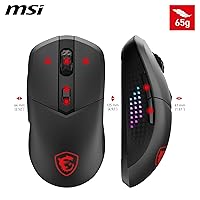
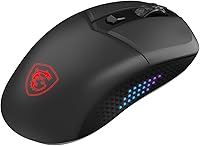
  • Weight: The mouse weighs 65g, placing it firmly in lightweight territory without requiring a honeycomb shell design.
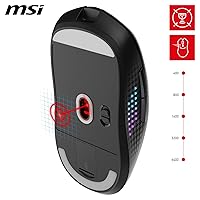
  • Sensor: A PixArt PAW3395 optical sensor handles tracking, with a maximum resolution of 26000 DPI and five selectable presets at 400, 800, 1600, 3200, and 6400 DPI.
  • Polling Rate: The polling rate runs at 1000Hz, meaning the cursor position is reported to the system up to 1000 times per second.
  • Wireless: 2.4GHz RF wireless connectivity delivers 1ms latency using the included USB dongle, with Bluetooth 5.3 available as a secondary wireless option.
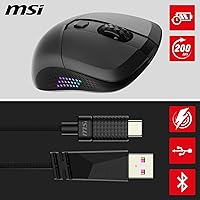
  • Wired Option: A 2-meter FriXionFree USB-C to USB-A cable is included for wired play or charging while in use.
  • Battery Life: The internal rechargeable battery provides up to 200 hours of use per full charge under typical wireless conditions.
  • Click Switches: OMRON mechanical switches are rated for 60 million clicks or more, offering a crisp tactile response and long-term reliability.
  • Button Count: The mouse features six programmable buttons: left click, right click, scroll wheel click, DPI toggle, and two side thumb buttons.
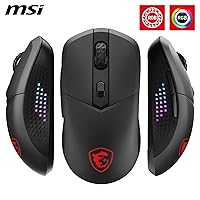
  • Design: The symmetrical ambidextrous body shape accommodates both left-handed and right-handed users without modification.
  • Mouse Feet: Pure PTFE skates are pre-installed on the underside, providing low-friction glide across both cloth and hard mouse pads.
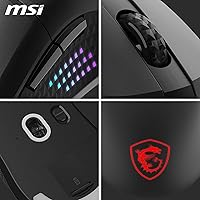
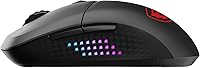
  • Grip Texture: Diamond-patterned anti-slip side grips are integrated into the shell to maintain control during extended or high-intensity sessions.
  • Lighting: RGB illumination via the MSI Dragon logo is powered by Mystic Light and supports millions of colors; full customization requires the MSI Center software on Windows.
  • Dimensions: The mouse measures 7.17 x 4.61 x 1.85 inches (LxWxH), fitting a medium-to-large hand profile comfortably.
  • Connectivity Modes: Three connectivity modes are supported: 2.4GHz RF wireless, Bluetooth 5.3, and wired USB-C, allowing flexible switching across devices.
  • OS Compatibility: Hardware button functions work across platforms, but MSI Center software for DPI tuning, RGB control, and macro assignment is available on Windows only.
  • Charging Port: The mouse charges via a USB-C port located on the front face, compatible with the included cable and most standard USB-C chargers.
  • Manufacturer: The VERSA 300 Elite is manufactured by MSI, a brand primarily known for gaming laptops, motherboards, and peripherals.
  • Release Date: The product was first made available in September 2023.

Related Reviews
Pulsar X3 Mini Wireless Gaming Mouse
80%
91%
Sensor Performance
88%
Click Feel & Switches
93%
Weight & Build
79%
Ergonomics & Grip Fit
89%
Wireless Latency
More
Pulsar X2F Wireless Fingertip Gaming Mouse
80%
94%
Weight & Form Factor
89%
Sensor Performance
91%
Polling Rate (8K Wireless)
88%
Switch Feel & Click Quality
78%
Grip & Ergonomics
More
Pulsar Gaming Gears Xlite v3 Medium Wireless Gaming Mouse
88%
93%
Ergonomics & Comfort
91%
Wireless Performance
89%
Battery Life
86%
Build Quality
94%
Precision & Sensor Accuracy
More
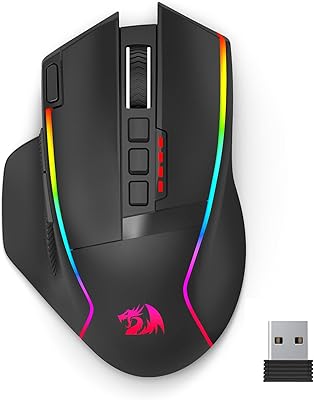
Redragon M915WL Wireless Gaming Mouse
86%
88%
Performance
91%
Build Quality
94%
Battery Life
85%
Ergonomics/Comfort
89%
Precision & DPI Control
More
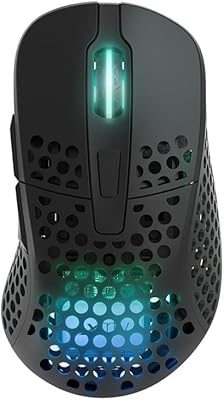
Xtrfy M4 Wireless Ultralight Gaming Mouse
82%
93%
Sensor Performance
91%
Wireless Performance
88%
Battery Life
86%
Weight & Form Factor
73%
Ergonomics & Fit
More
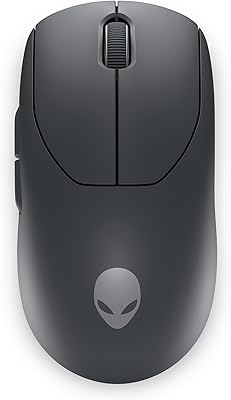
Alienware Pro Wireless Gaming Mouse
83%
91%
Precision and Performance
74%
Battery Life
88%
Ergonomics and Comfort
84%
Customization Options
90%
Build Quality
More
ROCCAT Kain 200 Wireless Gaming Mouse
82%
93%
Click Feel & Precision
88%
Sensor Accuracy
91%
Battery Life
76%
Ergonomics & Shape
87%
Wireless Performance
More
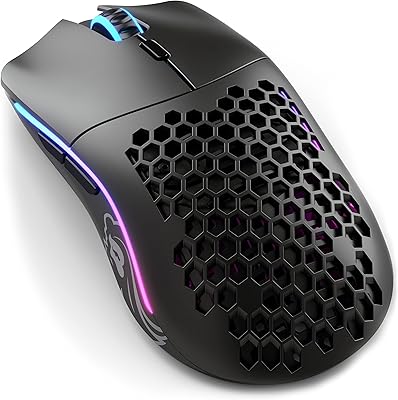
Glorious Model D- Wireless Gaming Mouse
87%
92%
Performance
88%
Ergonomics & Comfort
91%
Battery Life
84%
Build Quality
89%
Wireless Connectivity
More
MechLands AJ159 APEX Wireless Gaming Mouse
77%
93%
Sensor Performance
88%
Wireless Latency
63%
Build Quality
91%
Weight & Ergonomics
74%
Click Feel & Switches
More
MSI Immerse GH50 Wireless Gaming Headset
78%
89%
Battery Life
86%
Comfort & Fit
77%
Sound Quality
74%
Bass Response
69%
Microphone Quality
More

FAQ

The hardware itself works fine on Mac — you can plug in the USB dongle or pair via Bluetooth and use all six buttons without installing anything. The limitation is that MSI Center, which handles RGB customization and DPI profile management, is Windows-only. So on Mac you get a fully functional mouse, just without the deeper software controls.

MSI does not publish an official charge time, but most users report a full charge taking around 1.5 to 2 hours via the USB-C cable. Yes, you can use it in wired mode while it charges, so there is no forced downtime — just plug in and keep playing.

It is on the optimistic side, as advertised battery figures usually assume lower brightness settings and moderate polling activity. Real-world buyers report figures in the 150 to 200-hour range with RGB off or dimmed, which is still well above average for wireless gaming mice. If you run RGB at full brightness constantly, expect something closer to the lower end of that range.

Yes, Bluetooth 5.3 is a fully independent connection mode, so you do not need the dongle at all when using it over Bluetooth. It pairs like any standard Bluetooth device and works on tablets, laptops, and smartphones. Latency will be slightly higher over Bluetooth compared to the 2.4GHz connection, but for productivity use it is perfectly adequate.

At 7.17 inches long and 4.61 inches wide, it fits a medium-to-large hand reasonably well, especially in a palm or claw grip. Users with very large hands may find the profile slightly low at 1.85 inches, but the symmetrical shape means there are no awkward curves working against you. Reading a few hand-size-specific reviews on forums before buying is worth it if you are on the larger end.

Unfortunately, there is no dedicated dongle garage built into the mouse body, which is a genuine oversight for a wireless peripheral in this category. You will need to store it separately — in your laptop bag, a small pouch, or taped inside a carrying case. It is a small but real inconvenience if you move setups frequently.

This depends significantly on hand size and grip style. Claw and fingertip grip users tend to find the side buttons slightly forward of where their thumb naturally rests, requiring a small reach. Palm grip users with medium hands generally find the placement more natural. A handful of reviewers mention needing a short adjustment period before the placement feels intuitive.

Yes, the VERSA 300 Elite has a dedicated DPI toggle button that cycles through the five hardware-preset DPI levels — 400, 800, 1600, 3200, and 6400 — without any software required. If you want to change what those preset values actually are, you will need MSI Center on a Windows machine to do that.

The scroll wheel is functional and handles standard scrolling tasks without issue, but it does not stand out as a strong point. The steps feel average — not as tactile or precise as what you find on mice with dedicated scroll wheel engineering. For gaming and general use it is fine, but if smooth, precise scrolling is a priority for you, it is worth managing expectations here.

The mouse ships with PTFE skates already installed on the underside, but no spare set is included in the box. The pre-installed feet are genuine PTFE and should last a long time under normal use. If you ever wear them down, MSI-compatible replacement skates from third-party suppliers are widely available and inexpensive.