



Overview

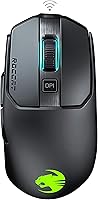
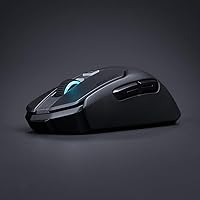
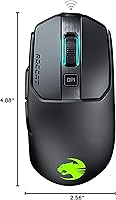
The ROCCAT Kain 200 Wireless Gaming Mouse sits confidently in the premium tier of wireless peripherals, where ROCCAT has built a reputation for pushing click technology and sensor engineering further than most expect. What makes this mouse compelling isn't just its wireless capability — it's that going cable-free here doesn't mean compromising on response time or tracking accuracy. The ergonomic right-handed shape suits palm and claw grip players well, feeling substantial without being awkward during extended sessions. For those already in the ROCCAT ecosystem, the AIMO RGB integration adds genuine value. Against competitors at this price level, the Kain 200 holds its own with a combination of hardware refinement and thoughtful engineering that few rivals match.

Features & Benefits

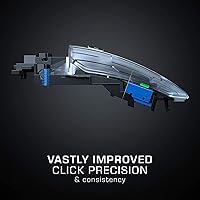
The standout engineering here is the Titan Click mechanism — a hinged button design with a low-tolerance spring that makes each press feel notably crisper than a conventional switch. Thanks to intelligent firmware, clicks register up to 8ms faster than typical gaming mice, which matters most in fast-paced scenarios where split-second inputs count. The Owl-Eye optical sensor tracks accurately up to 16,000 DPI across a variety of surfaces without the jitter or inconsistency some sensors exhibit at higher settings. The Titan Wheel 2.0 is a quiet upgrade: scroll steps feel deliberate and solid rather than mushy. Add a hybrid coating that stays grippy even during intense sessions, and the physical experience of using this wireless gaming mouse is genuinely polished.

Best For

The Kain 200 is a natural fit for right-handed players who favor palm or claw grip and want an ergonomic shape that doesn't force them to adapt. It's particularly well-suited for those who play long sessions — the 50-hour battery life means you're unlikely to find yourself scrambling for a cable mid-game. Gamers stepping up from a wired mid-range mouse will find the click feedback and sensor precision here a meaningful improvement. If you're already using ROCCAT peripherals, the AIMO ecosystem sync is a genuine bonus. That said, this mouse is built for medium-to-large hands, so players with smaller grips should try it before committing — it can feel too substantial for some.

User Feedback

Across more than 2,500 ratings, ROCCAT's flagship wireless mouse holds a 4.2 out of 5, and reading through the feedback reveals why. The click feel is probably the most consistently praised element — buyers describe it as having a satisfying deliberate snap that wired competitors in the same tier rarely match. Battery longevity also draws repeated praise, with many users noting the mouse outlasts their longest gaming weeks without needing a charge. On the downside, hand size matters here. Several reviewers with smaller hands found the shape uncomfortable over time. The companion software, ROCCAT Swarm, also draws mixed opinions — it works, but some users find it heavier on system resources than expected and occasionally temperamental during updates.

Pros

  • The Titan Click mechanism delivers a noticeably crisper, more precise actuation than standard gaming mouse switches.
  • Up to 50 hours of battery life means most players will go weeks between charges under normal use.
  • The Owl-Eye optical sensor tracks smoothly and accurately across different surfaces without stuttering at higher DPI settings.
  • Titan Wheel 2.0 gives scroll steps a solid, defined feel that is rare in gaming mice at this size.
  • The hybrid anti-wear coating stays grippy during intense sessions and resists the gradual degradation many mouse surfaces suffer.
  • AIMO RGB integration is a genuine perk for ROCCAT ecosystem users, syncing automatically without manual setup.
  • Wireless and wired combo connectivity gives flexibility if battery runs low during an important session.
  • A 4.2-star rating across more than 2,500 reviews reflects consistently positive reception from a broad range of buyers.
  • The ergonomic contour rewards palm and claw grip players with a natural, comfortable hold during extended play.

Cons

  • The size and shape make this wireless gaming mouse a poor fit for players with small hands.
  • ROCCAT Swarm companion software can feel resource-heavy and has been reported as occasionally unstable during updates.
  • Strictly right-handed design excludes left-handed gamers entirely with no ambidextrous version available in this line.
  • At its price point, buyers who don't need wireless or advanced click tech may find the value harder to justify.
  • Heavier than the ultralight wireless mice gaining popularity, which can be a drawback for players who prefer low-effort, fast-flick movements.
  • RGB lighting, while well-implemented, adds little functional value for gamers who prefer a minimal or dark setup.
  • No onboard memory mentioned for storing profiles, meaning settings may rely on software being active.

Ratings

Our AI-generated scores for the ROCCAT Kain 200 Wireless Gaming Mouse were produced by analyzing thousands of verified global user reviews, with spam, bot-submitted, and incentivized feedback actively filtered out before scoring. Each category reflects the honest distribution of real buyer experiences — strengths are credited where earned, and recurring frustrations are scored accordingly. The result is a transparent, balanced picture of where this wireless gaming mouse genuinely delivers and where it falls short.

Click Feel & Precision
93%
The Titan Click mechanism is the single most praised aspect across reviews worldwide. Gamers describe the actuation as noticeably crisper and more tactile than competing mice at similar price points, with the hinged button design eliminating the mushiness that plagues many standard switches during fast-paced gaming sessions.
A small number of users with very light click preferences find the spring tension slightly firmer than they expected, particularly during extended clicking in strategy or MMO games. This is a minor concern but worth noting for players who prefer ultra-light actuation force.
Sensor Accuracy
88%
The Owl-Eye optical sensor earns consistent praise for its smooth, jitter-free tracking across cloth pads, hard surfaces, and mixed-material desks. Gamers transitioning from budget optical sensors frequently comment on how reliably the cursor translates intent, even at higher DPI settings during fast movements.
At the extreme high end of the DPI range, a handful of users report minor inconsistency in tracking on glossy or reflective surfaces. For most players this is irrelevant since competitive gaming rarely demands settings above 3,200 DPI, but it is a real edge-case limitation.
Battery Life
91%
Fifty hours is the rated figure, and real-world feedback backs it up unusually well for a wireless gaming mouse with RGB active. Many buyers report going a full week or more of daily gaming before needing to plug in, which removes the anxiety that comes with shorter-battery wireless peripherals during long sessions or tournaments.
Battery drain accelerates noticeably when AIMO RGB lighting is running at full brightness. Users who prioritize vibrant lighting over endurance will find the effective range closer to 30 to 35 hours, which is still respectable but meaningfully below the headline number.
Ergonomics & Shape
76%
24%
For palm and relaxed claw grip players with medium to large hands, the contoured right-handed shape distributes weight well and feels natural during multi-hour sessions. The hump placement and side wall curvature suit the anatomy of larger hands without requiring any awkward finger repositioning.
This is the most polarizing category in user feedback. Players with smaller hands frequently describe the mouse as too bulky and difficult to control precisely, and the strictly asymmetric design excludes left-handed gamers entirely. Hand fit is genuinely make-or-break with this shape.
Wireless Performance
87%
The wireless connection is widely described as stable and latency-free under typical gaming conditions, with no meaningful difference perceived between the wired and wireless modes during competitive play. The ability to plug in via cable without losing functionality mid-session is a practical safety net that buyers appreciate.
A small subset of users in environments with dense 2.4GHz interference — such as apartments with many nearby networks — have reported occasional micro-stutters. This is not a frequent complaint but is worth considering for setups in RF-congested spaces.
Scroll Wheel
84%
The Titan Wheel 2.0 stands out in a field where scroll wheels are often treated as afterthoughts. The defined, tactile steps feel deliberate and controlled, which matters in games where weapon switching or ability cycling requires reliable single-notch precision without accidental over-scrolling.
A few users who prefer free-spinning or ultra-smooth scroll wheels for productivity tasks find the defined resistance slightly too stiff for casual document scrolling. The wheel is clearly optimized for gaming precision rather than general desktop use.
Build Quality
86%
The overall construction feels solid and premium in hand, with no creaking, flex, or hollow spots that often signal cut corners in mid-range peripherals. The hybrid anti-wear coating holds up well over months of daily use without the peeling or shine accumulation that cheaper coatings develop.
Some long-term users note that the side button covers can develop minor surface wear after a year or more of heavy fingertip contact. This is a durability concern that only surfaces over extended ownership rather than in the early period of use.
Software (ROCCAT Swarm)
61%
39%
ROCCAT Swarm covers the necessary bases — DPI configuration, button remapping, firmware updates, and AIMO lighting control are all accessible from a single interface. For users who set their preferences once and rarely return to the software, the experience is functional and complete enough.
Resource usage is the most consistent complaint: Swarm runs heavier in the background than most competing software suites, and a portion of users report instability or interface bugs following firmware or Windows updates. It works, but it requires more tolerance for rough edges than polished alternatives from other brands.
RGB Lighting
82%
18%
The AIMO lighting system earns genuine enthusiasm from buyers already using compatible ROCCAT peripherals, as the automatic ambient sync removes the tedium of manually coordinating lighting effects across a keyboard and mouse. The lighting zones themselves are vibrant and well-distributed across the shell.
For users outside the ROCCAT ecosystem, the RGB is attractive but not particularly differentiated from competitors at this price. Those who want granular per-zone animation control may find the AIMO approach — which prioritizes ambient intelligence over manual creativity — limiting for highly customized setups.
Weight & Balance
79%
21%
At 3.7 ounces, the Kain 200 hits a balanced middle ground that most palm grip players find comfortable without feeling flimsy. The weight distribution feels front-neutral during broad sweeping movements, reducing wrist fatigue during long gaming sessions compared to rear-heavy designs.
Players coming from ultralight gaming mice under 70 grams will notice the additional mass, particularly during fast low-sensitivity flick movements in FPS games. The weight is not excessive by traditional standards, but the market has shifted toward lighter options and the Kain 200 does not follow that trend.
Button Layout
81%
19%
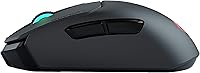
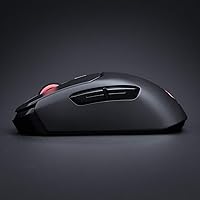
Five side buttons give this wireless gaming mouse more programmable flexibility than the standard two-button side layout found on most competitors. MMO and MOBA players in particular find the additional inputs useful for ability binding without reaching for the keyboard mid-fight.
The physical placement of the side buttons works well for larger hands but can feel slightly out of natural thumb reach for medium-sized hands in a relaxed palm grip. Some users report needing to consciously shift thumb position to reliably hit the lower side buttons.
Value for Money
73%
27%
For buyers who actively use the Titan Click mechanism, need extended battery life, and are invested in the ROCCAT ecosystem, the price is defensible against similarly specified competitors. The hardware engineering visible in the click mechanism and sensor alone justifies a premium over budget wireless options.
Buyers who are not specifically seeking the Titan Click advantage or AIMO integration may find competing wireless gaming mice offering comparable sensor performance at a lower price point. The value equation depends heavily on whether the unique ROCCAT features align with what the individual buyer actually prioritizes.
Out-of-Box Setup
88%
The plug-and-play wireless setup is fast and straightforward — most users report being ready to game within minutes of opening the box without needing to visit any software portal. The included battery arrives charged, which is a small but appreciated detail that is not universal in this category.
Users who want to configure DPI or lighting from day one will hit a mandatory software installation step that requires downloading ROCCAT Swarm before any customization is accessible. This is standard across the industry but slightly undercuts the otherwise smooth initial experience.

Suitable for:

The ROCCAT Kain 200 Wireless Gaming Mouse is built for right-handed PC gamers who want a wireless peripheral that doesn't ask them to accept trade-offs in click feel or tracking precision. If you regularly log multi-hour sessions — whether grinding ranked matches, playing immersive RPGs, or working late into the night — the exceptional battery life means charging is rarely a concern. Palm and relaxed claw grip players in particular will appreciate the ergonomic contour, which distributes hand weight naturally over long periods. Gamers upgrading from a wired mid-range mouse will find the Titan Click mechanism a genuine tactile step up, with a crispness that makes every input feel more deliberate. Those already invested in the ROCCAT ecosystem get an added bonus: the AIMO RGB lighting syncs intelligently with compatible peripherals, creating a cohesive setup without manual configuration fuss.

Not suitable for:

The ROCCAT Kain 200 Wireless Gaming Mouse is not the right call for everyone, and a few specific buyer profiles should think carefully before purchasing. Gamers with smaller hands are probably the most important group to flag — at nearly 5 inches long and built with a full ergonomic hump, this mouse can feel oversized and fatiguing for those with a smaller grip span. Left-handed players are also out of luck entirely, as the asymmetric shape is strictly designed for right-hand use with no ambidextrous option in this model. Budget-conscious buyers may find the price harder to justify if they don't need wireless freedom or the Titan Click refinements — there are capable wired alternatives at a lower cost. Finally, users who prefer lightweight mice for fast, low-effort flicking may find the Kain 200 feels too substantial compared to ultralight competitors in the wireless space.

Specifications

  • Sensor: The Owl-Eye optical sensor delivers tracking up to 16,000 DPI, providing consistent accuracy across a wide range of surfaces and sensitivity settings.
  • Click Mechanism: Titan Click uses a hinged button design with a low-tolerance spring hinge, enabling faster and more precise actuation compared to conventional gaming mouse switches.
  • Click Speed: Intelligent firmware allows click registration up to 8ms faster than standard switch implementations, reducing input lag at the hardware level.
  • Scroll Wheel: The Titan Wheel 2.0 features defined, tactile scroll steps that feel solid and deliberate, comparable in resistance and feedback to a primary mouse button click.
  • Connectivity: Supports both wireless and wired operation, giving users the option to switch to a cable connection when battery is low or charging is needed.
  • Battery Life: Rated for up to 50 hours of use on a single charge under typical gaming conditions, powered by an included lithium polymer battery.
  • Battery Type: One lithium polymer rechargeable battery is included in the box and integrated into the mouse body.
  • Weight: The mouse weighs 3.7 ounces (approximately 105g), placing it in the mid-weight range for ergonomic wireless gaming mice.
  • Dimensions: The mouse measures 4.88 inches long, 2.56 inches wide, and 1.69 inches tall, sized to accommodate medium-to-large right hands comfortably.
  • Button Count: Features five programmable side buttons in addition to the primary left and right click buttons and scroll wheel click.
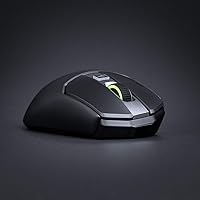
  • Lighting: AIMO RGB backlighting provides intelligent ambient illumination that automatically synchronizes with other compatible ROCCAT peripherals without manual configuration.
  • Grip Coating: A hybrid anti-wear performance finish covers the shell, designed to remain grippy, resist dirt accumulation, and withstand prolonged daily use without degrading.
  • Platform: Compatible with Windows 7, Windows 8, Windows 10, and Windows 11 operating systems on PC hardware.
  • Color: Available in Black; the finish is consistent across the shell with RGB lighting zones providing the primary visual customization.
  • Model Number: The official model number is ROC-11-615-BK, which should be referenced when seeking replacement parts, firmware, or warranty support.

Related Reviews
Pulsar X3 Mini Wireless Gaming Mouse
80%
91%
Sensor Performance
88%
Click Feel & Switches
93%
Weight & Build
79%
Ergonomics & Grip Fit
89%
Wireless Latency
More
Pulsar X2F Wireless Fingertip Gaming Mouse
80%
94%
Weight & Form Factor
89%
Sensor Performance
91%
Polling Rate (8K Wireless)
88%
Switch Feel & Click Quality
78%
Grip & Ergonomics
More
Pulsar Gaming Gears Xlite v3 Medium Wireless Gaming Mouse
88%
93%
Ergonomics & Comfort
91%
Wireless Performance
89%
Battery Life
86%
Build Quality
94%
Precision & Sensor Accuracy
More
Redragon M915WL Wireless Gaming Mouse
86%
88%
Performance
91%
Build Quality
94%
Battery Life
85%
Ergonomics/Comfort
89%
Precision & DPI Control
More
Alienware Pro Wireless Gaming Mouse
83%
91%
Precision and Performance
74%
Battery Life
88%
Ergonomics and Comfort
84%
Customization Options
90%
Build Quality
More
Xtrfy M4 Wireless Ultralight Gaming Mouse
82%
93%
Sensor Performance
91%
Wireless Performance
88%
Battery Life
86%
Weight & Form Factor
73%
Ergonomics & Fit
More
Glorious Model D- Wireless Gaming Mouse
87%
92%
Performance
88%
Ergonomics & Comfort
91%
Battery Life
84%
Build Quality
89%
Wireless Connectivity
More
MechLands AJ159 APEX Wireless Gaming Mouse
77%
93%
Sensor Performance
88%
Wireless Latency
63%
Build Quality
91%
Weight & Ergonomics
74%
Click Feel & Switches
More
Glorious Model I 2 Wireless Gaming Mouse
87%
91%
Performance
94%
Ergonomics & Comfort
90%
Battery Life
88%
Customization & Features
85%
Build Quality & Durability
More
Glorious Model O Wireless Gaming Mouse
89%
94%
Precision & Performance
93%
Lightweight & Comfort
89%
Battery Life
88%
Build Quality & Durability
91%
Wireless Stability
More

FAQ

Yes, the Kain 200 functions as a plug-and-play device out of the box — you can use it wirelessly or wired without installing anything. That said, if you want to customize DPI settings, remap buttons, or configure the AIMO lighting, you will need to install ROCCAT Swarm. Basic operation requires no software at all.

ROCCAT rates it at up to 50 hours, and most users report battery life that genuinely reflects that figure under typical gaming conditions. With RGB lighting active, you can expect somewhat less, but even then the Kain 200 tends to last well across multiple gaming sessions before needing a charge. It is one of the more honestly rated battery claims in this product category.

No — the shape is strictly ergonomic for right-handed use. The button layout and contoured hump are positioned specifically for right-hand grip styles, and using it left-handed would be uncomfortable and impractical. Left-handed gamers should look at ambidextrous alternatives.

The wireless performance on this mouse is generally considered stable and responsive. Users playing fast-paced games report no noticeable lag or dropout under normal conditions. As with any 2.4GHz wireless peripheral, heavy RF interference in your environment could theoretically cause issues, but this is rarely flagged as a real-world problem in user feedback.

Palm grip and relaxed claw grip are the sweet spots for this shape. The ergonomic hump supports the natural curve of a palm grip well, and the button reach works cleanly for claw grip players with medium to large hands. Fingertip grip players or those with small hands may find the size and shape less accommodating.

Officially, it is supported on Windows only. That said, it may function as a basic HID input device on macOS or Linux since the hardware itself does not require drivers for core operation. You would lose access to software-driven features like DPI adjustments and lighting customization, as ROCCAT Swarm is Windows-exclusive.

The difference is noticeable. Standard gaming mice typically use a floating button design where some travel and play exist before the switch actuates. The Titan Click mechanism is hinged with a tighter spring tolerance, so the button moves less before registering and the feedback feels crisper and more immediate. Many users describe it as the most satisfying click they have experienced in a gaming mouse.

If you want to customize anything beyond default settings, Swarm is necessary. It handles DPI configuration, button remapping, lighting control, and firmware updates. The honest caveat is that some users find it heavier on system resources than comparable software from other brands, and occasional bugs during updates have been reported. It works, but it is not the most refined companion software on the market.

ROCCAT has not prominently advertised a specific polling rate figure for this model in its official specifications, but the combination of the Titan Click mechanism and intelligent firmware is engineered to minimize input latency at the hardware level. For most gaming scenarios, the registered click speed improvement from the firmware alone has a more practical impact than polling rate differences.

The mouse charges via a USB cable connection, and the wired-and-wireless combo design means you can continue using it while it charges by simply plugging it in. This is a practical advantage — you are never forced to stop playing just because the battery is running low, unlike mice that go completely offline during charging.

Where to Buy