


Overview
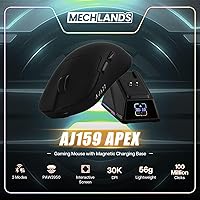
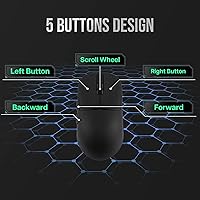
The MechLands AJ159 APEX Wireless Gaming Mouse enters a crowded mid-range field swinging with a spec sheet that genuinely punches above its price tier. At just 56 grams, the AJ159 APEX sits comfortably among the lightest wireless mice available today, pairing that featherweight build with PixArt's top-tier PAW3950 sensor. Then there's the magnetic charging dock featuring a customizable RGB display — a genuinely unusual touch you rarely see at this price point. AJAZZ and MechLands aren't household names in the West, so the real question isn't whether the specs look good on paper — they do — it's whether the execution actually holds up.
Features & Benefits
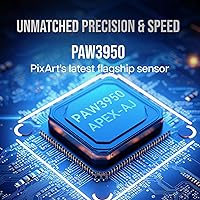
The PAW3950 is PixArt's current flagship sensor, and finding it here is legitimately notable — it tracks at speeds most hands will never stress-test, meaning you won't hit its ceiling even during erratic flick shots. The AJ159 APEX also supports an 8000Hz polling rate over 2.4GHz wireless, which matters most to competitive players on high-refresh monitors who want cursor updates far more frequent than any standard mouse delivers. At 56 grams, it trades blows with recognized ultralight competitors on feel alone. The Huano switches are less familiar than Omron or Kailh, but they register cleanly with a crisp tactile response and are rated for serious long-term punishment.
Best For
The AJ159 APEX is a strong fit for FPS and esports players who want wireless performance without crossing into premium-brand pricing. If you game on a high-refresh monitor and hate cables cutting across your mousepad, the 2.4GHz mode is the real draw here. It also suits setup-conscious users who care about desk aesthetics — the charging dock is a genuine conversation piece rather than a forgettable plastic brick. Hand size matters: the shape feels most natural for small-to-medium hands using a claw or fingertip grip. If you've been hesitating to go wireless, this mouse makes the jump easy without demanding a premium price for the privilege.
User Feedback
Buyers frequently praise sensor accuracy and the sheer lightness of the AJAZZ AJ159, with many noting it feels genuinely competitive in-game. The charging dock display earns curiosity from newcomers, though some settle into ignoring it once the novelty wears off. On the critical side, a few owners find the side button feel mushier than expected, and software support from AJAZZ lacks the polish you get from Logitech or Razer. Battery life reports are generally solid but occasionally fall short of advertised figures during intensive sessions. Some users also flag intermittent Bluetooth pairing hiccups, though 2.4GHz connectivity tends to stay stable for the vast majority.
Pros
- The PAW3950 sensor delivers flagship-tier tracking accuracy that rivals mice costing significantly more.
- At just 56 grams, the AJ159 APEX competes directly with dedicated ultralight mice on raw feel alone.
- An 8000Hz wireless polling rate puts cursor update speed well ahead of most mice in this price bracket.
- Tri-mode connectivity gives users genuine flexibility across Bluetooth, 2.4GHz, and wired setups.
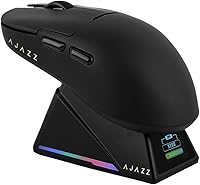
- The magnetic charging dock doubles as a small desk accessory rather than an afterthought accessory.
- Huano switches are rated for serious long-term use, meaning click reliability should not degrade quickly.
- The 400mAh battery holds up well through extended gaming sessions under 2.4GHz conditions.
- The price-to-sensor ratio is hard to argue with — few mice offer PAW3950 hardware this affordably.
- Three connection modes make it a practical option for gamers who switch between PC setups or devices.
Cons
- Software support from AJAZZ lags far behind what mainstream brands offer in terms of polish and stability.
- Side button feedback feels mushy to some users, which is noticeable during games that rely on those inputs.
- Bluetooth pairing can be inconsistent, making it a less reliable option for quick device switching.
- Build quality at this price tier shows in subtle ways — the plastics and tolerances do not feel premium.
- Huano switches are unfamiliar to many Western buyers, making pre-purchase confidence harder to establish.
- Real-world battery life during high-polling wireless sessions can fall short of the advertised figures.
- AJAZZ and MechLands have limited warranty and customer support infrastructure compared to established brands.
- The charging dock display, while novel, offers limited day-to-day utility beyond the initial novelty factor.
- Smaller form factor may not suit palm-grip users or those with larger hands during marathon sessions.
Ratings
The scores below for the MechLands AJ159 APEX Wireless Gaming Mouse were generated by our AI system after analyzing verified purchase reviews from buyers worldwide, with spam, bot-submitted, and incentivized feedback actively filtered out. The results reflect a genuine cross-section of user experience — the standout strengths and the recurring frustrations alike. Where this mouse impresses, the scores show it; where it falls short for real buyers, we have not softened that either.
Sensor Performance
Wireless Latency
Build Quality
Weight & Ergonomics
Click Feel & Switches
Battery Life
Charging Experience
Dock Display
Connectivity Flexibility
Software & Customization
Value for Money
Out-of-Box Experience
Feet & Glide
Suitable for:
The MechLands AJ159 APEX Wireless Gaming Mouse is a genuinely compelling choice for competitive FPS players and enthusiast gamers who want top-tier sensor performance without paying the premium that established brands charge for comparable hardware. If you play on a high-refresh monitor and have been eyeing the wireless transition, the low-latency 2.4GHz mode delivers the kind of responsiveness that removes any real excuse to stay tethered. At 56 grams, it will feel immediately natural to anyone already accustomed to ultralight mice, and those coming from heavier options may find the weight reduction alone improves comfort over long sessions. Gamers with small-to-medium hands using a claw or fingertip grip will find the shape particularly agreeable. It also rewards desk-setup enthusiasts who want a charging dock that looks considered rather than purely functional — the display screen is a small but genuinely distinctive touch that stands apart from the generic cradles most wireless mice ship with.
Not suitable for:
Buyers who prioritize brand pedigree and polished software ecosystems should temper their expectations before purchasing the MechLands AJ159 APEX Wireless Gaming Mouse — AJAZZ and MechLands simply do not have the companion software depth or community support that Logitech G HUB or Razer Synapse offer. Gamers with larger hands or those who prefer a palm grip may find the compact, lightweight form factor works against comfort over multi-hour sessions. The Huano switches, while durable on paper, have a feel that divides opinion, and users accustomed to the crisp snap of Omron or Kailh switches may need time to adjust — or may never warm to them. Anyone expecting rock-solid Bluetooth reliability for productivity switching across multiple devices should know that Bluetooth pairing hiccups have been reported, and the 2.4GHz dongle is clearly the more stable mode. Finally, buyers who want a mouse they can trust straight out of the box with zero software tinkering may find the configuration experience frustratingly unpolished compared to what mainstream brands provide.
Specifications
- Sensor: Powered by the PixArt PAW3950, currently one of the most capable optical sensors available in consumer gaming mice.
- Native DPI: Supports up to 30,000 DPI natively, with an overclocked mode that pushes sensitivity to 42,000 DPI for users who need extreme cursor speed.
- Tracking Speed: Rated for 750 IPS tracking speed, meaning the sensor can accurately follow even the fastest hand movements without losing positional data.
- Acceleration: Handles up to 50G of acceleration, covering the full range of motion any realistic gaming style will produce.
- Polling Rate: Operates at 8000Hz over 2.4GHz wireless and 1000Hz in wired mode, delivering cursor position updates far more frequently than standard gaming mice.
- Mouse Weight: The mouse body weighs 56 grams, placing it firmly in ultralight territory alongside dedicated lightweight competitors.
- Connectivity: Supports three connection modes: 2.4GHz wireless via USB dongle, Bluetooth, and standard wired USB — switchable without powering down.
- Battery: Equipped with a 400mAh internal battery paired with low-power consumption technology to extend playtime between charges.
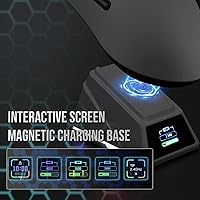
- Charging: Charges via a magnetic docking base, which holds the mouse securely and begins charging automatically on contact — no cable hunting required.
- Dock Display: The charging dock features an RGB screen capable of showing the current time, date, and user-uploaded animated GIFs for desk personalization.
- Switches: Uses Huano Green Shell White Dot Transparent switches, rated for up to 100 million actuations and designed for crisp, reliable click registration.
- Package Size: The retail package measures 7.05 x 6.38 x 2.2 inches and weighs approximately 1.98 ounces including packaging materials.
- Color Option: Currently available in Black; no additional official colorways are listed by the manufacturer at this time.
- Availability: First made available for purchase in May 2024, making it a relatively recent entry in the mid-range wireless gaming mouse segment.
- Manufacturer: Produced by AJAZZ, a Chinese peripherals manufacturer, and sold under the MechLands brand on the Amazon marketplace.
- Movement Type: Uses optical movement detection technology — no ball or laser — which is the current standard for competitive gaming mice.
Related Reviews
Pulsar X3 Mini Wireless Gaming Mouse
Pulsar X2F Wireless Fingertip Gaming Mouse
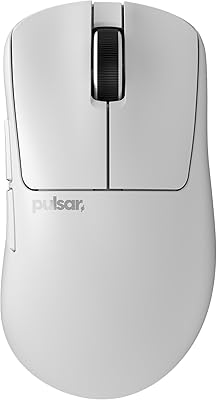
Pulsar Gaming Gears Xlite v3 Medium Wireless Gaming Mouse
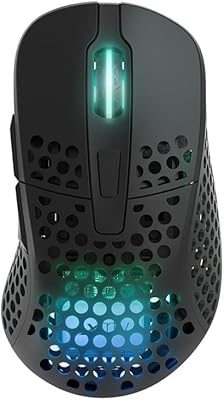
Xtrfy M4 Wireless Ultralight Gaming Mouse
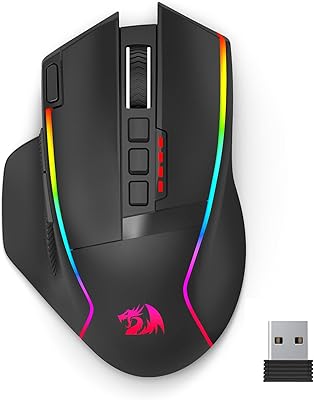
Redragon M915WL Wireless Gaming Mouse
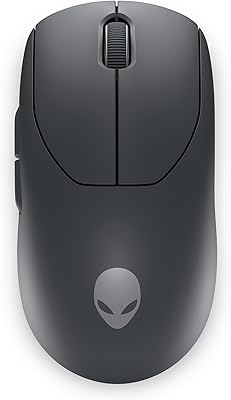
Alienware Pro Wireless Gaming Mouse
Glorious Model D- Wireless Gaming Mouse
Glorious Model O Wireless Gaming Mouse
VGN F1 MOBA Wireless Gaming Mouse