Overview

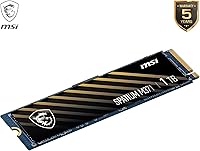
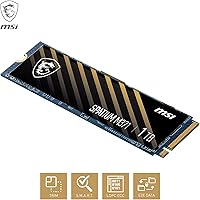
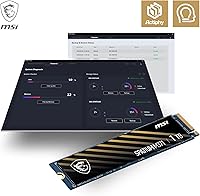
The MSI SPATIUM M371 1TB NVMe SSD sits comfortably in the mid-range PCIe Gen3 storage market — a space that still makes a lot of sense for buyers who don't need bleeding-edge Gen4 speeds and prefer not to pay for them. MSI, long known for graphics cards and motherboards, has been quietly building out a credible storage lineup, and the SPATIUM M371 reflects that maturity. The standard M.2 2280 form factor means it slots into virtually any modern desktop or laptop without adapter headaches. And that 5-year limited warranty is genuinely reassuring at this price point — most budget-tier drives don't offer that kind of coverage.

Features & Benefits

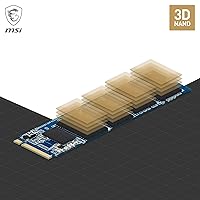
Running on a PCIe Gen3 x4 interface, this MSI NVMe drive reaches sequential read speeds around 2350MB/s — fast enough that large file transfers and OS boots feel noticeably snappier compared to any SATA SSD. The 3D NAND flash inside keeps the physical footprint tiny while packing in a full terabyte of usable space. Built-in error-correction works quietly in the background, helping to preserve data integrity over the drive's lifespan without any user intervention. The 210 TBW endurance rating is solid for a home user writing roughly 40GB a day — that's nearly 15 years of typical use. MSI Center adds real-time health monitoring, though its value is most pronounced if you're already running an MSI motherboard.

Best For

The SPATIUM M371 is a natural fit for anyone upgrading an aging desktop that still has a PCIe Gen3 slot — the speed improvement over a spinning hard drive or old SATA SSD is immediately obvious. Students and home office users get the most value here: a terabyte of fast, reliable storage for everyday work without the premium attached to Gen4 alternatives. Gamers building a mid-range PC build where the GPU and CPU are absorbing most of the budget will find this drive punches above its weight for game load times and system responsiveness. It's also a smart pick for replacing sluggish OEM drives in pre-built desktops.

User Feedback

Across around 100 ratings, this M.2 SSD holds a strong 4.6-star average — though with that sample size, a few outlier reviews can influence the overall picture, so patterns matter more than any single comment. The consistent praise centers on easy installation and a noticeable speed boost for buyers coming from HDDs or SATA drives. A handful of users specifically call out smooth compatibility with their desktop builds. On the flip side, a few reviewers note that MSI Center feels most useful within the MSI ecosystem; standalone users may find it adds little. No widespread thermal or reliability complaints appear, which is encouraging for a drive aimed at long-term daily use.

Pros

  • Noticeably faster OS boot times and app launches compared to any SATA SSD or mechanical hard drive.
  • The 5-year limited warranty provides genuine long-term confidence that is rare among drives in this price tier.
  • Standard M.2 2280 form factor ensures broad compatibility with virtually any modern desktop motherboard.
  • 210 TBW endurance rating comfortably covers well over a decade of typical home or office use.
  • MSI SPATIUM M371 1TB NVMe SSD integrates natively with MSI Center for real-time health monitoring and backup.
  • 3D NAND flash technology delivers dense, reliable storage in an extremely compact and lightweight footprint.
  • PCIe Gen3 x4 interface provides strong everyday throughput without requiring a Gen4-capable motherboard to benefit.
  • Straightforward installation process makes this a practical option for first-time builders and casual upgraders alike.
  • Built-in error-correction helps maintain data integrity passively across the full lifespan of the drive.
  • A well-rounded 1TB capacity covers the day-to-day storage needs of students, home workers, and casual gamers.

Cons

  • Gen3 speeds fall noticeably short of modern PCIe Gen4 drives for sustained high-throughput professional workloads.
  • MSI Center monitoring features offer limited value to anyone not already running an MSI motherboard.
  • With roughly 100 reviews at time of writing, long-term real-world reliability data remains somewhat thin.
  • No PCIe Gen4 support means this drive will not keep pace in performance-first or future-proofed storage builds.
  • The 1TB capacity ceiling can feel restrictive quickly for video editors or users with large media libraries.
  • No bundled heatsink means thermal throttling could become a concern inside poorly ventilated or compact desktop cases.
  • MSI's storage brand credentials are far less established than its reputation in GPUs and motherboards.
  • Backup and restore tools within MSI Center are fairly basic relative to dedicated third-party storage management software.
  • Not explicitly optimized for laptop deployment, despite the physical compatibility of the M.2 2280 form factor.

Ratings

The MSI SPATIUM M371 1TB NVMe SSD earns its overall standing based on AI-driven analysis of verified buyer reviews sourced from global markets, with spam, incentivized ratings, and bot activity actively filtered out before any score is calculated. The results reflect a genuinely balanced picture — crediting the drive where it delivers real-world value and flagging the trade-offs that actual users have encountered. Scores across all categories capture both the moments where this M.2 SSD impresses and the areas where buyer expectations should be managed.

Read/Write Performance
78%
22%
Buyers upgrading from mechanical hard drives or SATA SSDs report a dramatic improvement in everyday responsiveness — Windows loads in under 15 seconds for many users, and large application suites open nearly instantly. The 2350MB/s sequential read speed handles file-heavy tasks like video imports or game installations noticeably faster than entry-level Gen3 competition.
Users coming from newer Gen4 drives will notice the ceiling — sustained large transfers top out well below what current flagship NVMe options can do. For workloads involving continuous 4K video editing or high-speed data pipelines, the Gen3 bandwidth limit becomes a real constraint rather than a theoretical one.
Installation Ease
91%
The standard M.2 2280 form factor means it slides into virtually any modern motherboard slot without adapters or tools beyond a single Phillips screwdriver. First-time builders consistently mention how straightforward the physical installation is — slot it in, secure the screw, and the system recognizes it immediately on first boot.
A handful of users encountered confusion when the drive was not pre-formatted for Windows, requiring a quick disk initialization step before it appeared in File Explorer — a non-issue for experienced builders but mildly frustrating for first-timers. No setup guide is included in the box, so newcomers should expect to consult a brief online tutorial.
Value for Money
83%
For a Gen3 NVMe drive offering this combination of endurance rating, warranty length, and software integration, the price-to-performance ratio holds up well against similarly spec'd competitors. Home users and students who do not need bleeding-edge Gen4 performance can stretch their build budgets further without sacrificing meaningful day-to-day speed.
As Gen4 NVMe prices continue to fall, the gap between this drive and faster options narrows, making the value case slightly less compelling than it was at launch. Buyers who plan to keep their system for many years might find investing slightly more in a Gen4 drive a smarter long-term decision.
Endurance & Longevity
82%
18%
The 210 TBW rating translates to genuinely long service life for typical home or office users — someone writing 20GB per day would theoretically hit that ceiling in nearly 30 years. The built-in ECC error-correction adds another layer of quiet protection against data corruption during that extended lifespan.
More demanding prosumer workloads — such as daily 4K video exports or large database operations — can erode TBW headroom significantly faster than typical home use. With only around 100 user reviews available, there is limited real-world longevity data from early adopters to validate the drive's performance past the two-year mark.
Warranty Coverage
93%
A 5-year limited warranty is a genuine differentiator at this price level — most competing mid-range drives cap coverage at 3 years. For buyers who treat storage as a long-term investment and want protection beyond the typical upgrade cycle, this coverage provides meaningful peace of mind.
A limited warranty means physical damage, accidental drops, or failures caused by exceeding the 210 TBW endurance threshold are not covered. Some users have noted that navigating MSI's warranty claim process requires clear documentation, so keeping digital copies of your proof of purchase from day one is strongly advised.
Software Experience
67%
33%
For users already managing an MSI motherboard or GPU through MSI Center, having drive health metrics and backup options in the same dashboard is a genuinely useful time-saver. Real-time temperature and health monitoring can alert users to potential issues before they become data loss events.
Outside the MSI hardware ecosystem, MSI Center offers little that free third-party tools like CrystalDiskInfo do not already provide. A few reviewers noted that the software felt redundant or unnecessarily heavyweight for what amounts to basic drive monitoring, and the backup tools lack the depth of dedicated storage management software.
Compatibility
88%
The M.2 2280 form factor is by far the most ubiquitous M.2 size in modern desktop motherboards, meaning compatibility headaches are rare for the vast majority of buyers. Users report plug-and-play recognition on a wide range of Intel and AMD platforms without needing BIOS updates.
A small subset of laptop users reported that their notebooks used the shorter 2242 or 2230 M.2 slots, making the drive physically incompatible — an issue easy to avoid by checking specs in advance but frustrating when overlooked. Compatibility with older pre-UEFI systems can also be inconsistent.
Thermal Management
62%
38%
Under normal desktop workloads — typical OS usage, gaming, and moderate file transfers — temperatures stay within comfortable operating ranges in cases with reasonable airflow. Users with well-ventilated mid-tower builds report no throttling events during standard daily use.
No heatsink is included in the box, which is a missed opportunity at this tier given how many competing drives bundle even a basic thermal pad. In compact builds or cases with restricted airflow, sustained write operations — such as large backup jobs — can push temperatures high enough to trigger performance throttling.
Real-World Boot Speed
84%
Users switching from HDDs to this M.2 SSD consistently describe boot time reductions from over a minute down to 10-15 seconds, which transforms the feel of an entire system for everyday use. Application launch times — particularly for heavier software like Adobe Creative Cloud tools or game engines — also see meaningful improvements.
Buyers already on a fast SATA SSD will notice a more modest subjective improvement in boot speed, since the biggest real-world gains come from the HDD-to-NVMe transition rather than SATA-to-NVMe. The gap becomes less perceptible during light multitasking where storage is rarely the bottleneck.
Gaming Performance
77%
23%
For mid-range gaming rigs, this NVMe drive handles open-world game streaming and asset loading noticeably better than SATA alternatives, with large RPGs and shooters benefiting from reduced level-load stutter. Gamers who routinely install and play several large titles simultaneously will appreciate the 1TB capacity holding more games without constant juggling.
Modern gaming engines increasingly leverage DirectStorage technology, which is optimized for Gen4 drives — meaning this Gen3 SSD will start to show its age as more titles adopt that feature. Competitive gamers sensitive to every millisecond of load time will find Gen4 alternatives a more future-ready investment.
Brand Reliability
74%
26%
MSI's established reputation in PC hardware — spanning over two decades of GPU and motherboard manufacturing — lends credibility to its storage lineup that newer, lesser-known brands cannot easily replicate. The 5-year warranty commitment further signals that MSI stands behind this drive with the confidence of a mature hardware company.
MSI's storage division lacks the long track record of dedicated SSD manufacturers like Samsung or Western Digital, meaning there is less independent long-term reliability data available across large user samples. With under 110 ratings on record, the data pool for this specific model remains too narrow to draw firm reliability conclusions.
Packaging
58%
42%
The drive arrives protected in standard anti-static packaging appropriate for sensitive electronics, and the compact size means it ships without excess materials. For buyers who simply want the drive to arrive safely, the packaging does its job without complication.
No mounting screw, installation guide, or thermal pad is included — buyers are expected to source these independently or rely on what their motherboard provides. At this price point, several competing drives include at minimum a mounting screw and basic documentation, making the SPATIUM M371 feel sparingly equipped out of the box.
Upgrade Impact
86%
Users consistently describe the switch from an HDD or aging SATA drive to this M.2 SSD as transformative for their entire PC experience, not just isolated tasks. The improvement feels most dramatic in daily workflow scenarios — opening browsers with dozens of tabs, booting into a fresh Windows session, or loading large project files.
Users already running a Gen4 NVMe drive, or even a fast Gen3 competitor, are unlikely to feel a significant difference in day-to-day use. The upgrade impact is heavily dependent on what the buyer is coming from — those already on fast NVMe storage may find the switch unnoticeable without benchmark software.

Suitable for:

The MSI SPATIUM M371 1TB NVMe SSD is an excellent match for desktop builders and everyday PC users who want a meaningful speed upgrade without stretching their budget toward Gen4 territory. If you are currently running a mechanical hard drive or an aging SATA SSD, the transition to this drive will be immediately tangible — OS boots, application launches, and large file moves all respond significantly faster. Students and home office workers who need dependable, spacious storage for documents, media files, and light creative work will find the 1TB capacity hits a practical sweet spot for daily use. Mid-range gamers working within a tight build budget can confidently direct more spending toward GPU and CPU while trusting this M.2 drive to handle system storage and game load times competently. Users already embedded in the MSI ecosystem — running an MSI motherboard or monitoring GPU performance through MSI Center — get additional value from native software integration for drive health tracking and backup. The 5-year limited warranty rounds out the appeal for anyone who wants long-term peace of mind without paying flagship storage prices.

Not suitable for:

Buyers chasing the fastest possible storage for demanding workloads like 4K video editing, large database transfers, or intensive content creation pipelines should look past this drive toward PCIe Gen4 NVMe options, which can nearly double the sequential throughput available here. Power users who routinely push sustained high-speed data operations will hit the ceiling of Gen3 bandwidth faster than the typical home or office user ever would. The MSI SPATIUM M371 1TB NVMe SSD is also not an ideal match for anyone hoping to future-proof a build around next-generation storage standards, since Gen3 will increasingly become the baseline rather than a competitive choice. Users expecting meaningful value from MSI Center without an MSI motherboard will find the software integration largely irrelevant, leaving the drive without a key differentiating feature. Finally, anyone whose primary storage demands exceed 1TB — such as photographers with large RAW archives or users running multiple storage-heavy games simultaneously — would be better served by a higher-capacity alternative rather than treating this as a sole drive.

Specifications

  • Form Factor: Uses the M.2 2280 format, measuring 80mm in length — the most widely supported M.2 size across modern desktop and laptop motherboards.
  • Interface: Connects via a PCIe Gen3 x4 NVMe slot, delivering substantially lower access latency than any SATA-based SSD connection.
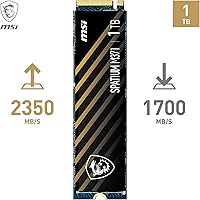
  • Sequential Read: Rated sequential read speed reaches up to 2350MB/s, enabling fast large-file transfers and rapid operating system loading.
  • Sequential Write: Rated sequential write speed reaches up to 1700MB/s, well suited for saving large media files or installing software packages quickly.
  • Capacity: Provides 1TB of usable storage, a practical amount for an operating system, installed applications, and a substantial everyday file library.
  • NAND Type: Built with 3D NAND Flash, which stacks memory cells vertically to achieve higher density and improved reliability within a compact footprint.
  • Endurance: Rated at 210 TBW (terabytes written), a threshold that comfortably exceeds the demands of typical home or office workloads for well over a decade.
  • Warranty: Backed by a 5-year limited warranty from MSI, offering above-average long-term coverage for a drive in the mid-range storage segment.
  • Error Correction: Incorporates built-in ECC (error-correcting code) that automatically detects and corrects data errors to help extend the reliable service life of the NAND flash.
  • Software: Compatible with MSI Center, which provides real-time health monitoring, performance metrics, and backup and restore functionality on supported systems.
  • Weight: Weighs just 1.41 oz, making it one of the lightest internal storage upgrades available for compatible desktop and laptop builds.
  • Protocol: Uses the NVMe (Non-Volatile Memory Express) protocol, which supports far more parallel data queues than older AHCI interfaces, reducing latency on everyday tasks.
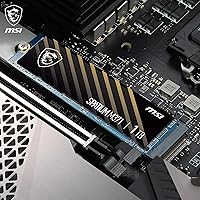
  • Installation: Designed for internal installation, sliding directly into any compatible M.2 slot and securing with a single motherboard retaining screw.
  • Compatibility: Listed as compatible with desktop PCs equipped with a PCIe Gen3 M.2 slot, and physically fits many laptops that share the standard 2280 form factor.
  • Color: Features a black PCB finish that integrates cleanly into most motherboard aesthetics without requiring a dedicated heatsink cover.

Related Reviews
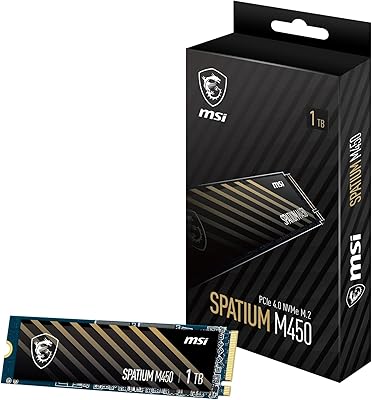
MSI SPATIUM M450 1TB NVMe SSD

76%
84%
Value for Money
88%
Read Speed Performance
71%
Write Speed Performance
93%
Installation Ease
67%
Thermal Management
More
MSI SPATIUM M480 PRO 1TB NVMe SSD
82%
93%
Sequential Read Performance
88%
Sequential Write Performance
67%
Thermal Management
91%
Endurance & Longevity
89%
Value for Money
More
RONGSHU RS001 1TB NVMe SSD
75%
91%
Value for Money
88%
Read/Write Speed
93%
PS5 Compatibility
53%
Brand Trustworthiness
71%
Thermal Management
More
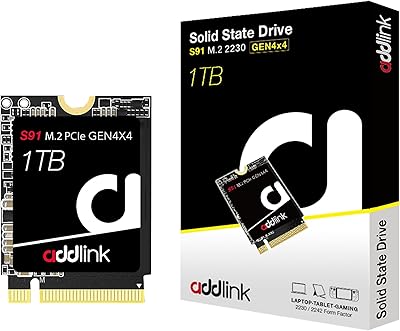
Addlink S91 1TB M.2 2230 NVMe SSD
80%
83%
Read Performance
74%
Write Performance
94%
Form Factor Fit
88%
Value for Money
93%
Installation Ease
More
ORICO O7000 1TB NVMe SSD
85%
93%
Performance
89%
Thermal Management
70%
Ease of Installation
90%
Compatibility with PS5
88%
Build Quality
More
GiGimundo G7400 1TB NVMe SSD
86%
92%
Performance
94%
Speed (Read/Write)
84%
Thermal Management
88%
Compatibility with Gaming PCs
72%
Compatibility with PS5
More
Crucial P5 1TB NVMe SSD
84%
91%
Read Performance
88%
Write Performance
86%
Random I/O Responsiveness
71%
Thermal Management
94%
Installation Ease
More
TEAMGROUP MP44L 1TB NVMe SSD
89%
94%
Performance
96%
Speed (Read/Write)
85%
Heat Management
91%
Installation Ease
92%
Compatibility
More
WD_BLACK 1TB SN7100 NVMe SSD
89%
94%
Read Speed Performance
89%
Write Speed Performance
92%
Power Efficiency
91%
Endurance and Longevity
87%
Value for Money
More
KingSpec XG7000 1TB NVMe M.2 SSD
81%
88%
Read Speed Performance
79%
Write Speed Consistency
74%
Thermal Management
91%
Value for Money
86%
PS5 Compatibility
More

FAQ

Yes — the drive is specifically built for PCIe Gen3 x4 M.2 slots, so it is a natural match for mid-range and older boards that do not support Gen4. Just confirm your motherboard has a 2280-compatible M.2 slot in its specifications before buying.

Physically, the M.2 2280 form factor is widely used in laptops as well, so it will fit most notebook M.2 slots. MSI lists it as optimized for desktop use, so check your laptop's supported M.2 key type and maximum drive length before installing. Some ultrabooks use shorter 2242 or 2230 slots that will not physically accommodate a 2280 drive.

Not at all — the drive functions as a standard NVMe SSD in any compatible system with no software required. MSI Center is an optional add-on that becomes most useful if you want to track drive temperature and health, or if you already use it to manage an MSI motherboard or GPU.

In raw sequential throughput, this NVMe drive is roughly three to four times faster than a typical SATA SSD. You will notice the difference most clearly in OS boot times, application launches, and moving large files — though for light tasks like web browsing or word processing, the gap is less apparent.

TBW stands for terabytes written, and it represents the total volume of data MSI guarantees can be written to the drive before wear becomes a concern. Writing around 50GB per day — well above what most home users do — the drive would take roughly 11 years to approach that limit, so longevity is unlikely to be a practical worry for typical buyers.

Absolutely — there is no requirement to use it as the primary OS drive. Many users install it purely as a fast secondary drive for games, large project files, or media libraries while keeping a separate drive for the operating system. Performance and reliability are identical regardless of how it is assigned.

MSI Center includes basic backup and restore tools that can help move data across drives. For a full disk clone — copying your entire existing drive over to this one — a dedicated third-party tool like Macrium Reflect or Acronis True Image will give you more control and a smoother migration experience.

The SPATIUM M371 does not include a heatsink in the box. In a well-ventilated desktop case under typical workloads, temperatures should remain reasonable, but in a cramped or passively cooled build with sustained heavy writes, some throttling is possible. If your motherboard already has an M.2 heatsink bracket, using it is a sensible precaution at no extra cost.

For most gaming scenarios it is a strong fit — game load times, level streaming, and asset decompression all benefit meaningfully from NVMe speeds over SATA. If the GPU and CPU are absorbing the majority of your build budget, this M.2 SSD strikes a practical balance between storage performance and overall cost.

MSI covers manufacturing defects under a 5-year limited warranty, so a drive that fails through no fault of your own within that window should qualify for a replacement through MSI support. Keep your original proof of purchase accessible, and note that the warranty does not cover physical damage or drives that have exceeded the rated 210 TBW endurance threshold.