Overview

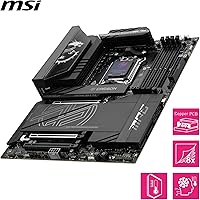
The MSI MPG X870E Carbon WiFi Motherboard arrived in late 2024 as one of the most fully loaded options on AMD's AM5 platform, built for builders who want to push Ryzen 7000, 8000, or 9000-series CPUs without running into hardware ceilings. It uses a standard ATX footprint, so it drops comfortably into any mid-tower or full-tower case. What separates this X870E board from more modest alternatives is sheer feature density — the power delivery, thermal engineering, and connectivity options are all specced well above the baseline. This is not a board for casual builders watching their budget. It earns its price through specs, not branding.
Features & Benefits

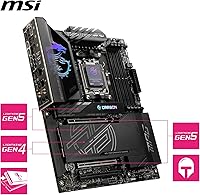
The MPG Carbon WiFi's 18-phase VRM is the centerpiece for anyone serious about overclocking. A 110A Smart Power Stage design means the CPU gets clean, stable current even under sustained all-core loads — the kind of scenario where cheaper boards throttle or run hot. Thermal management extends to the M.2 slots too, where the Shield Frozr II covers both sides of each drive to prevent throttling during long sequential writes. Memory support is aggressive: four DDR5 DIMM slots can hit 8400+ MT/s in a 1DPC single-rank setup, which matters for latency-sensitive workloads. Add two Gen5 x4 M.2 slots, a PCIe 5.0 x16 slot, and dual-band WLAN-7, and you have a board with very few connectivity gaps.

Best For

This MSI flagship motherboard makes the most sense for a specific kind of builder — one who plans to actually use the headroom it provides. Enthusiast overclockers chasing high memory speeds or pushing Ryzen 9000-series CPUs to their limits will appreciate the VRM overhead and BIOS tuning options. Content creators running multiple fast NVMe drives will benefit from the Gen5 M.2 availability. Competitive gamers building a top-tier AMD rig will find it eliminates the usual platform bottlenecks. The dual LAN ports — 5 Gbps and 2.5 Gbps — plus WLAN-7 make it a strong fit for home lab users or streamers who need rock-solid network redundancy. Budget-focused builders, though, are better served elsewhere.

User Feedback

Buyers consistently point to VRM stability as the standout strength, with many reporting clean overclocks at aggressive DDR5 speeds without voltage instability or thermal warnings. Build quality gets praise too — the heatsink coverage feels substantial, and the M.2 shields look and function well. The criticism that comes up most often centers on BIOS complexity: experienced builders adapt quickly, but first-time AM5 users report a steep learning curve. A handful of buyers noted DDR5 kit compatibility quirks, particularly with some high-speed kits requiring manual XMP adjustments to post correctly. On the value question, opinion splits predictably — those who use the feature set fully consider it well justified; those who do not, do not.

Pros

  • The 18-phase VRM handles sustained all-core loads without throttling, giving real overclocking headroom.
  • Two Gen5 x4 M.2 slots deliver up to 128 Gbps throughput — ideal for the fastest NVMe drives available.
  • DDR5 support up to 8400+ MT/s in 1DPC mode makes this one of the strongest memory overclocking platforms on AM5.
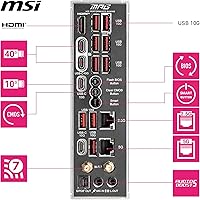
  • WLAN-7 and dual LAN (5 Gbps + 2.5 Gbps) cover virtually every wired and wireless networking need out of the box.
  • The Shield Frozr II M.2 heatsinks actively reduce drive temperatures during long sequential write sessions.
  • PCIe 5.0 x16 primary slot ensures GPU compatibility is not a bottleneck now or in the near future.
  • Physical build quality consistently draws praise from buyers — heatsinks feel solid and fitment is tight.
  • Bluetooth 5.4 support is a practical bonus for peripherals, headsets, and wireless accessories.
  • Compatible with Ryzen 7000, 8000, and 9000 series, giving the board useful longevity across CPU generations.

Cons

  • The BIOS complexity is a real barrier — less experienced builders report a frustrating initial setup process.
  • Some high-speed DDR5 kits require manual XMP or EXPO profile adjustments to post correctly at rated speeds.
  • The premium price is hard to justify if you are not actively overclocking or using multiple Gen5 NVMe drives.
  • Full ATX size limits case compatibility and rules out compact or small form factor builds entirely.
  • A handful of users reported early BIOS versions had stability quirks that required firmware updates to resolve.
  • The dual LAN setup adds value only if your network infrastructure can actually take advantage of 5 Gbps throughput.
  • At this price tier, buyers expect a smoother out-of-box memory compatibility experience than some have reported.

Ratings

Our AI rating engine analyzed verified global buyer reviews for the MSI MPG X870E Carbon WiFi Motherboard, actively filtering out incentivized, duplicate, and bot-generated feedback to surface what real builders actually experienced. Scores reflect both the genuine strengths enthusiasts praised and the friction points that came up repeatedly across different use cases and skill levels. Nothing is glossed over — where this X870E board earns its premium reputation and where it falls short are both reflected transparently below.

VRM & Power Delivery
94%
Builders running sustained all-core workloads on Ryzen 9000-series chips consistently reported clean voltage delivery without thermal throttling, even during extended rendering or compute sessions. The 18-phase, 110A SPS design gives serious overclockers a foundation that holds up where lesser boards start struggling.
A small number of users noted that fully unlocking the VRM's potential requires manual BIOS tuning that goes beyond plug-and-play. Those who left settings on auto occasionally missed out on the stability headroom the power system is actually capable of providing.
Thermal Management
91%
The FROZR GUARD heatsink system drew consistent praise from users who monitor component temperatures during long gaming or encoding sessions — VRM temps stayed notably lower than on competing boards under similar load conditions. The double-sided M.2 Shield Frozr II kept NVMe drives out of throttle territory even when running multiple drives simultaneously.
A handful of users in high-ambient-temperature environments noted that passive cooling has its limits without decent case airflow supporting it. The heatsinks do their job well, but they are not a substitute for proper case ventilation in warm climates or poorly ventilated enclosures.
Memory Overclocking
89%
This is one of the clearest strengths of the MPG Carbon WiFi — users chasing high-speed DDR5 configurations found the platform stable at 7600 MT/s and beyond with proper XMP or manual tuning, with some reporting clean posts at 8000+ MT/s in a 1DPC single-rank setup. For memory-sensitive workloads like video editing and simulation software, the performance gains were tangible.
Not all DDR5 kits behave predictably out of the box. Several users reported needing to drop speeds manually or adjust primary timings before their kits would post reliably, which adds friction for builders expecting a straightforward plug-and-boot experience with high-speed memory.
Storage Expandability
93%
Having two PCIe Gen5 x4 M.2 slots alongside two Gen4 x4 slots means content creators and power users can mix and match ultra-fast storage without any compromise on the GPU slot or secondary peripherals. Users running multiple NVMe drives in parallel noted no lane contention issues, which is a real differentiator from mid-range chipsets.
The Gen5 M.2 advantage is still somewhat forward-looking — Gen5 NVMe drives remain expensive and relatively niche, so most buyers are currently running Gen4 drives in those slots. The benefit is real, but it may be a year or two before most users are actually exploiting that bandwidth ceiling.
BIOS & Tuning Experience
67%
33%
Experienced enthusiasts and overclockers found the BIOS well-organized for advanced tuning, with granular control over CPU, memory, and power parameters. Those who knew what they were looking for appreciated the depth of options available without needing third-party software workarounds.
For builders newer to high-end AM5 platforms, the BIOS presents a genuine learning curve. Multiple user reviews flagged confusing layout choices, unintuitive default settings for memory profiles, and a lack of guided setup options — making first-boot configuration more stressful than it needed to be.
Networking
88%
The combination of WLAN-7 and dual LAN ports — 5 Gbps and 2.5 Gbps — covers virtually every wired and wireless scenario without needing an add-in card. Users in home lab setups and those who stream while maintaining a separate wired game connection particularly appreciated the flexibility of having both ports active simultaneously.
The 5 Gbps LAN advantage only matters if your router or switch supports it, which many home setups do not yet. A small number of users also reported that the WLAN-7 driver installation on fresh Windows 11 installs required a manual driver download rather than automatic detection.
Build Quality & Aesthetics
86%
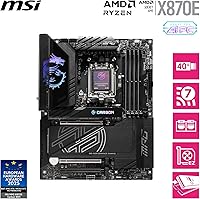
Physical feedback from buyers was consistently positive — the board feels dense and well-made, with heatsink contact quality and PCB rigidity that reflect its tier. The carbon-patterned shroud and RGB accents are restrained enough to suit most build aesthetics without looking garish.
A few buyers noted that the M.2 shield removal process requires more force than expected, and the screws are small enough to be fiddly during initial installation. Nothing breaks, but it is not the most polished installation experience compared to some competitors at this price level.
PCIe 5.0 GPU Support
82%
18%
The full PCIe 5.0 x16 primary slot ensures no bandwidth limitation for current-generation GPUs and positions the board for next-generation cards without needing an upgrade. Users who prioritize platform longevity found this a meaningful factor in choosing X870E over standard X870.
As with Gen5 storage, the practical benefit today is limited since no consumer GPU currently saturates PCIe 4.0 bandwidth. Buyers who are not future-proofing deliberately may feel this feature is contributing to cost without delivering a day-one performance advantage.
CPU Compatibility Range
87%
Supporting Ryzen 7000, 8000, and 9000 series out of a single AM5 socket gives this MSI flagship motherboard meaningful generational flexibility. Users who are currently on Ryzen 7000 and planning a CPU upgrade without a full platform swap found this particularly reassuring.
BIOS updates are required for newer CPU generations, and on early retail units, not all Ryzen 9000 chips were supported at initial boot. Most users resolved this quickly, but it adds a step that less experienced builders may not anticipate when first powering on a new build.
Value for Money
63%
37%
For buyers who genuinely use the VRM headroom, all four M.2 slots, dual LAN, and aggressive memory overclocking, the feature density justifies the cost in a way that is hard to replicate with mid-range alternatives. The board delivers on its promises for the right use case.
The honest assessment from a large portion of buyers is that most of the advanced capabilities go unused in everyday gaming or productivity builds. Mid-range X870 or B650E boards handle standard workloads effectively at significantly lower cost, making this a hard sell unless you have specific, enthusiast-level needs.
Out-of-Box Setup
71%
29%
Hardware installation itself was described as straightforward by most buyers — standard ATX mounting, clear labeling on headers, and a well-organized rear I/O. Experienced builders reported clean first boots without hardware issues.
Software and BIOS setup tell a different story. Default memory settings often do not enable XMP automatically, Wi-Fi drivers sometimes need manual installation, and the initial BIOS experience assumes familiarity with advanced PC building concepts that casual builders may not yet have.
Cooling Accessory Compatibility
79%
21%
The board's standard AM5 mounting pattern means it works with the vast majority of current AMD-compatible CPU coolers, including popular 240mm and 360mm AIO liquid coolers. Users building high-thermal-load systems found cooler mounting straightforward without adapter kits.
The dense heatsink layout around the socket area can create clearance issues with some large air coolers that have wide heatsink bases or oversized fan clips. A small number of users had to swap cooler fans or reposition their setup to clear the VRM heatsink properly.
Software & Utilities
72%
28%
MSI Center provides a reasonable suite of monitoring and tuning tools that experienced users found functional for fan control, performance profiles, and RGB management. Those who preferred software-side tuning without diving into the BIOS appreciated having a desktop interface for common adjustments.
MSI Center has a reputation among users for being resource-heavy and occasionally unreliable after Windows updates. Several reviewers recommended disabling background processes from the suite and using BIOS controls directly, suggesting the software layer is more of a convenience than a fully polished experience.

Suitable for:

The MSI MPG X870E Carbon WiFi Motherboard is built for a very specific kind of PC builder — one who plans to push the AM5 platform hard and wants the hardware foundation to back it up. Enthusiast overclockers chasing aggressive DDR5 memory speeds or sustained all-core CPU performance will find the 18-phase VRM and robust thermal solution genuinely useful, not just specced for marketing. Content creators and video editors who run multiple high-speed NVMe drives simultaneously will appreciate having two Gen5 M.2 slots on hand without needing an expansion card. Gamers assembling a flagship Ryzen 9000-series rig who want to eliminate platform-level bottlenecks will also be well served here. Home lab users or streamers who need reliable, high-throughput wired networking alongside next-gen wireless will find the dual LAN ports and WLAN-7 module replace what would otherwise require separate add-in cards.
Not suitable for:

The MSI MPG X870E Carbon WiFi Motherboard is a poor fit for anyone who does not intend to use a meaningful portion of what it offers. Budget-conscious builders assembling a solid but straightforward gaming or work PC will find themselves paying a steep premium for features they may never touch — mid-range X870 or even B650E boards handle everyday Ryzen workloads competently at a fraction of the cost. First-time PC builders should also think carefully: the BIOS is capable but complex, and the learning curve is real if you are not already familiar with manual memory tuning or overclocking settings. The ATX form factor rules it out for small form factor builds entirely. Those planning to stick with DDR5 speeds in the standard range will also find the high-bandwidth memory support largely wasted.
Specifications

  • Socket: Uses the AMD AM5 socket, supporting Ryzen 7000, 8000, and 9000 series processors.
  • Chipset: Built on the AMD X870E chipset, the highest-tier option in AMD's current consumer platform lineup.
  • Form Factor: Standard ATX at 11.88 x 11.51 inches, compatible with full-tower and mid-tower cases that support ATX boards.
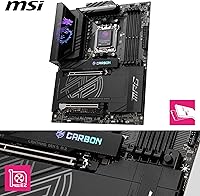
  • VRM Design: Features an 18-phase Duet Rail Power System using 110A Smart Power Stage components with Core-Boost architecture.
  • Memory Slots: Four DDR5 DIMM slots supporting speeds up to 8400+ MT/s in a 1DPC single-rank configuration for extreme overclocking.
  • M.2 Storage: Includes four M.2 slots total: two PCIe Gen5 x4 slots at up to 128 Gbps and two PCIe Gen4 x4 slots at up to 64 Gbps.
  • PCIe Slot: Primary x16 slot runs at PCIe 5.0, providing full bandwidth headroom for current and next-generation discrete graphics cards.
  • Wireless: Onboard WLAN-7 module with Bluetooth 5.4 handles next-generation Wi-Fi connectivity and modern peripheral pairing.
  • Wired LAN: Dual LAN ports offer 5 Gbps and 2.5 Gbps connections simultaneously for flexible high-throughput wired networking.
  • Thermal System: FROZR GUARD cooling includes a 7W/mK MOSFET thermal pad, a heat pipe-equipped VRM heatsink, and double-sided EZ M.2 Shield Frozr II pads.
  • M.2 Cooling: All four M.2 slots are covered by double-sided Shield Frozr heatsinks to reduce NVMe drive throttling under sustained workloads.
  • Weight: The board weighs 3.31 pounds, reflecting the substantial heatsink and build material investment across the PCB.
  • Model Number: Official MSI model identifier is 7E49-001R, useful for BIOS downloads, warranty registration, and compatibility lookups.
  • Launch Date: Released in September 2024, positioning it as a current-generation board aligned with the Ryzen 9000 series launch window.
  • Platform: Designed for Windows 11 and fully compatible with its security and driver requirements for AM5 Ryzen processors.
  • Bluetooth: Bluetooth 5.4 is integrated via the WLAN-7 module, supporting low-latency audio peripherals and modern wireless accessories.

Related Reviews

MSI MPG B550 Gaming Carbon WiFi Motherboard
87%
93%
Gaming Performance
89%
Wi-Fi Performance
91%
Connectivity Options
88%
Build Quality
85%
Overclocking Stability
More
MSI MPG X670E Carbon WiFi ATX Motherboard
78%
91%
Build Quality
88%
VRM & Thermal Performance
63%
BIOS Experience
67%
DDR5 Compatibility & Memory Tuning
86%
PCIe 5.0 & Storage Expandability
More
MSI MPG X870E EDGE TI WIFI Motherboard
83%
93%
VRM & Power Delivery
84%
BIOS Usability
91%
Storage Performance
88%
Wireless Connectivity
82%
DDR5 Overclocking
More
MSI MPG Z790 Carbon WiFi II Motherboard
84%
91%
VRM & Power Delivery
84%
DDR5 Compatibility & Memory OC
88%
BIOS Experience
86%
Wireless Connectivity (Wi-Fi 7 & BT 5.4)
93%
M.2 Storage Expansion
More
MSI MPG Z390 Gaming PRO Carbon Motherboard
86%
92%
Performance
89%
Build Quality
85%
Ease of Installation
78%
RGB Customization
91%
Compatibility with Intel 8th/9th Gen CPUs
More
MSI MPG B850 Edge TI WiFi Motherboard
86%
91%
Performance
89%
Build Quality
93%
Cooling Efficiency
75%
Ease of Installation
90%
Wi-Fi and Connectivity
More
MSI MPG B760I Edge WiFi Mini-ITX Motherboard
81%
88%
Build Quality
93%
Feature Set
82%
BIOS & Software
86%
Wireless Performance
74%
Thermal Management
More
MSI MPG Z790 Edge WiFi DDR4 Gaming Motherboard
86%
89%
Performance
92%
Power Delivery System
88%
Cooling Efficiency
91%
Ease of Installation
84%
Wi-Fi Connectivity
More
MSI MPG B650I EDGE WIFI AMD AM5 M-ITX Motherboard
87%
88%
Performance
91%
Build Quality
85%
Ease of Installation
90%
Wi-Fi and Connectivity
89%
Compatibility with Ryzen 7000 Series
More
MSI MPG B550 GAMING PLUS Motherboard
86%
92%
Performance with Ryzen CPUs
90%
PCIe 4.0 Support
85%
Cooling Efficiency
88%
Ease of Installation
87%
Wireless Connectivity (Wi-Fi and Bluetooth)
More

FAQ

Yes, the MSI MPG X870E Carbon WiFi Motherboard is fully compatible with Ryzen 7000 series processors on the AM5 socket. You do not need to upgrade your CPU to use this board, although it is also ready for Ryzen 8000 and 9000 series chips if you plan to upgrade down the line.
Possibly, depending on when the board was manufactured. MSI ships boards with BIOS versions that may or may not include Ryzen 9000 support out of the box. It is worth checking the MSI support page for your model number and flashing the latest BIOS before installing a newer CPU if you are unsure.

The board supports standard DDR5 modules, but high-speed kits above 6000 MT/s often require enabling XMP or EXPO profiles manually in the BIOS to run at rated speeds. A small number of users have reported that some kits need additional voltage or timing adjustments to post stably, so checking MSI's QVL memory compatibility list before buying is a smart move.

Honestly, it has a learning curve. MSI's Click BIOS is feature-rich but assumes you already know what you are looking at. If you are new to manual overclocking or memory tuning, expect to spend some time reading documentation or watching tutorials. For standard out-of-box use without overclocking, setup is straightforward enough.

The X870E chipset provides enough PCIe lane bandwidth to run all four M.2 slots concurrently without pulling lanes from the primary PCIe 5.0 x16 slot. This is one of the key advantages of X870E over the standard X870 and lower-tier chipsets.

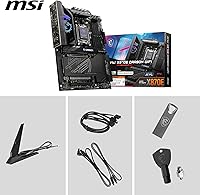
Yes, MSI includes external Wi-Fi antennas in the retail package for the WLAN-7 module. They attach to the rear I/O panel connectors and should be installed for best signal quality, especially if your case is metal-enclosed.

Yes, both the 5 Gbps and 2.5 Gbps LAN ports are independently functional and can be used simultaneously. Link aggregation support depends on your router or switch, but running them as separate connections to different networks or devices is straightforward from the OS side.

This X870E board uses a passive cooling solution for the VRM — there are no active fans on the heatsinks. Under sustained all-core CPU loads the heatsinks do their job through mass and the heat pipe design, so you will not hear any coil whine or fan noise coming from the board itself during normal operation.

It will work perfectly fine without overclocking, but you would be paying for capability you are not using. If your build is focused on straightforward productivity or gaming without memory or CPU tuning, a mid-range X870 or B650E board would handle your workload just as well at a lower price point. The MPG Carbon WiFi really earns its cost when you push the platform.

Any case that officially supports ATX motherboards will fit this one. It measures 11.88 x 11.51 inches, which is standard ATX sizing. Full-tower and mid-tower cases are fine. Micro-ATX or mini-ITX cases will not work, and some compact mid-towers with tight clearances may make cable routing or M.2 access awkward, so check your case specs before buying.

Where to Buy