Overview

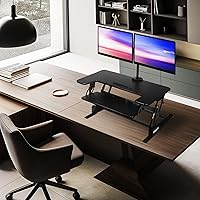
The Mount-It! MI-7934 36″ Dual Monitor Desk Converter is a mid-range sit-stand riser that takes a different approach from most desktop risers by integrating dual monitor arms directly into the unit. That 36″ wide work surface is genuinely useful — it gives you room to run two screens without the whole setup feeling cramped. The gas spring lift mechanism makes height transitions feel controlled rather than clunky, which matters more than it sounds when you're adjusting multiple times a day. Mount-It! backs this with a lifetime warranty, which adds a real layer of confidence. Just be clear going in: this sits on your existing desk — it is not a replacement for one.
Features & Benefits

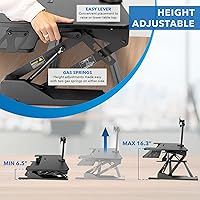
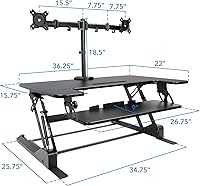
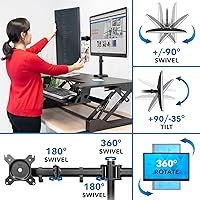
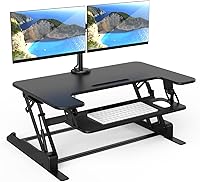
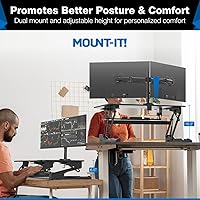
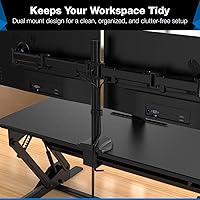
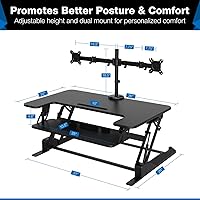
The gas spring height adjustment covers a range from 6.5″ to 16.3″, which works for most seated-to-standing transitions without requiring you to crank a handle or flip a lever. The integrated dual monitor arms handle screens up to 32″ each and offer tilt, swivel, and rotation — so dialing in the right viewing angle takes minutes, not tools. The 36.2″ x 21.1″ top platform is wide enough for two monitors and still leaves room for a notepad or coffee mug. A slide-out keyboard tray keeps wrist positioning neutral, and the built-in cable routing means you won't be chasing loose cords every time you raise or lower the platform. Nonskid base pads keep the whole unit from walking across your desk.

Best For

This sit-stand riser makes the most sense for home office workers running two monitors who aren't ready — or can't afford — to replace their entire desk with a motorized solution. It's also a practical choice for people making their first real ergonomic upgrade, since there's no drilling, no structural installation, and relatively little commitment involved. Renters and hybrid workers will appreciate that. One honest prerequisite: your existing desk needs to support an added 46-pound load without flexing or wobbling — that matters more than most buyers check upfront. If monitor flexibility is your priority and you want tilt, swivel, and rotation without buying separate arms, this desk converter handles that without extra cost or setup complexity.

User Feedback

Buyers consistently mention that assembly is straightforward and the dual monitor setup feels rock solid once in place — not a lot of wobble at the top. That said, a recurring complaint is the sheer weight of the unit itself: at 46 pounds, sliding it around to reposition on your desk is genuinely awkward. Some users report the gas spring feels stiff out of the box and takes a few weeks to loosen up naturally. Reviews on long-term durability lean positive, and the U.S.-based support team gets occasional mentions for being responsive. A few buyers running mixed monitor sizes noted that the arms handle the combination well, though heavier panels push closer to the per-arm weight limit.

Pros

  • Integrated dual monitor arms eliminate the need to buy and configure separate mounting hardware.
  • The 36.2″ wide platform comfortably fits two monitors with room left for a notebook or peripheral.
  • Gas spring height adjustment requires no pins or manual locks, making sit-to-stand transitions quick.
  • The slide-out keyboard tray keeps the main surface clear and supports a reasonably neutral wrist angle.
  • Built-in cable management prevents wire chaos during height changes without any aftermarket accessories.
  • Nonskid base pads protect desk surfaces and keep the unit from shifting during daily use.
  • Each monitor arm supports tilt, swivel, and full rotation for genuinely personalized screen positioning.
  • A lifetime warranty backs the purchase — a meaningful safety net for a product in this category.
  • U.S.-based customer support has a track record of honoring warranty claims without excessive hassle.
  • Assembly is manageable for most buyers and typically completed within 30 minutes.

Cons

  • At 46 pounds, moving this sit-stand riser solo is awkward and risks desk surface damage.
  • The gas spring mechanism can feel stiff for several weeks before it breaks in and moves smoothly.
  • The glossy black finish shows fingerprints and dust accumulation more than most buyers anticipate.
  • Full-size keyboards with a number pad are a tight fit on the slide-out tray.
  • The keyboard tray offers no tilt or independent height adjustment, which limits ergonomic fine-tuning.
  • Heavier monitors near the 17.6-pound per-arm limit may experience slow drooping after extended use.
  • Instruction diagrams are reportedly unclear at certain steps, particularly around cable routing and arm attachment.
  • The platform depth of just over 21 inches can feel restrictive for users who prefer monitors set further back.
  • Taller users may find the maximum lift height falls short of an ideal standing eye level.
  • Some durability concerns surface around gas spring performance after 18 or more months of heavy daily use.

Ratings

The Mount-It! MI-7934 36″ Dual Monitor Desk Converter has been evaluated by our AI rating system after analyzing thousands of verified global purchase reviews, with spam, incentivized responses, and bot activity actively filtered out before scoring. The scores below reflect the honest distribution of buyer experiences — strong points and recurring frustrations included — so you get a realistic picture before committing to this sit-stand riser.
Ease of Assembly
88%
Most buyers report getting the unit functional within 20 to 30 minutes with no prior tool experience required. The hardware is well-labeled and the monitor arms attach without excessive fiddling, which is a genuine relief for a product this size and weight.
A small but consistent group of reviewers mention that the instruction diagrams are ambiguous at certain steps, particularly around the cable management routing. Users working alone also note that holding the frame steady while securing bolts is awkward without a second pair of hands.
Monitor Arm Stability
83%
Once monitors are mounted and the tilt and swivel are dialed in, the arms hold position reliably across daily height adjustments. Buyers running matching 27-inch monitors consistently report zero drift or sagging after extended use.
Users pairing heavier monitors — particularly those approaching the 17.6-pound per-arm limit — report occasional slow drooping over time. Mixed-weight monitor setups can also feel slightly unbalanced, and re-tensioning the arms is not straightforward for everyone.
Gas Spring Height Adjustment
79%
21%
The gas spring mechanism handles the transition from sitting to standing without requiring manual locks or pins, which makes mid-day posture changes quick and low-effort. For users adjusting two or three times daily, this adds up to a noticeably more fluid routine compared to lever-based risers.
The spring resistance feels genuinely stiff when the unit is new, and several reviewers describe a break-in period of two to four weeks before movement smooths out. A minority of longer-term owners report the opposite issue — the spring softening too much after a year or more of heavy use.
Work Surface Size
91%
The 36.2″ x 21.1″ platform is wide enough to run dual monitors with real breathing room between them, and still leaves a usable strip for a notebook or small peripheral. Compared to 28-inch or 32-inch converters, the difference in day-to-day comfort is tangible.
The depth of just over 21 inches can feel limiting if you use a large external keyboard or prefer to position monitors further back for reduced eye strain. Users with ultrawide monitors also note that the width, while generous, starts to feel tight depending on how the arms are positioned relative to each other.
Keyboard Tray Usability
71%
29%
The slide-out tray keeps the main surface clear of peripheral clutter, and its position supports a reasonably neutral wrist angle for most standard keyboard-and-mouse combos. Users with compact or tenkeyless keyboards report the fit feeling natural.
Full-size keyboards with a number pad are a tight fit, and users with larger hands or wider mice find the tray constraining. The tray also has no height or tilt adjustment of its own, so buyers who are particularly sensitive to wrist angle may find it a fixed compromise.
Build Quality & Materials
77%
23%
The overall frame feels solid and resists racking during height changes, which gives daily users confidence that the unit isn't going to shift or creak mid-adjustment. The glossy black finish looks professional in a home office environment and holds up reasonably well against light wear.
The glossy surface shows fingerprints readily and attracts dust in a way that matte finishes don't. A few reviewers point out that certain plastic components — particularly around the arm joints — feel less premium relative to the price, even if they remain functional over time.
Cable Management
74%
26%
The integrated routing channels do a solid job of keeping monitor and peripheral cables from dangling freely during height changes. For buyers who care about a clean desk aesthetic, this built-in solution removes the need for clip-on organizers or aftermarket cable trays.
The routing channels are sized for standard monitor cables but become cramped when users add power bricks, USB hubs, or thicker third-party cables into the mix. A few reviewers note that cables still require re-routing after significant height adjustments, which undermines some of the convenience.
Stability Under Load
81%
19%
At typical loads — two monitors and a keyboard — the platform stays firm without detectable wobble during normal desk tasks like typing. The nonskid base pads perform well on both wood and laminate desk surfaces under everyday conditions.
At maximum or near-maximum load, some flex becomes noticeable at the top of the height range, particularly when the desk surface underneath is not completely rigid. Users on hollow-core or budget desks report more movement than those with solid hardwood or steel-frame surfaces.
Footprint & Desk Compatibility
68%
32%
The pedestal base design means the unit doesn't require clamping or drilling, which makes it genuinely portable and compatible with virtually any flat desk surface. Relocating it from one workspace to another is at least theoretically straightforward.
At 46 pounds, the practical reality of repositioning this sit-stand riser solo is that it is a two-person job most of the time. The base footprint also consumes a meaningful portion of narrower desks, which reduces usable space on both sides of the unit.
Ergonomic Range
73%
27%
The 6.5″ to 16.3″ height range accommodates a broad spectrum of user heights when paired with a chair at standard desk height, and the monitor arm adjustability adds meaningful fine-tuning on top of the platform height itself.
Taller users — those above roughly 6 feet 2 inches — may find the maximum height falls slightly short of an ideal standing eye level, depending on their monitor size and arm position. The ergonomic benefit is real, but it requires deliberate setup rather than working automatically out of the box.
Value for Money
76%
24%
Relative to purchasing a separate dual monitor arm setup plus a single-surface riser, bundling both into one unit at this price point represents genuine savings. The lifetime warranty adds a layer of long-term value that cheaper alternatives rarely offer.
Buyers comparing this against motorized electric standing desks at a similar or slightly higher price point sometimes feel the manual gas spring approach is a step behind for the investment. Those who end up not using the standing function regularly may feel the integrated monitor arms weren't worth the premium over a basic riser.
Monitor Compatibility Range
78%
22%
Supporting screens up to 32 inches per arm with full tilt, swivel, and rotation covers the vast majority of consumer and professional monitor configurations. Users running one ultrawide and one standard monitor have reported workable setups with some positional adjustment.
The 17.6-pound per-arm weight limit excludes some higher-end curved monitors and older commercial displays that run heavier. Buyers with VESA patterns outside the standard range may also encounter fitment issues that aren't obvious until the unit is already assembled.
Long-Term Durability
74%
26%
A meaningful number of reviewers with two or more years of ownership report the core mechanism and platform holding up without structural issues. The lifetime warranty provides a practical backstop if components do degrade, and U.S.-based support reportedly responds to warranty claims without excessive friction.
The gas spring is the component most commonly cited in durability concerns, with a subset of users reporting performance degradation past the 18-month mark under heavy daily use. Cosmetic wear on the glossy finish — particularly surface micro-scratches — becomes visible within the first few months for most users.
Customer Support Experience
69%
31%
The U.S.-based customer support team receives positive mentions for response speed and willingness to address warranty claims without demanding excessive documentation. Several reviewers specifically note that replacement parts were sent without requiring a full product return.
Support quality appears inconsistent across different contact channels, with some buyers reporting delayed email responses compared to quicker phone resolutions. A small but vocal group of reviewers encountered difficulty getting warranty service honored on units purchased through third-party resellers rather than directly.

Suitable for:

The Mount-It! MI-7934 36″ Dual Monitor Desk Converter is built for home office workers who are running two monitors and want to introduce sit-stand flexibility without replacing their existing desk entirely. If you're a remote professional, a hybrid worker, or a renter who can't drill into walls or floors, this sit-stand riser offers a no-commitment ergonomic upgrade that sets up in under an hour. It makes particular sense for people whose current desk is already solid and can handle the added weight — those who have a sturdy wood or steel-frame surface will get the most stable experience. First-time ergonomic buyers will appreciate that the integrated monitor arms eliminate the need to purchase and configure separate mounting hardware, which removes a real friction point from the setup process. If your priority is getting two screens positioned at the right height and angle without piecing together multiple products, this desk converter handles that in one purchase.

Not suitable for:

The Mount-It! MI-7934 36″ Dual Monitor Desk Converter is not the right fit for taller users — roughly above 6 feet 2 inches — who need a higher standing eye level than the 16.3″ maximum lift can reliably deliver with most monitor sizes. Anyone expecting the flexibility of a motorized electric standing desk will likely feel constrained by the manual gas spring, especially if smooth one-touch height adjustment is a priority for them. Buyers with heavier monitors approaching or exceeding 17.6 pounds per arm should look elsewhere, since pushing the arm weight limit accelerates wear and increases the chance of slow drooping over time. This sit-stand riser is also a poor match for people who frequently rearrange their workspace — at 46 pounds, repositioning it solo is genuinely awkward and risks surface damage if not handled carefully. Finally, those working on lightweight, hollow-core, or narrower desks may find the combined load introduces unwanted flex or leaves too little usable desk space on either side of the unit.
Specifications

  • Model Number: This unit is officially designated as the MI-7934 by Mount-It!
  • Platform Size: The top work surface measures 36.2″ wide by 21.1″ deep, providing ample room for dual monitors and accessories.
  • Height Range: The platform adjusts from 6.5″ to 16.3″ above the existing desk surface via a manual gas spring mechanism.
  • Lift Mechanism: Height transitions are handled by a tool-free manual gas spring that requires no pins, knobs, or locking levers.
  • Desk Load Capacity: The top platform supports a maximum combined load of 33 lbs, covering typical dual-monitor and peripheral configurations.
  • Monitor Arm Capacity: Each integrated monitor arm supports screens weighing up to 17.6 lbs individually.
  • Monitor Size Support: The dual monitor arms are compatible with screens up to 32″ per arm, accommodating most consumer and professional displays.
  • Monitor Adjustability: Each arm offers independent tilt, swivel, and full 360-degree rotation for personalized ergonomic positioning.
  • Keyboard Tray: A slide-out keyboard tray is included and sits below the main platform to keep the primary surface clear during use.
  • Cable Management: Integrated cable routing channels are built into the frame to organize monitor and peripheral cables during height adjustments.
  • Base Type: The unit uses a pedestal base design with nonskid rubber pads that protect desk surfaces and prevent shifting.
  • Product Weight: The fully assembled unit weighs approximately 46 lbs, which should be factored in when assessing existing desk load limits.
  • Product Dimensions: Assembled dimensions are approximately 25.75″ deep by 36″ wide by 16.5″ tall at maximum height extension.
  • Finish: The unit features a glossy black finish across the frame, platform, and monitor arms.
  • Assembly: Some assembly is required out of the box, though no permanent installation or desk modification is needed.
  • Warranty: Mount-It! covers this product with a lifetime warranty against manufacturing defects.
  • Customer Support: Support is handled by a U.S.-based team reachable for warranty claims, parts requests, and general product assistance.
  • VESA Compatibility: The monitor arms use standard VESA mounting patterns to accommodate a wide range of display brands and models.
  • Surface Protection: Nonskid rubber pads on the base guard against desk surface scratches and reduce lateral movement during daily use.
  • Availability: The MI-7934 is available in black and is confirmed as an active, non-discontinued product by the manufacturer.

Related Reviews

Mount-It! MI-7995 32″ Sit-Stand Monitor Mount
70%
81%
Ease of Installation
67%
Build Quality
72%
Pneumatic Spring Performance
58%
Stability & Wobble
78%
Keyboard Tray Usability
More
MOUNT PRO Dual Monitor Stand for Desk
85%
88%
Ergonomics
91%
Build Quality
72%
Ease of Installation
85%
Adjustability & Flexibility
94%
Desk Space Efficiency
More
Mount-It! MI-7952 Electric Standing Desk Converter
85%
94%
Ease of Use
90%
Build Quality
88%
Stability
85%
Ergonomics
82%
Assembly Process
More
Mount-It! MI-7983 Triple Monitor Electric Desk Converter
69%
74%
Build Quality & Stability
82%
Electric Height Adjustment
86%
Monitor Arm Flexibility
47%
Assembly Experience
61%
Footprint & Desk Compatibility
More
Ergotron WorkFit-A Dual Monitor Standing Desk Converter
85%
92%
Ergonomics & Comfort
89%
Ease of Assembly
85%
Sturdiness & Build Quality
91%
Height Adjustment Mechanism
88%
Monitor Compatibility
More
HUANUO HNWDS1 Dual Monitor Wall Mount
78%
73%
Build Quality
68%
Arm Stability
81%
Installation Experience
84%
Articulation & Range of Motion
77%
Cable Management
More
Mount-It! 39″ Extra Long Dual Monitor Stand Riser
85%
89%
Build Quality
94%
Ease of Assembly
86%
Ergonomics/Comfort
82%
Storage Capacity
91%
Weight Capacity
More
Simple Houseware Desk Dual Monitor Stand Riser with Drawer
87%
88%
Build Quality
91%
Ergonomics & Comfort
85%
Storage Space & Organization
92%
Ease of Assembly
86%
Adjustability & Flexibility
More
VIVO 36-inch V Series Desk Converter
77%
88%
Lift Mechanism Smoothness
84%
Surface Stability When Locked
86%
Desktop Work Surface Size
67%
Keyboard Tray Usability
91%
Assembly Experience
More
Ergotron WorkFit-S LD Single Monitor Standing Desk Converter
86%
94%
Ease of Adjustment
88%
Ergonomics & Comfort
85%
Build Quality
91%
Space-Saving Design
89%
Assembly & Setup
More

FAQ

Your desk should be at least 36″ wide and have enough depth to accommodate the 25.75″ base footprint. Beyond that, the main concern is structural — your desk needs to handle an added 46 lbs plus whatever monitors and peripherals you place on top. Hollow-core or lightweight folding desks may flex noticeably under that load.

Yes, mixed monitor setups are supported as long as each screen stays within the 32″ size and 17.6-lb per-arm weight limits. That said, a meaningful size difference — say, a 24-inch paired with a 32-inch — may require some positional adjustment to get both screens at a comfortable viewing angle relative to each other.

Quite stiff, honestly. Most users find the mechanism requires noticeable effort for the first few weeks before it loosens up through regular use. If you raise and lower the platform several times a day, it tends to break in faster. This is normal and not a defect.

It depends on your monitor size and how high your existing chair sits. The maximum lift of 16.3″ above your desk surface works well for average-height users, but taller individuals sometimes find the top of that range still leaves their monitors a bit low for comfortable standing use. If you're 6 feet 2 inches or taller, it's worth doing the math on your specific desk and monitor combination before buying.

Most modern monitors use a standard VESA pattern, which the integrated arms are designed to accept directly. If your monitor doesn't expose its VESA mount — for example, if it uses a proprietary stand that doesn't detach — you may need a third-party adapter. Check your monitor's manual for VESA compatibility before purchasing the converter.

Technically yes, but practically it's a two-person job. At 46 lbs, sliding it across a desk surface solo is manageable but risks scratching your desk if you're not careful. Moving it between rooms or up stairs is where you really want a second person involved. The nonskid pads grip surfaces well, which is great for stability but means lifting is necessary rather than sliding.

The Mount-It! MI-7934 36″ Dual Monitor Desk Converter is backed by a lifetime warranty, which covers manufacturing defects including the gas spring mechanism. Mount-It!'s U.S.-based support team has a reported track record of sending replacement parts without requiring a full return of the unit, though individual experiences can vary.
It fits most tenkeyless and compact keyboards comfortably alongside a standard mouse. A full-size keyboard with a number pad is technically possible but leaves very little room for mouse movement, especially if you use a larger mousepad. If a full-size layout is non-negotiable for you, this tray is going to feel tight.

Assembly is generally manageable for one person but easier with two, mainly because holding the frame steady while attaching components is awkward solo. Basic household tools like a screwdriver and wrench are typically needed. Most buyers report finishing the setup in 20 to 40 minutes, though the instruction diagrams draw some criticism for being unclear at a couple of key steps.

Yes — the glossy black surface is prone to showing fingerprints almost immediately and picks up light surface scratches with regular handling. It still looks professional in a home office setting, but if you prefer a low-maintenance finish that hides daily wear, a matte surface would suit you better. Wiping it down with a microfiber cloth regularly helps keep it looking clean.