Overview

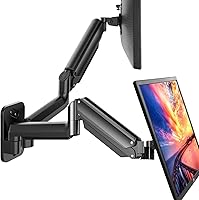
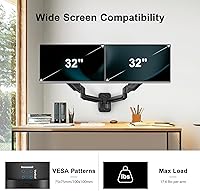
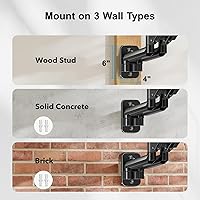
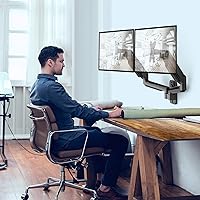
The HUANUO HNWDS1 Dual Monitor Wall Mount is a budget-friendly, wall-mounted arm system designed to hold two screens between 17 and 32 inches, making it a practical choice for anyone trying to reclaim desk space without a large investment. It mounts directly to wood studs, concrete, or brick, which gives it a stable foothold most freestanding arms simply cannot match. With over 2,300 customer ratings and a rank of #48 in its Amazon category, this wall mount has clearly found an audience among home office workers and students looking for a reliable, no-frills solution.

Features & Benefits

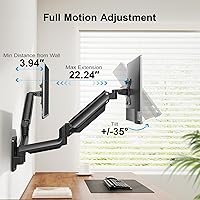
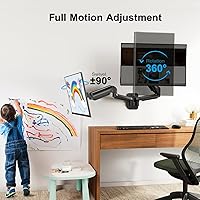
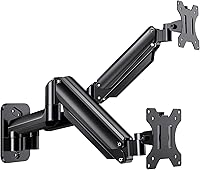
Each arm on this monitor wall mount offers full articulation — swivel up to 90 degrees in either direction, tilt 35 degrees up or down, and 360-degree rotation so you can switch between landscape and portrait mode without any tools. That rotation capability is something many buyers overlook until they actually need it. The built-in cable routing channels do a solid job keeping cords out of sight, and the alloy steel construction feels appropriately sturdy for its price tier. Height adjustment is smooth enough for regular repositioning, whether you are transitioning between sitting and standing throughout the day.

Best For

This wall mount is a strong fit for remote workers and students who want a cleaner desk setup without spending heavily. If your monitors top out at 32 inches and your walls are standard wood-stud construction, installation should be fairly straightforward. It also suits anyone running a mixed portrait-landscape dual display configuration, since the 360-degree rotation makes switching orientations simple. That said, if you plan to reposition your screens frequently throughout the day or use particularly heavy panels, a higher-end articulating arm would likely serve you better over time.

User Feedback

Buyers who have set up the HUANUO dual arm tend to praise how approachable the installation process is, with many completing both mounts within the advertised timeframe. Portrait mode flexibility comes up repeatedly as a standout positive, especially among users running a vertical screen alongside a horizontal one. On the downside, a noticeable share of reviews mention minor arm wobble with larger 32-inch monitors, and some note that dialing in the right arm tension takes a bit of trial and error. Long-term durability is generally acceptable, though a handful of users report gradual loosening after extended daily use.

Pros

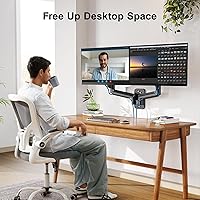
  • Frees up the entire desk surface, making a tangible difference in day-to-day workspace comfort.
  • Full 360-degree rotation per arm makes portrait-mode setups straightforward and tool-free.
  • Compatible with the vast majority of consumer monitors via 75x75 and 100x100mm VESA support.
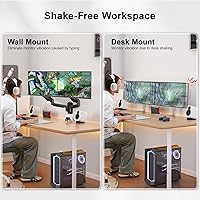
  • Wall anchoring eliminates the base wobble that plagues most freestanding dual monitor stands.
  • Built-in cable channels keep cords organized and out of sight with minimal effort.
  • Complete hardware kit is included, so there are no surprise accessory purchases after unboxing.
  • Tilt and swivel range comfortably covers most ergonomic adjustments for seated or standing users.
  • Customer support is responsive for missing hardware or basic installation questions.
  • Matte black finish blends cleanly with most monitor bezels and home office aesthetics.
  • For monitors in the 24-to-27-inch range, arm stability holds up well over months of normal use.

Cons

  • Arm tension loosens gradually under heavier monitors, requiring periodic re-tightening to prevent screen drift.
  • Initial tension calibration is trial and error, with no clear guidance in the included instructions.
  • Plastic joint housings feel noticeably cheaper than the metal arms and show wear faster.
  • Cable routing channels are narrow and struggle to accommodate thicker cords or multiple cables cleanly.
  • Real-world usable weight capacity appears lower than the advertised spec based on long-term user reports.
  • Missing hardware on arrival is a recurring complaint, requiring a customer service interaction before setup can begin.
  • The wall-plate instructions do not address drywall anchor scenarios, leaving some buyers without adequate guidance.
  • Finish inconsistencies and surface scuffs on joint areas become visible within the first few months of use.

Ratings

The HUANUO HNWDS1 Dual Monitor Wall Mount scores here reflect AI-driven analysis of verified global buyer reviews, with spam, incentivized, and bot-generated feedback actively filtered out. Ratings span everything from installation ease to long-term arm stability, giving a transparent picture of where this wall mount genuinely delivers and where it falls short. Both consistent praise and recurring frustrations are weighted equally so you can make a fully informed decision.

Build Quality
73%
27%
Most buyers find the alloy steel construction reassuringly solid for the price bracket, with the arms feeling substantial rather than hollow or flimsy out of the box. Users running 24-inch monitors day-to-day report no structural concerns after months of regular use.
Several reviewers note that plastic components in the joint housings feel noticeably cheaper than the metal arms themselves. A subset of long-term users report that these joints show wear faster than expected, especially with frequent repositioning.
Arm Stability
68%
32%
For monitors in the 24-to-27-inch range, the arms hold their position well once tension is properly set, and users doing focused desk work appreciate that screens stay exactly where they left them. The wall-anchored design inherently eliminates the base wobble common in freestanding arms.
Owners running large 32-inch panels consistently mention a noticeable sag or drift over time as the arm tension gradually loosens. Getting the initial tension calibration right is a trial-and-error process that frustrates a meaningful share of first-time buyers.
Installation Experience
81%
19%
The included hardware kit is complete, and the instruction sheet is clear enough that buyers with basic DIY confidence consistently report finishing both arms within ten to fifteen minutes. Wood-stud installations in particular go smoothly, with the wall plate sitting flush and secure.
Buyers mounting into drywall anchors rather than studs report less confidence in the long-term hold, and the instructions do not address this scenario in enough detail. Locating the correct screwdriver bit for tension adjustment is a minor but recurring annoyance mentioned in multiple reviews.
Articulation & Range of Motion
84%
The combination of swivel, tilt, and full 360-degree rotation per arm gives users genuine flexibility, and portrait-mode capability is a standout feature that buyers who need vertical screen orientation genuinely appreciate. Switching between landscape and portrait takes seconds once you understand the locking mechanism.
The swivel motion can feel slightly stiff on initial setup and benefits from loosening adjustment, which is not clearly documented. A few users note the tilt range, while adequate for most, is limiting for setups where the wall position creates an unusually steep viewing angle.
Cable Management
77%
23%
The built-in routing channels do a competent job concealing cables along the arms, and users who take time during installation to thread cords properly end up with a noticeably cleaner desk area. For a wall mount at this price, having any cable management at all is appreciated.
The channels are narrow and accommodate only a limited number of cables comfortably, which becomes a problem for users with multiple peripherals or thicker power cords. A few reviewers mention that cables pop out of the guides during arm repositioning.
Value for Money
88%
At its price point, this wall mount offers a feature set that typically costs significantly more from established brands, and buyers who primarily want a clean desk with stable dual screens routinely describe it as one of the better budget purchases they have made. The included hardware eliminates any additional accessory cost.
Buyers who push the product hard, repositioning arms multiple times daily or loading heavy 32-inch panels, find the value proposition weakens as wear sets in faster than the price tag suggests it should. Compared to mid-range competitors, the long-term cost-per-year calculation is less favorable.
Compatibility
82%
18%
Supporting both 75x75 and 100x100mm VESA patterns covers the vast majority of consumer monitors on the market, and users report that the mounting plate hardware accommodates most standard screen backs without modification. Compatibility issues are rare in the review pool.
The mount does not support larger VESA patterns like 200x200mm, which excludes some older or commercial-grade monitors. A handful of buyers with ultrawide or unusually heavy panels near the weight limit report that the arms struggle to hold position reliably.
Desk Space Savings
91%
This is consistently the most enthusiastically praised outcome in user reviews. Buyers who previously used dual monitor stands describe the freed desk surface as transformative for their workflow, with room for notepads, peripherals, and general breathing space that simply did not exist before.
The benefit is entirely contingent on a suitable wall surface being available close enough to the desk, which is not always the case in rental apartments or oddly configured home offices. Users in those situations occasionally discover this limitation only after purchase.
Ease of Adjustment
71%
29%
Once the tension is correctly set, day-to-day micro-adjustments to tilt and swivel are smooth enough that users doing ergonomic repositioning between sitting and standing report a genuinely improved experience. The arms respond to light pressure without requiring significant force.
The initial tension-setting process requires a specific Allen key and a degree of patience that not all buyers anticipate. Reviews frequently mention that under- or over-tightening on the first attempt leads to either drooping screens or uncomfortably stiff movement.
Packaging & Unboxing
79%
21%
Most buyers find all components well-organized and accounted for on unboxing, with hardware sorted into labeled bags that reduce setup confusion. The arms arrive with protective wrapping that prevents cosmetic scratches during shipping.
A small but consistent number of reviews mention missing hardware pieces or bags that were unsealed in transit, requiring contact with customer service before installation could begin. The box itself offers minimal crush protection for the heavier metal components.
Aesthetics & Finish
76%
24%
The matte black finish reads as clean and professional in desk setup photos shared by buyers, blending well with most monitor bezels and dark-themed workstations. The arms have a sleek enough profile that they do not dominate the visual space of a home office.
Up close, the finish on joint components shows minor inconsistencies that are more visible in brighter room lighting. A few users note surface scuffs appearing on high-contact areas within the first few months of use.
Weight Capacity Reliability
67%
33%
For monitors well within the specified weight range, say 24-inch panels averaging around 10 to 12 pounds, the arms hold steadily and buyers report no sagging issues even after prolonged use. The rated capacity feels credible for lighter monitor configurations.
Buyers running monitors near the stated 17.6-pound per-arm limit report noticeably faster tension loss and arm drift. The real-world usable weight ceiling appears to sit somewhat below the advertised spec based on patterns across multiple long-term reviews.
Customer Support
74%
26%
HUANUO receives positive mentions for responsiveness when buyers report missing hardware or installation questions, with several reviewers noting that replacement parts were shipped promptly without requiring a full product return. The support experience is considered above average for this price tier.
Support response times appear inconsistent, with some buyers waiting several days for a reply during peak periods. Resolution quality for more complex issues like persistent arm sag is less satisfying, with generic troubleshooting advice being the common outcome.

Suitable for:

The HUANUO HNWDS1 Dual Monitor Wall Mount is a genuinely practical choice for home office workers, students, and casual gamers who run two monitors in the 24-to-27-inch range and want to reclaim desk real estate without committing serious money to a premium arm brand. If your walls offer wood studs or solid masonry and you are comfortable with a basic DIY installation, this mount delivers a clean, stable dual-screen setup that freestanding stands simply cannot match in terms of desk clearance. Remote workers transitioning to a more ergonomic workspace will appreciate the height and tilt adjustability, especially if they alternate between sitting and standing throughout the day. The 360-degree rotation per arm also makes this a strong fit for anyone running a mixed portrait-landscape configuration, such as a vertical screen for code or documents alongside a horizontal panel for reference or communication tools. Budget-conscious buyers who prioritize functionality over premium build finishing will find the value proposition here hard to argue with.

Not suitable for:

Buyers who plan to mount large 32-inch monitors near the stated weight limit should approach the HUANUO HNWDS1 Dual Monitor Wall Mount with realistic expectations, as user feedback consistently points to faster arm tension loss and noticeable drift when the arms are pushed toward their maximum load. If you reposition your screens multiple times daily as part of an active workflow, the joint mechanisms are likely to show wear sooner than you would want at any price point. Renters or users in offices where wall drilling is prohibited will find this mount impractical entirely, since it requires permanent wall anchoring for proper use. Anyone seeking a polished, premium build with the kind of tight tolerances and smooth adjustments found on high-end arms from established ergonomic brands will be disappointed by the plastic joint components and the occasional inconsistency in finish quality. Similarly, monitors using larger VESA patterns beyond 100x100mm are simply incompatible, which rules out some older or commercial-grade displays.

Specifications

  • Monitor Size: Each arm supports screens between 17″ and 32″ diagonally.
  • Weight Capacity: Each arm holds up to 17.6 lbs (approximately 8 kg) per monitor.
  • VESA Compatibility: Compatible with 75x75mm and 100x100mm VESA mounting hole patterns.
  • Swivel Range: Each arm swivels up to 90° left and 90° right from center.
  • Tilt Range: Each arm tilts up to 35° upward and 35° downward for glare reduction.
  • Rotation: Each arm supports 360° rotation, enabling both landscape and portrait orientations.
  • Material: Primary structural components are constructed from alloy steel with plastic joint housings.
  • Finish: Matte black powder-coat finish applied across all visible arm and mount surfaces.
  • Wall Compatibility: Designed for installation into wood studs, solid concrete, and brick walls.
  • Product Weight: The complete mount assembly weighs 8.76 lbs (approximately 3.97 kg) as packaged.
  • Package Dimensions: The retail package measures 14 x 9 x 4 inches in its shipped configuration.
  • Cable Management: Built-in cable routing channels run along both arms to conceal monitor and power cords.
  • Hardware Included: All necessary mounting screws, bolts, and Allen keys are included in the package.
  • Model Number: The manufacturer model number for this unit is HNWDS1.
  • Movement Type: Arms support articulating, swivel, tilt, and rotation movements simultaneously per arm.
  • Date Available: This product was first made available for purchase in March 2020.
  • Manufacturer: Designed and sold by HUANUO, a brand specializing in monitor mounting solutions.
  • Warranty: HUANUO provides customer service support for defects and missing hardware, though a formal warranty period is not explicitly stated in product documentation.

Related Reviews
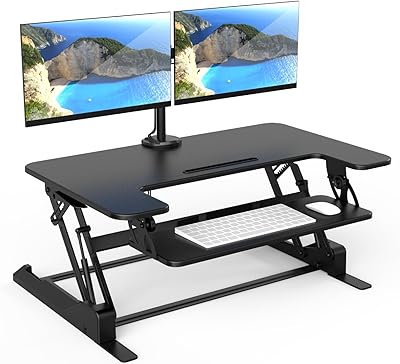
Mount-It! MI-7934 36″ Dual Monitor Desk Converter
77%
88%
Ease of Assembly
83%
Monitor Arm Stability
79%
Gas Spring Height Adjustment
91%
Work Surface Size
71%
Keyboard Tray Usability
More
MOUNT PRO Dual Monitor Stand for Desk
85%
88%
Ergonomics
91%
Build Quality
72%
Ease of Installation
85%
Adjustability & Flexibility
94%
Desk Space Efficiency
More
HUANUO Large Dual Monitor Stand with Drawer
86%
90%
Build Quality
88%
Ergonomics
72%
Storage Capacity
94%
Ease of Assembly
85%
Desk Organization
More
Mount-It! 39″ Extra Long Dual Monitor Stand Riser
85%
89%
Build Quality
94%
Ease of Assembly
86%
Ergonomics/Comfort
82%
Storage Capacity
91%
Weight Capacity
More
Mount-It! MI-7995 32″ Sit-Stand Monitor Mount
70%
81%
Ease of Installation
67%
Build Quality
72%
Pneumatic Spring Performance
58%
Stability & Wobble
78%
Keyboard Tray Usability
More
TobenONE UDS041W USB-C Triple Monitor Docking Station
77%
84%
Multi-Monitor Output
91%
Single-Display Performance
93%
Integrated 100W Charging
88%
Data Transfer Speed
79%
Ethernet Performance
More
Tecmojo 9U Wall Mount Rack
85%
87%
Build Quality
91%
Ease of Installation
88%
Cable Management
85%
Weight Capacity
90%
Material Durability
More
Tedgetal 12U Wall Mount Rack
86%
92%
Build Quality
88%
Ease of Installation
90%
Weight Capacity
85%
Design & Airflow
87%
Space Efficiency
More
AFOOYO Dual Monitor Stand Riser
85%
92%
Ergonomics
88%
Build Quality
65%
Ease of Assembly
91%
Storage Capacity
93%
Adjustability
More
gianotter D1-2B Dual Monitor Stand Riser
78%
88%
Build Quality
81%
Stability & Wobble Resistance
74%
Storage Functionality
94%
Ease of Setup
67%
Pen Holder Performance
More

FAQ

It should, provided your monitor weighs under 17.6 lbs and uses a 75x75 or 100x100mm VESA pattern. That said, user feedback suggests that arms holding monitors near the upper weight limit tend to loosen faster over time, so if your 32-inch panel is on the heavier side, keep a hex key handy for periodic tension adjustments.

The mount is designed for wood studs, solid concrete, or brick, and that is genuinely the safest way to install it. Drywall anchors are not officially recommended, and the instructions do not cover that scenario. Given the combined weight of two mounted monitors plus the arms themselves, stud mounting is strongly advisable for long-term safety.

Most buyers with basic DIY confidence manage it in under fifteen minutes. The hardware kit is complete and the instructions are clear enough for a first-timer. The trickier part is setting the arm tension correctly afterward, which takes a bit of patience and a few small adjustments before the arms hold position the way you want.

No, the HUANUO HNWDS1 Dual Monitor Wall Mount only supports 75x75mm and 100x100mm VESA patterns. If your monitor uses a larger pattern, you would need a different mount that explicitly lists 200x200mm compatibility.

Yes, and this is actually one of the more praised features among buyers. Each arm rotates a full 360 degrees independently, so mixing portrait and landscape orientations on the same mount is straightforward and does not require any tools once the arms are installed.

This is the most common issue reported by users, and it almost always comes down to arm tension being set too loosely. There is an adjustment bolt inside the arm joint that controls resistance, and tightening it incrementally with the included Allen key usually resolves the problem. If the drooping returns quickly, it may indicate the monitor is close to the arm weight limit.

The channels are functional but on the narrow side. Most users can route a power cable and a display cable per arm without much difficulty, but if you are adding USB hubs, multiple data cables, or thicker cords, things get tight. It helps to thread the cables through during installation before fully tightening the arms in place.

Since the mount attaches directly to the wall rather than to the desk, the desk height has no effect on monitor position. Your monitors stay fixed at whatever height and angle you set on the wall arms. This can be either an advantage or a limitation depending on your workflow, so factor that in before purchasing.

You will need a drill with the appropriate bit for your wall type, a stud finder if you are mounting into wood-frame walls, and a level to make sure the wall plate sits straight. Everything needed for the arm assembly itself is included in the package.

Based on buyer experiences, HUANUO is reasonably responsive about sending replacement hardware for missing or defective components. Reaching out directly through the Amazon seller contact or their customer service channel is the standard approach, and most users report receiving replacement parts without needing to return the full product.