Overview

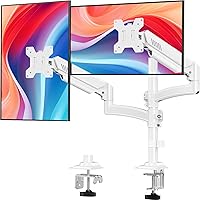
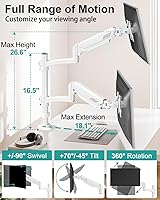
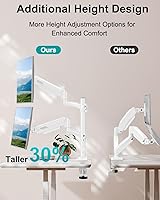
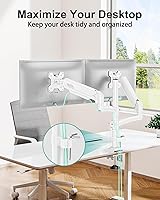
The MOUNT PRO Freelift Dual Monitor Stand sets itself apart from the crowded dual-arm market with one straightforward advantage: it stands taller than most. While a typical dual monitor arm tops out at a modest height, this mount adds an extra 16.5-inch column, pushing screens up to 26.6 inches from the desktop. That's a meaningful difference if you're tall, use a sit-stand desk, or want to stack one monitor directly above another. It comes in white — a deliberate choice that suits modern, minimal desk setups far better than the default black most competitors offer. Gas spring tech at this price point is genuinely rare, making this dual monitor arm worth a close look.

Features & Benefits

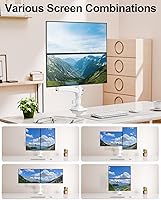
The extended column height is what makes the Freelift stand genuinely different — it pushes screens to 26.6 inches above your desk, a reach that most standard dual arms fall well short of. For taller users or anyone running a stacked vertical layout, that extra elevation is immediately felt in posture and comfort. The gas spring arms handle counterbalancing smoothly, and repositioning a screen is a one-handed job once tension is dialed in. You also get full swivel, generous tilt, and 360-degree rotation, so flipping a display to portrait or angling one toward a colleague takes seconds. One firm caveat: curved monitors with 1000R, 1500R, or 1800R curvature are not supported — worth confirming before you buy.

Best For

This dual monitor arm works particularly well for taller users — if you're around six feet or more and standard arms keep leaving your screens at an awkward downward angle, the extended pole here makes a real, day-to-day difference. It's also a practical pick for anyone trying to stack monitors vertically and reclaim horizontal desk space in tighter rooms. The white finish is a deliberate aesthetic decision that pairs well with clean, minimal office builds. And if you're stepping up from static stands but don't want to spend heavily on a premium brand, the gas spring freedom here gives noticeably more everyday usability at a reasonable price.

User Feedback

This mount launched in April 2025, so the review pool is still building — a 4.4-star rating this early is encouraging rather than conclusive. Buyers consistently mention that assembly goes smoothly, with labeled components and readable instructions cutting down on guesswork. The height reach draws particular appreciation from taller users who've struggled with lower-profile arms. On the critical side, a few reviewers flag that gas spring tension can be finicky to calibrate when monitors sit near the top of the supported weight range. The built-in cable routing works, though some find it takes more patience than expected to keep wires looking tidy. Long-term reliability is still an open question given how recently the product shipped.

Pros

  • The extended pole raises screens significantly higher than most competing dual arms, a genuine relief for tall users.
  • Gas spring repositioning is smooth and one-handed once tension is correctly set for your monitor weight.
  • Frees up a substantial amount of desk surface that factory stands typically consume.
  • Full 360-degree rotation per arm makes switching between landscape and portrait mode quick and practical.
  • Assembly is straightforward, with labeled parts that reduce guesswork during installation.
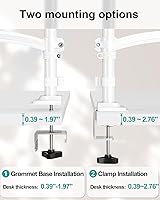
  • Two mounting options — clamp and grommet — give flexibility across different desk types and thicknesses.
  • The white finish is a rarity in this category and suits modern, minimal desk builds well.
  • Built-in cable routing keeps wires off the desk without requiring separate cable management accessories.
  • Supports a wide monitor size range per arm, from compact 13-inch displays up to larger 32-inch panels.
  • Competitive price for a gas spring dual arm, sitting well below premium-brand alternatives with similar motion range.

Cons

  • Curved monitors with 1000R, 1500R, or 1800R curvature are explicitly incompatible — a hard stop for many buyers.
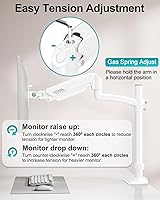
  • Gas spring tension calibration can be finicky when monitors sit near the upper end of the supported weight range.
  • The cable management channel, while present, requires patience to use neatly and may not fully conceal thicker cable bundles.
  • The Freelift stand launched in April 2025, so long-term durability data from real users is still limited.
  • The white finish, while attractive, may show scuffs or marks more visibly than a black powder-coated alternative.
  • Grommet mounting is only supported on desks up to 1.97 inches thick, which may exclude some thicker solid-wood desks.
  • Minor positional drift over time is a known trait of gas spring arms generally, and this mount is not immune.
  • At nearly 9.5 lbs, the assembled unit is moderately heavy and may be cumbersome to reposition if you rearrange your desk setup frequently.

Ratings

The scores below were generated by our AI after analyzing verified buyer reviews for the MOUNT PRO Freelift Dual Monitor Stand from across global markets, with spam, bot-submitted, and incentivized feedback actively filtered out. The result is a balanced picture that reflects both what users genuinely appreciate and where real frustrations surface. Nothing is glossed over — the ratings capture the honest trade-offs that matter most when making a purchase decision.

Height Reach
93%
Taller users consistently call out the elevated pole as the single most impactful thing this arm does differently. Getting screens to a true eye-level position without propping the monitor on books or risers is something buyers in the six-foot-plus range genuinely notice and appreciate every day.
A small number of users with very low desk heights found the minimum height positioning less flexible than expected, as the extended pole adds fixed height that cannot be removed if you actually want screens lower rather than higher.
Ease of Assembly
88%
Labeled components and clearly written instructions make the setup process approachable even for buyers who have never installed a monitor arm before. Most solo setups are completed within 30 to 45 minutes, and reviewers repeatedly mention that the labeled hardware removes the usual trial-and-error frustration.
A handful of buyers found that tightening the pole base clamp adequately required more force than expected, and a few noted that the instruction diagrams, while clear, could have benefited from more detailed torque guidance to avoid under-tightening.
Gas Spring Performance
82%
18%
For monitors sitting comfortably in the middle of the supported weight range, the gas spring counterbalancing feels smooth and responsive — repositioning a screen mid-workday takes one hand and a couple of seconds, which is a meaningful upgrade over friction-based arms at a similar price.
Buyers running monitors near the upper weight limit report noticeable difficulty dialing in stable tension, with some experiencing slow positional drift over hours. Calibration at the heavier end requires patience and occasional rechecking, particularly in the weeks after initial setup.
Build Quality
79%
21%
The all-metal construction gives the Freelift stand a noticeably solid feel compared to mixed plastic-and-metal arms at the same price point. The arm joints feel secure during adjustment, and there is no flexing or creaking in the pole under normal daily use.
Some buyers reported minor wobble when the arms are extended to near their maximum horizontal reach, particularly on desks with any surface vibration from nearby equipment. The finish, while clean, shows minor scuff marks more readily than a matte black equivalent would.
Monitor Compatibility
71%
29%
The arm handles a wide practical range of flat-panel monitors, from compact 13-inch displays all the way up to 32-inch panels, and the dual VESA support covers the two most common mounting patterns without needing adapters for the vast majority of setups.
Curved monitor users are entirely excluded — 1000R, 1500R, and 1800R displays are not supported, and this catches some buyers off guard after purchase. Users with non-standard VESA patterns or monitors without rear mounting holes are similarly out of luck without third-party adapters.
Adjustability Range
86%
The combination of swivel, tilt, and full 360-degree rotation means the arm handles portrait mode coding setups, collaborative screen sharing, and angled viewing for standing desk users all without any tool use. The range of motion in each direction feels generous for a mid-range arm.
The tilt range is slightly asymmetric — more generous tilting forward than backward — which can be mildly limiting for users mounting screens above eye level who need to angle displays downward at a sharper angle.
Desk Space Recovery
91%
Replacing two factory monitor stands with this single-pole mount visibly transforms a cluttered desk surface, giving back usable area for keyboards, notebooks, and peripherals. Buyers who made the switch from stands report the freed desk space as an immediate and tangible quality-of-life improvement.
The base clamp or grommet footprint itself occupies a fixed point at the desk edge, which can be mildly inconvenient on narrower desks where edge real estate is already limited. The mount cannot be centered on the desk without a grommet hole in the right position.
Cable Management
63%
37%
The built-in cable routing channel does keep wires off the desk surface and prevents cables from dangling freely behind screens. For setups with a single cable per monitor, the result looks reasonably tidy without any additional accessories.
Buyers running multiple cables per monitor — power, video, and USB — find the channel undersized and difficult to load neatly, with stiffer cables resisting the routing path. Several reviewers noted the end result looked worse than simply using adhesive cable clips mounted independently.
Mounting Flexibility
81%
19%
Having both clamp and grommet options included in the box — with hardware for each clearly separated — means buyers are not forced to choose at the point of purchase and can adapt to their desk type without buying additional parts. The clamp range covers most desks, including thicker solid-wood surfaces.
The grommet option is limited to desks up to 1.97 inches thick, which excludes some heavier hardwood or butcher-block desk builds that are popular in home office setups. The clamp also requires a sufficiently straight desk edge to seat evenly, which rounded or beveled profiles can complicate.
Aesthetic Design
84%
The white finish is a deliberate and relatively rare choice in a category dominated by black arms, and it reads as a thoughtful design decision rather than a gimmick. Buyers building Scandinavian-inspired or all-white setups specifically call out the color as a deciding factor.
The white surface accumulates fingerprints and light scuffs visibly over time, particularly around the arm joints where users grip during repositioning. Buyers who handle their setup frequently may find themselves wiping it down more often than they would with a darker finish.
Value for Money
83%
Getting gas spring technology, full-motion adjustability, and an extended-height pole at this price tier is genuinely competitive — most comparable arms from premium brands cost significantly more for a similar feature set. Buyers treating this as a step up from basic tilt stands generally feel the value proposition holds up.
Buyers who compare it directly against established premium brands note occasional quality-control inconsistencies — small variances in arm tension between units — suggesting the savings come with some manufacturing tolerance trade-offs that are not present at higher price points.
Stability Under Load
74%
26%
For monitors within the comfortable mid-range of the supported weight and size envelope, the mount holds position well through normal workday adjustments and does not shift or sag under static load during regular desk use.
When both arms are extended horizontally to their maximum reach with heavier monitors attached, some users observe a low-frequency sway when bumping the desk — a known trade-off with single-pole dual arms that is not unique to this mount, but worth flagging for users in high-vibration desk environments.
Instructions & Setup Experience
87%
The inclusion of labeled parts is consistently praised in buyer feedback as a practical decision that reduces assembly time and eliminates the frustration of sorting through identical-looking hardware. The instruction manual reads logically and matches the physical components without forcing buyers to interpret ambiguous diagrams.
A small number of buyers found the final tension calibration step under-explained — the instructions indicate where to adjust but do not give clear guidance on how many turns correspond to meaningful tension changes, leaving some users doing repetitive trial-and-error.

Suitable for:

The MOUNT PRO Freelift Dual Monitor Stand is a strong match for taller users — particularly anyone around six feet or more who has found that standard dual arms simply don't raise screens high enough for comfortable eye-level viewing. It also works well for people running a vertical stacked monitor layout, where one screen sits directly above the other, since the extended pole provides the clearance most standard arms can't offer. Home office workers who've been putting up with bulky factory stands and wasted desk real estate will immediately feel the benefit of freeing up that surface space. The white finish makes it a natural fit for modern, minimal workspaces where most black monitor arms would look out of place. And if you're budget-conscious but still want the smooth, one-handed repositioning that gas spring arms provide — rather than the friction-based adjustments of cheaper tilt-only mounts — this dual monitor arm sits at a price point that's hard to argue with.

Not suitable for:

The MOUNT PRO Freelift Dual Monitor Stand is not the right call if you're running curved monitors with a 1000R, 1500R, or 1800R curvature — the mount simply isn't designed for them, and forcing the fit risks both the display and the arm. Users with very heavy monitors pushing close to the per-arm weight ceiling may also find the gas spring tension tricky to dial in precisely, which can lead to slow screen creep over time. If you need to mount ultrawide panels or anything that doesn't carry standard VESA 75×75mm or 100×100mm hole patterns on the back, this mount won't accommodate them either. Buyers who need a near-silent, completely rigid setup for video production or precise color-critical work may find that even well-calibrated gas spring arms introduce minor positional drift. Finally, if you share a desk and frequently switch between wildly different monitor sizes or weights on the two arms, recalibrating the spring tension each time can become a real friction point.

Specifications

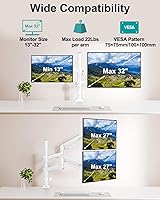
  • Monitor Size Range: Each arm supports screens from 13″ to 32″ in size.
  • Weight Capacity: Each arm holds monitors weighing between 4.4 lbs and 22 lbs.
  • VESA Compatibility: Compatible with standard VESA hole patterns of 75×75mm and 100×100mm.
  • Max Screen Height: Screens can be raised up to 26.6″ above the desktop surface, measured from the VESA center point.
  • Pole Extension: An additional 16.5″ column is included, raising the overall height beyond what standard dual arms provide.
  • Swivel Range: Each arm swivels ±90° horizontally, allowing screens to face left, right, or straight ahead.
  • Tilt Range: Screens tilt up to 70° forward and 45° backward to achieve a comfortable viewing angle.
  • Rotation: Full 360° rotation per arm supports both landscape and portrait screen orientations.
  • Arm Mechanism: Dual gas spring arms dynamically counterbalance monitor weight, enabling smooth, tool-free height and position adjustments.
  • Durability Rating: The gas spring mechanism is rated for 20,000 motion cycles under standard operating conditions.
  • Clamp Mount Range: The C-clamp mounting option accommodates desk edges between 0.39″ and 2.76″ thick.
  • Grommet Mount Range: The grommet mounting option is compatible with desk thicknesses between 0.39″ and 1.97″.
  • Curved Screen Support: Not compatible with curved displays rated at 1000R, 1500R, or 1800R curvature.
  • Cable Management: A built-in cable routing channel runs along each arm to keep monitor cables organized and off the desk surface.
  • Material: The arm assembly is constructed from metal throughout for structural rigidity during adjustments.
  • Color: Available in white, offering a cleaner aesthetic alternative to the standard black finish common in this category.
  • Product Weight: The complete mount unit weighs 9.44 lbs as shipped.
  • Mounting Types: Supports both C-clamp and grommet installation methods, with clearly labeled hardware included for each option.

Related Reviews
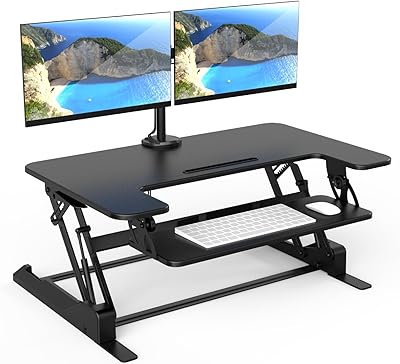
Mount-It! MI-7934 36″ Dual Monitor Desk Converter
77%
88%
Ease of Assembly
83%
Monitor Arm Stability
79%
Gas Spring Height Adjustment
91%
Work Surface Size
71%
Keyboard Tray Usability
More
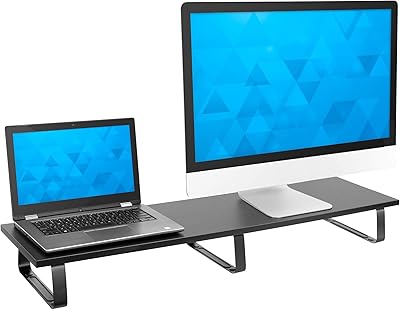
Mount-It! 39″ Dual Monitor Stand Riser
81%
81%
Build Quality
91%
Surface Width & Capacity
73%
Ergonomic Lift
77%
Under-Shelf Storage
84%
Stability & Anti-Slip Performance
More
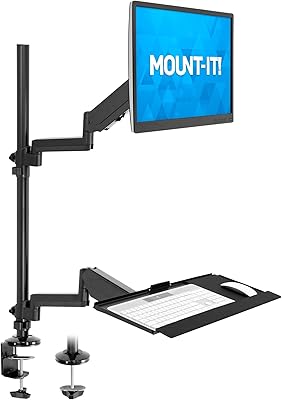
Mount-It! MI-7995 32″ Sit-Stand Monitor Mount
70%
81%
Ease of Installation
67%
Build Quality
72%
Pneumatic Spring Performance
58%
Stability & Wobble
78%
Keyboard Tray Usability
More
Zimilar Z208L-4 Dual Monitor Stand Riser
80%
91%
Value for Money
78%
Build Quality
88%
Aesthetic Design
74%
Adjustability
82%
Stability
More
ErgoFocus Dual Monitor Stand Riser
83%
91%
Build Quality
63%
Ease of Assembly
88%
Stability
85%
Ergonomics/Comfort
93%
Storage Space
More
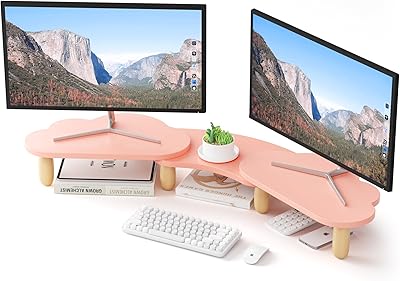
AFOOYO Rainbow Cloud Dual Monitor Stand
72%
93%
Aesthetic Design
81%
Build Quality
67%
Assembly Experience
72%
Ergonomic Benefit
76%
Value for Money
More
gianotter D1-2B Dual Monitor Stand Riser
78%
88%
Build Quality
81%
Stability & Wobble Resistance
74%
Storage Functionality
94%
Ease of Setup
67%
Pen Holder Performance
More
HUANUO Dual Monitor Stand Riser with Drawer
79%
83%
Build Quality
88%
Platform Stability
86%
Storage Utility
76%
Ergonomic Benefit
91%
Value for Money
More
WESTREE CS3006 Dual Monitor Stand Riser
77%
83%
Build Quality & Sturdiness
78%
Adjustability & Flexibility
81%
Storage Drawer Functionality
86%
Desk Surface Organization
74%
Monitor Compatibility
More
HUANUO HNWDS1 Dual Monitor Wall Mount
78%
73%
Build Quality
68%
Arm Stability
81%
Installation Experience
84%
Articulation & Range of Motion
77%
Cable Management
More

FAQ

It depends on the curvature rating of your monitor. The MOUNT PRO Freelift Dual Monitor Stand does not support curved panels rated at 1000R, 1500R, or 1800R. If your curved monitor falls into one of those categories, this mount is not compatible. Flat and mildly curved screens within the 13″ to 32″ size range and VESA mounting pattern are fine.

Flip your monitor around and look at the back — you should see a square or rectangular cluster of four screw holes. Measure the distance between them. If they are spaced 75mm apart or 100mm apart (in a square pattern), you are good to go. If there are no holes at all, or the spacing is different, the mount won't work without an adapter.

It should get you considerably closer to a comfortable eye-level position than a standard dual arm would. The extended pole pushes the VESA center up to 26.6″ above the desk, which is notably higher than most competitors in this price range. Whether that is enough for your specific setup depends on your chair height and desk height, but tall users are exactly who this mount is designed for.

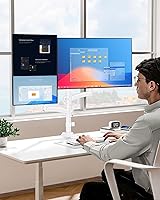
Yes, and that is actually one of the stronger use cases for this arm. The taller pole gives you the vertical clearance to position one display above the other without them overlapping or sitting uncomfortably close. It works well for developers or content creators who want a coding editor on the bottom and a reference or preview screen on top.

Most buyers find it straightforward. The parts are labeled, which takes a lot of the guesswork out of knowing which bolt goes where. Expect the full setup to take roughly 30 to 45 minutes if you are doing it solo. Having a second person hold the pole steady while you attach the base makes things easier, but it is manageable alone.

Each arm supports up to 22 lbs, so 18 to 20 lbs falls within the rated range. That said, some users report that calibrating the gas spring tension becomes more finicky near the upper weight limit — you may need to spend a few extra minutes adjusting the tension screw to get the arm to hold position without slowly drifting down. It is workable, but requires a bit more patience than lighter monitors.

The C-clamp can handle desk edges up to 2.76″ thick, which covers most standard office and gaming desks. If your desk has a rounded or beveled edge, the clamp should still seat reasonably well, though it may not grip as evenly as it would on a flat, square edge. When in doubt, the grommet mount option is the more secure choice if your desk has a pre-drilled hole.

It is a built-in channel that runs along the arm, which does keep cables off your desk. It works best with standard monitor cables like DisplayPort or HDMI. Thicker or stiffer cables can be a bit awkward to route neatly, and if you have multiple cables per monitor, it takes some effort to get everything to sit tidy. It is genuinely useful, just not as polished as the cable management on higher-end arms.

The white finish on this dual monitor arm is applied to the metal construction, not a plastic coating. In practice, it holds up reasonably well, but like any light-colored surface, it can show scuffs or marks more readily than a black arm would. If your desk setup sees a lot of daily movement and adjustment, that is worth factoring in.

The gas spring mechanism is rated for 20,000 motion cycles, which is a meaningful benchmark. If you are repositioning your screens two or three times a day, that rating translates to many years of regular use before the mechanism would realistically show wear. Since the product only launched in early 2025, long-term real-world reports are still limited, but the durability spec is comparable to other mid-range gas spring arms with proven track records.