Overview

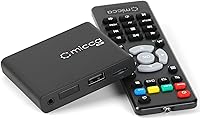
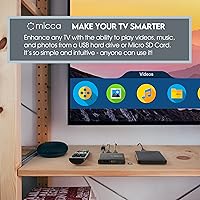
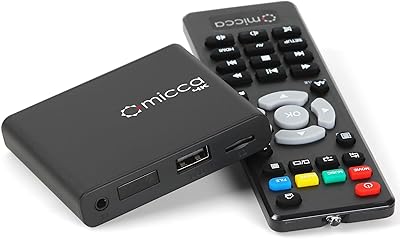
The Micca G3 Digital Media Player is exactly what it sounds like — a small, no-frills box that lets any TV play videos, music, and photos straight from a USB drive or microSD card. No Wi-Fi, no subscriptions, no app store to navigate. Just plug it in, load up your files, and it works. At under three inches square, this little box disappears easily behind a monitor or screen, and it ships with a remote for basic control. Air mouse remotes from third parties work too, which matters if you plan to hide the unit away. Nearly 8,000 Amazon ratings suggest this has found a wide, genuinely satisfied audience.

Features & Benefits

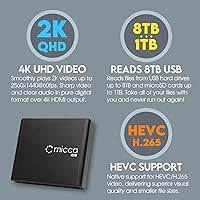
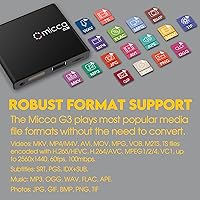
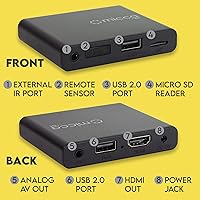
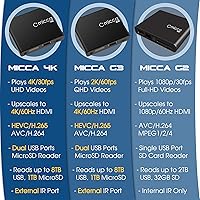
Natively, this media player tops out at 2K resolution — 2560x1440 at 60fps — with 4K upscaling over HDMI for modern displays. That distinction matters: it upscales the output signal to 4K but does not decode true 4K source files, so adjust expectations accordingly. Codec support is broad, covering H.265/HEVC, H.264, MPEG variants, and VC1 across MKV, MP4, AVI, MOV, and more. Dual USB ports handle drives up to 8TB, and the microSD slot accepts cards up to 1TB. An analog AV output lets older TVs and stereo receivers connect without adapters. Video rotation in 90-degree increments rounds out a capable spec sheet for something this compact.

Best For

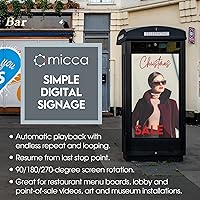
This little box earns its keep most visibly in commercial signage situations. Think of a cafe looping a daily menu on a wall-mounted screen, a hotel lobby running a welcome video on repeat, or an art gallery displaying rotating still images — the Micca G3 handles all of it reliably and automatically, without anyone needing to touch a remote. Home users with libraries of personal videos or family photos will find it equally useful, especially if their TV lacks a USB port or smart features. It also breathes new life into older analog TVs via composite AV. For non-technical users, the setup is genuinely straightforward — plug in a drive, and playback begins.

User Feedback

With a 4.2-star average across nearly 8,000 reviews, this media player has earned its reputation through consistent real-world performance. Buyers highlight ease of setup and the reliability of long-term looping — people running signage setups report it running for months without interruption. Honest criticism surfaces too, though. Some users find that very high-bitrate files can cause occasional stuttering, and a handful note the included remote feels limited in range for larger rooms. It is also worth stating plainly: there is no Wi-Fi, no internal storage, and no app ecosystem here — this is purely a local file player. Know that going in, and there is very little to complain about.

Pros

  • Setup takes minutes — plug in a drive and playback starts automatically, no configuration required.
  • Auto-loop and resume features make unattended signage operation genuinely hands-off.
  • Broad codec support covers nearly every common video format without conversion headaches.
  • The composite AV output is a rare and welcome addition for older TVs and stereo systems.
  • At well under three inches square, this media player hides easily behind almost any screen.
  • Compatible with third-party air mouse remotes, which is essential for concealed installations.
  • Supports USB drives up to 8TB and microSD cards up to 1TB — storage headroom is rarely a concern.
  • Video rotation up to 270 degrees makes portrait-mode displays straightforward to configure.
  • Nearly 8,000 ratings averaging 4.2 stars reflects dependable long-term reliability across a wide range of buyers.
  • No subscription, no account, no internet connection ever required — total operational independence.

Cons

  • Natively tops out at 2K resolution; true 4K source decoding is not supported, despite the 4K HDMI output.
  • Very high-bitrate video files can cause stuttering — not every demanding encode will play cleanly.
  • The bundled remote has a limited effective range, which is frustrating in larger rooms or commercial spaces.
  • No Wi-Fi or app support whatsoever — completely useless as a streaming or internet media device.
  • The user interface feels dated and can be awkward to navigate for users expecting a modern menu experience.
  • No internal storage means a USB drive or card must always be physically attached to function.
  • Playlist customization options are basic — users needing fine-grained playback control may find it restrictive.
  • Occasional reports of inconsistent behavior when switching between very different file formats in the same session.

Ratings

The scores below for the Micca G3 Digital Media Player were generated by our AI engine after analyzing thousands of verified global buyer reviews, actively filtering out incentivized, bot-generated, and duplicate feedback to surface genuine user sentiment. Each category reflects the real distribution of praise and frustration we found across home users, small business owners, and digital signage operators. Both the standout strengths and the honest pain points are weighted into every score.

Ease of Setup
93%
Buyers across all technical skill levels consistently describe getting this media player running in under five minutes — plug in power, connect HDMI, insert a drive, and content starts playing automatically. Non-technical users, including elderly buyers and small business owners without IT support, single this out as the device's most important quality.
A small number of users found the initial menu navigation unintuitive when trying to adjust output resolution or rotation settings for the first time. The manual could be clearer on these configuration steps, and a few buyers resorted to online forums for guidance.
Signage & Loop Reliability
91%
For restaurant menu boards, retail displays, and lobby welcome videos, the auto-loop and resume-from-last-position functionality works exactly as advertised over long unattended periods. Multiple business owners report running the Micca G3 continuously for months without a single unexpected shutdown or loop failure.
Some users noted that after a power outage or unexpected interruption, the resume feature occasionally starts from a slightly earlier point than expected rather than the precise last frame. It is a minor issue in most contexts, but for tightly choreographed presentations it can be noticeable.
Video Playback Quality
78%
22%
For standard H.264 and H.265 encoded files at typical bitrates, playback is smooth and the upscaled 4K HDMI output looks clean and sharp on modern displays. Users playing personal video collections or professionally encoded signage content report very satisfying results.
The 2K native ceiling becomes apparent with demanding source files — very high-bitrate encodes above 60 to 80 Mbps can stutter noticeably, and true 4K files simply will not play cleanly. Technically minded buyers who expected genuine 4K decoding based on the marketing language have expressed frustration.
Format Compatibility
88%
The breadth of supported codecs and containers — MKV, MP4, AVI, MOV, VOB, M2TS, and more alongside H.265, H.264, and legacy MPEG formats — means most buyers can plug in a drive and play files without any conversion. FLAC audio and subtitle support in SRT and PGS formats are welcome additions at this price tier.
Edge-case formats and unusual encoding profiles occasionally cause playback failures with no clear error message, leaving users unsure whether the file, the drive, or the player itself is at fault. A small but vocal group of users with niche media libraries found the limits sooner than expected.
Build Quality & Design
74%
26%
The compact plastic shell feels sturdy enough for stationary use, and at 62 grams it is light enough to mount behind a screen with basic adhesive strips or a small bracket. The discreet matte black finish blends into most AV setups without drawing attention.
The unit feels clearly consumer-grade in hand — the plastic casing has some flex and lacks the solidity of commercial signage hardware. Buyers using it in environments where it might be handled frequently, rather than left fixed behind a display, have noted it does not inspire confidence in long-term physical durability.
Remote Control
61%
39%
The included infrared remote covers basic playback functions adequately for straightforward home use, and compatibility with third-party wireless air mouse remotes is a smart design choice that makes concealed installations practical without additional adapters.
The bundled remote has a noticeably limited effective range and requires a clear line of sight, which is a genuine problem once the unit is mounted behind a screen. Several buyers in larger rooms or commercial spaces found themselves needing to purchase an air mouse almost immediately, adding unexpected cost.
Storage Flexibility
86%
Support for USB drives up to 8TB and microSD cards up to 1TB means storage capacity is almost never a practical constraint, even for large video libraries or high-resolution image collections running across multiple screens. FAT32, exFAT, and NTFS compatibility covers virtually every drive a buyer might already own.
Having no internal storage at all means the device is fully dependent on an external drive being present at all times — a loose USB connection or a missing card completely stops playback. In unmanned signage deployments, this is a real operational vulnerability if the drive is accidentally disturbed.
Value for Money
89%
For what this little box is designed to do — reliable offline media playback and unattended looping — the price point is hard to argue with, especially given the strong codec support, dual USB inputs, and analog AV output that most competitors at this tier omit. Small business owners consistently describe it as one of the better low-risk investments they have made for their signage needs.
Buyers who purchased expecting something closer to a full smart media player or 4K streaming box felt the value proposition collapsed quickly when they discovered the limitations around true 4K decoding and the complete absence of any network features. Expectations matter enormously here.
Long-Term Reliability
83%
The absence of moving parts and a fanless design contribute to a strong track record of sustained operation, with numerous buyers reporting trouble-free use across one to two or more years of regular or continuous deployment. The 4.2-star average across nearly 8,000 ratings is a meaningful data point for a product at this price.
A statistically small but consistent segment of reviews reports units failing or developing intermittent playback issues after six to twelve months of continuous 24/7 use. As a consumer-grade device without a commercial-duty rating, this is not entirely surprising, but buyers planning mission-critical signage deployments should factor in a backup unit.
Portrait Mode Support
81%
19%
The configurable 90, 180, and 270-degree output rotation is a genuinely useful feature for vertical menu boards and unconventional display orientations, and it works reliably once set. Retail and hospitality buyers who need portrait-mode screens find this a compelling differentiator over cheaper alternatives.
The rotation setting is applied to the entire output signal rather than per-file, so mixed-orientation content libraries require manual adjustments between sessions. Users hoping for automatic orientation detection or per-file rotation will be disappointed.
Analog AV Output
77%
23%
Having a composite AV output in 2024 is unusual and genuinely appreciated by buyers reviving older CRT televisions or routing audio into a legacy stereo receiver. This feature has earned specific positive mention from users in hospitality and community settings where older displays are still in active use.
The composite output is limited to standard-definition video quality by nature, and some buyers expected clearer documentation clarifying that HDMI and analog AV cannot deliver different content simultaneously. A handful of users also reported needing a separate RCA cable, as one is not always included.
User Interface
58%
42%
For simple playback tasks the on-screen menu is functional and accessible enough that most users never need to dig deeply into settings. Buyers who set it up once for a signage loop and never touch it again rarely have complaints about the interface at all.
The UI looks and behaves like it has not been updated in several years — navigation is clunky, font rendering is basic, and the settings layout is not immediately logical to a first-time user. Buyers coming from modern streaming devices find the experience jarring, and there is no firmware update mechanism that buyers widely report being able to access.
Subtitle Support
72%
28%
SRT, PGS, and IDX+SUB subtitle formats cover the most common needs for users playing foreign-language film libraries or captioned content, and buyers report subtitles loading and displaying correctly for well-formatted files without any manual configuration.
Subtitle rendering has limits — poorly formatted SRT files or complex PGS tracks from high-definition Blu-ray rips can display incorrectly or fail to load entirely. Users with large foreign-language libraries have noted inconsistency that required re-encoding some subtitle tracks to get reliable results.

Suitable for:

The Micca G3 Digital Media Player is purpose-built for anyone who needs reliable, offline media playback without the complexity of a smart TV ecosystem or a streaming subscription. Small business owners are probably the most natural fit — a cafe owner who wants a menu looping on a wall screen, a retailer running a promotional video in a window display, or a hotel lobby playing a welcome reel on repeat will find this little box does exactly what they need, day in and day out, with minimal fuss. Galleries and museums that want to run video installations or photo slideshows without expensive commercial hardware will appreciate how easily it can be hidden behind a screen and controlled with a wireless air mouse. Home users with collections of personal videos, family photos, or offline movie files will also get real mileage from it, especially if their TV lacks a USB port or any smart features. Anyone reviving an older analog TV gets bonus points — the composite AV output means this media player works with screens that most modern devices have completely abandoned.

Not suitable for:

If you are hoping for a streaming device — something to run Netflix, YouTube, or any internet-based app — the Micca G3 Digital Media Player will disappoint you entirely, because it has no Wi-Fi radio and no app support of any kind. It is strictly a local file player, which is a genuine dealbreaker for cord-cutters or anyone whose media lives in the cloud rather than on a physical drive. Users with large libraries of very high-bitrate 4K source files should also temper expectations: the player upscales output to 4K over HDMI but natively tops out at 2K resolution, and demanding files can push it into occasional stuttering territory. The included remote is functional but basic, and buyers in larger rooms or commercial spaces have noted that its range feels limited — something worth solving with a third-party air mouse before deployment. There is also no internal storage, so you are always dependent on an external drive or card being physically present.

Specifications

  • Dimensions: The unit measures 0.59 x 2.95 x 2.52 inches, making it small enough to tuck behind most flat-panel displays.
  • Weight: At 62 grams (2.19 ounces), it is light enough to mount or tape behind a screen without concern.
  • Video Resolution: Native playback supports up to 2560x1440 (2K Quad-HD) at 60fps; HDMI output is upscaled to 4K/60Hz.
  • Video Codecs: Supports H.265/HEVC, H.264/AVC, MPEG-1, MPEG-2, MPEG-4, and VC1 encoded files.
  • Container Formats: Compatible containers include MKV, MP4, M4V, AVI, MOV, MPG, VOB, M2TS, and TS.
  • Audio Formats: Plays MP3, OGG, WAV, FLAC, and APE audio files from USB or microSD storage.
  • Photo Formats: Displays JPG, GIF, BMP, PNG, and TIF image files for slideshows or static display.
  • Subtitle Support: Supports SRT, PGS, and IDX+SUB subtitle formats for compatible video files.
  • USB Storage: Accepts USB flash drives and USB hard drives up to 8TB formatted in FAT, FAT32, exFAT, or NTFS.
  • MicroSD Storage: The built-in microSD slot supports cards up to 1TB capacity.
  • HDMI Output: Full-size HDMI port outputs at up to 4K/60Hz for use with modern TVs, monitors, and projectors.
  • Analog AV Output: Composite video and stereo analog audio output allows connection to older TVs and stereo receivers.
  • Video Rotation: Output can be rotated in 90, 180, or 270-degree increments to support portrait or non-standard display orientations.
  • Auto-Play & Loop: The unit begins playback automatically on power-up and supports endless content looping with resume-from-last-position functionality.
  • Remote Control: An infrared remote is included; the unit is also compatible with third-party wireless air mouse remotes for non-line-of-sight use.
  • Connectivity: Connectivity options are limited to HDMI and analog AV; there is no Wi-Fi, Bluetooth, or Ethernet port.
  • Internal Storage: There is no onboard storage; all media must be supplied via a connected USB drive or microSD card.
  • Brand & Model: Manufactured by Micca under the model designation Speck G3, first made available in May 2022.

Related Reviews
Micca Speck 4K
Micca Speck 4K
87%
94%
Local Playback Reliability
92%
Ease of Setup
88%
Format Compatibility
96%
Digital Signage Functionality
64%
Large Library Navigation
More
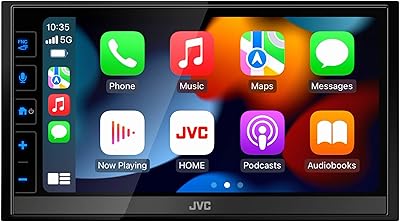
JVC KW-M780BT Digital Media Player
84%
78%
Ease of Setup
88%
Bluetooth Connectivity
91%
Sound Quality
85%
User Interface & Touchscreen
92%
Apple CarPlay & Android Auto Integration
More
NEUMI Atom 4K Lite
NEUMI Atom 4K Lite
87%
94%
Continuous Playback Reliability
88%
Video Quality & Format Support
92%
Trigger Sensor Capability
68%
Initial Storage Setup
96%
Form Factor & Design
More
VK 10.1-inch Car Headrest DVD Player
65%
71%
Value for Money
63%
Screen Quality
78%
Ease of Installation
51%
Build Quality
74%
Media Compatibility
More
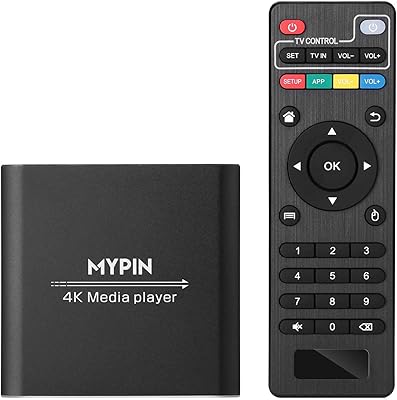
Koramzi CB-107 ATSC Digital TV Converter Box
73%
88%
Ease of Setup
74%
Channel Reception
91%
Value for Money
61%
USB Recording
63%
Remote Control
More
MYPIN HA0284-NCUSF 4K Media Player
77%
91%
Ease of Setup
88%
Format Compatibility
74%
4K Video Quality
83%
H.265 Decoding Performance
86%
Storage Flexibility
More
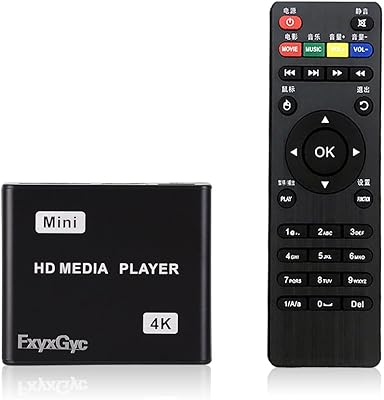
MYPIN Mini 1080p HDMI Media Player
78%
91%
Ease of Setup
83%
Format Compatibility
78%
Build Quality & Portability
76%
Video Playback Quality
58%
Remote Control & Navigation
More
Kenwood DPX304MBT Double DIN Digital Media Receiver
78%
91%
Ease of Installation
86%
Bluetooth Performance
62%
Alexa Voice Control
83%
Display Clarity
74%
Audio Output Quality
More
FxyxGyc 4K01 4K HDMI Media Player
82%
88%
4K Playback Performance
92%
File Format Compatibility
86%
External Storage Support
74%
Interface Navigation
91%
Digital Signage Reliability
More
Zidoo Z9X 8K
Zidoo Z9X 8K
78%
91%
Video Processing Quality
93%
Blu-ray & ISO Playback
88%
Hi-Fi Audio Performance
62%
Android App Ecosystem
84%
NAS & Network Streaming
More

FAQ

No — the Micca G3 Digital Media Player has no Wi-Fi radio and no support for any streaming apps whatsoever. It is strictly a local file player, meaning your media needs to be on a USB drive or microSD card. If you need streaming, you will want a different device entirely.

Not natively. This little box decodes video up to 2K (2560x1440) and upscales the HDMI output signal to 4K/60Hz for compatible displays. If you have true 4K source files, they may not play back smoothly or at all, depending on bitrate and codec. For standard HD and 2K content, the picture quality on a 4K screen still looks sharp.

Setup is about as simple as it gets. Plug the HDMI cable into your TV, connect power, insert a USB drive or microSD card with your media files, and playback starts automatically. Most buyers report having it running within a couple of minutes, with no menus to configure and no account to create.

Yes, and this is honestly one of its strongest points. The player will auto-play and loop content endlessly on its own once powered on. It also resumes from the last stopping point if power is interrupted, which is particularly useful for digital signage setups that run unattended for long hours.

It does. The video output can be rotated in 90, 180, or 270-degree increments through the settings menu, so portrait orientation for vertical displays is fully supported. This is a common use case for restaurant menu boards and retail signage, and it works reliably.

Yes. The unit is small enough to mount or tape behind most flat panels, and while the included infrared remote does require line of sight, you can pair it with a third-party wireless air mouse remote for control without any direct angle. Many signage users do exactly this for a clean, cable-hidden installation.

The player supports FAT, FAT32, exFAT, and NTFS file systems, so most off-the-shelf USB drives will work without reformatting. If you are using a drive larger than 32GB, exFAT or NTFS is the practical choice, and both are fully supported.

Yes — the unit includes a composite AV output with standard RCA-style connections for video and stereo audio. This means it works with older CRT televisions and can also send audio to a separate stereo receiver or amplifier, which is a genuinely useful feature that most modern media players have dropped.

The codec and format support is broad enough to handle the vast majority of common video files without issue. Where buyers have reported trouble is with very high-bitrate encodes — files pushing 80 to 100 Mbps or unusual encoding profiles can cause occasional stuttering. Standard H.264 and H.265 files at typical bitrates play back without problems.

Based on buyer feedback, reliability is one of this media player's most consistent strengths. Multiple reviewers running it in restaurants, offices, and retail locations report months of uninterrupted operation. It does not run hot and has no moving parts, which helps with long-term durability. That said, like any consumer-grade device, it is not rated or certified for commercial continuous-duty use, so keeping a spare on hand for critical installations is sensible.