





Overview
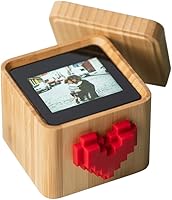
The Lovebox Photo Messenger Smart Display is a connected messaging device that turns the simple act of sending a photo into something that actually resonates. The idea is straightforward: you send a photo, drawing, or message through a smartphone app, and the physical device on your loved one's desk comes to life — its spinning pixel heart alerting them that something new has arrived. They lift the lid to reveal the surprise. It's designed for couples, parents, grandparents, and anyone navigating distance. The brown wooden enclosure feels considered and warm, not plastic-cheap, which matters when you're handing this to someone as a meaningful gift.
Features & Benefits
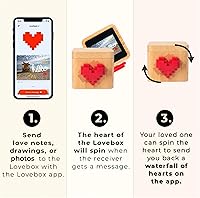
The 7cm color screen displays photos at WQVGA resolution — small, but sharp enough for a face, a snapshot, or a hand-drawn sketch to land with impact. The companion app, available free on both iOS and Android, lets you send unlimited photos and drawings, stickers, and text messages without jumping through hoops. Setup is refreshingly simple: plug it in via micro-USB, connect to Wi-Fi, pair through the app, and you're done in minutes. The recipient can spin the heart on the device to fire back a cascade of virtual hearts to your phone — a small but satisfying two-way interaction. It works anywhere in the world, not just across town.
Best For
This love messenger makes the most sense for long-distance couples who are tired of yet another text or DM, and want something that feels more deliberate. It's also a strong pick for adult children looking for a gift that keeps their elderly parents or grandparents connected without requiring them to navigate a smartphone. Parents with kids at college abroad find real value in it too — something sitting on a desk, spinning to life, carries more emotional weight than a notification badge. That said, both the sender and the recipient need a stable Wi-Fi connection, so it's not a fit for everyone. If that's in place, the daily ritual this creates is truly hard to replicate with an app alone.
User Feedback
With over 1,000 ratings and a 4.4-star average, the Lovebox earns its reputation mostly through emotional impact. Reviewers consistently mention how it changed the dynamic with a distant grandparent or partner — the spinning heart alone generates a surprising amount of delight. On the critical side, some users flag concerns about the app's long-term reliability, and a handful mention that the screen brightness can feel underwhelming in bright room lighting. There are also occasional notes about Wi-Fi dropouts making the device temporarily unresponsive. A smaller number raise questions about whether certain features require a paid subscription down the road. It's not a flawless device, but for buyers who prioritize the experience over specs, most find it worth the investment.
Pros
- The spinning heart alert creates a genuinely delightful moment that a phone notification simply cannot replicate.
- Setup takes minutes — plug in, connect to Wi-Fi, pair the app, and you are done.
- The free companion app supports photos, drawings, stickers, and text messages without an upfront subscription.
- Works across continents, making it one of the few gifts that functions as well for overseas relationships as local ones.
- The warm wooden enclosure looks like a decorative object, not a tech gadget, which helps it fit naturally in a home.
- Grandparents and older recipients consistently love it — no smartphone literacy required on their end.
- The two-way heart response gives the recipient a way to reply without needing to type a single word.
- Over 1,000 buyers have rated it 4.4 stars, suggesting the emotional payoff holds up beyond the initial unboxing.
Cons
- Both sender and recipient need reliable Wi-Fi — one weak connection and the whole experience stalls.
- The 7cm screen is small; photo detail and image quality are limited compared to a standard digital photo frame.
- Some long-term users report concerns about app features shifting behind a paid subscription over time.
- Screen brightness can feel flat or underwhelming in well-lit rooms, reducing the visual impact of photos.
- The device is entirely dependent on the companion app remaining functional — discontinued software would render it useless.
- Occasional Wi-Fi dropout issues have left some users unable to send or receive messages without troubleshooting.
- It serves a single purpose; unlike a tablet or smart display, there is no flexibility to expand what it does.
- The price point requires genuine commitment — this is a considered purchase, not a casual impulse buy.
Ratings
Our AI rating system analyzed thousands of verified global buyer reviews for the Lovebox Photo Messenger Smart Display, actively filtering out incentivized, bot-generated, and outlier submissions to surface what real long-term users actually experience. The scores below reflect both the genuine emotional impact this connected display delivers and the practical friction points that show up after the novelty wears off. Nothing has been softened — strong categories and weak ones are scored with equal transparency.
Emotional Impact
Ease of Setup
App Usability
Display Quality
Build Quality
Wi-Fi Reliability
Value for Money
Gift Presentation
Recipient Experience
Long-Distance Functionality
Grandparent Suitability
Message Variety
Device Longevity
Suitable for:
The Lovebox Photo Messenger Smart Display was built for people who feel the weight of distance and want something more personal than a text message. It's an ideal choice for long-distance couples who want to maintain a small daily ritual of connection — sending a photo from a morning walk or a quick hand-drawn note before bed. Adult children who worry about elderly parents or grandparents feeling isolated will find this especially compelling, since the recipient doesn't need to navigate a smartphone at all; they simply respond to a spinning heart. It also resonates strongly with parents of college students studying abroad, where time zones make real-time calls difficult but a surprise photo arriving on a desk can carry real emotional weight. If you're shopping for an anniversary, Valentine's Day, or a holiday gift for someone who has everything, this connected display offers an experience rather than just an object — which is increasingly hard to find at any price point.
Not suitable for:
The Lovebox Photo Messenger Smart Display is not the right fit for buyers who expect plug-and-forget reliability without any ongoing dependencies. Both the sender and recipient must have stable, consistent Wi-Fi — if either side has unreliable internet, the core experience breaks down entirely. It's also a poor match for anyone who needs high-resolution photo display; the 7cm screen is charming in context but won't satisfy someone expecting a proper digital photo frame experience. Budget-conscious shoppers may find the price hard to justify for what is, functionally, a single-purpose messaging device. People who are skeptical of app-dependent hardware should also proceed with caution — if the companion app is ever discontinued or paywalled more aggressively, the device's core functionality would be at risk. And if the recipient is someone who dislikes having another plugged-in gadget on their desk, the novelty may wear off faster than expected.
Specifications
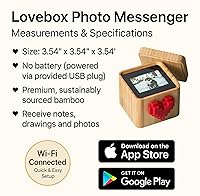
- Screen Size: The device features a 7cm (approximately 2.75″) color display screen on the interior panel.
- Resolution: The screen operates at WQVGA resolution, suitable for displaying photos, drawings, and text messages.
- Color Display: The display is a full color screen, allowing photos and images to be shown with color accuracy.
- Dimensions: The unit measures 1.39 x 1.24 x 0.99 inches, making it compact enough to fit on a nightstand or desk without taking up noticeable space.
- Weight: The device weighs 1.25 pounds, giving it a solid, non-flimsy feel despite its small footprint.
- Connectivity: The Lovebox connects to the internet exclusively via Wi-Fi, managed through the companion smartphone app.
- Power Input: The device is powered via a 5V 1A micro-USB cable, which is included in the box along with a US power plug.
- App Compatibility: The companion app is available for free on both iOS (App Store) and Android (Google Play) devices.
- Message Types: Users can send photos, hand-drawn sketches, stickers, and text messages through the app to the device.
- Alert Mechanism: A spinning pixel heart on the lid of the device alerts the recipient when a new message has arrived.
- Recipient Reply: The recipient can spin the physical heart on the device to send a virtual cascade of hearts back to the sender's smartphone.
- Enclosure Finish: The unit comes in a brown wooden-finish enclosure designed to blend into home decor rather than look like consumer electronics.
- App Access: Access to the Lovebox app is free with the device, with no mandatory upfront subscription required at time of launch.
- Global Use: The device supports worldwide connectivity, functioning across different countries and time zones as long as Wi-Fi is available.
- In the Box: Each purchase includes the Lovebox unit, a micro-USB power cable, a US power plug adapter, and access to the free companion app.
- Brand: The device is manufactured and sold by Lovebox, a brand focused on connected gifting and relationship technology.
- Model Number: The official model number for this unit is COMOYA, as listed in Amazon product records.
- Market Rank: As of available data, the device holds a Best Sellers Rank of #138 in the Digital Picture Frames category on Amazon.
- Launch Date: The product was first made available for purchase in March 2021.
- Manufacturer: The device is produced by Lovebox, which is responsible for both the hardware and the ongoing companion app development.
Related Reviews
EASTSHINE S2 LCD Display Smart Charger
Pyle PHUD19 2.6″ Car HUD Display
Pixedge Frameo 10.1-inch Digital Photo Frame
EURANS No-App Fitness Smartwatch
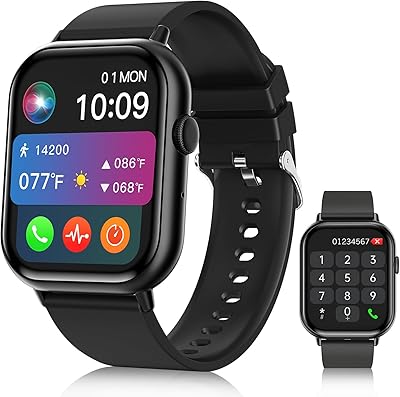
Williben 2.01″ HD Fitness Smartwatch

Canvia 24-Inch Smart Digital Art Frame
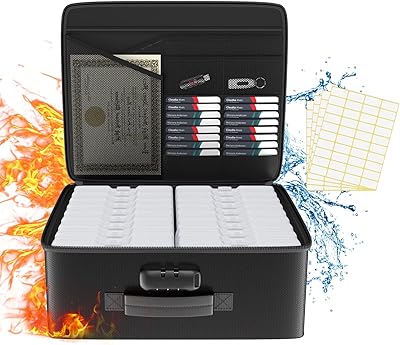
Tamfile 18-Compartment Fireproof Photo Storage Box
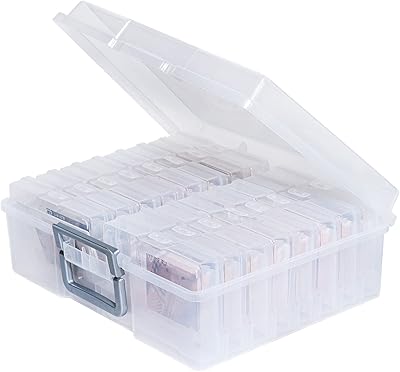
novelinks 16-Case 4×6 Photo Storage Box

ASUS ProArt Display PA169CDV 15.6” 4K Pen Display