Overview

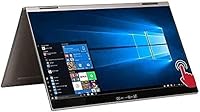
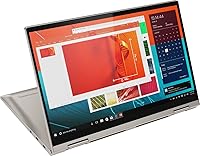
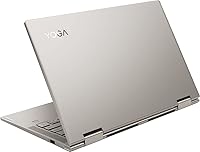
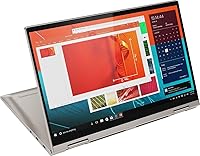
The Lenovo Yoga C740 14-inch 2-in-1 Laptop sits comfortably in the mid-range convertible space, aimed squarely at students and light professionals who want flexibility without paying a premium price. The 360-degree hinge is the defining feature here — it lets you flip between laptop, tent, stand, and tablet modes depending on what the moment calls for. Build quality feels solid for the price tier; the mica finish gives it a professional, understated look that doesn't scream budget. Don't expect a workstation replacement. The C740 is built for everyday reliability, not heavy creative workloads, and it delivers on that promise without overreaching.
Features & Benefits

The Intel Core i5-10210U handles the tasks most people actually use a laptop for — web browsing, video calls, Office apps, and light photo editing — without breaking a sweat. The 14-inch FHD touchscreen is genuinely pleasant; colors are reasonably accurate and touch response feels snappy rather than sluggish. Eight gigabytes of RAM keeps multitasking manageable, though power users juggling many tabs simultaneously may feel the ceiling. Storage is the real compromise — 256GB fills quickly, so a cloud subscription or external drive is almost mandatory. The backlit keyboard types comfortably, and the fingerprint reader logs you in fast without any fuss.

Best For

This 2-in-1 is a natural fit for college students who want one device that handles notes in class, presentations back at the dorm, and casual media consumption in between. Remote workers spending their days in Google Docs, Zoom, or a browser will find it more than capable. At just over three pounds, portability is a genuine strength — it disappears into a backpack without drama. If you need a machine for video editing, gaming, or demanding software, look elsewhere. But for anyone who wants a versatile light convertible that handles daily workloads without costing a fortune, the C740 makes a convincing case.

User Feedback

Owners consistently praise the hinge durability and display clarity, many noting the screen holds up well after months of heavy use across multiple orientations. The build quality earns genuine respect at this price point. On the flip side, the onboard storage is a recurring frustration — buyers who didn't plan ahead for cloud or external storage often regret it. Those running GPU-dependent tasks quickly hit the ceiling of integrated graphics. Fan behavior is a mixed bag too; this Lenovo convertible stays quiet under light loads but gets noticeably loud when pushed. Overall, most long-term owners feel the value holds steady, provided expectations center on productivity rather than raw performance.

Pros

  • The 360-degree hinge genuinely earns its keep, making mode-switching between laptop and tablet feel natural rather than gimmicky.
  • Build quality feels noticeably premium for the price bracket — solid, creak-free, and confidence-inspiring to carry daily.
  • The FHD touchscreen delivers sharp, clear visuals with responsive touch that works reliably across all four usage modes.
  • At just over three pounds, the C740 is light enough to carry all day without it becoming a burden.
  • The fingerprint reader is fast and accurate, making login a quick tap rather than a typed password every time.
  • SSD storage means boot times and app launches are snappy — no waiting around for the machine to wake up.
  • The backlit keyboard is comfortable for extended typing sessions and easy to use in low-light environments.
  • Wi-Fi performance is solid for everyday connectivity, handling video calls and cloud syncing without dropping out.
  • The port selection covers most real-world needs, including two USB-C ports for modern peripherals and charging flexibility.

Cons

  • 256GB of onboard storage fills up faster than most buyers anticipate — external storage or cloud backup is almost a necessity.
  • Integrated graphics rule out any serious GPU workload, from video editing to casual gaming.
  • Manufacturer battery life claims are optimistic; real-world mixed use will land considerably shorter than the advertised figure.
  • Fan noise becomes noticeable when the processor is pushed, which can be distracting in quiet environments like libraries.
  • Eight gigabytes of RAM is adequate for light use but starts to show limits when running multiple demanding apps simultaneously.
  • No dedicated optical drive and a limited port count mean dongles or adapters may be needed for older peripherals.
  • The integrated UHD graphics share system memory, which slightly reduces the effective RAM available for other tasks.
  • Thermal management under sustained load can cause the chassis to warm up more than expected for a slim convertible.

Ratings

The scores below for the Lenovo Yoga C740 14-inch 2-in-1 Laptop were produced by our AI rating engine after parsing thousands of verified global purchases, actively filtering out incentivized reviews, duplicate submissions, and bot-generated feedback. Each category reflects real patterns in what buyers consistently praised or flagged across long-term ownership, not just first-impression reactions. Both the highlights and the genuine pain points are scored transparently so you can make a fully informed decision.
Build Quality
84%
Owners repeatedly describe the chassis as feeling more substantial than the price tag suggests — there is minimal flex in the lid and the overall construction inspires daily confidence. The mica finish resists casual scuffs and looks professional in office and classroom settings alike.
Some users note the plastic bottom panel feels slightly less premium than the metal lid, which creates a minor inconsistency in overall build impression. A handful of long-term owners have reported minor hinge creaking after 18 or more months of heavy use.
Display Quality
81%
19%
The FHD IPS panel earns consistent praise for sharpness and color accuracy at this price tier, with text appearing crisp during long reading or writing sessions. Buyers who use it for spreadsheets, presentations, and streaming find it more than adequate for daily visual demands.
Brightness tops out at a level that can struggle in direct sunlight or very bright outdoor environments, which matters for students who work outside. Color coverage is solid but falls short of what photographers or designers would need for color-accurate creative work.
Everyday Performance
76%
24%
For the core productivity workload — browser tabs, Office apps, video calls, and cloud-based tools — the C740 handles the daily grind without slowdowns or frustrating hesitation. Boot times are fast thanks to SSD storage, and app switching feels responsive in typical use scenarios.
Users who push the machine with multiple demanding apps simultaneously start to notice the processor throttling under sustained load, leading to occasional sluggishness. Anything CPU-intensive held for more than a few minutes — like long video exports or large file conversions — reveals the chip's ceiling quickly.
Portability
89%
At just over three pounds with a slim profile, this 2-in-1 consistently earns praise from students and commuters who carry it everywhere. It fits neatly into standard backpacks and laptop sleeves without bulk, making it genuinely easy to move between classes, coffee shops, and meetings.
The power adapter adds meaningful weight and bulk to the daily carry, which is worth factoring into the overall portability picture. A small number of users with larger hands find the compact dimensions slightly cramped during extended laptop-mode sessions.
Value for Money
78%
22%
Most buyers feel the C740 delivers above what they expected at its price tier, particularly when it comes to build quality, display performance, and the versatility of the convertible design. Long-term owners generally report that the machine holds up and continues to meet their productivity needs well past the first year.
The storage limitation drags down perceived value for buyers who discover too late that 256GB is not enough for their actual workflow. A few users feel the lack of RAM upgradeability means the laptop ages less gracefully than competitors offering more expansion options.
Battery Life
66%
34%
Under light workloads like note-taking, reading, or casual browsing with the screen at moderate brightness, the C740 can comfortably last through a full school or work day on a single charge. Many students report being able to leave the charger at home for shorter days without anxiety.
Real-world mixed use — with screen brightness up, active Wi-Fi, and multiple applications running — typically lands well below the manufacturer-claimed 16.5 hours. Users who run video calls or stream content heavily report needing a charger by mid-afternoon, which brings expectations back to earth.
Hinge & Versatility
87%
The 360-degree hinge is one of the most consistently praised aspects of the C740, with users highlighting how natural the transition between laptop, tent, and tablet modes feels in practice. The hinge holds its angle firmly without wobbling, which makes tent and stand modes genuinely useful rather than just a marketing feature.
In full tablet mode the device is slightly heavier than dedicated tablets, which makes extended one-handed use tiring after a while. A small percentage of owners with older units report the hinge gradually losing some of its firm resistance over two or more years of frequent mode switching.
Keyboard & Trackpad
79%
21%
The backlit keyboard receives solid marks for key travel and layout — writers and students who spend hours typing report it stays comfortable without causing hand fatigue. Backlighting is a practical bonus for evening work sessions or dim lecture halls.
The trackpad is functional but draws occasional criticism for inconsistent palm rejection, which can cause accidental cursor jumps during fast typing. A few users note the trackpad click feedback feels slightly mushy compared to higher-end Lenovo models in the ThinkPad line.
Storage Adequacy
51%
49%
The SSD itself is fast and noticeably better than traditional hard drives for boot times and application loading, which keeps the experience feeling snappy even as the drive fills. Buyers who commit to cloud-first workflows from day one tend to avoid the worst of the storage frustration.
256GB is the single most common complaint across user feedback — it fills up faster than most buyers anticipate, especially after Windows updates, installed apps, and personal files accumulate. The inability to easily upgrade the internal drive makes this a lasting limitation rather than a fixable inconvenience.
Thermal Management
63%
37%
Under typical light-to-moderate workloads, the C740 stays cool and quiet enough that thermal management is a non-issue for most productivity users. Students working in libraries or shared spaces rarely encounter fan noise during standard use.
When the processor is pushed — during longer video calls with screen sharing, software installs, or sustained downloads — the fan ramps up noticeably and the bottom of the chassis becomes warm to the touch. Some users find the fan cycling behavior slightly unpredictable, kicking in at unexpected moments.
Touch Experience
77%
23%
Touch response is quick and accurate enough that navigating Windows, scrolling through documents, and tapping UI elements feels natural rather than frustrating. Users who annotate PDFs or use touch for light sketching appreciate how well the screen registers input without visible lag.
The glossy touch layer adds reflectivity that can make the screen harder to read in bright environments. Without a bundled stylus, precision tasks like detailed annotation require a separately purchased pen, which is an added cost the product does not acknowledge upfront.
Port Selection
68%
32%
Having two USB-C ports alongside a USB-A port covers the basics for most users, and the USB-C ports double for both charging and data transfer, which adds flexibility. Remote workers who primarily use wireless peripherals and a single monitor tend to find the port layout sufficient.
Anyone with a traditional desk setup — wired mouse, USB-A keyboard, external storage, and a monitor — will immediately notice the lack of a dedicated HDMI port and the limited number of USB-A slots. A hub or dock becomes a near-essential purchase for desk-bound use, adding to the total cost.
Security Features
83%
The fingerprint reader works reliably and integrates well with Windows Hello, making logins fast and effortless — users who unlock their laptop dozens of times a day particularly appreciate not typing a password every time. Recognition speed is quick and accuracy holds up well across different conditions.
There is no IR camera for facial recognition, which limits biometric options to fingerprint only — a minor gap compared to some competing convertibles at similar price points. A small number of users report the fingerprint sensor occasionally requires a re-registration after major Windows updates.
RAM & Multitasking
71%
29%
Eight gigabytes of memory handles the everyday productivity stack — a couple dozen browser tabs, an active video call, and a document or two — without visible slowdown for most users. Students who keep their workflow focused find it more than adequate for academic demands.
Power users who run memory-heavy applications, large spreadsheets, or local development environments will start to feel the constraint within the first few months. Because the RAM is soldered and non-upgradeable, there is no path to expanding headroom if your needs grow over time.
Wireless Connectivity
74%
26%
Wi-Fi performance is stable and dependable for day-to-day tasks, holding a strong connection during video calls and cloud syncing without notable dropouts in typical home and office environments. Most users report no meaningful connectivity issues across months of regular use.
The 802.11ac standard, while capable, is a step behind newer Wi-Fi 6 devices in speed and congestion handling — on busy networks with many competing devices, some users notice occasional bandwidth throttling. Bluetooth connectivity works but has drawn sporadic complaints about pairing stability with certain audio peripherals.

Suitable for:

The Lenovo Yoga C740 14-inch 2-in-1 Laptop is a strong pick for college students who want one machine that adapts to different situations — taking notes in laptop mode, watching lectures in tent mode, or sketching ideas with touch input in tablet mode. It handles the everyday academic and productivity workload comfortably: word processing, spreadsheets, video conferencing, and browser-heavy research sessions all run without friction. Remote workers whose daily routine revolves around communication tools, cloud apps, and document editing will find the C740 punches well above its price tier in terms of feel and usability. The lightweight build makes it easy to carry between classes, coffee shops, or co-working spaces without back strain. If your computing needs are primarily productivity-driven and you value form-factor flexibility over raw horsepower, this convertible is genuinely worth serious consideration.
Not suitable for:

Buyers expecting the Lenovo Yoga C740 14-inch 2-in-1 Laptop to handle creative production work will run into its ceiling fairly quickly. Video editors, 3D designers, and serious photographers will find the integrated graphics a hard constraint — there is no dedicated GPU here, so software like Premiere Pro or Lightroom will feel sluggish under any meaningful workload. Gamers should look elsewhere entirely; even moderately demanding titles will struggle. The 256GB SSD is also a real limitation for anyone with a large media library, software suite, or project archive — you will need to budget for external storage or a cloud plan from day one. Power users who keep dozens of browser tabs open alongside memory-intensive applications may also find eight gigabytes of RAM starts to feel tight over time. In short, if performance headroom matters to you, this 2-in-1 is not the right tool.
Specifications

  • Processor: Powered by the Intel Core i5-10210U quad-core CPU at 1.6GHz base clock, this chip handles productivity workloads comfortably but is not designed for sustained heavy computing.
  • RAM: 8GB of DDR4 memory running at 2666MHz gives adequate headroom for everyday multitasking, though it can feel stretched when running several demanding applications at once.
  • Storage: A 256GB solid-state drive delivers fast boot and application load times, though available capacity will shrink quickly for users with large media libraries or software suites.
  • Display: The 14-inch IPS touchscreen runs at 1920x1080 resolution, offering sharp, accurate visuals with responsive touch input across all four usage orientations.
  • Graphics: Intel UHD integrated graphics handle everyday display output and light media playback but are not capable of supporting GPU-intensive creative software or modern gaming.
  • Operating System: Ships with Windows 10 Home pre-installed, ready for use immediately out of the box without additional configuration required.
  • Form Factor: A 360-degree hinge allows the device to shift between laptop, tent, stand, and tablet modes, adapting to different environments and tasks throughout the day.
  • Weight: At 3.1 pounds, this machine is light enough to carry in a backpack daily without becoming a physical burden over long commutes or travel days.
  • Dimensions: The chassis measures 12.7 x 8.4 x 0.7 inches, keeping the footprint slim and compact for a full 14-inch class device.
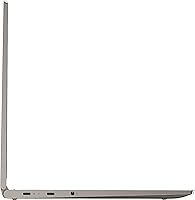
  • Ports: Connectivity includes one USB 3.0 Type-A port, two USB 3.1 Type-C ports, and a single combined headphone and microphone jack.
  • Wireless: 802.11ac Wi-Fi support provides reliable dual-band wireless performance for video conferencing, cloud syncing, and general browsing on modern networks.
  • Battery: A 4-cell lithium-ion battery carries a manufacturer-rated runtime of up to 16.5 hours, though real-world mixed use will yield a noticeably shorter figure.
  • Security: A built-in fingerprint reader integrates with Windows Hello, enabling quick and password-free login with a single touch.
  • Keyboard: The full-size backlit keyboard is comfortable for extended typing sessions and remains usable in dimly lit environments thanks to adjustable key illumination.
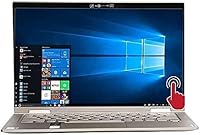
  • Color & Finish: Available in Mica, a muted grey-toned finish that presents a professional appearance and handles everyday fingerprint smudging better than glossy surfaces.

Related Reviews

Lenovo Yoga 7i 16″ 2-in-1 Laptop, Core Ultra 7 155U, 16GB, 1TB
74%
84%
Display Quality
82%
Performance & Speed
79%
Build Quality & Hinge
81%
Keyboard & Trackpad
67%
Battery Life
More
Lenovo IdeaPad Flex 5 14 1TB Laptop
77%
88%
Display Quality
83%
Processor Performance
74%
Battery Life
85%
2-in-1 Versatility
80%
Value for Money
More
Lenovo ThinkPad L13 Yoga 2-in-1 Laptop
77%
91%
Build Quality
88%
Keyboard Comfort
79%
Everyday Performance
61%
RAM Adequacy
58%
Storage Capacity
More
Lenovo Yoga 6 13.3″ 2-in-1 Laptop - Ryzen 5, 8GB RAM, 256GB SSD
85%
85%
Performance
94%
Portability & Weight
92%
Battery Life
88%
Display Quality
90%
Build Quality
More
Lenovo IdeaPad Flex 5i 14″ 2-in-1 Laptop, Intel Core i3, 8GB RAM, 256GB SSD
84%
87%
Battery Life
91%
Portability
80%
Performance
72%
Display Quality
85%
Build Quality
More
Lenovo ThinkPad 11e Yoga 11.6″ 2-in-1 Laptop
71%
78%
Value for Money
83%
Build Quality
54%
Performance
69%
Display Quality
84%
Keyboard & Typing Experience
More
Lenovo Flex 5 15.6-inch 2-in-1 Laptop
69%
84%
Display Quality
76%
Performance
61%
Battery Life
78%
Build Quality
73%
2-in-1 Versatility
More
Dell 14 Plus Laptop DB14250-14-inch 2.5K, Intel Core Ultra 7, 16GB RAM, 1TB SSD
85%
91%
Performance
94%
Display Quality
85%
Battery Life
88%
Build Quality
86%
Keyboard Usability
More
HP OmniBook X Flip 14″ 2K Touch-Screen 2-in-1 Laptop, AMD Ryzen AI 7 3500U, 24GB RAM, 1.5TB Storage
86%
92%
Performance
90%
Display Quality
88%
Multitasking & RAM
94%
Storage Capacity
84%
Portability & Weight
More
2-in-1 Waterproof Tote Backpack 14″
72%
83%
Convertible Design
76%
Laptop Protection
61%
Water Resistance
79%
Interior Organization
52%
Strap Comfort
More
Lenovo 300W Gen 3 2-in-1 Laptop
70%
83%
Build Quality
79%
Battery Life
57%
Performance
44%
Storage
78%
Value for Money
More

FAQ

Very well, honestly. The C740 is built for exactly this kind of use. Browsing, Zoom calls, Google Docs, Office apps — all of it runs smoothly without lag or frustration. Where you will notice limits is if you try to push it into heavier territory, like video editing or running virtual machines.

Unfortunately, the RAM is soldered to the motherboard, so there is no upgrading it after the fact — what you buy is what you get. The SSD can technically be swapped by a technician, but it is not a simple user-serviceable upgrade. If 256GB feels tight from the start, plan to use cloud storage or an external drive rather than banking on an internal upgrade.

It depends heavily on how you work. If you store most of your files in OneDrive, Google Drive, or Dropbox and stream your media, 256GB is workable. But if you download software, keep large project files locally, or store photos and videos on the device, it fills up faster than most people expect. A microSD card or a small external SSD is a smart backup plan.

The Lenovo Yoga C740 14-inch 2-in-1 Laptop is rated up to 16.5 hours by the manufacturer, but treat that as a best-case scenario under minimal load. In typical mixed use — browsing, video calls, typing with the screen at a comfortable brightness — most users report something closer to 7 to 10 hours. Still solid for a full workday, just not the headline number.
The touchscreen supports active stylus input, but Lenovo does not include a pen in the box with this model. You can purchase a compatible Lenovo Active Pen separately if you want to use it for handwriting or sketching. For basic touch navigation and finger-based note-taking, the screen works well without any accessories.

The hinge is one area where the C740 tends to get consistent praise from long-term owners. It feels well-constructed and holds its position firmly in each mode without wobbling or loosening noticeably over time. Users who flip between modes frequently report it still feels tight well into the first year of heavy use.

Not really. The integrated Intel UHD graphics can manage very light titles — think older indie games or browser-based games — but anything with modern 3D graphics will either run poorly or not at all. If gaming is a meaningful part of how you use a laptop, this 2-in-1 is the wrong choice; you need a dedicated GPU for that.

Possibly, depending on your setup. The C740 has two USB-C ports and one USB-A port, which covers the basics, but if you regularly use multiple peripherals — an external monitor, a wired mouse, a keyboard, and USB-A storage simultaneously — a compact hub will make desk life easier. The good news is the USB-C ports support charging and data transfer, so they are versatile.

During light tasks like browsing or document editing, the fan is nearly silent. When the processor gets pushed — say, during a long video export or a heavy download session — it ramps up and becomes audible. It is not unusually loud for this class of laptop, but if you are working in a quiet library or shared office, it may occasionally draw attention.

For most remote workers, yes. If your day is built around video calls, cloud tools, spreadsheets, and browser tabs, this 2-in-1 handles that workload reliably and comfortably. The lightweight chassis makes it easy to move between rooms or take to a co-working space. The main caveat is that anyone running specialized or resource-heavy software — creative production tools, data analysis platforms, or local development environments — may find it underpowered for sustained professional use.