Overview

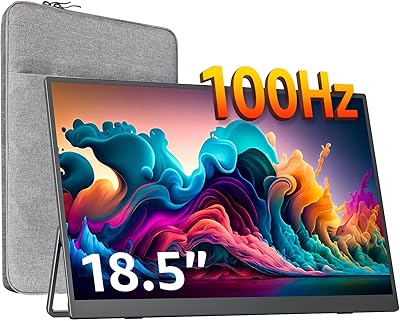
The kksmart K-ZD185FH 18.5-inch Portable Monitor stands out in a crowded field simply by being bigger — at 18.5 inches, it's noticeably larger than most portable displays in this price tier, which typically top out around 15 or 16 inches. kksmart is a relatively new brand in this space, and this model only arrived in March 2025, meaning long-term reliability data is still thin. The core proposition is practical: a large secondary screen with wide device compatibility and a built-in kickstand, aimed squarely at remote workers, travelers, and gamers who want meaningful screen real estate without the bulk of a traditional monitor.
Features & Benefits

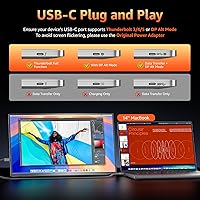
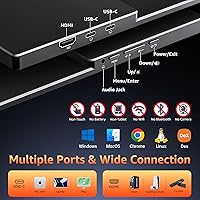
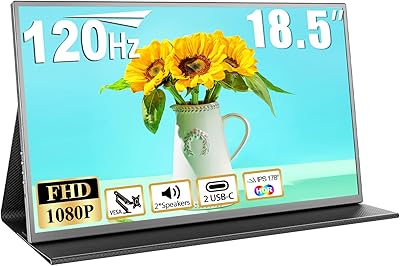
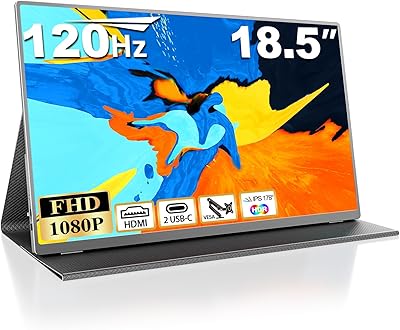
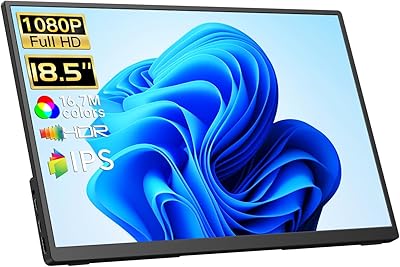
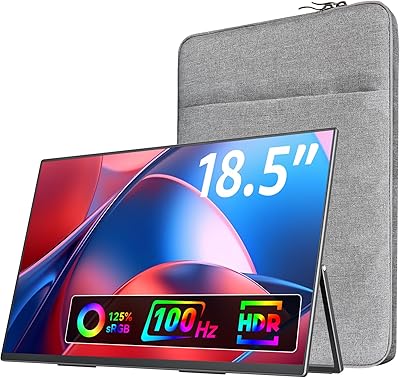
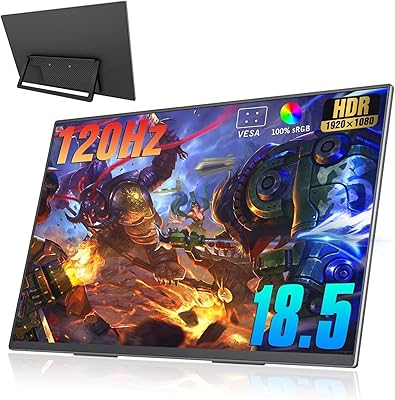
The IPS panel delivers 1920×1080 resolution with a matte anti-glare coating — practical for anyone working near windows or under office lighting. Where this travel display genuinely pulls ahead of similarly priced rivals is the 100Hz refresh rate; most portable monitors in this range are stuck at 60Hz, so the difference in scrolling and motion clarity is real. Color coverage sits at 128% sRGB with 8-bit depth, meaning images look rich without obvious banding. Connectivity covers dual USB-C ports and a full-size HDMI, with single-cable plug-and-play for devices supporting Thunderbolt 3/4/5 or DP Alt Mode. A 75×75mm VESA mount adds desk flexibility that few portables offer.

Best For

This portable monitor makes the most sense for frequent business travelers who find standard 15-inch portables too cramped for real work — spreadsheets, split-screen browsing, and presentation prep all benefit from the extra space. Remote workers setting up in hotels or shared offices will appreciate the kickstand and VESA flexibility. MacBook and Surface owners with USB-C DP Alt Mode support can connect with a single cable and be up and running in minutes. It also suits gamers wanting a 100Hz portable display for console or laptop sessions on the road, and students or freelancers who multitask heavily and need more screen room than a laptop alone provides.

User Feedback

Early buyers of the 18.5-inch screen generally highlight screen size and color vibrancy as the standout positives — the extra inches and rich output tend to impress people upgrading from smaller portables. On the downside, the 280-nit brightness draws criticism in brighter environments; it works fine indoors but feels dim near sunlit windows. There is also a transparency issue worth flagging: the marketing copy lists the weight at 2.24 pounds, while the official spec sheet states 4.84 pounds — a significant discrepancy buyers should clarify before purchasing. USB-C compatibility catches some users off guard if their laptop lacks DP Alt Mode. Given the March 2025 launch, review volume remains limited, so treat current impressions as preliminary.

Pros

  • At 18.5 inches, this portable monitor offers substantially more screen real estate than most rivals in this price range.
  • The 100Hz refresh rate is a genuine differentiator — scrolling and motion feel noticeably smoother than 60Hz portables.
  • 128% sRGB coverage produces vibrant, rich visuals that hold up well for creative work and casual gaming.
  • Dual USB-C ports plus full-size HDMI means you are covered for virtually any device without hunting for adapters.
  • Single-cable plug-and-play setup works effortlessly with compatible MacBooks and Surface devices.
  • The built-in adjustable kickstand removes the need for a separate stand, which is a real convenience when traveling.
  • VESA 75×75mm compatibility gives desk-bound users the option to mount it properly on an arm or stand.
  • The matte anti-glare coating reduces reflections in office and mixed-lighting environments effectively.
  • Built-in speakers add basic audio without needing external devices, useful for video calls on the go.
  • The slim 0.49-inch profile makes it easy to slide into a laptop bag alongside other gear.

Cons

  • At 280 nits, brightness is below average and will feel dim near windows or in brighter indoor spaces.
  • The weight discrepancy between marketing copy and spec sheet is a transparency issue that makes it hard to plan your carry setup confidently.
  • USB-C connectivity requires Thunderbolt 3/4/5 or DP Alt Mode, which older or budget laptops often lack entirely.
  • As a brand new 2025 release, there is very little long-term owner data to judge build quality or durability.
  • Built-in speakers are likely adequate at best — do not expect useful audio quality for music or detailed media.
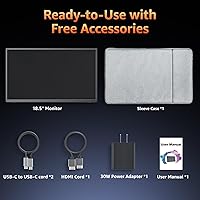
  • No mention of a protective carry case or sleeve included, which is a noticeable omission for a travel-focused device.
  • kksmart is a relatively unknown brand with limited established after-sales support or warranty track record.
  • The 18.5-inch size, while an advantage for screen space, makes it bulkier than compact 15-inch portables for tight bag packing.

Ratings

The scores below for the kksmart K-ZD185FH 18.5-inch Portable Monitor were generated by our AI system after analyzing verified global user reviews, with spam, bot activity, and incentivized feedback actively filtered out. Ratings reflect honest buyer experiences across a range of real-world use cases — from hotel room work setups to on-the-go gaming sessions. Both the standout strengths and the genuine frustrations are represented transparently in every category score.
Screen Size & Impact
91%
The 18.5-inch display is the single most praised aspect of this travel display among early buyers. Compared to the 15-inch portables that dominate this price range, users consistently describe the extra screen space as transformative for side-by-side multitasking, spreadsheet work, and extended reading sessions during travel.
The larger size comes at a cost to true portability — it is noticeably harder to slip into a standard laptop sleeve alongside a 15-inch notebook. A few users noted that bags designed for typical portable monitors feel tight or incompatible with this display's footprint.
Image Quality
88%
The IPS panel with 128% sRGB coverage draws consistent praise for producing rich, punchy colors that hold up well across productivity tasks and casual gaming. Users working with photos and presentations noted that colors looked accurate and lively without obvious oversaturation or washed-out tones.
At 280 nits, brightness limits the panel's performance in brighter environments. Several buyers working near windows during daytime hours found the image noticeably harder to read, and contrast can appear flat when ambient light competes with the screen output.
Refresh Rate Performance
86%
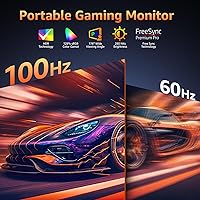
The 100Hz refresh rate is a clear differentiator at this price point, and users upgrading from 60Hz portable monitors noticed the improvement immediately. Scrolling through long documents feels visibly smoother, and gamers using the display with a laptop or console appreciated the reduction in motion blur during fast gameplay.
The 100Hz advantage is largely wasted on users with older devices that top out at 60Hz output, and there is no adaptive sync mentioned in the specs, which may leave some competitive gamers wanting more. A minority of buyers reported needing to manually configure their device to unlock 100Hz rather than it enabling automatically.
Connectivity & Compatibility
79%
21%
Having two USB-C ports and a full-size HDMI port gives this travel display genuine versatility — most buyers found at least one connection option that worked without hunting for adapters. MacBook and Surface users with modern Thunderbolt ports particularly appreciated the clean single-cable setup for both power and video.
The USB-C DisplayPort Alt Mode requirement catches a significant number of buyers off guard, particularly those with budget Windows laptops or older ultrabooks that have USB-C ports but lack video output support. This compatibility caveat is buried in the product listing and causes real frustration for unprepared buyers.
Portability & Form Factor
72%
28%
The slim 0.49-inch profile and frameless design make the 18.5-inch screen surprisingly easy to carry in a padded laptop bag. Business travelers heading through airports found it stacked neatly alongside notebooks and tablet sleeves without adding awkward bulk to carry-on luggage.
The weight situation is genuinely confusing: marketing materials list 2.24 pounds while the official spec sheet shows 4.84 pounds — nearly a 2.5-pound discrepancy that several buyers flagged after receiving the product. Until this is clarified, packing decisions for weight-conscious travelers are harder to make with confidence.
Built-in Kickstand
82%
18%
The integrated kickstand is one of the more practical features on this portable monitor, eliminating the need to carry a separate stand for desk or tabletop use. Hotel room workers and co-working space regulars found it easy to set up a stable viewing angle in under a minute without any accessories.
The kickstand offers limited tilt range compared to a dedicated stand, and on softer surfaces like beds or fabric-covered desks, it can shift slightly during use. It also adds a small amount of rear bulk that reduces the ultra-slim profile the product otherwise achieves.
Build Quality
69%
31%
The slim, frameless chassis feels reasonably solid for its price tier, and early buyers have not widely reported flexing or creaking during transport. The matte coating is applied evenly and shows no obvious quality inconsistencies based on available feedback.
kksmart is a new brand with no established long-term reliability track record, and the product has only been on the market since early 2025. There is simply not enough owner data yet to assess how the panel, hinges, or casing hold up after months of regular travel use.
Brightness & Outdoor Use
51%
49%
For controlled indoor environments — dim offices, hotel rooms, evening use — the 280-nit output is perfectly adequate, and most users working in typical settings did not raise brightness as a concern. The matte coating helps somewhat by reducing glare rather than requiring the screen to overpower it.
Outdoors or near bright windows, 280 nits simply does not cut it. Buyers who frequently work in cafes with natural light or need to use the monitor on a balcony or patio described the screen as difficult to read. This is a notable limitation that the product listing does not address clearly enough.
VESA Mount Flexibility
84%
The inclusion of a 75×75mm VESA mount on a portable monitor is an uncommon and genuinely useful feature. Users who travel but also maintain a home or office desk setup appreciated being able to attach the display to an existing monitor arm without purchasing a separate stand.
VESA mounting requires that the kickstand be folded away, and the mount attachment points are modestly sized, so cheaper or bulkier monitor arms may not align perfectly. It is a bonus feature rather than a primary use case, and heavier arms could strain the monitor's thin housing over time.
Color Accuracy
81%
19%
The 128% sRGB coverage with 8-bit depth is genuinely above average for this class of portable monitor, and users working on presentations, photo editing, and design mockups on the road found colors appeared consistent and satisfying without the washed-out look common on cheaper panels.
No factory calibration data or ICC profile is included, so users with professional color accuracy requirements will need to calibrate the display themselves. Out of the box, some buyers noted a slight cool color temperature bias that required manual adjustment through the on-screen menu.
Setup & Ease of Use
87%
For compatible devices, the plug-and-play experience is exactly as advertised — plug in the USB-C cable and the display is recognized within seconds, no driver installation required. Remote workers setting up temporary desks in unfamiliar spaces found this reliability genuinely stress-reducing.
The on-screen display menu for adjusting brightness, color settings, and input sources has a basic interface that some users found slightly unintuitive to navigate. First-time portable monitor users occasionally needed a few minutes to locate and configure settings they expected to find more quickly.
Gaming Experience
76%
24%
The combination of 100Hz and 128% sRGB makes this 18.5-inch screen a legitimately enjoyable option for casual and mid-level gaming on the road. Console gamers connecting a PS5 or Xbox via HDMI found the display responsive and visually engaging for a portable setup.
Without any mention of adaptive sync technology such as FreeSync or G-Sync compatibility, competitive PC gamers may notice occasional tearing at variable frame rates. The 280-nit brightness also slightly mutes the visual impact of dark game environments, which are harder to see at lower brightness levels.
Audio Performance
44%
56%
The presence of built-in speakers at all is convenient for video calls and quick media playback without needing to reach for headphones. For a brief conference call or watching a short video in a quiet hotel room, they cover basic needs adequately.
The built-in speakers deliver thin, low-volume audio with limited bass and poor loudness at maximum output. Multiple buyers described them as barely functional for anything beyond notification sounds, and most users default to headphones or external speakers for any meaningful audio content.
Value for Money
78%
22%
Compared to other portable monitors in this price range, the combination of 18.5 inches, 100Hz, and VESA compatibility represents a genuinely strong feature-per-dollar proposition. Buyers who prioritized screen size and refresh rate over brand prestige found the value case compelling.
The unresolved weight discrepancy and unknown long-term durability introduce real risk for a mid-range purchase. Buyers paying for a premium travel companion expect transparent, accurate specs, and the confusion around basic details like weight chips away at the overall value proposition.

Suitable for:

The kksmart K-ZD185FH 18.5-inch Portable Monitor is a strong fit for professionals who regularly work from hotels, client sites, or co-working spaces and find smaller portable displays too limiting for real productivity. At 18.5 inches, it gives you meaningfully more room for side-by-side windows, spreadsheets, and reference documents than the 15-inch portables that dominate this category. MacBook and Surface users with Thunderbolt or DP Alt Mode support will appreciate the single-cable setup — no adapters, no fuss. Gamers who want a 100Hz portable display for console or laptop sessions on the road will also get genuine value from the smoother motion compared to standard 60Hz travel monitors. Students and freelancers who multitask heavily and need a second screen but cannot justify a full desktop monitor will find the built-in kickstand and VESA flexibility genuinely useful across different workspaces.
Not suitable for:

Buyers who need a bright display for outdoor use or near sunlit windows should look elsewhere — at 280 nits, this travel display will struggle in anything brighter than a dim indoor setting, and that is not a minor caveat. Anyone with an older laptop that lacks Thunderbolt 3/4/5 or DP Alt Mode on its USB-C port will face compatibility issues and may need an HDMI cable instead, which adds a cable to carry. If you are extremely weight-sensitive — for example, fitting everything into a carry-on backpack — be aware that the marketing copy and the official spec sheet list noticeably different weights, so confirm the actual figure before buying. Color professionals who need factory-calibrated accuracy or wide color gamut beyond sRGB should consider a more specialized panel. Finally, buyers who want a proven, well-reviewed product with years of user feedback should note that this monitor only launched in early 2025, and the long-term reliability picture is still unclear.

Specifications

  • Brand & Model: This monitor is manufactured by kksmart under the model designation K-ZD185FH.
  • Screen Size: The display measures 18.5 inches diagonally, making it notably larger than most portable monitors in its price category.
  • Resolution: The panel outputs at 1920×1080 Full HD, delivering a standard 16:9 aspect ratio suitable for productivity and media.
  • Panel Type: An IPS panel is used, which provides wider viewing angles and more consistent color reproduction compared to TN alternatives.
  • Refresh Rate: The display supports a 100Hz refresh rate, offering smoother motion than the 60Hz standard common among portable monitors.
  • Color Gamut: Color coverage is rated at 128% sRGB with 8-bit depth, supporting 16.7 million colors for vibrant, detailed visuals.
  • Brightness: Peak brightness is rated at 280 nits, which is adequate for typical indoor use but may feel insufficient in bright or sunlit environments.
  • Screen Surface: The panel features a matte anti-glare coating that reduces reflections during use near windows or under overhead lighting.
  • Ports: Connectivity includes two USB-C ports and one standard full-size HDMI port for broad device compatibility.
  • USB-C Requirement: Single-cable USB-C operation requires the source device to support Thunderbolt 3, Thunderbolt 4, Thunderbolt 5, or DisplayPort Alt Mode.
  • VESA Mount: The monitor supports a standard 75×75mm VESA pattern, allowing attachment to compatible monitor arms and wall mounts.
  • Kickstand: A built-in adjustable kickstand is integrated into the rear of the unit, enabling variable tilt angles without a separate stand.
  • Speakers: The monitor includes built-in speakers, providing basic onboard audio without requiring external devices for casual use.
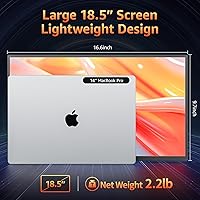
  • Dimensions: Physical dimensions are 16.6 × 9.7 × 0.49 inches at maximum thickness, with a minimum profile of approximately 0.25 inches at the thinnest point.
  • Weight: The official spec sheet lists the weight at 4.84 pounds, though marketing materials reference 2.24 pounds — buyers should verify before purchase.
  • Aspect Ratio: The display uses a standard 16:9 widescreen aspect ratio, consistent with most laptops and external monitors in this category.
  • Availability: The kksmart K-ZD185FH first became available in March 2025, making it a very recent product with limited long-term owner data.
  • Compatibility: The monitor is compatible with MacBook, Microsoft Surface, Windows laptops, desktop PCs, Xbox, PS4, and PS5, among other devices.

Related Reviews
Motyeowe 18.5 Inch Portable Monitor
86%
89%
Display Quality
94%
Portability & Design
88%
Connectivity
84%
Performance (Gaming)
91%
Ease of Setup
More
VisionOwl 18.5-Inch 1080p Portable Monitor
77%
91%
Screen Size & Real Estate
83%
Display Clarity & Sharpness
78%
Color Accuracy & Vibrancy
81%
Refresh Rate & Motion Performance
89%
Connectivity & Setup Ease
More
Qunub 18.5-inch Portable Monitor
85%
89%
Display Quality
94%
Portability
85%
Gaming Performance
90%
Setup & Installation
88%
Build Quality
More
Cocopar 18.5-inch Portable Monitor
84%
90%
Display Quality
95%
Portability & Weight
88%
Gaming Performance
85%
Connectivity
80%
Build Quality
More
CoolHood 18.5-inch Portable Monitor
88%
94%
Portability
88%
Display Quality
91%
Ease of Setup
85%
Gaming Performance
89%
Color Accuracy
More
CUIUIC 18.5″ Portable Monitor
74%
83%
Display Quality
88%
Screen Size & Real Estate
58%
Portability & Weight
61%
USB-C Connectivity
72%
Build Quality & Materials
More
HotYeah 18.5-inch 1080P Portable Monitor
75%
83%
Display Clarity
78%
Color Vibrancy
81%
Refresh Rate & Motion
57%
Brightness & Outdoor Use
67%
USB-C Connectivity
More
Upperizon 18.5-inch Portable Monitor
85%
89%
Display Quality
91%
Portability & Design
85%
Ease of Setup
88%
Color Accuracy
82%
Gaming Performance
More
Ingnok 18.5-inch FHD Portable Monitor
72%
83%
Value for Money
91%
Setup & Ease of Use
78%
Display Quality
61%
Brightness
59%
Build Quality
More
Usparkle GS185CM1 18.5-inch Portable Monitor
82%
88%
Display Quality
90%
Gaming Performance
94%
Portability
85%
Connectivity Options
86%
Color Accuracy
More

FAQ

Yes, as long as your MacBook has a USB-C port that supports Thunderbolt 3, Thunderbolt 4, Thunderbolt 5, or DisplayPort Alt Mode, a single USB-C cable handles both video and power delivery. Most MacBooks from 2016 onward qualify, but it is worth double-checking your specific model before assuming single-cable operation will work.

Absolutely — the monitor includes a full-size HDMI port specifically for that scenario. You will just need a standard HDMI cable, and you may need a separate power source since HDMI does not carry power. Most users in this situation plug in via USB-C for power while using HDMI for video.

Honestly, it depends on the light levels. At 280 nits, this travel display is fine in typical indoor office or hotel room conditions, but if you regularly work near a bright window or in a sunlit space, you may find it feels dim. For outdoor use, it is not well-suited at all.

This is a legitimate concern. The marketing description states 2.24 pounds, while the official product spec sheet lists 4.84 pounds — a significant difference. We recommend contacting the seller directly or checking the most recent buyer reviews for real-world weight reports before purchasing, especially if you are packing light for travel.

Based on the design and early buyer feedback, the kickstand is functional and provides a reasonably stable viewing angle for desk or tabletop use. That said, no built-in kickstand on a portable monitor is as rock-solid as a dedicated stand, so expect some minor flex if you are typing forcefully near it on an unsteady surface.

Yes — the rear of the monitor includes a 75×75mm VESA mounting pattern, which is compatible with most standard monitor arms and wall mounts. This makes it surprisingly flexible for a portable monitor, letting you use it as a semi-permanent desk setup when you are not traveling.

The difference is most noticeable when scrolling through long documents, web pages, or during fast-paced gaming — motion just looks cleaner and less choppy. For static work like writing or spreadsheets, you will barely notice it. If gaming or video smoothness matters to you, 100Hz is a meaningful step up in this product category.

Yes, you can connect a PS5 or Xbox using a standard HDMI cable. Keep in mind that at 1080p and 100Hz, it aligns well with console output settings, though you will want to manually configure your console's resolution and refresh rate to match the display for the best results.

The built-in speakers are really a convenience feature for video calls or quick audio playback — do not expect anything impressive in terms of volume or sound quality. For movies, music, or any serious audio, external speakers or headphones will serve you much better.

That is the honest uncertainty with this product right now. It launched in early 2025, so there simply is not enough long-term owner feedback yet to speak confidently about durability, panel longevity, or how kksmart handles warranty claims. The specs and feature set look competitive on paper, but if buying from a proven brand with an established support track record matters to you, it is worth weighing that gap before committing.