Overview

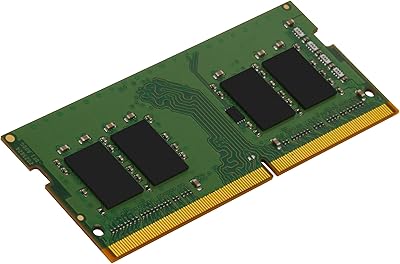
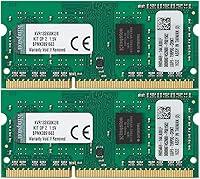
The Kingston ValueRAM 8GB DDR3 1333MHz Laptop RAM is a straightforward, no-fuss memory upgrade from one of the most recognized names in PC memory. One thing worth clarifying upfront: this is a dual-channel kit containing two separate 4GB modules, not a single 8GB stick — a detail that trips up more buyers than you would expect. The DDR3 1333MHz specification puts it squarely in the era of laptops built between roughly 2010 and 2015, using a 204-pin SODIMM form factor at a standard 1.5V. Before ordering, check your laptop manual or use a memory compatibility tool — getting this wrong is the single most avoidable mistake buyers make.
Features & Benefits

Running in dual-channel mode gives this DDR3 upgrade a slight edge over a single-stick configuration — your system's memory controller accesses both modules simultaneously, which helps with multitasking and general responsiveness. The CL9 latency is entirely standard for this speed tier; don't expect low-latency performance, but it's exactly what the spec calls for. It's unbuffered and non-ECC, meaning it belongs in consumer notebooks rather than servers. One spec worth noting is the single-rank SR x8 layout, which some older laptops handle fine but others don't — particularly machines that require dual-rank modules. The lifetime warranty and free Kingston technical support are genuine, long-term value adds.

Best For

This memory kit makes the most sense for anyone trying to squeeze more life out of a laptop that feels sluggish under modern browsers and office software. If your machine shipped with 2GB or 4GB of DDR3 memory, bumping to 8GB makes a real difference for everyday tasks like web browsing, document editing, and light multitasking. IT professionals refreshing a batch of older office notebooks will find it a cost-effective solution. Students on tight budgets with aging hardware are another natural fit. Just be absolutely clear on one point: if your laptop uses DDR4 or DDR5, this kit is entirely incompatible — full stop.

User Feedback

The Kingston ValueRAM kit carries a 3.7-out-of-5 rating across nearly 300 reviews — respectable in volume, but lower than Kingston's usual standing. Dig into the feedback and a clear pattern emerges. Buyers who verified compatibility beforehand largely report smooth installs, immediate BIOS recognition, and a noticeable responsiveness boost. The complaints cluster almost entirely around compatibility problems — wrong laptop model, SR x8 conflicts, or ordering DDR3 when the machine needed DDR4. A smaller number mention dead-on-arrival units, though Kingston's warranty process draws consistent praise for being responsive. The mixed rating reflects buyer mismatch far more than any consistent product defect.

Pros

  • Comes as a genuine dual-channel kit, giving your system two matched 4GB sticks right out of the box.
  • Kingston is a well-established memory brand with a long track record of consistent quality in consumer RAM.
  • Backed by a lifetime warranty, which is rare at this price point and adds meaningful long-term peace of mind.
  • Free technical support from Kingston is available if you run into installation or compatibility questions.
  • Buyers who confirm compatibility beforehand consistently report smooth BIOS recognition and hassle-free installation.
  • Running in dual-channel mode offers a modest but real performance edge over a single-module 8GB configuration.
  • Standard 1.5V voltage means no special power or cooling requirements for the notebooks it targets.
  • The upgrade from 4GB to 8GB makes a noticeable difference for multitasking and keeping multiple browser tabs open.
  • Compact SODIMM form factor drops directly into standard notebook memory slots without any adapter or modification.

Cons

  • The SR x8 single-rank layout causes genuine compatibility failures in some older laptops that require dual-rank modules.
  • DDR3 1333MHz is a legacy specification, and finding compatible laptops still in active daily use is increasingly rare.
  • A handful of buyers have reported receiving dead-on-arrival units, which is frustrating even when the warranty covers it.
  • The 3.7-out-of-5 rating is noticeably lower than Kingston typically earns, signaling that the buying experience has real pitfalls.
  • No XMP or performance profiles are included — what you see is exactly what you get, with zero headroom for tuning.
  • If your laptop already runs DDR3 at 1600MHz, installing this kit can pull your system down to the slower 1333MHz speed.
  • Compatibility verification requires checking your laptop manual or manufacturer website, which many buyers skip and then regret.
  • The dual-module kit design means both slots get occupied, leaving no room to expand memory further down the road.

Ratings

Our AI scoring system analyzed hundreds of verified global buyer reviews for the Kingston ValueRAM 8GB DDR3 1333MHz Laptop RAM, actively filtering out incentivized, duplicate, and bot-generated submissions to surface what real users actually experienced. The scores below reflect an honest synthesis of both the genuine strengths and the documented frustrations of this memory kit, with no attempt to smooth over the rougher edges. Where praise was consistent, scores climb; where pain points were recurring, they are reflected transparently.

Compatibility
58%
42%
Buyers who took the time to cross-reference their laptop model against Kingston's compatibility database consistently reported smooth recognition at boot, with the BIOS detecting both modules immediately without any manual configuration. For supported systems, the install-and-go experience was almost universally positive.
Compatibility is where this kit loses the most ground in buyer feedback. The single-rank SR x8 configuration caused outright failures in certain laptops requiring dual-rank modules, and a meaningful number of buyers ordered without verifying DDR3 SODIMM support only to discover their system used DDR4 — a mismatch no workaround can fix.
Value for Money
74%
26%
For buyers working with a tight budget who need to extend the life of an older DDR3 machine, the price-per-gigabyte ratio is genuinely competitive, especially paired with a lifetime warranty that most budget RAM alternatives simply do not offer. Students and IT technicians refreshing older office fleets repeatedly cited cost-effectiveness as the primary reason for choosing this kit.
The value equation weakens significantly if you end up with a compatibility mismatch, since return shipping and the hassle of sourcing a replacement erodes any initial savings. At its price point, some buyers also feel there are newer alternatives — such as faster 1600MHz DDR3 kits — available for only marginally more.
Installation Ease
81%
19%
Users who confirmed compatibility beforehand described installation as genuinely straightforward — pop open the access panel, seat the two sticks, close it back up, and power on. No driver installation, no BIOS configuration, and no software setup was required in the vast majority of reported cases.
The experience sours quickly for buyers who discover mid-install that their laptop only has one free SODIMM slot, or that the slot configuration does not support dual-channel mode in the way they expected. A small subset also reported needing to reseat modules multiple times before the system recognized both sticks reliably.
Performance Uplift
69%
31%
Laptops that were limping along on 2GB or 4GB of RAM showed meaningful improvements in everyday responsiveness after installing this DDR3 upgrade — faster browser tab switching, smoother multitasking in office applications, and noticeably reduced swap activity. For the target use case, the subjective improvement is real and appreciated.
This is 1333MHz DDR3 running at CL9 latency — legacy hardware by any modern measure — and buyers expecting a dramatic transformation will be let down. The dual-channel benefit over a single 8GB stick is modest at best in real-world laptop workloads, and systems already running at 1600MHz will see a clock speed regression after this kit is installed.
Build & Module Quality
77%
23%
Kingston's manufacturing consistency is generally well-regarded, and most buyers noted that the modules felt solid and well-constructed out of the packaging. The gold-contact edge connectors showed no signs of oxidation or defect in the overwhelming majority of units received.
A recurring thread across negative reviews involves dead-on-arrival modules — units that simply failed to initialize on first use. While the warranty covers replacement, receiving a non-functional kit from a brand of Kingston's reputation is an unwelcome surprise that several buyers found difficult to overlook.
Dual-Channel Functionality
72%
28%
When installed correctly in a laptop with two matching SODIMM slots, the paired modules do operate in dual-channel mode, giving the memory controller simultaneous access to both sticks. Buyers running memory diagnostics confirmed dual-channel activation, and the configuration is as plug-and-play as it gets for a matched kit.
Not every laptop with two slots supports dual-channel with this specific rank and density combination, and some users found their system defaulted to single-channel mode despite both sticks being seated. The kit also occupies both available slots, leaving no path for future memory expansion.
Warranty & Support
83%
Kingston's lifetime warranty is one of the more tangible differentiators for this memory kit versus off-brand alternatives. Buyers who needed to invoke the warranty reported that Kingston's support team was responsive and processed replacements without excessive friction — a meaningful reassurance for a hardware purchase.
Free technical support is helpful in theory, but in practice, Kingston's support scope is limited to helping diagnose memory-related issues rather than providing guidance on whether your specific laptop model will support this kit before you buy. Compatibility vetting still falls entirely on the buyer.
BIOS Recognition
79%
21%
For compatible laptops, BIOS recognition was consistently reported as immediate and accurate — the system correctly identified 8GB of installed RAM at 1333MHz without requiring any manual entry or profile selection. This kind of out-of-the-box functionality is what most buyers reasonably expect and what this kit delivers when the hardware match is right.
Edge cases exist where certain laptop BIOS versions required a firmware update before fully recognizing the new modules, adding an unexpected step for less technically experienced users. A small number of buyers also reported intermittent recognition failures that were resolved only after reseating the modules.
Speed & Latency
61%
39%
The 1333MHz DDR3 speed rating is entirely appropriate for the era of hardware this kit targets, and laptops designed around this specification run the modules at their native rated speed without any compatibility tension. Buyers using these machines for basic productivity tasks reported no perceptible bottleneck attributable to the memory speed.
By any current benchmark standard, 1333MHz CL9 DDR3 is firmly at the bottom of the performance ladder. There is no XMP profile, no overclock headroom, and no performance tuning available — the spec you buy is the spec you get, full stop. Buyers migrating from faster DDR3 1600MHz modules may actually notice a step backward.
Packaging & Delivery
75%
25%
Modules arrived in antistatic packaging appropriate for sensitive electronic components, and the majority of buyers found the kit well-protected against shipping damage. The compact size of the kit means it ships quickly and with minimal risk of transit-related physical damage.
Documentation included in the packaging is minimal — there are no printed compatibility guides or installation instructions, which can leave less experienced buyers feeling unsupported at the most critical moment of the purchase. Some buyers also reported receiving opened or repackaged units, raising concerns about prior handling.
Multitasking Headroom
71%
29%
Jumping from 4GB to 8GB on an older DDR3 laptop opens up meaningful multitasking headroom for everyday computing — keeping a dozen browser tabs open alongside a spreadsheet and a PDF reader no longer causes the system to visibly struggle. For students and light office users, this represents a practical and noticeable quality-of-life improvement.
Eight gigabytes of DDR3 is a ceiling, not a launching pad — modern workflows involving video editing, large dataset handling, or even heavier browser sessions will still push these older systems to their limits. Buyers hoping this upgrade will make their aging laptop competitive with a modern mid-range machine are setting themselves up for disappointment.
Brand Reputation
82%
18%
Kingston Technology has been a mainstay in consumer memory for decades, and that track record carries weight with buyers who remember a time when RAM quality varied wildly between manufacturers. The brand name alone contributed to a baseline level of trust that influenced purchase decisions even among buyers who comparison-shopped on price.
The 3.7-out-of-5 aggregate rating is meaningfully lower than what Kingston typically earns on its other product lines, which has caused some buyers to second-guess whether the ValueRAM tier reflects the same quality standards as Kingston's flagship offerings. Fair or not, the mixed rating chip away at the brand trust advantage.

Suitable for:

The Kingston ValueRAM 8GB DDR3 1333MHz Laptop RAM is a practical choice for anyone trying to breathe new life into an older notebook that is starting to feel sluggish under the weight of modern software. If your laptop was built between roughly 2010 and 2015 and originally shipped with just 2GB or 4GB of DDR3 memory, this kit delivers a meaningful everyday improvement for web browsing, document editing, and light multitasking. Students on a tight budget who rely on an aging machine for coursework will find the value proposition hard to argue with. IT professionals managing fleets of older office notebooks will also appreciate the reliability of a trusted brand at a reasonable price point. As long as you take ten minutes to verify that your specific laptop model supports 1333MHz DDR3 SODIMM modules before ordering, this is a low-risk, high-reward upgrade.

Not suitable for:

The Kingston ValueRAM 8GB DDR3 1333MHz Laptop RAM has no business being in any laptop built in the last several years — if your machine uses DDR4 or DDR5 memory, this kit is simply incompatible, and no amount of forcing will change that. Power users expecting a performance transformation will also be disappointed; this is legacy hardware running at a standard 1333MHz with CL9 latency, and it will not turn an old budget laptop into a speed demon. The single-rank SR x8 configuration creates a real compatibility wrinkle for certain older systems that specifically require dual-rank modules, so checking your laptop's memory specifications goes beyond a casual recommendation — it is essential. Buyers who need ECC memory for data-integrity-sensitive workloads should look elsewhere entirely, as this kit is strictly non-ECC consumer hardware. If your existing RAM is already running at a higher speed like 1600MHz, installing this kit may actually cause your system to downclock to match it.

Specifications

  • Total Capacity: The kit provides 8GB of total memory delivered as two individual 4GB DDR3 SDRAM modules.
  • Memory Type: Modules use DDR3 SDRAM technology, which is incompatible with DDR4 or DDR5 slots found in modern laptops.
  • Speed Rating: Rated at 1333MHz (PC3-10600), placing it in the standard performance tier for DDR3 consumer memory.
  • Form Factor: Uses the 204-pin SODIMM form factor, the standard physical format for notebook and small-form-factor desktop memory.
  • CAS Latency: Operates at CL9 latency timings, which is the conventional rating for 1333MHz DDR3 memory modules.
  • Rank Configuration: Both modules are single-rank SR x8, which may cause compatibility issues in systems that require dual-rank memory.
  • Buffering: Unbuffered and non-ECC, meaning these modules are designed exclusively for consumer laptops rather than server or workstation use.
  • Operating Voltage: Runs at a standard 1.5V, requiring no special power delivery beyond what any DDR3-compatible laptop already provides.
  • Channel Support: Designed to operate in dual-channel mode when both modules are installed in compatible paired memory slots simultaneously.
  • Dimensions: Each module measures 3.75 x 1.8 x 0.3 inches, fitting directly into standard notebook SODIMM slots without modification.
  • Weight: The complete kit weighs 0.544 ounces, making it a negligible addition to any laptop's overall weight.
  • Manufacturer: Produced by Kingston Technology, one of the longest-established and most widely distributed memory manufacturers in the industry.
  • Model Number: The official Kingston part number for this kit is KVR13S9S8K2/8, which can be used to verify compatibility with manufacturer databases.
  • Warranty: Covered by Kingston's lifetime warranty and includes access to free technical support for the life of the product.
  • Release Date: This kit was first made available in March 2013 and has remained in active production without discontinuation.
  • Compatible Devices: Intended for use in laptops and notebooks that explicitly support DDR3 SODIMM memory, typically models manufactured between 2010 and 2015.

Related Reviews
Kingston ValueRAM 8GB 1333MHz DDR3 ECC DIMM
87%
88%
Performance for Servers
92%
Stability and Reliability
94%
Ease of Installation
90%
Compatibility with Workstations
86%
Energy Efficiency
More
Kingston ValueRAM 8GB DDR3 1600MHz ECC RAM
81%
91%
Reliability & Stability
67%
Compatibility
83%
Value for Money
88%
ECC Error Correction Performance
89%
Ease of Installation
More
Kingston ValueRAM 16GB DDR3 Desktop Memory Kit
73%
93%
Ease of Installation
89%
System Stability
82%
Compatibility Range
74%
Value for Money
61%
Memory Speed
More
Kingston 16GB Kit (2 x 8GB) DDR3 1600MHz SODIMM Laptop Memory
88%
88%
Performance Boost
91%
Ease of Installation
85%
Compatibility with Laptops
92%
Energy Efficiency
80%
Build Quality
More
Kingston ValueRAM 8GB DDR4-3200 Desktop RAM
80%
91%
Reliability & Stability
88%
Compatibility
86%
Value for Money
93%
Ease of Installation
78%
Performance for Everyday Use
More
KLEVV DDR4 8GB 3200MHz SODIMM Laptop RAM
87%
88%
Performance
90%
Compatibility
94%
Ease of Installation
92%
Value for Money
85%
Stability during Regular Use
More
Kingston ValueRAM 8GB DDR4 2666MHz Laptop RAM
80%
88%
Value for Money
83%
Compatibility
92%
Ease of Installation
79%
Performance Gains
91%
Reliability
More
A-Tech 8GB DDR4 2666MHz SODIMM Laptop RAM
81%
93%
Value for Money
91%
Installation Ease
78%
Compatibility Range
82%
Performance Impact
84%
Build & Module Quality
More
Crucial 8GB DDR5 4800MHz SODIMM Laptop RAM
89%
91%
Performance Boost
88%
Installation Ease
94%
Compatibility with Intel 12th Gen & AMD Ryzen 7000
85%
Power Efficiency
90%
Multitasking Support
More
SK Hynix HMA41GS6AFR8N 8GB DDR4 Laptop RAM
83%
93%
Reliability & Stability
76%
Compatibility Range
91%
Installation Experience
88%
Value for Money
94%
Brand Trustworthiness
More

FAQ

The most reliable method is to check your laptop's official support page or user manual for the exact memory specification it accepts — specifically whether it uses DDR3 SODIMM at 1333MHz or 1600MHz. You can also use Kingston's own online compatibility tool at kingston.com, where you enter your laptop model and it tells you which modules are confirmed to work. Do not assume that because your laptop uses DDR3, any DDR3 kit will fit — the rank configuration and density requirements vary by model.

It comes as two separate 4GB sticks, not a single 8GB module. The kit is designed to be installed as a pair, ideally in two matching memory slots so your system can take advantage of dual-channel mode. This is one of the most common points of confusion buyers run into, so it is worth double-checking that your laptop has two available SODIMM slots before ordering.

If your laptop currently has 2GB or 4GB of RAM and regularly runs multiple browser tabs, office applications, or anything that causes it to slow down noticeably, then yes — upgrading to 8GB will make a real difference for everyday tasks. That said, set realistic expectations: this is a DDR3 1333MHz kit, which is legacy hardware, so it will not transform an aging machine into a high-performance system. The improvement is most pronounced in multitasking responsiveness, not raw processing speed.

In most cases, yes, but your system will run both modules at the slower 1333MHz speed rather than 1600MHz. Memory always defaults to the rated speed of the installed module. If maximizing memory speed matters to you, it would be worth looking for a 1600MHz DDR3 SODIMM kit instead so you are not leaving any performance on the table.

Single-rank means each module uses memory chips arranged in one accessible layer rather than two. Some older laptops are specifically optimized for dual-rank modules and may fail to recognize or stably run single-rank alternatives. It is an uncommon issue, but it does account for a portion of the negative compatibility reports buyers have left. If your laptop's documentation or manufacturer site specifies dual-rank memory, this particular kit may not be the right fit.

It depends entirely on the specific Mac model and year. Older MacBook and MacBook Pro units from the early-to-mid 2010s that used user-replaceable DDR3 SODIMM memory may be compatible, but Apple's compatibility requirements can be strict. Always cross-reference the exact Mac model against Kingston's compatibility database before purchasing, as Apple machines often have tighter memory tolerances than typical Windows laptops.

Yes, you can install a single 4GB stick if you only have one free slot or prefer that configuration. However, running a single module means your system operates in single-channel mode rather than dual-channel, which gives up the modest performance benefit the paired kit is designed to provide. If your laptop only has one SODIMM slot, a single 8GB module would be a better purchase than this dual-channel kit.

Kingston's lifetime warranty covers manufacturing defects for as long as you own the product. If a module fails under normal use, you can contact Kingston's support team directly to arrange a replacement. The process involves verifying the failure and returning the defective module. Buyers who have gone through the process generally report that Kingston's support is straightforward and responsive, which is one of the genuine strengths of buying from an established brand.

It is worth understanding why the rating sits where it does before writing off the product. The majority of negative reviews trace back to compatibility problems — buyers who ordered without confirming their laptop's memory requirements and then found the modules did not work as expected. There are also a small number of dead-on-arrival reports, which can happen with any hardware. If you verify compatibility carefully beforehand, the experience for most buyers is straightforward and positive.

For the specific use case it serves — extending the life of an older DDR3 laptop — yes, it still makes practical sense. If you have a machine that is otherwise functional but memory-constrained, spending a modest amount on this DDR3 upgrade is far cheaper than replacing the entire laptop. That said, if you are shopping for memory for a laptop purchased in the last five or six years, DDR3 is almost certainly not what you need, and it is worth confirming your system's memory type before spending anything.