Overview

The CozylaHome 10.1-inch Digital Picture Frame launched in April 2024 and has already carved out a respectable #223 ranking in its category — a solid signal for a newcomer. What sets this connected photo frame apart from basic slideshow displays is its focus on two-way communication: family members can send photos, short videos, and even voice messages through the companion app, and gift-givers can preload content remotely before the recipient ever touches the box. That said, it only supports 2.4GHz WiFi, and the AI photo enhancement is capped at 30 uses per month. This frame is built for people who want something more personal than a static display.
Features & Benefits

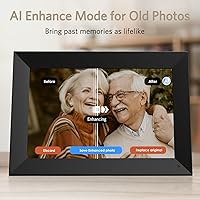
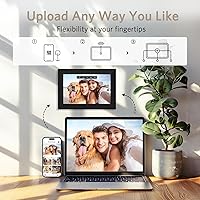
The 10.1-inch touch screen runs at 1280x800 resolution with auto-brightness that adjusts to the room, and it handles both landscape and portrait orientations without fuss. The My Cozyla app — compatible with iOS 13.4 and Android 7.0 and above — lets anyone in the family push photos, short clips, or voice-annotated memories directly to the frame. Videos stored locally cap at 10 minutes, but link it to Google Photos and that limit disappears entirely. The remote gift preloading feature is genuinely clever: a sender fills the frame with personal content before gifting it, so the recipient powers it on to an already-curated collection. Old family photos can be run through the AI enhancement tool to restore faded colors and sharpness.

Best For

This connected photo frame makes the most sense for families spread across different cities or countries who want a richer, more interactive way to stay visually connected than a group chat allows. It works especially well when one family member sets it up remotely for a grandparent or older relative who might struggle with tech — the touchless gift setup removes that friction entirely. People with extensive Google Photos libraries will find the integration practical rather than gimmicky. It also appeals to anyone sitting on a box of old printed photos they have been meaning to digitize and restore. Holiday gifting, especially for Christmas, is clearly a primary use case here.

User Feedback

With a 4.7-star average across 129 ratings, early buyers seem genuinely pleased, though the review pool is still small enough that the picture may shift over time. Most reviewers highlight ease of setup and the emotional impact of receiving voice messages attached to photos as real standouts. A handful of buyers have noted frustration with WiFi connectivity, particularly in homes that have moved to 5GHz-only networks — worth checking before gifting. A few users questioned whether 30 monthly AI enhancements is enough for heavy users. Compared to established names like Aura or Nixplay, the Cozyla frame competes on the communication angle rather than pure hardware refinement, which suits some buyers better than others.

Pros

  • Remote gift preloading lets you fill the frame with personal content before it is ever unwrapped — a genuinely thoughtful touch.
  • Voice messages attached to photos add an emotional layer that static frames simply cannot replicate.
  • Google Photos integration means unlimited cloud storage without manual file management.
  • Auto-brightness adjustment keeps the display comfortable whether the frame sits in a bright living room or a dim bedroom.
  • Supports both landscape and portrait orientations, so it adapts to almost any shelf or desk setup.
  • Setup is simple enough that a family member can configure it remotely for an older or less tech-comfortable recipient.
  • The 10.1-inch touch screen is sharp enough for everyday photo display and easy to navigate without a remote.
  • Compatible with a wide range of sharing sources including Facebook, email, and direct web uploads.
  • Can display videos up to 10 minutes from local storage, which is longer than most competing frames allow.
  • Early buyers report high satisfaction with photo quality and the overall gifting experience.

Cons

  • 2.4GHz-only WiFi is a real limitation in homes that have upgraded to modern 5GHz or mesh network setups.
  • Thirty AI photo enhancement credits per month is a low cap for anyone with a large archive of old images to restore.
  • With just over 100 ratings at launch, long-term reliability and app stability are still unproven.
  • The My Cozyla app adds a dependency — if the service changes or the app has issues, core features could be affected.
  • Screen resolution at 1280x800 lags behind premium competitors like the Aura Carver for users who prioritize display sharpness.
  • No Bluetooth pairing option limits how the frame can receive content without a WiFi connection.
  • Wall mounting is supported but requires additional setup effort; out of the box it is primarily a desk frame.
  • The brand is relatively new and lacks the established support track record of Nixplay or Aura.

Ratings

Our AI rating system analyzed verified buyer reviews for the CozylaHome 10.1-inch Digital Picture Frame from multiple global sources, actively filtering out incentivized, duplicate, and bot-generated feedback to surface what real owners actually experience. The scores below reflect both the genuine strengths that keep buyers happy and the friction points that have caused frustration — nothing is glossed over. Whether you are buying for yourself or as a gift, these ratings are designed to help you make a clear-eyed decision.

Ease of Setup
88%
Early buyers consistently describe the initial setup as refreshingly straightforward, with the remote gift preloading feature earning particular praise. Family members report being able to configure the frame on behalf of a grandparent or older relative entirely through the app, without the recipient needing to touch a single setting.
A recurring issue involves homes that have transitioned to 5GHz-only networks, where connecting the frame requires adjusting router settings first — a step that catches some buyers off guard and can stall the gifting experience.
Photo Display Quality
82%
18%
Most owners are satisfied with how their photos look on the 10.1-inch screen, noting that colors appear warm and true to life for everyday family snapshots. The auto-brightness feature earns genuine appreciation from people who keep the frame in rooms with varying natural light throughout the day.
Buyers who upgrade from basic frames are generally pleased, but those comparing the Cozyla frame directly to the Aura Carver notice the resolution gap at 1280x800 — fine details in landscape or portrait photography are not rendered with the same sharpness you get from higher-end displays.
App Experience
74%
26%
The My Cozyla app handles the core sharing workflow well enough for most families, and the ability to push voice-annotated photos from a smartphone directly to the frame is something early users describe as genuinely touching, especially for long-distance relationships.
A portion of reviewers mention occasional sync delays and inconsistent push notifications, which can undermine the real-time sharing appeal. App reliability on older Android devices has also drawn some criticism, suggesting the software experience is not yet as polished as the hardware.
Voice Message Feature
91%
The ability to attach a voice recording to a photo is the feature buyers mention most emotionally. Grandparents receiving frames loaded with grandchildren's voices alongside holiday photos describe the experience as far more meaningful than a standard digital album or a text message.
The feature depends on the companion app functioning reliably on the sender's end, and a small number of users report that voice clips occasionally fail to sync or arrive without audio despite showing as delivered in the app.
Remote Gift Preloading
93%
This is the standout feature that separates this connected photo frame from most competitors at this price point. Gift-givers describe the ability to curate an entire personal photo collection and load it before shipping as something that made the unboxing moment noticeably more emotional and memorable for the recipient.
The preloading process, while well-designed in concept, requires the gift-giver to have a stable internet connection and a reasonably modern smartphone. A few buyers reported confusion about the three-step setup flow, wishing the instructions were slightly more visual.
Video Playback
79%
21%
The 10-minute local video cap is more generous than what most competing frames allow, and buyers who link the frame to Google Photos effectively have no length restriction at all. Short family clips and birthday videos are reported to play back smoothly without buffering issues on a stable connection.
Buyers who primarily want to use local storage for longer videos will hit the 10-minute ceiling quickly, and there is no workaround unless they adopt Google Photos — a platform not everyone already uses or wants to commit to.
WiFi Connectivity
61%
39%
On standard 2.4GHz networks, connection is described as stable and consistent by the majority of buyers, and the initial pairing process through the app is reported to be quick once the correct network is selected.
The 2.4GHz-only limitation is a real friction point in modern homes. Users with mesh networks or routers configured to broadcast a single combined SSID often find the frame refuses to connect or drops intermittently, requiring IT-level troubleshooting that is unreasonable to expect from a gifting product.
AI Photo Enhancement
68%
32%
For digitized prints from the 1980s and 1990s, the AI enhancement tool does a credible job of lifting dull colors and restoring contrast, and early adopters who used it on old family albums describe the results as noticeably improved compared to the originals.
The 30-credit monthly cap frustrates buyers with large archives who would like to run the tool across dozens of images at once. There is also a segment of users who find the enhancement results inconsistent — impressive on some photos, over-processed on others.
Build Quality
76%
24%
The frame feels reasonably solid for its weight class, and the slim 0.99-inch profile gives it a modern look that does not look out of place on a contemporary desk or shelf. The touch screen responds accurately and does not require excessive pressure to register.
Compared to premium competitors, the plastic casing does show minor flex under hand pressure, and some buyers note that the stand feels less robust than expected at this price tier — not a dealbreaker, but a noticeable quality gap relative to Aura's build standards.
Google Photos Integration
86%
Buyers who are already embedded in the Google Photos ecosystem find the integration genuinely practical — new photos added to a linked album appear on the frame automatically, removing any need for manual uploads or ongoing management.
The integration is heavily dependent on Google Photos specifically, with no equivalent native support for Apple iCloud or Amazon Photos. iPhone-first households that do not use Google Photos will need to adapt their workflow or rely on manual sharing through the app instead.
Value for Money
77%
23%
Relative to what the frame offers — voice messaging, remote gifting, unlimited cloud storage via Google Photos, and AI enhancement — the mid-range pricing is broadly seen as fair by buyers who prioritize communication features over display specs.
Buyers who primarily want a high-quality photo display and compare the hardware specs alone against similarly priced Nixplay or Aura frames may feel the resolution and build materials do not fully justify the cost, especially given the 2.4GHz WiFi limitation.
Sharing & Multi-User Support
83%
The shared mode that lets multiple family members contribute photos to a single frame is well-received, particularly in large families where several people want to send content to one recipient. The variety of input sources — app, email, Facebook, Google Photos — makes participation easy regardless of technical ability.
Managing multiple contributors can occasionally result in content arriving without clear context, especially when senders do not add captions. There is no moderation or approval queue, so all content pushed by invited members appears on the frame automatically.
Auto-Brightness & Power Management
81%
19%
The automatic brightness adjustment is one of those understated features buyers appreciate after living with the frame for a few weeks. It keeps the display from being uncomfortably bright in a dark bedroom at night and does not require any manual intervention.
A handful of buyers note that the sleep schedule configuration is not immediately intuitive and requires navigating deeper into the settings menu — something that can be confusing for recipients who set the frame up independently without guidance.
Compatibility
72%
28%
The frame works with a broad range of content sources and supports both major mobile operating systems, making it accessible for mixed-device families where some members use iPhones and others use Android phones.
iOS users on versions below 13.4 and Android users below 7.0 cannot use the companion app at all, which may be a genuine limitation for buyers gifting the frame to older relatives still using outdated smartphones or tablets.

Suitable for:

The CozylaHome 10.1-inch Digital Picture Frame is a strong fit for families who live apart and want a more personal way to stay connected than texting photos back and forth. If you have a parent or grandparent who is not particularly tech-savvy, the remote preloading feature is genuinely useful — you set everything up, fill the frame with photos and voice notes, and they simply plug it in and enjoy it without any app downloads or account creation on their end. It suits Google Photos users especially well, since that integration removes storage headaches entirely and lets the frame pull from an existing library without manual uploads. Gift-givers who want something more thoughtful than a standard frame will appreciate how much personalization is possible before the box even ships. Anyone looking to breathe new life into faded or low-resolution old family photos will also find the monthly AI enhancement credits a practical bonus rather than a novelty.
Not suitable for:

The CozylaHome 10.1-inch Digital Picture Frame is not the right choice if your home network runs exclusively on 5GHz WiFi — this frame only connects over 2.4GHz, and that is a hard technical limitation with no workaround short of changing your router settings. Buyers who want the sharpest possible display for large-format photography or fine art prints may find the 1280x800 resolution underwhelming compared to higher-end competitors like the Aura Carver. If you plan to run heavy AI photo restoration on a large archive, the 30-credit monthly cap will feel restrictive fairly quickly. This connected photo frame also relies on a companion app ecosystem, so anyone uncomfortable with app-based sharing or concerned about cloud dependency may find the experience frustrating. Finally, if you need 5GHz connectivity, Bluetooth pairing, or a larger screen size, there are better-matched options available at a similar price point.
Specifications

  • Screen Size: The display measures 10.1 inches diagonally, suitable for desk placement or wall mounting in personal spaces.
  • Resolution: The touch screen runs at 1280 x 800 pixels, delivering clear and colorful photo reproduction for everyday viewing.
  • Touch Screen: The frame features a capacitive touch screen for direct navigation through photos, videos, and settings without a remote.
  • Dimensions: The frame body measures 7.3 x 10.5 x 0.99 inches, keeping it slim enough to fit on a desk without dominating the space.
  • Weight: The unit weighs 2.16 pounds, light enough for easy repositioning but stable enough to sit securely on a flat surface.
  • WiFi Connectivity: The frame connects exclusively over 2.4GHz WiFi networks and does not support 5GHz bands.
  • Orientation: The frame supports both landscape and portrait display modes, switchable through the touch interface or companion app.
  • Video Support: Videos stored locally can be up to 10 minutes long; videos shared via Google Photos have no length restriction.
  • Cloud Storage: Unlimited photo and video storage is available through Google Photos integration, with local storage also supported as a fallback.
  • AI Enhancement: The built-in AI photo restoration tool offers up to 30 free enhancement credits per month for improving older or low-quality images.
  • Companion App: The My Cozyla app is compatible with iOS 13.4 and above and Android 7.0 and above for remote sharing and management.
  • Sharing Sources: Photos and videos can be sent to the frame via the My Cozyla app, Google Photos, Facebook, email, and direct web upload.
  • Photo Captions: The frame supports both text and voice captions attached to individual photos, allowing senders to add personal context.
  • Gift Preloading: A remote gift setup mode allows the sender to preload photos and messages onto the frame before it is gifted, requiring no action from the recipient.
  • Display Method: The frame can be used freestanding on a desk via an included stand or mounted on a wall.
  • Brand: This digital frame is manufactured by Beijing Cozyla Technology Ltd. under the CozylaHome brand.
  • ASIN: The Amazon identifier for this product is B0CXDM7J2C, model number Cozyla CD-3X341F.
  • Availability: The frame was first listed for sale in April 2024 and ranks among the top 250 products in the Digital Picture Frames category on Amazon.

Related Reviews

KECAG 10.1-inch 1080p Digital Picture Frame
73%
88%
Display Quality
91%
Ease of Setup
84%
Value for Money
72%
Motion Sensor
63%
Remote Control
More
NOBKLEN 10.1-Inch WiFi Digital Photo Frame
81%
91%
Ease of Setup
86%
App Experience
72%
Display Quality
94%
Gifting Experience
88%
Photo Sharing Speed
More
Anna Bella 10.1 Inch Digital Picture Frame
86%
88%
Display Quality
91%
Ease of Setup
82%
WiFi Connectivity
74%
App Performance
89%
Storage Capacity
More
Uhale CR-1010 10.1-inch Digital Picture Frame
79%
91%
Ease of Setup
88%
Remote Photo Sharing
74%
Display Quality
67%
App Stability
72%
Build Quality
More
akimart 32GB 10.1-inch WiFi Digital Picture Frame
73%
88%
Ease of Setup
84%
Remote Photo Sharing
71%
Display Quality
63%
Build Quality
82%
Touch Screen Responsiveness
More
Frameo Digital Picture Frame 10.1 Inch with 64GB Memory
83%
85%
Display Quality
92%
Ease of Setup
80%
App Performance
91%
Storage Capacity
72%
WiFi Connectivity
More
Atatat Digital Picture Frame
73%
91%
Ease of Setup
72%
Display Quality
61%
Build Quality
83%
Value for Money
58%
Remote Control
More
Jaihonda 10-Inch Digital Picture Frame
73%
93%
Ease of Setup
78%
Display Quality
86%
Value for Money
58%
Build Quality
62%
Remote Control
More
Skylight 10-Inch WiFi Digital Picture Frame
78%
93%
Ease of Setup
91%
Photo Sharing Experience
84%
Display Quality
96%
Gift Readiness
67%
Value for Money
More
Feelcare HN-DPF1003 10-inch Digital Picture Frame
76%
88%
Ease of Setup
83%
Display Quality
76%
App Experience
51%
Video Support
79%
Touchscreen Responsiveness
More

FAQ

No, the Cozyla frame only supports 2.4GHz WiFi. If your router runs on 5GHz exclusively, you will need to enable a 2.4GHz band in your router settings before the frame can connect. Most modern dual-band routers support both, so it is usually a quick fix.

That is actually one of the strongest features of the CozylaHome 10.1-inch Digital Picture Frame. You can preload it with photos, videos, and voice messages through the My Cozyla app before it is even unboxed. The recipient just plugs it in and powers it on — no app downloads or account setup required on their end.

Once the frame is connected to WiFi, anyone you invite through the My Cozyla app can push photos and videos directly to it. You can also link it to a Google Photos album, which will automatically pull new images as they are added.

Based on available product information, the core sharing and display features work without a paid subscription. The AI photo enhancement tool does come with 30 free credits per month, and it is not yet fully confirmed whether additional credits beyond that require a purchase.

Yes. The shared mode lets you invite multiple family members to contribute photos and videos through the app. It is designed specifically for group participation, so grandchildren, siblings, and parents can all add content from their own devices.

Google Photos integration is optional, not required. You can share photos directly through the My Cozyla app, via email, or through Facebook. Local storage on the frame is also available. That said, Google Photos is the only way to bypass the 10-minute video length limit for locally stored clips.

Yes, the frame supports automatic brightness adjustment and can be set to a sleep schedule so it dims or powers off during nighttime hours, which also helps with energy consumption.

It works best on digitized versions of older photos where the main issues are fading, low contrast, or dull color. It is not a miracle tool for heavily damaged or blurry images, but for typical aging family snapshots it can make a noticeable difference. Keep in mind the 30-credit monthly limit, so prioritize your most important images first.

It supports both orientations. You can rotate the frame physically and it will adjust the display automatically, or you can switch orientation through the touch screen settings. This makes it flexible for different shelf and desk arrangements.

Aura and Nixplay have been in the market longer and offer slightly sharper displays and more polished app ecosystems. Where this frame differentiates itself is the voice message feature and the remote gift preloading capability, which neither Aura nor Nixplay does as directly. If display quality is your top priority, the Aura Carver has an edge; if gifting and family communication matter more, the Cozyla frame has a distinct angle worth considering.