
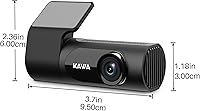
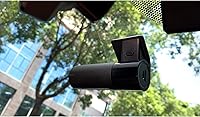
Overview

The KAWA D6 2K WiFi Dash Cam sits at the affordable end of the 2K dash cam market, offering a surprisingly compact and discreet package for drivers who want sharper footage without a steep price tag. KAWA launched this model in 2022 with a clear focus on value — modern features at a price that doesn't sting. One thing to flag upfront: there's no built-in screen. You manage everything through the companion app or on a computer, which suits some drivers just fine but may frustrate others. It runs on a supercapacitor instead of a battery, so heat-related power issues aren't a concern. Just know that parking monitoring requires a separately sold hardwire cable, which catches some buyers off guard.

Features & Benefits

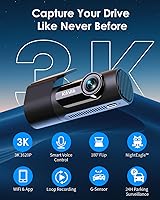
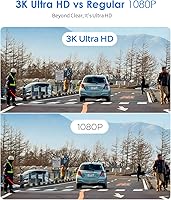
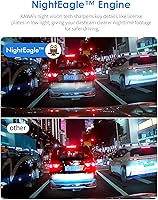
The 1440p resolution, encoded in H.265, is the real draw here. Footage comes out noticeably sharper than typical 1080p cameras, and the compression keeps file sizes lean enough that a large-capacity card lasts a long while between clears. The 145-degree wide angle covers multiple lanes without the heavy barrel distortion that often plagues budget lenses. Night performance relies on a six-element glass lens — it handles well-lit urban roads capably, though color detail does thin out on dark rural highways at speed. The 3D G-sensor locks clips automatically during detected impacts, and hands-free voice commands let you save footage or snap a photo without ever taking your hands off the wheel.

Best For

This compact front cam makes the most sense for daily commuters who want something tucked behind the mirror and largely forgotten about. It's a solid fit for ride-share or delivery drivers too — loop recording runs quietly in the background, and a quick voice command captures evidence without fumbling for buttons. Drivers in hot climates will appreciate the supercapacitor design, since battery-based cams often struggle in sun-baked interiors. That said, no onboard display means buyers who want to review clips directly on the unit should look elsewhere. If you're comfortable managing footage through a phone app, the workflow is genuinely straightforward and low-maintenance.

User Feedback

Owners consistently praise daylight footage sharpness and the small footprint — the unit barely registers in the rearview mirror, and plates are readable at a reasonable distance. Wi-Fi pairing also gets solid marks for being quick to set up. On the downside, a notable share of Android users report the companion app freezing or lagging on certain devices. Voice command recognition works, but requires a clear, deliberate tone to trigger reliably — casual or quiet speech sometimes gets ignored. The complete absence of GPS logging is a recurring complaint, especially from drivers who need location-stamped footage for insurance claims. The 18-month free replacement policy does add genuine peace of mind and earns consistent positive mentions.

Pros

  • Sharp 1440p footage with H.265 compression keeps files manageable without sacrificing detail on license plates and signs.
  • The compact, low-profile design tucks neatly behind the rearview mirror without eating into sightlines.
  • Supercapacitor power handles extreme cabin heat far better than standard battery-based competitors.
  • Wi-Fi pairing with the KAWA app is quick to set up and works reliably for clip downloads and live preview.
  • The 145-degree wide angle covers multiple lanes with minimal distortion — genuinely useful in dense traffic.
  • Hands-free voice commands let drivers lock clips or snap photos without taking their eyes off the road.
  • The 3D G-sensor auto-locks impact footage immediately, reducing the risk of critical clips being overwritten.
  • An 18-month free replacement policy and lifetime service warranty add meaningful long-term reassurance.
  • Night vision performance in well-lit urban environments is solid for a camera at this price tier.
  • Supports up to 256GB microSD cards, giving users flexible storage options for longer recording windows.

Cons

  • No GPS means footage carries no location data — a real problem for insurance or legal use cases.
  • The companion app has documented stability issues on several Android versions, causing freezes mid-use.
  • Voice command recognition requires a deliberate, clear tone and does not respond reliably to casual speech.
  • The parking monitor is a paid add-on in practice, since the required hardwire cable is sold separately.
  • No onboard screen makes in-car adjustments impossible without pulling out a phone.
  • Night vision color detail fades noticeably on unlit roads at speed, despite the marketed starlight capability.
  • Some users report SD card formatting errors, requiring manual reformatting before the card is recognized.
  • No rear camera option means drivers who want full coverage front and back must buy a second device.
  • The iOS and Android app experience is inconsistent, with the iOS version generally receiving better reviews.

Ratings

The KAWA D6 2K WiFi Dash Cam has been scored by our AI rating system after analyzing thousands of verified global buyer reviews, with spam, bot activity, and incentivized feedback actively filtered out. Scores reflect how real drivers experience this compact front cam day-to-day — not just what the spec sheet promises. Both the standout strengths and the recurring frustrations are factored in transparently, so the numbers tell the full story.

Video Clarity
83%
Daylight footage consistently earns praise from commuters who can read license plates and road signs with confidence. The 1440p resolution paired with H.265 compression gives the footage a noticeably cleaner look than most 1080p competitors at the same price point, and detail holds up well during slow urban driving.
At highway speeds, particularly in low-contrast lighting conditions like overcast days or dusk, fine detail can soften slightly. A handful of users also noted that footage can appear slightly over-sharpened in certain playback scenarios, which introduces minor artifacting around high-contrast edges.
Night Vision
67%
33%
In well-lit city environments — streetlights, parking lots, and commercial strips — the six-element lens does a respectable job retaining color rather than washing out to a flat grey. Drivers doing late-night urban commutes report that oncoming headlights are handled without excessive flare or overexposure.
On genuinely dark rural roads at speed, color detail degrades noticeably and the image gets grainier than the marketing suggests. Several reviewers specifically flagged that the starlight night vision label sets expectations the hardware does not fully meet once you leave lit roads behind.
App Experience
58%
42%
iOS users generally report a smooth pairing process — the camera creates its own Wi-Fi hotspot, the app connects quickly, and live preview loads without much fuss. Clip downloads to the phone work reliably once connected, which makes checking recent footage after a parking incident fairly straightforward.
Android users have a noticeably rougher experience, with recurring reports of the app freezing, crashing mid-download, or refusing to maintain a stable connection on certain device and OS combinations. This is one of the most consistent pain points across user feedback and it meaningfully drags the overall app score down.
Build Quality
74%
26%
The unit feels solid for its price tier — there are no obvious flex points or rattling components, and the compact housing sits flush and stable once mounted. Drivers who park in hot climates specifically appreciate the supercapacitor design, which sidesteps the swelling and failure issues that plague battery-based cameras in high-heat environments.
A few users noted the plastic casing picks up minor scratches easily and does not feel particularly premium to the touch. The mounting adhesive, while adequate for most windshields, has shown some weakening after extended exposure to direct sunlight through glass in very hot regions.
Ease of Installation
86%
Most buyers report having the camera up and running within ten to fifteen minutes of opening the box. The adhesive and static sticker mounting options cover most windshield surfaces, and routing the power cord along the headliner is straightforward in typical sedans and SUVs.
Vehicles with steeply raked or tinted windshields have caused fitment challenges for some users, and the static sticker mount is noticeably less secure than the adhesive option on curved glass. There are no detailed mounting angle instructions included, which leads to a bit of trial and error for first-time dash cam buyers.
Voice Control
61%
39%
When it works, hands-free voice control is a genuinely practical feature — triggering an emergency clip save or snapping a still without touching the device is useful during active driving. Drivers in quiet cabins with clear speech report reasonably consistent recognition performance.
Road noise, HVAC systems, and music reliably reduce recognition accuracy, and several users noted the commands require an unnaturally deliberate speaking style to register. It works well enough to be listed as a feature, but not reliably enough to be counted on in high-stress moments when you actually need it most.
Loop Recording
88%
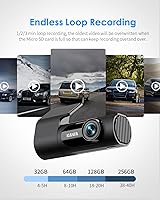
Continuous loop recording works quietly in the background without requiring driver intervention, which is exactly what most commuters want. The combination of H.265 compression and support for large-capacity cards means recording sessions can run for extended periods before the oldest clips start cycling out.
A small number of users reported occasional gaps in recorded footage, typically after the card reached capacity and the loop began overwriting, suggesting the transition between old and new clips is not always perfectly seamless. Formatting the card through the camera settings first appears to reduce this issue significantly.
G-Sensor & Emergency Lock
79%
21%
The 3D collision sensor is meaningfully more reliable than basic single-axis G-sensors found in many competing budget cams. In real fender-bender scenarios, multiple users confirmed the locked clip was available and intact when they went to retrieve it for insurance documentation.
The sensitivity calibration is not adjustable on all firmware versions, which means aggressive speed bumps or rough road surfaces can occasionally trigger false emergency locks and fill up the protected storage partition. A few users found themselves manually deleting falsely locked clips more often than expected.
Parking Mode
55%
45%
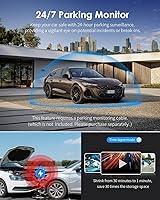
When set up with the hardwire cable, the time-lapse and collision detection combination gives drivers reasonable coverage for low-speed parking lot incidents and overnight protection. Drivers who invested in the separate cable generally report satisfaction with how the mode performs on long park durations.
The requirement to purchase a separate hardwire cable is a recurring frustration — many buyers discover this only after unboxing, expecting parking mode to work with the standard power cord. The additional cost and installation complexity push this feature out of reach for casual buyers who were counting on it as a ready-to-use function.
SD Card Compatibility
63%
37%
The camera supports cards up to 256GB, which gives users genuine flexibility in how long they want to record before footage cycles. High-endurance cards designed for continuous write workloads tend to work without issues according to the majority of users.
Compatibility with certain off-brand or older generation cards is inconsistent, and a notable portion of early user complaints involve cards not being recognized until reformatted through the device. First-time dash cam buyers who assume any spare microSD card will work out of the box run into this problem more often than not.
Value for Money
84%
At its price point, this compact front cam packs a feature set — 2K resolution, Wi-Fi, voice control, supercapacitor power, and a wide-angle lens — that would cost considerably more from established mid-tier brands. Budget-conscious buyers who calibrate their expectations accordingly tend to come away satisfied.
The lack of GPS, the screenless design, and the separately sold parking cable mean the true cost of a fully functional setup is higher than the sticker price suggests. For buyers who need GPS logging or expect parking mode out of the box, the value equation looks considerably less favorable.
Warranty & Support
77%
23%
The 18-month free replacement policy is above average for a budget dash cam, and the lifetime service commitment provides a longer-term safety net that several buyers specifically called out as a reason they chose this unit over alternatives. Response times from the support team are generally reported as prompt.
A lifetime warranty from a smaller brand carries inherent uncertainty about long-term availability of replacements or parts, and a handful of users noted that warranty claim processing required multiple email exchanges before resolution. The warranty is reassuring in principle but not unconditional in practice.
Discreet Design
89%
The small footprint is one of the most consistently praised physical traits — it tucks neatly behind the rearview mirror and is essentially invisible to the driver during normal use. Ride-share drivers especially appreciate that passengers rarely notice it, which avoids awkward conversations about recording.
The compact size does mean the lens and sensor hardware are physically smaller than on larger units, which is one contributing factor to the night vision limitations noted by users. Buyers who equate a larger device with better performance sometimes feel underwhelmed despite the form factor being intentional.

Suitable for:

The KAWA D6 2K WiFi Dash Cam is a strong pick for everyday commuters who want discreet, reliable front-facing coverage without a unit that dominates their windshield. Ride-share and delivery drivers will find the combination of continuous loop recording and hands-free voice commands particularly useful — grabbing a clip mid-route without touching the device is a genuinely practical advantage. Drivers living in hot climates get an extra benefit from the supercapacitor design, which holds up far better than lithium batteries in sun-baked cars over time. Budget-conscious buyers who want 2K resolution and Wi-Fi app control, without stretching into mid-range pricing, will find this compact front cam hits a reasonable sweet spot. It also suits anyone comfortable managing footage through a smartphone app rather than an onboard screen.

Not suitable for:

The KAWA D6 2K WiFi Dash Cam is not the right fit for drivers who rely on GPS-stamped footage — there is no location logging at all, which can matter when filing insurance claims or contesting traffic incidents. Anyone who wants to review clips directly on the device will be immediately frustrated, since there is no screen and all playback depends on the companion app or a computer. The parking monitoring feature, while functional, requires purchasing a separate hardwire cable, so buyers expecting a complete out-of-the-box solution may feel misled. Drivers who frequently switch between Android devices should also be cautious, as the app has shown stability issues on certain Android builds. Those needing a dual-channel front-and-rear setup will need to look at different options entirely, as this unit covers only the front view.

Specifications

  • Video Resolution: Records at 1440p (2K) using H.265 compression, producing sharper footage than standard 1080p while keeping individual file sizes manageable.
  • Field of View: The lens covers a 145-degree wide angle, capturing multiple lanes of traffic without severe barrel distortion at the edges.
  • Night Vision: Uses a 6-element full-HD spherical glass lens with Starlight color night vision to retain color information in low-light conditions without an infrared emitter.
  • Power Source: Powered by a built-in supercapacitor rather than a lithium battery, making it more resilient to the high cabin temperatures common in parked vehicles.
  • Connectivity: Features built-in Wi-Fi for wireless pairing with the KAWA mobile app on iOS and Android devices.
  • Storage: Accepts microSD cards up to 256GB (not included); no internal storage is built into the unit itself.
  • G-Sensor: Equipped with a 3D collision sensor that detects impact force across three axes and automatically locks the current clip to prevent it from being overwritten during loop recording.
  • Voice Control: Responds to hands-free voice commands that trigger emergency recording or save a still snapshot without physical interaction.
  • Display: There is no onboard screen; all footage review, settings changes, and live preview require the KAWA app or a Windows or Mac computer.
  • Parking Mode: Supports 24-hour parking monitoring via time-lapse recording and collision detection, but requires a separately purchased hardwire cable to function.
  • Mounting: Attaches to the windshield using either an adhesive tape mount or a static cling sticker, both included in the box.
  • Dimensions: The unit measures 2.2 x 3.74 x 1.38 inches, keeping it compact enough to sit discreetly behind most rearview mirrors.
  • Weight: Weighs 8.5 ounces, which is light enough that the adhesive mount holds it securely without strain on most windshields.
  • Video Playback: Recorded footage can be reviewed wirelessly through the KAWA app or by removing the SD card and accessing files on a Windows or Mac computer.
  • Compatible Vehicles: Designed for use in cars, trucks, minivans, motorcycles, and buses, covering a broad range of personal and commercial vehicles.
  • In the Box: Package includes the dash cam unit, a car charger, a power cord, adhesive tape, and a static sticker mount.
  • Warranty: Backed by an 18-month free replacement guarantee and a lifetime service warranty direct from the manufacturer.
  • Video Codec: Uses the H.265 (HEVC) codec for efficient compression, which reduces storage consumption compared to older H.264-encoded footage at equivalent quality.

Related Reviews
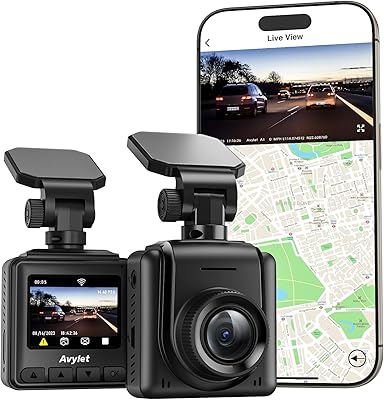
KAWA Mini 3 Compact Dash Cam
78%
93%
Discreet Design
83%
Video Quality (Daytime)
67%
Night Vision Performance
78%
Voice Control
57%
App & Wi-Fi Connectivity
More
Avylet A1 2K WiFi Front Dash Camera
73%
83%
Video Clarity
71%
Night Vision
62%
App Experience
91%
Ease of Installation
67%
Build Quality
More
VIOFO A119 V3 Dash Cam
77%
91%
Video Clarity
76%
Night Vision
88%
GPS Accuracy
67%
Parking Mode
83%
Build Quality
More
Kingslim D6 4K Dual Dash Cam
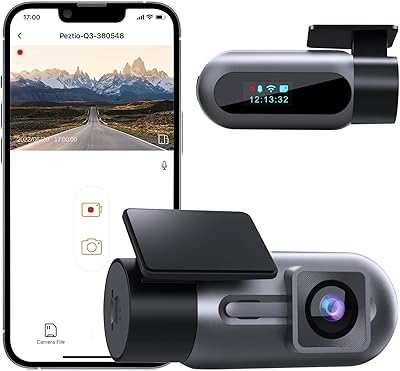
84%
91%
4K Video Quality
88%
Night Vision Performance
84%
Ease of Setup
89%
WiFi & GPS Functionality
82%
Build Quality & Durability
More
ARIFAYZ Q3 1080P WiFi Dash Cam
72%
91%
Ease of Installation
78%
Video Quality (Daytime)
57%
Night Vision Performance
59%
WiFi & App Experience
72%
Build Quality
More
Miden X5 3-Channel Dash Cam
75%
84%
Daytime Video Quality
67%
Night Vision Performance
91%
Multi-Channel Coverage
61%
WiFi & App Experience
83%
Installation Ease
More
USHJNV A10 4K+2K Dual Dash Camera
68%
83%
Daytime Video Quality
61%
Night Vision Performance
81%
Ease of Setup
58%
App Experience
63%
Parking Mode
More
Tecival H1 1080P Front Dash Cam
75%
83%
Daytime Video Quality
63%
Night Vision Performance
91%
Ease of Installation
61%
App & WiFi Experience
88%
Value for Money
More
Transcend DrivePro 250 Dash Cam
77%
88%
Video Clarity
67%
Night Vision
72%
ADAS Accuracy
86%
GPS Performance
63%
Wi-Fi & App Experience
More
Lgueati DC01 4K+2K Dual Dash Camera
75%
84%
Video Clarity (Front)
76%
Video Clarity (Rear)
71%
Night Vision
91%
Value for Money
88%
Ease of Installation
More

FAQ

Not directly on the unit itself — there is no screen built in. Your options are to pull the microSD card and plug it into a computer running Windows or Mac, or connect via the KAWA app over Wi-Fi. If you prefer reviewing clips on the go without a phone, this setup will frustrate you.

A Class 10 or UHS-I card rated for continuous write speeds works best — look for cards marketed specifically for dash cams or surveillance. Cards from reputable brands in the 64GB to 128GB range hit a practical sweet spot for most drivers. Some users have reported needing to format the card through the camera settings before it is recognized properly, so run a format on first use.

The parking mode uses time-lapse recording and the G-sensor to watch for motion or impacts while the car is off. The catch is that the dash cam needs a constant low-voltage power supply to stay on, which requires a hardwire kit — and that cable is sold separately under ASIN B0BKPKV72H. If you plug in through the standard cigarette lighter, power cuts off when the ignition does, so parking mode will not activate.

It performs reasonably well in lit urban environments — you can generally make out plates and road markings under streetlights. On genuinely dark rural roads at highway speeds, color detail does soften and the image gets noisier. It holds up better than many cams in its price range, but do not expect miracles on completely unlit backroads.

They work, but they are not particularly forgiving. You need to speak clearly and at a deliberate pace — casual or quiet speech often gets missed. Road noise, loud music, or a running air conditioner can interfere. It is a useful feature when it clicks, but do not count on it as a primary method of control.

No, there is no GPS module in this unit. Footage will not be stamped with speed or location data. For drivers who need that for insurance documentation or fleet use, this is a meaningful gap and worth factoring into the buying decision.

A supercapacitor charges and discharges faster than a lithium battery and does not degrade the same way under repeated heat cycles. In a car that sits in direct sunlight regularly, it is a genuine advantage — lithium batteries in budget cameras can swell or fail over time in hot climates. The supercapacitor does not store energy the way a battery does, so it relies entirely on the car's power supply while running.

The compact front cam creates its own direct Wi-Fi hotspot, so your phone connects directly to it rather than through your home router or mobile data. The setup is straightforward the first time — download the KAWA app, connect to the camera's hotspot in your phone settings, and open the app. Some Android users have reported occasional drops or app crashes, but iOS users generally find it more stable.

The manufacturer lists motorcycles as a compatible vehicle type, but it is worth thinking through the mounting situation carefully. The standard adhesive and static mounts are designed for flat glass surfaces, so you would need a bracket or third-party mount suited to handlebars or a fairing. Vibration at highway speeds is also harder on electronics over time, so mileage may vary depending on your bike and riding conditions.

KAWA offers an 18-month free replacement window and a lifetime service warranty, and they state that support messages are answered within 24 hours. That is a reasonable safety net for a budget camera. Real-world warranty experiences vary by brand, but the lifetime service commitment at least means you have a path to support if something goes wrong after the initial replacement period expires.