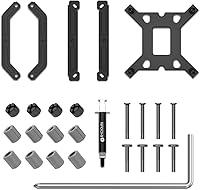
Overview

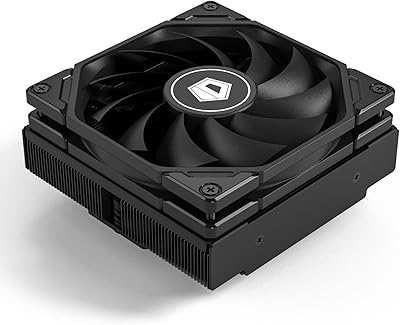
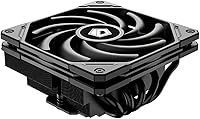
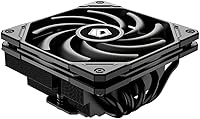
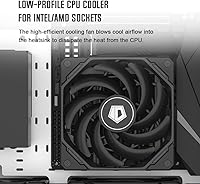
The ID-COOLING IS-55 Low Profile CPU Cooler is built for one specific kind of builder: someone squeezing real performance out of a compact system without the luxury of vertical space. At just 57mm tall, it fits where tower coolers simply cannot, making it a practical choice for HTPC and Mini-ITX cases with tight clearances. Mid-range pricing puts it in a competitive spot — buyers here expect more than a stock cooler but aren't chasing enthusiast-grade specs. Covering Intel LGA 1851, 1700, 1200, and 115X alongside AMD AM4 and AM5, socket compatibility is genuinely broad, meaning most people building on current or recent platforms won't need to think twice about fitment.

Features & Benefits

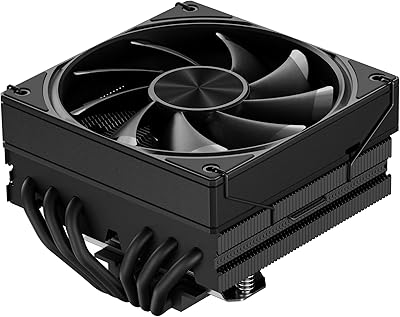
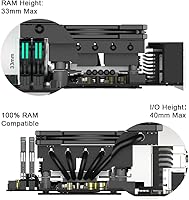
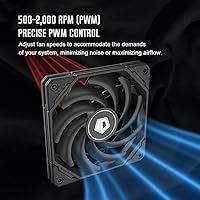
Where this slim air cooler earns its keep is in the thermal hardware. Five copper heatpipes is uncommon at this height and price range — most competitors manage three or four — so heat has more pathways away from the CPU. The 120x120x15mm PWM fan is impressively thin yet moves 54.6 CFM of air, and because it's PWM-controlled, it barely registers at idle — think library-quiet — only spinning up noticeably under sustained load. Noise sits between 13.8 and 31.2 dB depending on demand, which translates to near-inaudible at the low end. RAM clearance is another practical win; the flat profile doesn't encroach on memory slots, which matters in Mini-ITX boards where slots sit close to the socket.

Best For

The IS-55 is purpose-built for compact system builders — HTPC enthusiasts, Mini-ITX hobbyists, and anyone working inside a case where a strict height ceiling is a hard constraint. It handles mid-range CPUs like a Core i5 or Ryzen 5 running at stock settings with room to spare, but it's not the right tool for a 125W TDP chip or anything you plan to push hard through overclocking. If you're upgrading from a stock Intel or AMD cooler in a small chassis, the step up in thermal headroom and noise reduction is immediately noticeable. Just don't expect it to compete with a full tower cooler — thermal expectations need to match the physical constraints of the build.

User Feedback

Owners consistently praise the installation experience — the mounting hardware is sturdy and the backplate is well-made, which isn't always guaranteed at this price tier. Quiet operation under light to moderate workloads is the other recurring compliment; most users report it genuinely disappears acoustically during everyday tasks. That said, honest criticism does exist: this low-profile cooler runs into its thermal ceiling with higher-TDP processors or chips pushed beyond spec, and that's a real limitation buyers should factor in. A few users on AM5 platforms have noted minor bracket fitment quirks, though nothing installation-breaking. Compared to the Noctua NH-L12S or Thermalright AXP90, value for money is where the IS-55 tends to win out most convincingly.

Pros

  • Five heatpipes at this height is genuinely rare — most competing slim coolers ship with three or four.
  • PWM fan control keeps the IS-55 near-silent during everyday tasks like browsing or light productivity work.
  • At just 57mm tall, this low-profile cooler fits inside cases that reject virtually every other aftermarket option.
  • Broad Intel and AMD socket support means it works across most current-gen platforms without adapter headaches.
  • RAM clearance is a real advantage — tall memory kits fit without conflict, which Mini-ITX builders will appreciate.
  • Mounting hardware feels solid and the backplate is well-built, making installation straightforward even for first-timers.
  • The 120mm fan footprint moves decent airflow for its 15mm thickness, outperforming many thinner alternatives.
  • Priced competitively against Noctua and Thermalright equivalents while delivering comparable real-world quiet operation.
  • Fan wattage is negligible, adding essentially zero measurable draw to your system power budget.

Cons

  • Thermal headroom runs out quickly with CPUs above roughly 95W under sustained all-core load.
  • At maximum RPM the fan noise climbs noticeably and doesn't quite match the quietest competitors at their limits.
  • Occasional AM5 bracket fitment inconsistencies have been reported, which can add frustration during installation.
  • No bundled thermal paste is included in some shipments, requiring buyers to source their own.
  • Heavier or larger CPU dies can expose uneven contact pressure, potentially affecting thermal performance.
  • Compared to the Thermalright AXP90-X47, peak cooling capacity falls slightly short despite the larger fan.
  • The slim cooler design limits any future upgrade path — if your CPU TDP needs grow, you'll need a full replacement.
  • Limited documentation in the box makes the install process harder for less experienced builders.

Ratings

The ID-COOLING IS-55 Low Profile CPU Cooler scores below are generated by AI after analyzing thousands of verified global user reviews, with spam, incentivized, and bot-flagged submissions actively filtered out before scoring. The results reflect a genuine cross-section of real builder experiences — from HTPC enthusiasts and Mini-ITX hobbyists to everyday desktop upgraders — and both the strengths and the honest frustrations are represented in every category score.

Thermal Performance
72%
28%
For mid-range CPUs running at stock settings, users consistently report stable temperatures during productivity tasks, light gaming, and media playback. The five-heatpipe configuration gives this slim air cooler a meaningful edge over three-pipe competitors in the same height class, keeping chips like the Ryzen 5 7600 and Core i5-13400 well within safe operating ranges.
Once CPU TDP climbs past roughly 95W under sustained all-core load — rendering, heavy compilation, extended gaming on power-hungry chips — temperatures start creeping uncomfortably high. Users pairing this low-profile cooler with unlocked or high-TDP processors report thermal throttling, which is a hard ceiling that no amount of fan speed adjustment can fully overcome.
Noise Level
84%
At idle and during light workloads, this slim air cooler is practically inaudible — users in quiet home office and living room setups report forgetting it's running at all. The PWM controller keeps fan speed low until thermals genuinely demand otherwise, which makes it ideal for HTPCs where ambient silence matters more than peak performance.
At maximum RPM the acoustic character changes noticeably; 31 dB(A) is still moderate in absolute terms, but in a silent room it becomes audible as a consistent mid-pitched hum. A handful of users noted that the fan noise profile at full speed is slightly less refined than premium alternatives like Noctua slim fans, with a faint tonal quality under sustained load.
Build Quality
81%
19%
The mounting backplate feels solid and well-machined compared to what ships with budget coolers, and the heatsink fin stack has no flex or sharp edges that might catch a hand during installation. Users building in cramped Mini-ITX cases specifically appreciated that the hardware doesn't feel flimsy when tightening down in tight quarters.
The fan itself, while functional, uses plastic construction that feels a step below the heatsink body in perceived quality. A few users reported that the fan clips securing it to the heatsink require more force than expected to seat properly, which caused minor frustration during their first installation.
Ease of Installation
83%
Most users — including those who described themselves as first-time builders — completed installation without referencing anything beyond the included instructions. The backplate design is intuitive, the standoffs are clearly labeled, and the cooler sits flat without requiring awkward angles inside cramped cases.
AM5 bracket alignment drew the most criticism, with a noticeable subset of Ryzen 7000 and 9000 builders reporting that the bracket feels imprecise and requires careful repositioning to seat evenly. The included instructions also lack visual clarity for AMD installations specifically, which added confusion for users less familiar with AM5 socket geometry.
RAM Compatibility
88%
Because the IS-55 sits flat over the socket rather than extending vertically like a tower cooler, tall DDR4 and DDR5 memory kits — including 40mm-height modules — typically install without any clearance conflict. Mini-ITX builders in particular praised this aspect repeatedly, as RAM interference is one of the most common frustrations with low-profile cooler alternatives.
On a small number of motherboards with unusually positioned DIMM slots very close to the socket, the outer heatpipe path runs close enough to the first slot that inserting RAM after the cooler is installed becomes awkward. This isn't a widespread issue, but users who encountered it wished the manual flagged it as a potential edge case.
Value for Money
86%
Relative to the Noctua NH-L12S and Thermalright AXP90-X47, the IS-55 offers a genuinely competitive thermal and acoustic experience at a lower price point, making it an attractive option for builders who want quality without paying a premium brand tax. The five-heatpipe configuration feels especially well-priced for what it delivers in this niche.
The value case weakens slightly if you need to purchase quality thermal paste separately or replace the fan for quieter operation, both of which some users ended up doing. A small number of buyers also felt the packaging and accessory quality didn't quite match the price tier, citing missing or sparse documentation.
Socket Compatibility
79%
21%
Covering Intel from LGA 1151 through the latest LGA 1851, plus AMD AM4 and AM5, the IS-55 spans nearly every relevant desktop platform a current builder might be working with. Users appreciated not needing to purchase separate mounting kits or check compatibility matrices for recent Intel and AMD platforms.
Legacy Intel sockets beyond LGA 115X are not supported, which affects a narrow but real segment of users on older boards. The AM5 fitment inconsistency reported by multiple users also slightly undermines the otherwise clean compatibility story, especially given how many current AMD builds use that platform.
Fan Airflow Efficiency
76%
24%
Pushing 54.6 CFM through a 15mm-thick fan is a meaningful engineering achievement, and users in well-ventilated cases noticed that the airflow contribution to overall chassis temperature was positive. For HTPC builds with modest case ventilation, this thin fan pulls reasonable duty given its physical constraints.
Compared to a standard 25mm-thick 120mm fan at equivalent RPM, the thin fan profile inherently moves less air per rotation, and this gap becomes noticeable when the cooler is asked to handle CPUs near the top of its thermal range. Some users running warmer ambient environments reported that airflow alone couldn't compensate for reduced heatsink mass.
Heatsink Design
82%
18%
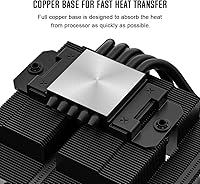
Five copper heatpipes routed through a dense aluminum fin stack is a thoughtful design for a 57mm-tall cooler — it maximizes surface area within the height constraint better than competing designs with fewer pipes. The contact base appears well-lapped from factory, with users reporting good thermal compound spread after removal.
The fin stack density, while effective for heat dissipation, can collect dust in environments with higher airborne particulate, and the slim fan makes cleaning between fins more awkward than with a standard cooler. A few users also noted that the heatsink overhangs slightly toward one edge of some motherboards, requiring a check against nearby capacitors or VRM heatsinks.
Longevity & Reliability
74%
26%
Among users who have run the IS-55 for over a year, the majority report no degradation in fan noise or thermal performance, suggesting the fan bearing and heatpipe seals hold up well under normal desktop use conditions. The aluminum fin stack shows no corrosion or structural fatigue in long-term reports.
The long-term dataset is thinner than for established brands like Noctua, which makes it harder to project multi-year durability with confidence. A small number of users reported early fan bearing noise developing within six to twelve months, which, while not widespread, is enough to note as a potential quality consistency issue.
Packaging & Accessories
63%
37%
The cooler arrives well-protected with foam inserts that prevent fin damage in transit, and the mounting hardware is organized into clearly separated bags, which users appreciated during installation. Thermal paste is included, covering the basic needs of a first-time builder.
The included thermal paste is functional but uninspiring, and several users replaced it immediately with better compound. The instruction manual is sparse on visual detail — particularly for AMD builds — and the overall unboxing experience doesn't convey the premium feel that the cooler itself delivers once installed.
Aesthetics
69%
31%
The black colorway on the IS-55 Black model gives it a clean, understated look that suits dark-themed builds and cases where the cooler is occasionally visible through a side panel. The low flat profile also contributes to a tidy, uncluttered interior aesthetic that HTPC builders tend to favor.
There are no RGB options, which is a deliberate choice but one that limits appeal for builders who prioritize visual customization. The fan frame design is utilitarian rather than styled, and up close the plastic fan housing looks noticeably less refined than the heatsink body it attaches to.
Weight & Footprint
85%
At roughly 450g, this low-profile cooler is light enough that motherboard flex during transport is not a concern, and the flat footprint means it doesn't shift the system's center of gravity the way tall tower coolers can. Users who move their small form factor PCs regularly appreciated the low-mass design.
The relatively wide heatsink footprint — matching a 120mm fan spread — can conflict with oversized VRM heatsinks or tall capacitors on budget Mini-ITX boards where component placement is less standardized. It is worth measuring the clearance around your specific socket before assuming a clean fit.

Suitable for:

The ID-COOLING IS-55 Low Profile CPU Cooler is the right call for anyone building inside a case where height is the governing constraint — think slim HTPC enclosures, compact Mini-ITX builds, or small form factor systems where a standard tower cooler physically won't fit. If you're pairing it with a mid-range CPU like a Ryzen 5 or Core i5 running at stock settings, it handles the thermal load comfortably without breaking a sweat. It's also a smart upgrade for anyone still running a stock Intel or AMD cooler inside a tight chassis who wants meaningfully quieter operation and a bit more thermal headroom. AMD AM4 and AM5 users, as well as those on Intel LGA 1700 or the newer LGA 1851 platform, will find the fitment straightforward without needing aftermarket brackets. For home theater builds especially, the near-silent operation at idle and light loads makes it easy to forget the fan is even spinning.

Not suitable for:

The ID-COOLING IS-55 Low Profile CPU Cooler is not the right tool if your CPU has a high thermal design power — anything pushing 125W or above under sustained load will likely exceed what this slim air cooler can reliably manage. Overclockers should look elsewhere entirely; the IS-55 has a defined thermal ceiling, and trying to push past it will result in throttling rather than performance gains. If your case has enough vertical clearance for a standard tower cooler, you'd be leaving cooling performance on the table by choosing this over options like the Noctua NH-U12S or a mid-tower air cooler. Users who run demanding workloads like video rendering or extended gaming sessions on power-hungry chips will find the thermal limits frustrating over time. It's also worth noting that while socket compatibility is broad, a small number of users have encountered minor fitment quirks with AM5 brackets, so it pays to double-check before assuming a plug-and-play experience.

Specifications

  • Cooler Height: The total installed height measures 57mm, making it compatible with cases that enforce a strict low-profile clearance limit.
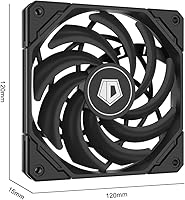
  • Fan Dimensions: The included fan measures 120×120×15mm, an unusually thin profile that allows it to move meaningful airflow without adding height.
  • Heatpipes: Five copper heatpipes conduct heat away from the CPU contact plate and distribute it across the aluminum fin stack.
  • Airflow: The fan delivers a maximum airflow of 54.6 CFM, competitive for a 15mm-thick fan in the slim cooler category.
  • Noise Level: Operating noise ranges from 13.8 dB(A) at minimum speed to 31.2 dB(A) at full load, covering near-silent to moderate acoustic output.
  • Fan Speed: The PWM fan operates between approximately 800 RPM at idle and a maximum of 3300 RPM under peak thermal demand.
  • Fan Connector: A 4-pin PWM connector allows the motherboard to automatically regulate fan speed based on real-time CPU temperature.
  • Power Draw: The fan consumes a maximum of 2.64W at 12V, contributing negligible load to the system power supply.
  • Total Weight: The complete cooler assembly weighs approximately 15.9 oz (around 450g), which is typical for a five-heatpipe low-profile design.
  • Intel Sockets: Compatible Intel sockets include LGA 1851, LGA 1700, LGA 1200, LGA 1151, LGA 1150, LGA 1155, and LGA 1156.
  • AMD Sockets: Compatible AMD sockets include AM5 and AM4, covering Ryzen processors from the 3000 series through the current 7000 and 9000 series.
  • Cooling Method: Cooling is achieved entirely through air convection — no liquid, pump, or TEC components are involved.
  • Fin Material: The heatsink fin stack is constructed from aluminum, which balances thermal conductivity with the low weight requirements of a compact cooler.
  • Heatpipe Material: The heatpipes are made from copper, providing higher thermal conductivity than aluminum alternatives used in budget coolers.
  • Brand: This cooler is manufactured and sold by ID-COOLING, a brand specializing in CPU and system cooling solutions for desktop PCs.
  • Model Number: The official model designation is IS-55 Black, distinguishing it from the silver variant within the IS-55 product line.
  • Fan Voltage: The fan is rated to operate at 12V DC, consistent with standard motherboard PWM fan header output.
  • Item Count: Each purchase includes one complete cooler unit with mounting hardware; no additional cooler unit or fan is bundled in the box.

Related Reviews
ID-COOLING IS-40X V3 Low Profile CPU Cooler
83%
80%
Performance
75%
Cooling Efficiency
92%
Noise Levels
84%
Build Quality
88%
Ease of Installation
More
ID-COOLING IS-47-XT Low Profile CPU Cooler
83%
85%
Cooling Performance
90%
Noise Level
88%
Build Quality
72%
Installation Ease
95%
Compatibility with Small Builds
More
ID-COOLING IS-40-XT Black Low Profile CPU Cooler
87%
86%
Cooling Performance
92%
Noise Level
89%
Ease of Installation
94%
Size/Footprint
87%
Build Quality
More
Cooler Master i71C RGB Intel Low-Profile CPU Air Cooler
84%
88%
Cooling Performance
91%
Noise Level
85%
RGB Customization
89%
Build Quality
75%
Installation Ease
More
upHere H85K6 Low Profile CPU Cooler
88%
88%
Cooling Performance
92%
Size & Compatibility
90%
Noise Level
85%
Ease of Installation
87%
Build Quality
More
ID-COOLING SL240 CPU Liquid Cooler
88%
91%
Cooling Performance
93%
Noise Level
88%
Customization Options (LCD & RGB)
84%
Installation Ease
89%
Build Quality
More
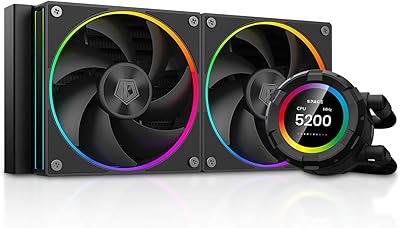
ID-COOLING FX240 PRO 240mm AIO CPU Cooler
78%
83%
Thermal Performance
67%
Pump Noise & Vibration
78%
Fan Performance & Noise
74%
Build Quality & Materials
86%
Installation Ease
More
ID-COOLING FROZN A410 GDL CPU Cooler
88%
93%
Cooling Performance
91%
Noise Level
88%
Build Quality
89%
Ease of Installation
85%
Compatibility
More
Noctua NH-L12Sx77 Low-Profile CPU Cooler
84%
88%
Thermal Performance
91%
Acoustics & Noise Level
94%
Build Quality & Materials
92%
Fan Quality
71%
Installation Experience
More
ID-COOLING FROZN A410 ARGB CPU Cooler
81%
83%
Thermal Performance
74%
Noise Level
91%
Value for Money
78%
Build Quality
89%
Ease of Installation
More

FAQ

It should fit with about 1mm to spare, but that margin is tight enough that you should double-check your case's exact internal clearance spec rather than relying on the nominal limit. Some cases measure clearance to the side panel foam or a protruding bracket rather than the bare panel, so a quick check of your case manual is worth the two minutes it takes.

Yes, both sockets are officially supported and the mounting hardware for each is included in the box. LGA 1851 is Intel's current platform for Core Ultra 200 series processors, so if you're building on that platform you're covered without needing any additional adapters.

At full tilt — 3300 RPM — it reaches around 31 dB(A), which is roughly comparable to a quiet library or a gentle hum you'd notice in a silent room but not over typical ambient noise. During everyday tasks like browsing or light office work, it's closer to 14 dB(A) and essentially inaudible. It's not the quietest cooler on the market at maximum speed, but for an HTPC or media PC it's entirely livable.

It handles mid-range CPUs running at stock settings very well — think Ryzen 5 or Core i5 class processors in the 65–95W TDP range. Push beyond that into high-TDP chips or try overclocking, and you'll start seeing thermal throttling under sustained loads. It's not designed for workstation or high-performance gaming CPUs running at full power for extended periods.

Generally yes — because the cooler sits flat and low rather than hanging over adjacent slots like a tower cooler, tall RAM modules typically have no conflict. That said, it's worth checking your specific motherboard layout, as some boards position the first DIMM slot unusually close to the socket edge.

ID-COOLING includes a pre-applied or packaged thermal compound with the IS-55, but the quality is adequate rather than exceptional. If you already have a quality thermal paste on hand, applying your own won't hurt performance and may marginally improve it, but the included compound is perfectly functional for most users.

The Noctua NH-L12S is taller at 70mm and generally offers slightly better peak thermal performance, but it also costs considerably more and won't fit in cases with strict sub-60mm limits. The IS-55 wins on height clearance and value; the NH-L12S wins on sustained thermal headroom and long-term Noctua build quality. If your case allows for the extra height, the Noctua is the better cooler — but the IS-55 fits where the Noctua simply can't go.

A small number of users have reported that the AM5 bracket requires careful alignment and can feel slightly imprecise compared to the Intel mounting hardware. It's not a widespread defect, but it's worth taking your time during installation and confirming the cooler is seated evenly before fully tightening the screws. Following the included instructions closely tends to resolve most fitment concerns.

Yes, it uses a standard 120×15mm fan with a 4-pin PWM connector, so replacement fans from Noctua, Arctic, or other brands in that slim 15mm format are compatible. Swapping to a higher-quality slim fan can reduce noise at max RPM if that's a priority for your build.

It can work in that context as long as the socket is supported and the chassis provides enough clearance, but keep in mind that NAS and server workloads often involve prolonged sustained CPU activity. If your processor runs near its TDP ceiling for extended periods, this low-profile cooler may not keep temperatures as stable as an active cooling solution with more thermal mass. For light-duty NAS builds with efficient, low-power CPUs it's a reasonable fit.

Where to Buy