
Overview

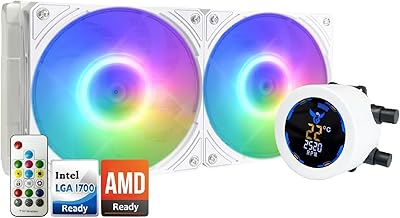
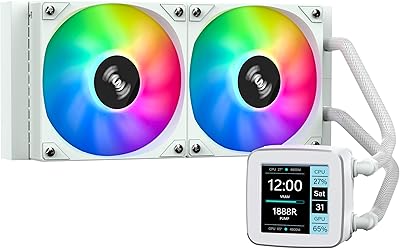
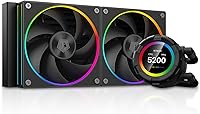
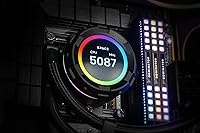
The ID-COOLING SL240 240mm AIO CPU Cooler sits firmly in the upper tier of the 240mm liquid cooling market, and that positioning shows in both its build quality and its feature set. The real differentiator here is the 2.1″ LCD display on the pump head — something most competitors at this size simply don't offer. ID-COOLING has been steadily building credibility in the cooling space, and this cooler reflects that growing maturity. It covers a wide range of Intel and AMD sockets, which makes it a practical pick across different platform builds, and it's clearly aimed at enthusiasts who want their rig to look as capable as it performs.

Features & Benefits

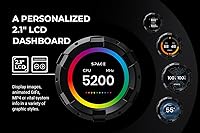
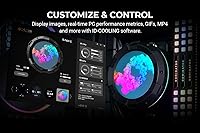
The customizable LCD dashboard is what most people buy this cooler for, and it earns that attention. At a sharp 480×480 resolution, it can display live CPU temperature, fan speed data, custom images, or even short video clips — making it genuinely useful rather than just decorative. The dual AF127 fans use fluid dynamic bearings, which run quieter and last longer than sleeve or ball-bearing alternatives. The pump operates at around 2,500 RPM, striking a reasonable balance between thermal performance and audible noise. Airflow sits at a competitive level for the 240mm class. The companion Space software handles both display customization and fan control, though it takes some getting used to.

Best For

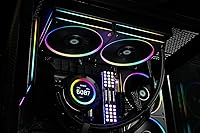
This 240mm AIO is a strong fit for builders who want a windowed mid-tower that actually looks finished — the kind of setup where the pump head becomes part of the aesthetic, not an afterthought. It works particularly well in dark or black-themed cases where the ARGB lighting and LCD contrast cleanly against the interior. For gaming rigs running modern mainstream CPUs, the 240mm radiator provides adequate headroom under typical workloads. That said, if you're pushing a high-core-count processor under sustained all-core loads, a 360mm cooler is the more sensible option. And if RGB lighting and a custom display hold zero appeal for you, you'd be paying for features you'll never actually use.

User Feedback

Buyers consistently praise the LCD display quality and the overall installation experience, with most reporting a straightforward mounting process regardless of platform. The visual impact at first boot gets mentioned frequently — the pump head genuinely draws attention in person. On the critical side, the Space software has a learning curve that some users find frustrating, particularly when setting up custom media on the display. A handful of buyers have also noted the tubing feels stiffer than expected, which can complicate routing in tighter cases. Real-world noise levels are low but not near-silent as one published spec figure might suggest — that number appears to be an anomaly. Long-term pump reliability seems solid based on current feedback, though most review windows are still relatively short.

Pros

  • The 2.1″ LCD display shows live system metrics or custom media at a genuinely sharp resolution for its size.
  • Fluid dynamic bearing fans tend to run quieter and outlast sleeve-bearing alternatives over time.
  • Installation is straightforward, with clear hardware and a process most builders complete without consulting a manual.
  • ARGB lighting on both the pump head and fans syncs well with major motherboard ecosystems.
  • Wide socket compatibility across Intel and AMD platforms adds real flexibility for future builds.
  • The pump operates at a noise level that most users describe as unobtrusive during everyday use.
  • Airflow output is competitive within the 240mm AIO class, not just adequate.
  • The LCD can display custom images, GIFs, or short video clips — not just static hardware data.
  • Build quality feels premium for the category, with no obvious cost-cutting in the materials that matter.

Cons

  • The Space software has a noticeable learning curve, especially when configuring custom media for the LCD display.
  • Tubing is stiffer than what many builders expect, which can complicate routing in tighter cases.
  • The published noise specification appears to be a measurement anomaly and should not be taken at face value.
  • A 240mm radiator has real thermal limits — sustained all-core loads on higher-end CPUs will expose them.
  • The LCD display and RGB features add cost that buyers indifferent to aesthetics are essentially subsidizing.
  • Long-term pump reliability data is still limited, as most available reviews cover shorter ownership windows.
  • The Space software introduces an ongoing software dependency that some users would rather avoid entirely.
  • Value perception drops sharply if the display customization features go unused after the initial setup.

Ratings

Our scores for the ID-COOLING SL240 240mm AIO CPU Cooler are generated by AI after analyzing thousands of verified purchase reviews worldwide, with spam, bot activity, and incentivized feedback actively filtered out before scoring. The result is an honest, data-driven breakdown that reflects real installation experiences, day-to-day usage patterns, and long-term ownership sentiment. Both the genuine strengths and the friction points buyers consistently encounter are transparently represented in every category below.

Display Quality
91%
The 2.1″ LCD panel consistently draws praise for its sharpness and color vibrancy — users report that custom images and GIFs look noticeably better in person than expected at this size. For builders who want live CPU temperature visible without an on-screen overlay during gaming, it delivers exactly that utility cleanly.
A small number of users noted minor color uniformity issues toward the panel edges under certain lighting conditions. The square aspect ratio also limits how some landscape-oriented images and video clips render without cropping.
Cooling Performance
78%
22%
For mainstream gaming CPUs under typical mixed workloads, the SL240 cooler keeps temperatures firmly in check — builders running mid-tier Intel and AMD processors report comfortable idle and load figures that hold steady during extended gaming sessions.
Users pushing higher-wattage CPUs with aggressive power limits report that the 240mm radiator begins to show its ceiling under sustained all-core workloads, with temperatures creeping higher than many would prefer. It is a physics constraint of the form factor, not a flaw specific to this unit, but it is worth knowing upfront.
Software Experience
61%
39%
The Space software does cover everything promised — fan curve customization, display mode switching, and media uploads all function as described. Users who invest time learning the interface generally get the display configured exactly how they want it.
The learning curve is steeper than buyers expect, particularly around uploading and formatting custom media for the display. Several users reported needing multiple attempts before their GIFs or video files rendered correctly, and a handful found the UI layout unintuitive compared to competing cooler software.
Build Quality
83%
The pump head feels solid and well-finished, and the radiator construction inspires confidence on first unboxing — nothing rattles, shifts, or feels hollow. Buyers upgrading from budget-tier AIOs consistently note the step-up in perceived quality.
The tubing is stiffer than what many builders are used to, which is a recurring point of frustration during installation, particularly in cases with non-standard radiator mounting positions. The plastic fan frames, while functional, feel slightly less premium than the pump head itself.
Installation Ease
84%
The mounting hardware is well-organized in the box and the process is logical enough that most experienced builders complete it without needing to consult a manual or tutorial. Compatibility across both Intel and AMD platforms is handled with the same hardware kit, which reduces confusion.
Stiffer tubing makes final positioning more demanding than average, especially when trying to route cleanly for cable management purposes. A small number of users also flagged that the instructions could be clearer for first-time AIO builders making the jump from air cooling.
Noise Level
76%
24%
Under normal gaming loads, the fluid dynamic bearing fans run at a level most users describe as easy to tune out, especially with a case panel closed. The pump hum is similarly unobtrusive during everyday mixed use.
Under sustained high-load scenarios where fan speeds ramp up significantly, noise becomes more noticeable — not loud, but present enough to register in a quiet room. One published specification figure for noise is widely regarded as unreliable, and real-world performance, while good, does not approach near-silent territory.
ARGB Lighting
88%
The ARGB implementation on both the fans and pump head is well-received — colors are vibrant, effects transition smoothly, and sync with major motherboard ecosystems works reliably for the vast majority of users. In dark-interior builds, the combined lighting effect is frequently described as striking.
A small subset of users on less common motherboard brands reported limited or inconsistent ARGB sync behavior, requiring workarounds through the Space software instead. The lighting cannot be fully disabled to a true off state without going through the software, which mildly irritates users who want a clean dark build.
Value for Money
69%
31%
For buyers who actively use the LCD display and appreciate the ARGB aesthetic, the price feels justified — the combination of a functional customizable display and solid cooling performance in one package is genuinely compelling at this tier.
Users who are indifferent to the display or lighting features consistently flag that they are paying a meaningful premium over comparable 240mm coolers that perform similarly on temperature alone. The value equation is heavily contingent on whether those aesthetic features matter to the individual buyer.
Fan Performance
81%
19%
The AF127 fans deliver airflow output that holds up well against competing fans shipped with other AIOs in this class, and the fluid dynamic bearings contribute to a noticeably smoother spin-up behavior compared to lower-grade bearing types.
At higher RPMs the fans produce a slightly higher-pitched tone that some users find less pleasant than the low drone of larger 140mm fans — a trade-off inherent to 120mm fan design rather than a quality issue specific to these units.
Socket Compatibility
89%
Coverage across current Intel and AMD mainstream and enthusiast sockets is broad, making this a practical choice for builders who may switch platforms in the future without needing a new cooler. Most users confirm the included hardware handles both ecosystems without any additional purchases.
As with many AIOs, support for the very latest socket revisions occasionally requires verification against the manufacturer's current compatibility list, since newer platforms sometimes need updated mounting kits not always included in older retail boxes.
Pump Reliability
74%
26%
Within the ownership windows covered by available reviews, the pump has been largely trouble-free — most users report consistent performance with no unusual noises, leaks, or degradation over the first year of use.
The long-term reliability picture is still incomplete given that the cooler has not been on the market long enough for a substantial base of multi-year ownership reports. A small number of users did report early pump noise anomalies, though these appear to be outliers rather than a systemic pattern.
Case Compatibility
72%
28%
For standard mid-tower and full-tower cases with a top or front 240mm mounting position, installation is generally smooth and the radiator fits without clearance surprises. The cooler works well in a wide range of common enthusiast case designs.
Compact mid-towers with limited radiator clearance and small form factor cases are effectively off the table. The stiffer tubing also reduces flexibility for cases that require the tubing to travel an awkward path from the pump head to the radiator mounting point.
Aesthetic Integration
92%
In windowed builds — particularly those with black or dark interiors — the combination of the illuminated LCD pump head, ARGB fan rings, and radiator creates a cohesive visual that buyers consistently highlight as the best-looking element of their entire build.
The aesthetic skews heavily toward the dark, RGB-forward gaming PC look, which means it can feel visually out of place in light-colored or minimalist build themes where subtlety is the goal.

Suitable for:

The ID-COOLING SL240 240mm AIO CPU Cooler is built for PC enthusiasts who want their build to say something before a single game launches — the kind of builder who spends real time on cable management, picks a case specifically for its tempered glass panel, and wants the pump head to pull its visual weight. It fits naturally into mid-to-high-end gaming rigs running modern mainstream processors, where a 240mm radiator provides genuine thermal headroom without overkill. The customizable LCD display is a particularly smart fit for users who like monitoring CPU temperature or fan speeds at a glance without keeping a software overlay open on their screen. Dark-themed builds with black interiors benefit most from the ARGB lighting and LCD contrast, though the cooler holds its own visually in lighter setups too. Broad socket compatibility across both Intel and AMD platforms also makes it a practical long-term investment if you anticipate a platform switch down the road.

Not suitable for:

If your priority is raw thermal performance above all else and you're running a high-core-count processor under sustained, demanding workloads, the SL240 cooler will hit the ceiling of what a 240mm radiator can realistically handle — a 360mm option would serve you better. Small form factor builds are largely off the table too, since compact cases rarely accommodate a full-size 240mm radiator with any breathing room. The ID-COOLING SL240 240mm AIO CPU Cooler is also a poor value proposition for buyers who simply want reliable cooling without any interest in RGB lighting or display customization — you'd be paying a meaningful premium for features you'd likely disable on day one. The companion Space software adds a dependency that some users will find more friction than it's worth, particularly those who prefer a set-it-and-forget-it setup. And if tubing routing is already tight in your chosen case, the stiffer-than-average tubes reported by some users could make installation more frustrating than it needs to be.

Specifications

  • Radiator Size: The cooler uses a 240mm radiator, a common form factor that fits most mid-tower and full-tower cases with a standard 240mm fan mounting position.
  • LCD Display: The pump head features a 2.1″ color LCD panel running at 480×480 resolution, capable of showing system metrics, images, GIFs, or short video clips.
  • Display Content: Supported display modes include CPU temperature, fan speed readouts, user-uploaded images, animated GIFs, and MP4 video files configured through the companion software.
  • Fan Model: Two AF127 ARGB fans are included, each using fluid dynamic bearings for quieter operation and improved longevity compared to sleeve or ball-bearing designs.
  • Airflow Output: Each fan delivers up to 78 CFM of airflow, which is competitive within the standard 240mm AIO cooler class for gaming and enthusiast builds.
  • Pump Speed: The pump operates at approximately 2,500 RPM under 12V DC power, with a tolerance of plus or minus 10%, balancing thermal throughput against audible noise.
  • Power Connector: The pump uses a standard 4-pin connector, compatible with the pump headers found on the vast majority of modern desktop motherboards.
  • ARGB Lighting: Both the pump head and the two included fans feature ARGB lighting, which can be synchronized with major motherboard ARGB ecosystems from brands like ASUS, MSI, Gigabyte, and ASRock.
  • Platform Support: The SL240 cooler is compatible with a wide range of current Intel and AMD desktop sockets, covering most mainstream and high-end consumer platforms.
  • Companion Software: ID-COOLING's Space software handles LCD display customization and fan curve configuration, and is required to upload custom media or adjust display settings beyond defaults.
  • Materials: The cooler housing, pump head casing, and fan frames are constructed primarily from plastic and rubber, which keeps overall weight reasonable without sacrificing structural integrity.
  • Package Weight: The complete boxed unit weighs approximately 4.92 pounds, inclusive of the radiator, fans, pump head, tubing, and mounting hardware.
  • Cooling Method: This is a closed-loop all-in-one liquid cooler — no manual filling, bleeding, or maintenance of the coolant loop is required after installation.
  • Voltage: The pump operates at 12V DC, which is the standard pump voltage used across virtually all consumer-grade AIO liquid coolers on the market.
  • Device Compatibility: The SL240 is designed exclusively for use in desktop PC configurations and is not suitable for servers, workstations using non-standard mounting solutions, or mobile platforms.

Related Reviews
ID-COOLING FX240 INF 240mm AIO Liquid Cooler
81%
83%
Thermal Performance
81%
Noise Level
91%
Design & Aesthetics
72%
ARGB & Lighting Control
78%
Build Quality & Materials
More
ID-COOLING FROSTFLOW X 280 AIO CPU Cooler
86%
92%
Cooling Performance
87%
Noise Level
75%
Ease of Installation
84%
Aesthetics (LED Lighting)
90%
Compatibility
More
greenDracaena Osprey 240mm AIO CPU Cooler
75%
74%
Thermal Performance
81%
Noise Level
78%
Build Quality
83%
Installation Experience
86%
Value for Money
More
ID-COOLING IS-55 Low Profile CPU Cooler
79%
72%
Thermal Performance
84%
Noise Level
81%
Build Quality
83%
Ease of Installation
88%
RAM Compatibility
More
ID-COOLING FROZN A410 ARGB CPU Cooler
81%
83%
Thermal Performance
74%
Noise Level
91%
Value for Money
78%
Build Quality
89%
Ease of Installation
More
ID-COOLING FROZN A410 GDL CPU Air Cooler
83%
78%
Thermal Performance
84%
Noise Level
91%
Value for Money
76%
Build Quality
89%
Installation Experience
More
ID-COOLING FX240 PRO 240mm AIO CPU Cooler
78%
83%
Thermal Performance
67%
Pump Noise & Vibration
78%
Fan Performance & Noise
74%
Build Quality & Materials
86%
Installation Ease
More
SAMA LD 240 AIO Liquid CPU Cooler
77%
88%
Value for Money
74%
Thermal Performance
83%
LCD Display Quality
71%
Noise Level
76%
Build Quality
More
ID-COOLING FROZN A400 Black CPU Cooler
85%
85%
Cooling Performance
90%
Noise Level
88%
Ease of Installation
91%
Size and Compatibility
86%
Build Quality
More
ID-COOLING FROZN A620 Dual-Tower Air CPU Cooler
81%
83%
Thermal Performance
81%
Noise Level
91%
Value for Money
67%
Installation Experience
84%
Build Quality
More

FAQ

It does support live CPU temperature readouts, but you do need to configure it through the Space software first — it does not auto-detect and display metrics straight out of the box. The setup process is fairly guided, though it takes a bit of time to get comfortable with the software.

Yes, the display supports custom images, GIFs, and even short MP4 video files, which you upload and manage through the Space software. Just keep your media sized appropriately for the square 480×480 display resolution so it renders cleanly without cropping or distortion.

Yes, the ARGB headers on both the fans and pump head are designed to sync with the major motherboard RGB ecosystems, including ASUS Aura Sync, MSI Mystic Light, Gigabyte RGB Fusion, and ASRock Polychrome. You will need to connect the ARGB cables to your motherboard's ARGB header to enable sync control.

Yes, it covers both of those current-generation sockets, along with a broad range of older Intel and AMD consumer platforms. Always double-check the manufacturer's official compatibility list for your specific socket before purchasing, as support for newer sockets occasionally requires a separate mounting bracket.

In practice, most users describe the noise level as low and unobtrusive during typical gaming loads — the fluid dynamic bearing fans run noticeably quieter than cheaper alternatives. One published specification figure for noise is essentially not credible as a real-world measurement, so take it with a grain of salt; real-world results are good but not whisper-silent under full load.

For mainstream gaming workloads and moderate productivity tasks, absolutely — the SL240 cooler handles those CPUs without issue. Where you might feel the limits is under sustained all-core workloads like heavy video encoding or extended rendering sessions, particularly if your CPU has a high power limit configured. In those cases, a 360mm radiator gives you more thermal margin.

It is on the firmer side compared to some other AIOs, which a handful of buyers have flagged. For most standard mid-tower cases, it is manageable, but if your case has an unusual radiator mounting position or you need the tubing to bend at a sharp angle, you may need to plan your layout a bit more carefully before committing.

Once you have configured the display settings and uploaded any media, the settings persist on the device itself — the software does not need to run continuously just to show the display. You would only need to reopen it if you want to change the display content or adjust fan curves.

Technically yes — the cooler will function as a liquid cooler and the fans will spin without the software installed. However, the LCD display will default to a basic state, and you will not be able to customize the display content or fine-tune fan behavior without it. If you are comfortable with that, skipping the software is an option.

That really comes down to what you actually want from a cooler. Pure thermal performance per dollar, there are 240mm options without displays that compete closely or even edge ahead. The premium here is almost entirely for the LCD screen and the aesthetics around it, so if those features genuinely matter to you — especially in a windowed case — the value proposition holds up. If you just want to keep your CPU cool and move on, a simpler cooler makes more sense.