Overview

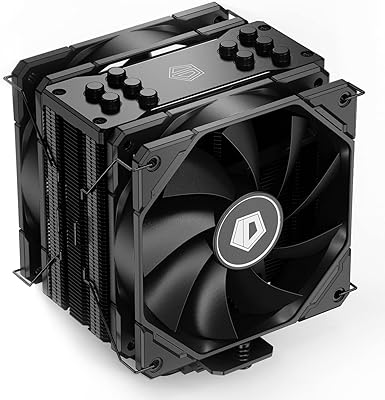
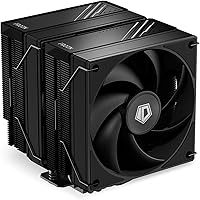
The ID-COOLING FROZN A620 Dual-Tower Air CPU Cooler sits in a competitive price bracket where buyers often wonder how much performance they are actually getting for their money. The short answer: quite a lot. This dual-tower air cooler covers both modern Intel and AMD sockets — including LGA1700, LGA1851, AM4, and AM5 — which means it will not go obsolete when you next upgrade your platform. At 153mm tall, it fits comfortably in most standard mid-tower cases without requiring a measuring tape and a prayer. It will not outperform high-end coolers costing two or three times as much, but at its price tier, it delivers well beyond what the specs on paper might suggest.
Features & Benefits

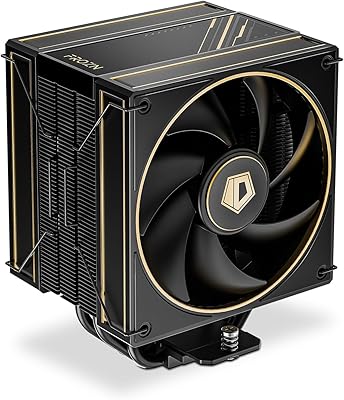
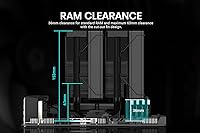
The FROZN A620 uses six copper heatpipes running from a direct-contact copper base up through an aluminum fin stack — a construction approach that punches well above this price range. Two 120mm FDB fans handle airflow duty, spinning quietly at low loads and ramping up predictably under stress thanks to PWM control. Fluid dynamic bearings tend to last longer and run quieter than the sleeve bearings common on cheaper coolers, which matters if you plan on keeping this build for a few years. The 270W TDP rating is generous enough for a Ryzen 7 or Core i7 without concern. For builders running tall RAM kits, the fin stack also has a notch cut into it that opens up meaningful extra clearance on the memory side.

Best For

ID-COOLING's black tower cooler makes the most sense for builders pairing it with a mid-range CPU — think Ryzen 5, Core i5, or even the lower end of Ryzen 7 and Core i7 territory. If you are coming from a stock cooler, the temperature drop will feel significant. The all-black finish also makes it a natural fit for anyone building a dark-themed system where a silver or white heatsink would look jarring. It supports AM5 and the latest Intel LGA1851 socket natively, so there is no hunting for separate mounting adapters. If you are a hardcore overclocker chasing maximum thermal headroom, pricier options exist. For everyone else building a clean, capable machine on a practical budget, it covers the brief well.

User Feedback

The community response to this dual-tower air cooler has been largely positive, with buyers frequently praising quiet idle operation and a noticeably cleaner experience versus stock Intel and AMD coolers. Thermal improvements over stock are consistently mentioned — nothing dramatic under heavy sustained load, but enough to reduce throttling concerns on warmer chips. The criticism that surfaces most often is not about performance; it is about the installation instructions, which some first-time builders found confusing, particularly around backplate and standoff assembly. A handful of users also noted that accessing the second RAM slot can be awkward depending on case layout. The 4.5-star average feels genuinely earned, though the total review count remains modest enough that the full picture may still be developing.

Pros

  • Substantial temperature drop over stock coolers, especially noticeable during gaming or multitasking sessions.
  • Dual FDB fans run near-silently at idle and ramp up gradually, never sounding intrusive during light use.
  • Covers both AMD AM5 and current Intel sockets natively, with no extra adapters needed.
  • The all-black finish looks cohesive in dark builds rather than clashing with the rest of the components.
  • Fin cutout design solves RAM clearance headaches without forcing buyers into expensive low-profile memory.
  • 270W thermal rating handles mainstream and upper-mid CPUs without thermal throttling concerns.
  • Dual-tower heatsink layout provides better airflow distribution than single-tower designs at a similar price.
  • FDB fan bearings are more durable long-term compared to cheaper sleeve-bearing alternatives.
  • Competitive value for the construction quality — copper base, copper heatpipes, and aluminum fins are not corners cut.
  • 153mm height fits most standard mid-tower cases without needing to verify compatibility obsessively.

Cons

  • Mounting instructions are not beginner-friendly; first-time builders have reported confusion around backplate assembly.
  • Accessing the second RAM slot after installation can be awkward in tighter cases with certain motherboard layouts.
  • The total review count is still modest, so the current rating may shift as more users report long-term experiences.
  • No RGB lighting option for builders who want the heatsink to contribute to their lighting setup.
  • At nearly 1.2kg, the cooler adds noticeable weight to the motherboard; not ideal if the system gets moved frequently.
  • Thermal performance plateaus quickly under sustained heavy workloads on more demanding processors.
  • Included thermal paste is functional but enthusiast builders may prefer to apply their own higher-quality compound.
  • Fan noise at maximum RPM is acceptable but not whisper-quiet — those sensitive to noise in full-load scenarios may notice it.

Ratings

The scores below for the ID-COOLING FROZN A620 Dual-Tower Air CPU Cooler were generated by our AI system after analyzing verified global user reviews, with spam, bot submissions, and incentivized feedback actively filtered out. Both the genuine strengths and the recurring frustrations buyers have reported are reflected transparently in each category. This is an honest snapshot of real-world ownership — not a marketing summary.

Thermal Performance
83%
Buyers consistently report double-digit temperature drops compared to stock coolers on chips like the Ryzen 5 7600X and Core i5-13600K. During gaming sessions and moderate workloads, the cooler keeps things controlled without the CPU ever feeling like a liability.
Under sustained heavy workloads — extended rendering, prolonged encoding runs — temperatures climb closer to the ceiling than enthusiast users would like. It handles mid-range chips well but starts to feel stretched on hotter, higher-end processors pushing consistent all-core loads.
Noise Level
81%
19%
At idle and light desktop use, the dual FDB fans are genuinely unobtrusive — most users say they forget the cooler is spinning at all. The PWM ramp-up is gradual and predictable, which means there are no jarring sudden spikes in fan noise during typical gaming sessions.
At full fan speed under heavy load, the noise is noticeable rather than silent. It is not harsh or shrill, but users who are particularly sensitive to fan noise in a quiet room will pick it up. It falls short of the near-inaudible experience that premium silent-focused coolers provide.
Value for Money
91%
At its price point, the combination of a dual-tower layout, copper heatpipes, FDB fans, and broad socket support is difficult to match from competing brands. Buyers who researched alternatives consistently concluded this dual-tower air cooler offers more hardware per dollar than most of its direct competitors.
The value proposition assumes you are using it on a mid-range CPU where it thrives. Pairing it with a more demanding chip and expecting flagship-tier performance creates a mismatch — at that point spending more on cooling is genuinely justified and the value calculation changes.
Installation Experience
67%
33%
The physical hardware quality — backplate, standoffs, and mounting brackets — feels solid and inspires confidence once everything is in place. Experienced builders familiar with aftermarket cooler installations generally report no issues getting it seated correctly on the first attempt.
First-time builders have flagged the instruction manual as a recurring pain point — identifying which hardware set corresponds to which socket is not clearly labeled, and the diagram quality leaves room for interpretation. Several reviews specifically mention spending extra time on the backplate step due to ambiguous guidance.
Build Quality
84%
The copper base feels machined to a reasonable finish, and the aluminum fins are consistent and free from the visible defects some budget coolers ship with. Fan frames are rigid, the all-black coating sits evenly across the heatsink, and nothing rattles or flexes when handled.
It does not feel as premium as coolers at a significantly higher price — the fin stack edges are functional rather than refined, and the fan clips, while secure, feel slightly plasticky compared to tool-free retention systems on pricier alternatives.
RAM Compatibility
78%
22%
The fin cutout design genuinely solves a real problem for builders running tall DDR5 kits, allowing clearance up to around 63mm on the memory side. Buyers with popular kits like G.Skill Trident Z5 or Corsair Vengeance DDR5 report no fitment issues when using the cutout positioning.
The standard clearance without using the cutout is limiting enough that buyers with taller RAM need to be aware of the fan positioning trade-off. Accessing the second DIMM slot after the cooler is fully installed also requires some patience depending on case layout and motherboard positioning.
Case Compatibility
86%
At 153mm in total height, this dual-tower air cooler clears the CPU cooler height limits of most popular mid-tower cases with room to spare. Builders using common enclosures like the Fractal Meshify C, Lian Li Lancool, or NZXT H-series cases report no fitment issues.
Compact mATX and ITX cases with tighter CPU cooler height restrictions are a real concern — 153mm is not extreme but it is not slim either. Buyers should always verify their specific case clearance before purchasing, particularly with smaller form-factor builds.
Socket Compatibility
93%
Coverage across both AMD AM5 and AM4 alongside Intel LGA1851, LGA1700, and older 115X platforms means the FROZN A620 works natively on virtually every current mainstream desktop CPU without needing third-party adapter kits. This is a genuine practical advantage for builders who upgrade platforms periodically.
The included hardware works well for current sockets, but the sheer number of brackets and parts in the box can add to installation confusion for users who have never done an aftermarket cooler install before and are unsure which pieces to set aside.
Aesthetics
79%
21%
The uniform all-black finish across the heatsink and fan frames looks intentional and cohesive inside a dark-themed build. Unlike silver or mixed-finish budget coolers, it does not visually clash with black motherboards, dark cases, or subtle addressable RGB setups nearby.
There is no RGB option for users who want the cooler itself to contribute to their lighting setup, which is an increasingly common expectation at this price tier. The aesthetic is clean but static, and the fins themselves are not particularly distinctive compared to more visually styled competitors.
Fan Quality
82%
18%
FDB bearings are a tangible step above the sleeve bearings found in many coolers at this price, translating into lower operating noise over time and better long-term reliability. The PWM control works responsively with major motherboard brands, and the fans spin up and down smoothly without hunting.
At peak RPM, the fans are audible and some users have noted a faint tonal quality at specific speed ranges. The fan clips, while functional, can be fiddly to attach to the heatsink during installation, particularly in a built system with limited hand clearance.
Packaging & Accessories
72%
28%
The cooler arrives well-protected and the included thermal paste is adequate for getting up and running immediately. All mounting hardware for supported sockets is present in the box, meaning no extra trips to source compatibility kits.
The instruction sheet is where ID-COOLING's packaging loses ground — it covers many socket variants but does so in a way that creates confusion rather than clarity, particularly for newer builders. A QR code linking to a video guide would go a long way here.
Long-Term Reliability
76%
24%
FDB fan bearings are rated for extended operational life and hold up well under normal thermal cycling. Users who have owned the cooler for over a year report no bearing noise degradation or unexpected performance drops, which suggests the core hardware is built to last.
The review base is still relatively modest given the product's age, which means long-term data beyond one to two years of use is limited. The black coating could show fingerprints or minor abrasion over time in accessible builds, though this is largely cosmetic.
Mounting Stability
80%
20%
Once fully seated and tightened, the cooler sits firmly on the CPU with no perceptible flex or movement. The backplate design provides good retention force across the heatsink base, which helps maintain consistent contact and thermal performance over time.
The weight of the assembled cooler at nearly 1.2kg means it is not ideal for systems that are frequently transported, and it places meaningful stress on the motherboard PCB without additional support. Some users in smaller cases noted the assembled mass felt imposing relative to the board.

Suitable for:

The ID-COOLING FROZN A620 Dual-Tower Air CPU Cooler is a strong pick for builders who want a meaningful upgrade over stock cooling without committing serious money to the cooling budget. It makes the most sense paired with a mid-range processor — a Ryzen 5 7600X, a Core i5-13600K, or similar chips that generate real heat under load but do not demand extreme thermal solutions. Builders working on a dark-themed system will appreciate that the all-black heatsink and fans look intentional rather than afterthought, fitting cleanly alongside dark cases and subtle RGB setups. Broad socket support across both current AMD AM5 and Intel LGA1700 and LGA1851 platforms means it works out of the box without hunting for adapter kits, which is a genuine convenience for anyone new to building. If you are sitting on a tall RAM kit and have worried about clearance, the offset fin cutout addresses that real frustration without requiring low-profile memory as a workaround.
Not suitable for:

The FROZN A620 is not the right tool if you are running a high-end processor under sustained workloads — think content creation, heavy video encoding, or anything that consistently pushes a flagship chip toward its thermal limits. At that tier, a premium tower cooler from a brand like Noctua or be quiet! will give you more headroom and longer-term confidence. Hardcore overclockers should also look elsewhere; this dual-tower air cooler is tuned for sensible, efficient operation rather than chasing the last few degrees under an aggressive manual overclock. Builders working inside a compact ITX or slim mATX case may find the 153mm height a tight fit or simply incompatible depending on the specific chassis. Finally, anyone who finds PC assembly intimidating should be aware that the mounting instructions have tripped up some first-time builders, so patience during installation is worth factoring in.

Specifications

  • Cooler Type: Dual-tower air cooler with an aluminum fin stack and copper base construction.
  • Height: The cooler stands 153mm tall, fitting comfortably in most standard mid-tower and full-tower PC cases.
  • Overall Dimensions: Full assembled dimensions measure 120mm × 140mm × 154mm (L × W × H).
  • Heatpipes: Six 6mm copper heatpipes run from the direct-contact base through the full height of the fin stack.
  • Base Material: The CPU contact base is machined copper for efficient heat absorption from the processor.
  • Fin Material: Aluminum fins make up the heatsink towers, providing a wide surface area for heat dissipation into the airstream.
  • Fan Size: Two 120mm × 120mm × 25mm fans are included, positioned as a push-pull pair across the fin stack.
  • Fan Bearing: Both fans use Fluid Dynamic Bearings (FDB), which offer quieter operation and longer service life than sleeve-bearing alternatives.
  • Fan Connector: 4-pin PWM connectors allow the motherboard to automatically regulate fan speed based on CPU temperature.
  • Fan Speed Range: Fan speed adjusts from approximately 500 RPM at idle up to 2000 RPM under full thermal load.
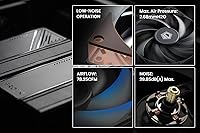
  • Max Airflow: At peak speed, the dual-fan setup moves up to 78.25 CFM of air through the heatsink.
  • Static Pressure: Maximum static pressure reaches 2.68 mmH2O, ensuring adequate airflow through the dense fin array.
  • Noise Level: At maximum fan speed the noise output measures 29.85 dB(A), which is relatively unobtrusive for an air cooler under load.
  • TDP Rating: Rated for up to 270W TDP, covering mainstream and upper-mid-range desktop processors without thermal throttling concerns.
  • Total Weight: The cooler weighs 1190g fully assembled, so secure motherboard tray support is recommended during transport.
  • RAM Clearance: Standard clearance on the memory side is 36mm, expandable to 63mm by positioning the fan to use the built-in fin cutout.
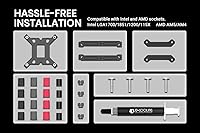
  • Socket Support: Compatible with Intel LGA1851, LGA1700, LGA1200, LGA1151, LGA1150, LGA1155, and LGA1156, as well as AMD AM5 and AM4.
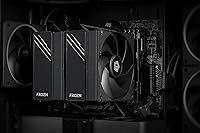
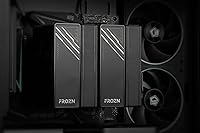
  • Color: The heatsink, fan frames, and fan blades are all finished in black for a consistent all-black appearance.
  • Voltage: Both fans operate at 12V DC via the standard 4-pin motherboard fan header.
  • Thermal Paste: Thermal paste is included in the package, pre-applied or separately supplied for initial installation use.

Related Reviews

Cooler Master MasterAir MA824 Stealth CPU Cooler
81%
88%
Thermal Performance
91%
Noise Level
93%
RAM Clearance
72%
Installation Experience
89%
Build Quality & Materials
More
Cooler Master Hyper 622 Halo Dual Tower CPU Cooler
82%
83%
Thermal Performance
88%
Noise Level
89%
Ease of Installation
67%
RAM Clearance
86%
Build Quality
More
ID-COOLING FROZN A410 ARGB CPU Cooler
81%
83%
Thermal Performance
74%
Noise Level
91%
Value for Money
78%
Build Quality
89%
Ease of Installation
More
ID-COOLING FROZN A410 GDL CPU Cooler
88%
93%
Cooling Performance
91%
Noise Level
88%
Build Quality
89%
Ease of Installation
85%
Compatibility
More
ID-COOLING FROZN A400 Black CPU Cooler
85%
85%
Cooling Performance
90%
Noise Level
88%
Ease of Installation
91%
Size and Compatibility
86%
Build Quality
More
ID-COOLING SL240 CPU Liquid Cooler
88%
91%
Cooling Performance
93%
Noise Level
88%
Customization Options (LCD & RGB)
84%
Installation Ease
89%
Build Quality
More
ID-COOLING IS-55 Low Profile CPU Cooler
79%
72%
Thermal Performance
84%
Noise Level
81%
Build Quality
83%
Ease of Installation
88%
RAM Compatibility
More
ID-COOLING FX240 PRO 240mm AIO CPU Cooler
78%
83%
Thermal Performance
67%
Pump Noise & Vibration
78%
Fan Performance & Noise
74%
Build Quality & Materials
86%
Installation Ease
More
ID-COOLING SE-225-XT CPU Cooler
85%
88%
Cooling Performance
91%
Noise Level
85%
Build Quality
89%
Compatibility
80%
Ease of Installation
More
ID-COOLING FX240 INF 240mm AIO Liquid Cooler
81%
83%
Thermal Performance
81%
Noise Level
91%
Design & Aesthetics
72%
ARGB & Lighting Control
78%
Build Quality & Materials
More

FAQ

Yes, the ID-COOLING FROZN A620 Dual-Tower Air CPU Cooler includes LGA1851 mounting hardware in the box, so no separate adapter kit is required. Intel's newer socket shifted the mounting standard, but ID-COOLING updated the included hardware to cover it natively.

Standard clearance on the memory side is 36mm, but the fin stack has a built-in cutout that opens up clearance to around 63mm when you position the front fan to take advantage of it. At 45mm your sticks should fit comfortably using that offset. If you are still unsure, check whether the cutout aligns with your specific DIMM slot positioning on your motherboard.

At idle or light desktop use you will barely notice it — the fans spin slowly and quietly. During extended gaming sessions the fans ramp up noticeably, but the noise level stays within a range most people find acceptable with a case panel on. It is not as whisper-quiet as premium silent-focused coolers, but it is far less intrusive than a stock cooler running at full speed.

The hardware itself is straightforward, but several users have noted that the printed instructions can be confusing — particularly around identifying which backplate and standoffs apply to your socket. It helps to look up a short video walkthrough for your specific socket type before starting. Take your time with the backplate step and confirm the correct hardware before tightening anything down.

At 153mm tall, the FROZN A620 fits most popular mid-tower cases without issue. Both the Meshify C and H510 have CPU cooler clearance well above 160mm, so you have comfortable headroom. Always check your specific case spec sheet for CPU cooler height limits, but for standard mid-towers this cooler is a safe choice.

For moderate workloads — gaming, light content creation, everyday multitasking — this dual-tower air cooler will handle those chips reasonably well. Under extended heavy workloads like prolonged video encoding or CPU-intensive rendering, you may see temperatures climb higher than with a premium cooler. It is workable for those CPUs in typical use cases, but if you are regularly pushing the chip hard for long periods, investing in a higher-tier cooler would give you more comfortable headroom.

Thermal paste is included in the package. The bundled compound is adequate for normal use and getting things running right away. If you want to squeeze out every last fraction of a degree, some enthusiasts prefer to use a premium aftermarket paste, but for most users what comes in the box is perfectly functional.

The black coating on the heatsink is a standard powder or anodized finish typical of this product category, and it holds up well under normal operating conditions. Heat cycling and airflow do not cause visible degradation under typical use. It is not a painted surface prone to chipping from contact during installation, though careful handling is always good practice.

Yes, both fans are attached with standard fan clips, so you can remove either one independently. Running it with just one fan reduces overall airflow and will raise temperatures under load, but it is a legitimate option if RAM clearance is the hard constraint. Just keep in mind that performance will take a moderate hit compared to the full dual-fan setup.

The difference is meaningful and immediately noticeable, especially under sustained load. Stock coolers are designed to keep the processor within spec under typical conditions, but they do it noisily and with less temperature headroom. Switching to this dual-tower air cooler typically brings CPU temps down by a double-digit margin under gaming or workload stress, and the fan noise at equivalent load is considerably lower. For anyone still on a stock cooler, it is a worthwhile upgrade.

Where to Buy