Overview
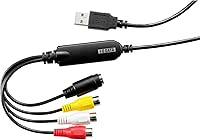
The I-O DATA GV-USB2/E is a compact USB capture dongle from a well-regarded Japanese peripheral brand, built specifically for one job: pulling video off aging VHS tapes and 8mm cassettes before those memories fade permanently. It connects via USB 2.0 Type A with no external power needed, keeping setup refreshingly simple. The brand behind it has been making storage and capture peripherals for decades, and this capture dongle reflects that practical engineering philosophy. Sitting at a mid-range price point, it slots neatly above the cheapest generic alternatives without veering into professional territory — which tells you exactly who the target buyer is.
Features & Benefits
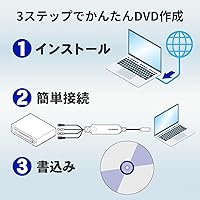
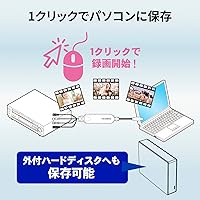
The capture dongle records analog video natively at 480p — that is the actual resolution ceiling of VHS and 8mm source material anyway — with a 720p upscale option for cleaner playback. The bundled LightCapture software handles recording with a single click and shows a live preview on your monitor while you capture, making it easy to verify the tape is playing correctly. You can record directly to DVD without touching your hard drive, or save files locally for editing first. Setup relies on a CD-ROM installer, which is handy if your PC has a disc drive but a minor hurdle for modern laptops that lack one. At just over two inches long, the stick itself barely takes up any space.
Best For
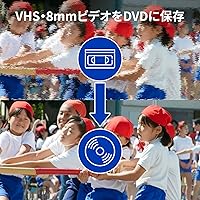
This VHS-to-digital adapter is squarely aimed at people sitting on decades of home video tapes they have been meaning to digitize — the kind slowly deteriorating in a closet somewhere. It is particularly well suited to first-time digitizers who want guided software without configuring OBS or any third-party tools. That said, this is strictly a Windows-only device; Mac households should look elsewhere. It also suits people who prefer producing physical DVD copies over managing cloud storage or network drives. What it is not designed for is high-definition capture or any modern HDMI source — keep expectations realistic, and it genuinely delivers.
User Feedback
Across roughly 1,200 ratings, the I-O DATA USB capture stick holds a 4.0 out of 5 average — a solid score suggesting most buyers got what they came for. Common praise centers on how painless initial setup is and how reliably it captures tapes without fussing over settings. On the flip side, some users have flagged audio sync issues, a known weak point in USB-based capture at this price tier. The CD-ROM installer draws occasional frustration from laptop users without optical drives. A few reviewers noted it compares favorably against cheaper generic alternatives, implying the build consistency justifies paying a little more.
Pros
- Plug-and-play USB setup works reliably on Windows 11, 10, and 8.1 without driver headaches.
- LightCapture software makes one-click recording accessible even for first-time users.
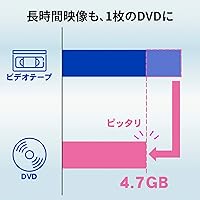
- Direct-to-DVD recording lets you skip file management entirely and burn tapes straight to disc.
- Live preview on your monitor lets you confirm signal quality before committing to a full capture.
- The tiny dongle form factor fits in a pocket and adds almost no clutter to a workspace.
- Performs more consistently than cheaper no-name alternatives on longer recording sessions.
- Printed instruction manual provides step-by-step guidance that genuinely helps less confident users.
- Backed by I-O DATA, a manufacturer with a long track record in Japanese peripheral hardware.
- Compatible with both VHS decks and 8mm camcorders, covering the two most common analog tape formats.
- Captures source material faithfully at its native resolution without introducing additional artifacts.
Cons
- Audio drift on recordings over 60 minutes is a recurring complaint that requires workarounds.
- CD-ROM installer creates a real barrier for laptops and mini PCs without optical drives.
- No Mac support at all — a detail that catches buyers off guard more often than it should.
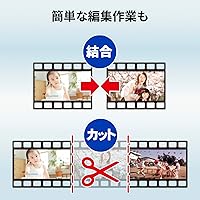
- LightCapture offers minimal editing depth; meaningful post-production requires a separate application.
- Video quality is only as good as the original tape — no image correction or noise reduction is applied.
- The short composite cable can create awkward cable tension if the VCR sits far from the PC.
- Software interface looks and feels dated compared to modern capture applications.
- Some users have reported driver reinstallation needed after major Windows update cycles.
Ratings
The I-O DATA GV-USB2/E has been scored by our AI engine after analyzing verified global buyer reviews, with spam, bot submissions, and incentivized feedback actively filtered out. The scores below reflect an honest synthesis of what real users experienced — the strengths that earned consistent praise and the friction points that repeatedly surfaced in critical feedback. Both sides are represented without softening.
Ease of Setup
Capture Reliability
Audio Sync Quality
Software Usability
Video Output Quality
Build Quality
Windows Compatibility
Direct-to-DVD Recording
Value for Money
Portability & Form Factor
Instruction Manual Quality
Long Tape Performance
Driver Stability
Suitable for:
The I-O DATA GV-USB2/E is a strong fit for anyone sitting on a collection of VHS tapes or 8mm cassettes that haven't been touched in years and need a low-friction way to preserve that footage digitally. It is particularly well matched to older or less tech-savvy users who would struggle with configuring open-source capture tools or managing raw video files — the bundled LightCapture software removes most of that complexity. If your goal is to produce physical DVD copies of home movies to share with family, the direct-to-DVD workflow makes that achievable without needing any video editing knowledge. Windows PC households where someone just wants to work through a stack of tapes methodically and get the job done will find this capture dongle reliable and approachable. The compact size also suits people who don't have a permanent digitizing station and need to set up and pack away the equipment between sessions.
Not suitable for:
The I-O DATA GV-USB2/E has real limitations that make it the wrong choice for a significant portion of buyers who might otherwise consider it. Mac users should stop here — there is no macOS support, and no workaround changes that. Anyone expecting high-definition output will also be disappointed; VHS and 8mm are standard-definition formats, and this adapter captures them faithfully at that ceiling without any meaningful image enhancement. If you plan to archive long tapes — think 90-minute home movies or feature-length recordings — recurring audio sync drift on extended captures is a documented frustration that requires splitting sessions into shorter segments. Users who own a modern slim laptop without an optical drive may find the CD-ROM installer an immediate obstacle, since there is no official alternative download path included in the box. Finally, videographers or content creators needing HDMI input, higher bit-rate capture, or professional-grade audio control should be looking at a fundamentally different class of hardware.
Specifications
- Brand: Manufactured by I-O DATA, a long-established Japanese peripheral hardware company.
- Model: The exact model designation is GV-USB2/E, part of I-O DATA's GV capture series.
- Interface: Connects to any host PC via a standard USB 2.0 Type A connector with no external power supply required.
- Form Factor: Ultra-compact dongle measuring 2.26 × 0.72 × 0.51 inches, small enough to store in a drawer or carry in a bag.
- Weight: The unit weighs 7 ounces including its attached composite input lead.
- Analog Input: Accepts composite video signals from VHS decks, 8mm camcorders, and other standard analog video sources.
- Capture Resolution: Native capture is 480p (standard definition); a 720p upscaled output option is also available.
- Compatible OS: Officially supports Windows 11, Windows 10, and Windows 8.1 only — no macOS or Linux support is provided.
- Included Software: Ships with LightCapture, a bundled video recording application that supports one-click capture, live preview, and basic editing.
- Installer Method: Software installation is handled via an included CD-ROM disc, requiring an optical drive on the host PC.
- Direct-to-DVD: Supports direct DVD recording mode, allowing video to be written to disc without first saving to a hard drive.
- HDD Recording: Also supports saving captured video files directly to the PC hard drive for later editing or archiving.
- Live Preview: The LightCapture software displays a real-time preview of the incoming video signal on the connected computer monitor during capture.
- Video Standard: Designed to capture NTSC and PAL composite video signals from consumer analog tape equipment.
- First Available: This product became available on Amazon in August 2023, reflecting a relatively recent production run of an established design.
- Origin: Designed and manufactured in Japan under I-O DATA's quality standards for the consumer peripheral market.
- Instruction Manual: A printed instruction manual is included in the box, covering setup, recording, DVD creation, and basic troubleshooting steps.
Related Reviews

Lemon Up 4 oz Talc-Free Dusting Powder

Sunday Riley C.E.O. 15% Vitamin C Serum

Sunday Riley C.E.O. Glow Vitamin C & Turmeric Face Oil 0.5oz
LENRUE E-1103 Computer Soundbar
Sennheiser e 604
Logitech C925e
TecTecTec Team8 E Golf GPS Earbuds
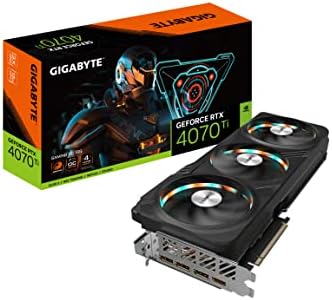
GIGABYTE GV-N407TGAMING OC-12GD
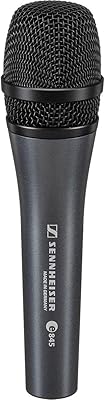
Sennheiser E 845 Supercardioid Microphone