Overview

The GoTEK SFR1M44-U100 USB Floppy Drive Emulator is a hardware replacement designed to breathe new life into machines that still depend on aging 3.5-inch floppy drives — industrial controllers, older CNC equipment, and embroidery machines chief among them. Instead of hunting down deteriorating floppy disks, this floppy emulator slots into the existing 34-pin floppy interface and reads data directly from a USB flash drive. It runs on an AT32F415 Cortex-M4 chip with GoTEK's default DOS/FAT12 firmware, meaning it works out of the box for IBM/PC-compatible systems. This is a niche tool built for a technical audience — if your machine needs a floppy drive, this USB drive replacement is worth a serious look.
Features & Benefits

One of the more practical advantages of this floppy emulator is its ability to store up to 1000 virtual partitions on a single USB flash drive — each partition mimicking a separate 1.44MB floppy disk. It connects through the same flat ribbon cable your old drive used, drawing power at 5V DC, so there is no complicated rewiring involved. The emulator maintains a 500 kbps transfer rate using MFM encoding, keeping it functionally identical to the original drive from the host machine's perspective. One critical step before anything works: the USB flash drive must be formatted to FAT12 at 1.44MB. Skip that, and the GoTEK emulator will not recognize the drive at all.

Best For

This USB drive replacement makes the most sense for embroidery machine owners who need to move stitch pattern files without scrambling for a working floppy disk. It is equally valuable in industrial settings — CNC operators and PLC technicians managing legacy control equipment will find it a reliable drop-in fix. Retro computing hobbyists with IBM PC-compatible hardware can use it straight out of the box. Amiga enthusiasts can also benefit, but they will need to flash the device with FlashFloppy firmware first — the default GoTEK firmware does not support Amiga disk formats. For the right machine, it is exactly what is needed.

User Feedback

Buyers who have installed the GoTEK emulator in embroidery machines are generally satisfied — most report a smooth setup and immediate functionality once the USB drive is correctly formatted. That last part is where things get bumpy. A recurring complaint involves the FAT12 formatting requirement: it is not prominently explained, and several users wasted time troubleshooting what turned out to be a simple formatting issue. Amiga users raise a separate concern — flashing the firmware is doable but adds an unexpected step for casual users. On the upside, industrial operators running the unit in high-uptime environments report consistent, reliable performance. A few reviewers also noted that ribbon cable orientation labeling could be clearer, leading to backwards installations on the first attempt.

Pros

  • Replaces a failing 3.5-inch floppy drive without requiring any rewiring or case modifications.
  • Up to 1000 virtual disk partitions on one USB flash drive means you can store an entire library of floppy images.
  • Works out of the box with IBM/PC-compatible systems running DOS or FAT12-based software.
  • The 34-pin ribbon cable connection is the same standard used by most legacy machines, making installation familiar.
  • Runs on 5V DC power, which virtually every older system with a floppy bay already supplies.
  • Maintains the same 500 kbps data transfer rate as an original floppy drive, so host machines detect no difference.
  • FlashFloppy firmware support opens the door to Amiga and other non-IBM platforms for users willing to flash it.
  • Compact and lightweight, fitting cleanly into the same drive bay the original occupied.
  • Reported to be reliable in industrial uptime environments where consistent read performance matters.

Cons

  • The FAT12 formatting requirement is not clearly communicated in the box, catching many buyers off guard.
  • Included documentation is minimal and lacks step-by-step guidance for first-time installers.
  • Ribbon cable orientation is not always obvious, and a backwards connection is a common first-install mistake.
  • Amiga compatibility requires flashing third-party firmware, which is an extra barrier for less technical users.
  • USB 1.1 standard limits future-proofing, though it is functionally adequate for the emulated 1.44MB capacity.
  • No display or selector dial included — navigating between virtual disk partitions requires a separately purchased or added interface.
  • FAT12 formatting tools are not bundled with the device, so users must source and run them independently.
  • The 1000-partition limit sounds generous, but actual USB drive capacity still constrains how many disk images fit.

Ratings

The GoTEK SFR1M44-U100 USB Floppy Drive Emulator scores below are generated by AI after analyzing verified global user reviews, with spam, bot-generated, and incentivized feedback actively filtered out. Ratings reflect the honest consensus of real buyers — from embroidery hobbyists to industrial maintenance technicians — and transparently capture both what this floppy emulator does well and where it genuinely falls short.
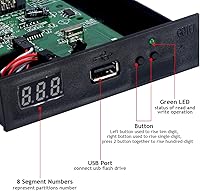
Ease of Installation
74%
26%
For users replacing a floppy drive in an embroidery machine or CNC unit, the physical swap is straightforward — the 34-pin ribbon connector and 5V power plug drop right into the existing slots. Most buyers with even light hardware experience report getting the unit seated and powered in under fifteen minutes.
The ribbon cable orientation is not clearly marked, and a backwards installation is one of the most common first-attempt mistakes reported. Without a proper setup guide in the box, first-timers often spend additional time troubleshooting what turns out to be a simple cable flip.
USB Drive Compatibility
68%
32%
Once correctly formatted, a standard USB flash drive works reliably and gives users access to up to 1000 virtual disk partitions — a huge practical upgrade over managing physical floppy disks. Buyers appreciate that virtually any affordable USB drive gets the job done.
The FAT12 formatting requirement at exactly 1.44MB is a significant friction point that the packaging barely addresses. A meaningful share of negative reviews stem entirely from this single step being missed, leading buyers to wrongly conclude the unit is defective.
Compatibility with Target Machines
83%
The GoTEK emulator performs reliably across a wide range of IBM/PC-compatible legacy machines, including embroidery systems and industrial PLCs, where it is used daily without issues. Industrial users in particular praise its consistent read performance in demanding workshop environments.
Compatibility is firmly limited to machines using the 34-pin IBM/PC interface with FAT12 disk formats — anything outside that scope requires firmware modifications or is simply unsupported. Buyers with less common legacy hardware occasionally discover incompatibilities only after purchase.
Firmware Flexibility
71%
29%
The ability to flash third-party FlashFloppy firmware meaningfully extends the emulator's usefulness beyond IBM/PC systems, opening it up to Amiga and other platforms that the default firmware cannot handle. Technically confident users see this as a genuine strength.
Out of the box, non-IBM users are essentially left without a working solution until they complete a firmware flash — a process that is not documented anywhere in the included materials. Amiga users in particular have flagged this as an unexpected hurdle that should be disclosed more prominently before purchase.
Documentation & Setup Guidance
41%
59%
For experienced hardware technicians or users who have installed a GoTEK emulator before, the minimal documentation is not a real obstacle. The core installation steps are simple enough that anyone with relevant background can get up and running without much reference material.
For the large portion of buyers who are embroidery hobbyists or non-technical machine operators, the lack of clear, step-by-step setup instructions is a serious problem. The FAT12 formatting step, ribbon cable orientation, and firmware distinctions are all left for users to figure out independently, which drives a disproportionate number of frustrated reviews.
Build Quality
78%
22%
The unit feels solid for its weight class, with a clean black housing that fits standard drive bays without gaps or rattling. Industrial buyers running it in workshop conditions report no structural failures even after extended continuous use.
Some users note that the board and connector labeling could be more legible, particularly around pin 1 orientation. The overall aesthetic is functional rather than refined, which is acceptable for its use case but may stand out in more visible machine panels.
Value for Money
82%
18%
Compared to hunting for original floppy drives — which are increasingly scarce, unreliable, and expensive — this USB drive replacement offers a cost-effective and long-term solution. Buyers who factor in the cost of sourcing physical floppy disks consistently rate the value favorably.
Users who run into setup difficulties and require additional tools, formatted USB drives, or separate partition selector hardware find that the total cost of ownership climbs higher than the base price suggests. Budget-focused buyers should account for these potential add-ons.
Partition Management
63%
37%
The concept of storing up to 1000 virtual disk images on a single USB drive is genuinely useful, particularly for embroidery users managing large pattern libraries or CNC operators with multiple program files. It removes the physical disk management problem entirely.
The base unit has no built-in display or navigation controls, so switching between partitions requires an external OLED and rotary encoder add-on that is sold separately. Without that upgrade, partition switching is a clunky experience that undermines the otherwise practical storage capacity.
Data Transfer Reliability
87%
At 500 kbps using MFM encoding, the emulator matches original floppy drive transfer behavior closely enough that host machines detect no functional difference. Industrial users report clean, error-free reads across thousands of cycles in production environments.
A small number of users report occasional read errors when using very large USB drives or certain off-brand flash drives, suggesting some sensitivity to USB media quality. Sticking to reputable, smaller-capacity drives largely eliminates this concern.
Physical Fit & Form Factor
89%
The 3.5-inch form factor is a true drop-in match for the drive bays found in legacy embroidery machines and industrial enclosures. No bracket modifications or adapters are needed in the vast majority of installations, which buyers consistently appreciate.
A small subset of machines with non-standard bay depths or proprietary mounting hardware may require minor adapter work. This is rare, but worth confirming against your specific machine's specifications before installing.
Long-Term Durability
81%
19%
Users who have had the GoTEK emulator running in industrial equipment for a year or more generally report no hardware failures or degraded performance. The solid-state nature of the unit gives it a clear reliability edge over mechanical floppy drives prone to read-head wear.
There is limited long-term data available for extreme environments involving high heat, vibration, or dust — conditions common in some manufacturing settings. Users in such environments should consider protective enclosures as a precaution.
Out-of-Box Readiness
53%
47%
For IBM/PC-compatible machines running DOS or FAT12 software, the default firmware is pre-loaded and the physical hardware is ready to install immediately. Experienced users can have it operational in a single session without any firmware work.
The requirement to separately source a FAT12 formatting tool, properly prepare the USB drive, and navigate undocumented cable orientation means the unit is far from truly ready out of the box for most buyers. The gap between expectation and actual setup effort is one of the most consistent criticisms across user reviews.
Seller & Brand Support
59%
41%
GoTEK is a recognized name in floppy emulation hardware with an established product line, and the unit benefits from a broader community of users who share setup guides and firmware resources online. This unofficial support network partially offsets the lack of official documentation.
Official manufacturer support for setup questions, firmware troubleshooting, or compatibility edge cases is minimal. Buyers who run into problems are largely dependent on third-party forums and community resources rather than any formal GoTEK support channel.

Suitable for:

The GoTEK SFR1M44-U100 USB Floppy Drive Emulator is the right call for anyone maintaining equipment that still relies on a physical 3.5-inch floppy drive and has no practical path to a modern interface upgrade. Embroidery machine owners are perhaps the most common buyers — if you need to load stitch pattern files onto a Brother, Janome, or similar older model, this floppy emulator eliminates the frustrating hunt for working floppy disks entirely. Industrial technicians keeping CNC routers, PLC controllers, or older manufacturing equipment running will also find it a dependable drop-in fix, especially in environments where sourcing original drives is increasingly difficult. Retro computing hobbyists with IBM PC-compatible setups can use it straight out of the box without touching any firmware. Small repair shops that service older machinery with floppy interfaces will appreciate having a reliable, repeatable solution they can deploy across multiple machines.
Not suitable for:

Anyone expecting a plug-and-play experience without any preparation will likely run into frustration — the GoTEK SFR1M44-U100 USB Floppy Drive Emulator requires the USB flash drive to be manually formatted to 1.44MB FAT12 before it will be recognized, and that step is easy to miss if you skim the documentation. Users with non-IBM legacy hardware, such as Amiga computers, cannot use this floppy emulator in its default state; it requires flashing third-party FlashFloppy firmware, which involves a separate process that may not be comfortable for everyone. If your machine uses a different floppy interface pin count or operates at a different voltage, this GoTEK emulator is not compatible without hardware modifications. Buyers who need a simple file transfer solution for a modern PC should look elsewhere entirely — this is not a general-purpose USB floppy drive and will not work that way. Those without any tolerance for light technical setup work should weigh that carefully before purchasing.
Specifications

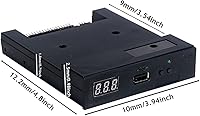
  • Form Factor: Designed as a standard 3.5-inch unit, it fits directly into the same drive bay as the original floppy drive it replaces.
  • Emulated Capacity: Each virtual partition emulates a 1.44MB 2HD floppy disk, matching the capacity of a standard double-density floppy.
  • Interface: Connects via a 34-pin flat ribbon cable, the same connector used by virtually all standard floppy drive installations.
  • Power Supply: Draws power at 5V DC, supplied through the same connector used by the original floppy drive in most legacy systems.
  • Transfer Rate: Operates at a data transfer rate of 500 kbps using MFM encoding, matching the performance of a genuine 1.44MB floppy drive.
  • Disk Geometry: Emulates 80 cylinders, 160 tracks, 18 sectors per track, and 512 bytes per sector — identical to standard 1.44MB floppy geometry.
  • USB Standard: Uses a USB 1.1 interface for the flash drive connection, which is sufficient for the emulated 1.44MB capacity per partition.
  • Virtual Partitions: A single USB flash drive can hold up to 1000 virtual disk partitions, each functioning as an independent 1.44MB floppy image.
  • USB Format: The USB flash drive must be pre-formatted to FAT12 at 1.44MB before the GoTEK emulator will recognize and read it.
  • Default Firmware: Ships with GoTEK OEM firmware configured for IBM/PC-compatible systems using a 34-pin interface and DOS/FAT12 disk format.
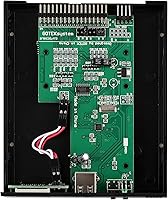
  • Processor Chip: Powered by an AT32F415 Cortex-M4 microcontroller, which handles the floppy emulation logic and USB communication.
  • Firmware Support: Compatible with third-party FlashFloppy firmware, which can be flashed onto the device to support Amiga and other non-IBM platforms.
  • Dimensions: Package dimensions measure 5.51 x 4.37 x 1.38 inches, consistent with a standard 3.5-inch drive bay unit.
  • Weight: The unit weighs 5.1 ounces, making it a lightweight drop-in replacement with no structural modifications required.
  • Color: The faceplate and housing are black, which suits most standard equipment bays without visual mismatch.
  • Compatibility: Intended for IBM/PC-compatible machines out of the box; Amiga and other platforms require a manual firmware flash before use.
  • Encoding Method: Uses Modified Frequency Modulation (MFM) encoding, the same method used by original 1.44MB floppy drives.
  • Manufacturer: Produced by GoTEK, a manufacturer specializing in floppy drive emulation hardware for industrial and legacy computing applications.

Related Reviews

G-Technology G-DRIVE Mobile 4TB Portable Hard Drive
77%
93%
Build Quality
91%
Mac Compatibility
61%
Transfer Speed
88%
Portability
58%
Value for Money
More
G-Technology 2TB G-DRIVE Mobile USB-C Portable External Hard Drive
88%
91%
Portability
88%
Transfer Speed
89%
Build Quality
94%
Ease of Use (Plug-and-Play)
92%
Compatibility (Mac/Windows)
More
G-Technology G-DRIVE Mobile 1TB Portable Hard Drive
75%
88%
Build Quality
93%
Mac Compatibility
91%
Portability
57%
Transfer Speed
62%
Value for Money
More
WAVLINK WL-ST334UA Dual-Bay USB 3.0 Hard Drive Docking Station
72%
83%
Offline Cloning Reliability
74%
Transfer Speed
79%
Build Quality
91%
Ease of Setup
38%
Mac Compatibility
More
ikuai 3.5″ USB 3.0 Hard Drive Enclosure
80%
93%
Ease of Setup
71%
Build Quality
62%
Cable Quality & Reliability
88%
Drive Compatibility
74%
Data Transfer Speed
More
SSK SD300 256GB USB Flash Drive
82%
83%
Transfer Speed
88%
Build Quality
79%
Value for Money
72%
USB-C Compatibility
92%
Plug-and-Play Setup
More
YIGORN 256GB Encrypted USB Drive
84%
91%
Security Features
88%
Fingerprint Recognition Speed
89%
Build Quality & Durability
84%
Data Transfer Speed
85%
Ease of Use
More
AOIRHLA 512GB USB Flash Drive
87%
87%
Performance
89%
Data Transfer Speed
82%
Compatibility
91%
Encryption and Security
95%
Portability and Size
More
SSK 2TB USB SSD Drive
85%
89%
Performance (Read/Write Speed)
91%
Build Quality & Durability
85%
Portability & Size
77%
Compatibility with Devices
90%
Waterproof & Shock Resistance
More
ThePhotoStick Omni 128GB USB Flash Drive
72%
88%
Multi-Device Compatibility
63%
Ease of Setup
54%
Transfer Speed
71%
Storage Capacity
61%
Build Quality & Durability
More

FAQ

Yes, and this is the step most people miss. Your USB drive must be formatted specifically to 1.44MB FAT12 format before the GoTEK emulator will recognize it. Standard FAT32 or exFAT formatting will not work. You can use a tool like the official GoTEK USB format utility or a compatible third-party tool to prepare the drive correctly.

In most cases, yes. The GoTEK SFR1M44-U100 USB Floppy Drive Emulator is widely used as a replacement in older embroidery machines that have a standard 3.5-inch floppy drive with a 34-pin connector. That said, it is worth double-checking that your specific machine uses a 34-pin interface and a 1.44MB DOS/FAT12 format before purchasing.

Not straight out of the box. The default firmware is configured for IBM/PC-compatible systems and does not support Amiga disk formats. To use it with an Amiga, you will need to flash the device with FlashFloppy firmware, which is a free open-source project. The process is manageable, but it does require some patience and basic technical comfort.

The base unit does not include a built-in display or selector buttons, so you will need to navigate partitions through an external interface or add-on. Many users pair this GoTEK emulator with an OLED display module and rotary encoder to make partition switching more practical. These are typically available separately and attach to header pins on the board.

This is a common stumbling block. The ribbon cable has a keyed edge — usually a red or colored stripe on one side — that should align with pin 1 on the connector. The board itself should have pin 1 marked, but the labeling can be faint. If the machine fails to detect the drive after installation, reversing the cable orientation is the first thing to check.

Almost any USB flash drive will work, but smaller capacities are fine since each partition only emulates 1.44MB. A 1GB or 2GB drive is more than sufficient to hold hundreds of virtual disk images. Very large drives are not necessary and may occasionally cause compatibility quirks depending on how they are partitioned.

It is designed exactly for that use case. As long as your CNC machine or PLC uses a standard 3.5-inch floppy bay with a 34-pin interface and expects IBM/PC-compatible FAT12 formatted disks, this USB drive replacement should work as a direct swap. Many industrial users report stable, consistent performance even in demanding uptime environments.

The emulator itself connects to your legacy machine, not directly to a modern Windows PC. However, you would use a modern PC to create and write the virtual disk image files onto the USB flash drive. Tools like WinImage or HxC Floppy Emulator Manager run on Windows and can help you create properly formatted FAT12 disk images.

Flashing the wrong firmware can cause the device to stop functioning correctly, though it is usually recoverable by re-flashing. If you do not need Amiga or other non-IBM support, there is no reason to touch the firmware at all — the default GoTEK firmware works well for standard IBM/PC and DOS-based machines. Only flash if you have a specific reason to do so.

Generally no, as long as you let any active read or write operation complete before switching partitions. Treat each partition like a real floppy disk — avoid swapping while a machine is actively writing. In practice, most machines using this type of emulator are reading files rather than writing to them, so switching partitions mid-operation is rarely an issue.