Overview

ThePhotoStick Omni 128GB USB Flash Drive is a multi-connector backup device built for people who are tired of juggling different cables and cloud subscriptions just to keep their photos safe. It covers all the major bases — iPhone, Android, Windows, and Mac — from a single stick small enough to toss in a pocket. That said, it isn't quite the plug-and-play experience some buyers expect. You'll need to download a companion app before anything actually backs up, which adds a setup step worth knowing about upfront. At its mid-range price, it sits in interesting territory: more capable than a basic single-port drive, but requiring a bit more patience than advertised.
Features & Benefits

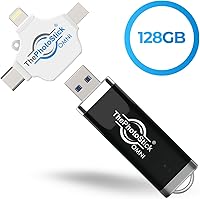
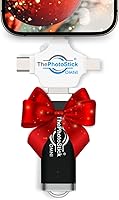
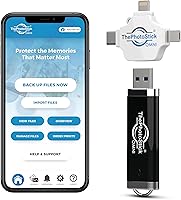
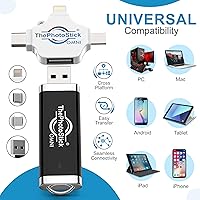
The headline feature here is the four built-in connectors. The Lightning end plugs into iPhones and older iPads, USB-C handles newer Android phones and modern Macs, microUSB covers older Android devices, and USB-A works with virtually any standard laptop or desktop port. That alone removes a lot of friction. The 128GB capacity is genuinely roomy — enough to hold tens of thousands of photos or a sizeable video library. The automatic scanning feature is convenient too; the app finds media files on its own without requiring manual selection. Just keep in mind that write speeds cap around 20 MB/s, so transferring a large video archive will take longer than you might expect, even though reads are impressively fast.

Best For

This multi-connector flash drive is a particularly natural fit for households where multiple device types coexist — one person on iPhone, another on Android, everyone sharing a family PC. Rather than maintaining separate backup solutions, it consolidates things into a single drive. It also works well for older adults or anyone who finds cloud services confusing or simply prefers having files somewhere physical and tangible. Travelers with spotty Wi-Fi will appreciate that none of this requires an internet connection. And if you're looking for a practical gift for a parent or grandparent who's been meaning to organize years of phone photos, this backup drive makes a genuinely useful option — assuming they're comfortable following a few app-guided steps.

User Feedback

With over 8,000 ratings and a 3.9-star average, the Omni photo stick has a divided but telling review profile. The most consistent praise centers on sheer convenience — buyers love not having to carry multiple adapters or manage separate cloud accounts. Critical reviews, though, raise some fair points. Several users mention that the initial Android setup is confusing, with the app not behaving as expected. Others note that the rotating connector mechanism shows wear over time. There's also a thread of complaints about actual usable storage falling short of the advertised 128GB, which is worth factoring in. Not a universally loved product, but for the right user, it clearly delivers on its core promise.

Pros

  • Four connector types in one body — Lightning, USB-C, USB-A, and microUSB — cover virtually every device you own.
  • No monthly fees or cloud subscriptions required; pay once and the storage is yours.
  • The automatic media-scanning app removes the need to manually locate or organize photo folders.
  • 128GB holds tens of thousands of photos, making it a viable long-term archive for most families.
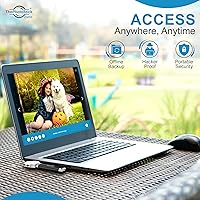
  • Fully offline operation means backups work anywhere, even without Wi-Fi or mobile data.
  • HEIC support ensures iPhone photos transfer correctly without format conversion headaches.
  • Compact and lightweight enough to live permanently on a keychain or in a travel bag.
  • Repeatedly praised as a thoughtful gift for parents and grandparents who want a simple photo-preservation solution.
  • Read speeds up to 125 MB/s make retrieving or browsing backed-up files fast and responsive.
  • Works across Windows, macOS, iOS, and Android — one drive genuinely replaces platform-specific backup tools.

Cons

  • Mandatory app installation surprises buyers who expect standard plug-and-play behavior right out of the box.
  • Write speeds of only 20 MB/s make large video library transfers frustratingly slow.
  • Android setup experience is noticeably rougher than on iOS, with permission issues reported frequently.
  • The rotating connector mechanism shows wear over time with frequent connector-switching.
  • Actual usable storage falls short of the full 128GB after formatting, leaving some buyers feeling misled.
  • No redundancy or recovery option exists if the physical drive is lost, stolen, or damaged.
  • RAW photo formats from dedicated cameras are not supported, limiting usefulness for photography enthusiasts.
  • App reliability is inconsistent — some backup sessions miss files and require a manual re-scan to catch them.
  • Customer support struggles to resolve persistent technical issues, particularly for Android-specific app bugs.
  • The wider multi-connector body can block adjacent ports on laptops with tightly spaced USB slots.

Ratings

The scores below for ThePhotoStick Omni 128GB USB Flash Drive were generated by our AI review engine after analyzing thousands of verified buyer experiences worldwide, with spam, incentivized, and bot-flagged submissions actively filtered out. The result is an honest breakdown that captures what real users genuinely love about this backup drive — and the frustrations that keep it from being a universally easy recommendation. Both sides of the story are reflected here.
Multi-Device Compatibility
88%
For households juggling iPhones, Android phones, and a shared Windows laptop, having one stick that handles all of them without a bag of adapters is a real convenience win. Most users report that switching between devices mid-session works exactly as advertised.
A small but vocal group of Android users — particularly those on less common brands — found that certain microUSB implementations caused recognition errors. Compatibility is broad, but it isn't perfectly universal across every device variant.
Ease of Setup
63%
37%
On iPhone and Windows, the initial setup is generally smooth. The companion app walks users through each step with clear on-screen prompts, which many less tech-savvy buyers found reassuring rather than overwhelming.
The expectation that this works like a standard plug-and-play drive trips up a lot of buyers — the app download is mandatory and not prominently communicated at purchase. Android setup in particular drew repeated complaints about unclear permissions and app behavior during first use.
Transfer Speed
54%
46%
Reading files back from the drive is genuinely fast — pulling photos onto a new device or browsing backed-up content feels responsive. For users who mainly need to access or verify their archives, the read performance holds up well.
The 20 MB/s write ceiling becomes a real problem when backing up years of video footage. Users transferring large MOV or MPEG4 libraries frequently reported multi-hour sessions, which undercuts the convenience story considerably for heavy video users.
Storage Capacity
71%
29%
128GB is genuinely useful space for a photo-focused backup drive. Families consolidating pictures from two or three phones over several years typically find it more than sufficient for still images and lighter video collections.
A recurring complaint involves the gap between advertised and actual usable storage after formatting and system overhead. Some buyers expected closer to the full 128GB to be available and felt misled, which is a fair frustration even if technically standard practice.
Build Quality & Durability
61%
39%
The compact form factor feels reasonably solid in hand, and the all-in-one connector design means fewer accessories to lose or damage separately. For light to moderate use, the construction holds up fine.
The rotating connector mechanism attracted mixed long-term feedback. Some users who switched connectors frequently — plugging into an iPhone one day and a PC the next — noticed loosening or stiffening of the pivot point after several months of regular use.
App Functionality
67%
33%
The app's automatic media-scanning feature is the core of what makes this drive accessible to non-technical users. It removes the need to manually hunt for photo folders across different operating systems, which is genuinely appreciated by the target audience.
The app experience varies more than it should across platforms. iOS users generally report a cleaner experience, while Android users encounter more friction — from permission prompts to occasional crashes on older devices running the minimum supported OS version.
Value for Money
66%
34%
For users who truly need multi-platform backup and want to avoid monthly cloud subscription fees, the one-time cost makes reasonable sense over a two to three year horizon. The breadth of connector types does add tangible value over basic single-port alternatives.
At its price point, the slow write speed and app dependency feel like compromises that competing storage solutions at similar prices don't always ask you to make. Tech-savvy buyers in particular tend to feel the value proposition is weaker for them.
File Format Support
83%
Coverage of HEIC — the default format on iPhones — alongside JPEG, PNG, GIF, MOV, and MPEG4 means most users won't hit format compatibility walls during a typical backup session. This is handled more thoughtfully than on many competing drives.
RAW photo formats from dedicated cameras are not supported, which matters for hobbyist photographers who might have hoped to use this as a universal archiving tool across both phone and camera libraries.
Portability & Form Factor
86%
Weighing under an ounce and fitting easily on a keychain or in a wallet pocket, this backup drive travels without adding meaningful bulk. Users who keep it in a bag as a permanent backup tool consistently mention its size as a practical advantage.
The four-connector design, while useful, makes the drive slightly wider than a standard USB stick. It won't fit flush in every USB port configuration, particularly in tight clusters on laptops where adjacent ports may be blocked.
Automatic Backup Reliability
69%
31%
When the app cooperates, the hands-off scanning approach works well for users who don't want to think about organizing folders or selecting files manually. Repeat backups are designed to skip duplicates, which saves time during subsequent sessions.
Reliability isn't perfect — some users report that certain file batches are missed in a scan, requiring a manual re-run. For users treating this as their sole backup solution, that inconsistency is a meaningful concern rather than a minor inconvenience.
Cross-Platform Consistency
72%
28%
Moving files between an iPhone and a Windows PC using the same drive is the scenario this product was designed for, and it generally handles it competently. Families with mixed-device households find this one of its most practically useful traits.
The experience quality isn't equal across platforms. macOS users occasionally report slower recognition times, and the app interface on Android feels noticeably less polished than its iOS counterpart, creating an uneven experience across the device spectrum.
Gift Suitability
81%
19%
Among the most genuinely positive feedback clusters is around gifting — particularly from adult children buying for parents who want a simple, physical way to preserve photos without cloud accounts. The concept lands well as a thoughtful, practical present.
The setup requirement can complicate the gifting experience if the recipient is on their own during first use. Without someone tech-savvy nearby to help with the app install and permissions, initial frustration can overshadow the good intentions behind the gift.
Offline Backup Capability
84%
Not needing Wi-Fi or a data connection to run a full backup is a genuinely useful advantage for travelers, people in rural areas, or anyone who has grown wary of cloud storage privacy. The local-first approach resonates strongly with a specific type of buyer.
Unlike cloud services, there is no redundancy or remote recovery option — if the physical drive is lost or damaged, so are the backups. Users relying solely on this drive without a secondary backup strategy are taking on a real data-loss risk.
Connector Versatility
79%
21%
Having USB-A, USB-C, Lightning, and microUSB built into one body genuinely reduces the need to carry a collection of adapters. For users traveling with multiple devices, that consolidation has practical day-to-day value that is hard to replicate with a standard drive.
The rotating mechanism that exposes each connector requires some physical manipulation, and the correct orientation isn't always obvious at first. A few users reported bending a connector slightly during early use before they understood how the pivot system worked.
Customer Support Experience
57%
43%
Users who reached out for help with app-related issues generally report that support was responsive to initial contacts. For straightforward problems like re-downloading the app or clarifying compatibility, the help resources were adequate.
For more persistent technical problems — especially Android-specific app bugs or connector recognition failures — several reviewers described a frustrating loop of troubleshooting steps that never fully resolved the issue, leaving them with an expensive drive they couldn't reliably use.

Suitable for:

ThePhotoStick Omni 128GB USB Flash Drive is genuinely well-suited for people who live in mixed-device households and have never found a tidy solution for consolidating photos across an iPhone, an Android phone, and a shared Windows PC. It particularly shines for older adults or less tech-confident users who find cloud storage confusing, privacy-concerning, or simply too dependent on a stable internet connection. If you're the kind of person who has thousands of phone photos sitting in a camera roll with no backup plan, this backup drive offers a guided, physical solution that doesn't require a subscription or ongoing account management. Travelers who spend time in areas with unreliable Wi-Fi will appreciate that the entire process works offline. It also makes practical sense as a gift for a parent or grandparent — provided someone patient is available to help with the initial app setup.
Not suitable for:

ThePhotoStick Omni 128GB USB Flash Drive is likely to frustrate buyers who expect a traditional plug-and-play experience, since it requires downloading a companion app before a single file can be transferred. If you're a heavy video shooter with large MOV or 4K files, the 20 MB/s write speed will test your patience during long backup sessions — this is not a drive built for bulk video archiving under a time constraint. Photographers shooting in RAW formats will hit a hard wall, as those file types are simply not supported. Tech-savvy users who are comfortable managing their own file systems will probably find the app layer more restrictive than helpful, and could get better raw performance from a comparably priced standard USB-C drive. Anyone relying solely on this as their one and only backup should also consider that a lost or damaged drive means lost data — there is no cloud redundancy built in.

Specifications

  • Storage Capacity: The drive offers 128GB of total flash storage, with actual usable space slightly lower after formatting and system overhead.
  • Read Speed: Maximum read speed reaches up to 125 MB/s, making file retrieval and content browsing fast and responsive.
  • Write Speed: Write speed is rated at up to 20 MB/s, which is adequate for photos but noticeably slower when transferring large video files.
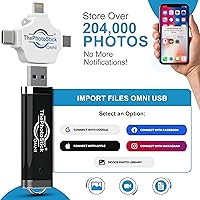
  • Connectors: The drive includes four built-in connection types — USB-A, USB-C, microUSB, and Lightning — all housed in a single rotating body.
  • Dimensions: The drive measures 4″ x 0.5″ x 0.1″, making it slim enough to fit on a keychain or slip into a wallet pocket.
  • Weight: At 0.704 ounces, the drive adds negligible weight to a bag, pocket, or keychain carry setup.
  • Compatible OS: Supported operating systems include Android 8.0 and above, iOS and iPadOS 13.0 and above, Windows 7 SP1 and above, and macOS 10.13 and above.
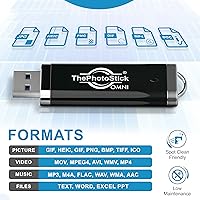
  • Supported Formats: The drive and companion app support JPEG, PNG, HEIC, GIF, MOV, and MPEG4 file formats for both photo and video backup.
  • App Requirement: A free companion app must be downloaded and installed on each device before any backup or transfer functionality becomes available.
  • Photo Capacity: Based on average file sizes, the drive can store an estimated 51,000 or more photos and videos across its full capacity.
  • Color: The drive is finished in black with a matte housing across the body and connector assembly.
  • Flash Interface: The primary desktop connection uses USB 3.0 via the USB-A connector, enabling the higher read speeds when plugged into a compatible port.
  • Hardware Platform: The drive is designed for cross-platform use and functions across Mac, Windows, iOS, and Android environments.
  • Release Date: This model was first made available in September 2021.
  • Connectivity Type: The drive connects physically to devices via its four integrated connector types and does not support wireless or Bluetooth transfer.
  • Amazon Ranking: The drive holds a Best Sellers Rank of number 29 in the USB Flash Drives category on Amazon at time of analysis.
  • User Rating: Based on 8,205 verified ratings on Amazon, the drive holds an average score of 3.9 out of 5 stars.
  • Manufacturer: The device is designed and sold by ThePhotoStick, a brand focused on consumer photo and video backup storage solutions.

Related Reviews
ORICO 128GB UFSD USB-C Flash Drive
87%
89%
Performance
93%
Build Quality
88%
Portability
76%
Compatibility
90%
Ease of Use
More
ySky 128GB USB 3.2 Solid State Flash Drive
89%
92%
Performance and Speed
89%
Build Quality & Durability
85%
Compatibility and Connectivity
94%
Ease of Use
88%
Portability and Design
More
MOVE SPEED V Series 128GB USB 3.2 Flash Drive
87%
92%
Performance
89%
Value for Money
88%
Build Quality
94%
Ease of Use
90%
Transfer Speed
More
Apricorn Aegis Secure Key 3Z 128GB USB 3.0 Flash Drive
87%
94%
Security Features
89%
Durability & Build Quality
91%
Ease of Use (Pin Authentication)
72%
Data Transfer Speed (Write Speed)
85%
Waterproof & Dustproof Performance
More
SanDisk 128GB Ultra Luxe USB 3.2 Gen 1 Flash Drive
89%
94%
Transfer Speed
90%
Build Quality
88%
Ease of Use
87%
Security Features (AES Encryption)
92%
Portability
More
SanDisk 128GB Extreme PRO USB 3.2 Solid State Flash Drive
88%
94%
Performance
92%
Speed
89%
Durability
90%
Portability
78%
Compatibility with Devices
More
Corsair Flash Voyager 256GB USB 3.0 Flash Drive

89%
88%
Performance
93%
Durability
90%
Compatibility
72%
Speed (Write)
89%
Water Resistance
More
Corsair Flash Voyager GTX 512GB USB 3.1 Flash Drive
88%
94%
Performance
91%
Build Quality
82%
Value for Money
89%
Portability
96%
Transfer Speed
More
Corsair Flash Voyager GTX 256GB USB 3.1 Flash Drive
86%
91%
Performance
94%
Speed
89%
Durability
87%
Portability
88%
Compatibility
More
Corsair Flash Voyager GTX 1TB USB 3.1 Flash Drive
88%
94%
Performance (Speed)
88%
Build Quality
92%
Portability & Size
91%
Durability (Ruggedness)
89%
Compatibility
More

FAQ

You do need to download the free companion app before the drive will do anything useful. It won't automatically appear as a standard storage folder the way a regular USB stick does. Once the app is installed and you follow the on-screen steps, the backup process is fairly guided — but skipping that setup step is not an option.

For iPhones and older iPads, you'll use the Lightning connector end of the drive. If you have a newer iPad Pro or MacBook that uses USB-C, there's a USB-C connector built in for those as well. The drive rotates to expose whichever connector you need.

For a large photo library with mostly still images, it's manageable — but if you're backing up a significant amount of video footage, expect it to take a while. The write speed tops out around 20 MB/s, so a library of several gigabytes of MOV or MP4 files could take an hour or more. It's worth running the first backup overnight if your collection is substantial.

Yes, that's exactly the kind of workflow this drive was designed for. You'd back up the photos from your Android using the microUSB or USB-C connector, then plug the drive into your Mac via USB-A or USB-C to access those same files. The app helps manage the process on each device end.

Yes. Newer iPhone models that have switched to USB-C are covered by the USB-C connector on the drive. The Lightning connector is still useful for older iPhones and iPads that haven't made that transition yet.

Unfortunately, no. The drive and its app only support common consumer formats like JPEG, HEIC, PNG, GIF, MOV, and MPEG4. RAW files from dedicated cameras are not on that supported list, so if you shoot in RAW, this backup drive isn't going to work as a camera archive tool.

It's a fair concern — user feedback on this point is genuinely mixed. For occasional use, most people find it holds up fine. However, users who switch connectors frequently over many months have reported that the pivot point can loosen or stiffen over time. It's not a fragile piece of kit, but it's also not built for rough daily handling.

Like virtually all flash storage, the real usable space is slightly less than the labeled 128GB once formatting and any pre-installed app data are accounted for. The actual available space is typically somewhere in the 116 to 119GB range. This is standard across the industry, but it's worth knowing upfront rather than being surprised at setup.

Once the app is downloaded and installed, everything else works entirely offline. There's no cloud component involved — files go directly from your device onto the physical drive. That's actually one of the genuine strengths here for travelers or anyone without reliable internet access.

Honestly, it depends. The app-guided setup is designed to be simple, and on iPhone it tends to go smoothly for most users. That said, if your mom is on Android or hasn't downloaded many apps before, the initial permissions and setup steps can be confusing without someone to walk her through it. If you can be there for the first use — even over a video call — it'll go much better than leaving her to figure it out solo.

Where to Buy