



Overview
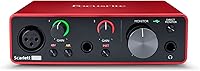
The Focusrite Scarlett Solo 3rd Gen stands as the industry standard for entry-level home recording, providing a bridge between amateur setups and professional sound. Wrapped in an iconic red metal chassis, this audio interface feels substantial on a desk despite its portable footprint. Focusrite refined the layout specifically for solo creators, moving essential controls to the front for quick access. This recording hub brings significant hardware improvements over its predecessors, particularly in its internal circuitry and connectivity. It feels like a piece of gear that can survive a backpack while delivering high-end results. By simplifying the interface without sacrificing quality, the Solo makes starting a studio feel less intimidating for anyone just finding their voice.
Features & Benefits
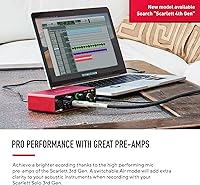
One of the most practical additions to the Solo is the switchable Air mode, which emulates classic ISA preamps to add high-end clarity to vocals or acoustic instruments. For musicians, the high-headroom instrument input is a vital feature because it prevents guitar clipping during aggressive strumming. I really appreciate the Gain Halo rings surrounding the knobs; they provide instant visual feedback by changing color when your levels are too hot. Inside, high-performance converters support audio up to 24-bit/192kHz, ensuring every nuance is captured accurately. This recording hub also offers low-latency monitoring, allowing you to hear yourself in real-time without distracting delays. It is entirely bus-powered via a single USB-C cable, keeping your workspace clean and mobile.
Best For
This recording hub is a natural fit for singer-songwriters who need a straightforward path to capture a microphone and an instrument simultaneously. If you are a beginner podcaster, this audio interface provides that professional polish without a steep learning curve. The compact size and rugged build make it a reliable choice for mobile producers who move between locations but still require a durable, bus-powered hub for their projects. Even for those not recording, it serves home office users who want high-fidelity audio playback through studio monitors or headphones. It strikes a balance between simplicity and performance, making it an excellent starting point for anyone building an affordable home studio without needing a massive console or complex routing.
User Feedback
Buyers frequently offer consistent praise for the straightforward setup process and the driver stability on both Windows and Mac. Many long-term users highlight the clean, low-noise pre-amplification that allows for professional results even with sensitive microphones. However, the experience is not without its quirks; there are occasionally mixed reviews regarding the complexity of the included software bundle, which can feel overwhelming for a true novice. Despite that, the general consensus focuses on the rugged build quality and the satisfying feel of the tactile knobs. This audio interface remains a top recommendation because it handles the basics better than almost anything else in its price bracket. It is a reliable piece of hardware that rarely gets in the way of the creative process.
Pros
- The iconic red metal chassis provides excellent durability for musicians who are frequently on the move.
- Switchable Air mode adds a pleasant high-end shimmer to vocals that helps them sit better in a mix.
- Intuitive Gain Halo rings provide immediate visual feedback to prevent digital clipping while you are recording.
- High-performance converters deliver clear, studio-grade audio resolution up to 24-bit/192kHz.
- A dedicated high-headroom instrument input allows for clean guitar recordings without unwanted distortion.
- The USB-C connection offers modern compatibility and allows the unit to run entirely on bus power.
- Direct monitoring ensures you can hear your performance with zero latency for a more natural feel.
- Tactile gain and volume knobs feel substantial and allow for precise adjustments during a session.
Cons
- The single microphone input prevents you from recording a stereo vocal or a multi-mic setup.
- Navigating the extensive third-party software bundle registration can be a tedious and confusing process for some.
- A lack of dedicated MIDI I/O means you cannot directly connect older hardware controllers or synthesizers.
- The plastic front and rear panels are more prone to scuffs and scratches than the aluminum body.
- Powering this recording hub solely through a laptop can noticeably drain the computer battery during long sessions.
- The gain range can feel a bit narrow when using extremely quiet dynamic microphones without a lifter.
- Bright LED rings around the gain knobs cannot be dimmed for those working in dark studio environments.
- Line and instrument inputs share a single channel, limiting your flexibility for complex signal routing.
Ratings
To provide a clear look at the Focusrite Scarlett Solo 3rd Gen, our AI analyzed thousands of verified owner reviews from across the globe, meticulously filtering out bot activity and incentivized feedback. These scores represent an honest synthesis of real-world performance, highlighting where this recording hub shines and where it occasionally falls short.
Build Quality
Ease of Setup
Vocal Clarity (Air Mode)
Portability
Value for Money
Software Bundle
Visual Level Monitoring
Instrument Input Headroom
Monitoring Latency
Preamp Noise Floor
Connectivity
Suitable for:
The Focusrite Scarlett Solo 3rd Gen is an ideal entry point for singer-songwriters and solo podcasters who need a reliable, high-quality path to get their voice and instruments into a computer. Its compact, bus-powered design makes it a favorite for mobile producers who need to record in various locations without carrying a bulky power supply. Home office workers looking to upgrade their audio for high-fidelity playback through studio monitors or professional headphones will also find it very effective. The simplified layout is specifically tailored for those who want to focus on their performance rather than menu-diving or complex routing. Because it handles the basics so cleanly, it remains a top choice for anyone building their first serious home studio setup.
Not suitable for:
This recording hub is not the right choice for bands or producers who need to record more than one microphone and one instrument simultaneously. If your workflow involves multi-mic drum setups or recording a live group, the Focusrite Scarlett Solo 3rd Gen will quickly become a bottleneck in your creative process. Producers who rely heavily on legacy hardware synthesizers might find the lack of dedicated MIDI ports frustrating, requiring additional adapters to connect their gear. It is also less than ideal for those who prefer a large, desktop console feel with many physical faders and extensive onboard routing options. If you anticipate expanding your studio to include multiple outboard preamps or complex signal chains, you might be better off investing in a higher-tier model from the start.
Specifications
- Connectivity: This recording hub uses a modern USB Type-C connection for data and power.
- Audio Resolution: The unit supports high-performance digital conversion at up to 24-bit/192kHz.
- Microphone Inputs: There is a single XLR input featuring a high-quality Scarlett microphone preamp.
- Instrument Inputs: The front panel includes one dedicated 1/4″ high-headroom instrument input for guitars or basses.
- Phantom Power: A switchable 48V phantom power toggle is available for use with condenser microphones.
- Line Outputs: The rear panel features two balanced 1/4″ TRS line outputs for connecting studio monitors.
- Headphone Output: A 1/4″ TRS stereo headphone jack is located on the front for private monitoring.
- Construction: The device is housed in a durable, industrial red anodized aluminum chassis.
- Power Source: The interface is entirely bus-powered, requiring no external wall outlet.
- Visual Indicators: Backlit Gain Halo rings provide real-time color-coded feedback on input signal levels.
- Air Mode: A switchable analog circuit emulates the frequency response of classic ISA microphone preamps.
- Dimensions: The unit measures approximately 1.71″ in height, 5.65″ in width, and 3.77″ in depth.
- Weight: This compact desktop device weighs approximately 12.3 oz.
- OS Compatibility: The hardware is designed for use with macOS, Windows, and iPadOS platforms.
- Direct Monitoring: A dedicated hardware switch enables zero-latency monitoring of input signals.
Related Reviews
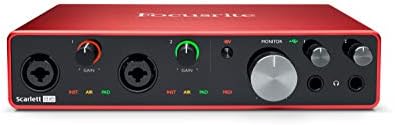
Focusrite Scarlett 8i6 3rd Gen USB Audio Interface

Focusrite Scarlett 18i20 3rd Gen Audio Interface
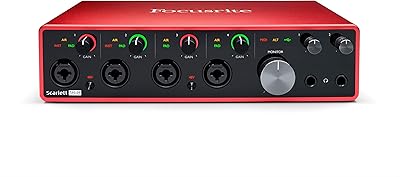
Focusrite Scarlett 18i8 3rd Gen USB Audio Interface
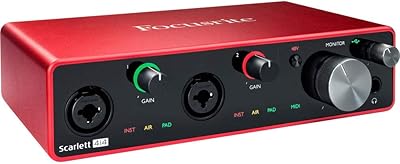
Focusrite Scarlett 4i4 3rd Gen Audio Interface
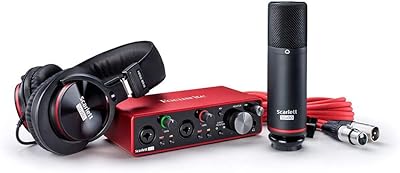
Focusrite Scarlett 2i2 Studio 3rd Gen Bundle
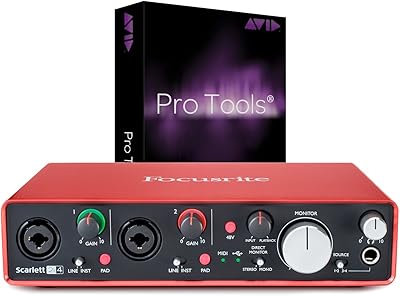
Focusrite Scarlett 2i4 2nd Gen Audio Interface
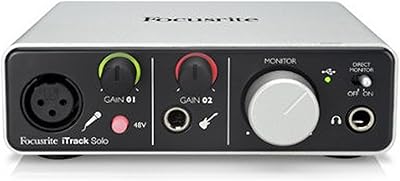
Focusrite iTrack Solo USB Audio Interface
Yoto Player 3rd Gen Kids Audio Player
RØDE VideoMic GO II Helix